
Our readers keep the lights on and my morning glass full of iced black tea. As an Amazon Associate, I earn from qualifying purchases.
Specs are compiled from manufacturer listings and verified buyer reviews and can change over time — please confirm the key details on the product page before buying.
You want to bring real-world objects into your CAD or 3D printing workflow, but the price tags on professional gear are brutal.
I’m Min — the founder and writer behind Gadgets Feed. This guide is built by comparing the manufacturers’ published specifications and the patterns across verified customer reviews, so you get each pick’s real strengths and trade-offs instead of marketing spin.
The right scanner for you depends on what you scan most: small parts need precision as fine as 0.02mm to 0.05mm (resolution that captures tiny details like gear teeth), larger objects need a wide field capture and wireless freedom, and tricky surfaces like dark plastics or chrome demand specific laser or structured-light tech. Here are the seven best performers under $1000, ranked for real-world use. 3d scanner under $1000
Quick Picks
- Creality CR-Ferret SE 3D Scanner — Best Value
- Creality CR-Scan Ferret Pro — Best Wireless
- 3DMakerpro Seal Lite 3D Scanner — Ultra Detail
- Revopoint INSPIRE 2 3D Scanner — Top Performer
- Revopoint POP3 Plus 3D Scanner — Best Display
- Shining 3D Einstar Handheld 3D Scanner — Hair & Body
- EINSTAR 2 Wireless 3D Scanner — Best Overall
How To Choose The Best 3D Scanner Under $1000
Choosing a 3D scanner in this price range is about understanding where the trade-offs live. You get serious hardware, but the specs that matter shift completely depending on whether you scan a coin, a car part, or a person. Here is what to look for.
Accuracy and Precision
Accuracy is how close the scan is to the real object’s size, while precision (sometimes called “resolution” or “point distance”) is how fine the surface detail is. If you scan small mechanical parts like gears, look for a precision number around 0.02mm to 0.05mm, so the mesh captures the teeth and edges without blurring. For larger objects like furniture or body parts, 0.1mm is more than enough. Never take a single number at face value — check whether it is accuracy or point distance.
Light Source and Surface Handling
The light source determines what you can scan without pre-treating the object with spray powder. Blue LED light (400–500nm wavelength) captures very fine detail on small objects but works best indoors. Infrared VCSEL projectors (vertical-cavity surface-emitting lasers) handle dark, reflective, or metallic surfaces better and often allow outdoor use up to certain lux levels (a measure of brightness). Some scanners need scanning spray (a fine powder) to coat shiny or black objects — verify if the model claims to skip it.
Scanning Speed and Tracking Stability
Speed is measured in frames per second (fps). A scanner running at 10 fps works fine for stationary objects, but 14 to 18 fps is noticeably more forgiving if your hands shake, because it captures enough data to fill gaps. Several models now include anti-shake tracking — a gyroscope or IMU (inertial measurement unit) that senses small hand movements and adjusts the scan data. Without this, you can get failed scans and gaps in the mesh.
Software and System Requirements
The scanner is only half the equation — your computer needs to keep up. Many models require a Windows PC with an 8th-gen Intel i5 or better, at least 8GB of RAM, and a decent GPU (graphics card). For wireless models, you also need to check whether the software runs on your phone (iPhone 11+ or Android 10+) and whether the workflow is smooth or frustrating. Free software with lifetime updates is a major plus.
Quick Comparison
| Model | Best For | Precision | Light Source | Wireless / Tether | Amazon |
|---|---|---|---|---|---|
| Creality CR-Ferret SE | Budget entry point for PC-only scanning | 0.1 mm | Structured Light (Anti-Shake) | USB only | $230.62Amazon |
| Creality CR-Scan Ferret Pro | Wireless multi-device scanning | 0.1 mm | Structured Light (Anti-Shake) | Wi-Fi 6, USB | $359.00Amazon |
| 3DMakerpro Seal Lite | Ultra-fine detail on small objects | 0.02 mm | Blue LED (400-500nm) | USB only | $359.00Amazon |
| Revopoint INSPIRE 2 | Versatile mixed-materials scanning | 0.03 mm | Multi-Line Laser & Structured Light | Wi-Fi 6, USB-C | $534.65$629.00Limited time dealAmazon |
| Revopoint POP3 Plus | Medium-object full-color scanning | 0.04 mm (0.05 mm Point Dist.) | Structured Light (Class 1 IR) | Wi-Fi 6, USB-C | $557.10$619.00Amazon |
| Shining 3D Einstar | Body and hair scanning | 0.1 mm point distance | 3x Infrared VCSEL + 2 Stereo Depth Cams | USB only | $645.00Amazon |
| EINSTAR 2 | Pro-grade wireless all-rounder | 3mm to 12mm marker support | 17-Line Blue Laser + VCSEL IR | Built-in wireless & USB-C | $999.00$1,249.00Amazon |
In‑Depth Reviews
1. Creality CR-Ferret SE 3D Scanner

The budget pick that repays patience with clean color scans — its anti-shake system keeps your hand tremors from ruining the mesh.
This scanner is built around a trick that sounds like marketing spin but actually works — anti-shake technology that counters hand tremors so you do not get a wobbly mess. At a resolution of 1000 dpi (dots per inch, a measure of detail density) and 24-bit full-color depth, it captures 16.7 million colors per pixel from its built-in 2MP camera, so models look realistic on screen. It weighs just 105g, meaning you can hold it steady for longer sessions without your arm tiring.
You need a decent PC to run it — the minimum is an 8th-gen i5 processor with Windows 10/11 and at least 8GB of RAM, plus Creality’s scanning software (version V2.3.0 or later). There is no battery handle here; this is a tethered-only unit that plugs straight into your computer. The SE is the most affordable way into Creality’s Ferret ecosystem, but you lose the mobile and wireless capability the Pro version offers.
The big trade-off is reliability. One reviewer noted, “It would lose tracking every few seconds,” and reported that the camera ran at a buggy 12 fps instead of the rated 30 fps after firmware updates. Another reviewer noted it took “a little bit of work to get the software downloaded.” For the price, the scanning quality is impressive when it works, but the experience is not frictionless. It costs less than the Ferret Pro, but that savings means you need to be willing to accept some software headaches.
What Stands Out
- Anti-shake tracking genuinely reduces failed scans for handheld use
- Scans black and metallic objects without needing spray
- Weighs only 105g for comfortable long scanning sessions
The Frustrations
- No battery handle or wireless capability — tethered to PC only
- Several buyers report tracking loss and software setup headaches
- Camera frame rate drops below advertised 30 fps for some users
Reach for this if: your budget is tight and you are willing to tinker with software to get clean, full-color scans of small to medium objects.
skip it if: you need a plug-and-play experience or want to scan without dragging a laptop around.
2. Creality CR-Scan Ferret Pro

The wireless upgrade that lets you scan on your phone or tablet — and buyers who moved up from the SE report far fewer setup headaches.
This is the same core Ferret hardware as the SE — 0.1mm accuracy, 24-bit full color, anti-shake tracking, and that 105g lightweight body — but the Pro adds a battery handle and built-in Wi-Fi 6 (the latest fast wireless standard). That means you can scan wirelessly with your Android phone, iPhone (iPhone 11 or later with iOS 15+), Windows PC, or a Mac with an M-series chip. The bundle includes a WiFi box, tripod, power bank, phone holder, and carrying case.
Compared to the SE, the Ferret Pro opens up a completely different scanning workflow. You can walk around an object outside (up to 30,000 lux — think a bright but shaded day) without being tethered. Export formats are OBJ (standard 3D), STL (common for 3D printing), or PLY (includes color data). The single catch is that it still struggles with very dark, reflective, or transparent surfaces, so you may need to spray those. Also, like the SE, it is not built for very small items like jewelry.
Buyers who moved up from the SE report vastly fewer setup frustrations because the mobile app handles the initial configuration better than the PC software. The 1-year warranty and responsive support team are a safety net if you hit issues. For the extra cost over the SE, you get genuine portability rather than just a spec sheet upgrade.
Wireless freedom that works: the Wi-Fi 6 connection is stable, and the included case makes it genuinely portable for on-site scanning jobs. If your workflow demands mobility, the Pro is worth the step up from the SE.
Who it fits: DIY creators and engineers who need to scan parts in a workshop or outdoors without a PC tethered to their belt.
The only real limit: avoid very small, shiny, or see-through objects — those still give this scanner trouble without spray.
3. 3DMakerpro Seal Lite 3D Scanner
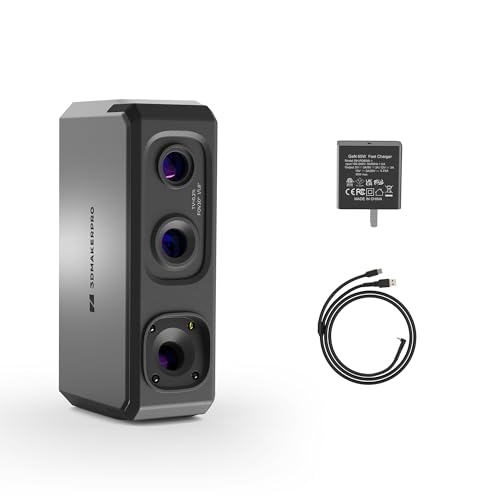
The detail king for tiny mechanical parts and fine textures — its 0.02mm accuracy is five times finer than the 0.1mm Creality models.
If your work involves scanning small objects from 10mm to 300mm — think gears, coins, or carved details — the Seal Lite is your most precise option under $1000. It uses a blue LED light source with a shorter wavelength (400–500nm) that projects finer structured light patterns (a grid of light that bends around the object to measure depth), achieving 0.02mm accuracy. That means it picks up tiny dents, scratches, and edge textures that blur on less precise hardware, so a coin’s raised lettering stays readable.
The trade-off is speed and scope. It runs at 10 fps, which is on the slower side, and it only captures mono texture (grayscale — no color). It is recommended for indoor use only, with a working distance of 180–280mm from the object (about 7 to 11 inches). The manufacturer is upfront that this is a handheld scanner with a real learning curve — they compare mastering it to learning to drive. It also demands a powerful PC to run JMStudio software smoothly. Optional accessories like a turntable and Smart Grip make the process easier.
Unlike the more versatile Revopoint INSPIRE 2 below, the Seal Lite is specialized. It does not try to handle large objects or outdoor environments. But if your daily scanning is small parts for 3D printing or reverse engineering, no other model in this price range gives you 0.02mm accuracy. The free lifetime JMStudio software includes visual tracking, error correction, and auto-alignment.
Why It Wins for Small Objects
- 0.02mm accuracy captures tiny surface details other under-$1000 scanners miss
- Blue LED structured light gives clean, noise-free meshes on small objects
- Free JMStudio software with auto-alignment and error correction
Where It Falls Short
- Mono texture only — no full-color capture
- Limited to small indoor objects between 10mm and 300mm
- Slow 10 fps scan speed and a steep learning curve
Best suited for: jewelers, model makers, and 3D-printing hobbyists who need sub-0.05mm precision on small parts and are happy to invest time in practice.
If you mostly scan larger items: the Revopoint INSPIRE 2 or Creality Ferret Pro will give you more range and faster results.
4. Revopoint INSPIRE 2 3D Scanner
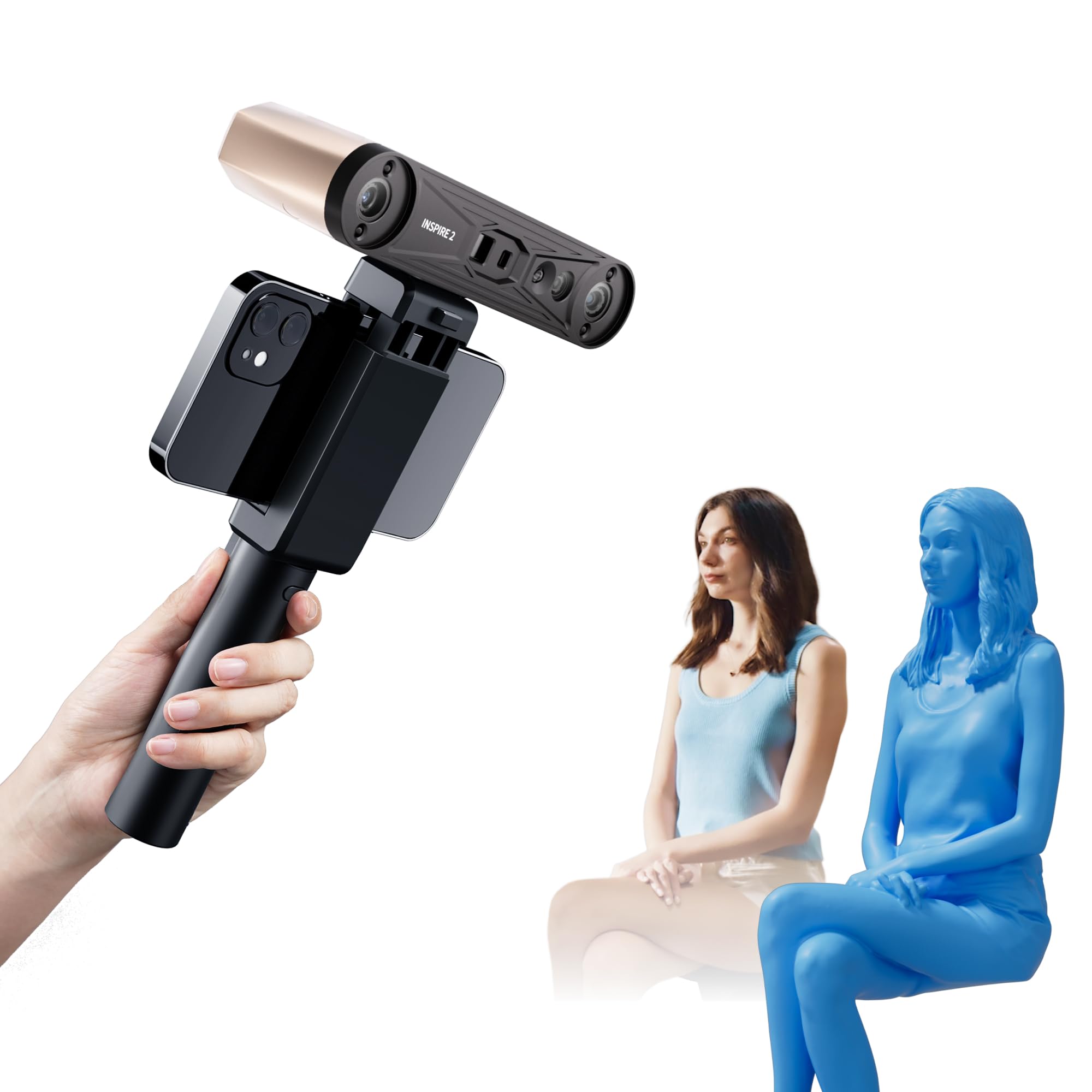
A dual-mode workhorse that handles shiny and dark surfaces without spray — its 0.03mm precision puts it in the same detail league as the Seal Lite while offering far more versatility.
The INSPIRE 2 is the only scanner in this lineup with two scanning modules in one unit: infrared structured light for general use, and 11 infrared laser lines (thin beams that sweep across the object to measure depth) for challenging surfaces like reflective chrome or matte black plastic. That means you can scan a car emblem or a glossy phone case directly, no scanning spray needed. It delivers up to 0.05mm accuracy and 0.03mm precision — numbers that put it in the same detail league as the Seal Lite while offering far more versatility.
It also has adjustable optical zoom at 1.5x and 2x magnification, which lets you focus the projected light to capture more surface detail on different object sizes. The full-color texture capture is synchronized automatically with the 3D geometry, making it a strong choice for heritage preservation or product design. At 190g, it is slightly heavier than the Creality models but still easily handheld. The aircraft-grade aluminum alloy front panel feels more premium than plastic competitors.
The one serious requirement is your PC: you need at least an Intel i7 13th-gen or AMD Ryzen 7 5800 with 16GB RAM and an NVIDIA RTX 3060 GPU. That is a much higher bar than the Creality models. The premium package includes the Revo Metro software, but the Revo Design tool for scan-to-CAD conversion (turning a 3D scan into a surface you can edit in CAD software like Fusion 360) is paid software sold separately.
Two Modules, Endless Scenarios
- Dual scanning modes handle reflective, dark, and metallic surfaces without spray
- 0.03mm precision and adjustable optical zoom for detailed scans
- Full-color texture capture with automatic geometry sync
What Holds It Back
- Very high PC requirements — needs a recent i7 or Ryzen 7 with 16GB RAM and a good GPU
- Outdoor limit of 20,000 lux restricts lighter conditions
- Revo Design for CAD workflow is an extra cost
Grab this for: reverse engineering and product design where you scan mixed materials — dark, shiny, metallic — without spraying every single part.
If your PC is older: the Creality Ferret Pro (0.1mm) or POP3 Plus (0.04mm) will run on less demanding hardware.
5. Revopoint POP3 Plus 3D Scanner

For medium-object full-color scanning at 18 fps — that is 80% faster than the Seal Lite — with a two-year warranty to back it up.
The POP3 Plus improves on its predecessor with 20% more accuracy and precision, down to 0.04mm precision and a 0.05mm fused point distance (the spacing between each measurement dot on the final 3D mesh). It uses a 1.5x and 2x optical zoom on the projector, which delivers 30% more point cloud detail than the POP 3. That extra data matters when you are scanning objects between 20mm and 2 meters — the balance for 3D printing, prototyping, and animation work. The 9-axis IMU (a stabilizer that detects rotation and acceleration on three planes) keeps scans steady at up to 18 fps, noticeably faster than the Seal Lite’s 10 fps.
The POP3 Plus uses class 1 infrared light — the safest class, so it is eye-safe and skin-safe for scanning body parts. It connects over Wi-Fi 6 or USB-C to iOS, Android, Windows, or macOS. Export options are unusually generous: PLY, OBJ, STL, ASC, 3MF, GLTF, and FBX. The free Revo Scan software handles everything from capture to editing and now includes a global marker tracking mode that makes scans with printed markers (small sticky dots you place on the object for alignment) much more reliable.
One area where it falls short of the INSPIRE 2 is handling tricky surfaces. The POP3 Plus does not have a dedicated multi-line laser module, so very reflective or dark objects may still need spray. The 190g weight matches the INSPIRE 2, and the three touch-sensitive buttons for starting, pausing, and exposure are intuitive. The two-year warranty (double Creality’s one-year offer) is a meaningful bonus.
Speed plus detail for medium objects: the 18 fps scan rate with the 9-axis IMU gives you smooth, fast captures for objects that sit between “tiny part” and “full human.” For that mid-range, it is among the most polished experiences here.
Perfect for: designers, animators, and 3D-printing enthusiasts scanning medium objects who want fast color scanning with minimal post-processing.
Consider the INSPIRE 2 instead if: you regularly scan reflective, shiny, or black items and want spray-free scanning.
6. Shining 3D Einstar Handheld 3D Scanner

The one scanner that handles hair — a notoriously tricky surface — with a dedicated Hair Mode that captures strands other models miss entirely.
The Einstar stands out because it is built around three infrared VCSEL projectors (vertical-cavity surface-emitting lasers) and two stereo depth cameras (dual cameras that work like human eyes to measure distance). That hardware array gives it a unique trick: a “Hair Mode” that actually captures strands of human hair for full-head scans. No other model under $1000 claims to do that. It collects point cloud data at up to 0.1mm point distance, and the built-in RGB camera captures color fidelity for skin tones and hair colors.
Scanning speed hits 14 fps, and the software’s detail enhancement technology optimizes point cloud data for complete capture on tricky organic shapes. There is no projector light during scanning — just infrared — so it is comfortable and safe for eyes. Outdoor performance is solid thanks to the three VCSEL projectors, which maintain data quality even in variable light. The single USB cable handles both data and power, keeping the setup simple.
The catch is that the original Einstar is an older design (first available September 2022) and it is tethered only — no wireless option. It weighs 3.08 lbs (about 1.4 kg), which is significantly heavier than the 190g Revopoint scanners and the 105g Creality models, so holding it steady for longer scans gets tiring. The software supports export in OBJ, STL, PLY, ASC, 3MF, and P3 formats, and it works with most 3D printers and design tools.
Hair Scanning Is Real
- Dedicated Hair Mode captures strands that other scanners miss entirely
- Three infrared VCSEL projectors give reliable outdoor performance
- Color camera captures good fidelity on skin tones and objects
Physical and Tech Limits
- Heavy 3.08 lb body is tiring for extended handheld use — much heavier than any other pick here
- No wireless scanning — must stay tethered to a PC via USB
- Older 2022 design lacks the precision (0.1mm) of newer models like the INSPIRE 2
Go for this if: you need to scan people — especially hair — for avatars, VR, or digital archiving, and you can work at a desk with a PC.
For better portability and detail on small parts: the EINSTAR 2 or INSPIRE 2 give you wireless freedom and much finer precision, though without the hair trick.
7. EINSTAR 2 Wireless 3D Scanner
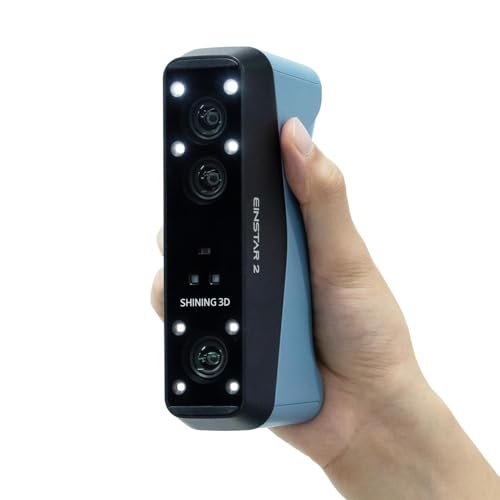
The flagship that merges pro laser speed with true wireless freedom — its 90 fps laser mode makes the Seal Lite’s 10 fps feel glacial.
The EINSTAR 2 sits at the top of this list for a reason: it packs dual scanning technology into a wireless package with a swappable battery that delivers up to 3 hours of uninterrupted scanning. In Laser HD mode, it fires 17 parallel blue laser lines for high-resolution detail on small objects, running at up to 90 fps — an class-leading speed that makes the Seal Lite’s 10 fps feel glacial. For larger objects, the VCSEL infrared mode scans at up to 20 fps with higher-resolution cameras that handle black surfaces and bright outdoor conditions (up to 110,000 lux in Laser HD mode, 70,000 lux in IR Rapid mode — enough for direct sunlight in the laser mode).
This is the only scanner here that adapts to the object size dynamically. It supports 3mm, 6mm, and 12mm markers (sticky alignment dots you place on the object) for alignment, meaning you can scan tiny parts or a whole car body with the same device. The reflective and dark surface handling is excellent — no spray required. The EXstar Hub PC software is intuitive and reduces system load compared to the first-generation Einstar, but one reviewer warned it needs a beefy PC: an i7-12700KF with an RTX 4060 Ti and 32GB RAM for larger scans. Smaller scans (.1 to.2 resolution) run on less powerful hardware fine.
One verified buyer coming from the original Einstar called it a “no brainer upgrade,” noting the wireless freedom, noticeably better scan quality and speed, and no more hanging cables. Another said it “works great for automotive scans.” The single negative review cited poor instructions and tracking issues, but the overwhelming positive pattern (4 out of 5 reviews at 5 stars) suggests those are edge cases or operator errors. The EINSTAR 2 is the only scanner under $1000 that truly bridges the gap between hobbyist and entry-level professional gear.
Professional-Grade Versatility
- Dual-mode scanning (17-line blue laser + VCSEL IR) handles tiny to large objects
- Swappable battery gives up to 3 hours of true wireless scanning
- 90 fps laser mode captures fast, dense point clouds
- Spray-free scanning for reflective, black, and metallic surfaces
What to Know Before Buying
- Demands a high-end PC for large scans — i7-12700KF, RTX 4060 Ti, 32GB RAM
- Laser HD mode works up to 110,000 lux, but IR mode is limited to 70,000 lux
- At 5.72 lbs it is the heaviest pick here, though the wireless design offsets this
The ultimate pick for: serious hobbyists, automotive enthusiasts, and professionals who need one scanner that does small parts, big objects, outdoors, and wireless — and can feed it the PC power it needs.
If you only scan small trinkets occasionally: the Seal Lite or Ferret Pro are easier to learn and cost half as much, and they do not demand a top-tier PC.
Understanding the Specs
Precision vs Accuracy vs Point Distance
Precision (also called resolution or point distance) tells you how far apart individual measurement points are on the final mesh. A 0.02mm point distance means points are 0.02mm apart — very fine detail. Accuracy tells you how close the whole mesh is to the real object’s dimensions. A scanner can have high precision (tight points) but lower accuracy (slightly wrong scale). For small mechanical parts, look for 0.02-0.05mm precision. For larger objects like furniture or body parts, 0.1mm is perfectly fine.
Light Source: Blue LED, Infrared, or Laser
The light source determines what surfaces you can scan without spray. Blue LED (400-500nm wavelength) projects very fine structured light for high-detail small scans but works best indoors. Infrared VCSEL (vertical-cavity surface-emitting lasers) handles dark and reflective surfaces better and often allows outdoor use. Multi-line blue lasers (like the 17-line array on the EINSTAR 2) give the best of both for small objects — high speed and detail. If you scan mixed materials, dual-mode scanners (structured light + laser) are the most flexible.
FAQ
Can I scan dark or reflective objects without using spray?
How powerful does my computer need to be for these scanners?
What is the difference between structured light and laser 3D scanning?
Can I use these scanners with my iPhone or iPad?
What file formats do these 3D scanners export?
How long does a typical scan take?
Is wireless scanning stable or does it cause lag?
What is the best scanner under $1000 for scanning people and hair?
How much post-processing do these scanners require?
Can I use these scanners for reverse engineering?
Final Thoughts: The Verdict
Across the board, the 3d scanner under $1000 winner is the EINSTAR 2 because it combines dual scanning modes — 17-line blue laser for tiny parts and VCSEL infrared for large objects — with true wireless freedom and a 3-hour swappable battery. If you want ultra-fine detail for small mechanical parts at a lower price, grab the 3DMakerpro Seal Lite, with its 0.02mm accuracy. And for scanning tricky surfaces like dark plastics, chrome, or mixed materials without spray, nothing under $1000 offers the same versatility as the Revopoint INSPIRE 2.
How We Picked
We do not accept paid placement. Every pick is matched to a real buyer and a real use-case; we do not hands-on test units.
Sources & Methodology
Specifications: manufacturer listings and product documentation. Review insights: verified customer reviews, as of July 2026. Pricing: not shown on this page (it changes often); check the current price via the retailer link.
As an Amazon Associate, Gadgets Feed earns from qualifying purchases. This does not affect which products we feature.
Product prices and availability are accurate as of the date/time indicated and are subject to change. Any price and availability information displayed on Amazon at the time of purchase will apply to the purchase of this product. As an Amazon Associate I earn from qualifying purchases.
CERTAIN CONTENT THAT APPEARS ON THIS SITE COMES FROM AMAZON. THIS CONTENT IS PROVIDED "AS IS" AND IS SUBJECT TO CHANGE OR REMOVAL AT ANY TIME.
Amazon and the Amazon logo are trademarks of Amazon.com, Inc. or its affiliates.