
Our readers keep the lights on and my morning glass full of iced black tea. As an Amazon Associate, I earn from qualifying purchases.
Specs are compiled from manufacturer listings and verified buyer reviews and can change over time — please confirm the key details on the product page before buying.
Keeping a traditional phone or fax machine working on a modern internet-based phone system depends on one small box: an ATA (analog telephone adapter). It bridges your old copper-wire devices to a VoIP (Voice over Internet Protocol) service, letting you keep the handsets you already own while ditching a costly landline plan. The catch is that not every ATA plays nice with every provider, and the setup process can trip up even people who know their way around a network.
I’m Min — the founder and writer behind Gadgets Feed. This guide is built by comparing the manufacturers’ published specifications and the patterns across verified customer reviews, so you get each pick’s real strengths and trade-offs instead of marketing spin.
if you need to revive a vintage rotary phone or hook up a fax machine to a cloud-based PBX, these are the top contenders for any ata telephone adapter setup in 2025.
Quick Picks
- Grandstream HT802 V2 — Best Overall
- Grandstream HT812 — NAT Router
- Yeastar TA200 — Compact Fax
- Ubiquiti UniFi UT‑ATA‑US — UniFi Only
- Cisco ATA 191 — Cisco Choice
- Cisco ATA 192 — Dual Ethernet
How To Choose The Best ATA Telephone Adapter
Choosing the right adapter starts with understanding where your phone or fax plugs in. Every ATA has at least one FXS (Foreign eXchange Subscriber) port, which is the standard phone jack you connect your analog device to. A two-port model lets you run two separate lines — a desk phone and a fax machine, for example — without buying a second box. The bigger decision is whether the adapter supports the security and provisioning features your VoIP provider requires. TLS (Transport Layer Security) and SRTP (Secure Real-time Transport Protocol) encryption are common must-haves for keeping your calls private. Many providers also rely on automated setup through TR-069 or XML config files, so an ATA that supports these saves you from manually typing in account details.
Ports, Speed, and Routing
The number and type of network ports on the ATA affect how you wire things up. A single 10/100Mbps Ethernet port is fine if the adapter just sits between your modem and one phone. A dual-Gigabit port model, like some of the picks below, includes a built-in NAT router that lets you share the internet connection with a computer or another device while also handling phone traffic. Keep in mind that your adapter can only deliver the voice quality your network allows — if your internet connection stutters, calls will too, no matter how good the ATA is.
Quick Comparison
| Model | Best For | Ports | Security | Network Speed | Amazon |
|---|---|---|---|---|---|
| Grandstream HT802 V2 | Reliable dual‑line VoIP | 2 FXS, 1 RJ‑45 | TLS & SRTP | 10/100Mbps | $41.50$59.00Amazon |
| Grandstream HT812 | Built‑in router & two lines | 2 FXS, 2 Gigabit | TLS & SRTP | Gigabit | $63.08Amazon |
| Yeastar TA200 | Compact fax & rotary phone | 2 FXS | — | — | $69.69Amazon |
| Ubiquiti UniFi UT‑ATA‑US | UniFi ecosystem users | 1 FXS, 1 RJ‑45 | — | — | $122.10Amazon |
| Cisco ATA 191 | Cisco‑centric VoIP setups | 2 FXS, 1 RJ‑45 | TLS, SHA‑2, SRTP | 10/100Mbps | Amazon |
| Cisco ATA 192 | Dual Ethernet & extra devices | 2 FXS, 2 RJ‑45 | TLS, SHA‑2, SRTP | 10/100Mbps | $165.93Amazon |
In‑Depth Reviews
1. Grandstream HT802 V2

The budget‑friendly workhorse that buyers trust for rock‑solid reliability.
You get two standard phone jacks (FXS ports) plus encryption that keeps your calls private — TLS (Transport Layer Security, which encrypts the commands that set up and tear down your call) and SRTP (Secure Real-Time Protocol, which encrypts the actual audio) — so your account credentials and conversations stay safe from snooping. The Grandstream HT802 V2 also supports TR‑069 and XML config files for automated provisioning, meaning your VoIP provider can push settings to it without you manually typing in every detail. Buyers report it is a “very reliable ATA adapter” and note that sound quality stays clear with no dropped calls so far.
The main thing to know: the 10/100Mbps Ethernet port is fine for voice traffic but will not help if you also need a high‑speed wired connection for a computer. And while many buyers got it running quickly with providers like voip.ms, several pointed out that a firmware update is needed before first use. One reviewer summed it up honestly — “tricky to setup. Lots of parameters” — but once configured correctly, it works well.
Unlike the Grandstream HT812 below, the HT802 V2 is a pure adapter with no built‑in NAT router, so one less device to configure if you already have a router handling your network.
Two-line reliability
- Supports 3‑way voice conferencing through the FXS ports
- Failover SIP server automatically switches to a secondary server if the main one drops
- Works with Grandstream’s UCM series IP PBXs for zero‑configuration setup
No PoE
- Network port is limited to 10/100Mbps, not Gigabit
Small office: Anyone who wants a proven, secure dual‑line adapter without paying for router features they do not need.
Power users: Expect to spend time on initial setup and firmware updates if you are configuring it yourself rather than using a provider’s template.
2. Grandstream HT812
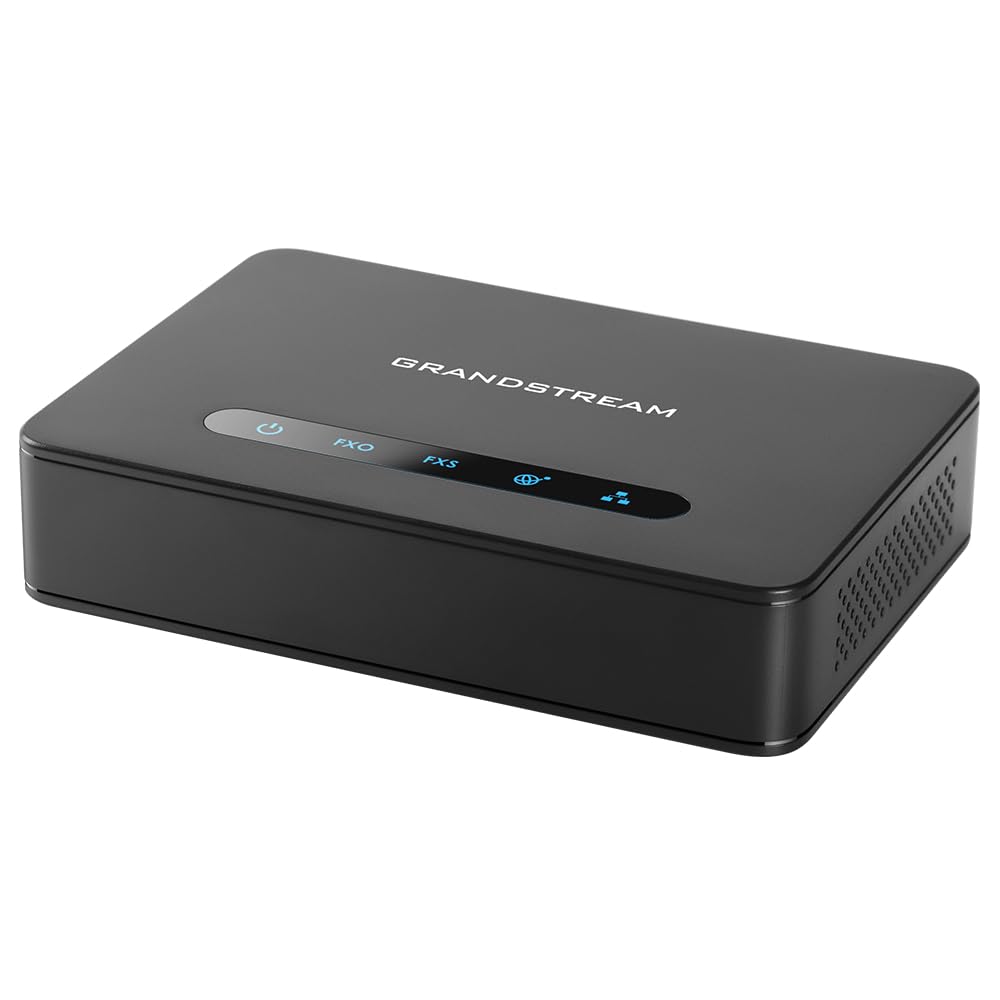
Two phone lines plus a Gigabit router in a single compact box.
You get Gigabit Ethernet ports that handle routing speeds up to 100MBps, so you can plug your computer into the adapter’s second LAN port and keep full Gigabit throughput while your phone uses the same internet connection — no extra switch or router needed. The Grandstream HT812 still offers 2 FXS ports for two separate phone lines and full TLS/SRTP encryption, giving both lines the same security.
Buyers confirm the real‑world payoff: one reviewer who “ported landline to VoIP provider” said their “family noticed no difference” in call quality. Another praised it as a “great way to save your landline number.” But the same review warned that the setup guide was necessary and that the built-in WebUI feels dated. A more concerning review came from an IT professional with “Cisco/Palo Alto experience” who could not get the device working with their Anveo SIP service at all — a reminder that compatibility with your specific provider is not guaranteed.
At 0.29 Kilograms, the HT812 is lighter than the Ubiquiti adapter (0.6 Kilograms). The trade‑off is that its dimensions (13″L x 9″W x 2.8″H) are larger than most other ATAs here, so check your desk space before ordering.
Four-line expandable
- Built‑in NAT router with Gigabit LAN ports
- TLS and SRTP encryption for secure calls and accounts
- Very compact for its feature set at 0.29 Kilograms
Complex setup
- Some buyers with advanced IT skills still failed to register with certain SIP providers
Growing business: Someone who wants to replace both their phone adapter AND a small switch or router in one device.
Simple needs: Its larger size and the possibility of provider incompatibility mean it is not a universal drop‑in solution.
3. Yeastar TA200
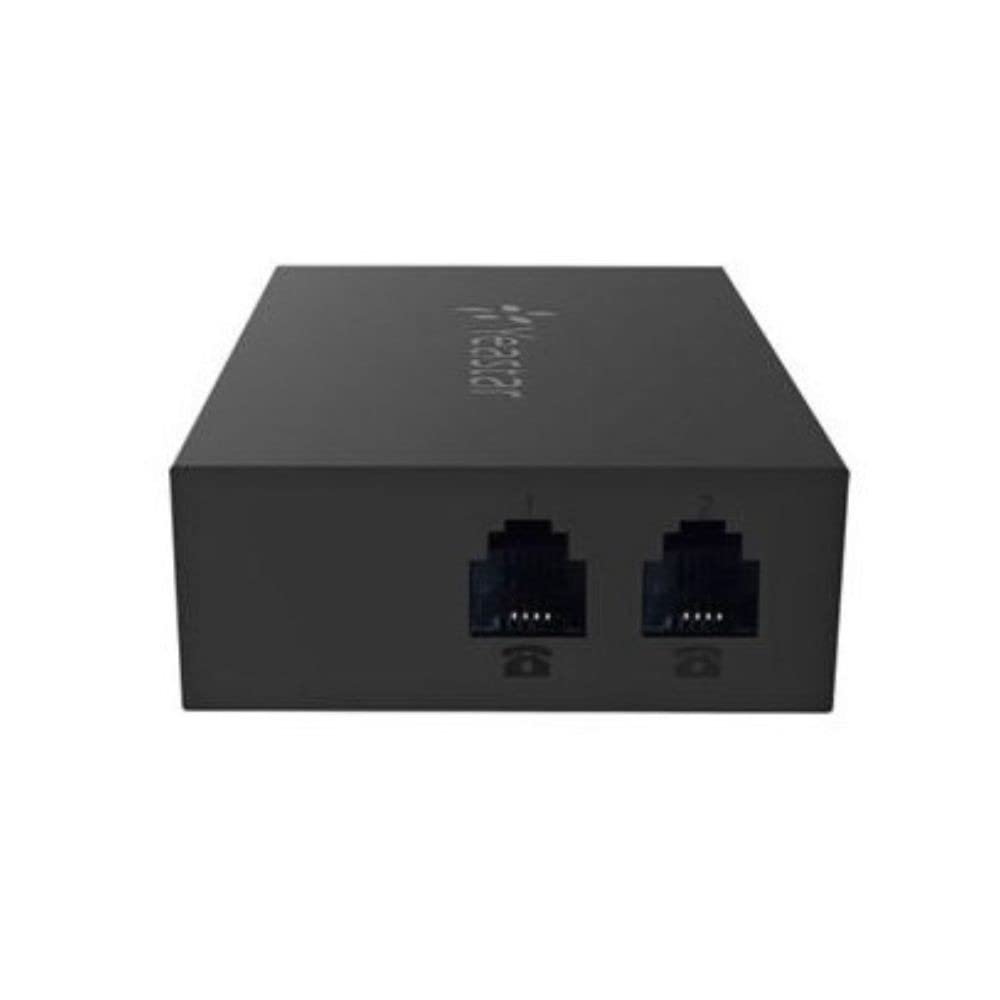
A tiny adapter that powers through USB and fits nearly anywhere.
If your goal is to connect a fax machine or a classic rotary phone to a modern IP PBX, the Yeastar TA200 is about as straightforward as it gets. It is a miniature device that gets its power directly from a USB port on your PC or IP-PBX, so there is no separate wall wart to lose. The form factor is small — its listed dimensions are 3.94 x 18.9 x 19.69 inches — which makes it easy to tuck behind a desk. One buyer summed it up simply: “Bought it so I could connect it to my fax. Worked perfectly.”
The catch is that this is a no‑frills adapter. It does not advertise TLS or SRTP encryption, and the data sheet does not list a network speed rating, so you are likely working with a basic Ethernet port. Another buyer tried to provision it with 3CX and reported “doesn’t work,” confirming that compatibility with popular PBX software is limited. On the flip side, a reviewer successfully used it with “pulse dialing” for a rotary phone, which is a niche many ATAs struggle with.
Compared to the Grandstream HT802 V2, the TA200 trades encryption features and automated provisioning for extreme simplicity and USB power. That makes it a specialist tool rather than a daily‑driver adapter for most homes.
High port density
- Powered via USB — no separate power adapter needed
- Works with pulse dialing for vintage rotary phones
- Very easy setup for basic fax and phone connections
Bulkier chassis
- Does not support TLS/SRTP encryption, limiting provider options
Multi-line offices: Anyone with a simple setup — a fax machine or analog desk phone connecting to a Yeastar or compatible IP PBX.
Compact desks: If your VoIP provider requires encrypted connections or automated provisioning, this is not the right adapter.
4. Ubiquiti UniFi UT‑ATA‑US

A single‑line adapter that lives and breathes inside the UniFi system.
This Ubiquiti adapter is designed exclusively for the UniFi ecosystem — it integrates directly with a UniFi Dream Machine or other UniFi console to enable features like call routing and auto‑attendant. The device itself is compact at 5.16 x 4.33 x 1.1 inches and weighs 0.6 Kilograms, making it heavier than the Grandstream HT812 (0.29 Kilograms) but still desk‑friendly. It has a single FXS port, so you can connect one analog phone or fax machine.
The real story here is in the mixed buyer experiences. One verified reviewer wrote “I tried everything to get this working” and reported that inbound calls had no audio, even after changing internet sources. Another flagged that the adapter “doesn’t function with CGNAT” (Carrier-Grade NAT, a technology many ISPs use that shares one public IP address among many customers), meaning outgoing calls worked but incoming calls did not. On the other hand, several buyers said setup was simple and the product worked flawlessly once the network conditions were right. The lack of a dedicated Ubiquiti support line makes troubleshooting tougher if you hit a wall.
If you do not already run UniFi network gear, skip this one — it is built to pair with UniFi controllers and will not serve you well as a standalone adapter. For UniFi fans who have checked that their ISP does not use CGNAT, it can be a clean single‑line solution.
Ecosystem integration
- smooth integration with the UniFi ecosystem and controller
- Compact size (5.16 x 4.33 x 1.1 inches)
- Advanced call features like auto‑attendant when paired with UniFi Talk
Requires gateway
- Single FXS port — you cannot connect two separate phone lines
UniFi users: Existing UniFi users who want to add a single analog phone line without leaving the UniFi management interface.
Standalone setups: You have CGNAT from your ISP, need two phone lines, or are not committed to the UniFi ecosystem.
5. Cisco ATA 191

Enterprise‑grade voice quality wrapped in a frustratingly opaque setup.
Cisco’s ATA 191 brings you two phone jacks (FXS ports) and the latest security standards — TLS (Transport Layer Security), SHA-2 (Secure Hash Algorithm 2), and SRTP (Secure Real-time Protocol) cipher suites — all in a device that measures just 1.1″L x 3.9″W x 3.9″H. That is small enough to hide behind a phone base. Advanced audio processing features like echo cancellation, voice activity detection, and comfort noise generation aim to deliver clear, natural sound.
Buyers consistently praise the end result — “works great once configured” — but the path to that point is rocky. One reviewer noted that the “non‑intuitive software” and documentation that “focuses on Cisco VoIP” makes third‑party provider setup a self‑guided effort. Another found that voicemail indicators were inconsistent, flashing “on both lines” rather than the one with a message. The unit also ships with a 1‑year limited hardware warranty, which is standard for this tier.
It is important to know that the ATA 191 works with Cisco UCM Versions 8.5(1) and later, but buyer reports suggest it works with services like Ring Central too — though you will need to configure it yourself. If you are a Cisco shop or comfortable editing config files, the voice quality is worth the hassle.
Cisco build quality
- Supports the latest encryption standards: TLS, SHA-2, SRTP
- Advanced audio preprocessing for natural voice quality
- Very compact size at 1.1″L x 3.9″W x 3.9″H
No Gigabit
- Documentation and software are heavily Cisco‑oriented, making third‑party setup cumbersome
Cisco shops: Cisco‑centric VoIP environments where you already know the configuration workflow.
Speed hungry: The non‑intuitive interface and sparse documentation for third‑party providers mean this is not a beginner‑friendly adapter.
6. Cisco ATA 192

Two Ethernet ports give this Cisco model a networking edge over its sibling.
The ATA 192 is essentially the ATA 191’s bigger sibling with one critical difference: it has two 10/100 Mbps RJ‑45 Ethernet ports instead of one. That extra port lets you daisy‑chain a computer or another network device through the adapter without needing a separate switch. Like the 191, it offers two FXS ports for connecting analog phones or fax machines, plus the same security suite of TLS, SHA-2, and SRTP.
Buyers who upgraded from other brands reported stark differences. One reviewer switched from a Grandstream HT802 that “failed on inbound/outbound calls” and found the Cisco ATA 192 setup with Callcentric to be easy and perfectly stable — no daily reboots needed, and consistent four rings before the answering machine picked up. Another praised it as “very stable and easy to programming,” noting it has been their go‑to solution for years for converting digital VoIP to standard fax machines. But a counterpoint: one buyer received the unit without a North American power plug (it was in a separate envelope), and another said the device “never worked.”
At 1.1 Pounds and measuring 9.8 x 6 x 2.5 inches, it is substantially larger and heavier than the ATA 191. The extra Ethernet port is the main reason to choose this over the 191, but the 10/100Mbps speed limit on those ports means you are not getting Gigabit passthrough.
Dual Gigabit ports
- Two 10/100 Mbps Ethernet ports for daisy‑chaining network devices
- Supports TLS, SHA-2, and SRTP encryption suites
- Owners mention stable operation without daily reboots — unlike some competitors
Costlier
- Larger and heavier than the ATA 191, which may matter on a crowded desk
Fast LAN: You need two phone lines AND the ability to pass a wired network connection through the same device without adding a separate switch.
Budget buyers: You need Gigabit speeds on that passthrough port, or you want a more compact adapter.
Understanding the Specs
FXS Port & SIP Profiles
The FXS (Foreign eXchange Subscriber) port is the standard RJ-11 phone jack that provides dial tone, battery, and ringing voltage to your analog phone or fax. Every ATA has at least one. SIP (Session Initiation Protocol) profiles are the separate accounts you can register with a VoIP provider — a 2‑port ATA with 2 SIP profiles lets each phone line have its own phone number and provider settings.
TLS & SRTP Encryption
TLS (Transport Layer Security) encrypts the signaling information — the data that sets up and tears down your call — so account credentials stay private. SRTP (Secure Real-time Transport Protocol) encrypts the actual audio stream of the call itself. If a VoIP provider requires one or both, your ATA must support those standards or it will not register.
FAQ
What is the difference between an ATA and a VoIP gateway?
Will any ATA work with my VoIP provider like voip.ms or RingCentral?
Can I connect a fax machine to an ATA?
How many phones can I connect to a two‑port ATA?
Do I need a firmware update before using my ATA?
What is CGNAT and why does it break my ATA?
Can I use an ATA with a rotary (pulse dialing) phone?
What is the difference between a 10/100Mbps and a Gigabit ATA port?
Why does my ATA need a configuration file from my provider?
Can I use an ATA without a landline or VoIP subscription?
Final Thoughts: The Verdict
For most buyers, the ata telephone adapter winner is the Grandstream HT802 V2 because it delivers reliable two‑line performance with strong security at a reasonable price. If you want a built‑in Gigabit router to simplify your networking, grab the Grandstream HT812. And for a compact USB‑powered adapter that handles vintage rotary phones, the standout is the Yeastar TA200.
How We Picked
We do not accept paid placement. Every pick is matched to a real buyer and a real use-case; we do not hands-on test units.
Sources & Methodology
Specifications: manufacturer listings and product documentation. Review insights: verified customer reviews, as of July 2026. Pricing: not shown on this page (it changes often); check the current price via the retailer link.
As an Amazon Associate, Gadgets Feed earns from qualifying purchases. This does not affect which products we feature.
Product prices and availability are accurate as of the date/time indicated and are subject to change. Any price and availability information displayed on Amazon at the time of purchase will apply to the purchase of this product. As an Amazon Associate I earn from qualifying purchases.
CERTAIN CONTENT THAT APPEARS ON THIS SITE COMES FROM AMAZON. THIS CONTENT IS PROVIDED "AS IS" AND IS SUBJECT TO CHANGE OR REMOVAL AT ANY TIME.
Amazon and the Amazon logo are trademarks of Amazon.com, Inc. or its affiliates.