
Our readers keep the lights on and my morning glass full of iced black tea. As an Amazon Associate, I earn from qualifying purchases.
Specs are compiled from manufacturer listings and verified buyer reviews and can change over time — please confirm the key details on the product page before buying.
You have a 4K camera, a console, or a DJ booth feeding a pristine HDMI signal — and you need that feed to travel over a network to YouTube, OBS, Facebook, or a remote NVR without dropping frames or adding a noticeable delay. A 4K HD encoder box takes that raw HDMI video and compresses it into a network-ready stream using H.265 or H.264 (two efficient video compression standards that shrink file sizes while keeping image quality). The challenge is picking one that delivers smooth 4K at 30 fps without hidden license costs or a frustrating setup process.
I’m Min — the founder and writer behind Gadgets Feed. This guide is built by comparing the manufacturers’ published specifications and the patterns across verified customer reviews, so you get each pick’s real strengths and trade-offs instead of marketing spin.
Every encoder reviewed here supports native 4K input and output, HDMI connection, and multi-protocol streaming — making this the straightforward place to find the right 4k hd encoder box for your live production, event streaming, or broadcast setup.
Quick Picks
- 4K HDMI Video Encoder/Decoder, ZowieBox — Best Overall
- URayCoder UHE265-1L-4K — 24/7 Workhorse
- WayPonDEV Link Pi ENC1-V3 — Protocol Swiss Army Knife
- URayCoder UHE265-1S-4K — Quality-First Streamer
- URayCoder UHE265-1L-4K (HD Model) — IPTV Specialist
- URayCoder UHE265-4-4K — Multi-Channel Pro
How To Choose The Best 4K HD Encoder Box
Picking the right encoder means matching the box to your streaming scenario — live event, 24/7 broadcast, or remote camera feed.
Native 4K Input vs. Upscaling
Some boxes advertise “4K support” but only upscale a 1080p signal to 4K, which adds processing lag and softens detail. You want a box that accepts a true 4K HDMI signal at 3840×2160 and encodes it at that resolution. Check for the specific resolution in the specs — “4K@30fps input” means native, not upscaled.
Streaming Protocols and Platform Compatibility
SRT (Secure Reliable Transport) is the gold standard for low-latency, reliable streaming over the open internet because it handles packet loss better than older protocols. RTMP is what most live platforms (YouTube, Facebook, Twitch) natively ingest. If you plan to stream to multiple platforms at once, choose a box that can output several different protocol streams simultaneously — the URayCoder units, for example, can push four at once. RTSP and ONVIF matter if you are feeding video into an NVR for security or surveillance use.
Licensing Traps (NDI in Particular)
NDI (Network Device Interface) is a popular low-latency video-over-IP standard, but the full NDI license costs extra on some encoders. The WayPonDEV ENC1-V3 ships without an NDI license, so NDI streams cut off at exactly 30 minutes unless you buy a license separately. Certified NDI HX3 boxes like the ZowieBox include the license in the price. Always check whether NDI support is “native” or “trial-limited” before buying.
Latency and Bitrate Control
For live interactive streaming (gaming, remote camera pan-tilt-zoom control, Q&A sessions), you want an encoder that can push latency under 100ms. Bitrate, measured in Mbps (megabits per second), controls video quality. A box with a maximum bitrate of 20Mbps at 4K delivers a clean stream for most use cases. For low-bandwidth scenarios, look for H.265 support, which delivers roughly the same quality at about half the bitrate of H.264. The URayCoder UHE265-1S-4K, for example, can do 720p H.265 at just 2200 kbps (kilobits per second), well under the bitrate your home internet can handle.
Quick Comparison
| Model | Best For | Max Resolution | Streaming Protocols | NDI License | Amazon |
|---|---|---|---|---|---|
| ZowieBox | Compact NDI streaming | 4K@30fps input / 1080p@60fps stream | NDI HX3, SRT, RTMP, RTSP | Included (Certified) | $191.00Amazon |
| URayCoder UHE265-1L-4K | Multi-stream and 24/7 reliability | 4K@30fps | SRT, RTMP, RTSP, HLS, WebRTC, UDP | N/A | $199.00Amazon |
| WayPonDEV ENC1-V3 | Multi-protocol flexibility on a budget | 4K@30fps input / 1080p@60fps | SRT, RTMP, RTSP, ONVIF, HLS | Not included (trial, extra cost) | $149.99Amazon |
| URayCoder UHE265-1S-4K | High-quality single-stream encoding | 4K@30fps | SRT, RTMP, RTSP, HLS, WebRTC, UDP | N/A | $189.00Amazon |
| URayCoder UHE265-1L-4K (HD Model) | IPTV and stable long-term streams | 4K@30fps | SRT, RTMP, RTSP, HLS, UDP, MP4 | N/A | $199.00Amazon |
| URayCoder UHE265-4-4K | Multi-channel enterprise streaming | 4K@30fps | SRT, RTMP, RTSP, HLS, WebRTC, Multicast | N/A | $499.00Amazon |
In‑Depth Reviews
1. 4K HDMI Video Encoder/Decoder, ZowieBox

A compact aluminum box smaller than your phone that brings certified NDI HX3 to any HDMI source.
This is the encoder that skips the licensing headache entirely — the ZowieBox comes with a built-in certified NDI HX3 license, so you are not staring at a frozen stream after 30 minutes. It takes a 4K@30fps HDMI signal and can loop out the same 4K@30fps while streaming at 1080p@60fps, giving you a zero-lag passthrough for your local monitor while the network gets the compressed version. The enclosure is aluminum (4.84 x 2.68 inches, 5.9 ounces), it includes a tally light and an LCD screen that shows the streaming status, and it supports PoE (Power over Ethernet) over 100 meters or USB-C power from a power bank — so you can rig it on a camera tripod or a cold shoe mount without hunting for a wall outlet.
Buyers report it works well for NDI wireless streaming from a Sony ZV1 to OBS and Twitch, noting the value of the included NDI license. The reviewer mentioned a catch: the Wi-Fi antenna is inside the metal box, so it is sensitive to weak network signals, sometimes requiring a restart during network handoffs. As an encoder/decoder combo, it can only run one mode at a time — not both — and the USB capture card function is not currently supported. For live game streaming without a PC, or for turning any camera into an NDI source for a Tricaster or vMix system, this is the most complete all-in-one pick of the group.
NDI Advantage
- Certified NDI HX3/HX2/HX included — no 30-minute trial limit
- Supports PoE (100 meters) or USB-C power bank for portable setups
- Web UI works on PC, phone, or pad with live preview and PTZ camera control
Know the Limits
- Cannot run as encoder and decoder at the same time — only one mode
- Internal antenna is inside a metal case, so Wi-Fi can be unreliable on weak networks
- Recording splits at 45 minutes / 4GB max, causing a brief freeze at the stitch point
Grab it for: Anyone who needs a portable, plug-and-play NDI encoder with no extra licensing cost — perfect for console game streaming, wireless camera feeds, or multi-camera production.
Look elsewhere if: You need to encode and decode simultaneously, or your workflow depends on uncompressed SHQ NDI, which this box does not support.
2. URayCoder UHE265-1L-4K
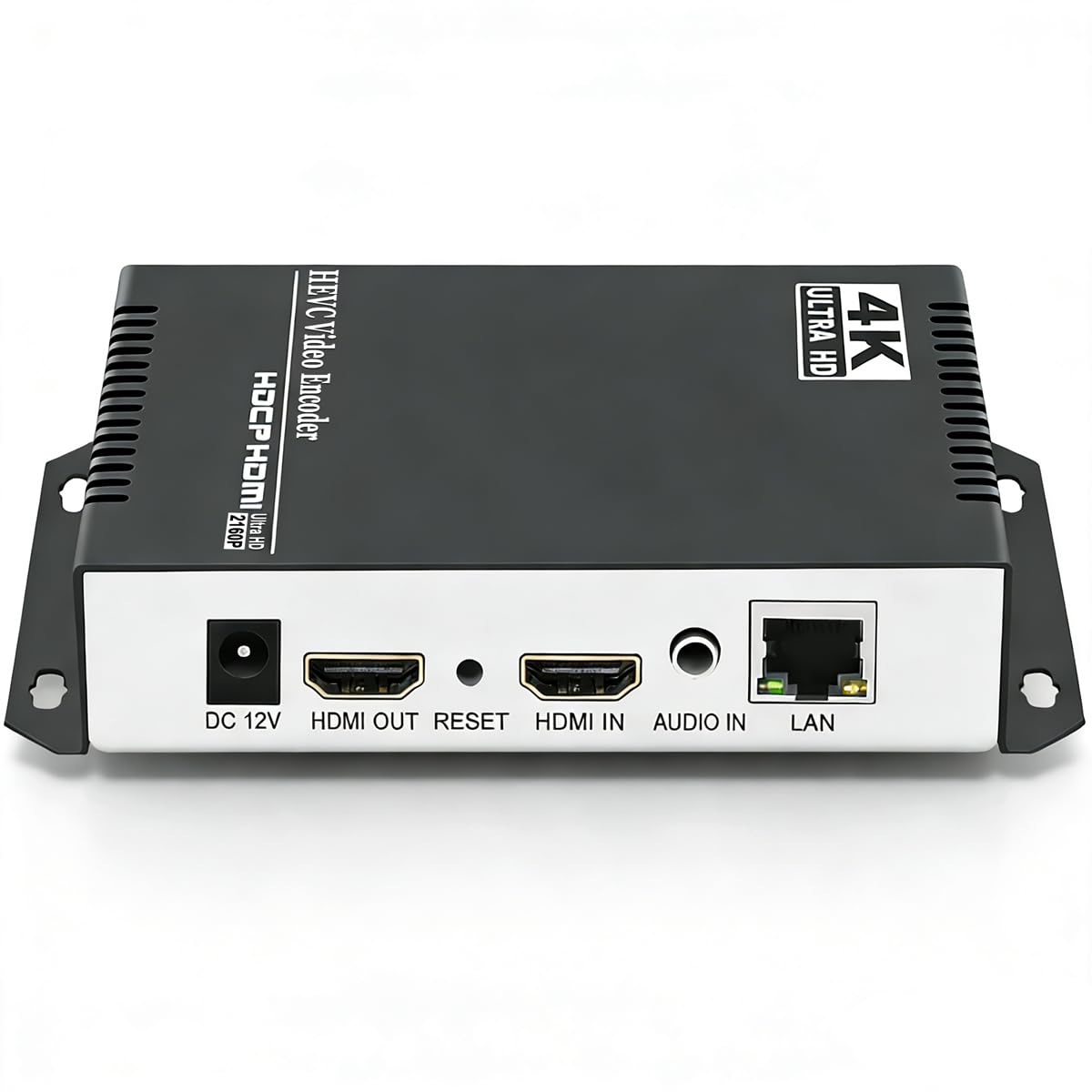
An encoder that one buyer ran for nearly a year without a single reboot, pushing H.265 to a remote mobile viewer.
If reliability is your top concern, this is the box. The UHE265-1L-4K uses the same H.265/H.264 dual encoding chip as the other URayCoder units in this list, but the 1L form factor adds a larger chassis (7 x 5 x 1 inches) that stays cool under load. One reviewer noted it running 24/7 for nearly a year without a hitch, connecting it to an AV receiver for remote mobile viewing. It supports up to 4K@30fps input and can simultaneously push four video streams with different protocols — for example, one RTMP stream to YouTube, one SRT stream to a private server, one HLS stream for a monitoring dashboard, and one WebRTC stream for low-latency browser viewing. The catch: the default IP is 192.168.1.168, which owners mention takes about an hour to configure if your network is on a different subnet, requiring a direct PC connection to change it.
Buyers also note a minor HDCP quirk — it supports standard HD but not 4K HDCP, so you may need to run a TV input detection pass to resolve HDMI sync issues. The support team responds within minutes, multiple reviewers confirm, and the unit ships with a lifetime free warranty. Unlike the WayPonDEV or ZowieBox, this has no NDI functionality, so it is a pure IP video encoder for broadcast, IPTV, or enterprise surveillance feeds.
Rock-Solid Streams
- Supports simultaneous output of 4 different protocol streams at once
- Runs cool enough for 24/7 operation — one buyer mentioned a full year without issues
- Includes lifetime free warranty and responsive technical support
Setup Hurdle
- Hard-coded default IP (192.168.1.168) requires direct PC connection to configure
- No remote control included — needs an external control solution like Harmony Hub
- HDCP support works for standard HD but not 4K sources
Ideal for: IPTV operators, church AV teams, or anyone running a 24/7 stream who wants rock-solid reliability and multi-protocol flexibility.
Not for: Users who need NDI or a plug-and-play experience — the setup takes patience and a basic understanding of IP networking.
3. WayPonDEV Link Pi ENC1-V3

An encoder that handles SRT, RTMP, RTSP, ONVIF, and even WiFi6 modules, all with a built-in web server for configuring settings.
The ENC1-V3 is the most protocol-diverse box here, supporting SRT, RTMP, RTMPS, RTSP, HTTP, HLS, UDP, ONVIF, unicast, and multicast — and it can convert between any of these protocols on the fly. It accepts 4K@30fps via HDMI 1.4, encodes with H.264 or H.265, and pushes a maximum bitrate of 20Mbps. A buyer tested it with SRT and confirmed it works flawlessly at 50ms latency, which is excellent for real-time interactive streaming like live game commentary or remote teaching. The box also supports WiFi6 and 4G/5G modules (COMFAST-957AX and COMFAST 952AX), so you are not tied to a wired Ethernet cable in the field. The onboard 2GB DDR4 RAM and 8GB eMMC give it enough local storage to handle buffering and multi-picture guide switching.
However, there is a clear trap: the NDI stream freezes after exactly 30 minutes because the device ships without an NDI license. Buyers warn the combined cost (unit plus extra NDI license) makes it overpriced compared to dedicated NDI encoders. The HDMI passthrough audio is also reportedly choppy. If you stay within its native protocol set — SRT, RTMP, RTSP — and skip NDI, it is a remarkably flexible value for the price. Unlike the ZowieBox, which is NDI-first, this is a multi-protocol box that happens to also attempt NDI.
Protocol King
- Covers SRT, RTMP, RTMPS, RTSP, HTTP, HLS, UDP, ONVIF — more than any other box here
- Latency tested at 50ms with SRT for real-time interaction
- Supports WiFi6 and 4G/5G modules for wireless or cellular streaming
The NDI Catch
- No NDI license included — stream cuts off at exactly 30 minutes
- Combined cost with license (extra) pushes it past more capable NDI options
- HDMI passthrough audio is reported as choppy by one buyer
Choose this for: Anyone who needs the widest possible protocol support — especially SRT and ONVIF — and does not need long-duration NDI streaming. Great for multi-platform broadcasting on a budget.
skip it if: NDI is your main workflow. You will be better served by the ZowieBox (NDI license included) at a similar price point.
4. URayCoder UHE265-1S-4K
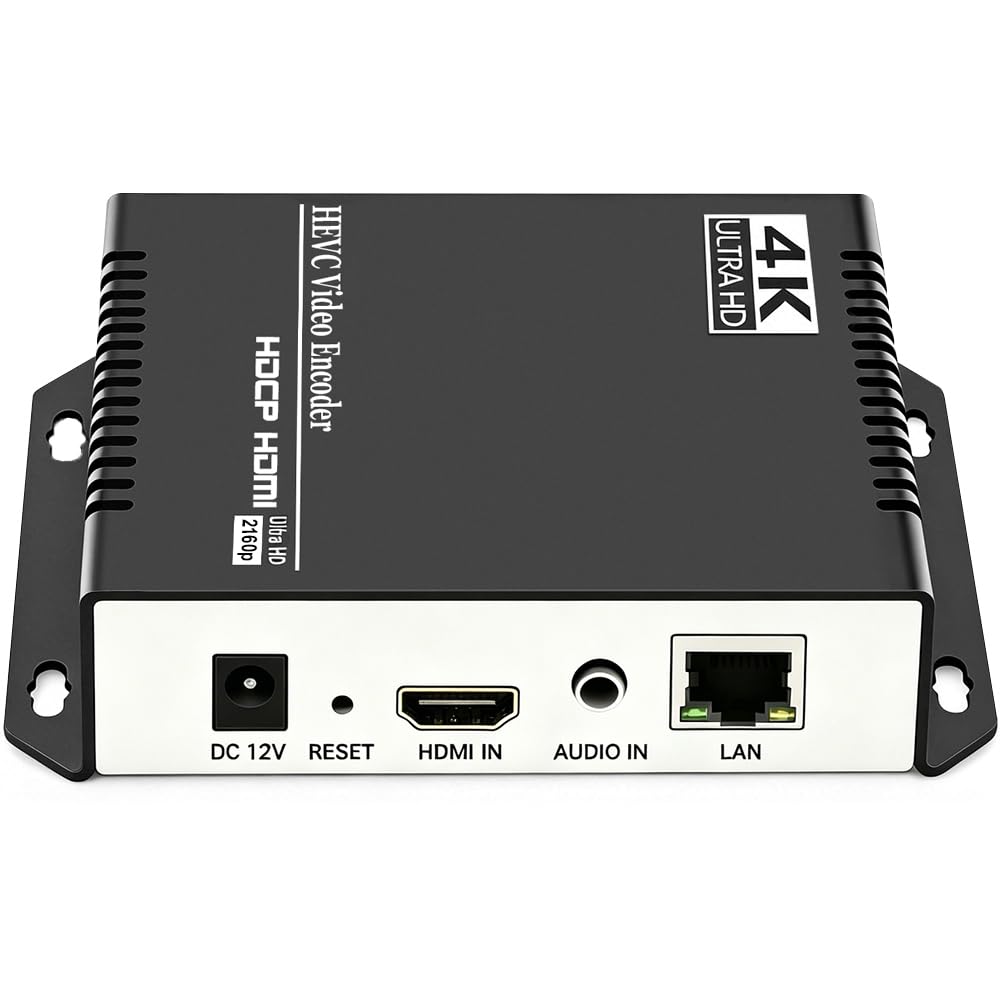
The encoder that a buyer said surpasses much more expensive models, delivering clean 720p H.265 at just 2200 kbps.
Image quality is where this box stands out. The UHE265-1S-4K uses the same H.265/H.264 dual encoding chip as the 1L model but in a smaller form factor (1.1 pounds). One reviewer specifically measured the output: 720p H.265 at 2200 kbps (kilobits per second) with 64 kbps AAC audio — a very efficient bitrate that keeps your stream looking sharp even on a constrained home upload speed. It supports 4K@30fps input, plus up to 120fps at 2K and lower resolutions, which is useful if you are streaming fast-motion content like sports or gaming at lower resolution. The protocol support matches the bigger URayCoder units: HTTP, RTSP, RTMP(S), SRT, HLS, MP4, Multicast (UDP, RTP, PTL), ONVIF, FLV, WebRTC, TRTC, and ICECAST.
Customers note the setup is straightforward — one called it “easy to set up” with “great picture quality.” The biggest complaint is that the power supply is not included in the box, so you may spend 30 minutes digging through cables to find a compatible adapter before you even start. Unlike the larger 1L model, this 1S variant lacks a few customization features like scrolling captions and OSD overlays, but it still supports static text and logo insertion. For a small studio, church live stream, or content creator who values image quality over raw protocol breadth, this is a clean, focused pick. That said, the HDMI input on both URayCoder units lacks NDI support entirely, so you are working in pure IP-encoder territory.
Picture Quality
- One reviewer tested 720p H.265 at 2200 kbps with 64 kbps AAC audio — very bandwidth-efficient
- Supports up to 120fps at 2K resolution for smooth fast-motion content
- Lifetime free warranty and responsive tech support (firmware update in 2 days per one review)
Missing Pieces
- Power supply not included in the box — you need a compatible 12V adapter
- No remote control included
- Requires port forwarding for wide-area network streaming
Reach for this if: You value per-bit efficiency — the H.265 encoding at low bitrates is genuinely impressive for bandwidth-limited setups like garage studios or remote locations.
Reconsider for: Anyone who needs NDI support or expects a full retail box with a power cable included.
5. URayCoder UHE265-1L-4K (HD Model)

An identical chipset to the other 1L unit but tuned for IPTV workflows with MP4 and M3U8 output support.
At first glance this looks like a copy of the URayCoder UHE265-1L-4K reviewed above, but the HD model emphasizes a different output pipeline. It supports the same H.265/H.264 dual encoding at 4K@30fps and the same protocol set, but buyers specifically highlight MP4 and M3U8 outputs as the key selling point for IPTV distribution — you can record a stream directly to an MP4 file or serve an HLS (M3U8) playlist for multicast delivery to many viewers at once. One owner reported multicast for IPTV works great and the unit is easy to set up with “no lag, compact, and durable.” The form factor is smaller at 5.12 x 4.13 x 1.1 inches and 0.5 kilograms, making it the most portable URayCoder option.
The biggest negative, as one buyer put it, is the lack of a power switch — you have to unplug it to turn it off, which is inconvenient if you want to let the circuit cool down. Another reviewer noted the initial HDMI output was gray until a firmware update fixed it. The tech support from URayCoder is consistently fast, with one reviewer receiving a firmware patch and live TeamViewer support from a Chinese company for a free solution. Like all URayCoder units, it comes with a lifetime free warranty. If you are building an IPTV headend or need a reliable encoder that can record to local files while streaming, this is the focused pick.
IPTV-Ready
- Supports MP4 recording and M3U8 (HLS) output for multicast IPTV systems
- Compact aluminum shell at 5.12 x 4.13 x 1.1 inches — easy to rack-mount
- Excellent tech support with TeamViewer remote assistance cited by multiple buyers
Small Annoyances
- No power on/off switch — you must unplug to stop or reboot
- Initial firmware may cause gray output; a firmware update is needed from the start for some units
Best for: IPTV operators, church streaming teams, or education broadcasters who need HLS playlists, MP4 recording, and multicast support in one small box.
Not for: Users who expect a plug-and-play experience with NDI or WebRTC — this is a pure file-and-stream encoder.
6. URayCoder UHE265-4-4K
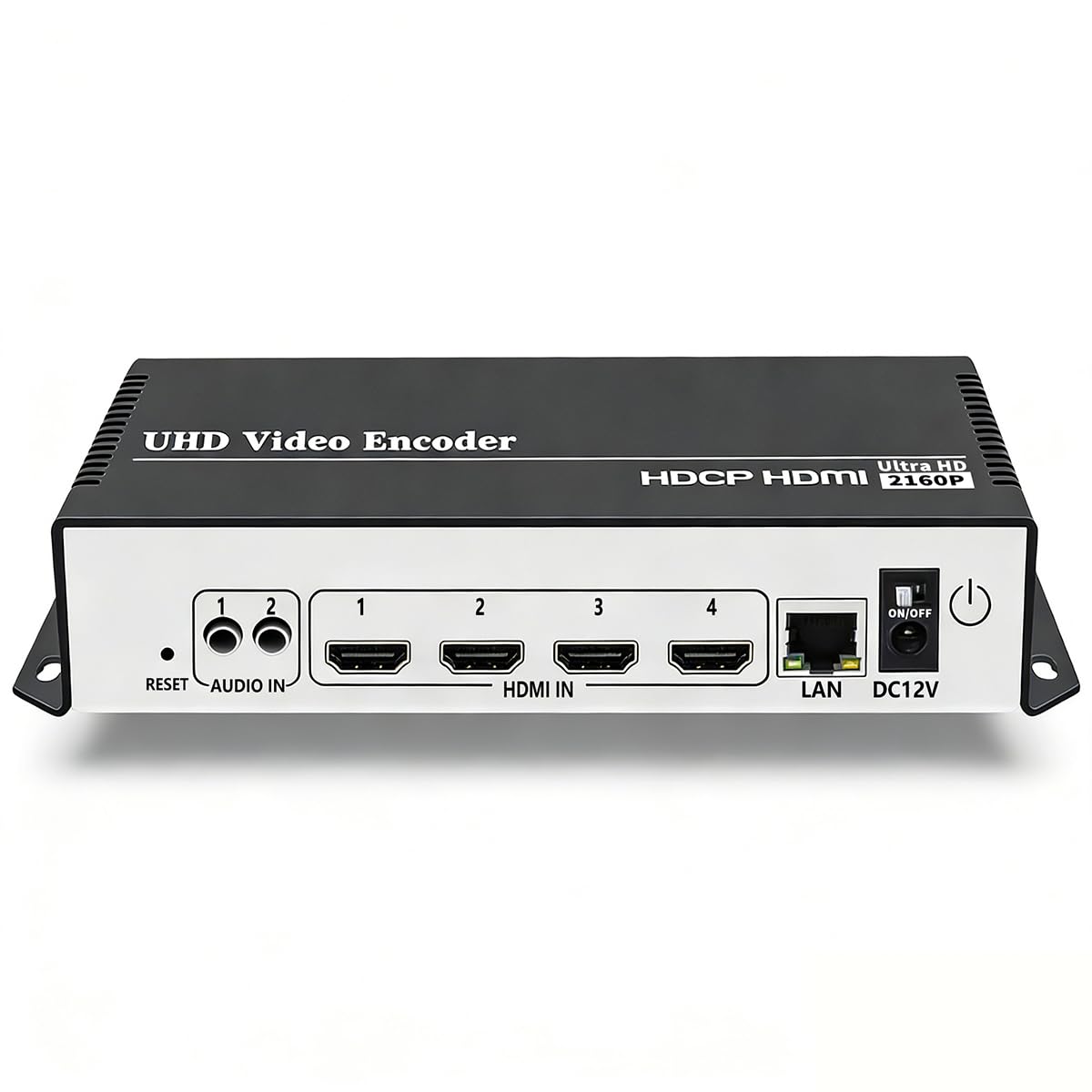
A four-channel encoder that reviewers point out matches TeraDek quality and simultaneously streams to YouTube, Facebook, and Twitch on one box.
This is the heavy lifter. The UHE265-4-4K takes up to four independent HDMI sources and encodes each one simultaneously using the same H.265/H.264 dual chipset. It supports 4K@30fps input on each channel and can push four separate protocol streams per channel — so one camera feed could go to YouTube via RTMP, Facebook via RTMPS, a private SRT server, and a local HLS dashboard, all from a single 4.72 x 3.94 x 1.18 inch box. One customer observed using two of these units to stream reliably to both Blue Iris surveillance software and OBS simultaneously. The support team (buyers name “Linda” and “Allen”) is consistently praised for being fast and helpful.
The catch is the setup difficulty. Buyers warn that DHCP is off by default, which causes immediate connection problems if you simply plug it into a switch. Getting it configured for a live event that changes on the fly is “too hard to set up” — one reviewer specifically notes there is no way to stop a stream gracefully other than unplugging the power cord. For a 24/7/365 fixed installation (security camera feed, house of worship broadcast, campus signage), the unit works great once you get it running. It lacks HLS output for YouTube (RTMP is your YouTube path), and like every URayCoder box here, there is no NDI support. This is an enterprise-grade multi-channel encoder for permanent installations, not a grab-and-go unit for one-off events.
Multi-Camera Hub
- Four independent HDMI inputs — each encodes 4K@30fps simultaneously
- Each channel can output 4 different protocol streams for multi-platform broadcasting
- Buyers compare the quality to TeraDek at a fraction of the cost
Setup Intensive
- DHCP is off by default — requires manual IP configuration on a connected PC
- No graceful stop button — you must unplug to restart or end a stream
- Instructions are poor, and the web interface is not intuitive for on-the-fly changes
Ideal for: A permanent multi-camera installation — security surveillance, house of worship multi-angle streaming, or multi-channel IPTV headend.
Not for: Mobile event production or anyone who needs to change stream destinations on the fly during a live show.
Understanding the Specs
H.265 vs H.264 Encoding
These are two video compression standards — think of them as how tightly the box squeezes your video data. H.265 (also called HEVC, or High Efficiency Video Coding) can deliver 720p at 2200 kbps versus 4000-5000 kbps with H.264 for similar quality. For example, the URayCoder UHE265-1S-4K delivers clean 720p video at just 2200 kbps with H.265, whereas H.264 would need closer to 4000-5000 kbps for the same clarity. The trade-off: H.265 requires more processing power, which adds slightly more latency — one user highlighted “minimal quality gain over H.264 but more lag” on the 1L model. For low-bandwidth streaming (hotel Wi-Fi, cellular, congested home networks), H.265 is the better choice. For live interactive work where every millisecond counts, H.264’s lower encoding latency may be preferable.
SRT, RTMP, and NDI — Which Protocol Matters
SRT (Secure Reliable Transport) is the modern standard for streaming over the unpredictable public internet — it automatically recovers from packet loss, so your video does not freeze when network congestion hits. The WayPonDEV ENC1-V3 tested SRT at 50ms latency, making it excellent for remote interviews. RTMP (Real-Time Messaging Protocol) is the older standard that YouTube, Facebook, and Twitch still ingest natively — almost every encoder here supports it. NDI (Network Device Interface) is a different approach: it treats video as a network source that other software (OBS, vMix, Tricaster) can discover and use without extra configuration. The ZowieBox is the only pick here with a certified NDI HX3 license included. If you work in an NDI production environment (Tricaster, vMix, BirdDog), NDI support is non-negotiable. For direct-to-platform streaming, RTMP and SRT cover your needs.
FAQ
What is the difference between a 4K HD encoder box and a regular capture card?
Will a 4K HD encoder box work with my existing PTZ camera?
How do I set up a 4K HD encoder box if my network uses a different IP range?
Can I use a 4K HD encoder box to stream to multiple platforms at the same time?
Why does my encoder freeze after 30 minutes when using NDI?
Do I need a power supply, or can I use Power over Ethernet (PoE)?
What is the lowest latency I can expect from a 4K HD encoder box?
Can a 4K HD encoder box work as both encoder and decoder at the same time?
Will a 4K HD encoder box introduce noticeable video delay compared to a direct HDMI cable?
How do I add text overlays or logos to my stream using an encoder box?
Final Thoughts: The Verdict
For most people, the 4k hd encoder box winner is the ZowieBox because it includes a certified NDI HX3 license in the price, packs PoE and USB-C power flexibility into a compact 5.9-ounce aluminum chassis, and handles both encoding and decoding duties for live production. If you want maximum protocol flexibility and sub-100ms SRT latency on a budget, grab the WayPonDEV ENC1-V3 — just skip its NDI mode. And for enterprise-grade multi-stream or 24/7 IPTV reliability, the standout is the URayCoder UHE265-4-4K with its four independent HDMI channels.
How We Picked
We do not accept paid placement. Every pick is matched to a real buyer and a real use-case; we do not hands-on test units.
Sources & Methodology
Specifications: manufacturer listings and product documentation. Review insights: verified customer reviews, as of July 2026. Pricing: not shown on this page (it changes often); check the current price via the retailer link.
As an Amazon Associate, Gadgets Feed earns from qualifying purchases. This does not affect which products we feature.
Product prices and availability are accurate as of the date/time indicated and are subject to change. Any price and availability information displayed on Amazon at the time of purchase will apply to the purchase of this product. As an Amazon Associate I earn from qualifying purchases.
CERTAIN CONTENT THAT APPEARS ON THIS SITE COMES FROM AMAZON. THIS CONTENT IS PROVIDED "AS IS" AND IS SUBJECT TO CHANGE OR REMOVAL AT ANY TIME.
Amazon and the Amazon logo are trademarks of Amazon.com, Inc. or its affiliates.