
Our readers keep the lights on and my morning glass full of iced black tea. As an Amazon Associate, I earn from qualifying purchases.
Specs are compiled from manufacturer listings and verified buyer reviews and can change over time — please confirm the key details on the product page before buying.
Hunting for a graphics card around $200 puts you in the balance for 1080p gaming without emptying your wallet. The right card delivers high frame rates in competitive shooters and solid settings in modern AAA titles. Get it wrong, and you risk a card that struggles with new games or fails quickly.
I’m Min — the founder and writer behind Gadgets Feed. This guide is built by comparing the manufacturers’ published specifications and the patterns across verified customer reviews, so you get each pick’s real strengths and trade-offs instead of marketing spin.
Whether you are building your first gaming rig, reviving an old desktop, or hunting for a budget-friendly upgrade, finding the right $200 gpu depends on matching VRAM (video memory), clock speeds, and power requirements to your specific monitor and case setup.
Quick Picks
- ASRock Intel Arc A580 Challenger 8GB OC Graphics Card — Best Overall
- GPVHOSO GTX 1060 6GB Computer Graphics Card — Best Value
- ASUS GeForce GTX 1060 6GB Dual-Fan OC Edition — Speed King
- AISURIX RX 5500 XT 8GB GDDR6 Graphics Card — Silent Performer
- MSI Gaming RTX 3050 LP 6G OC Graphics Card — SFF Champion
- GIGABYTE GeForce RTX 3050 WINDFORCE OC V2 6G Graphics Card — No-Frills RTX
- maxsun AMD Radeon RX 580 8GB 2048SP GDDR5 (White) — White Build
- Kelinx RX 590 8GB Graphics Card, 2048SP GDDR5 256Bit Gaming GPU — Entry-Level 8GB
- Gigabyte R9 270X 2GB GDDR5 OC Graphics Card — Legacy Option
How To Choose The Best $200 GPU
At this price point, you are balancing older architectures with modern features. The three key factors are VRAM, clock speeds, and PSU compatibility.
VRAM — Your Buffer Against Stuttering
Video RAM (VRAM) is where the card stores textures and frame data. For 1080p gaming in 2024, 6GB is the bare minimum for modern titles, and 8GB is the safe zone. A card like the GPVHOSO GTX 1060 6GB, while solid on older games, can hit its ceiling in newer releases that demand more texture memory. Meanwhile, an 8GB card like the Kelinx RX 590 or the maxsun RX 580 gives you a buffer so you do not have to drop texture quality to medium just to avoid stuttering.
Clock Speed and Architecture — The Real Performance Driver
Higher GPU clock speeds (MHz) generally mean faster processing, but architecture matters equally. For example, the ASUS GTX 1060 6GB has a boost clock of 1809 MHz, but the GPVHOSO GTX 1060 6GB runs at 1531 MHz — a real gap in raw number crunching. Newer architectures like Intel’s Xe HPG on the ASRock Arc A580 or the RDNA architecture on the AISURIX RX 5500 XT also bring features like AI upscaling (XeSS) and modern encoding support that older Polaris-based cards lack entirely.
Power Connectors and PSU Requirements
Every card at this price point needs its own power cable from your power supply. Most use a single 8-pin or 6-pin PCIe connector. You must check that your PSU has the right cable and enough wattage headroom. The Kelinx RX 590 recommends a 450W or higher power supply, while the ASRock Arc A580 asks for 650W. If you are upgrading a pre-built office PC with a low-wattage PSU, a card like the MSI RTX 3050 LP 6G that needs no external power is your only safe option.
Quick Comparison
| Model | Best For | VRAM | GPU Clock | Memory Clock | Amazon |
|---|---|---|---|---|---|
| ASRock Arc A580 Challenger 8GB | Best Overall / Modern 1080p with XeSS | 8GB GDDR6 | 2000 MHz | 16 Gbps | Amazon |
| GPVHOSO GTX 1060 6GB | Value / Retro & Esports Gaming | 6GB GDDR5 | 1531 MHz | 8 GHz | Amazon |
| ASUS GTX 1060 6GB Dual-Fan OC | High Clock Speed / Reliable Brand | 6GB GDDR5 | 2 GHz | — | Amazon |
| AISURIX RX 5500 XT 8GB | Quiet Cooling / 8GB GDDR6 Value | 8GB GDDR6 | 1750 MHz | — | $169.99Amazon |
| MSI RTX 3050 LP 6G OC | Small Form Factor / No Power Cable Needed | 6GB GDDR6 | 1492 MHz | 14 Gbps | $209.99$229.99Amazon |
| GIGABYTE RTX 3050 WINDFORCE OC V2 6G | Basic Ray Tracing / No External Power | 6GB GDDR6 | 1477 MHz | — | $209.99Amazon |
| maxsun RX 580 8GB 2048SP | White Theme Build / Budget 144FPS Esports | 8GB GDDR5 | — | — | $139.99Amazon |
| Kelinx RX 590 8GB 2048SP | Entry-Level Upgrade / 4K Media | 8GB GDDR5 | 1667 MHz | 1667 MHz | Amazon |
| Gigabyte R9 270X 2GB | Legacy System / Last-Resort (2GB VRAM) | 2GB GDDR5 | 1050 MHz | 5600 MHz | Amazon |
In-Depth Reviews
1. ASRock Intel Arc A580 Challenger 8GB OC Graphics Card

This card brings AI upscaling and 8GB of fast GDDR6 to the under-$200 bracket — the best mix of modern features and raw speed in this roundup.
Powered by Intel’s Xe HPG architecture (Intel’s latest graphics engine designed for gaming), this card runs at a 2000 MHz clock speed from the start. That factory overclock gives you smooth 1080p gameplay in recent titles. It is built for 1440p workloads thanks to its 256-bit memory interface (the data highway between the GPU and VRAM) and 16 Gbps GDDR6 memory, which pumps out enough bandwidth for creative tasks and modern games alike. The dual-fan 0dB Silent Cooling keeps fans off entirely when you are browsing or watching video, so the card stays silent.
That said, this card demands more from your system than the GPVHOSO GTX 1060 does. Buyers report great performance for the price, with one reviewer noting they got “170+ fps War Thunder (max)” paired with an i5-12400F. It also supports Intel Xe Super Sampling (XeSS), which is Intel’s AI upscaling technology that boosts frame rates in supported games, similar to NVIDIA’s DLSS.
The modern edge
- Factory overclocked at 2000 MHz — the highest base clock in this roundup
- 8GB GDDR6 on a 256-bit interface for high bandwidth
- DisplayPort 2.0 outputs for future-proof monitor connections
- 0dB Silent Cooling stops fans under low load
The system ask
- Requires two 8-pin PCIe power connectors and a 650W PSU
- Some users report random black screens that may be driver-related
- Intel Arc drivers are still maturing compared to NVIDIA/AMD
Top pick for: anyone building a new or recent system who wants the best blend of modern features, high bandwidth, and a clean upgrade path — and who has a 650W PSU ready to go.
One real limit: the higher power draw and dual 8-pin connectors mean it won’t work in older office PCs with weak power supplies.
2. GPVHOSO GTX 1060 6GB Computer Graphics Card

A proven workhorse for older games that skips modern frills to hit a low price — and needs only a 400W power supply.
This is a no-name-brand take on the classic GTX 1060 6GB, and it delivers exactly what you expect: smooth, reliable performance in titles up to around 2019. The GPU clock runs at 1531 MHz, and owners mention it handles “max graphics at consistent FPS on older games; smooth performance.” It is backward compatible with PCIe 2.0 (the older slot standard), meaning it will slot into aging motherboards without issues — breathing new life into an old gaming PC.
You lose some of the higher speeds compared to the ASUS GTX 1060 6GB, which has a boost clock of 1809 MHz. But this GPVHOSO card holds its own for the price, needing only a 400W power supply and a single 6-pin cable. Just keep your expectations realistic: the 6GB VRAM will struggle with newer releases at high texture settings, and there is no support for modern features like ray tracing or DLSS.
Solid budget anchor: great for esports, older AAA titles, and reviving a dusty desktop — but skip it if you want to play the latest games at high settings.
Reach for this if: your gaming library stops around 2019-2020 and you want a cheap, reliable drop-in upgrade that just works.
Look elsewhere if: you need 8GB of VRAM for modern texture-heavy games.
3. ASUS GeForce GTX 1060 6GB Dual-Fan OC Edition
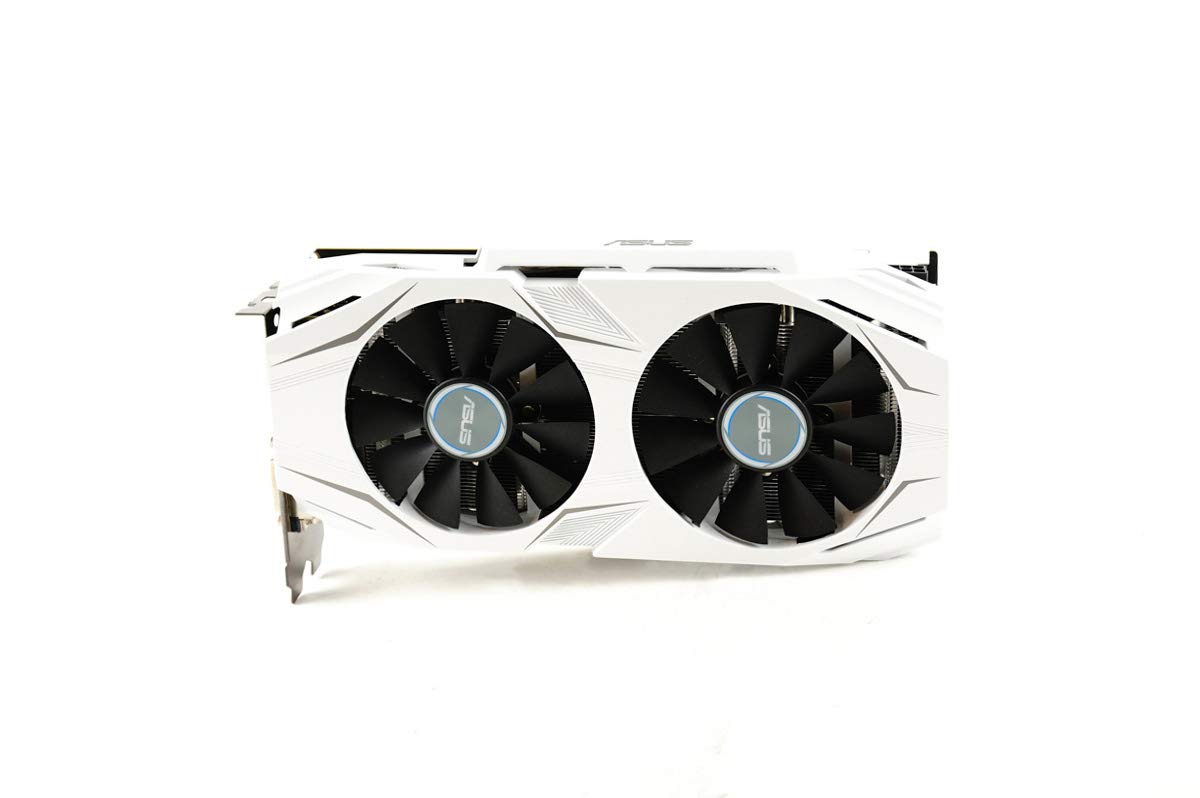
The brand-name option that pushes the GTX 1060 architecture to its peak clock speed — 2 GHz boost is the fastest in this tier.
At a 2 GHz boost clock, this is the fastest GTX 1060 in the roundup — outpacing the GPVHOSO model’s 1531 MHz by a big margin. That extra clock speed translates into real-world performance in CPU-bound scenarios and older games. It is a renewed (refurbished) card, but customers note it arrived “like new” and that one owner “replaced broken GPU in ASUS G11CD; works fine.” The dual-fan design delivers double the airflow of a single-fan card, keeping noise low under load.
The catch is that even at 2 GHz, you are still limited to 6GB of GDDR5 memory and an older architecture with no ray tracing. It also uses a memory clock of 1809 MHz, which is faster than the GPVHOSO’s 8 GHz memory clock on the spec sheet, but in practice, both are GDDR5 and the real-world difference in gaming is modest. This card makes sense if you trust the ASUS brand, need a drop-in replacement for a specific pre-built like the G11CD, or want the highest possible clocks on a GTX 1060.
The clock advantage
- 2 GHz boost clock — the highest GPU speed in the GTX 1060 tier
- Dual-fan cooling runs quieter than single-fan designs
- ASUS Auto-Extreme build quality with Super Alloy components
The architecture limit
- Still only 6GB VRAM — modern games will push past it
- Renewed product with no warranty guarantee from ASUS
- No modern features like ray tracing or DLSS
Stick with this if: you need a known brand, a quiet cooler, and the highest possible clock speeds from a GTX 1060 — and your games fit inside 6GB of VRAM.
pass on it if: you want more than 6GB of memory or plan to play recent AAA releases.
4. AISURIX RX 5500 XT 8GB GDDR6 Graphics Card

An 8GB GDDR6 card that keeps cool and quiet, built on modern RDNA architecture — but quality control is a gamble.
This card uses the newer RDNA architecture (AMD’s modern graphics engine design) from AMD, which brings better efficiency and modern encoding support compared to the older Polaris-based RX 580/590. The 8GB of GDDR6 memory is a real advantage over 6GB competitors — reviewers point out it “runs RE4 remake 60 FPS at medium-high (no RT)” and that the fans stay off during light use for a completely silent experience. At 1750 MHz, the GPU clock delivers smooth performance in modern esports titles at high settings.
The flip side is the build quality concerns several buyers noted. One reported the “card arrived bent; needed manual reshaping to boot,” and another said “only 1 of 3 display ports works.” The plastic backplate feels cheaper than metal alternatives, and the 128-bit memory interface (the data path to the VRAM) is narrower than the 256-bit interface on older cards like the RX 580, which can hurt performance in memory-heavy scenes. It uses a single 8-pin power connector and draws a maximum of 130W.
The quiet gamble: you get modern 8GB GDDR6 and a fan that stops at idle, but the inconsistent quality control makes this a card to buy from a seller with a good return policy.
Pick this if: you want 8GB of GDDR6 on a budget, keep your system on for long hours, and value a silent idle mode.
it’s not for you if: you cannot afford the risk of a defective card or need all three DisplayPorts to work.
5. MSI Gaming RTX 3050 LP 6G OC Graphics Card

The compact card that fits slim cases and runs on slot power alone — no cables needed, making it the only safe option for many office PC upgrades.
This is the card for anyone trying to upgrade a small-form-factor (SFF) pre-built like a Dell Optiplex or HP EliteDesk. It measures just 6.9 x 2.7 inches, it comes with a low-profile bracket, and critically, it needs no external PCIe power cable — it draws all its power from the motherboard slot. Buyers confirm it “fits Dell Inspiron 3471 SFF without mods” and that it “handles demanding titles at 1080p with DLSS Quality.”
The RTX 3050 chip includes entry-level ray tracing cores (hardware for realistic lighting effects) and DLSS (NVIDIA’s AI upscaling that boosts frame rates), giving you access to NVIDIA’s upscaling tech. However, this is the 6GB version with a 96-bit memory interface (a very narrow data path), so ray tracing at any meaningful setting will tank frame rates. The boost clock sits at 1492 MHz, and the GPU hits about 78°C under load. You also get two HDMI 2.1a ports and one DisplayPort 1.4a output. One owner noted that “one fan clatters on 1/25 startups for 10 seconds” after 15 months, so the fan quality is not premium, but for the purpose, it fits a very narrow need perfectly.
The space-saver
- Low-profile design fits tightly in small cases and comes with a low-profile bracket
- No external power cable needed — runs entirely on slot power
- Includes DLSS upscaling for modern games at 1080p
- Dual fans with zero RPM idle for quiet operation
The trade-offs
- 6GB VRAM on a 96-bit bus is the lowest bandwidth in this roundup
- Ray tracing is not practically usable — you have to lower settings heavily
- Reports of intermittent fan noise on a small percentage of units
Use it for: upgrading a slim office PC into a 1080p gaming machine without replacing the power supply.
Avoid it if: you have room for a full-size card and want better raw performance per dollar.
6. GIGABYTE GeForce RTX 3050 WINDFORCE OC V2 6G Graphics Card

A straightforward RTX 3050 that does not need extra power cables — the easiest drop-in upgrade for a pre-built system with no spare connectors.
Like the MSI LP version, this GIGABYTE card runs on slot power alone — no external 6-pin or 8-pin connector needed. That makes it an equally excellent choice for upgrading pre-built systems where the power supply lacks extra cables. The GPU clock is 1477 MHz, slightly lower than the MSI model, but the twin WINDFORCE fans keep the card cool under load. One reviewer noted it works great for basic 1080p gaming with ray tracing in Minecraft, and another upgraded from 2GB to 6GB of video memory and saw a big improvement in general system responsiveness.
The same 6GB GDDR6 memory and 96-bit interface apply here, so bandwidth is the limiting factor. It also outputs up to 7680×4320 pixels, so you could theoretically drive a high-resolution display for media consumption, just not for demanding games. A few buyers said their system “freaked out over it on install” until drivers loaded, so expect a small setup hiccup. For the price, this is the most straightforward choice if you want an RTX card with zero power supply changes.
Easiest upgrade: slot it in, plug nothing extra, and get basic ray tracing and DLSS — but the narrow memory bus keeps performance in the entry-level zone.
Grab this for: a media-center PC or office desktop upgrade where adding a power cable is not possible.
Pass if: you need the extra performance of a card that uses a dedicated power cable.
7. maxsun AMD Radeon RX 580 8GB 2048SP GDDR5 (White)

An 8GB gaming card with a white PCB that fits themed builds and handles modern games at medium settings — the only white option here.
The RX 580 is a well-known budget champion, and this version from maxsun stands out for its white color scheme, making it a rare match for white-themed PC builds. It packs 8GB of GDDR5 memory on a 256-bit bus — a wider interface than the newer RTX 3050 cards — which helps in texture-heavy games. Shoppers say it “handles 144 FPS in Fortnite/VALORANT/CS:GO, 60 FPS in AAA with lowered settings,” confirming its place as a solid 1080p performer for competitive play.
The downsides are real. The card has a plastic dual-fan cooler that feels cheap, and one buyer mentioned the power port only had 6 pins for overclocking instead of the advertised 8. Another buyer said it would not boot until they upgraded from a 620W to a 750W power supply, so the power requirements might be higher than stated. The 2048SP variant is a slightly cut-down version of the full RX 580 — it has fewer shaders (processing units) and a lower clock than the original.
The look and memory
- White PCB and cooler stand out in a sea of black cards
- 8GB GDDR5 on a 256-bit bus for good texture performance
- Great 144 FPS performance in popular esports titles
The corners cut
- Cheaper build quality with a plastic shroud and basic cooling
- May require a 750W power supply despite its age and power draw
- 2048SP variant is a lower-tier version of the standard RX 580
Choose this if: you are building a white-themed PC and need an 8GB card for budget 1080p gaming.
look elsewhere if: build quality consistency matters more than the color of your parts.
8. Kelinx RX 590 8GB Graphics Card, 2048SP GDDR5 256Bit Gaming GPU
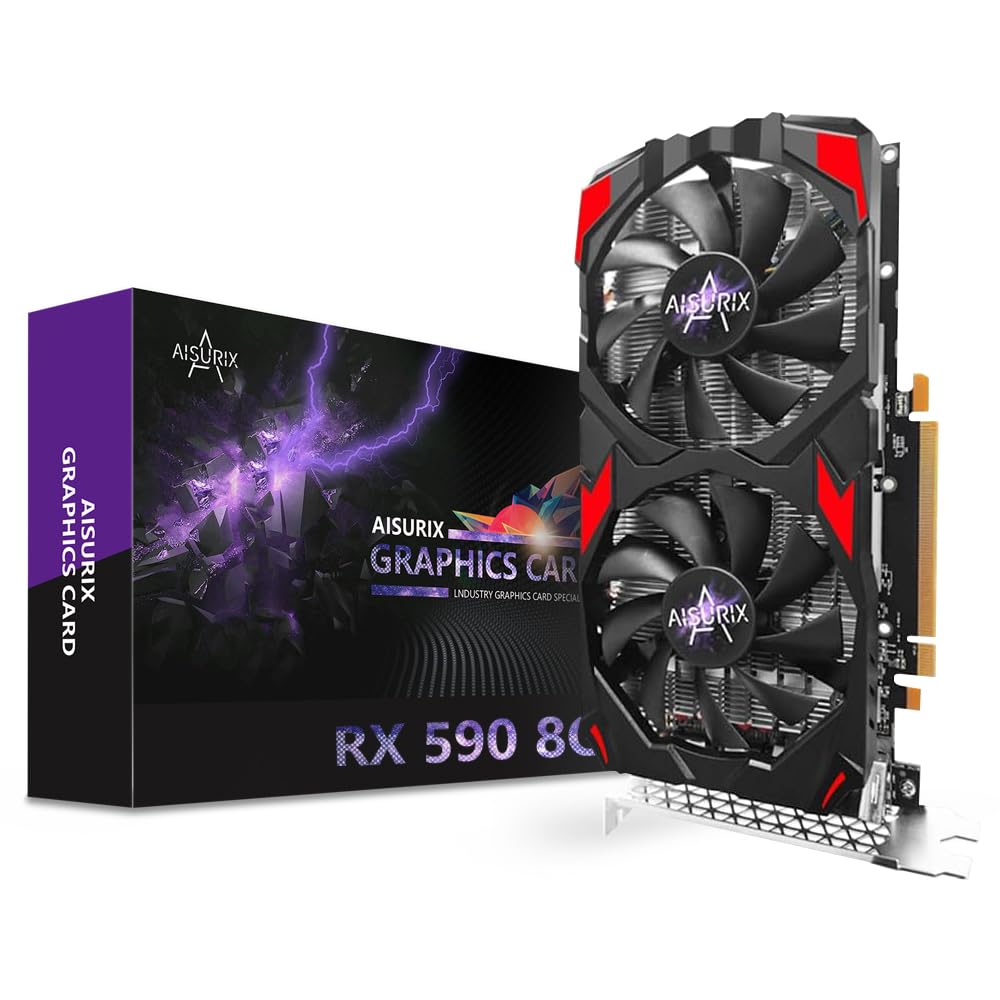
A budget 8GB Polaris card that works for 1080p gaming but comes with a reliability warning — the riskiest pick in this roundup.
This Kelinx RX 590 runs at a 1667 MHz GPU clock and offers 8GB of GDDR5 memory on a 256-bit bus — the same class of specs as the maxsun RX 580 but with slightly higher clock speeds. It is a good fit for someone moving from integrated graphics who just wants to play at 1080p without spending much. Buyers report it is “good for low-demand use” and that it “plays most games” at acceptable settings.
However, the customer reviews tell a worrying story. One owner said it “worked fine initially, then graphical glitch and failure” and another reported the card “died after a week” with random crashes and a “no video card recognized” error. That is not a one-off: the reliability data on this model is the weakest in the entire roundup. It requires a 450W or higher power supply and a single 8-pin power connector.
Only if you must: the 8GB VRAM and 1667 MHz clock look good on paper, but the reported failure rate makes this a risky buy without a solid return policy.
Consider it only when: your budget is extremely tight, you need 8GB VRAM, and you can afford the hassle of a potential return.
Stay away if: you need the card to work reliably for more than a few weeks.
9. Gigabyte R9 270X 2GB GDDR5 OC Graphics Card

The last-resort card for a very old system — but 2GB of VRAM is a dealbreaker for any modern gaming use.
The R9 270X is a card from 2013. With only 2GB of GDDR5 memory, a core clock of 1050 MHz, and a boost clock of 1100 MHz, it is hopelessly outclassed for any modern AAA game. Even at the time, buyers described it as “performance between GTX 660 and GTX 760.” The Gigabyte WINDFORCE 3X cooling solution was decent for its era, keeping temps under 62°C even overclocked, and one reviewer still praised it as “one of the best cards under $200” back when it cost new.
But here is the problem: multiple owners mention defective units — “two defective units (not recognized in device manager)” and “product failed on installation; screen shows colors or is black” — and you are buying a decade-old card that was already prone to “widespread driver issue with R9 series.” Even if it works, 2GB VRAM means you cannot play most games released after 2015 at acceptable texture quality. The memory clock is 5600 MHz and it features 2xDVI/HDMI/DisplayPort outputs.
Real talk: skip this unless you have a specific vintage system that needs a PCIe card for display output only, and you never plan to play a modern game.
Only buy this if: you need a working display adapter for an old desktop and literally nothing else will fit your budget or slot.
Do not buy it for: any gaming use in 2024 or later — the 2GB VRAM is a hard wall.
Understanding the Specs
VRAM (Video Memory)
This is the card’s short-term memory for holding textures and frame data. For a card at this price, you should target 8GB if you want to play modern games without running out of memory and causing stutters. A 6GB card like the GTX 1060 can still play most games, but you will have to lower texture quality in newer releases. A 2GB card like the R9 270X is practically unusable for any game made in the last eight years.
GPU Clock Speed (MHz)
This tells you how fast the graphics processor itself runs. Higher clock speeds indicate faster performance within the same architecture, but cross-brand comparisons are not straightforward. A 2000 MHz card (ASRock Arc A580) clearly outperforms a 1050 MHz card (R9 270X), but comparing 1667 MHz RX 590 to 1531 MHz GTX 1060 is less clear due to architecture differences.
Memory Clock and Bandwidth
Memory clock speed (measured in MHz or Gbps) combined with the memory bus width (measured in bits) determines how fast the card can move data in and out of its VRAM. A 256-bit bus with GDDR5 offers more bandwidth than a 96-bit bus with GDDR6, even though the GDDR6 is a faster memory type by spec. The ASRock A580 uses a 256-bit interface with 16 Gbps memory, giving it a clear bandwidth advantage over the 96-bit RTX 3050 cards.
Power Connectors and PSU Rating
Every card in this guide needs a specific type of power connection from your power supply. Most use a single 6-pin or 8-pin PCIe cable. Some cards like the MSI and GIGABYTE RTX 3050 run on slot power alone, which is critical if your PSU has no extra cables. The total wattage recommendation (450W, 650W, etc.) includes the rest of your system — if you have a power-hungry CPU, lean toward a higher-rated PSU.
FAQ
What is the best $200 GPU for 1080p gaming?
Is 6GB of VRAM enough for gaming in 2024?
Will a $200 GPU work in my old Dell Optiplex or HP office PC?
Do I need to upgrade my power supply for a $200 GPU?
What is the difference between GDDR5 and GDDR6?
Is the RX 580 still a good graphics card in 2024?
Should I buy a new or refurbished GPU at this price?
Why does the ASRock Arc A580 need more power than the GTX 1060?
Can I use a $200 GPU for video editing or photo editing?
What does “low profile” mean on a GPU?
Final Thoughts: The Verdict
For most buyers, the best $200 gpu is the ASRock Intel Arc A580 Challenger 8GB OC because it delivers modern architecture, 8GB of GDDR6, and the highest out-of-box clock speed in this price range — all with future-ready DisplayPort 2.0 outputs. If you cannot upgrade your power supply and need a card that runs on slot power alone, grab the MSI RTX 3050 LP 6G OC. And for the tightest budget that still wants 8GB VRAM for esports gaming, the maxsun RX 580 8GB 2048SP (White) is a capable choice.
How We Picked
We do not accept paid placement. Every pick is matched to a real buyer and a real use-case; we do not hands-on test units.
Sources & Methodology
Specifications: manufacturer listings and product documentation. Review insights: verified customer reviews, as of July 2026. Pricing: not shown on this page (it changes often); check the current price via the retailer link.
As an Amazon Associate, Gadgets Feed earns from qualifying purchases. This does not affect which products we feature.
Product prices and availability are accurate as of the date/time indicated and are subject to change. Any price and availability information displayed on Amazon at the time of purchase will apply to the purchase of this product. As an Amazon Associate I earn from qualifying purchases.
CERTAIN CONTENT THAT APPEARS ON THIS SITE COMES FROM AMAZON. THIS CONTENT IS PROVIDED "AS IS" AND IS SUBJECT TO CHANGE OR REMOVAL AT ANY TIME.
Amazon and the Amazon logo are trademarks of Amazon.com, Inc. or its affiliates.