
Our readers keep the lights on and my morning glass full of iced black tea. As an Amazon Associate, I earn from qualifying purchases.
Specs are compiled from manufacturer listings and verified buyer reviews and can change over time — please confirm the key details on the product page before buying.
If you game with a mouse, a full-size keyboard with a numpad wastes precious inches of mouse-swinging space. A 75% keyboard solves this by keeping the function row and arrow keys but trimming the numpad, giving you a compact deck for twitchy aim without losing the shortcuts you actually use. The hard part isn’t finding one — it’s choosing between a handful of genuinely good options packed with features like hot-swap sockets (plates that let you change switches without soldering), gasket-mounted plates (silicone pads that soften each keystroke), and creamy pre-lubed switches.
I’m Min — the founder and writer behind Gadgets Feed. This guide is built by comparing the manufacturers’ published specifications and the patterns across verified customer reviews, so you get each pick’s real strengths and trade-offs instead of marketing spin.
To find the 75% keyboard for gaming that fits your setup and budget, I looked at build quality, key-feel, battery life, wireless performance, and the extra features — like screens and knobs — that actually improve your daily use.
Quick Picks
- Corsair K65 Plus Wireless — Premium Pick
- YUNZII C75 Wireless Mechanical Keyboard — Powerhouse Battery
- AULA S75 PRO Wireless Mechanical Keyboard — Screen & Knob
- YUNZII B75 PRO Wireless Mechanical Keyboard — Top Value
- DAREU EK75PRO Sakura Pink — Aesthetic Pick
- HINATSUSIKE H83 Pro 75% Wireless Mechanical Keyboard — Programmer’s Choice
- Redragon K724 PRO Wireless Gasket Gaming Keyboard — Budget Champion
How To Choose The Best 75% Keyboard For Gaming
A 75% keyboard is a specific creature — it keeps the F-row and arrow keys but drops the numpad, making it wider than a 60% board but still far more compact than a tenkeyless (TKL, a keyboard without a numpad). The trick is finding one that feels great under your fingers and stays reliable during long gaming sessions.
Switch Type and Feel
Most gaming keyboards in this category use linear switches (smooth keypress, no bump or click). Pre-lubed linear switches, like the ones on many picks here, sound quieter and feel silkier right from the start. If you want the option to swap later, a hot-swappable PCB (circuit board) lets you pop in different switches without any soldering iron.
Connectivity and Latency
Tri-mode keyboards let you switch between a wired USB-C connection, a fast 2.4GHz wireless dongle, and Bluetooth. For gaming, the 2.4GHz mode has the lowest latency (delay) and feels like a wired connection. Bluetooth is fine for typing on a tablet or switching between devices, but you will feel a slight delay in fast-paced shooters.
Build Quality and Sound
A gasket mount structure uses rubber or silicone pads between the plate and case, giving the keys a softer, bouncier bottom-out and reducing the hollow “ping” sound. Combined with multiple layers of foam, this produces the “thocky” or “creamy” sound that keyboard enthusiasts describe. Pay attention to the keycaps too — double-shot PBT keycaps (plastic keycaps with legends molded through, not printed) resist shine and fading much better than cheaper ABS ones.
Quick Comparison
| Model | Best For | Layout / Keys | Connectivity | Battery | Amazon |
|---|---|---|---|---|---|
| Corsair K65 Plus | Premium build & long battery | 75% / 84 keys | 2.4GHz / BT / USB-C | 266 hours (RGB off) | $159.99Amazon |
| YUNZII C75 | Massive battery & cute aesthetic | 75% / 84 keys | BT 5.0 / 2.4GHz / USB-C | 5500mAh | $73.58$91.99Limited time dealAmazon |
| AULA S75 PRO | Built-in screen & knob | 75% / 80 keys | BT 5.0 / 2.4GHz / USB-C | ~20h with RGB | $82.99Amazon |
| YUNZII B75 PRO | Creamy feel on a budget | 75% / 82 keys | BT / 2.4GHz / USB-C | 4000mAh | $63.99$79.99Amazon |
| DAREU EK75PRO | Quiet, light switches & pink aesthetic | 75% / 81 keys | BT 5.1 / 2.4GHz / USB-C | Long (2-4 weeks per users) | $64.99Amazon |
| HINATSUSIKE H83 Pro | VIA programmable & rock-solid build | 75% / 83 keys | BT 5.0 / 2.4GHz / USB-C | 4000mAh | $47.99Amazon |
| Redragon K724 PRO | Value with a 1.14″ TFT screen | 75% / 81 keys | BT 3.0/5.0 / 2.4GHz / USB-C | Good (week+ per users) | $59.99$69.99Amazon |
In‑Depth Reviews
1. Corsair K65 Plus Wireless

Battery champ with a premium feel that outlasts marathon sessions.
This is the board you grab when you want industrial-grade build quality and an absurdly long runtime. The pre-lubricated Corsair MLX Red linear switches (smooth, no bump, no click) feel responsive under your fingers, making them a solid pick for both frantic gaming and long typing sessions. The real headline here is the 266-hour wireless battery life with the RGB off — that’s weeks of daily use without reaching for the USB-C cable. Buyers report the keys are “smooth, tactile, and quiet” and the “compact, clean wireless setup” is super responsive with no lag.
It connects via low-latency 2.4GHz wireless, Bluetooth, or USB wired, and Corsair includes secure AES encryption (a security standard) for the wireless signal. The multi-function rotary dial on the top left lets you adjust volume or control media without hunting for hotkeys. The PBT dye-sublimated keycaps (plastic keycaps with ink baked into the surface) resist fading and shine far better than cheaper options, keeping the board looking new for years. At 84 keys in a compact 75% layout, it also works with PC, Mac, PS5, PS4, Xbox, and iPad. One thing to keep in mind: the default keycaps do not let the RGB shine through the legends, so you may want aftermarket caps if you rely on backlighting in a dark room.
Why it stands out
- 266-hour battery life with RGB off — runs for weeks on a charge
- Pre-lubricated MLX Red linear switches feel silky and quiet
- Multi-function rotary dial for fast volume and media control
- PBT dye-sub keycaps resist shine and wear over the long haul
The trade-off
- Stock keycaps are not shine-through, so letters are hard to see in the dark
- Battery life drops noticeably with full RGB on, per some user reports
Best suited for: The gamer who wants a durable, long-lasting wireless board with a premium brand name and a solid typing feel.
One thing to know: If you game in a dark room, budget extra for aftermarket shine-through keycaps to see your legends.
2. YUNZII C75 Wireless Mechanical Keyboard
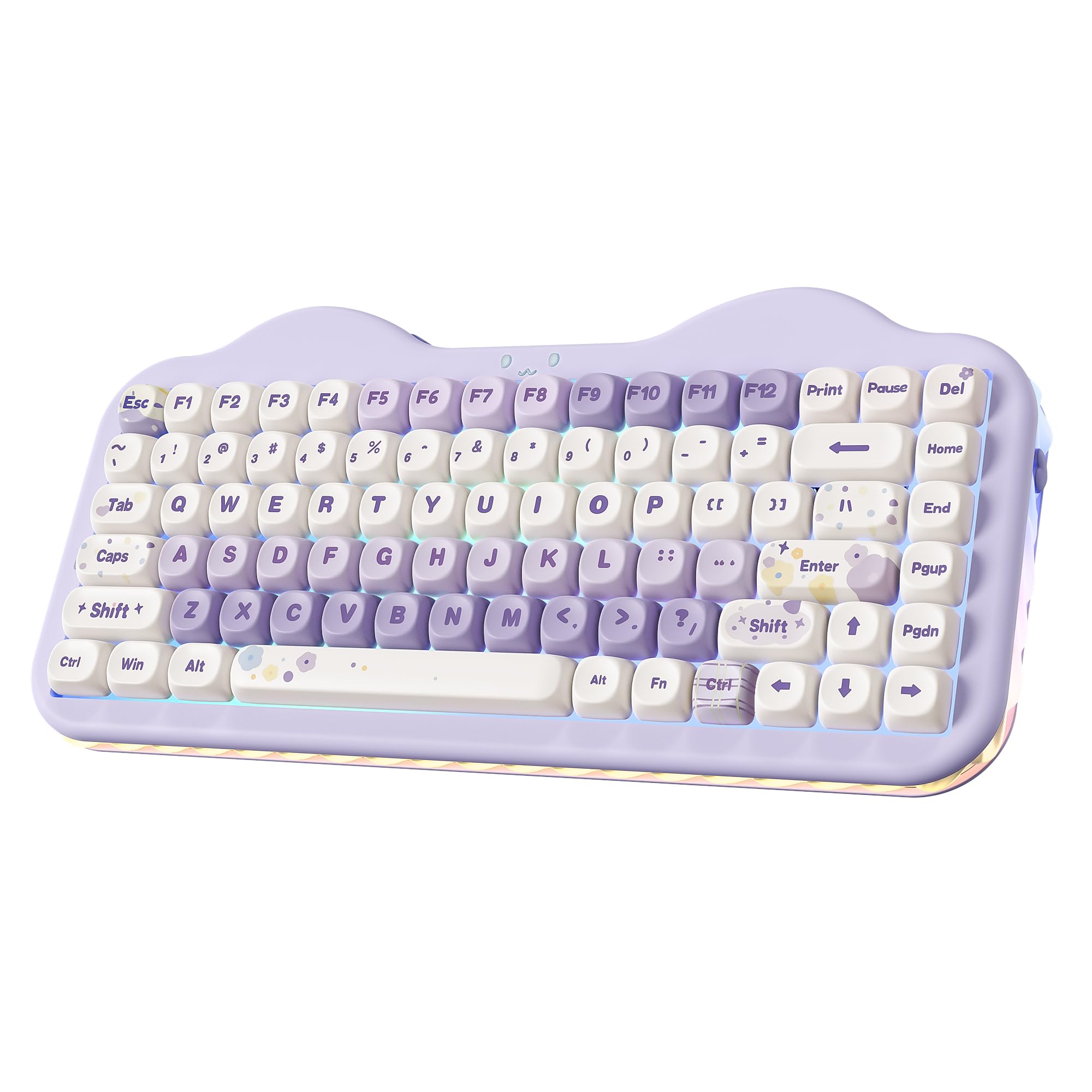
A massive battery hides under a cute cake-design exterior.
The YUNZII C75 packs a 5500mAh battery — the largest capacity in this lineup — which means you can go weeks between charges even with frequent use. It uses a gasket mount structure (silicone pads that soften keystrokes) with multiple layers of sound-absorbing fillings and pre-lubed linear switches, giving you that creamy, thocky sound that feels satisfying with every keystroke. Owners mention it has an “excellent thocky/creamy sound” and describe it as “heavy feel” with “durable purple cable”. One reviewer noted the “FN key lock took 30 min to figure out,” so the learning curve on the software side is real.
The 75% layout keeps 84 keys, including the function row and arrow keys. It connects via Bluetooth 5.0, 2.4GHz wireless, or USB-C, and can smoothly switch between up to five devices. The hot-swappable PCB (circuit board) supports both 3-pin and 5-pin switches, so you can swap in your preferred switches later without soldering. The 3-zone RGB includes per-key lighting, a cute cat face emblem, and side underglow, all customizable through the programmable software. It also comes with a dust cover and extra keycaps and switches in the box.
What you get
- 5500mAh battery delivers exceptional endurance for long work sessions and gaming marathons
- Gasket mount and five-layer padding produce a creamy, thocky sound
- 3-zone RGB with side underglow and a cat face emblem for a unique look
- Includes dust cover, extra keycaps, and switch puller
The catch
- Software and FN key lock require some patience to set up
- Plasticky feel compared to metal-framed boards
Go for it if: You want the absolute best battery life in a 75% board, plus a fun, colorful design that works as a desk accessory.
Look elsewhere if: You prefer a minimalist all-black look or do not want to deal with software quirks during initial setup.
3. AULA S75 PRO Wireless Mechanical Keyboard

A gorgeous little LCD screen turns this budget board into a conversation piece.
The AULA S75 PRO is one of the cheapest keyboards you can buy that includes a TFT color screen (a small, full-color display). That screen shows your battery status, date, time, operating system, and even custom GIF images, making it genuinely useful. A multi-function knob next to the screen lets you adjust volume, backlight brightness, or switch RGB effects without fumbling with FN combos. Customers note it has “amazing sound” with a “crisp, between creamy and clacky” feel, and note that the “2.4GHz wireless has no gaming latency” while “Bluetooth has delay but good for typing.”
The board uses a hot-swappable PCB (circuit board) compatible with both 3-pin and 5-pin switches, and comes with pre-lubricated linear switches and stabilizers. The gasket mount structure (silicone pads) and five-layer silencer fillings produce a creamy, thocky typing sound. It has 19 RGB lighting effects with over 16.8 million colors, plus side lighting. Connectivity is tri-mode: Bluetooth 5.0, 2.4GHz wireless, and USB-C. One note: the driver software only works on Windows in wired mode, and the screen calibration also requires a wired Windows connection — so Mac users will miss that feature. Battery life runs around 20 hours with full RGB on, or about a week with the auto-sleep feature. Unlike the larger YUNZII C75 (which has a 5500mAh battery), the AULA S75 PRO has a smaller capacity battery that drains faster with the screen and LEDs active, but it is still fine for a desk that sits near an outlet.
What’s impressive
- Built-in LCD screen shows battery, time, and custom GIFs
- Creamy, thocky sound with a solid gasket mount and five-layer padding
- 2.4GHz wireless has zero gaming lag, per multiple user reports
- Hot-swappable PCB supports 3/5-pin switches for easy customization
The limitations
- Screen and driver software only work on Windows in wired mode
- Battery life with RGB on is about 20 hours — much less than top picks
Best for: Windows gamers who want a cool screen and knob without paying premium prices.
skip it if: You use a Mac and want to use the screen, or you need a battery that lasts a full work week with LEDs on.
4. YUNZII B75 PRO Wireless Mechanical Keyboard

Creamy, thocky typing at a price that leaves room in your budget for a new game.
The B75 PRO delivers a typing feel that punches well above its price point, thanks to a gasket mount structure (silicone pads) with five-layer padding and pre-lubed linear switches. The “Milk” switches produce a clacky, creamy sound that reviewers describe as “perfect for gaming/WFH” and “amazing sound and feel” for the price. The 75% layout has 82 keys, including a multi-function knob that adjusts volume, backlight brightness, and switches between gaming and office modes with a long press.
It connects via Bluetooth, 2.4GHz wireless, and USB-C, and the 4000mAh battery keeps it running for extended sessions. The hot-swappable PCB (circuit board) supports 3-pin and 5-pin switches, and the south-facing LEDs let the RGB shine through the keycaps clearly. It has over 20 built-in backlight modes and programmable software for remapping keys and recording macros. Reviewers point out that FN+ options do not work on Mac — it works perfectly with Windows via Bluetooth or USB — but Mac users can still use the 2.4GHz dongle. The package includes a dust cover, extra keycaps and switches, a switch/keycap puller, and a USB-C cable.
Highlights
- Gasket mount with five-layer padding creates a creamy, thocky typing feel
- Multi-function knob with long-press mode switching (gaming/office)
- 4000mAh battery for long wireless sessions
- Includes dust cover, extra keycaps, and switches from the start
Shortfalls
- FN+ combos do not work on Mac, limiting customization on Apple systems
- Battery life is poor according to some buyers — keyboard sleeps frequently, so keep it plugged in
Reach for this if: You are a Windows user who wants a creamy, satisfying typing feel for both gaming and work without spending a fortune.
Consider alternatives if: You are on a Mac and rely on FN key shortcuts for everyday tasks.
5. DAREU EK75PRO Sakura Pink
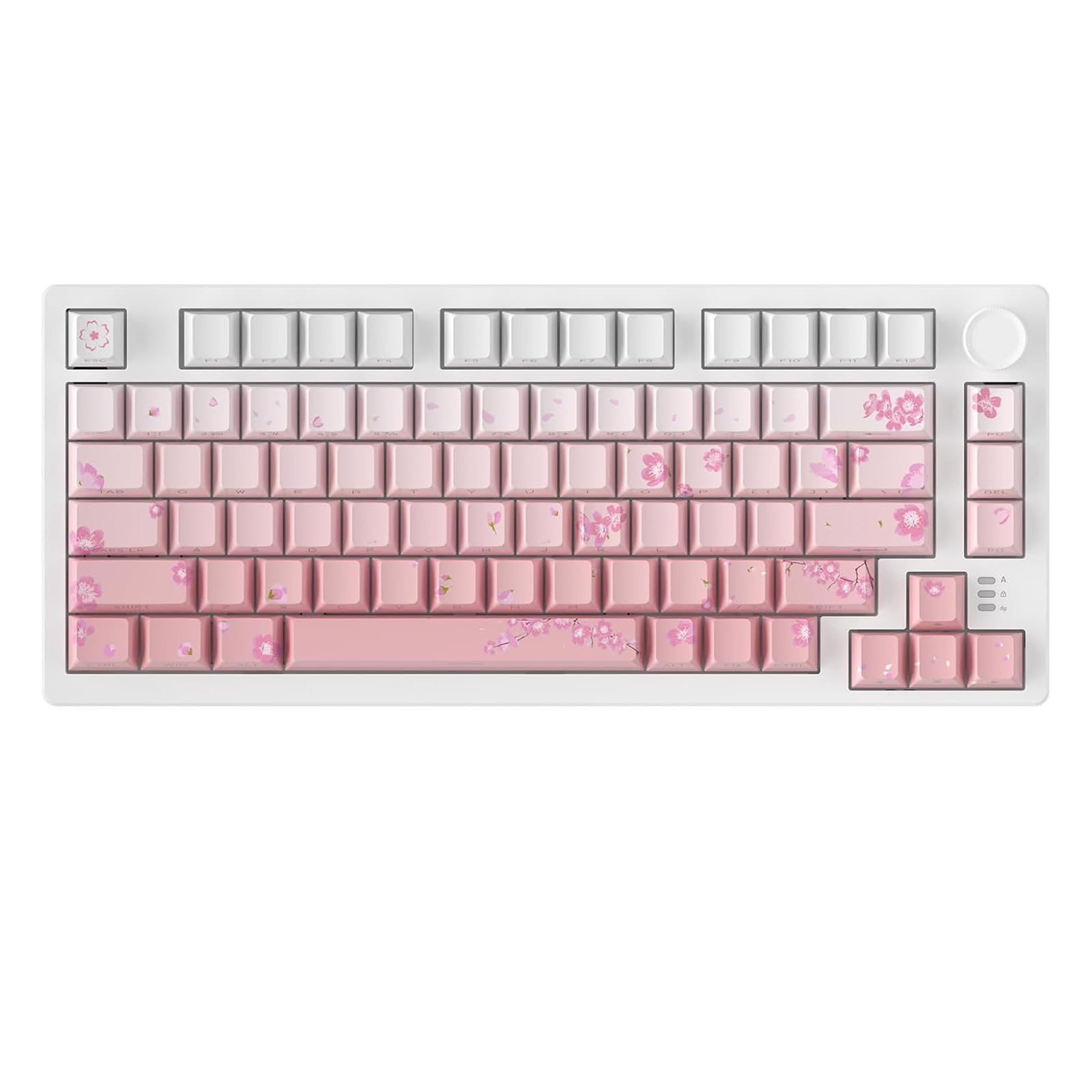
Ultra-light, ultra-quiet switches wrapped in a stunning pink design that lasts.
The DAREU EK75PRO stands out for two reasons: the Sakura Pink aesthetic and the custom Hifi Dream Switch, which is an ultra-light linear switch with an actuation force (the pressure needed to press a key) so low that shoppers say it is “especially ideal for women with long nails.” The result is a keyboard that is extremely quiet and buttery smooth — buyers describe it as “a quiet, satisfying ASMR key sound quality” and “the CUTEST aesthetic.” The hot-swappable PCB (circuit board) supports nearly all 3/5-pin switches, and the gasket mount structure (silicone pads) with multi-layer sound-dampening filling reduces keystroke noise while adding a satisfying thocky feel.
The 81-key 75% layout includes a multi-function knob that can be programmed to control volume, playback, brightness, or even launch tools like a calculator. It connects via Bluetooth 5.1, 2.4GHz wireless, and USB-C, and supports up to five devices at the same time. The side-printed PBT keycaps (plastic keycaps with printed legends) use double injection molding and heat sublimation, so they are fade-proof, sweat-resistant, and soft to the touch. A specific buyer noted the battery lasts “2-4 weeks depending on how much I’m on my PC,” placing it solidly in the mid-range for endurance. Unlike the YUNZII boards, which use firmer Milk switches, the DAREU EK75PRO uses a lighter switch that may feel too soft for those who prefer a firmer keystroke.
What it does best
- Ultra-light Hifi Dream Switches are smooth, quiet, and perfect for long typing sessions
- Sakura Pink aesthetic with fade-proof side-printed PBT keycaps
- Multi-layer gasket mount reduces noise and produces a satisfying thocky sound
- Long battery life — users report 2-4 weeks between charges
One drawback
- Very light switches may feel too soft or mushy for gamers used to heavier springs
- No numpad, which is expected for 75% but worth noting
Ideal for: Anyone who wants a gorgeous pink keyboard with ultra-quiet, light switches for shared spaces or long typing sessions.
Not for: Gamers who prefer a heavier, more tactile switch for firm feedback during key presses.
6. HINATSUSIKE H83 Pro 75% Wireless Mechanical Keyboard
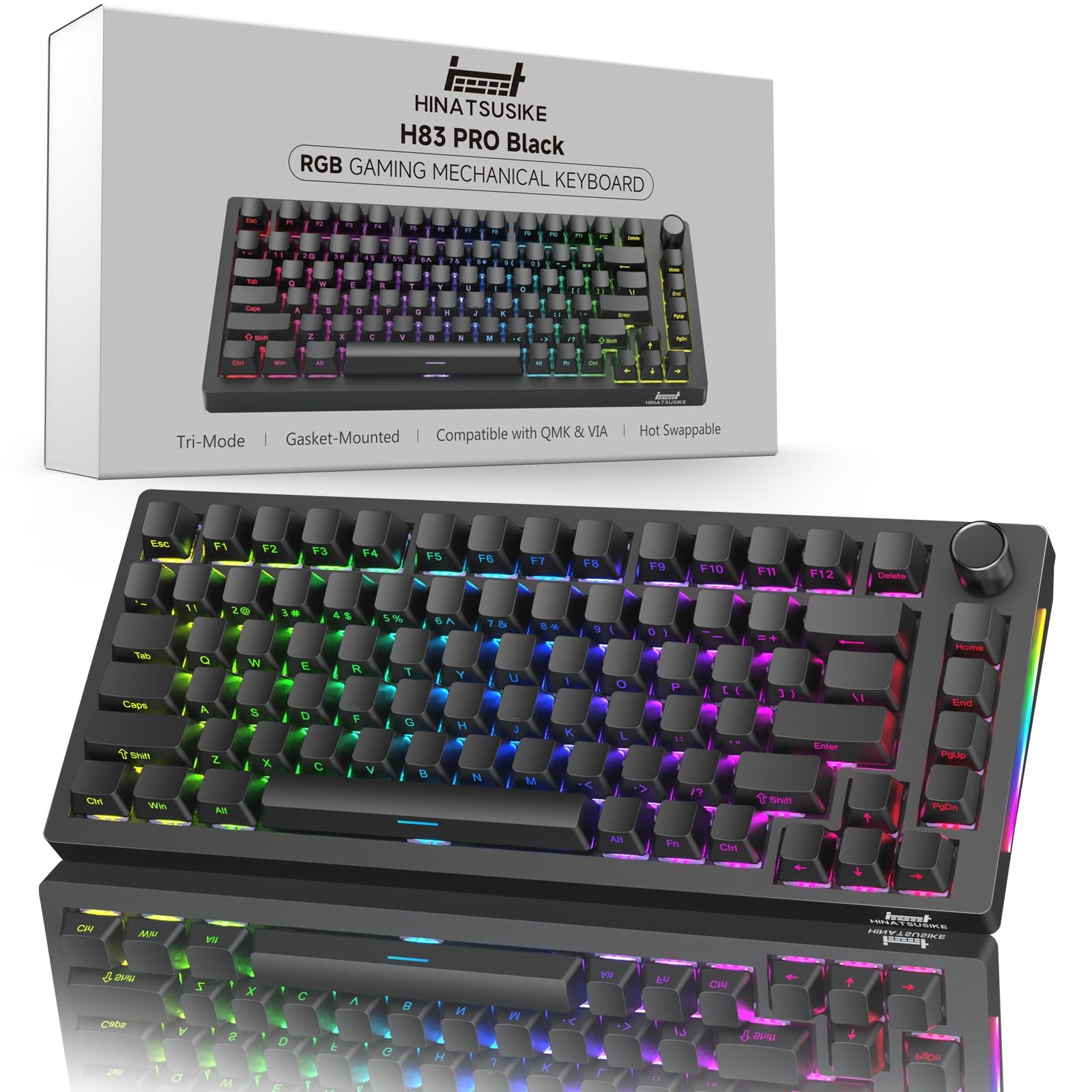
A rock-solid tank with VIA programming and a knob that beats boards costing twice as much.
This keyboard feels like a premium product that was accidentally priced too low. It has 83 keys in a 75% layout and uses pre-lubed Cardamom linear switches with a 45gf (grams of force) light actuation force, 1.9mm pre-travel for quick response, and 3.5mm total travel. The gasket structure (silicone pads) is paired with EVA foam and a silicone bottom pad to reduce hollow resonance, producing a cleaner, more defined sound. One buyer says it “feels like a heavy duty high quality keyboard” and that “it’s meaningfully heavier than all of my other keyboards and feels rock solid, like I could do some crimes with this thing.”
The board supports tri-mode connectivity: Bluetooth 5.0, 2.4GHz wireless (with 1000Hz polling rate, meaning it reports input every 1 millisecond), and USB-C wired. It packs a 4000mAh battery for long wireless sessions, has 16.8 million RGB colors with 18 built-in lighting presets, and the knob controls volume plus saturation and brightness when you press FN. The anti-oil PBT keycaps (plastic keycaps resistant to finger oils) have side-printed legends for a clean look. A key differentiating feature is true VIA (open-source keyboard configuration software) / QMK (firmware) software support — you can remap every key and record macros. That said, buyers report “it took me a while to get the VIA software to recognize this device” and you may need to manually load a JSON file. It also lacks dongle storage on the body, though the manufacturer includes a keycap that doubles as dongle storage as a quirky workaround.
Why it wins
- Full VIA/QMK support for unlimited key remapping and macro programming
- Rock-solid build with heavy weight and zero flex, rivaling premium boards
- Gasket structure with EVA foam and silicone pad for a clean, defined sound
- 4000mAh battery and 1000Hz 2.4GHz wireless for lag-free gaming
Things to know
- VIA software setup requires downloading and loading a JSON file — not plug-and-play
- No on-board dongle storage (though a special keycap holds the dongle)
Perfect for: Power users and programmers who want VIA/QMK customization in a compact, ultra-durable frame without paying a premium.
pass on it if: You just want a keyboard that works from the start with zero setup — the VIA learning curve is real.
7. Redragon K724 PRO Wireless Gasket Gaming Keyboard
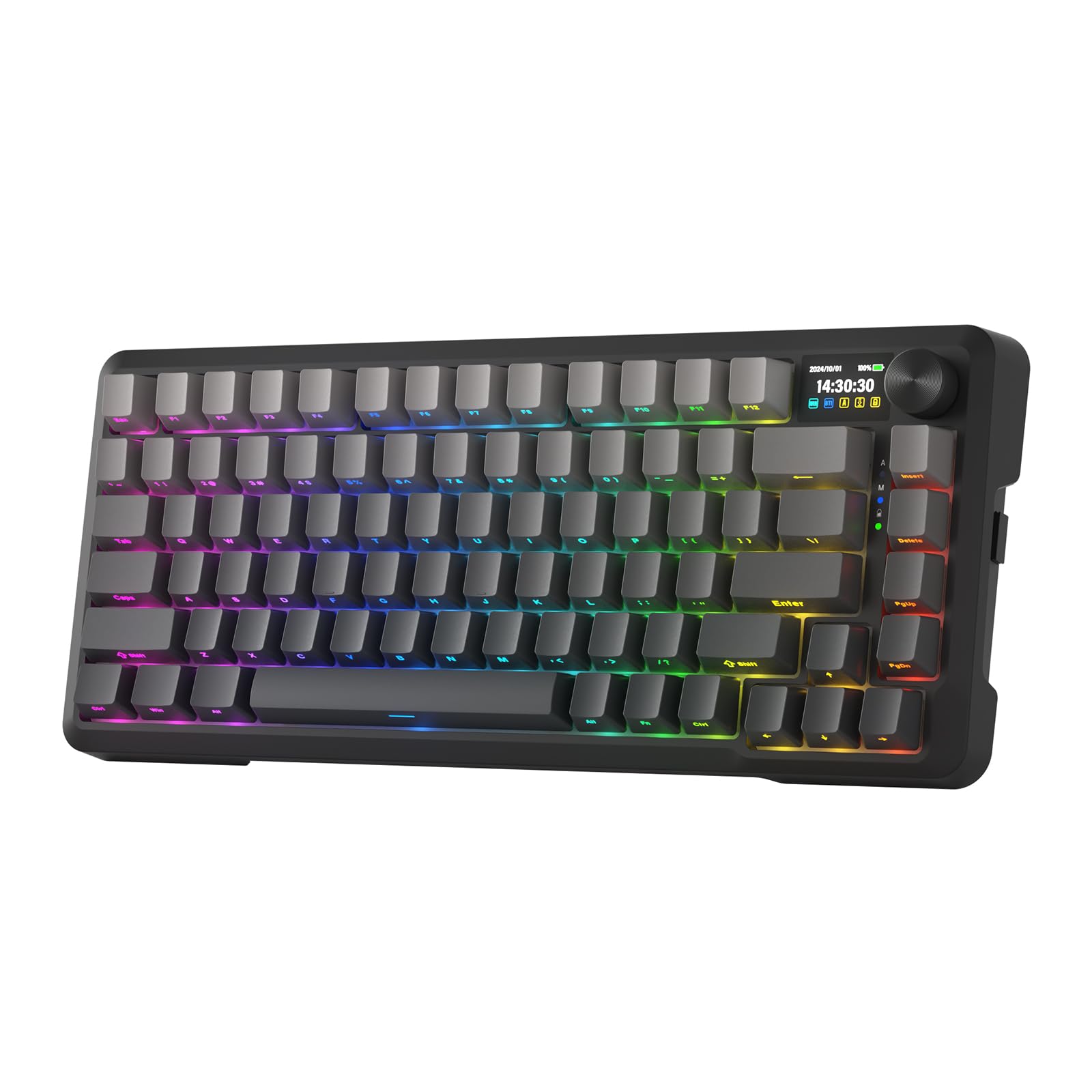
A TFT screen and gasket mount at a price that redefines “value.”
The Redragon K724 PRO manages to pack a 1.14-inch TFT info screen (a small, full-color display) into a budget-friendly 75% keyboard. That screen shows keyboard info such as connection mode, battery level, typing status, and even custom GIF memes. It uses a gasket mount design (silicone pads) with five layers of noise-dampening material (3.5mm PO foam, IXPE switch foam, PET sound pad, bottom socket foam, and a silicone bottom pad) to eliminate the hollow noise and create ultra-clean typing acoustics. The custom Mint Mambo linear switches are “thick-lubed” for a silky, creamy feel. Owners mention it has “smooth, satisfying clicks, not overly loud” and that the “spacebar stabilizers [are] like boards.”
The 81-key layout keeps the function keys without requiring FN combos, a thoughtful design that makes it more practical than many 65% boards. It connects via USB-C wired, Bluetooth 3.0/5.0, and 2.4GHz wireless. The one-knob control manages backlight brightness and media functions. The hot-swappable socket (circuit board) supports nearly all 3/5-pin switches, and Redragon’s pro software lets you design macros and customize RGB. At 81 keys versus the 83-key HINATSUSIKE H83 Pro, meaning slightly fewer physical buttons but still includes all essential function and arrow keys. Customers note the battery “lasts for a week or even more” and the board is “GG WP” with “excellent build quality” that “rivals Razer/Logitech.”
Best features
- 1.14″ TFT screen with GIF support — a rare feature at this price tier
- Five-layer noise dampening and gasket mount for a creamy, thocky sound
- Custom Mint Mambo switches are thick-lubed and smooth from the start
- Battery lasts a week or more, according to multiple verified buyers
Minor downsides
- Short USB-C cable placed on the left side, which may annoy some desk setups
- Software is functional but not as polished as premium brands
Who it fits: Budget-conscious gamers who still want a TFT screen and gasket-mount feel — this is the best value-per-dollar board in the list.
Look elsewhere if: You need a longer cable or prefer the cable to exit the center of the board.
Understanding the Specs
Gasket Mount vs. Tray Mount
The way a keyboard’s plate connects to its case dramatically changes how it feels and sounds. A gasket mount uses rubber or silicone pads suspending the plate, absorbing shock and creating a softer, bouncier bottom-out. This is what produces that desirable “thocky” or “creamy” acoustic profile. A traditional tray mount screws the plate directly into the case, resulting in a harsher, hollower sound. Every pick in this review uses a gasket mount structure because that is where the enthusiast-grade feel lives.
Hot-Swappable Switches
A hot-swappable PCB (circuit board) has sockets that let you pull out a switch and push in a new one without any soldering. This is the single most valuable feature for customization because it lets you try linear, tactile, or clicky switches until you find your perfect feel. All the keyboards here support hot-swapping for 3-pin and 5-pin switches, which covers 99% of aftermarket switches on the market. You can start with the pre-lubed linear switches most ship with and later swap in a heavier tactile switch for typing or a clicky switch for audible feedback.
Polling Rate and Wireless Latency
The polling rate, measured in Hz (hertz, or cycles per second), tells you how often the keyboard reports its position to your computer. A 1000Hz polling rate means it reports every 1 millisecond — essentially instantaneous for human reflexes. In this lineup, wired and 2.4GHz wireless modes hit 1000Hz. Bluetooth typically runs at 125Hz to 250Hz, which introduces a slight delay. For competitive gaming, 2.4GHz wireless is the standard. The Redragon K724 PRO and the HINATSUSIKE H83 Pro specifically advertise 1000Hz hyperspeed performance over their 2.4GHz connection.
Keycaps: PBT vs. ABS and Shine-Through
Keycaps come in two main plastics. PBT (polybutylene terephthalate) is more durable and resistant to developing a shiny, greasy surface over thousands of key presses. ABS (acrylonitrile butadiene styrene) feels smoother initially but will shine over time. Dye-sub or double-shot PBT keycaps, like those on the Corsair K65 Plus and DAREU EK75PRO, have legends that do not fade. “Shine-through” keycaps have translucent legends that let backlighting pass through cleanly — important for gaming in dim rooms. South-facing LEDs, which these keyboards use, put the light at the bottom of the switch to minimize interference with Cherry-profile keycaps.
FAQ
What makes a 75% keyboard different from a TKL or 60%?
Can I use a 75% keyboard with a PS5 or Xbox?
How often do I need to charge a wireless 75% keyboard?
Is 2.4GHz wireless good enough for competitive gaming?
How long do PBT keycaps last compared to ABS?
What is VIA software and why does it matter?
Can I use a 75% keyboard on Mac?
How do I clean a mechanical 75% keyboard?
Final Thoughts: The Verdict
Across the board, the best 75% keyboard for gaming is the HINATSUSIKE H83 Pro because it combines true VIA/QMK programmability with a rock-solid gasket mount build and a 4000mAh battery at a price that undercuts the competition. If you want premium brand reliability and the longest battery life on the market, grab the Corsair K65 Plus. And for the best value-per-dollar with a TFT screen and excellent build quality, the standout is the Redragon K724 PRO.
How We Picked
We do not accept paid placement. Every pick is matched to a real buyer and a real use-case; we do not hands-on test units.
Sources & Methodology
Specifications: manufacturer listings and product documentation. Review insights: verified customer reviews, as of July 2026. Pricing: not shown on this page (it changes often); check the current price via the retailer link.
As an Amazon Associate, Gadgets Feed earns from qualifying purchases. This does not affect which products we feature.
Product prices and availability are accurate as of the date/time indicated and are subject to change. Any price and availability information displayed on Amazon at the time of purchase will apply to the purchase of this product. As an Amazon Associate I earn from qualifying purchases.
CERTAIN CONTENT THAT APPEARS ON THIS SITE COMES FROM AMAZON. THIS CONTENT IS PROVIDED "AS IS" AND IS SUBJECT TO CHANGE OR REMOVAL AT ANY TIME.
Amazon and the Amazon logo are trademarks of Amazon.com, Inc. or its affiliates.