
Our readers keep the lights on and my morning glass full of iced black tea. As an Amazon Associate, I earn from qualifying purchases.
Specs are compiled from manufacturer listings and verified buyer reviews and can change over time — please confirm the key details on the product page before buying.
Jumping to the newest Wi-Fi standard doesn’t have to mean breaking the bank. To get faster speeds and lower lag (ping), you need a router that handles the newer, wider data lanes. The premium price tags on flagship routers can be a hard sell, but you can get real Wi-Fi 7 performance without them. This guide focuses on the specs and real-world trade-offs that matter most for your budget.
I’m Min — the founder and writer behind Gadgets Feed. This guide is built by comparing the manufacturers’ published specifications and the patterns across verified customer reviews, so you get each pick’s real strengths and trade-offs instead of marketing spin.
To find the right budget wifi 7 router, you need to balance speed, how far the signal reaches, and the ports that hook it all together.
Quick Picks
- ASUS RT-BE92U BE9700 Tri-Band WiFi 7 Router — Top Performer
- TP-Link Tri-Band BE9700 WiFi 7 Router (Archer BE600) — Large Home Pick
- NETGEAR Nighthawk Dual-Band WiFi 7 Router (RS180) — Reliable Choice
- GL.iNet GL-BE6500 (Flint 3e) WiFi 7 Router — VPN & Customize
- ASUS RT-BE82U WiFi 7 Router — Wired Workhorse
- NETGEAR Nighthawk Dual-Band WiFi 7 Router (RS140) — Compact Coverage
- Cudy BE6500 WiFi 7 Router Dual Band Gigabit Gaming Router — Gaming Entry
- GL.iNet GL-MT3600BE (Beryl 7) Portable Travel Router — Travel Companion
- Cudy BE3600 WiFi 7 Gigabit 4 Stream Dual Band Router — Budget Pioneer
How To Choose The Best Budget WiFi 7 Router
Picking the right entry-level Wi-Fi 7 router depends on a few key decisions. The most important specs for this category are your home’s size, your internet plan, and how many wired devices you own.
Coverage Area and Antennas
A router’s coverage is its first and most important job. Look for the stated square footage it can cover, and remember that walls and floors will reduce that number. Routers with high-gain antennas, like the 5.5 dBi models, push the signal further, making them better for stubborn corners.
Ports and Wired Speed
Your router needs the right ports to match your internet plan. A 2.5 Gig internet port (2.5 Gbps wired) is the standard for modern fiber and cable plans, letting you get speeds above 1 Gbps. If you have a server or a very fast connection, a 10 Gbps port becomes worth the upgrade. Make sure your router’s wired ports are faster than your internet plan, or you will be bottlenecking your own connection.
Frequency Bands: Dual vs Tri-Band
Dual-band routers work on 2.4 GHz (for older devices and long range) and 5 GHz (for fast speeds) frequencies, while tri-band adds a third 6 GHz channel (for the fastest, least congested signals). The 6 GHz band is much less congested, meaning less interference from your neighbors’ networks. If you live in a dense apartment building, a tri-band router with a 6 GHz channel is a huge advantage for clean, fast Wi-Fi.
Quick Comparison
| Model | Best For | Speed (Max) | Coverage | Key Ports | Amazon |
|---|---|---|---|---|---|
| ASUS RT-BE92U | Advanced Features | BE9700 (9.7 Gbps total) | 2750 sq. ft. | 10G + Multi 2.5G | $197.99$249.99Amazon |
| TP-Link Archer BE600 | Large Home Value | BE9700 (9.7 Gbps total) | 2600 sq. ft. | 10G + 2.5G | $189.99$249.99Limited time dealAmazon |
| NETGEAR RS180 | Reliable Coverage | BE5500 (5.5 Gbps total) | 2500 sq. ft. | 2.5 Gig (2.5 Gbps wired) | $199.00Amazon |
| GL.iNet Flint 3e | VPN & Customization | BE6500 (6.5 Gbps total) | 2500 sq. ft. | 5x 2.5G (2.5 Gbps each) | $179.99Amazon |
| ASUS RT-BE82U | Solid Wired Setup | BE6500 (6.5 Gbps total) | Extended | 5x 2.5GbE (2.5 Gbps each) | $159.10$199.99Amazon |
| NETGEAR RS140 | Small Home Simplicity | BE5000 (5.0 Gbps total) | 2250 sq. ft. | 2.5 Gig (2.5 Gbps wired) | $158.00Amazon |
| Cudy BE6500 | Gaming on a Budget | 6500 Mbps (6.5 Gbps total) | 1500 sq. ft. | Gigabit (1 Gbps wired) | $89.90$99.99Amazon |
| GL.iNet Beryl 7 | Travel Security | 3600 Mbps (3.6 Gbps total) | Travel | 2x 2.5G (2.5 Gbps each) | $129.98Amazon |
| Cudy BE3600 | Entry-Level WiFi 7 | 3600 Mbps (3.6 Gbps total) | 2500 sq. ft. | Gigabit (1 Gbps wired) | $84.99Amazon |
In‑Depth Reviews
1. ASUS RT-BE92U BE9700 Tri-Band WiFi 7 Router

A feature-packed tri-band powerhouse that future-proofs your home network with a 10G port.
This router gives you a dedicated 6 GHz band which is like having a private highway for your newest devices, free from the traffic jam of 2.4 GHz and 5 GHz networks. It delivers speeds of up to 9700 Mbps, and the 320 MHz channels on the 6 GHz band handle heavy lifting without breaking a sweat. With a coverage range of 2750 square feet, it is built to stretch across larger homes without needing a mesh satellite right away.
Buyers report that the setup is easy and that the router feels very fast and stable once you get it running. However, a number of users mention an important trade-off with the MLO (Multi-Link Operation) feature, which links multiple bands at once. As one reviewer noted, devices like smart thermostats and some Samsung and Apple phones can start dropping connections, suggesting that the MLO software is not yet fully mature. The ASUS AiProtection Pro software is subscription-free, which keeps commercial-grade security on your network without a recurring cost—a clear win over some competitors that push paid services.
If you want the advanced features of a 6 GHz band and a 10 Gbps port without the highest price in the premium bracket, this is your starting point. It is a router that rewards experienced users willing to tinker a bit.
What Stands Out
- Stellar 2750 sq. ft. coverage for a large home
- Subscription-free AiProtection Pro security
- Two 10G ports for ultra-fast wired connections
The Catch
- MLO feature can cause connectivity issues with some smart home devices
- Setup and configuration best for experienced users
Your Router if: You have a large house, want the fastest Wi-Fi 7 speeds available, and enjoy managing advanced network settings.
Look Elsewhere if: You want a simple plug-and-play experience without any potential early-adopter hiccups.
2. TP-Link Tri-Band BE9700 WiFi 7 Router (Archer BE600)

A tri-band challenger that uses its third band and 10G port to beat the big names on value.
The Archer BE600 hits a balance by offering tri-band performance—adding that crucial 6 GHz channel—at a price that undercuts most comparable routers. It claims coverage up to 2,600 square feet, making it a direct competitor to larger homes. The hardware is impressive: a dedicated 10 Gbps WAN/LAN port and a secondary 2.5 Gbps WAN/LAN port mean your fastest wired devices and your internet plan will never be the bottleneck.
TP-Link’s HomeShield provides the safety net, offering network protection, parental controls, and IoT security from a single dashboard. This router is designed to handle up to 120 devices simultaneously, so a house full of smart bulbs, cameras, and gaming consoles won’t fight for bandwidth as much as they would on a dual-band router. The inclusion of both a 10G port and a 2.5G port gives you a flexible wired setup that handles the fastest residential internet plans and local media servers.
If your home pushes past 2,000 square feet and you need a tri-band router that does not demand the highest premium on the shelf, this is the unit that brings the most value per dollar on the table.
Home Coverage Hero: The 2600 sq. ft. coverage is matched with a 10G port, a combination rarely seen at this tier, giving you both distance and wired speed.
Go for this if: You have a large home with many devices, need a 10G port for a fast NAS or PC, and want tri-band stability.
Skip it for: A smaller apartment where a dual-band router’s range would be sufficient, saving you money.
3. NETGEAR Nighthawk Dual-Band WiFi 7 Router (RS180)

A rock-solid performer with the coverage to handle a large home without the tri-band cost.
If you have a sizable home and want a reliable, no-fuss upgrade, the NETGEAR RS180 is the most straightforward choice for solid Wi-Fi 7. It covers up to 2,500 square feet, which matches many larger homes, and its 2.5 Gig internet port (2.5 Gbps wired) is perfectly matched to modern fiber plans. Reviewers consistently praise its easy setup and the noticeable improvement in both speed and range over older routers, with one buyer saying the WiFi and area coverage are “awesome” and that it more than doubled their coverage area.
It only runs on standard 2.4 GHz and 5 GHz bands, which is a common choice that ensures broad compatibility with all your old and new devices. The 2.5G port is ready for multi-gig internet service, so you can actually use the faster speeds your ISP offers. The simple fact that it has no reported major feature bugs makes it a strong contender for those who want a stable network from the first power-on.
The trade-off is that you do not get a 6 GHz band, but at this price point, the sheer reliability and coverage make it a fantastic foundation for a modern home network.
Easy Upgrade: For users who just want better Wi-Fi everywhere in their house without learning a new interface or troubleshooting features, this router is the most stress-free path.
Reach for this if: You value simple, reliable performance above all else and your home is around 2,500 sq. ft.
Consider another if: You absolutely need the 6 GHz band for a specific device or live in a very congested Wi-Fi area.
4. GL.iNet GL-BE6500 (Flint 3e) WiFi 7 Router

A powerful home router with class-leading VPN speed and total firmware control for enthusiasts.
The Flint 3e is a networking Swiss Army knife for people who need to route traffic through a VPN (Virtual Private Network, which encrypts your internet activity) for privacy or work. It delivers VPN speeds of up to 680 Mbps over WireGuard (a modern, fast VPN protocol) and OpenVPN (an older but widely compatible protocol), so your entire home network can be encrypted without the usual massive speed penalty. It covers up to 2,500 square feet and uses MLO (Multi-Link Operation) and 4K-QAM (a more efficient data encoding method) to push Wi-Fi 7 speeds up to 6.5 Gbps.
This router runs on OpenWrt 21.02 (an open-source, customizable router operating system), meaning advanced users can install custom plugins, block ads with AdGuard Home, and set up a VPN server and client simultaneously. However, one buyer mentioned a missing feature: “Lack of Band Steering (the ability to automatically move devices to the fastest band) is a big con for me,” explaining that devices would sometimes stick to the slower 2.4 GHz band after a reboot instead of jumping to 5 GHz. This means some setup tweaking is required for the best user experience, making it less ideal for a pure plug-and-play buyer.
The five 2.5 Gigabit Ethernet ports (each supporting 2.5 Gbps wired speed) are a huge advantage if you have multiple wired computers or a NAS (Network Attached Storage), as they all have full multi-gig speed without a separate switch.
The Upside
- Excellent VPN performance with WireGuard speeds up to 680 Mbps
- Fully customizable OpenWrt firmware with AdGuard Home support
- Five 2.5G Ethernet ports for wired multi-gig
The Downside
- No automatic band steering; devices may not connect to the fastest band
- Setup and optimal configuration require technical knowledge
Built for Tinkerers: Get this if you run a VPN server at home or want granular control over your network with plugins.
Not for Beginners: skip it if you just want a router that works perfectly the moment you plug it in.
5. ASUS RT-BE82U WiFi 7 Router
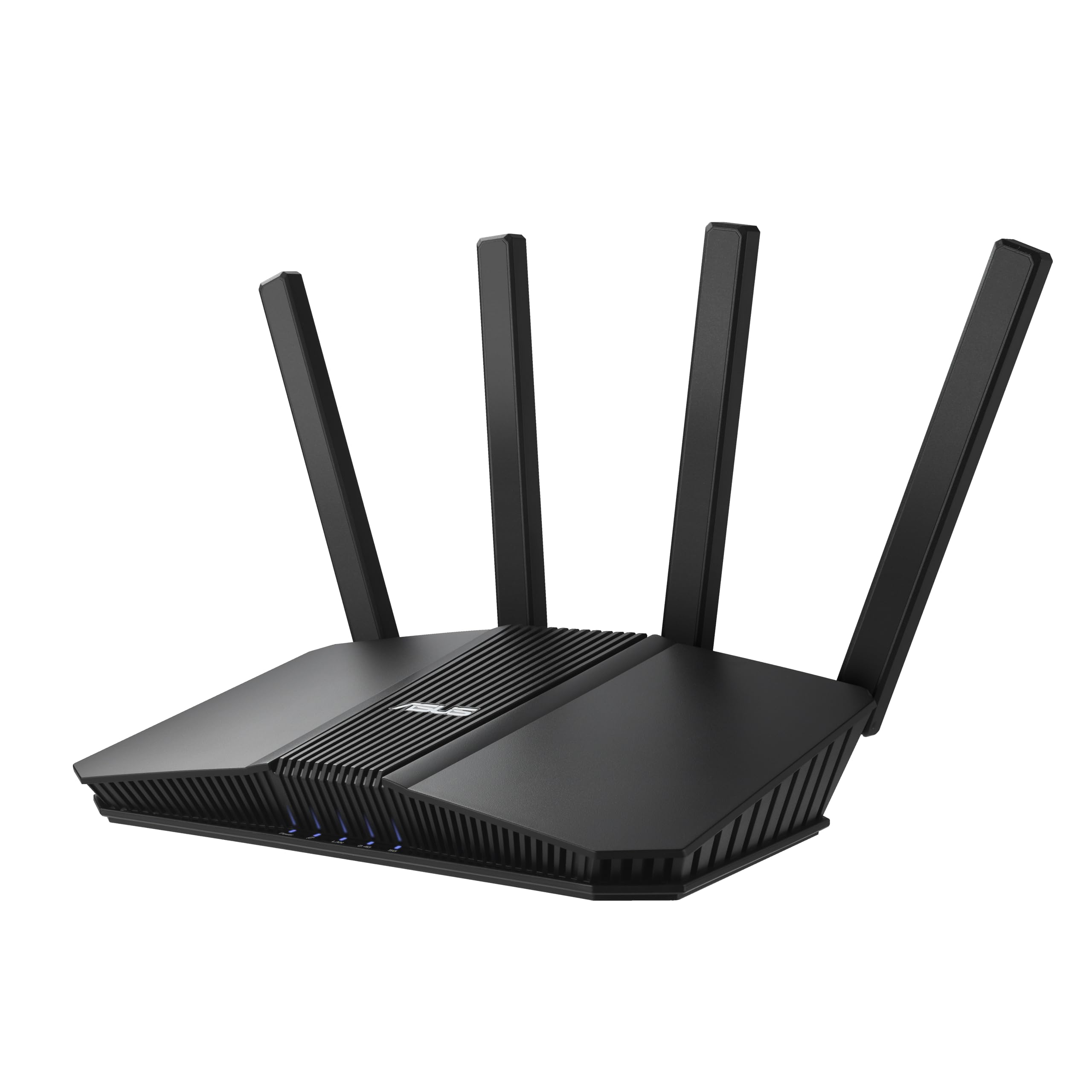
A no-nonsense router that puts its money into five fast 2.5GbE ports for wired performance.
For many homes, the bottleneck is not the Wi-Fi but the cables connecting the game console, PC, and TV. The RT-BE82U solves this by giving you five 2.5GbE ports (each supporting 2.5 Gbps wired speed), so every wired device gets a full multi-gig connection to the router without sharing a single slow line. Reviewers confirm it is a “great choice for a fast router” and note that a user saw “speed is about 15% higher than with my older WiFi6 (AX) Router.”
It supports Wi-Fi 7 speeds up to 6.5 Gbps on its dual bands (2.4 GHz and 5 GHz) and comes with commercial-grade security through AiProtection Pro, which requires no monthly subscription. The ASUS AiMesh system lets you add other compatible ASUS routers to create a smooth whole-home mesh network if you need to extend coverage later. The setup is straightforward, and the web interface is well-organized, making it accessible for users who want control without a steep learning curve.
The lack of a 6 GHz band is the single limitation here, but for anyone who prioritizes wired connections and a great mesh-ready platform, this is a very strong value pick—and a more capable wired setup than the NETGEAR RS180 thanks to those five multi-gig ports.
Speed Demon Wired: With five 2.5GbE ports and AiProtection Pro, this is the clear winner for multi-gig wired home networks that need security and mesh flexibility.
Choose this if: You have multiple wired devices (PCs, consoles, NAS) and want a future-proof switch-like experience.
pass on it if: You need a dedicated 6 GHz band for a specific Wi-Fi 7 device.
6. NETGEAR Nighthawk Dual-Band WiFi 7 Router (RS140)

A smaller, simpler router that delivers big coverage for apartments and smaller houses.
The RS140 is a fantastic entry point into Wi-Fi 7 if your home is not a sprawling estate. It covers up to 2,250 square feet and has a sleek, smaller footprint that fits easily on a shelf. It runs on a 5 GHz frequency and delivers BE5000 speeds (up to 5.0 Gbps total), which is more than enough for most households with a 1 Gbps internet plan. The 2.5 Gig internet port (2.5 Gbps wired) ensures that those speeds are not capped, handling future multi-gig upgrades from your ISP.
The main difference between this and the RS180 is coverage: the RS140 covers 2,250 sq. ft. versus the Cudy BE6500 at 1,500 square feet. This makes it a smarter buy for larger apartments or standard homes. It does not include a built-in modem, so you will need a separate cable or fiber modem to provide internet to it, which is standard for pure routers.
This is a very balanced choice for someone who just wants a reliable Wi-Fi 7 upgrade for a moderate-sized space.
Small Space, Big Signal: If your home is under 2,250 sq. ft., this router will likely cover every corner without needing an extender.
Ideal for: Apartments and smaller homes that want strong, reliable Wi-Fi 7 coverage without any extra features to manage.
Consider another if: Your home is larger than 2,250 square feet or you require a 6 GHz band.
7. Cudy BE6500 WiFi 7 Router Dual Band Gigabit Gaming Router

A budget-focused router that prioritizes raw Wi-Fi speed for gaming over coverage and wired ports.
The Cudy BE6500 puts its budget into the Wi-Fi side of the equation, offering a theoretical data transfer rate of 6500 Mbps. It uses a Broadcom 2 GHz quad-core CPU to handle that routing, and includes VPN client and server support for privacy. The Cudy Mesh and APP compatibility let you expand the network later if needed.
The catch with this router is its coverage and wired speed. It has a stated connectivity range of 1,500 square feet, which is considerably less than competitors like the NETGEAR RS140 (2,250 sq. ft.). It also uses gigabit ports (1 Gbps wired), which means the maximum wired speed is 1 Gbps. This creates a bottleneck if you have an internet plan faster than 1 Gbps or want to transfer files between wired computers at speeds higher than 1 Gbps, limiting its usefulness for multi-gig setups.
It is a good choice for a gaming setup in a smaller apartment where you primarily use Wi-Fi and have standard gigabit internet.
The Good
- High 6500 Mbps Wi-Fi speed for gaming and streaming
- Broadcom 2 GHz quad-core CPU for solid processing
The Bad
- Limited to 1,500 sq. ft. coverage
- Gigabit ports bottleneck multi-gig wired networks
Best for Small Pads: If you live in an apartment or small house and want fast Wi-Fi for gaming, this is a solid budget option.
Not for Large Homes: The 1,500 sq. ft. coverage and 1Gbps wired ports make it a hard pass for bigger spaces or multi-gig setups.
8. GL.iNet GL-MT3600BE (Beryl 7) Portable Travel Router

A pocket-sized router that encrypts your travel data and handles up to 120 devices on the go.
The Beryl 7 is a completely different kind of network tool: a travel router that creates a secure, private Wi-Fi network wherever you go. You plug it into a hotel’s ethernet port or connect it to a public Wi-Fi hotspot, and it then broadcasts your own encrypted network. It runs on a 2.4 GHz and 5 GHz dual-band system, with wireless speeds of 688 Mbps and 2882 Mbps respectively. As one buyer put it, “I powered it from my laptop during setup, then left it plugged in to the small power adapter it comes with while traveling.”
Its VPN performance is exceptional for such a small device, with WireGuard speeds up to 1100 Mbps and OpenVPN up to 1000 Mbps. This lets you connect through a VPN service (like PIA or ExpressVPN) to encrypt all your traffic against snooping hotel networks. It also has a physical toggle switch to quickly enable VPN or AdGuard Home. The dual 2.5G Ethernet ports (each 2.5 Gbps wired) are a surprising bonus, giving you multi-gig wired speeds that are rare on any travel router.
The main limitation is that its coverage is designed for a single room, not a whole house, making it a specialist tool rather than a home router replacement.
Why You Want It
- Super fast WireGuard VPN speeds up to 1100 Mbps
- Supports up to 120 devices, great for work groups or trips
- Dual 2.5G Ethernet ports for multi-gig wired connections
Its Limit
- Designed for personal/room coverage, not whole-home use
- Limited 2.4 GHz frequency range for home use
For Frequent Flyers: This is the ultimate tool for anyone who needs a secure, private network in hotels or Airbnbs.
Not a Home Router: It will not replace your main home router, nor is it meant to.
9. Cudy BE3600 WiFi 7 Gigabit 4 Stream Dual Band Router

The cheapest ticket to Wi-Fi 7, stretching its signal with 5.5dBi high-gain antennas for surprising coverage.
If your goal is simply to get Wi-Fi 7 into your home for the lowest possible entry fee, this is the starting line. The Cudy BE3600 uses 5.5 dBi high-gain antennas (which focus the signal to reach farther) to push a stable dual-band signal up to 2,500 square feet, which is an unexpectedly large coverage for its price class. It supports VPN clients and servers, so you can route your traffic for privacy without needing a separate solution.
However, the buyer reports tell a mixed story. While some users report a strong and fast connection, others warn about stability. One owner reported, “After 4 months, wired connections degrade severely; wireless is hit-or-miss.” This suggests the hardware or firmware might not be as durable as more established brands, making it more of a stop-gap than a long-term solution. It is a good deal, but it comes with a reliability asterisk.
This router is an excellent proof of concept for what budget Wi-Fi 7 can be, but your trust in its longevity should be tempered by the user reports.
The Gateway: For the absolute lowest price, it gives you Wi-Fi 7 speeds and wide coverage, but buyer reviews note a significant risk of long-term bugs and performance degradation.
Go for this if: You are on a strict budget and need a temporary Wi-Fi 7 upgrade to test the waters.
Stretch your budget if: You need a reliable router for many years, as the buyer review pattern suggests potential stability issues.
Understanding the Specs
Frequency Bands (Dual vs Tri-Band)
This tells you how many radio channels the router uses. A dual-band router uses the common 2.4 GHz and 5 GHz bands. A tri-band router adds a 6 GHz band, which is much less crowded and offers the highest possible speeds for the newest Wi-Fi 7 devices. If you live in a dense area with many Wi-Fi networks, tri-band is a huge advantage for reducing interference.
Multi-Link Operation (MLO)
This is a core Wi-Fi 7 feature. It lets a device connect to multiple bands at the same time (e.g., 5 GHz and 6 GHz simultaneously). This increases speed and reduces lag because the router can spread the data across both bands. However, some users report that MLO can cause compatibility issues with older smart home devices, so it may be a feature you need to disable for stability.
FAQ
Do I need a Wi-Fi 7 router if I don’t have Wi-Fi 7 devices?
Will a budget Wi-Fi 7 router be faster than my current Wi-Fi 6 router?
What does BE5000 or BE9700 mean in the router name?
Do I need a new modem for a Wi-Fi 7 router?
What is a 2.5 Gigabit Ethernet port and do I need it?
Is a tri-band router worth the extra cost for a small apartment?
What is a VPN router and why would I use one?
Will a Wi-Fi 7 router improve my online gaming performance?
Final Thoughts: The Verdict
If you want one dependable pick, the budget wifi 7 router winner is the NETGEAR RS180 because it delivers the most reliable coverage at 2,500 sq. ft. with a simple setup that just works. If you want advanced features and the best wired performance, grab the ASUS RT-BE82U and its five 2.5GbE ports. And for travel security and VPN performance on the go, the standout is the GL.iNet Beryl 7.
How We Picked
We do not accept paid placement. Every pick is matched to a real buyer and a real use-case; we do not hands-on test units.
Sources & Methodology
Specifications: manufacturer listings and product documentation. Review insights: verified customer reviews, as of July 2026. Pricing: not shown on this page (it changes often); check the current price via the retailer link.
As an Amazon Associate, Gadgets Feed earns from qualifying purchases. This does not affect which products we feature.
Product prices and availability are accurate as of the date/time indicated and are subject to change. Any price and availability information displayed on Amazon at the time of purchase will apply to the purchase of this product. As an Amazon Associate I earn from qualifying purchases.
CERTAIN CONTENT THAT APPEARS ON THIS SITE COMES FROM AMAZON. THIS CONTENT IS PROVIDED "AS IS" AND IS SUBJECT TO CHANGE OR REMOVAL AT ANY TIME.
Amazon and the Amazon logo are trademarks of Amazon.com, Inc. or its affiliates.