
Our readers keep the lights on and my morning glass full of iced black tea. As an Amazon Associate, I earn from qualifying purchases.
Specs are compiled from manufacturer listings and verified buyer reviews and can change over time — please confirm the key details on the product page before buying.
You can slap a “4K” label on any webcam, but if the sensor is tiny your video will look grainy the second a cloud passes overhead. The real difference is the physical sensor size — that is what actually captures enough light to make 4K resolution look sharp instead of soft. This guide covers the webcams that deliver that light capture, those that can physically follow you around a room, and which ones are worth adding to your setup today.
I’m Min — the founder and writer behind Gadgets Feed. This guide is built by comparing the manufacturers’ published specifications and the patterns across verified customer reviews, so you get each pick’s real strengths and trade-offs instead of marketing spin.
To find your perfect 4k computer camera, you need to match the sensor size, autofocus speed, and any tracking features to your actual workspace and lighting conditions.
Quick Picks
- YOLOLIV YoloCam S3 — Best Overall
- Insta360 Link 2 Pro — Premium Pick
- OBSBOT Tiny 3 Lite — Compact Power
- Elgato Facecam 4K — Streamer’s Choice
- Logitech Brio 4K — Trusted 4K
- EMEET C960 Ultra — Budget Champion
How To Choose The Best 4K Computer Camera
Shopping for a 4K webcam can be confusing because marketing specs don’t tell you if your video will actually look clear in a dim room. Here are the three specs that truly separate a great webcam from an expensive disappointment.
Sensor Size: The Real Engine of Image Quality
Think of the sensor as the camera’s light bucket. A 1/1.3″ sensor has a physically larger surface area than a standard 1/2.8″ sensor, which means it collects more light in every single frame. That translates directly to cleaner video when you’re not sitting under a ring light, with less digital noise and a wider dynamic range between shadows and highlights. The best cameras in this lineup use sensors around 1/1.3″ or 1/1.5″, while budget-friendly options often squeeze the same 4K pixels onto a smaller sensor that struggles the moment the light drops.
Autofocus: The Difference Between Crisp and Blurry
Basic webcams use contrast-detect autofocus, which hunts back and forth before locking on. Faster systems like Phase Detection Autofocus (PDAF) — similar to what you find in mirrorless cameras — snap into focus instantly and stay locked even when you move close to the lens to show a document. A 0.2-second autofocus is good for a stationary desk setup; a PDAF system is essential if you gesture, lean in, or hold objects up to the camera during calls or streams.
AI Tracking: Does Your Camera Follow You?
If you pace while you present or want to keep moving around a whiteboard, a standard fixed-lens webcam will either frame you too tight or leave you cut off. AI tracking cameras use a motorized gimbal (PTZ: Pan, Tilt, Zoom) that physically turns to follow you. Some systems track a single face, some lock onto a whole group, and a few even respond to hand gestures or voice commands. The trade-off is that these moving cameras can sometimes stutter or lose track in complex lighting, so read the real-user notes carefully before buying one of these.
Quick Comparison
| Model | Best For | Sensor Size | Autofocus Type | Digital Zoom | Amazon |
|---|---|---|---|---|---|
| YOLOLIV YoloCam S3 | Cinematic image quality | 1/1.3″ | PDAF | 4x | $219.00Amazon |
| Insta360 Link 2 Pro | AI tracking & versatility | 1/1.3″ | PDAF | 4x | $249.99Amazon |
| OBSBOT Tiny 3 Lite | Compact PTZ tracking | 1/2″ | PDAF | 4x | $199.00Amazon |
| Elgato Facecam 4K | Streamer control & filters | Sony STARVIS 2 | Auto / Manual | — | $199.99Amazon |
| Logitech Brio 4K | Proven, reliable 4K | — | Auto Focus | 5x | $168.50Amazon |
| EMEET C960 Ultra | Budget-friendly entry | 1/1.5″ | 0.2s Autofocus | — | $79.99$129.99Limited time dealAmazon |
In‑Depth Reviews
1. YOLOLIV YoloCam S3

This webcam’s 1/1.3″ sensor is likely the largest ever fitted into a webcam, giving you video that looks as clean as a mirrorless camera without needing perfect lighting.
That big sensor captures a lot more light than a standard 1/2.8″ one — so your face stays sharp and well-lit in a dim home office without a professional ring light. The Phase Detection Autofocus (PDAF) system locks onto your face instantly. You can lean in to show a document, and the focus follows naturally without a blurry pause.
Buyers report that the 4K footage is “clean and sharp.” One reviewer noted they replaced their Sony ZV-1 mirrorless camera with this webcam for streaming. The all-aluminum body acts as a heat sink, so the manufacturer guarantees no overheating during 24/7 non-stop use. The included Compose software gives you full manual controls for contrast, sharpness, saturation, exposure, white balance, and color grading using YoloLiv’s Picasso Resolve engine. One small caveat: Picasso Resolve color grading is currently Windows-only, with Mac support listed as “coming soon.”
What it delivers best
- Largest 1/1.3″ sensor in a webcam for superior low-light performance and cinematic background blur
- Fast PDAF autofocus tracks faces instantly without hunting
- All-aluminum body ensures no overheating, even during 24/7 use
- Full manual controls and color grading via Compose software
Where it holds back
- Pro color grading (Picasso Resolve) is Windows-only for now
- At 219.00 MSRP, it is the most expensive pick here
- No built-in AI tracking gimbal like the Insta360 or OBSBOT
Who it truly fits: Streamers, content creators, and anyone who does multiple video calls a week and wants genuine DSLR-level clarity from a plug-and-play webcam.
One honest trade-off: If you need the camera to physically swivel and follow you around a room, you will need a different pick — this is a fixed-lens shooter, not a PTZ tracker.
2. Insta360 Link 2 Pro

Get the same large 1/1.3″ sensor as the YoloCam S3, but with a physical gimbal that pans and tilts to follow you across the room.
This is the camera for you if you pace while presenting, work at a whiteboard, or want to be framed perfectly without touching the lens. The AI tracking system also recognizes hand gestures — you can zoom in or out or activate Whiteboard Mode with a wave, so you never have to alt-tab out of your presentation. One standout feature you will not find on most competitors is Elgato Stream Deck integration. You can program physical buttons to switch camera modes, trigger presets, or control multiple Linked cameras at once. That is a big workflow booster for streamers or anyone running a multi-camera setup. The mic array uses beamforming directional pickup to isolate your voice from background noise.
Owners mention the AI tracking is “smooth, fast, and never feels jerky.” One reviewer upgraded from a Logitech Brio and called it an “inexpensive upgrade to get better control, better tracking.” The main limitation to be aware of: this camera is currently not compatible with ARM-based Windows systems or Windows Hello Face Recognition.
Gimbal-powered versatility: The Link 2 Pro is the best physical tracker here — it physically moves to keep you centered, which no fixed-lens camera can do.
One thing to check: It requires decent lighting to work its best; customers note you are wasting your money on the AI features if your lighting is poor.
Reach for this if: You present to a camera while moving, gesturing, or writing on a whiteboard and want the camera to do all the framing work for you.
Look elsewhere if: You use an ARM-based Windows laptop or rely on Windows Hello face login — this camera does not support either.
3. OBSBOT Tiny 3 Lite

This tiny PTZ webcam is 48% smaller and 34% lighter than its predecessor, yet still packs AI tracking and a triple-mic array into a pocketable frame.
Compared to the previous model, it houses a 1/2″ CMOS sensor plus a triple-mic array for professional spatial audio. You can slip it into a laptop bag for travel and still have AI-powered tracking and 4K HDR video on the other side of the world. The PTZ (Pan, Tilt, Zoom) gimbal responds to voice commands and hand gestures, so you can zoom, track, and switch presets without touching a button. It runs at 4K@30fps or 1080p@120fps for smooth slow-motion capture. The Wide ISO Domain runs from 100 to 6400, which gives the camera flexibility across indoor lighting scenarios. Buyers consistently praise the clarity: “The 4K image quality is sharp, HDR handles indoor lighting well, and the 1/2″ sensor performs noticeably better than most built-in laptop cameras.” One buyer mentioned the AI tracking is “smooth, fast, and never feels jerky.”
The trade-off is that the software and firmware can be finicky. Some reviewers point out the camera “keeps turning off in the middle of a Google Meet or Zoom call,” and describe the software as “buggy and unstable.” If you are willing to troubleshoot occasionally, the hardware is genuinely impressive for its footprint.
What makes it special
- 48% smaller and 34% lighter than the previous model — truly portable PTZ
- Triple-mic array delivers spatial audio with directional precision
- Runs 1080p@120fps for smooth motion capture
- Wide ISO Domain (100-6400) for low-light flexibility
Where reliability lags
- Software instability: some users report random disconnects during calls
- AI follow mode can get confused and track random objects instead of you
- Not as plug-and-play as the Insta360 or YoloCam S3
Best suited for: Travelers and presenters who need AI tracking in a compact form factor and are comfortable with some software tweaks.
skip it if: You need absolute reliability for critical business calls without any chance of the camera freezing mid-meeting.
4. Elgato Facecam 4K

Screw a 49mm lens filter onto this webcam just like a real DSLR, thanks to the premium Sony STARVIS 2 sensor inside.
You get uncompressed 4K video at 60 FPS with HDR support. That is smooth, artifact-free footage you can keyframe and color-grade in OBS without any built-in compression fighting you. The headline spec is the 49mm lens filter thread: you can screw on a polarizer, a variable ND filter, or a diffusion filter to control the light hitting the sensor. This camera does not have a built-in microphone, so you need to budget for a separate mic. That is actually a plus for streamers who already own a quality XLR or USB microphone. It also saves its settings to internal flash memory, so you can plug it into any computer and your exposure, white balance, and zoom settings load instantly.
Buyers rave about the “top-notch” quality, calling it “definitely better than the Logitech 4K webcam.” However, one detailed review flags the ultra-wide lens as a drawback: “it’s way too wide… sure you can use software to digitally zoom in and crop, but then you lose all the 4K quality.” If you want a tight talking-head shot, you may find the default field of view too wide without losing resolution to crop.
No-compromise image chain: The Sony STARVIS 2 sensor plus 49mm filter support gives you total control over the image — no other webcam here allows physical light manipulation.
Caveat to plan for: The wide-angle lens makes it tough to get a tight solo shot without digital zoom; this is better for room-scale or wide-group framing.
Ideal for: Streamers and video pros who already own a good microphone and want DSLR-like filter control and uncompressed 4K60 video.
Not for you if: You want a tight, interview-style close-up without cropping, or you need the camera to double as a microphone.
5. Logitech Brio 4K

This veteran 4K workhorse offers the highest digital zoom in this lineup — 5x — so you can zoom in on a whiteboard or product detail from across the room.
The HD Auto Light Correction adjusts exposure automatically so even if you have a window behind you, your face stays visible. The built-in noise-canceling microphone picks up your voice clearly while filtering out keyboard clatter. Shoppers say that the camera is “portable for daily use; works plugged into monitors or clipped to laptops” and is “better than built-in PC/Mac cameras.” It works from the start with Microsoft Teams, Zoom, Google Voice, and pretty much every video app. The 5x digital zoom, at 5x versus the OBSBOT Tiny 3 Lite’s 4x zoom, makes the Brio a better choice if you frequently need to frame small objects.
The trade-off is that the Brio uses contrast-detect autofocus rather than PDAF, so it can hunt for a moment when you move in and out of the frame. Its sensor is also not as large as the 1/1.3″ cameras above, so low-light performance won’t match the premium picks. But for consistent, every-call reliability in a normal office, this is the safest choice.
Why it’s a safe bet
- 5x digital zoom is the highest magnification in this guide
- HD Auto Light Correction keeps your face visible in mixed lighting
- Widely compatible with Teams, Zoom, Google Voice, and more
- Proven build quality and driver reliability across Windows and macOS
Where it falls behind
- Contrast-detect autofocus hunts more than PDAF cameras
- Smaller sensor struggles in low light compared to 1/1.3″ rivals
- No physical AI tracking or gesture control
Who it reliably serves: Corporate and remote workers who need a fuss-free, widely compatible 4K webcam that just works on every call.
One honest gap: If you stream in low light or need fast autofocus for dynamic movement, either the YoloCam S3 or Insta360 Link 2 Pro will deliver better image quality.
6. EMEET C960 Ultra
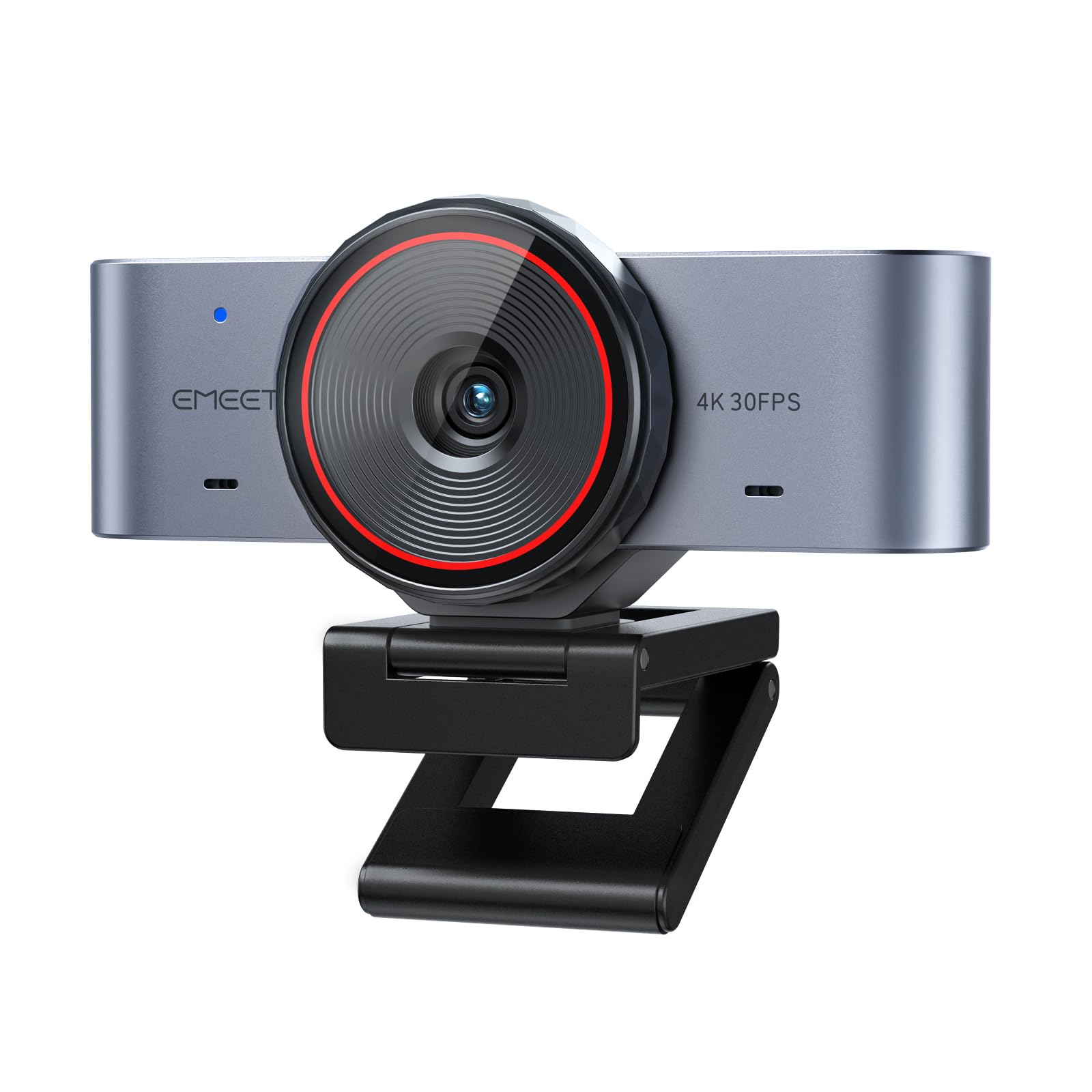
This entry-level 4K camera uses a 1/1.5″ sensor, which is larger than typical budget webcams, so it captures more light for what the manufacturer describes as “stronger detail, improved low-light clarity, and wider dynamic range.”
The autofocus works at 0.2 seconds — fast enough for a stable desk setup where you do not move around much. The full-metal body is a rare find at this tier, solving the cheap plastic feel and overheating issues common at this price point. A Smart Whiteboard Mode in the EMEET Studio software automatically recognizes wall whiteboards, corrects perspective, and tune clarity for presentations — a genuinely useful feature for educators and meeting facilitators. The built-in rotating privacy cover lets you mechanically block the lens when the camera is not in use.
The reviews are a mixed bag. Some buyers call it “the best value webcam currently” and praise its plug-and-play setup. But a significant minority is disappointed: one reviewer bluntly says “Camera quality is somehow worse than my 10 year-old Logitech C920. Thought I was getting an upgrade but this is a noticeable loss in video quality.” It is also not compatible with Windows Hello face recognition. This one feels like a sensor lottery — your image quality may vary.
What it does well
- 1/1.5″ sensor is larger than typical budget 4K webcams for better low-light capture
- Full-metal body avoids cheap plastic feel and overheating
- Whiteboard Mode with perspective correction is useful for teachers
- Rotating privacy cover offers mechanical lens blocking
Where it falters
- Video quality is inconsistent — some buyers report it is worse than a decade-old Logitech C920
- No Windows Hello compatibility
- Autofocus is slower than PDAF systems on premium picks
Best for: Budget-conscious buyers who need a 4K label and a metal build, and are comfortable with potentially variable image quality.
Proceed with caution if: You rely on consistent, crisp video quality for professional calls — you may want to save up for the Logitech Brio or YoloCam S3 to avoid the jump back to an older webcam.
Understanding the Specs
Sensor Size (1/1.3″, 1/1.5″, 1/2″)
This number describes the physical size of the camera’s imaging sensor. A larger denominator (like 1/1.3″) means a physically larger sensor than 1/2″. Because the sensor is the light-capturing surface, a larger sensor collects more light per pixel, which directly reduces graininess in dim rooms and gives you a wider range of visible detail between the darkest shadows and the brightest window light. All the premium picks here use sensors around 1/1.3″ or 1/1.5″, while budget-friendly ones often use a 1/2.8″ sensor that struggles without perfect lighting.
PDAF vs. Contrast-Detect Autofocus
Autofocus systems determine how fast and accurately the camera tracks a moving face. Phase Detection Autofocus (PDAF) splits the incoming light so the camera can sense focus distance instantly — it locks onto your face without hunting back and forth. Contrast-detect autofocus, found on the Logitech Brio and EMEET C960, works by scanning through focus points until it finds the sharpest contrast, which takes longer and can make your video look slightly blurry while it searches. For dynamic presenters, PDAF is the better choice.
FAQ
What is the difference between 4K and 1080p for a computer camera?
Does a 4K webcam need a fast computer?
Can I use a 4K webcam as a DSLR replacement?
What is AI tracking and do I need it?
How important is a microphone on a 4K webcam?
Does a webcam with HDR really help?
What is the difference between optical zoom and digital zoom on a webcam?
Is a 4K webcam worth it if my internet is slow?
Final Thoughts: The Verdict
Across the board, the 4k computer camera winner is the YOLOLIV YoloCam S3 because it combines the largest 1/1.3″ sensor with PDAF autofocus and professional-grade software controls at a price far below an entry-level mirrorless camera. If you want AI-powered physical tracking that follows you across the room, grab the Insta360 Link 2 Pro. And for a no-fuss, proven 4K webcam that works reliably on every platform without software quirks, the standout is the Logitech Brio 4K.
How We Picked
We do not accept paid placement. Every pick is matched to a real buyer and a real use-case; we do not hands-on test units.
Sources & Methodology
Specifications: manufacturer listings and product documentation. Review insights: verified customer reviews, as of July 2026. Pricing: not shown on this page (it changes often); check the current price via the retailer link.
As an Amazon Associate, Gadgets Feed earns from qualifying purchases. This does not affect which products we feature.
Related Guides
Product prices and availability are accurate as of the date/time indicated and are subject to change. Any price and availability information displayed on Amazon at the time of purchase will apply to the purchase of this product. As an Amazon Associate I earn from qualifying purchases.
CERTAIN CONTENT THAT APPEARS ON THIS SITE COMES FROM AMAZON. THIS CONTENT IS PROVIDED "AS IS" AND IS SUBJECT TO CHANGE OR REMOVAL AT ANY TIME.
Amazon and the Amazon logo are trademarks of Amazon.com, Inc. or its affiliates.