
Our readers keep the lights on and my morning glass full of iced black tea. As an Amazon Associate, I earn from qualifying purchases.
Specs are compiled from manufacturer listings and verified buyer reviews and can change over time — please confirm the key details on the product page before buying.
If your desk is cluttered with two or three mice for your laptop, desktop, and tablet, you are wasting time and space swapping dongles and re-pairing. A 3 channel wireless mouse lets you connect one mouse to three different devices and switch between them with a single button press — no unplugging, no waiting. The trick is picking the one that actually holds a connection and feels good in your hand for hours.
I’m Min — the founder and writer behind Gadgets Feed. This guide is built by comparing the manufacturers’ published specifications and the patterns across verified customer reviews, so you get each pick’s real strengths and trade-offs instead of marketing spin.
After looking at battery life, button count, connectivity options, and real owner feedback, these three models stand out as the top contenders for anyone shopping for a 3 channel wireless mouse.
Quick Picks
- Lenovo 700 Multi-Device Wireless Mouse — Best Overall
- HP 420 Programmable Bluetooth Mouse — Programmable Pick
- CITLLA Ergonomic Bluetooth Mouse — Ergonomic Champ
How To Choose The Best 3 Channel Wireless Mouse
A three-channel mouse saves you from juggling multiple receivers, but not all models handle the switching the same way. Here are the three things to check before you buy.
Battery Life: Disposable vs. Rechargeable
Some mice run on a single AA battery for up to 36 months, meaning you barely think about power for years. Others are rechargeable via USB-C and need a top-up every month or two. A disposable battery means no cables on your desk, but you keep a spare battery handy. A rechargeable model saves you from buying batteries but adds a charging routine to your week.
Connectivity: Bluetooth vs. USB Dongle
Most 3-channel mice pair via Bluetooth, which frees up your USB ports. Some also include a 2.4 GHz USB dongle for a more stable connection on older devices or computers without Bluetooth. If you plan to use the mouse with a tablet or phone, Bluetooth is your only option. If you use a desktop without built-in Bluetooth, the USB dongle is essential.
Button Count and Programmability
More buttons mean you can assign shortcuts like browser back/forward, copy/paste, or mission control without lifting your fingers. Some mice let you program these buttons with official software, while others have fixed functions you cannot change. If you work in spreadsheets or design software, a dedicated thumb wheel for horizontal scrolling is a standout.
Quick Comparison
| Model | Best For | Battery Life | Buttons | Connectivity | Amazon |
|---|---|---|---|---|---|
| Lenovo 700 Multi-Device | Longest battery life | 36 months | 8 | Bluetooth + 2.4 GHz | $24.99Amazon |
| HP 420 Programmable | Customizable shortcuts | 24 months | 6 | Bluetooth 5.3 | $27.99Amazon |
| CITLLA Ergonomic | Ergonomic design + fast scroll | 1440 hours (~60 days) | 7 | Bluetooth + 2.4 GHz | $42.99$45.99Amazon |
In‑Depth Reviews
1. Lenovo 700 Multi-Device Wireless Mouse

The set-and-forget workhorse that outlasts every other mouse on battery life alone.
You can switch between your laptop, desktop, and tablet with a single button press — no re-pairing — because this mouse connects to three devices at once via Bluetooth or a 2.4 GHz Lenovo Pro Unified Pairing Receiver (a single small USB dongle). The battery life is the standout here: a single AA battery lasts up to 36 months, which is a full 50% longer than the HP 420 below at 24 months, so you can safely toss it in a bag and forget about power for years.
Buyers report they have been using this mouse for months and love how super quiet the clicks are and how easily it switches between a server node and a laptop when needed. One owner also noted it works on almost any surface, even the arm of a soft reclining chair, so you do not need a mouse pad. With 8 programmable buttons, you get two more customization options than the HP 420’s 6, giving you extra shortcuts for copy/paste or volume control. The ambidextrous shape works equally well for left- and right-handed users, though some reviewers mention the plastic body feels a bit cheap compared to pricier options like the Logitech Pebble.
Why It Earns Top Billing
- 36-month battery life — easily the longest in this roundup
- 8 programmable buttons for more shortcut flexibility
- Works on glass surfaces and fabric armrests without a pad
- Silent clicks that won’t disturb coworkers or family
A Couple of Trade-Offs
- Plastic build feels inexpensive to the touch
- Uses a single AA battery rather than USB-C rechargeable
Your best bet if: you want a reliable multi-device mouse that you never have to think about charging for years, and you value quiet operation and extra programmable buttons.
Think twice if: you prefer a rechargeable battery or want a sturdier, higher-end feel in your hand.
2. HP 420 Programmable Bluetooth Mouse

The customizer’s companion that frees up your USB port and stays reliable.
This mouse connects via Bluetooth 5.3 (no dongle needed — use that USB-A port for something else) and pairs with up to three devices. You can drag and drop files between computers using one mouse, and the 4D tilt wheel lets you scroll horizontally through wide spreadsheets without lifting your hand. It tracks at up to 4000 DPI (dots per inch, meaning the cursor moves farther for each inch you move the mouse), which owners mention works smoothly on surfaces like a pant leg or a recliner armrest. Battery life is rated at 24 months from a single AA battery.
One reviewer noted they had trouble with USB-dongle mice over the years that would start behaving sluggishly after a while, but after six months with this Bluetooth model, it is still working well — suggesting the direct Bluetooth link avoids the interference issues common with some receivers. The 6 programmable buttons and 4D tilt wheel let you assign shortcuts like browser forward/back or volume control, though you need to download HP’s software to customize them. Some users note the plastic edges feel a bit sharp for extended use, and the side buttons are awkward for left-handed users, so test the grip before committing.
What Makes It Unique
- Runs on Bluetooth 5.3 — no USB dongle needed
- 4000 DPI tracks on almost any surface reliably
- 24-month battery from a single AA battery
- Made with 65% post-consumer recycled materials
Where It Trips
- Plastic edges can feel sharp after hours of use
- Side buttons are not designed for left-handed users
Grab this for: a dongle-free setup that stays reliable long-term, especially if you want programmable buttons and a horizontal scroll wheel for spreadsheets.
skip it if: you are left-handed or prefer a rechargeable battery over swapping AA cells.
3. CITLLA Ergonomic Bluetooth Mouse
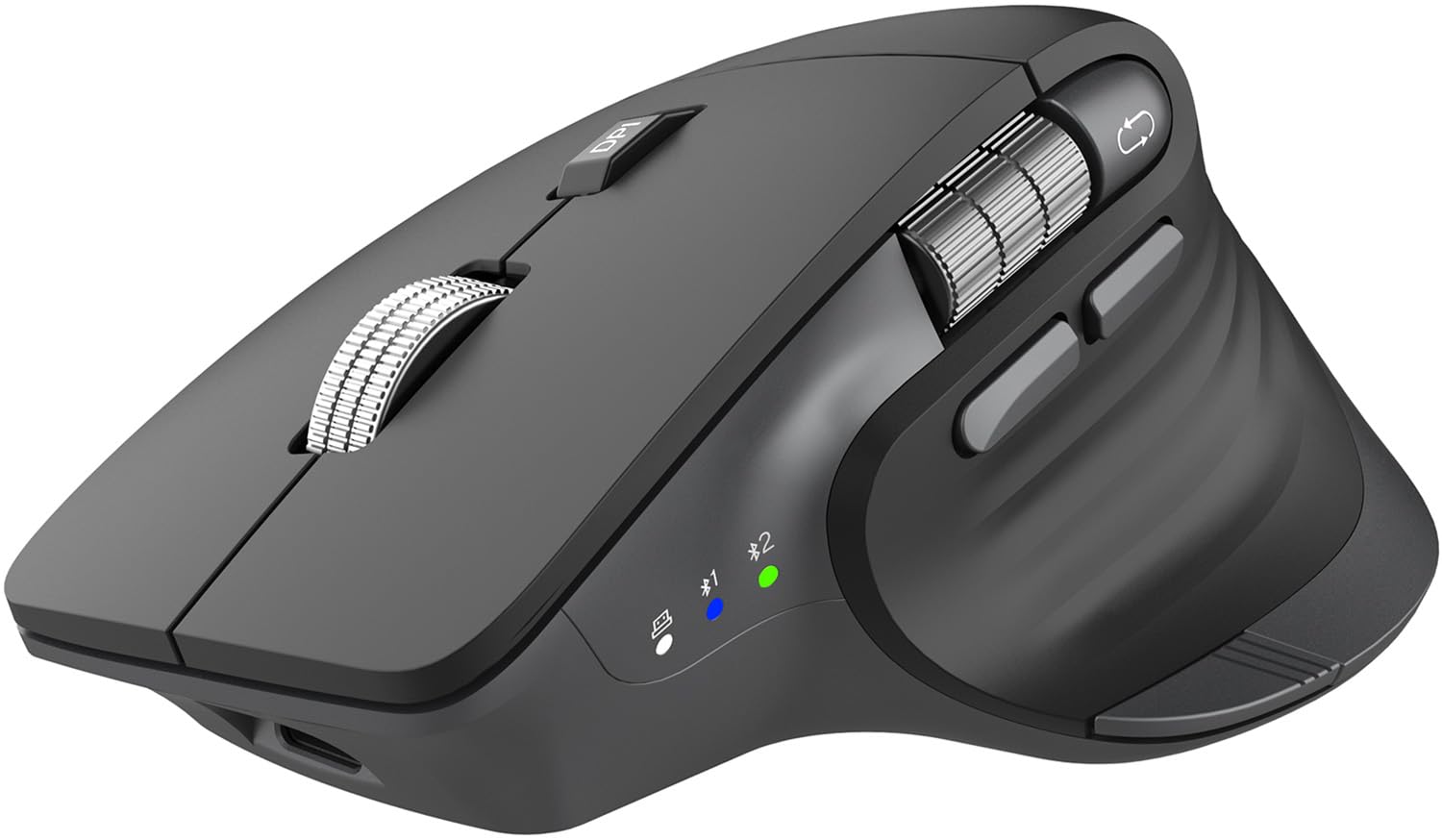
The Logitech MX alternative that brings a thumb wheel and fast scroll at half the price.
This ergonomic mouse is shaped to fit your right hand naturally, with a dedicated thumb wheel for horizontal scrolling in Excel or design software — a feature not found on either the Lenovo or HP above. It connects to three devices using two Bluetooth channels plus a 2.4 GHz USB dongle (which stores inside the mouse), so you can switch between a laptop, desktop, tablet, or phone with one click. The flying scroll wheel spins freely for zipping through long documents, then locks for precise line-by-line scrolling.
Buyers call it a decent MX Master clone for half the price, noting the easy connectivity via both dongle and Bluetooth and the left-right thumb scroll. It runs on a rechargeable battery that CITLLA claims lasts up to 60 days per charge via USB-C, with five adjustable DPI levels up to 4800 DPI for smooth tracking on different surfaces. However, some reviewers mention battery drain feels fast — dropping from 100% to 92% in minutes — and the build quality feels a bit cheap for the premium price point, unlike the sturdier Lenovo or HP above. A few owners also report that the button functions are not remappable without third-party software, so the side buttons may not do what you expect on a Mac.
The Standout Features
- Thumb wheel for horizontal scrolling — a rarity at this price
- Fast flying scroll wheel for long documents and spreadsheets
- Rechargeable via USB-C, stores dongle inside the body
- 4800 DPI with 5 adjustable levels for precision tracking
The Honest Catch
- Battery drains noticeably faster than claimed for some users
- Button mapping requires third-party software on Mac
- Build quality feels less premium than the price suggests
Reach for this if: you spend all day in spreadsheets or design apps and want a thumb wheel and fast scroll without paying Logitech MX Master prices.
Look elsewhere if: you need a mouse that just works from the start with no battery anxiety or software tinkering.
Understanding the Specs
Battery Life: Months vs. Hours
You will see battery life listed two ways on multi-device mice. “Months” (like 36 or 24) means the mouse runs on a disposable AA or AAA battery and is measured assuming average daily use — you swap it once every year or two. “Hours” (like 1440 hours) means a rechargeable battery, typically lasting about 60 days before you plug in a USB-C cable. Neither is better; it just depends whether you prefer no charging cables (disposable) or no battery shopping (rechargeable).
DPI Sensitivity
DPI stands for dots per inch — how far the cursor moves for each inch you slide the mouse. A higher DPI (4000 or 4800) means the cursor zips across a big monitor with a small hand movement, which is great for fast navigation. A lower DPI is better for precise work like photo editing. Most multi-device mice let you adjust DPI on the fly with a button, so you can slow down for fine work and speed up for browsing.
Silent Clicks
Silent click mice use dampened switches that make a soft thud instead of a loud click. This is a huge plus if you work in a shared office, a library, or next to a sleeping partner. The trade-off is that the tactile feel is softer — some people prefer the audible snap of a traditional click for confirmation. All three mice in this guide feature silent or near-silent clicks.
Multi-Device Switching
Most 3-channel mice let you pair three devices and switch between them by pressing a button on top or on the bottom. Some models support Bluetooth only, while others also include a 2.4 GHz USB dongle. The dongle option is helpful if you have an older computer without Bluetooth or if you want a dedicated channel for your main desktop while using Bluetooth for a laptop and tablet.
FAQ
What does 3 channel mean on a wireless mouse?
Can I use a 3 channel mouse with a tablet or phone?
Do I need a USB dongle for each device?
How long does the battery last on a rechargeable 3 channel mouse?
Is a Bluetooth mouse better than a 2.4 GHz wireless mouse?
Can I program the buttons on any 3 channel mouse?
Will a 3 channel mouse work on a glass desk?
What is the difference between a 3 channel mouse and a regular wireless mouse?
Are these mice good for left-handed users?
Do I need to install software to use these mice?
Final Thoughts: The Verdict
For the majority of shoppers, the best 3 channel wireless mouse is the Lenovo 700 Multi-Device because it delivers the longest battery life, the most programmable buttons, and works on virtually any surface while staying affordable. If you want a USB-dongle-free setup with customizable shortcuts for spreadsheets, grab the HP 420 Programmable. And for ergonomic comfort with a thumb wheel and fast flying scroll at half the price of a Logitech MX Master, the CITLLA Ergonomic is a compelling alternative.
How We Picked
We do not accept paid placement. Every pick is matched to a real buyer and a real use-case; we do not hands-on test units.
Sources & Methodology
Specifications: manufacturer listings and product documentation. Review insights: verified customer reviews, as of July 2026. Pricing: not shown on this page (it changes often); check the current price via the retailer link.
As an Amazon Associate, Gadgets Feed earns from qualifying purchases. This does not affect which products we feature.
Related Guides
Product prices and availability are accurate as of the date/time indicated and are subject to change. Any price and availability information displayed on Amazon at the time of purchase will apply to the purchase of this product. As an Amazon Associate I earn from qualifying purchases.
CERTAIN CONTENT THAT APPEARS ON THIS SITE COMES FROM AMAZON. THIS CONTENT IS PROVIDED "AS IS" AND IS SUBJECT TO CHANGE OR REMOVAL AT ANY TIME.
Amazon and the Amazon logo are trademarks of Amazon.com, Inc. or its affiliates.