
Our readers keep the lights on and my morning glass full of iced black tea. As an Amazon Associate, I earn from qualifying purchases.
Specs are compiled from manufacturer listings and verified buyer reviews and can change over time — please confirm the key details on the product page before buying.
If your CPU is running hot enough to throttle your gaming or video editing, an air cooling kit is the straightforward fix — no pumps, no leaks, just a solid chunk of metal and a fan or two doing the job. You want something that drops your temperatures without breaking your budget or sounding like a vacuum cleaner, and the right model handles both.
The Thermalright PS120SE delivers the best overall balance: seven copper heat pipes and a 25.6 dB noise level let it cool a hot chip quietly, which is why it tops this list for most buyers. The ID-COOLING FROZN A620 SLK clears your RAM completely while pushing the most air (79.7 CFM) if you prefer airflow over silence. The upHere UE2K6 US gives you six pipes and dual fans at a low price for a tight budget.
Picking the right air cooling kit depends on heat pipe count, fan noise, and whether the cooler actually fits inside your case without blocking your RAM slots — and we break down exactly which models deliver on all three.
Quick Picks
- Thermalright PS120SE CPU Air Cooler — Top Performer
- upHere CPU Air Cooler (D6SEK-US) — Best Value
- ID-COOLING FROZN A620 SLK — RAM-Friendly
- be quiet! Pure Rock Pro 3 Black — Silent Premium
- upHere Dual Tower CPU Cooler (UE2K6 US) — Budget Champion
How To Choose The Best Air Cooling Kit
The right cooler does not have to be complicated. Focus on the three things that actually determine whether a kit will cool your specific processor, fit inside your case, and stay quiet enough that you forget it is spinning.
Heat Pipes and TDP Rating
Heat pipes are the copper tubes that carry heat away from your CPU. More pipes (six or seven) generally mean better heat transfer for high-power chips like a Ryzen 9 or an Intel i7. Check the cooler’s TDP (thermal design power) rating — a 280W cooler can handle heavy overclocks, while a 105W unit is fine for an office PC. The Thermalright PS120SE, for example, handles 105W to 280W with seven pipes.
Noise and Fan Speed
Fan noise is measured in decibels (dB). A cooler rated at 25 dB is very quiet — about the level of a whisper — while one at 34 dB is more noticeable but still far quieter than a stock Intel or AMD cooler. PWM fans (pulse-width modulation) let your motherboard adjust the speed based on CPU temperature, so the fan runs slow when you are browsing and speeds up only when you game.
Clearance: Case, RAM, and Motherboard
Dual-tower coolers are tall and wide. Measure your case width before buying — 154mm to 161mm height is typical. Also check RAM clearance: some coolers overhang the memory slots, so you may need low-profile RAM. Models like the ID-COOLING FROZN A620 SLK feature an offset design that clears tall RAM sticks completely.
Quick Comparison
| Model | Best For | Heat Pipes | Noise Level | Max Fan Speed | Amazon |
|---|---|---|---|---|---|
| Thermalright PS120SE | Premium Performance | 7 | 25.6 dB | 1650 RPM | $35.90Amazon |
| ID-COOLING FROZN A620 SLK | High Airflow & RAM Room | 6 | 33.9 dB | 2500 RPM | $45.99$49.99Amazon |
| be quiet! Pure Rock Pro 3 | Silent Premium Build | 6 | 34.8 dB | 2000 RPM | $54.90$64.90Amazon |
| upHere Dual Tower (D6SEK-US) | Value Dual-Tower | 6 | 25 dB | 1600 RPM | $29.99Amazon |
| upHere Dual Tower (UE2K6 US) | Budget-Friendly | 6 | 25 dB | 1650 RPM | $29.99Amazon |
In‑Depth Reviews
1. Thermalright PS120SE CPU Air Cooler

Seven copper heat pipes working together to tame even the hottest chips.
Keeping an overclocked i9 or Ryzen 9 cool without sounding loud is where this cooler earns its spot. You get a 280W TDP (thermal design power) ceiling, meaning it can handle a heavily overclocked chip without breaking a sweat. Buyers report an i7-4790k dropped from 98°C to under 65°C after installation — a real-world drop that keeps your CPU from thermal throttling during long gaming sessions. The fans spin at 1650 RPM (revolutions per minute), yet the noise level stays at 25.6 dB (about as loud as a whisper), so you barely hear them under load.
The included TF7 thermal paste and brackets for LGA 1150 make it ready for older builds, though the installation is not for beginners — you need access to the back of the motherboard. Compared to the upHere UE2K6 US, the Thermalright’s extra heat pipe gives it a meaningful thermal buffer for high-TDP chips, but it costs more.
Where It Shines
- Seven heat pipes deliver top-tier heat transfer capacity
- Quiet 25.6 dB operation even near max fan speed
- Compatible with Intel LGA 1700 and AMD AM5 from the start
Where It Trips
- Installation is finicky — needs motherboard back access and careful screw alignment
- Some buyers found the included thermal paste dried out
- Large build may crowd smaller cases
Best for power users: Anyone running a high-TDP chip who wants air-cooling reliability and is comfortable with a moderately tricky installation.
Grab the upHere UE2K6 US instead if a tight budget is your main constraint and you run a mid-range chip.
2. upHere CPU Air Cooler (D6SEK-US)

More airflow than the premium pick, at a budget-friendly price point.
You get 68.2 CFM (cubic feet per minute) of airflow from this dual-tower cooler. — yet it costs significantly less. Owners mention it dropped temps by 25°C under full load on a 165W TDP LGA2066 chip, a solid result for a six-pipe design. The noise level is rated at 25.6 dB (whisper-quiet), which is among the quietest in this roundup, and the included Y-adapter (Y-shaped splitter cable) lets both fans share one motherboard header.
The 30mm direct-contact heat pipe area helps draw heat away efficiently, and the cooler fits Intel LGA 1851 as well as AMD AM5 sockets. One catch: some buyers described the included thermal paste as old and thick, so you may want to replace it. The screw alignment can also be tricky, though installation is easier if you mount the cooler outside the case first.
What Stands Out
- Highest airflow in the group at 68.2 CFM
- Very quiet at 25 dB with solid cooling performance
- Wide socket compatibility including LGA 2066 and AM5
What to Expect
- Included thermal paste may be dried out — have a spare tube ready
- Fan clips are tight and can be difficult to attach
- Adjustable mounting bracket works well but screws need careful alignment
Reach for this if: You want maximum airflow per dollar and are willing to spend a few minutes on careful installation.
If you want a truly low-maintenance assembly experience with no thermal paste issues, the ID-COOLING FROZN A620 SLK has a simpler magnetic cover installation.
3. ID-COOLING FROZN A620 SLK
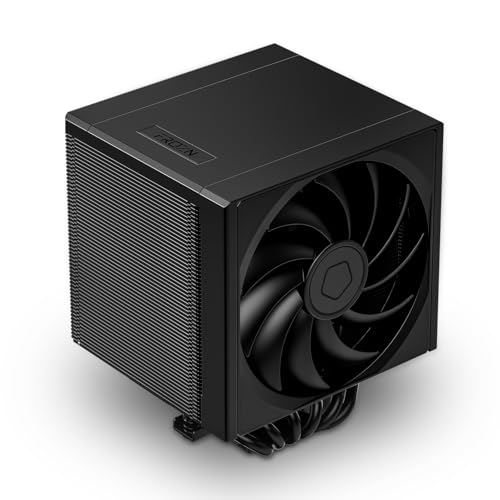
A hybrid tower that gives you dual-cooler power without blocking your RAM.
If you have tall RGB memory sticks (RAM sticks with decorative lights), the FROZN A620 SLK clears them completely while delivering serious cooling power. It uses an asymmetric layout (offset tower design) and six heat pipes to keep your CPU cool while leaving every RAM slot completely open. Customers note it keeps a Ryzen 9 9900X (162W PPT) under 80°C during AIDA AVX stress testing, and one owner noted their 7950X3D never passed 60°C while gaming. The dual counter-rotating fans spin up to 2500 RPM (revolutions per minute) and push 79.7 CFM (cubic feet per minute) — by far the highest airflow in this list — but that comes with a noise level of 33.9 dB (louder than the upHere or Thermalright picks).
Installation is genuinely fast: no fan removal, no wire clips, and the magnetic top cover snaps on cleanly. The included plastic nut driver helps you reach tight spots around the motherboard. However, the 3-pin power connector (instead of a 4-pin PWM) means you do not get full speed control on older motherboards, and the 1300-gram weight may sag in some orientations if not properly secured. If you prioritize whisper-quiet operation over maximum airflow, the upHere D6SEK-US at 25 dB is a better fit.
The Big Win
- Complete RAM clearance — no tall memory stick will interfere
- Highest rated airflow at 79.7 CFM for heavy cooling demand
- Easy, tool-guided installation with magnetic top cover
The Trade-Off
- Louder at full speed (33.9 dB) than most competitors here
- 3-pin connector limits PWM fan control flexibility
- Heavy construction at 1300 grams may require careful mounting
Ideal for RAM-heavy builds: If you have tall RGB memory sticks, this cooler clears them completely while delivering serious cooling power.
Consider the Thermalright PS120SE if silence under load matters more to you than RAM clearance.
4. be quiet! Pure Rock Pro 3 Black

German engineering meets near-silent cooling in a compact dual-tower package.
A compact 161mm height lets this cooler fit most mid-tower cases without blocking your RAM. The Pure Rock Pro 3 uses six 6mm heat pipes with HDT (heatpipe direct touch) technology — the pipes sit flush against the CPU surface for maximum thermal transfer. Reviewers point out an AM4 3800X dropped from 84°C to 72°C during stress testing, and the included Pure Wings 3 120mm PWM fan (120-millimeter pulse-width modulation fan) keeps noise at 34.8 dB even at 2000 RPM. The offset design increases RAM and VRM cooler (voltage regulator module heatsink) clearance, so it fits many builds that would reject the bulkier Thermalright PS120SE.
At 1400 grams, it is the heaviest cooler here, but the installation kit is straightforward — self-explanatory mounting and pre-applied thermal paste make setup easier than the Thermalright or upHere options. However, one reviewer noted the pre-applied paste had a broken plastic seal and is conductive (it can short-circuit components if it spreads), so careful handling is required. This cooler is for you if you want premium build quality with a compact fit, but be aware the conductive paste needs careful application or replacement.
What Impresses
- Compact 161mm height fits most cases easily
- HDT technology for direct CPU-to-heatpipe contact
- Offset fan design clears tall RAM and VRM heatsinks
What Needs Care
- Pre-applied thermal paste is conductive and had a broken seal in some units
- Noisier than the upHere or Thermalright at full speed (34.8 dB)
- Heaviest cooler at 1400 grams
Choose this for: A blend of premium build quality, easy installation, and strong cooling that outperforms the Thermalright on compact case fit.
The Thermalright PS120SE is a better buy if you want quieter operation at full load and are not limited by case height.
5. upHere Dual Tower CPU Cooler (UE2K6 US)

A six-pipe dual-tower cooler that costs less than most single-tower designs.
For about the same price as a game, this cooler brings six heat pipes, dual 120mm PWM fans (120-millimeter pulse-width modulation fans), and a noise rating of just 25 dB (whisper-quiet). Shoppers say it dropped CPU temps from 90°C to 35°C under heavy load on an older X99 platform, and a builder with over 40 years of experience called it the easiest cooler they ever used. The compact off-center design avoids RAM interference, so you can keep your tall memory modules.
The 1650 RPM fans push enough air for most gaming and productivity builds, and the included long screwdriver makes the non-disassembly fan install genuinely simple — no removing your existing fan first. The 1.45-watt power draw is negligible. However, the aluminum construction and simple aesthetic do not match the premium feel of the be quiet! unit, and the fan clips can be tight to attach. This is the right choice for a Ryzen 5 or Intel i5 build on a tight budget; pass on it if you need the highest cooling capacity for a 250W+ overclocked CPU.
Why It Works
- Excellent value — six heat pipes and dual fans at a budget-friendly price
- Very quiet at 25 dB even under load
- Easy installation with included long screwdriver
The Catch
- Aluminum build feels less premium than pricier options
- Fan clip attachment can be frustrating on first install
- Not designed for extreme overclocking on high-TDP chips
Perfect for budget builders: Gets you dual-tower cooling performance without spending premium money — ideal for Ryzen 5 or Intel i5 builds.
If your budget stretches further, the Thermalright PS120SE gives you that extra heat pipe for high-TDP chips.
Understanding the Specs
Heat Pipes
Heat pipes are sealed copper tubes filled with a small amount of liquid. When the CPU heats up, that liquid vaporizes, travels to the cooler end of the pipe, condenses back into liquid, and returns to the CPU — cycling heat away. More pipes (six or seven) mean more heat can be moved per second, which is why high-end coolers pack in as many as they can.
Decibels (dB) and Noise
Decibels measure sound pressure. A 25 dB cooler is quieter than a library (about 30 dB), while a 34 dB cooler is still quieter than a normal conversation (60 dB). The difference between 25 dB and 34 dB is noticeable but not dramatic — both are far quieter than the stock coolers that ship with most CPUs.
FAQ
Will a dual-tower air cooler fit in my case?
How many heat pipes do I actually need?
Does a quieter cooler mean worse cooling performance?
Will these coolers block my RAM slots?
What does TDP mean for a CPU cooler?
Can I install a dual-tower cooler on an ITX motherboard?
Is thermal paste included with these coolers?
Which is better — 6 heat pipes at 25 dB or 7 heat pipes at 25.6 dB?
Final Thoughts: The Verdict
For most people, the air cooling kit winner is the Thermalright PS120SE because its seven heat pipes and 25.6 dB noise level deliver the best all-around balance of cooling power and quiet operation. If tall RAM sticks are your headache, grab the ID-COOLING FROZN A620 SLK for complete clearance. And for a budget-friendly build that still gives you dual-tower performance, the upHere Dual Tower (UE2K6 US) is the best deal in this roundup.
How We Picked
We do not accept paid placement. Every pick is matched to a real buyer and a real use-case; we do not hands-on test units.
Sources & Methodology
Specifications: manufacturer listings and product documentation. Review insights: verified customer reviews, as of July 2026. Pricing: not shown on this page (it changes often); check the current price via the retailer link.
As an Amazon Associate, Gadgets Feed earns from qualifying purchases. This does not affect which products we feature.
Related Guides
Product prices and availability are accurate as of the date/time indicated and are subject to change. Any price and availability information displayed on Amazon at the time of purchase will apply to the purchase of this product. As an Amazon Associate I earn from qualifying purchases.
CERTAIN CONTENT THAT APPEARS ON THIS SITE COMES FROM AMAZON. THIS CONTENT IS PROVIDED "AS IS" AND IS SUBJECT TO CHANGE OR REMOVAL AT ANY TIME.
Amazon and the Amazon logo are trademarks of Amazon.com, Inc. or its affiliates.