
Our readers keep the lights on and my morning glass full of iced black tea. As an Amazon Associate, I earn from qualifying purchases.
Specs are compiled from manufacturer listings and verified buyer reviews and can change over time — please confirm the key details on the product page before buying.
Getting into 3D printing while staying affordable means finding a machine that doesn’t require constant tinkering just to get a decent first layer. Resin printers deliver jaw-dropping detail for miniatures, while FDM (a machine that melts plastic filament through a heated nozzle) printers give you bigger, stronger parts for functional projects — and the best ones under $500 now rival machines that cost twice as much just a few years ago. The real challenge is picking the right technology for your specific project, then trusting that the printer’s auto-leveling (automatic bed calibration that sets the nozzle height) and slicer profiles (pre-made settings in the software that cuts your model into layers) actually work from the start.
I’m Min — the founder and writer behind Gadgets Feed. This guide is built by comparing the manufacturers’ published specifications and the patterns across verified customer reviews, so you get each pick’s real strengths and trade-offs instead of marketing spin.
If you need ultra-fine resin detail for tabletop miniatures, the ELEGOO Mars 5 Ultra is your best pick; for big functional prints, the Bambu Lab A1 Mini Combo delivers multi-color FDM that just works. This roundup of the 3d printer under $500 options narrows the field to nine models that actually deliver reliable results within a sensible budget.
Quick Picks
- Bambu Lab A1 Mini Combo — Best Overall
- ELEGOO Mars 5 Ultra — Rapid Resin
- ELEGOO Centauri Carbon — Enclosed Powerhouse
- Creality K1C — Speed Enclosed FDM
- Creality Ender-3 V3 KE — Budget Speed FDM
- Anycubic Kobra X — Multicolor FDM
- FLASHFORGE Adventurer 5M — Reliable FDM Workhorse
- Phrozen Sonic Mini 8K S — Ultra-Detail Resin
- ANYCUBIC Photon Mono 4 — Entry Resin Value
How To Choose The Best 3D Printer Under $500
Before you click “buy,” you need to decide between resin (liquid cured by UV light) and FDM (plastic filament melted through a nozzle). They serve totally different purposes. Resin printers like the ANYCUBIC Photon Mono 4 give you stunning detail but a smaller print size and messy cleanup. FDM printers like the FLASHFORGE Adventurer 5M build bigger, tougher parts but with visible layer lines. Your project determines your pick.
Build Volume vs. Resolution — Pick Your Priority
Every printer under $500 forces a trade-off between how big you can print and how fine the detail is. Resin printers typically cap out around 6 inches tall with resolutions as fine as 17 microns (the size of each pixel). FDM printers can print 10-inch cubes but at a 0.1mm layer height, which is much coarser. If you print 28mm miniatures, go resin. If you print drone parts or cosplay props, go FDM.
Quick Comparison
| Model | Best For | Technology | Build Volume | Max Speed | Amazon |
|---|---|---|---|---|---|
| Bambu Lab A1 Mini Combo | Plug-and-Play Multicolor | FDM | — | 10,000 mm/s² accel. | $349.00Amazon |
| ELEGOO Centauri Carbon | Carbon Fiber & Enclosed FDM | FDM CoreXY | 256x256x256 mm | 500 mm/s | $359.99Amazon |
| Creality K1C | High-Speed Enclosed FDM | FDM CoreXY | 220x220x250 mm | 600 mm/s | $399.00$549.00Amazon |
| Creality Ender-3 V3 KE | Budget FDM Speed | FDM | 220x220x250 mm | 500 mm/s | from $378.08Amazon |
| Anycubic Kobra X | Multicolor FDM | FDM | 260x260x260 mm | 600 mm/s | $299.99$459.99Limited time dealAmazon |
| ELEGOO Mars 5 Ultra | Fast Resin Printing | Resin MSLA | 6.04×3.06×6.49 in | 150 mm/h | $299.99$356.98PrimeAmazon |
| FLASHFORGE Adventurer 5M | Reliable FDM Workhorse | FDM CoreXY | — | 600 mm/s | $249.00$299.00Amazon |
| Phrozen Sonic Mini 8K S | Ultra-Fine Detail Resin | Resin MSLA | 6.5×2.8×6.7 in | — | $299.99Amazon |
| ANYCUBIC Photon Mono 4 | Entry-Level Resin Value | Resin MSLA | 6.04×3.42×6.49 in | 70 mm/h | $209.99$239.99PrimeAmazon |
In‑Depth Reviews
1. Bambu Lab A1 Mini Combo

The mini machine that delivers multi-color prints with zero calibration fuss.
From the moment you unbox it, this printer does everything for you — full-auto calibration handles Z-offset and bed leveling without you touching a single screw. The real a neat extra is the AMS lite (an add-on unit that holds up to four filament spools) that lets you print in multiple colors without manually swapping filament spools mid-print. At a noise level of ≤48 dB, it purrs quietly enough to run overnight in your bedroom without disturbing your sleep.
Buyers report that setup takes about 20 minutes, and the active flow rate compensation (an algorithm that adjusts the extrusion speed in real-time, so layer lines stay even) means even your first print has smooth surfaces. The acceleration of 10,000 mm/s² is the fastest in this roundup, letting it zip through detailed models faster than most FDM printers here. The catch is that reviewers mention the printer shakes hard at high speeds unless it sits on a very rigid, heavy table — otherwise layer lines can wobble. For multi-color FDM at this price point, nothing else comes close.
Unlike the Creality K1C that needs a textured plate for certain materials, the A1 Mini just works with the included flexible bed from the start. It is the most beginner-friendly FDM printer in this list, hands down.
What Stood Out
- Full-auto calibration means zero manual leveling
- Multi-color printing without filament swaps
- Quiet enough for a shared room
Watch Out For
- Needs a very sturdy, heavy table to avoid shaking
- Multi-color mode uses more filament for purge waste
- No built-in enclosure for ABS or carbon fiber
Grab it if: you want a FDM printer that works straight from the start and lets you print in multiple colors without learning manual calibration.
Look elsewhere if: you need a large build volume for big functional parts or plan to print carbon-fiber filaments.
2. ELEGOO Mars 5 Ultra
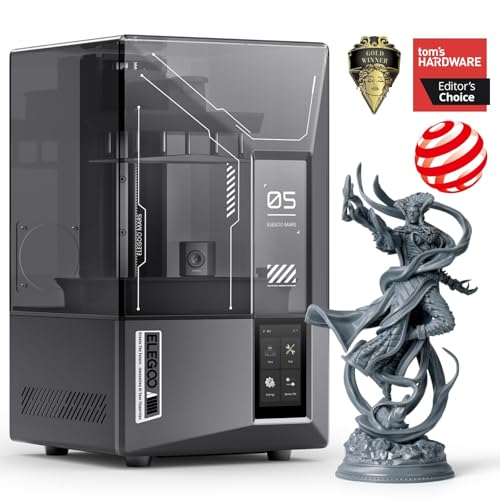
Resin printing at speeds that leave the competition in the dust.
This is the fastest resin printer in the lineup, hitting up to 150 mm/h, compared to the ANYCUBIC Photon Mono 4’s 70 mm/h. The trick is the tilt release technology (a system where the resin vat rocks back and forth instead of peeling the model off the clear film at the bottom), which shaves seconds off every layer without sacrificing detail. The 7-inch 9K monochrome LCD (a display that uses more efficient UV light and lasts significantly longer than earlier color screens) has an 18-micron (0.018 millimeter) XY resolution that captures tiny textures and sharp edges, so 28mm miniatures look like hand-painted sculptures rather than plastic blobs.
Buyers rave about the AI camera that spots failures like a stuck print or resin shortage and alerts you on your phone before you waste an entire 6-hour print. The smart mechanical sensor also checks for residue that might damage the LCD screen — a safeguard cheaper resin printers lack. The self-check and automatic leveling functions mean you unbox, pour resin, and print without touching a leveling screw. Some owners mention the lid is unhinged and takes up bench space when removed, and the camera is easy to block with large models, but the print reliability is excellent for a resin printer at this price. The fan is also slightly audible, according to some buyers.
The Highlights
- Fastest resin speed here at 150 mm/h
- AI failure detection saves time and resin
- Auto leveling and self-check for true plug-and-play
The Downsides
- Lid is fully removable, no hinges
- Camera easy to block with large prints
- Resin printing still requires messy cleanup and ventilation
Perfect for: anyone who wants resin-quality miniatures fast and hates manual leveling.
skip it if: you want FDM-strength functional parts or don’t have a ventilated workspace for resin fumes.
3. ELEGOO Centauri Carbon

An enclosed CoreXY workhorse ready for advanced filaments right from the start.
The Centauri Carbon is the only printer in this list under $500 with a fully enclosed chamber and a 320°C (608°F) brass-hardened steel nozzle, which means it can handle carbon-fiber reinforced filaments (PLA-CF, PETG-CF) that would clog a standard brass nozzle. The CoreXY (a motion system where two motors at the back drive the print head via crossed belts) structure hits up to 500 mm/s with 20,000 mm/s² acceleration, so a Benchy boat prints in 18 minutes according to reviewers. It ships fully assembled and pre-calibrated — you just remove the shipping screws, install the screen, and run the auto-leveling.
Buyers who upgraded from an Ender 3 report massive time savings, with 24-hour prints dropping to 5 hours at better quality. The built-in chamber camera with dual LED lighting lets you monitor prints remotely and capture time-lapse videos. At 38.5 pounds, this is the heaviest printer here — the rigid die-cast aluminum frame soaks up vibration, keeping layer lines consistent even at speed. The main trade-off is that some units had hotend communication errors early on, and ELEGOO’s support process can be slow. But reviewers who got a good unit report 300–400 hours of trouble-free PETG and PLA+ printing.
Biggest Strengths
- Enclosed chamber for advanced filaments like carbon fiber
- Heavy die-cast frame minimizes vibration
- Minimal assembly, ready in minutes
Biggest Weaknesses
- Heavier and larger than most FDM options
- Some users report early hotend failures
- Tech support can take weeks for replacements
Reach for this if: you want to print carbon-fiber parts or need an enclosed machine for materials like ABS (acrylonitrile butadiene styrene, a strong plastic that needs a warm chamber) and nylon.
Not for you if: you are a first-time buyer who just wants to print PLA and don’t need the enclosure.
4. Creality K1C

Carbon-fiber ready and faster than most, but it demands a perfect surface.
The K1C punches out prints at 600 mm/s with 20,000 mm/s² acceleration, according to Creality. It has a closed chamber and a hardened steel nozzle tip specifically for carbon-fiber filaments like PLA-CF and PETG-CF, which are popular for making parts that are stronger and more dimensionally stable than standard PLA. The silent mode drops noise to ≤45 dB, and the built-in active carbon filter scrubs fumes so you could keep it running in your living room without headaches.
Customers note that while the print quality from the stock part cooling is excellent, the violent acceleration can cause failures on a light desk — it needs a rock-solid surface to hold still. One reviewer noted that the smooth build sheet requires glue stick adhesion for most filaments, which is a minor hassle. Over 200 prints, users say it handles TPU (thermoplastic polyurethane, a flexible rubber-like material), PETG, and PLA flawlessly with the self-leveling, and it integrates smoothly with ORCA slicer. The biggest complaint: Creality support can be slow, sending one replacement part at a time rather than a full assembly.
Why It Wins
- Very fast 600 mm/s with enclosed chamber
- Handles carbon fiber and advanced filaments
- Quiet mode at ≤45 dB
The Catch
- Aggressive acceleration needs a rigid surface
- Smooth plate often requires glue stick
- Tech support can be slow to respond
Choose this for: fast, enclosed printing with carbon fiber materials and a need for a small footprint.
Pass on it if: you have a wobbly desk or want the most beginner-friendly experience possible.
5. Creality Ender-3 V3 KE

A fast, affordable FDM entry point with automatic leveling and a massive community.
For beginners who want speed without the premium price, the Ender-3 V3 KE hits 500 mm/s with 8,000 mm/s² acceleration using the Sprite Direct Extruder (a mechanism that feeds filament directly into the nozzle for smoother extrusion with flexible materials like TPU). The CR Touch sensor (a probe that detects the bed surface at multiple points and compensates for tilt) handles automatic bed leveling so you don’t have to manually adjust the bed corners. The 300°C nozzle lets you print PETG, ABS, and even some nylon blends.
Buyers describe it as a “reliable workhorse” after initial setup, with consistent prints and a huge modding community if you want to tinker. The assembly takes about 10 minutes, and the dual fans cool the print fast for sharp overhangs. Some reviewers warn that the power supply defaults to 235V instead of 115V, so you need to flip the switch on the back for US outlets. The fans are also quite loud — this is not a bedroom printer unless you seal it in an enclosure. One buyer mentioned catastrophic jams after 10 prints that required a new hotend, but most find it solid for the price. Unlike the Bambu A1 Mini, this one gives you a 220x220x250 mm build volume for larger parts.
Pros
- Fast 500 mm/s with Sprite Direct Extruder
- Huge modding community for upgrades
- Quick 10-minute assembly
Cons
- Fans are loud
- Power supply defaults to 235V — check the switch
- Some reports of early extruder jams
Ideal for: budget-conscious buyers who want a fast FDM printer and don’t mind a little setup effort.
Avoid if: you need a quiet printer for a shared room or want completely hands-off operation.
6. Anycubic Kobra X

Born with four colors and a hunger for bigger prints.
The Kobra X is the only FDM printer here that ships with native 4-color multi-material printing from the start — no separate AMS unit required. You can expand up to 19 colors by adding up to 4 ACE 2 Pro units, though note the ACE 2 Pro is not compatible with the older ACE Pro. The print volume is a generous 260mm x 260mm x 260mm (10.2 inches cubed), making it larger than most in this roundup. The hardened steel nozzle and vibration compensation keep layers smooth even at the max speed of 600 mm/s, completing a Benchy boat in 14 minutes according to Anycubic.
Reviewers point out 265 hours of printing with only one user-caused failure, praising the excellent bed adhesion and the “Spaghetti detection” AI camera that spots failed prints. The slicer reduces filament travel path compared to other multi-color systems. Some reviewers found the software glitchy, with one user unable to connect to WiFi due to missing login fields. The open-source slicer ecosystem is a plus for experienced users. Overall, it offers a massive build volume and multicolor capability that beats the Bambu A1 Mini on raw size.
Advantages
- 4-color printing without extra hardware
- Large 260mm³ build volume
- The brand says it reduces purge waste by 81.25%
Disadvantages
- Software can be glitchy and hard to connect
- ACE Pro and ACE 2 Pro are not cross-compatible
- Still requires some slicer learning curve
Best value for: users who want multicolor FDM with a big build volume and don’t mind some software tweaking.
Skip if: you want a fully smooth, app-driven experience from the start.
7. FLASHFORGE Adventurer 5M

A CoreXY FDM workhorse that PLA, PETG, and TPU call home.
This machine uses a CoreXY all-metal motion structure that’s inherently more stable and faster than a cantilevered gantry (a design where the print head hangs off one side arm), giving you high-quality output at up to 600 mm/s. The fully automatic one-click leveling system measures the distance from the nozzle to the build plate at multiple points and sets the offsets without you touching a wrench. The patent quick-detachable nozzle swaps in 3 seconds with no tools, and you can choose from 0.25, 0.4, 0.6, or 0.8 mm diameters to switch between high-precision and high-speed modes.
Buyers with over 1,000 hours report it’s an “excellent value PLA workhorse” that handles PLA, PETG, and TPU well — but note that the stock nozzle assembly is not user-serviceable and must be replaced as a whole unit (though third-party upgrades like Durozzle exist). At 29 pounds, it is heavier than the 7.7-pound Anycubic Photon Mono 4, giving it the mass to stay stable during rapid direction changes. The flexible double-sided PEI steel plate (a build surface that you can bend to pop off finished prints) lets you remove parts easily. Some negative reviews mention software and firmware bugs like WiFi drops and a finicky touchscreen, but experienced users find it a reliable choice. The printer is louder than the enclosed Bambu A1 Mini, so it is a worse bet for a bedroom.
Strengths
- Stable CoreXY design for quality at speed
- Tool-less nozzle swap in 3 seconds
- Proven long-term reliability with PLA, PETG, TPU
Weaknesses
- Firmware and software can be buggy
- Nozzle assembly is not user-serviceable
- Louder than enclosed printers
Stick with this if: you want a proven, fast FDM printer with easy nozzle swaps and a stable frame — it is the more durable choice over the Ender-3 V3 KE for daily use.
Look elsewhere if: you need an enclosed chamber or a completely polished software experience.
8. Phrozen Sonic Mini 8K S

Ultra-fine 22-micron detail that makes miniatures look factory-cast.
If your only goal is the highest possible detail on small models, the Sonic Mini 8K S delivers with a 22-micron (0.022 millimeter) XY resolution on a 7.1-inch 8K monochrome LCD. That pixel size is so small that layer lines on a 28mm miniature become nearly invisible to the naked eye, so your tabletop figures look crisp. One reviewer uses it for professional orthodontic prints, which shows how precise the Z-axis calibration is. The build volume is compact at 6.5 x 2.8 x 6.7 inches, so you’re limited to small parts.
Buyers call it a “workhorse” that is very reliable, though it requires a USB stick to print files — there is no WiFi transfer. The open-source software support means you can use Lychee, Chitubox, or Tango slicers without being locked into one ecosystem. The main downside is the manual leveling, which is a step back from the auto-leveling on the ELEGOO Mars 5 Ultra. For a beginner who wants to dip toes into resin printing without a big investment, this is a solid entry point with professional-grade resolution. If detail is your highest priority, this is the sharper choice over the Photon Mono 4.
Pros
- Exceptional 22-micron detail for miniatures
- Compatible with multiple popular slicers
- Reliable printing with minimal tuning
Cons
- No WiFi printing — USB only
- Small build volume limits part size
- Manual leveling required
Perfect for: modelers and hobbyists who want the finest possible detail on small resin prints.
Not for: anyone who needs to print large parts or wants wireless convenience.
9. ANYCUBIC Photon Mono 4

An absurdly affordable resin printer with a 10K screen that punches above its weight.
The Photon Mono 4 is the cheapest resin printer in this list, but its 7-inch 10K monochrome LCD boasts a 17×17-micron pixel size (0.017 x 0.017 millimeter). That means tiny lettering on a model comes out sharp and readable. The LighTurbo matrix light source provides stable, uniform UV light that reduces layer lines for ultra-smooth surfaces. The print volume is 6.04 x 3.42 x 6.49 inches — smaller than many competitors, but enough for daily tasks and demanding miniatures.
Shoppers say that the print quality is excellent for the price, though one owner reported “some leveling issues in the back corner” that were easy to work around. The 4-point leveling method is beginner-friendly because you only need to level the build plate once and then lock the four screws. The laser-engraved build plate improves adhesion so models stay put, while still making removal simple. The main trade-offs: the FEP (the clear film at the bottom of the resin vat) is a proprietary single-unit design that scratches easily and must be bought specifically for this model. The build is mostly plastic, and the touchscreen is small and basic. At this price, you can’t beat the value for getting into resin printing. The slower 70 mm/h speed means the ELEGOO Mars 5 Ultra finishes prints in half the time, so this is the choice for patient beginners on a tight budget.
High Points
- 10K resolution with 17-micron pixel size
- Very affordable entry point to resin printing
- Beginner-friendly 4-point leveling
Low Points
- Smaller print volume than some competitors
- Proprietary FEP unit scratches easily
- No WiFi — USB transfer only
Best for: budget-constrained beginners who want incredible detail for tabletop miniatures or small prototypes. Its 17-micron pixel is actually finer than the Phrozen Sonic Mini 8K S’s 22-micron, at a lower price.
Not for: anyone who needs a large build volume, WiFi printing, or prefers auto-leveling over manual screws.
Understanding the Specs
Resolution — Microns and Pixels
The XY resolution of a resin printer (measured in microns, one micron being one-thousandth of a millimeter) determines the smallest detail your printer can reproduce. A 17-micron pixel on the Anycubic Photon Mono 4 produces sharper edges and finer textures than a 50-micron screen. For FDM printers, layer height (usually 0.1 to 0.2 mm) is the spec that matters — thinner layers mean smoother surfaces but longer print times.
Print Speed — mm/s vs mm/h
FDM printers measure speed in millimeters per second (mm/s) for how fast the nozzle moves — a 600 mm/s printer like the Creality K1C can finish a Benchy boat in under 20 minutes. Resin printers measure speed in millimeters per hour (mm/h) for how fast the build plate rises between layers — 150 mm/h on the Mars 5 Ultra and 70 mm/h on the Photon Mono 4. Faster is better, but quality trade-offs exist at extreme speeds on FDM machines.
Build Volume — How Big Can You Print?
This is the maximum size of a 3D object the printer can make. Resin printers typically have smaller volumes (around 6 inches cubed) because the LCD screen limits the print area. FDM printers can be much larger — the Anycubic Kobra X offers a 260mm³ cube, letting you print helmets or large brackets in one piece. Always measure your typical project before choosing a printer.
Auto Leveling vs Manual Leveling
Auto-leveling uses a sensor (like a CR Touch probe or a built-in mechanical switch) to measure the bed at multiple points and automatically compensate for tilt. This is a massive time-saver and eliminates the most common beginner failure: a bad first layer. Manual leveling requires you to turn screws at each corner of the bed with a piece of paper to gauge nozzle distance. All modern printers under $500 now have some form of auto-leveling, but the Phrozen Sonic Mini 8K S is manual-only.
FAQ
What is the best 3D printer under $500 for a complete beginner?
Resin or FDM — which should I buy under $500?
How much does a 3D printer under $500 cost to run per print?
Do I need a ventilated room for a resin printer under $500?
Which printer under $500 has the largest build volume?
Can I print carbon fiber filament with a 3D printer under $500?
What is the difference between FDM and resin printing for beginners?
How long does a typical print take on a budget 3D printer?
Final Thoughts: The Verdict
For most buyers, the 3d printer under $500 winner is the Bambu Lab A1 Mini Combo because it combines true plug-and-play auto-calibration with multi-color printing and whisper-quiet operation in a compact frame that just works. If you want resin-level detail for miniatures and fast speeds, grab the ELEGOO Mars 5 Ultra. And for carbon-fiber functional parts or an enclosed all-metal workhorse, the ELEGOO Centauri Carbon is the one to beat in this price bracket with its fully enclosed 256x256x256 mm build volume and 320°C nozzle.
How We Picked
We do not accept paid placement. Every pick is matched to a real buyer and a real use-case; we do not hands-on test units.
Sources & Methodology
Specifications: manufacturer listings and product documentation. Review insights: verified customer reviews, as of July 2026. Pricing: not shown on this page (it changes often); check the current price via the retailer link.
As an Amazon Associate, Gadgets Feed earns from qualifying purchases. This does not affect which products we feature.
Related Guides
Product prices and availability are accurate as of the date/time indicated and are subject to change. Any price and availability information displayed on Amazon at the time of purchase will apply to the purchase of this product. As an Amazon Associate I earn from qualifying purchases.
CERTAIN CONTENT THAT APPEARS ON THIS SITE COMES FROM AMAZON. THIS CONTENT IS PROVIDED "AS IS" AND IS SUBJECT TO CHANGE OR REMOVAL AT ANY TIME.
Amazon and the Amazon logo are trademarks of Amazon.com, Inc. or its affiliates.