
Our readers keep the lights on and my morning glass full of iced black tea. As an Amazon Associate, I earn from qualifying purchases.
Specs are compiled from manufacturer listings and verified buyer reviews and can change over time — please confirm the key details on the product page before buying.
The biggest headache with a 40mm computer fan isn’t its tiny size — it’s the high-pitched whine that comes with most small fans. You want to silence a noisy DVR, cool a 3D printer hotend (the part that heats the nozzle), or keep a home server running without sounding like a jet engine. The right 40mm fan gives you a quiet workspace instead of a constant annoyance. This guide finds the quietest, most reliable picks for your exact setup.
I’m Min — the founder and writer behind Gadgets Feed. This guide is built by comparing the manufacturers’ published specifications and the patterns across verified customer reviews, so you get each pick’s real strengths and trade-offs instead of marketing spin.
You just need a 12V power source and the right thickness space. This roundup of the best 40mm computer fan options helps you match the right fan to your specific device and noise tolerance.
Quick Picks
- Noctua NF-A4x10 FLX — Ultra Quiet
- GDSTIME 2Pcs 4020 4Pin PWM — Best Value
- WDERAIR 2-Pack 40mm x 20mm — Budget Twin
How To Choose The Best 40mm Computer Fan
Picking the right tiny fan depends on three main things: how loud it is, where it has to fit, and what kind of connector your device uses. Getting these right means no more annoying whine and perfect cooling.
Noise Level (dB) Is The #1 Priority
For a 40mm fan, noise is almost always the problem. Look for a fan rated at or below 22 dB (decibels) if you want something quiet enough for a bedroom or office. Every 3 dB reduction is a noticeable drop in perceived loudness — the difference between a mild hum and an annoying buzz.
Thickness: 10mm vs 20mm
A 40mm x 10mm fan (the slim version) fits in tight spots like DVRs (digital video recorders) and network switches. A 40mm x 20mm fan (the thicker version) moves more air and creates higher static pressure (the ability to push air through tight spaces like heatsinks), making it better for cooling dense server cases or heatsinks. Always measure the space inside your device before buying.
Connector Type: 3-Pin vs 4-Pin PWM
A 3-pin connector runs at a fixed speed or can be adjusted by changing the voltage. A 4-pin PWM (Pulse Width Modulation) connector lets your motherboard or controller automatically adjust the fan speed based on temperature, which keeps things quieter under light loads and only spins up when needed.
Quick Comparison
| Model | Best For | Noise Level | Max Speed | Thickness | Amazon |
|---|---|---|---|---|---|
| Noctua NF-A4x10 FLX | Ultra-quiet replacements | 17.9 dB | 4500 RPM | 10mm | $15.95Amazon |
| GDSTIME 2Pcs 4020 4Pin PWM | PWM-controlled server cooling | 22 dB | 5000 RPM | 20mm | from $15.99Amazon |
| WDERAIR 2-Pack 40mm x 20mm | Budget twin-pack for projects | 22 dB | 5000 RPM | 20mm | $15.99Amazon |
In‑Depth Reviews
1. Noctua NF-A4x10 FLX

The quietest 40mm fan you can buy, period — a premium pick for anyone who hates fan noise.
If you want silence first, this is the fan. At just 17.9 dB (decibels), the Noctua NF-A4x10 FLX is noticeably quieter than the 22 dB GDSTIME or WDERAIR options below — at 17.9 dB versus 22 dB, so you barely hear it. This 40x40x10mm, 12V, 3-pin fan spins at a maximum 4500 RPM (revolutions per minute, or full spins per minute). It uses Noctua’s Flow Acceleration Channels and Advanced Acoustic Optimisation frame to push 8.2 Cubic Meters Per Hour of air without the irritating whine that plagues most small fans. That means you can keep a DVR or 3D printer cool in a bedroom without the constant drone.
Buyers report this fan replaced loud Lorex DVR fans easily. The included adapters (a Low-Noise Adaptor, an extension cable, and an OmniJoin adaptor set for proprietary fan headers) make it versatile for retrofitting. One owner highlighted that the rubber anti-vibration mounts (instead of screws) further reduce noise transmission. The MTTF (Mean Time To Failure, a lifespan rating) is over 150,000 hours, which could mean years of continuous use before a replacement is needed.
The catch is the price and the thickness. It costs about the same as a 2-pack of budget fans. At 10mm thick, it is perfect for tight spots like DVRs, network switches, and 3D printers, but less ideal for dense 1U server cases that need the extra static pressure of a 20mm thick fan.
Why It Wins
- 17.9 dB is the quietest noise level in this roundup — at 17.9 dB versus 22 dB fans
- Over 150,000 hours of rated lifespan
- Includes every adapter you could need for proprietary connectors
- Anti-vibration rubber mounts instead of hard screws
The Trade-Offs
- Pricier than buying a budget 2-pack
- 10mm thickness moves less air than 20mm options
- 3-pin connector means no automatic motherboard speed control
Reach for this if: you need the absolute quietest 40mm fan for a DVR, network switch, or 3D printer hotend and don’t mind paying a premium for silence and quality.
Look elsewhere if: you need high airflow for a dense 1U server case or want automatic PWM speed control from your motherboard.
2. GDSTIME 2Pcs 4020 4Pin PWM
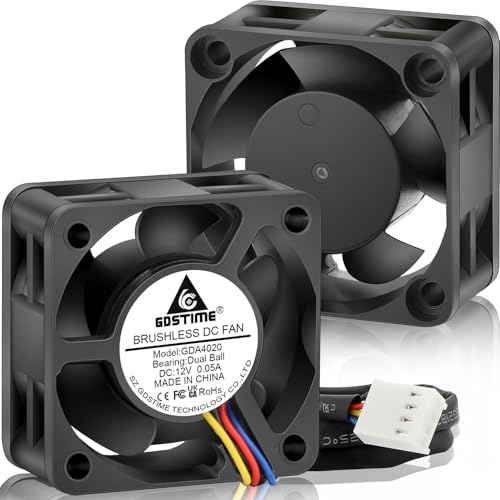
A smart twin-pack with automatic speed control — the balance for server builders and tinkerers.
If you need to cool a 1U server case or a NAS (Network Attached Storage) and want the motherboard to handle the fan speed automatically, the GDSTIME 2-pack is the obvious choice. These are 40x40x20mm, 12V, 4-pin PWM fans that reach a maximum 5000 RPM and produce 22 dB of noise. The ultra-wide RPM range, controlled by the 4-pin PWM header, lets you set a custom fan curve in BIOS (basic input/output system, the motherboard’s settings) so the fans run silently at low loads and only spin up when things get hot — something the 3-pin Noctua cannot do automatically.
Each fan delivers 5.52 CFM (cubic feet per minute) of airflow and 0.11 In H2O (inches of water, a measure of static pressure) — solid numbers for a 20mm fan. The dual ball bearings are rated for 50,000 hours and let the fan be mounted flat or upright without issue. That is a big deal because sleeve-bearing fans wear out fast when mounted horizontally. Owners mention using these to cool off HDDs (hard disk drives), taking off about 3 to 4°C (degrees Celsius) from drive temperatures, which can extend the life of your storage.
You get two fans and eight screws in the box, so it is ready to go for a dual-fan project. The main trade-off is that 22 dB is louder than the Noctua above — think a quiet computer hum rather than near-silence. Also, the 20mm thickness means it won’t fit into the slim 10mm slots of many DVRs and network switches, so always check your clearance first.
Standout Features
- 4-pin PWM for automatic motherboard speed control — run quiet until needed
- 20mm thickness delivers strong 5.52 CFM airflow and 0.11 In H2O static pressure
- Dual ball bearings last 50,000 hours and work in any orientation
- 2-pack includes mounting screws for a complete setup
Know Before You Buy
- 22 dB noise level is audible — not silent like the Noctua
- 20mm thickness will not fit in slim 10mm device slots
- Cable length may be tight for some installations
Perfect for: anyone building or upgrading a 1U server, NAS, or 3D printer enclosure who wants automatic PWM fan control and good airflow for the price.
Not for: DVRs or network switches with 10mm fan slots, or anyone who needs virtually silent operation.
3. WDERAIR 2-Pack 40mm x 20mm
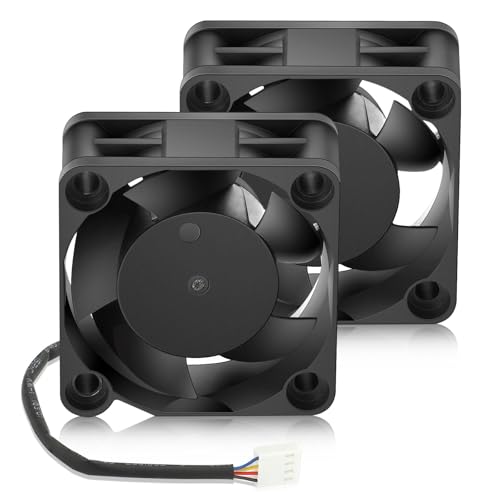
A high-speed, bargain-priced twin pack that favors airflow over silence for project cooling.
If you are cooling a retro PC build, a Proxmox (an open-source server platform) cluster, or a general ventilation project on a tight budget, the WDERAIR 2-pack is the entry-level workhorse. These are 40x40x20mm, 12V, 4-pin PWM fans that hit the same 5000 RPM maximum and 5.52 CFM airflow as the GDSTIME set above, with the same 22 dB noise rating. The specs are nearly identical, so you get the same high-speed performance for less money.
The key difference is in the details. Customers note these fans are quieter than 15,000 RPM server fans, but at full speed they are still noticeable — good for a ventilated server cabinet, not ideal for a quiet bedroom. One reviewer used a USB PD 12V controller to run them for a Proxmox cluster cooling project, praising the effective PWM control. The package includes two fans, protective grates, and mounting hardware, which adds real value for a first-time builder.
The honest trade-off is build quality consistency. One reviewer noted a connector tab defect that could pose a risk on 3-pin headers, though the overall build is described as solid. If you need the absolute quietest operation, the Noctua is a clear step up. But if you just need two functional, high-speed PWM fans for a project, this kit delivers strong performance for the money.
Best Bits
- High 5000 RPM speed for serious airflow on a budget
- 4-pin PWM connector for automatic speed control
- Comes with protective grates and mounting screws — a complete kit
- Good value twin-pack for multi-fan projects
Watch For
- 22 dB noise level is audible at full speed
- Reported connector tab issue on some units
- Build quality not as refined as premium Noctua option
Best suited for: budget-conscious builders who need a twin-pack of high-speed PWM fans for server racks, retro PCs, or ventilation projects where some fan noise is acceptable.
skip it if: you need whisper-quiet operation — the Noctua is the right choice for silence.
Understanding the Specs
Noise Level (dB)
Measured in decibels (dB), this tells you how loud the fan is during operation. For a 40mm fan, anything at or below 20 dB is very quiet — you will hear a gentle whisper rather than a hum. At 22 dB, the fan is still quiet but definitely audible. The difference between 17.9 dB and 22 dB makes a real difference in a quiet room.
Max RPM (Revolutions Per Minute)
This is how fast the fan blades spin. A higher RPM generally means more airflow, but also more noise. 4500 to 5000 RPM is the typical range for a 40mm fan. A fan with 5000 RPM (like the GDSTIME and WDERAIR) moves slightly more air than a 4500 RPM fan (like the Noctua), but the trade-off is higher noise.
Thickness (10mm vs 20mm)
The thickness of a 40mm fan determines both where it fits and how much air it can push. A 10mm fan (like the Noctua) is slim enough for tight DVRs and switches. A 20mm fan (like the GDSTIME and WDERAIR) is thicker, creating more static pressure for dense server cases and heatsinks. Always measure the space in your device before buying.
Connector Type (3-Pin vs 4-Pin PWM)
The connector determines how you control the fan speed. A 3-pin connector runs at a fixed voltage speed, or you can manually adjust it with a Low-Noise Adaptor (as supplied with the Noctua). A 4-pin PWM connector allows your motherboard to automatically adjust the fan speed based on temperature, keeping things quieter when the system is cool.
Bearing Type
This affects the fan’s lifespan and mounting flexibility. Dual ball bearings (used in the GDSTIME and WDERAIR) last longer (up to 50,000 hours) and can be mounted horizontally or vertically without issue. Sleeve bearings are cheaper but wear out faster and are best used only in vertical orientation.
FAQ
Will a 40mm fan fit in my DVR or network switch?
What is the difference between a 3-pin and a 4-pin PWM fan?
How do I know if a 10mm or 20mm thick 40mm fan fits my device?
How long does a typical 40mm computer fan last?
Can I use a 40mm fan to cool a 3D printer hotend?
What does PWM mean on a fan?
Is a 5000 RPM 40mm fan too loud for a bedroom?
Can I mount a 40mm fan horizontally?
Which 40mm fan is best for a 1U server chassis?
How do I install a 40mm fan in a device with a proprietary connector?
Final Thoughts: The Verdict
For most people, the best 40mm computer fan winner is the Noctua NF-A4x10 FLX because its 17.9 dB noise level is class-leading for a quiet home or office setup, plus it comes with every adapter you could need. If you want automatic PWM speed control for a server build, grab the GDSTIME 2-pack. For a budget-friendly twin-pack for project ventilation, the WDERAIR 2-pack delivers solid high-speed performance at a bargain price.
How We Picked
We do not accept paid placement. Every pick is matched to a real buyer and a real use-case; we do not hands-on test units.
Sources & Methodology
Specifications: manufacturer listings and product documentation. Review insights: verified customer reviews, as of July 2026. Pricing: not shown on this page (it changes often); check the current price via the retailer link.
As an Amazon Associate, Gadgets Feed earns from qualifying purchases. This does not affect which products we feature.
Related Guides
Product prices and availability are accurate as of the date/time indicated and are subject to change. Any price and availability information displayed on Amazon at the time of purchase will apply to the purchase of this product. As an Amazon Associate I earn from qualifying purchases.
CERTAIN CONTENT THAT APPEARS ON THIS SITE COMES FROM AMAZON. THIS CONTENT IS PROVIDED "AS IS" AND IS SUBJECT TO CHANGE OR REMOVAL AT ANY TIME.
Amazon and the Amazon logo are trademarks of Amazon.com, Inc. or its affiliates.