
Our readers keep the lights on and my morning glass full of iced black tea. As an Amazon Associate, I earn from qualifying purchases.
Specs are compiled from manufacturer listings and verified buyer reviews and can change over time — please confirm the key details on the product page before buying.
The real question when buying a 4K desktop computer isn’t just “can it handle the resolution?” — it’s whether the machine you pick actually makes your daily work or gaming feel fluid, not frustrating. A system that stutters on a single 4K screen or runs out of memory with a few browser tabs open defeats the whole purpose of upgrading. This guide focuses on prebuilt desktops that deliver a real 4K experience, from multi-monitor productivity setups to high-refresh-rate gaming rigs, so you can match the hardware to what you actually do.
I’m Min — the founder and writer behind Gadgets Feed. This guide is built by comparing the manufacturers’ published specifications and the patterns across verified customer reviews, so you get each pick’s real strengths and trade-offs instead of marketing spin.
To pick the right 4k desktop computer, you need to match its processor (CPU), graphics card (GPU), and memory to what you actually do — whether that is running three 4K monitors in a small office or gaming at 120+ fps (frames per second) on a 1440p screen.
Quick Picks
- HP EliteDesk 805 G9 SFF Business Desktop Computer — Best Overall
- HP Mini Desktop PC Computer for Office Work — Compact Power
- KOTIN Prebuilt Gaming PC RTX 5070 12GB — Best Value
- Dell Pro Tower Plus Tower Desktop Computer — Business Pro
- MSI Codex Z2 Gaming Desktop — Stylish Performer
- Thermaltake LCGS View i570-170 Gaming Desktop — Premium Pick
- CyberPowerPC Gamer Xtreme Gaming Desktop — Top Performer
How To Choose The Best 4K Desktop Computer
Picking the right desktop for 4K work or play is simpler when you know which three components do the heavy lifting. The graphics card (GPU) determines whether your 4K video editing timeline stays smooth or whether your games run at playable frame rates. The processor (CPU) handles how many tasks your machine can juggle at once without stuttering. And the amount of RAM plus storage speed decides how quickly you can load large 4K files and keep multiple apps open simultaneously.
Graphics: Integrated vs Dedicated
For office work, spreadsheets, web browsing, and even light video editing across two or three 4K monitors, modern integrated graphics like the AMD Radeon 740M or Intel UHD 770 are perfectly capable. They handle desktop compositing and 4K video playback without breaking a sweat. But the moment you fire up a modern game at 4K resolution, or render a complex 4K video timeline, a dedicated graphics card — ideally the NVIDIA GeForce RTX 5070 with 12GB of VRAM — becomes non-negotiable. The RTX 5070’s Blackwell architecture delivers the raw rasterization and ray-tracing power needed to push those extra pixels.
Memory and Storage: The 4K Bottleneck
4K content is data-heavy. A single minute of uncompressed 4K video can eat up several hundred megabytes. If your desktop has only 16GB of RAM, you’ll hit a wall trying to run a photo editor, a browser with 20 tabs, and a video encoding tool all at once. For comfortable 4K multitasking, 32GB is the realistic starting point, and 64GB gives you serious headroom for virtual machines or heavy creative suites. Storage is equally critical — a PCIe NVMe SSD (1TB or more) ensures your 4K assets load in seconds rather than minutes, while older mechanical hard drives will choke on large file transfers.
Form Factor: Mini, SFF, or Full Tower
How much space you have on your desk — and how much cooling your components need — dictates the case size. Mini PCs (around 6-7 inches square) can support three 4K monitors through integrated graphics and are whisper-quiet, making them ideal for cramped office desks. Small-form-factor (SFF) towers like the HP EliteDesk add room for a few internal upgrades while staying compact. Full-size mid-towers, almost always used for gaming desktops, fit liquid cooling systems and large graphics cards that generate significant heat, but they take up considerably more floor or desk space.
Quick Comparison
| Model | Best For | CPU | GPU | RAM / Storage | Amazon |
|---|---|---|---|---|---|
| HP EliteDesk 805 G9 SFF | Quiet business workstation | AMD Ryzen 5 8500G | Radeon 740M (integrated) | 32GB DDR5 / 1TB PCIe SSD | $969.99Amazon |
| HP Mini Desktop (i7-12700T) | Triple 4K monitor productivity | Intel Core i7-12700T | Intel UHD 770 (integrated) | 64GB DDR4 / 2TB NVMe SSD | $1,429.00$1,499.00Amazon |
| KOTIN Prebuilt Gaming PC | 4K gaming with side display | AMD Ryzen 7 9700X | RTX 5070 12GB (dedicated) | 32GB DDR5 / 1TB NVMe SSD | $1,799.99$1,899.99Amazon |
| Dell Pro Tower Plus | Virtual machines & 4-display office | Intel Core Ultra 5 235 | Integrated (supports 4x 4K) | 64GB DDR5 / 2TB PCIe SSD | $1,799.99Amazon |
| MSI Codex Z2 | High-refresh 4K gaming | AMD Ryzen 7 8700F | RTX 5070 12GB (dedicated) | 32GB DDR5 / 2TB NVMe SSD | $2,089.72Amazon |
| Thermaltake LCGS View i570 | Liquid-cooled gaming powerhouse | Intel Core i9-14900KF | RTX 5070 12GB (dedicated) | 32GB DDR5 / 1TB NVMe M.2 | $2,173.99Amazon |
| CyberPowerPC Gamer Xtreme | Serious 4K gaming & streaming | AMD Ryzen 9 9900X | RTX 5070 12GB (dedicated) | 32GB DDR5 / 1TB PCIe 4.0 SSD | $2,319.99Amazon |
In‑Depth Reviews
1. HP EliteDesk 805 G9 SFF Business Desktop Computer

A quiet, compact tower that drives dual 4K displays without taking over your desk.
The HP EliteDesk 805 G9 SFF earns its spot because its AMD Radeon 740M integrated graphics (graphics built into the processor) can drive two 4K monitors at up to 3840×2160 resolution each — so you can run spreadsheets on one screen and web apps on the other without a separate graphics card. The Ryzen 5 8500G processor (6 cores, boosting to 5.0 GHz) handles multi-tab browsing, accounting software, and video calls quietly. One buyer reports it is “fast, quiet, well-built Windows 11 Pro PC with great gaming capability, tons of memory.”
At 11 pounds and roughly 12 inches deep, this desktop fits into tighter spaces than a standard tower, and it comes with a wired keyboard and mouse so you can start immediately. However, the 32GB of DDR5 RAM (memory) and 1TB PCIe SSD (storage drive) are less than the Dell Pro Tower Plus’s 64GB and 2TB. Also, one buyer notes that “HP uses non-standard SATA power connector on motherboard, requiring a separate adapter” to add internal drives.
The real concern here is reliability consistency. While many owners are thrilled, a verified buyer reported the unit “crashed randomly from start,” with HP support unable to resolve a suspected RAM issue. That makes this a great buy if you get a good unit, but the variance in quality control is worth noting.
Dual 4K balance: If your workday is spreadsheets, web apps, and two 4K monitors in a quiet office, this compact desktop delivers solid integrated graphics at a value that few machines this size match.
The gamble: A minority of units arrive with instability; a quick stress test on arrival is smart before you fill it with data.
Reach for this if: you need a clean, space-saving dual-4K business machine with a strong processor and zero desire to tinker with fans or liquid cooling.
Look elsewhere if: you plan to run multiple virtual machines, need 64GB+ RAM from the start, or want an easy path to add extra internal storage without hunting for a proprietary adapter.
2. HP Mini Desktop PC Computer for Office Work

A 6.97-inch mini that drives three 4K monitors simultaneously for serious multitaskers.
The HP Mini Desktop (i7-12700T) stands out for its triple 4K output at 60Hz — two DisplayPort 1.4 plus one HDMI 2.1 — all driven by the integrated Intel UHD 770 graphics (graphics built into the processor). That means stock traders with three screens, video editors previewing timelines across multiple panels, or data analysts comparing dashboards can do it all from a machine smaller than a shoebox. The 64GB of DDR4 RAM and 2TB NVMe SSD exceed the HP EliteDesk (32GB/1TB), and it matches the Dell Pro Tower Plus (64GB/2TB) in a much smaller case.
Buyers report it “arrived on time, error-free for a month,” with one user calling it a “workhorse with zero problems.” The whisper-quiet operation and included wired keyboard, mouse, and stand mean you truly need nothing else at checkout. However, the Intel UHD 770 is strictly for desktop productivity and media playback — gaming at 4K is out of reach.
Screen-count champion: No other machine in this price range lets you run three 4K monitors from a package this small, and the 64GB/2TB spec surpasses what the Dell and HP EliteDesk offer at a similar tier.
One compromise: The integrated Intel UHD 770 lacks the power for 4K gaming or heavy GPU rendering; this is a pure productivity specialist.
Ideal for: the multi-monitor office worker who values desk space above all else and needs generous RAM for dozens of browser tabs plus heavy spreadsheets or code editors.
Not for: anyone who plans to play modern games at 4K, edit long 4K video timelines without a dedicated GPU, or upgrade the graphics card later (there is no slot for one).
3. KOTIN Prebuilt Gaming PC RTX 5070 12GB
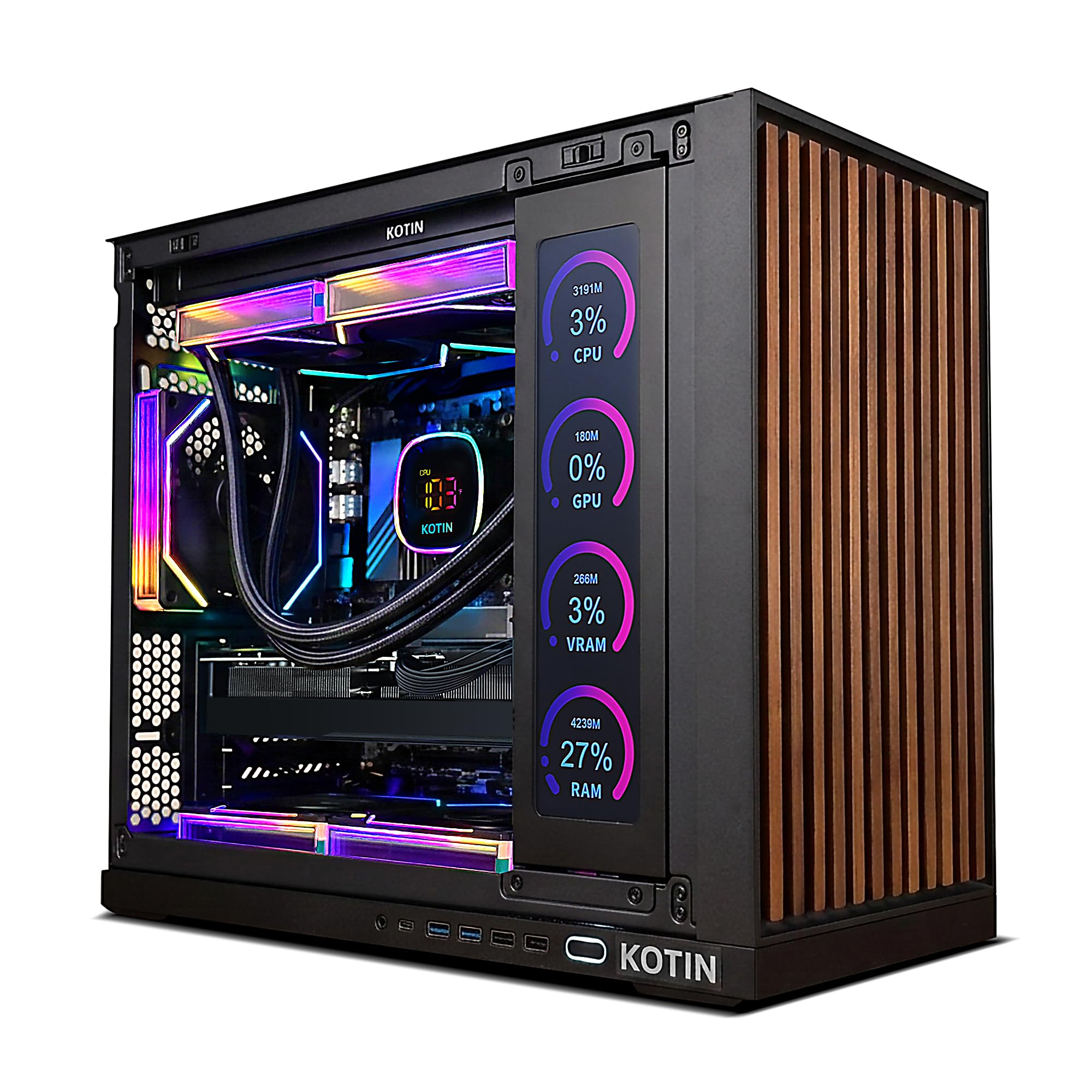
A 4K-ready gaming rig with a built-in secondary screen that shows your temps at a glance.
The KOTIN Prebuilt Gaming PC earns its gaming spot by pairing an NVIDIA GeForce RTX 5070 (12GB GDDR7 — its own dedicated video memory) with the AMD Ryzen 7 9700X, an 8-core processor that boosts to 5.5 GHz. That is a 5.5 GHz clock speed, compared to the HP Mini’s i7-12700T at 4.7 GHz, giving it a clear edge in processor-heavy tasks like streaming while gaming. One buyer confirms it runs “all my games 120+ fps on 1440p easily.” The 360mm liquid cooler keeps the Ryzen 7 cool under load, and the 850W 80+ Gold power supply leaves room for future upgrades.
The integrated 11.3-inch smart secondary screen is a genuine conversation starter, displaying CPU/GPU temperatures, usage, and weather in real time. At 32GB of DDR5 6000MHz memory and a 1TB PCIe 4.0 NVMe SSD, it matches the CyberPowerPC and MSI Codex on RAM but trails the MSI Codex in storage capacity (the MSI offers 2TB).
A small but notable risk: one reviewer noted a “faulty screen/boot issue” and needed a return, though they praised the customer service. Most reviews, however, describe a “fast, and stays cool” machine that handles demanding titles with ease.
What stands out
- 5.5 GHz boost clock leads the CPU speed comparison in this list
- 360mm liquid cooler keeps peak CPU temps around 163°F under load per buyers
- Built-in secondary screen adds a functional and visual twist
What to watch
- 1TB storage, compared to the MSI Codex Z2’s 2TB at a similar price
- Occasional reports of boot issues mean you should test within the return window
Best for: the gamer who wants a liquid-cooled, 4K-capable PC with a unique visual feature (the side screen) and doesn’t need 2TB of storage out of the gate.
skip it if: you need maximum storage in one drive, or you prefer a brand with a longer warranty track record.
4. Dell Pro Tower Plus Tower Desktop Computer
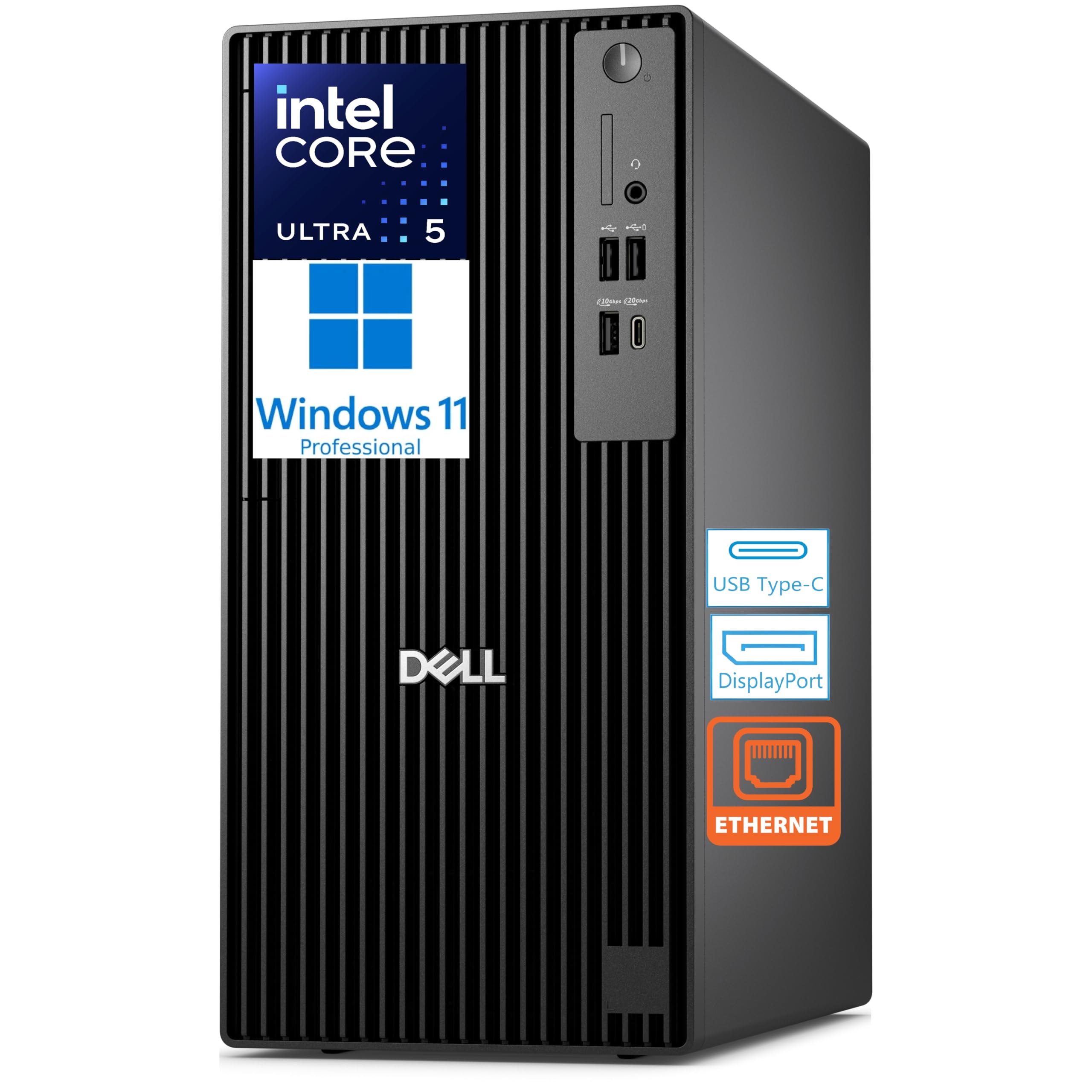
A tower that runs four 4K monitors and multiple virtual machines without breaking stride.
The Dell Pro Tower Plus is built for serious multitasking: its integrated Intel graphics support up to four 4K displays at once through three DisplayPort connections plus a rear USB-C display output — making it the multi-monitor leader of this list. The Intel Core Ultra 5 235 processor (14 cores, boosting to 5.0 GHz) includes a 13 TOPS NPU (neural processing unit for AI tasks), and the 64GB of DDR5 RAM combined with a 2TB TLC M.2 PCIe SSD delivers 64GB and 2TB, compared to the HP EliteDesk’s 32GB and 1TB.
Buyers confirm the Dell’s raw workload capability: one reports it “runs Windows 2016 Server and VMWare Workstation smoothly; runs 4+ loaded servers without RAM/slowness issues.” The tower also includes a built-in DVD+/-RW optical drive (for reading/writing discs) and a chassis intrusion switch (a security sensor that detects if the case is opened). The catch: there is no Wi-Fi or Bluetooth built in, so you will need a wired Ethernet connection or a USB adapter. One buyer mentioned “shipping took over a week (from Canada, delayed by customs).”
RAM and storage leader: With 64GB and 2TB, it matches the HP Mini on capacity but adds the ability to run four 4K monitors instead of three, plus an optical drive for legacy media.
One omission: No built-in wireless connectivity (Wi-Fi or Bluetooth) — plan for a wired network or a cheap USB dongle.
Ideal for: IT professionals running multiple VMs, developers needing a 4-display setup, or anyone who demands 64GB RAM and 2TB storage from the start from a trusted business brand.
Not for: users who need Wi-Fi ready to go without a dongle, or anyone gaming at 4K (no dedicated GPU here).
5. MSI Codex Z2 Gaming Desktop

A prebuilt gaming PC that pairs 2TB of storage with the new Blackwell RTX 5070.
Where the KOTIN and CyberPowerPC offer 1TB drives, the MSI Codex Z2 steps up with a 2TB NVMe SSD — giving you twice the space for your 4K game installs without any immediate need for an upgrade. The NVIDIA GeForce RTX 5070 (12GB) on the Blackwell architecture handles ray tracing and high-refresh 4K gaming, paired with the AMD Ryzen 7 8700F (8 cores, boosting to 5.0 GHz). Owners mention it runs “Frostpunk 2 buttery smooth” and handles “3x 27″ 4K monitors easily.”
The Codex Z2 uses an air cooler with four system fans (three front intake, one rear exhaust) plus RGB lighting controlled via the MSI Center software. Its aesthetic is clean and understated compared to the more aggressively styled KOTIN and Thermaltake picks. One common complaint: the built-in Bluetooth module is poor, with one buyer recommending an upgrade to a TP-Link BE9300 PCIe card. There is also a risk of SSD failure — one owner reported a failure requiring an RMA that took over 2.5 weeks.
Storage advantage
- 2TB NVMe SSD exceeds the 1TB drives in the KOTIN, Thermaltake, and CyberPowerPC
- Four-fan air cooling keeps thermals under control without liquid maintenance
- Easy RGB customization via MSI Center
Known issues
- Built-in Bluetooth is widely reported as poor; plan for a USB or PCIe upgrade
- Occasional SSD failures and RMA wait times of 2+ weeks
Go for this if: storage space is your top priority in a 4K gaming desktop — 2TB means you can install several modern titles without juggling uninstalls.
Think twice if: you need flawless Bluetooth from the start or prefer liquid cooling over a high-airflow fan setup.
6. Thermaltake LCGS View i570-170 Gaming Desktop

An Intel i9 flagship with closed-loop liquid cooling for the most demanding 4K titles.
The Intel Core i9-14900KF is the most powerful CPU in this roundup — 24 cores (8 Performance + 16 Efficient) with a 32MB cache, paired with an RTX 5070 12GB and 32GB of DDR5 6000MT/s RGB memory. The closed-loop liquid cooling with a 240mm radiator keeps that i9 from thermal throttling during marathon gaming sessions. Buyers describe it as an “all around beast of a machine” with “crisp” graphics, and one owner specifically praised its flawless performance on Cyberpunk, Rust, Baldur’s Gate 3, and Helldivers.
The Thermaltake View i570 stands out for its aesthetic design — filtered ventilated side mount radiator support, PSU power cover, and RGB lighting built into the case. It ships with Windows 11 Home and includes no bloatware, per buyer feedback. The minor trade-off: some customers note the fans are “very slightly noisy” under load, though this is expected for a liquid-cooled i9 system pushing an RTX 5070. Storage is limited to 1TB NVMe M.2, while the MSI Codex Z2 offers 2TB, but the motherboard likely has additional M.2 slots for expansion.
CPU king: The i9-14900KF outpaces every other processor in this list for multi-threaded workloads, making this the pick for 4K gaming plus heavy streaming or content creation.
Trade-off: 1TB storage fills fast with modern game installs; you will likely want to add a second drive early on.
Best for: the enthusiast who wants Intel’s top consumer CPU cooled by liquid and an RTX 5070 in a chassis built for airflow and looks, with no interest in tinkering.
Consider alternatives if: you need more than 1TB of storage without an immediate add-on purchase, or you are sensitive to fan noise during quiet gameplay moments.
7. CyberPowerPC Gamer Xtreme Gaming Desktop

A 12-core Ryzen 9 paired with liquid cooling and the RTX 5070 for serious 4K gaming.
The AMD Ryzen 9 9900X (12 cores, 4.4 GHz base) is the highest-core-count CPU in this list, edging out the Thermaltake’s i9-14900KF on raw multi-threaded throughput and tying the Thermaltake on GPU with the RTX 5070 12GB. The liquid-cooled CPU, tempered glass side panel, and customizable RGB lighting give it the look of a custom build without the assembly labor. It also includes Wi-Fi 6 and Bluetooth 5.3 built-in — a convenience the Dell Pro Tower and MSI Codex lack without add-on cards.
Reviewers point out the CyberPowerPC is “super fast, runs all my games on high settings without issues, and stays pretty quiet.” However, the brand has a mixed reliability reputation: one verified buyer describes a “second Cyberpower PC failed due to video card issues” with “random crashes, Windows won’t boot.” The one-year warranty covers parts and labor, but some users have found the support process frustrating.
Spec highlights
- 12-core AMD Ryzen 9 9900X is the highest core-count CPU in the roundup
- Liquid cooling, tempered glass, and built-in Wi-Fi 6 + Bluetooth 5.3
- Includes keyboard and mouse
Reliability watch
- Mixed build quality reports — some units fail within weeks
- 1TB storage is half the MSI Codex Z2’s capacity
- Warranty support can be a hassle according to some buyer experiences
Ideal for: the gamer who wants maximum CPU cores for streaming + gaming in one box and values built-in wireless connectivity without extra dongles.
Proceed with caution if: you have had a bad experience with prebuilt PCs before — the mixed reliability means buying from a retailer with a generous return policy is wise.
Understanding the Specs
Integrated vs Dedicated Graphics for 4K
Integrated graphics (like AMD Radeon 740M or Intel UHD 770) share your system’s RAM (memory) and are designed for desktop productivity, video playback, and light photo editing — they reliably drive two or even three 4K monitors at 60Hz for office tasks. Dedicated graphics cards (like the NVIDIA GeForce RTX 5070 with its own 12GB of GDDR7 memory) add the raw processing power needed for 4K gaming, 3D rendering, and video encoding. The rule: if you game or create at 4K, go dedicated; if you work in spreadsheets and browsers across multiple screens, integrated is sufficient and saves money.
RAM Capacity and Speed
For a 4K desktop, 32GB of DDR5 (found in the KOTIN, MSI Codex, Thermaltake, and CyberPowerPC) is the practical minimum for smooth multitasking with multiple 4K assets open. 64GB (found in the HP Mini and Dell Pro Tower) adds headroom for virtual machines, large development environments, or heavy creative suites. Speed matters too — DDR5 at 5600 MT/s or 6000 MT/s transfers data faster than DDR4, reducing load times and stutter when moving large 4K video or texture files.
FAQ
Can a desktop with integrated graphics really run two or three 4K monitors?
Is 32GB of RAM enough for a 4K video editing desktop?
Will the RTX 5070 run modern games at 4K 60fps?
What is the difference between a mini PC and a small-form-factor tower for 4K?
Does a prebuilt 4K gaming desktop need liquid cooling?
How do I know if a desktop supports dual or triple 4K monitors?
What storage size should I look for in a 4K desktop computer?
Is a laptop replacement with a 4K display better than a desktop for 4K work?
Final Thoughts: The Verdict
Across the board, the 4k desktop computer winner is the HP EliteDesk 805 G9 SFF because it combines a powerful Ryzen 5 processor with Radeon 740M integrated graphics, dual 4K display support, a compact footprint, and a price that stays reasonable for a business-class machine. If you want a mini PC with triple 4K monitor support and 64GB of RAM ready to go, the HP Mini Desktop (i7-12700T) is the strongest productivity pick. And for 4K gaming with an RTX 5070 and liquid cooling, the KOTIN Prebuilt Gaming PC delivers excellent value with its secondary display and powerful CPU.
How We Picked
We do not accept paid placement. Every pick is matched to a real buyer and a real use-case; we do not hands-on test units.
Sources & Methodology
Specifications: manufacturer listings and product documentation. Review insights: verified customer reviews, as of July 2026. Pricing: not shown on this page (it changes often); check the current price via the retailer link.
As an Amazon Associate, Gadgets Feed earns from qualifying purchases. This does not affect which products we feature.
Related Guides
Product prices and availability are accurate as of the date/time indicated and are subject to change. Any price and availability information displayed on Amazon at the time of purchase will apply to the purchase of this product. As an Amazon Associate I earn from qualifying purchases.
CERTAIN CONTENT THAT APPEARS ON THIS SITE COMES FROM AMAZON. THIS CONTENT IS PROVIDED "AS IS" AND IS SUBJECT TO CHANGE OR REMOVAL AT ANY TIME.
Amazon and the Amazon logo are trademarks of Amazon.com, Inc. or its affiliates.