
Our readers keep the lights on and my morning glass full of iced black tea. As an Amazon Associate, I earn from qualifying purchases.
Specs are compiled from manufacturer listings and verified buyer reviews and can change over time — please confirm the key details on the product page before buying.
Your 3D printer is printing skipped layers, blobs, or jams — and the fix is usually just one part swap. The right hotend (the assembly that melts the filament), direct-drive extruder (the motor-and-gear unit that pushes the filament), or hardened nozzle (the replaceable tip that touches the bed) turns a finicky machine back into a reliable workhorse. Picking the wrong part means wasted filament and hours of tinkering.
I am Min — the founder and writer of Gadgets Feed. I built this guide by comparing manufacturers’ published specs and patterns in verified customer reviews. You get each pick’s real strengths and trade-offs, not marketing spin.
Whether you own a Creality, ELEGOO, Anycubic, or FlashForge, the right 3d printer parts can restore original print quality or open up faster, higher-temperature capabilities your stock setup never had.
Quick Picks
- Creality Official Ender 3 V3 SE KE Hotend Upgrades Kit — Best Overall
- ELEGOO 3D Printer Extruder for Neptune 3 Pro/3 Plus/3 Max — Best Value
- Anycubic Printhead Assembly for Kobra 3 / Combo / V2 — Premium Pick
- FLASHFORGE AD5X 3D Printer Hardened Nozzle, All Sizes 4-Pack — Top Performer
How To Choose The Best 3D Printer Parts
Replacing a worn or underpowered part does not have to be complicated. A few details decide if the swap takes ten minutes or turns into a frustrating afternoon. First, match the part to your printer model — hotends (the melting assembly), extruders (the filament feeder), and nozzles (the tips) are often locked to specific machines. For example, a Creality Ender 3 V3 SE hotend will not fit a Neptune 3 Pro. Next, think about what you actually print. Standard PLA and PETG work fine with basic brass nozzles, but carbon-fiber or glass-filled filaments need hardened components (steel parts) that resist wear. Finally, decide if you want a speed upgrade — a ceramic heating block that reaches 200°C in 40 seconds — or a reliable drop-in replacement that restores the print quality your machine had when new.
Know your printer model and part standard
Every major brand uses a different mounting geometry, screw pattern, and wiring harness. A part listed for a specific model (like “Ender 3 V3 SE/KE”) bolts on without adapters. A generic “universal” hotend needs custom brackets or firmware tweaks. Check the “Compatible with” line in the product description. If it does not name your printer, keep looking. Some assemblies, like the Anycubic printhead, include the entire carriage and fan shroud, so you replace the whole front end at once. Others, like the FlashForge hardened nozzles, swap only the tip.
Match the nozzle material to your filament
Standard brass nozzles wear down fast when you push abrasive filaments like carbon-fiber nylon (PA-CF) or glass-filled PETG (PET-CF). Hardened-steel nozzles, such as the FlashForge AD5X set, resist that wear so the extrusion diameter (the hole the melted plastic comes out of) stays consistent over many spools. If you mostly print plain PLA, brass is fine. If you ever plan to try composites, buy a hardened set upfront so you do not have to swap later.
Consider heat-up speed and temperature ceiling
A stock hotend on many budget printers struggles to reach 260°C reliably. That limits you to PLA, PETG, and ABS. Upgraded ceramic heating blocks, like the Creality kit with its 60W 360° heating ring, push past 300°C and heat up to 200°C in 40 seconds. You wait less at the start of a print and can run engineering-grade materials like polycarbonate (PC) or carbon-fiber blends. If you never print hotter than 250°C, a standard replacement extruder like the ELEGOO unit works fine. If you want to explore advanced filaments, a high-temperature hotend is worth the extra cost.
Quick Comparison
| Model | Best For | Compatible Printers | Max Temp | Weight | Amazon |
|---|---|---|---|---|---|
| Creality Ender 3 V3 SE KE Hotend Kit | High-speed & high-temp upgrade | Ender 3 V3 SE / V3 KE | 300°C | 2.39 oz | Amazon |
| ELEGOO Neptune 3 Pro Extruder | Plug-and-play OEM replacement | Neptune 3 Pro / 3 Plus / 3 Max | — | 1.06 lbs | Amazon |
| Anycubic Kobra 3 Printhead Assembly | Complete printhead swap | Kobra 3, Kobra 3 Combo, V2, V2 Combo | — | 1.1 lbs | Amazon |
| FLASHFORGE AD5X Hardened Nozzle Set | Abrasive-material printing | FlashForge AD5X series | — | 2.08 oz | Amazon |
In‑Depth Reviews
1. Creality Official Ender 3 V3 SE KE Hotend Upgrades Kit

The hotend that fixes extruder skipping and open up high-temp filaments for your Creality V3.
If you own an Ender 3 V3 SE or V3 KE and want to print faster than the stock hotend allows, this ceramic heating block kit is the one upgrade that changes everything. It supports printing speeds up to 600 mm/s — triple what many stock setups manage — and the 60W 360° encircling ceramic heating ring brings the block to 200°C in 40 seconds, so you are not waiting around for the first layer. The integrated quick-swap nozzle reduces clogging, and the all-metal design resists up to 300°C, letting you run everything from PLA to polycarbonate and carbon-fiber nylon (PA-CF).
Buyers report that replacing the original hotend after two years of use solved extruder skipping and poor print quality. One reviewer called it a “huge improvement.” Another owner noted the installation takes about ten minutes. The nozzle design pushes the Teflon tube away from the heater, which prevents the deterioration and fumes that can happen with cheaper hotends. The kit includes two different Teflon tube lengths: 0.028M for the V3 KE and 0.022M for the V3 SE. Use the right one for your machine.
At 2.39 ounces it is noticeably lighter than the 1.1-pound Anycubic printhead assembly. That makes sense because this is a hotend-only swap, not a full carriage replacement. The titanium-alloy throat (the metal tube that connects the cold side to the hot side) minimizes heat transfer upward, keeping the cold side cooler and improving retraction performance (how well filament pulls back to stop oozing). Just ensure your first layer has good adhesion — the manufacturer notes that a loose first layer can clog the nozzle by picking up loose print material.
The upgrade that delivers: Heats up in 40 seconds to 200°C, prints reliably at high speed, and opens the door to advanced filaments — all in a ten-minute install.
One thing to watch: The fan mount threads can strip if overtightened. Reviewers suggest flipping the mount 180° if you feel resistance. Trimming the Teflon tube to the correct length takes a steady hand.
Best for you if: You have an Ender 3 V3 SE or V3 KE and want to print faster, hotter, or with carbon-fiber composites without buying a new printer.
Hold off if: Your stock hotend still works fine for basic PLA and you do not need the speed or temperature headroom.
2. ELEGOO 3D Printer Extruder for Neptune 3 Pro/3 Plus/3 Max

The drop-in replacement that brings a Neptune 3 back to day-one printing in two minutes.
When your Neptune 3 Pro, 3 Plus, or 3 Max starts giving you homing failures (the print head cannot find its starting position), auto-leveling errors, or print quality that keeps getting worse, the extruder is often the culprit. This fully assembled dual-gear direct-drive unit is the fastest fix you can buy. It is the OEM part from ELEGOO, so every screw hole, wire connector, and gear alignment matches the original exactly. One reviewer noted that a “2-min installation restored Day 1 print quality after nearly a year of disuse.” Multiple reviewers mention it immediately fixed homing and auto-leveling issues that the original extruder had been causing.
At 1.06 pounds it is over seven times heavier than the Creality hotend kit. That weight is the entire extruder assembly including the motor and gears — you are replacing the complete mechanism that feeds filament, not just the hotend. Unlike the Creality kit, which requires trimming a Teflon tube and aligning a fan mount, this extruder bolts on and works. The dual-gear drive (two gears grip the filament instead of one) gives you positive filament grip, which reduces slipping on flexible materials like TPU.
One caveat: this extruder works only on the Neptune 3 Pro, 3 Plus, and 3 Max. ELEGOO explicitly says it is not compatible with other models. The unit comes tested from the factory, so some test filament may remain inside the nozzle when you open the box. If you have a Neptune 3 that is acting up, this is the most direct fix available without troubleshooting loose wires or partial clogs.
Truly plug-and-play: No firmware, no modification, no guesswork. Swap the part and your Neptune 3 prints like new in under ten minutes.
The only catch: It only fits three specific Neptune 3 models. If you own a different printer, this extruder will not mount.
Best for: Neptune 3 owners who want a reliable, no-fuss replacement that restores homing and print quality immediately.
skip it if: You own a non-ELEGOO machine or your Neptune needs a hotend upgrade rather than an extruder swap.
3. Anycubic Printhead Assembly for Kobra 3 / Combo / V2

The full front-end swap that turns a major filament backup into a twenty-minute fix.
A bad print job that melts a blob of plastic over your hotend and fans can feel like the end of the road for that printer. This Anycubic printhead assembly lets you replace the entire carriage, hotend, and fan shroud in one go. It fits the Kobra 3, Kobra 3 Combo, Kobra 3 V2, and Kobra 3 V2 Combo (but not the Kobra 3 Max). One buyer summed it up simply: “I was back in business in about 20 minutes.” The installation involves removing two bolts from the old printhead and bolting on the new one — no soldering, no firmware updates, no chasing wires through a cable chain.
At 1.1 pounds and with product dimensions of 5.12 x 7.48 x 5.63 inches, this is the largest part in this lineup. You are replacing the whole front end, not just a nozzle or a hotend. It is slightly heavier than the 1.06-pound ELEGOO extruder, but that extra weight includes the fan duct, the heat sink, and the full printhead housing. Unlike the Creality hotend kit, which adds a performance upgrade, this Anycubic assembly is a direct OEM replacement intended to restore original function after a failure.
Owners mention that the print quality improves “tenfold” after swapping a damaged head. They add that the assembly is “beginner-friendly” because the screw locations are obvious and Anycubic provides installation videos. The one thing the kit does not include is the 4-filament merger piece (the part that combines four filaments into one for multi-color printing) used in the combo units — that is a separate part. For a standard single-filament replacement, everything you need is in the box.
Why you want it
- Replaces damaged or clogged printhead completely in about 20 minutes
- OEM fit means no adapters or firmware changes needed
- Installation videos provided for first-timers
What to check first
- NOT compatible with the Kobra 3 Max — double-check your model
- Does not include the 4-filament merger piece used in combo setups
- Heavier and bulkier than a simple hotend or nozzle swap
Reach for this if: Your Kobra 3-series printer has a damaged or gunked-up printhead and you want the fastest route back to printing.
Look elsewhere if: You only need a nozzle replacement or your printer is not a Kobra 3 variant.
4. FLASHFORGE AD5X 3D Printer Hardened Nozzle, All Sizes 4-Pack
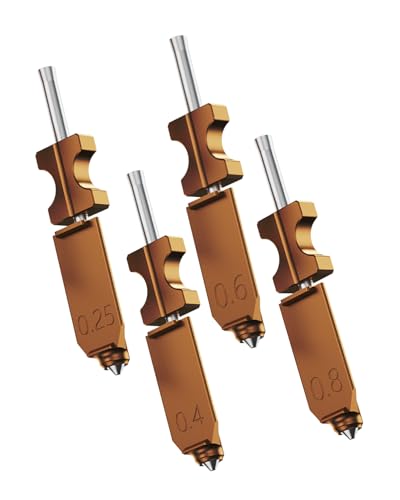
The four-nozzle kit that keeps your AD5X printing fast without wearing out on rough filaments.
If you push carbon fiber, glass fiber, or any abrasive composite through your FlashForge AD5X, standard brass nozzles will wear out in a few spools. This hardened nozzle set gives you four sizes — 0.25 mm, 0.4 mm, 0.6 mm, and 0.8 mm — in one pack. You can switch between fine detail and high-speed bulk printing without buying separate kits. The all-in-one hotend design integrates the heater block, heat sink, and precision metal tube into a single unit. It supports extrusion rates up to 32 mm³/s (the volume of melted filament it can push per second), which keeps print quality consistent even at speed. One buyer mentioned that the “high-flow design maintains quality at speed” and that the set is “great for abrasives.”
At 2.08 ounces it is 15% lighter than the Creality hotend kit at 2.39 ounces. Its package dimensions of 3.66 x 2.87 x 2.13 inches are more compact than the Creality’s 4.13 x 1.81 x 1.38 inches. That makes sense because these are individual nozzles, not a full hotend assembly. You swap the tip only, not the heater block or cooling fan. FlashForge recommends using the 0.25 mm and 0.4 mm sizes for PLA, PETG, and ABS. Use the 0.6 mm and 0.8 mm for carbon fiber and glass fiber composites, where a larger diameter (0.6 mm or 0.8 mm) lowers the risk of clogging.
After installing a new nozzle, run temperature and bed leveling calibration. The manufacturer advises slightly raising the nozzle temperature above the previous filament when switching to clear any residue and reduce clogging. Customers note that the installation is straightforward and that the nozzles work “great for finer detail prints.” Unlike the Anycubic printhead, which replaces the whole front end, or the ELEGOO extruder, which swaps the feed mechanism, this set is strictly for nozzle-level upgrades: the tip that contacts the filament and the print bed.
Smart investment for abrasive users: Four hardened nozzles in one box cover everything from 0.25 mm ultra-fine detail to 0.8 mm fast bulk prints. They resist wear that would destroy brass in days.
One thing to know: These are FlashForge AD5X-specific nozzles. They will not fit Creality, ELEGOO, or Anycubic hotends without an adapter.
Grab them if: You own a FlashForge AD5X and regularly print carbon fiber, glass fiber, or other abrasive composites that chew through standard brass nozzles.
Skip them if: Your printer is a non-FlashForge model or you only print basic PLA and PETG where brass nozzles last for months.
Understanding the Specs
Hotend vs Extruder vs Nozzle
A hotend is the assembly that melts the filament. It includes the heater block (the metal part that gets hot), heat break (the thermal barrier between hot and cold sides), and nozzle (the tip). An extruder is the motor and gears that push the filament into the hotend. A printhead assembly combines both plus the fan shroud. A nozzle set is just the replaceable tips. Knowing which part is failing saves you time and money: if the filament is not melting evenly, replace the hotend; if it is slipping or grinding, replace the extruder; if the print surface is rough, replace the nozzle.
Temperature ceiling (max temp)
The maximum temperature a hotend can reach before the heat break fails or the PTFE tube (the plastic tube that guides filament into the hotend) degrades. Standard hotends usually top out around 260°C, enough for PLA, PETG, and ABS. Upgraded ceramic hotends like the Creality kit handle 300°C, letting you print polycarbonate (PC), nylon (PA), and carbon-fiber blends (PA-CF) that require hotter melt zones. If you never plan to print above 260°C, a standard replacement is fine. If you want to experiment with engineering-grade materials, a 300°C-capable hotend is essential.
FAQ
Will the Creality hotend kit fit my Ender 3 V2 or Ender 3 Pro?
Can I use the ELEGOO extruder on a Neptune 4 or Neptune 2?
Does the Anycubic printhead assembly include the 4-filament merger piece for the combo model?
How do I know which nozzle size from the FlashForge set to use?
Will the Creality hotend work with Sprite extruder nozzles?
How often should I replace a hardened-steel nozzle?
Can the ELEGOO extruder be repaired, or do I replace the whole unit?
Does the Anycubic printhead assembly require firmware updates after installation?
Final Thoughts: The Verdict
For most buyers, the best 3d printer parts pick is the Creality Official Ender 3 V3 SE KE Hotend Upgrades Kit. It is the only part that both restores stock performance and opens up faster, higher-temperature printing with a genuine ceramic heating block and quick-swap nozzle. If you own a Neptune 3 and just want a reliable drop-in that fixes homing and print issues instantly, grab the ELEGOO Neptune 3 Extruder. For anyone running abrasive composites through a FlashForge AD5X, the FLASHFORGE AD5X Hardened Nozzle Set delivers four hardened sizes that resist wear and keep your flow rate high.
How We Picked
We do not accept paid placement. Every pick is matched to a real buyer and a real use-case; we do not hands-on test units.
Sources & Methodology
Specifications: manufacturer listings and product documentation. Review insights: verified customer reviews, as of July 2026. Pricing: not shown on this page (it changes often); check the current price via the retailer link.
As an Amazon Associate, Gadgets Feed earns from qualifying purchases. This does not affect which products we feature.