
Our readers keep the lights on and my morning glass full of iced black tea. As an Amazon Associate, I earn from qualifying purchases.
Specs are compiled from manufacturer listings and verified buyer reviews and can change over time — please confirm the key details on the product page before buying.
You do not need a liquid loop to tame a hot CPU. The two things that matter most in an air cooler are simple: does it stop your processor from thermal throttling (slowing itself down to avoid damage) under heavy work, and is the fan noise quiet enough that you can sit next to it without going nuts. This guide walks through the numbers on heat pipe count, fan speed measured in RPM (revolutions per minute — how many times the fan blade spins in 60 seconds), noise level measured in decibels (dB — a unit for sound intensity), and case clearance — the space your PC case has for a tall cooler — so you can pick the tower that fits your CPU, your case, and your ears.
I’m Min — the founder and writer behind Gadgets Feed. This guide is built by comparing the manufacturers’ published specifications and the patterns across verified customer reviews, so you get each pick’s real strengths and trade-offs instead of marketing spin.
These picks rank the best air CPU cooler options that deliver serious cooling without the complexity or leak risk of liquid setups.
Quick Picks
- Thermalright Peerless Assassin 120 Digital ARGB — Best Overall
- PCCOOLER RZ620 CPU Cooler — Best Value
- be quiet! Dark Rock 5 CPU Air Cooler — Silent Contender
- Cooler Master Hyper 612 APEX — Premium Single Tower
- be quiet! Dark Rock Elite BK037 — Dual Fan Elite
- Noctua NH-D15 G2 chromax.Black — Ultimate Performance
How To Choose The Best Air CPU Cooler
Picking an air cooler gets easier when you know which specs actually predict real cooling. You do not need to be an engineer — just watch a few key numbers and one measurement rule so the cooler you order fits inside your case without blocking your RAM (random access memory) sticks.
Tower Design and Heat Pipes
A single-tower cooler works fine for mid-range CPUs. If you are running a high-power chip like a Ryzen 9 or Intel Core i9, a dual-tower design with at least six heat pipes (sealed copper tubes that pull heat from the CPU into the fin stack) is safer. Each heat pipe is 6mm wide — the standard size — and six of them usually handle modern high-TDP (thermal design power — the maximum heat a CPU generates) processors without needing liquid cooling.
Fan Size, Speed, and Noise
A 120mm fan is the most common size on tower coolers and balances airflow with noise well. Fan speed is measured in RPM (revolutions per minute — how many full spins the fan does in 60 seconds). Higher RPM pushes more air but creates more noise, measured in decibels (dB — a unit for sound intensity). A cooler running at 1850 RPM with a noise level around 25 dB feels whisper-quiet in a normal room. One pushing 2200 RPM at 30 dB will be noticeably louder under load. Look for a PWM (pulse-width modulation — a 4-pin connector that lets your motherboard precisely control fan speed) fan connector. It lets the motherboard automatically adjust fan speed based on CPU temperature, staying quiet when you browse and ramping up only when needed.
Case Clearance and RAM Compatibility
The biggest mistake people make is buying a cooler too tall for their case or too wide for their RAM slots. A dual-tower cooler typically stands between 157mm and 162mm tall, so measure the width of your PC case from the motherboard tray (the metal plate the motherboard screws onto) to the side panel before ordering. Many large coolers overhang RAM slots. If your memory sticks have tall heat spreaders (metal fins that dissipate heat from RAM), you may need to install the fan higher or run single-fan mode — which slightly reduces cooling. Check the clearance spec: anything below 32mm with both fans means you need low-profile RAM.
Quick Comparison
| Model | Best For | Airflow (CFM) | Fan Speed (RPM) | Noise Level (dB) | Amazon |
|---|---|---|---|---|---|
| Thermalright Peerless Assassin 120 Digital | Best Overall | 88.89 | 1850 | 25.6 | Amazon |
| PCCOOLER RZ620 | Best Value | 86.73 | 2200 | 28 | Amazon |
| be quiet! Dark Rock 5 | Silent Mid-Tower | 55 | 2100 | 29.8 | Amazon |
| Cooler Master Hyper 612 APEX | High-End Single Tower | — | 2400 | 30 | Amazon |
| be quiet! Dark Rock Elite | Premium Dual Fan | 80.2 | 2000 | 25.8 | Amazon |
| Noctua NH-D15 G2 chromax.Black | Ultimate Performance | 155.6 m³/h | 1500 | 24.8 | Amazon |
In‑Depth Reviews
1. Thermalright Peerless Assassin 120 Digital ARGB Black

A dual-tower beast that pushes 88.89 CFM of airflow while staying whisper-quiet at 25.6 dB.
The Thermalright Peerless Assassin 120 Digital makes you wonder why anyone bothers with liquid cooling for a standard build. It moves 88.89 CFM (Cubic Feet per Minute — a measure of how much air the fans push each minute) through its two fans, at 88.89 CFM versus the be quiet! Dark Rock 5’s 55 CFM, so it is clearly in a different league for raw cooling. Buyers report it kept an AMD Ryzen 9 7950X3D under 52°C in a stress test, versus 58-60°C with a liquid cooler — a serious advantage against closed-loop (pre-sealed, non-serviceable) liquid coolers that cost twice as much. It measures 5.43 inches long by 4.92 inches wide by 6.38 inches tall, so you absolutely must check your case clearance before ordering. This is not a tight fit — it is a big tower that demands room.
The six copper heat pipes use AGHP (Anti-Gravity Heat Pipe — technology that lets the cooler work equally well whether your motherboard is mounted horizontally or vertically), so it handles the weird orientation some small-form-factor cases force. The magnetic top cover with its digital display board feels premium, and the 4-pin PWM (pulse-width modulation) fan connector means your motherboard automatically dials down the 1850 RPM max speed when the CPU is idling. Some owners mention a slight high-pitched tone from the fans under full load, but the 25.6 dB rating is still lower than most competitors, making it one of the quietest high-performance coolers you can buy.
What wins you over
- Industry-leading 88.89 CFM airflow for serious CPU heat loads
- Digital display board adds a unique visual touch without needing RGB software
- Quieter than most dual-tower coolers at 25.6 dB
The trade-offs
- Large 6.38-inch height may not fit mid-tower cases with narrow clearance
- Some customers note fan whine under full load at closer range
Who this cooler fits: Anyone running a high-end AMD or Intel CPU who wants air-cooling performance that rivals AIO liquid coolers, without the pump noise or leak risk.
One real catch: The 162mm total height demands a wide case, and the digital top cover is plastic (not glass), so if you want all-metal build, look higher.
2. PCCOOLER RZ620 CPU Cooler

A dual-tower cooler with three speed modes and a max 2200 RPM — but it stays quieter than most at 28 dB.
The PCCOOLER RZ620 delivers performance for a fraction of the price of premium brands, without obvious corners cut on build quality. Its 2200 RPM max speed compared to the Thermalright Peerless Assassin’s 1850 RPM, giving it a raw speed advantage when your CPU is under heavy load. One buyer reports: “ran cinabench for 30min on my i7 10700 never went over 70C,” which shows it handles serious stress. The aluminum aerospace-grade top cover feels much more expensive than the price tag suggests, and the 28 dB noise level is impressively low for a fan that can spin that fast.
It stands 157.5mm tall — shorter than many dual-tower competitors — so it fits easier inside standard mid-tower cases. The reverse gravity heat pipe design means you can mount the cooler horizontally or vertically, and performance does not suffer, which helps if you move your PC to a different orientation. It fits Intel LGA 115X/1200/1700 and AMD AM4/AM5 sockets, and the shock-absorbing rubber pads on the fan reduce vibration noise at higher speeds. The trade-off is that at sustained full 2200 RPM, it is audibly louder than the Peerless Assassin, but the three-speed switch lets you dial it back for quieter everyday use.
Why it stands out
- Three selectable fan-speed modes let you tune between silence and max cooling
- 157.5mm height fits more cases than the competition
- Aerospace-grade aluminum top cover looks and feels premium
Points to consider
- At 2200 RPM the fan is noticeably louder than 1850 RPM competitors
- A few reviewers point out it does not fit smaller cases — measure first
Perfect for: The builder who wants dual-tower cooling on a budget and does not mind tweaking a fan-speed switch to find their noise balance.
One catch: At full speed this fan is not silent, so if absolute quiet is your top priority, look at the Peerless Assassin instead.
3. be quiet! Dark Rock 5 CPU Air Cooler

A compact single-tower cooler that prioritizes silence and RAM clearance over raw airflow numbers.
The be quiet Dark Rock 5 is the cooler you pick for a quiet, reliable, no-fuss mid-range CPU that does not overhang your RAM slots or force you to buy low-profile memory. Its asymmetrical tower design leaves unobstructed room for RAM sticks of any height. At just 3.97 inches wide, it is 1.46 inches narrower than the Peerless Assassin, so it slides into tighter cases without drama. It weighs 2.2 pounds, which is 0.78 pounds lighter than the Cooler Master Hyper 612 APEX, so there is less stress on your motherboard socket.
Buyers running a Ryzen 7800X3D report it cools fantastically and praise the offset design for making RAM access easy. The included long-neck screwdriver makes installation simpler than most coolers in this range. The noise level sits at 29.8 dB — higher than the Thermalright’s 25.6 dB — because the smaller fin stack has to spin a little harder to move the same heat. The ceramic-particle black coating looks sleek, and the Silent Wings 4 PWM fan uses a fluid-dynamic bearing (a bearing that uses oil pressure to reduce friction and noise) that stays smooth and vibration-free as it ramps up under load.
What it does well
- Asymmetrical design gives full RAM clearance — no low-profile memory needed
- Light 2.2-pound weight reduces motherboard socket stress
- Included long-neck screwdriver simplifies installation
What it lacks
- 55 CFM airflow is lower than dual-tower competitors — not ideal for high-TDP CPUs
- 29.8 dB noise level is higher than the quietest coolers in this list
Ideal for: A clean, quiet build with tall RGB RAM sticks — this cooler lets your memory shine without blocking it.
skip it if: You are cooling a power-hungry chip that needs maximum airflow, because the Dark Rock 5 prioritizes silence and clearance over sheer cooling capacity.
4. Cooler Master Hyper 612 APEX
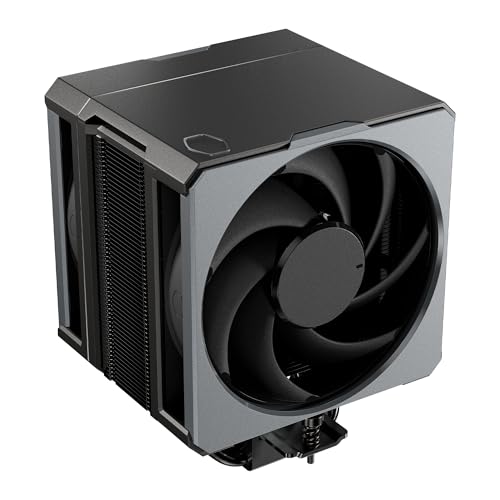
A single-tower cooler with dual 120mm fans and 2400 RPM speed aimed squarely at Ryzen 9 and Ultra 9 CPUs.
The Cooler Master Hyper 612 APEX takes a different route from the dual-tower crowd by focusing on a high-density fin design and two high-speed Mobius 120mm fans that can spin up to 2400 RPM — the fastest fan speed in this roundup. That explains why Cooler Master markets this single-tower design for Ryzen 9 and Intel Ultra 9 processors. The six copper heat pipes pair with a copper base to pull heat quickly into the fin stack. The Loop Dynamic Bearing (a bearing designed for quiet operation and long life) in the fans helps keep noise down during normal use. At 2.98 pounds, it is 0.78 pounds heavier than the be quiet Dark Rock 5, so it is a denser unit that leans on its material mass for thermal absorption as much as the fans.
Buyers with an i7-12700KF report excellent performance and appreciate the zero-RGB design that keeps the build looking clean. The stealth top cover and jet-black finish match well with a dark build. The real downside is that 2400 RPM at full tilt produces a noise level of 30 dB — the loudest on this list — so this is not a silent cooler when it is working hard. Installation is straightforward with the redesigned brackets for LGA 1851 and AM5, but one reviewer specifically recommended BIOS tweaking (adjusting settings in the motherboard’s basic input/output system) the fan curve down to around 1900 RPM to balance noise and cooling.
What makes it special
- 2400 RPM max speed pushes more air through a single-tower fin stack
- Six copper heat pipes and a copper base handle high-TDP chips well
- Redesigned mounting bracket simplifies installation on modern platforms
The honest downsides
- 30 dB noise is the loudest at full speed — quieter competitors exist
- Single-tower design cannot match dual-tower airflow for extreme overclocking
Reach for this if: You have a top-tier chip and want a cooler that can hit high RPMs when needed, and you are comfortable tuning a fan curve in BIOS.
Look elsewhere if: You want absolute silence or a dual-tower form factor — the single tower runs hotter or louder to keep up with heavy loads.
5. be quiet! Dark Rock Elite BK037
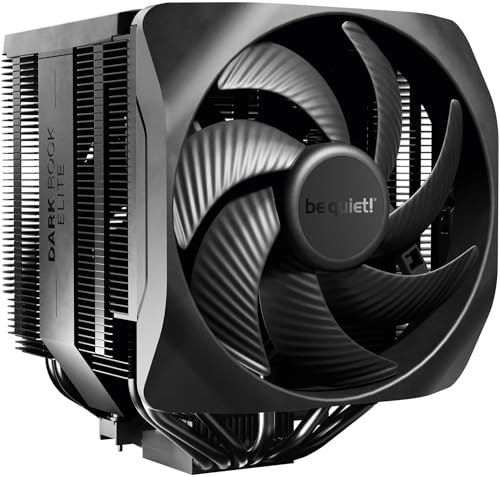
Seven heat pipes and dual 135mm Silent Wings fans with a physical speed switch for instant performance tuning.
The be quiet Dark Rock Elite earns the premium badge honestly. It packs seven copper heat pipes — more than any other cooler here — paired with two 135mm Silent Wings PWM fans that can push 80.2 CFM of air through the dense aluminum fin stack. A physical Speed Switch on the cooler lets you toggle between Quiet Mode (max 1500 RPM) and Performance Mode (max 2000 RPM), so you can instantly choose between near-silent operation at 25.8 dB or full cooling. In Quiet Mode, the noise drops even lower, making it among the most versatile noise-to-performance tools in this roundup.
At 5.7 inches long by 5.35 inches wide by 6.61 inches tall, it is a large cooler. The 3.4-pound weight is heavier than the Cooler Master Hyper 612 APEX, so a solid backplate and proper mounting are essential. The front fan rail system lets you adjust the fan height in five steps, giving you real clearance flexibility for tall RAM sticks. Buyers with an i5-14600K report no high-temp issues under heavy load, and several note it is dead silent even in Performance Mode, with only GPU fans audible. The ARGB (addressable RGB — lighting that can be controlled per LED) top cover adds lighting if you want it, but the ceramic-coated black finish looks equally classy without RGB.
Why it is worth the upgrade
- Seven heat pipes offer the highest heat transfer capacity in this comparison
- Physical Speed Switch lets you toggle between silent and performance instantly
- Adjustable front fan rail system fits almost any RAM configuration
Where it falls short
- Heavy 3.4-pound design may stress standard backplates over time
- One reviewer noted vague installation instructions and short fan cables
Best for: A high-end workstation or overclocked system where you want premium cooling and the freedom to switch between silent and performance modes on the fly.
The one caveat: The cooler is tall and heavy, so check your case width and motherboard socket reinforcement before clicking buy.
6. Noctua NH-D15 G2 chromax.Black

The iconic dual-tower cooler returns with eight heat pipes, 20% more fin area, and a nearly silent 24.8 dB operation.
The Noctua NH-D15 G2 chromax.Black is the cooler that shows how far air cooling has come. Despite spinning at only 1500 RPM, it moves 155.6 cubic meters per hour (a different unit from CFM, but the effect is the same — it handles the most power-hungry consumer chips). The noise level is a remarkable 24.8 dB, the quietest in this entire roundup, so you get extreme cooling without any audible penalty.
Buyers in tropical climates report running the NH-D15 G2 on a Ryzen 9 9950X3D at 30°C ambient (room) temperature and seeing idle temps of 50°C and stress temps between 84-88°C — genuinely impressive for an air cooler in heat-soak conditions. The offset design with recessed lower fins clears the top PCIe x16 slot on most motherboards and offers 59mm of RAM clearance in single-fan mode — enough for practically any RAM stick on the market. At 5.98 inches wide, it is the broadest cooler here, so you absolutely need to verify your case width. The included SecuFirm2+ (a mounting system from Noctua that works with multiple socket types) with a Torx-based screwdriver makes installation straightforward, and the bundled NT-H2 (a high-performance thermal paste) is some of the best in the industry.
What makes it legendary
- Eight heat pipes and 20% more surface area than the previous generation handle extreme CPUs
- 24.8 dB noise level is the quietest here — near-silent at idle, barely audible under load
- 59mm RAM clearance with one fan install eliminates memory conflicts
The reality check
- At 5.98 inches wide, many mid-tower cases will not fit it
- Premium price tag is several times higher than dual-tower options with similar performance
For those who want the best: If you have a top-tier CPU, a wide case, and want the absolute best air cooling money can buy with almost no noise, this is the one.
Not for small builds: The massive width and price mean this is only for full-tower builds with premium budgets — budget options deliver 70-80% of the cooling for much less.
Understanding the Specs
CFM and Airflow
CFM stands for Cubic Feet per Minute, and it measures how much air the cooler’s fans can push through the fin stack every minute. A higher CFM means more hot air moves away from the CPU, which generally leads to lower temperatures — but only if the fin stack is dense enough to shed heat into that moving air. The Thermalright Peerless Assassin moves 88.89 CFM, while the be quiet Dark Rock 5 moves 55 CFM, giving the Thermalright a direct advantage in raw cooling potential. More CFM does not always mean better real-world performance, though, because fin density and heat pipe count matter just as much for transferring heat from the CPU base into the airflow.
Noise Level in Decibels
Noise is measured in decibels (dB), and every 3 dB increase represents roughly a doubling of sound intensity — so 28.6 dB is noticeably louder than 25.6 dB, even if the numbers look close on paper. A cooler running at 24.8 dB, like the Noctua NH-D15 G2, is near-silent in a normal room, while one at 30 dB, like the Cooler Master Hyper 612 APEX at full speed, will be clearly audible. The trade-off is that quieter coolers usually have lower max RPM or use larger, slower-spinning fans — so you get less noise but also slightly less peak cooling capacity unless the fin and heat pipe design is excellent enough to compensate.
FAQ
Will an air CPU cooler fit inside my mid-tower case?
How many heat pipes do I really need for a modern CPU?
Does a higher RPM fan always cool better?
Can I install an air cooler with my existing motherboard and RAM?
Is a dual-tower cooler always better than a single-tower?
How loud is too loud for a CPU cooler?
Does an air cooler last longer than an AIO liquid cooler?
Which cooler is best for a Ryzen 7800X3D or 9800X3D?
Do I need to buy thermal paste separately?
What is the difference between PWM and DC fan control?
Final Thoughts: The Verdict
If you want one dependable pick, the air cpu cooler winner is the Thermalright Peerless Assassin 120 Digital because it delivers nearly 89 CFM of airflow with a noise level of just 25.6 dB — performance that rivals liquid coolers at a fraction of the cost. If you want absolute quiet and maximum thermal headroom for extreme CPUs, grab the Noctua NH-D15 G2 chromax.Black. And for a budget-friendly dual-tower build that fits tighter cases, the PCCOOLER RZ620 delivers adjustable speed modes in a 157.5mm height.
How We Picked
We do not accept paid placement. Every pick is matched to a real buyer and a real use-case; we do not hands-on test units.
Sources & Methodology
Specifications: manufacturer listings and product documentation. Review insights: verified customer reviews, as of July 2026. Pricing: not shown on this page (it changes often); check the current price via the retailer link.
As an Amazon Associate, Gadgets Feed earns from qualifying purchases. This does not affect which products we feature.