
Our readers keep the lights on and my morning glass full of iced black tea. As an Amazon Associate, I earn from qualifying purchases.
Specs are compiled from manufacturer listings and verified buyer reviews and can change over time — please confirm the key details on the product page before buying.
Picking your first soldering kit can feel like guessing in the dark — too many wattages, tip shapes, and “helping hands” that don’t actually help. This guide cuts through that noise by matching the six best beginner kits to the real work you plan to do, from fixing a gaming controller to building a hobby circuit.
I’m Min — the founder and writer behind Gadgets Feed. This guide is built by comparing the manufacturers’ published specifications and the patterns across verified customer reviews, so you get each pick’s real strengths and trade-offs instead of marketing spin.
Repairing a PS5 controller, building a guitar pedal, or tackling a home DIY project all work best when you match temperature control, included tools, and heating speed to your skill level and workspace. The right beginner soldering kit makes that possible.
Quick Picks
- WEP 926LED V3 Soldering Station 130W MAX — Best Overall
- Crtsweker 100W Digital Display Soldering Iron — Top Performer
- Preciva 927 IV Soldering Station Kit — Precision Pick
- Plusivo S578 Soldering Iron Station Kit — Best Value
- YIHUA 947-V Soldering Iron Kit with 3 LED Lights — Portable Kit
- MotyGarlo 80W LCD Digital Soldering Gun Kit — Budget Champion
How To Choose The Best Beginner Soldering Kit
A soldering kit is a collection of tools — the iron, a stand, solder wire, tips, and extras like a pump and tweezers. For a beginner, the right kit saves you from buying everything separately and guessing which parts work together.
Wattage and Heating Speed
Wattage determines how fast the iron heats up and how well it maintains temperature when touching a joint. Higher wattage (80W to 130W) gives you faster recovery when soldering larger connections. Lower wattage (60W) works fine for small electronics like headphones and single wires but will struggle on thicker components.
Temperature Control and Display
A variable temperature control with a digital readout lets you set an exact heat for the job — lower temperatures for delicate boards and higher for heavy connections. Kits without this feature run at a fixed heat, which often burns components or creates weak joints. A digital display, ideally in both °C and °F, helps you follow tutorials precisely.
Accessories That Matter
Helping hands (the two alligator clips on a weighted base) hold your work steady while you solder — a must for beginner hand-eye coordination. A desoldering pump (a spring-loaded tool that removes molten solder) helps you fix mistakes and redo a joint. Extra tips in different shapes (fine point, chisel, bevel) let you tackle different connection types without buying more gear later. A silicone mat and tip cleaner also protect your workspace and keep the iron tinned.
Quick Comparison
| Model | Best For | Wattage | Max Temp | Item Weight | Amazon |
|---|---|---|---|---|---|
| WEP 926LED V3 | Space-saving workstation | 130W max | 896°F | 0.9 kg | Amazon |
| Crtsweker 100W Station | PS5 / console repair | 100W | 896°F | 0.86 kg | Amazon |
| Preciva 927 IV | Precision work with magnifier | 130W max | 896°F | — | Amazon |
| Plusivo S578 Station | All-in-one multimeter kit | 60W | 932°F | 1.9 kg | Amazon |
| YIHUA 947-V | Portable LED-lit kit | 60W | — | — | Amazon |
| MotyGarlo 80W Gun | Budget-friendly value | 80W | — | — | Amazon |
In‑Depth Reviews
1. WEP 926LED V3 Soldering Station 130W MAX

The station that bakes the holder, spool, and sponge into one tidy block so your desk stays clear.
This kit keeps your bench organized by building the tip holder directly onto the station body — no separate stand sliding around. You get a 130W MAX iron, which buyers report “heats fast, good quality tips, adjustable dial with digital readout.” The heat stays steady because a PID microcontroller (a small computer inside that constantly adjusts the heat) keeps the tip at your set temperature with minimal drift. That means joints come out consistently shiny rather than grainy, a big plus for beginners.
At 130W max versus the Crtsweker 100W station below, this lets you solder thicker speaker wires or ground lugs without the tip cooling down mid-joint. The sleep mode drops to idle after 10 minutes of inactivity to save tip life. It weighs 0.9 kilograms, close to the Crtsweker’s 0.86 kilograms, so it feels planted without hogging your desk.
The one trade-off is the 110-127V voltage restriction — reviewers warn not to plug it into 220V, making it a US-only kit unless you use a step-down transformer.
What Stands Out
- 130W max for faster heat recovery on larger joints
- Integrated iron holder and spool dispenser save workspace
- PID temperature control keeps the tip stable
- Includes brass tip cleaner, sponge, and solder wire
One Limitation
- 110-127V only — does not work on 220V outlets without a transformer
- No helping hands or magnifier included
Grab it if: you want a compact station with fast 130W heat and a clean desk layout — ideal for hobbyists who solder several times a week.
Look elsewhere if: you need built-in helping hands or a magnifying glass for precision work on very small boards.
2. Crtsweker 100W Digital Display Soldering Iron Station Kit
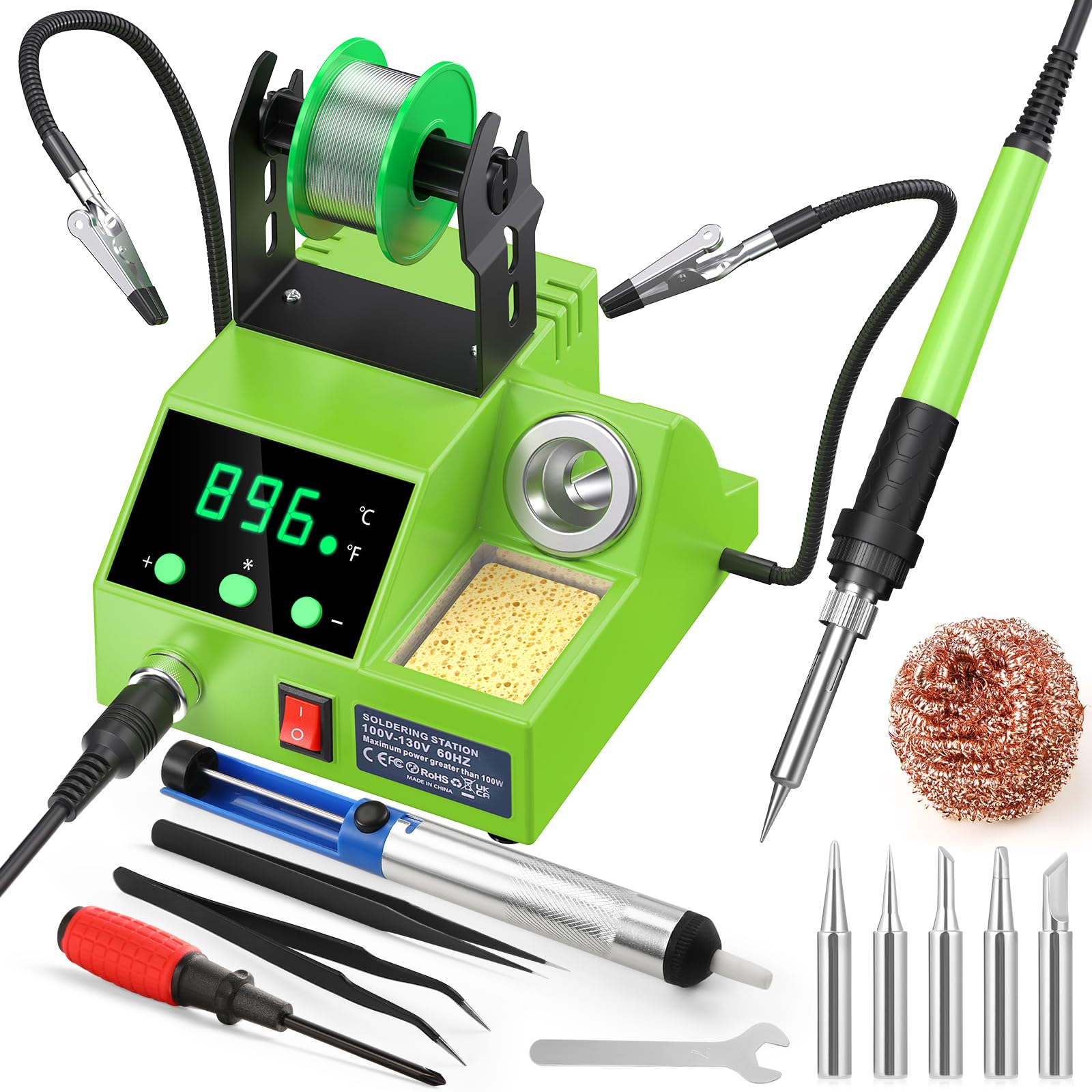
The 100W station that one reviewer noted “held a motherboard for a PS5 controller repair” right from the start.
This Crtsweker kit earns its spot for console and phone repair because it pairs a 100W ceramic heater with two helping hands that actually grip rather than wobble. One buyer who used it for a PS5 controller repair noted the helping hands “held motherboard for PS5 controller repair.” The temperature range spans 356°F to 896°F (180°C to 480°C) with an LED display you can switch between °C and °F — a helpful touch when following tutorials from different regions.
The auto-sleep timer is adjustable from 0 to 600 seconds and lets the iron rest at a low temperature instead of burning at full heat, improving tip life. Reviewers mention the included solder is low quality and recommend buying 63/37 flux-core solder separately — a common complaint in budget-friendly kits. At 0.86 kilograms it is slightly lighter than the WEP (0.9 kilograms), which helps when you need to reposition the station mid-project. It also includes a calibration function so you can verify the displayed temp against a thermometer if you need tighter accuracy.
The four vents on the steel pipe cool the iron faster when resting, though left-handed users may find the layout backward, as one buyer mentioned.
Why It Works
- 100W heater recovers heat quickly on ground planes
- Auto sleep adjustable up to 600 seconds saves tip life
- Helping hands included — holds boards for controller repair
- Temperature calibration function for accuracy
The Catch
- Included solder is low quality — budget to buy 63/37 separately
- Left-handers may find the iron rest layout awkward
Best suited for: console tinkerers and phone repair beginners who need a stable station with helping hands to hold the board steady.
skip it if: you prefer an iron that sits on a stand rather than a station — this is a permanent desk setup.
3. Preciva 927 IV Soldering Station Kit
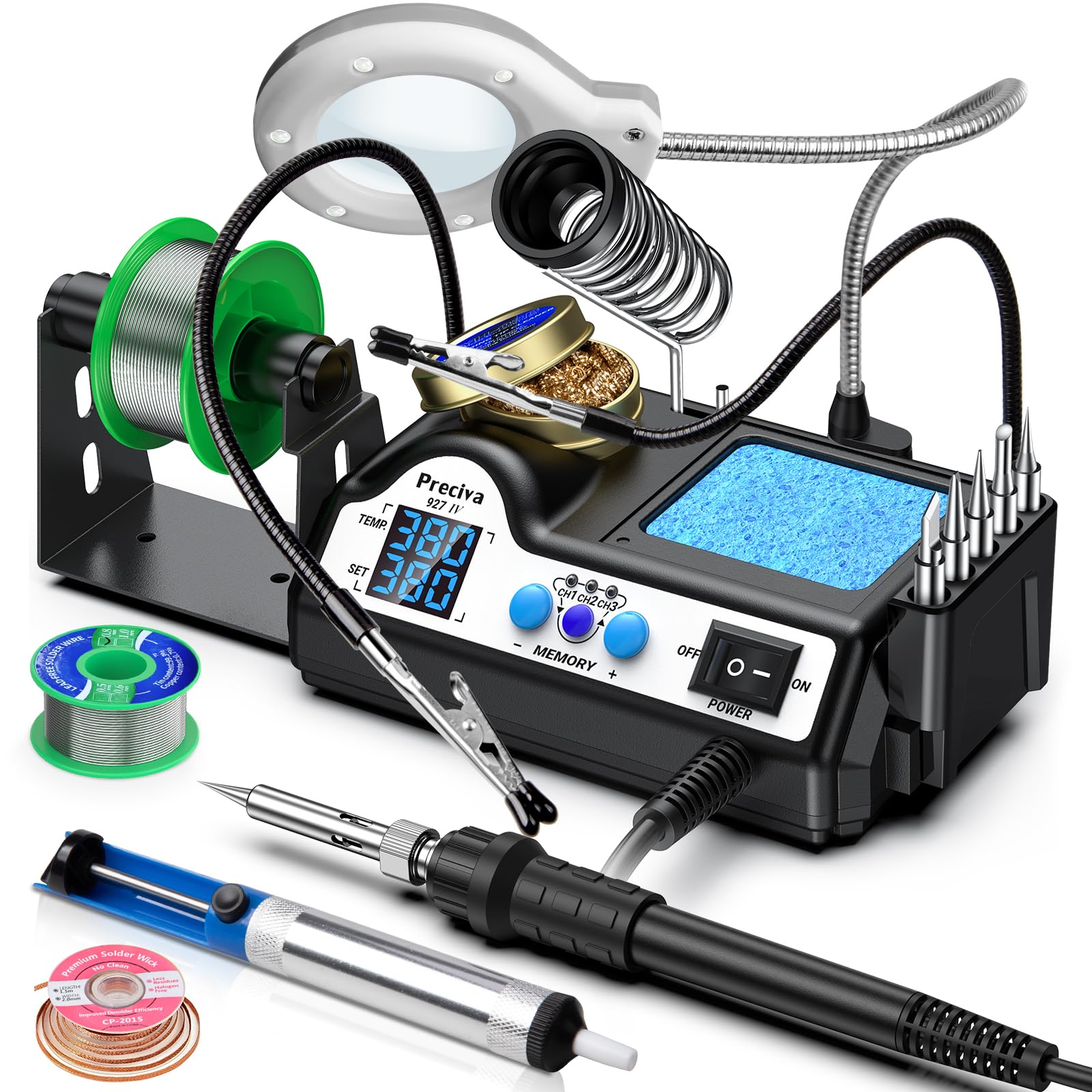
The station that lets you store your three most-used temperatures and switch between them with one button.
Need to switch between fine-pitch IC work and heavy ground connections without dialing from scratch? The 130W max Preciva holds three programmable memory slots for exactly that. It can reach 572°F in 15 seconds, so you are not waiting between joints. The dual digital display shows both the target temperature and the actual tip temperature simultaneously, giving you real-time feedback on how well the iron holds its set point.
Unlike the Crtsweker above, this kit adds a 5x magnifying glass with an LED light — useful for checking solder joints on tiny pads. Owners mention it “heats up quickly, holds temperature well” and that the controls are “simple with a clear display.” PID technology (precise constant-temperature programming) keeps the actual temperature within ±2°C of the display, which matters when you are working near a component’s rated limit. The auto-sleep timer is adjustable from 0 to 99 minutes.
One owner reported the magnifying glass felt too small for heavy use — it works for quick checks but will not replace a desk-mounted magnifier for prolonged fine work.
What Makes It Special
- Three preset temperature slots for quick switching
- Dual display shows set temp and actual temp at the same time
- Reaches 572°F in 15 seconds for fast workflow
- Includes 5x magnifying glass with LED for detail work
Minor Complaints
- Magnifying glass is small — not a replacement for a full bench magnifier
- No temperature rating given in Celsius for the lower bound in specs
Ideal for: the beginner who plans to do several board types and wants to save time switching between temperatures without re-dialing.
Not for you if: you never work on fine-pitch components and prefer a simple knob with no preset programming to learn.
4. Plusivo S578 Soldering Iron Station Kit

The kit that throws in a digital multimeter and so many extras you will not need to buy anything else for a year.
At 60 watts and a max temp of 932°F (500°C), the Plusivo S578 is the slowest-heating of the premium picks here — but it compensates with sheer completeness. The kit includes a digital multimeter (for testing voltage and continuity), solder paste, solder wick, a wire stripper, cutter, electrical tape, heat-shrink tubes, a mini PCB, and a pouch to hold it all. A 60W vs the WEP’s 130W means it struggles on heavy wire-to-wire splices, but for small electronics (guitar switches, headphone jacks, battery terminals) it is more than adequate.
Customers note the kit is “better than expected” and that the multimeter “has come in very handy” for verifying connections. The temperature stability is rated at ±2°C, matching the Preciva’s precision despite the lower wattage. The station has standby and sleep modes that cool the iron automatically when you step away. At 1.9 kilograms it is the heaviest station here — which keeps it planted but makes it less portable if you move between workspaces.
The integrated iron holder on the station body keeps your bench tidy, similar to the WEP design. You get 30-day manufacturer support and lifetime customer support if anything goes wrong.
The Big Advantage
- Includes digital multimeter, wire stripper, cutter, and heat shrink — a full toolset
- Temperature stability within ±2°C for consistent joints
- Standby and sleep mode protect the tip
- Lifetime customer support from Plusivo
The Downside
- 60W is slower on thick wires — not for heavy ground lugs
- At 1.9 kg it is the heaviest station, harder to move around
Choose this if: you are building a first-time toolkit and want a multimeter, wire stripper, and heat shrink included without buying them separately.
Pass if: you plan to solder thick battery wires or chassis grounds — the 60W iron will frustrate you with slow heat recovery.
5. YIHUA 947-V Soldering Iron Kit with 3 LED Lights
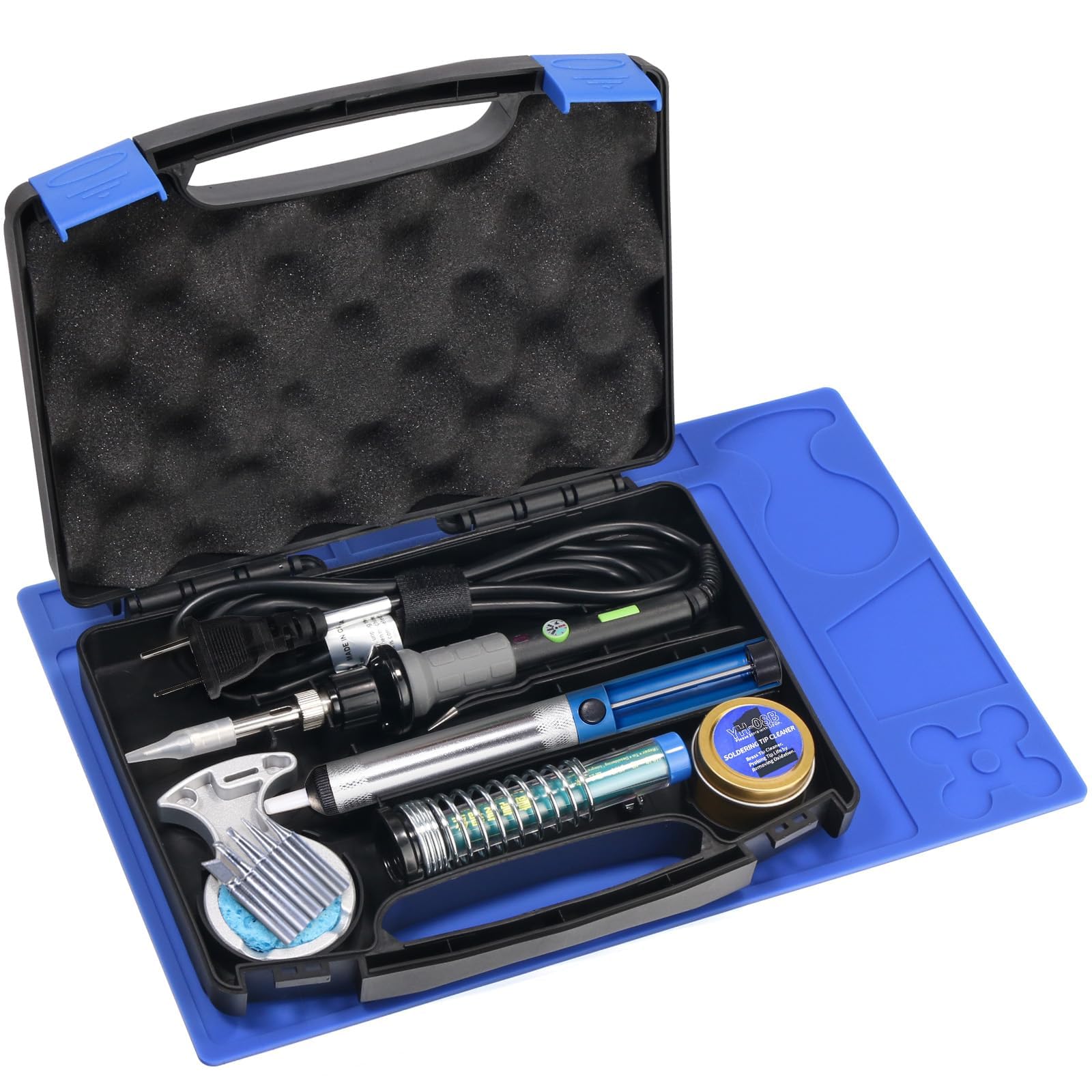
The LED-lit iron that comes in a custom case with every slot molded to hold its accessory in place.
See the joint clearly even in a dark chassis — the YIHUA 947-V puts three built-in LED lights right on the iron. It is a 60-watt iron with a ceramic heating element, and it reaches working temperature quickly. The kit packs into a portable case with dedicated cutouts for the iron, five extra tips, the desoldering pump, tweezers, a cleaning sponge, and a silicone pad — making it the easiest kit here to store after a session.
Reviewers point out that “the tip’s point doesn’t get as hot as sides, causing awkward placement and burn risk” — the conical tip has a temperature gradient that means you need to use the flat side for larger joints. One customer observed it “heats up super quick and works like a charm” for guitar work. At 60W, it matches the Plusivo’s power level, so it is best suited for small electronics and hobby jewelry work rather than heavy electrical connections. The operation indicator light tells you when the iron is live, adding a safety layer for new users.
The master switch on the handle lets you turn the iron off without unplugging the whole unit. The plastic handle feels a bit cheap, as shoppers say, but the iron performs well for its price.
Standout Features
- 3 LED lights on the iron illuminate the work area
- Portable case with custom slots keeps everything organized
- Master switch on handle for quick shut-off
- Includes silicone mat and tweezers
What to Watch
- Tip point runs cooler than the sides — use the tip side for smaller joints
- 60W is slower on thicker wires than the 100W Crtsweker or 130W WEP
Reach for this if: you work in dim areas or need a kit that packs completely into a case and stays organized in a drawer or tool bag.
Look away if: you need a station with stable tip temperature across the whole profile — the YIHUA’s tip gradient makes consistency harder.
6. MotyGarlo 80W LCD Digital Soldering Gun Kit

The 80W gun-style kit that comes as a “complete set” with five tips and a pump at an entry-level price.
Some beginners prefer a trigger grip over a pen — the MotyGarlo 80W is a pistol-grip soldering gun that fits naturally in your palm. Buyers report it is a “complete set, excellent device functionality as advertised, well-designed ergonomics, convenient organized kit.” The LCD screen shows the set temperature, and an on-off switch lets you power down without unplugging.
Unlike the station-style kits above, this gun does not have a separate base unit, so it is more portable but lacks features like sleep mode and helping hands. The 80W ceramic heating element helps the tip reach temperature quickly and maintain it during short soldering bursts. You get five tips, a desoldering pump, a solder wire tube, and 14 pieces total in the kit — enough to complete most beginner projects without extra purchases.
The gun form factor can fatigue your wrist over a long session compared to a pen-style iron on a station, and the lack of a sleep function means you must remember to switch it off to avoid overheating the tip.
What You Get
- 80W for faster heating than 60W kits
- Pistol grip that feels natural for some beginners
- LCD temperature display with on-off switch
- Complete 14-piece set with five tips and pump
Missing Features
- No sleep mode — you must manually switch off
- Gun shape can tire the wrist during long soldering sessions
Best for: someone on a tight budget who wants an 80W iron, five tips, and a pump in one box without spending on a station.
Not ideal if: you plan hours-long projects or want automatic sleep to protect the tip — the gun has no idle safety features.
Understanding the Specs
Wattage — The Real-World Power
Wattage tells you how fast the iron recovers heat after it touches a joint. Higher wattage (80W to 130W) means the element re-heats faster when you connect to a large ground plane or a thick wire that sucks away heat. Lower wattage (60W) works fine for small through-hole components and headphone jacks but will cool noticeably on connectors. If you plan to solder anything thicker than 14 AWG wire, aim for at least 80W.
Sleep Mode and Auto Shut-Off
A sleep mode drops the iron temperature to a low idle after a set time of inactivity — typically 10 to 20 minutes. This extends the life of your tip because it is not cooking at full temperature when you are away, and it reduces fire risk if you forget to turn it off. Auto shut-off completely powers down the station after a longer idle period. Kits without these features require you to manually switch off every time.
FAQ
Can I use a beginner soldering kit to fix a gaming console?
What wattage do I really need as a beginner?
Do I need a soldering station or just an iron?
What does a desoldering pump do and why do I need one?
Is a 60W iron good enough for guitar electronics?
What is a ceramic heating element and is it better?
How do I set the right soldering temperature?
What accessories should I buy that are not in the kit?
Will a 130W station damage tiny circuit board pads?
What does “helpless hands” mean in soldering kits?
Final Thoughts: The Verdict
For most buyers, the beginner soldering kit winner is the WEP 926LED V3 because its 130W max power, PID temperature control, and space-saving design give you professional-level heat stability without a professional price tag. If you want helping hands from the start for console repair, grab the Crtsweker 100W Station. And for the most complete toolset including a multimeter and wire stripper, the Plusivo S578 is your best bet.
How We Picked
We do not accept paid placement. Every pick is matched to a real buyer and a real use-case; we do not hands-on test units.
Sources & Methodology
Specifications: manufacturer listings and product documentation. Review insights: verified customer reviews, as of July 2026. Pricing: not shown on this page (it changes often); check the current price via the retailer link.
As an Amazon Associate, Gadgets Feed earns from qualifying purchases. This does not affect which products we feature.