
Our readers keep the lights on and my morning glass full of iced black tea. As an Amazon Associate, I earn from qualifying purchases.
Specs are compiled from manufacturer listings and verified buyer reviews and can change over time — please confirm the key details on the product page before buying.
You want a graphics card that gives you smooth, stutter-free gaming at 1920×1080 without emptying your wallet or sounding like a hairdryer. The problem is the shelves are full of confusing model numbers and shifting specs. This guide cuts through that noise by comparing published specifications and real-world buyer reports so you can pick the right card for your build.
I’m Min — the founder and writer behind Gadgets Feed. This guide is built by comparing the manufacturers’ published specifications and the patterns across verified customer reviews, so you get each pick’s real strengths and trade-offs instead of marketing spin.
These are the current cards worth your attention for a sharp, fast 1080p setup. This is your complete resource for finding the best 1080p video card for your specific needs and budget.
Quick Picks
- XFX Speedster SWFT210 Radeon RX 7600 — Top Performer
- ASRock Radeon RX 7600 Challenger 8GB OC — Silent Operator
- GIGABYTE GeForce RTX 5060 WINDFORCE OC 8G — Future Proof
- ASUS Dual NVIDIA GeForce RTX 5060 8GB GDDR7 OC — SFF Ready
- ZER-LON GeForce GTX 1660 Super 6GB — Best Value
- msi Gaming RTX 3050 Ventus 2X 6G OC — Low Power Champ
- MOUGOL AMD Radeon RX 580 8GB — Budget All-Rounder
- msi Gaming GeForce GT 1030 4GB DDR4 LP OC — Entry Level Hero
How To Choose The Best 1080P Video Card
Picking a 1080p video card is simpler when you know the three things that matter most: the memory size and type, the core clock speed for raw performance, and the power connector you will need to plug into your power supply.
Memory Matters: VRAM and Memory Type
VRAM (video RAM) is the card’s dedicated memory for textures and game data. For smooth 1080p gaming today, 4GB is the minimum, 6GB is a comfortable balance, and 8GB gives you headroom for modern titles with high-resolution texture packs. The memory type counts, too — GDDR6 is faster and more efficient than older GDDR5 or GDDR4, meaning quicker loading and smoother frame delivery.
Core Engine Speed: GPU and Boost Clock
The clock speed of the graphics chip itself (measured in MHz) tells you how fast the card processes data. A higher boost clock generally means more frames per second in games. However, a higher clock is just part of the picture — the architecture and number of cores also play a big role, so look at boost clock numbers as a general performance guide within the same generation.
Power and Physical Fit
Most 1080p cards require a 6-pin or 8-pin power connector directly from your power supply. Some low-power cards get all their electricity from the PCIe slot itself, which is great for older systems with smaller power supplies. Always check the card’s length and width against your case clearance — a big dual-fan card may not fit in a small form-factor desktop.
Quick Comparison
| Model | Best For | GPU Clock (MHz) | VRAM | Memory Type | Amazon |
|---|---|---|---|---|---|
| XFX Speedster SWFT210 RX 7600 | High-FPS 1080P Gaming | 2655 | 8GB | GDDR6 | $299.99Amazon |
| ASRock RX 7600 Challenger | Silent 1080P Performance | 2695 | 8GB | GDDR6 | $279.99Amazon |
| GIGABYTE RTX 5060 | Future-Proof 1080P | 2512 | 8GB | GDDR7 | $349.99Amazon |
| ASUS Dual RTX 5060 | Compact & Quiet 1080P | 2535 | 8GB | GDDR7 | $369.99Amazon |
| ZER-LON GTX 1660 Super | Budget 1080P Gamer | 1530 | 6.00 GB | GDDR6 | $229.99Amazon |
| msi RTX 3050 Ventus | Low-Power PC Upgrade | 1492 | 6 GB | GDDR6 | $209.95$219.99Amazon |
| MOUGOL RX 580 | Budget All-Rounder | 1244 | 8 GB | GDDR5 | from $129.99Amazon |
| msi GT 1030 | Entry-Level/Office PC | 1430 | 4 GB | GDDR4 | $119.97Amazon |
In‑Depth Reviews
1. XFX Speedster SWFT210 Radeon RX 7600

The silent powerhouse that keeps your 1080P frames high and your fan noise low.
The XFX Speedster delivers easy high-frame-rate 1080p gaming thanks to its boost clock of up to 2655 MHz and 8GB of GDDR6 memory on a 128-bit bus. This means you can run demanding titles with high settings and still keep temps under control, thanks to the SWFT Dual Fan cooling solution. Buyers report it “gets the job done” and that switching from an older Nvidia card was smooth on Linux.
One reviewer did note that they had to update the drivers to stop occasional system crashes, after which the card ran perfectly with max GPU temps in the upper 70s at 60% fan speed. It is a compact card at just 9.49 inches long, making it a strong fit for most mid-tower cases without clearance worries.
Unlike the ASRock RX 7600 below, the XFX uses a simpler dual-fan setup with no fan-stop mode, but it maintains solid cooling and offers a slightly lower peak clock. It is a fantastic pick for anyone wanting that modern RDNA 3 architecture at a price that undercuts many similarly-specced competitors.
What You Get
- High boost clock of 2655 MHz for smooth FPS
- 8GB GDDR6 memory handles modern textures at 1080p
- Compact design fits many cases easily
- Works from the start on Linux systems
Watch Out For
- Some buyers experienced driver-related crashes before updating
- No 0dB silent fan-stop feature
- Requires an 8-pin power connector
Best for the sharp shooter: If you want high frame rates in competitive shooters and modern AAA games without spending premium money, this XFX card is your balance.
Might be overkill if: You only play older or less demanding titles; a mid-range card like the ZER-LON GTX 1660 Super would save you cash for the same 1080p experience.
2. ASRock Radeon RX 7600 Challenger 8GB OC

The card that is damn-near silent under light loads and screams in performance when it counts.
The ASRock Challenger RX 7600 is built for the gamer who values quiet operation as much as raw power. Its 0dB Silent technology completely stops the fans under low load, making it perfect for desktop work or older games where you want zero noise. When you fire up a demanding title, the dual fans kick in, keeping the card cool as it runs at a factory-overclocked boost clock of up to 2695 MHz.
It packs 8GB of GDDR6 memory on a 128-bit bus and uses a PCIe 4.0 x8 interface, which means it offers plenty of bandwidth for modern game textures without requiring the newest motherboard. Owners mention it is “damn near silent” and easy to set up, with one user noting they went from not being able to play certain games to running them on high settings at 60 FPS. The card measures 269.2 x 131.8 x 40.3 mm and requires a single 8-pin power connector with a recommended 550W power supply.
Compared to the XFX version above, the ASRock runs a slightly higher boost clock (2695 MHz vs 2655 MHz) and includes the 0dB fan-stop feature for silent operation, making it a better choice for noise-sensitive setups. The catch is that some users on Linux (Bazzite specifically) noted it can struggle with the most demanding modern titles, so manage expectations for ultra settings on brand-new releases.
Silent but deadly at 1080p: The ASRock RX 7600 is a premium mid-range pick that excels at delivering high frame rates in a quiet package. It is a solid choice for anyone building a system where silence matters as much as speed.
Reach for this if: You want buttery-smooth 1080p gaming with the ability to handle light 1440p, and you hate fan noise during everyday tasks.
Look elsewhere if: Your power supply is under 550W, as this card needs dedicated power for full performance.
3. GIGABYTE GeForce RTX 5060 WINDFORCE OC 8G

The ultra-modern card that brings next-gen features like DLSS 4 to your 1080P setup.
The GIGABYTE RTX 5060 is built on the latest NVIDIA Blackwell architecture and includes DLSS 4, a feature that uses AI to boost frame rates while keeping image quality high. It comes with 8GB of the newest GDDR7 memory on a 128-bit bus, a meaningful step up from older memory types for faster data handling. The boost clock runs at 2512 MHz, and the WINDFORCE cooling system keeps the card quiet and cool even during intense gaming sessions.
Customers note excellent performance, with one reviewer noting over 250 FPS in many games and that it handles titles like Cyberpunk 2077 well. Another mentioned you need to run DDU (a driver uninstaller) before swapping from an old GPU to avoid boot issues on older motherboards, which is a simple but important step. The card is 7.83 inches long, making it a relatively compact option given its high-end internals.
Compared to the ASUS RTX 5060 below, the GIGABYTE has a slightly lower boost clock (2512 MHz vs 2535 MHz OC) but uses the same core Blackwell chip and GDDR7 memory. It lacks the ASUS’s axial-tech fan and 0dB technology, but the WINDFORCE system is still highly effective and typically runs quieter under load.
The Upside
- Cutting-edge NVIDIA Blackwell architecture with DLSS 4 support
- Fastest memory type available: 8GB GDDR7
- PCIe 5.0 interface for future-proof compatibility
- Compact 7.83-inch length fits most cases
The Catch
- 8GB VRAM may need settings management in very heavy future titles
- Requires running a DDU tool before installation to avoid driver conflicts on older boards
For the forward-looking gamer: This is the card to choose if you want the latest features, including DLSS 4, and plan to keep your 1080p build relevant for years to come.
Not for tight budgets: If you are strictly looking for the most value per frame at 1080p today, the cheaper RX 7600 or GTX 1660 Super options will deliver comparable performance without the premium.
4. ASUS Dual NVIDIA GeForce RTX 5060 8GB GDDR7 OC Edition

A compact, fan-cooled beast built for small form-factor builds that need big 1080P frames.
The ASUS Dual RTX 5060 is designed for enthusiasts who want a high-powered card that fits into compact cases without sacrificing performance. It is an SFF-Ready Enthusiast GeForce Card, meaning it is engineered to work in small form-factor systems. At just 9 inches long and 4.8 inches wide, it is easy to slot into tight spaces, and the axial-tech fan design (with a smaller fan hub for longer blades and a barrier ring for increased downward air pressure) ensures it stays cool.
It features an impressive 623 AI TOPS of AI performance, which powers DLSS 4 and other AI-accelerated tasks. The boost clock reaches 2565 MHz in OC mode (2535 MHz default), slightly higher than the GIGABYTE 5060. It comes with 8GB of GDDR7 memory and supports PCIe 5.0 for maximum bandwidth. The 0dB Technology stops fans completely when the card is under low load, creating a silent computing experience for desktop work.
Compared to the GIGABYTE RTX 5060, this ASUS model is built for tighter cases and quieter operation at the cost of a slightly longer board length. It also has a higher AI TOPS rating (623 vs not stated for GIGABYTE), making it better suited for creative and AI workloads alongside gaming. The included 3-year warranty adds confidence for a premium purchase.
Built for the compact enthusiast: The ASUS Dual RTX 5060 is the ideal choice for anyone building a small form-factor gaming rig who doesn’t want to compromise on modern features, including DLSS 4 and high boost clocks.
Grab this for: A future-proof compact 1080p build where every inch of case space counts and you want the quietest possible operation under low load.
Consider alternatives if: You have a large tower case; the GIGABYTE RTX 5060 offers similar performance at a lower cost without the SFF premium.
5. ZER-LON GeForce GTX 1660 Super 6GB

The tried-and-true workhorse that “screams at 1080p” according to buyers.
The ZER-LON GTX 1660 Super delivers outstanding value for the 1080p gamer on a tighter budget. It runs at a core clock of 1530 MHz and packs 6GB of GDDR6 memory on a 192-bit bus, giving it a healthy memory bandwidth advantage over many cards in its price range. Its memory clock speed is 1750 MHz, while the MOUGOL RX 580 has a 7000 MHz memory clock, showing how much newer memory technology helps.
One reviewer noted it “cranked up” their Lenovo desktop beyond expectations, while another noted it “screams at 1080p with high frame rates in just about any game I throw at it.” The dual-fan cooling system uses a combination of grooved and copper powder sintered composite heat pipes to keep the core cool. It supports up to an 8K display output despite being a budget card, and it includes one HDMI, one DisplayPort, and one DVI port for multi-monitor setups.
The main trade-off here is the lack of modern features like ray tracing and DLSS, which you would get on an RTX 3050 or higher. However, for pure 1080p rasterization performance, this card often beats newer entry-level options at this price point. It also requires an 8-pin power connector, so check your PSU before buying.
Why It Wins
- Excellent 1080p high-frame rate gaming performance
- 6GB GDDR6 memory on a 192-bit bus for solid bandwidth
- Very quiet fans that stop under light load
- Supports up to 8K display output
The Trade-Offs
- No ray tracing or DLSS support (older architecture)
- Requires an 8-pin power connector
- Not built for 1440p ultra settings
A perfect pick for the budget gamer: If you want a card that provides excellent 1080p performance without the bells and whistles, the GTX 1660 Super is one of the best value options available today.
skip it if: You absolutely need ray tracing capabilities for newer games, in which case aim for an RTX 3050 or higher.
6. msi Gaming RTX 3050 Ventus 2X 6G OC

The slot-powered wonder that breathes new life into old office PCs for casual 1080P gaming.
The msi RTX 3050 Ventus is a unique card because it runs entirely on power from the PCIe slot — no external power connector needed. This makes it the perfect upgrade for older desktops like a Dell Inspiron with a low-wattage PSU (as one buyer mentioned for a 290W PSU). It features a boost clock of 1492 MHz and 6GB of GDDR6 memory on a 96-bit bus, and it is built on the Ampere architecture with support for ray tracing and DLSS.
Reviewers point out that it is an excellent entry-level RTX GPU, with one user noting solid 1080p performance in Cyberpunk 2077: 50-60 FPS on high, approximately 100 FPS on medium, and around 120 FPS on low settings. Another noted that it runs cool and quiet, with a max temp of 62°C under load and idle temps of 30-35°C, and that the fans themselves are “very quiet.” Its compact size (7.4 x 4.3 inches) means it fits in almost any case.
The 96-bit memory interface is a significant bottleneck compared to the 192-bit bus of the GTX 1660 Super above, which means the 1660 Super has noticeably more memory bandwidth and can push higher frame rates at 1080p. However, the RTX 3050 excels in low-power, slot-powered situations where no other modern card can go. It is also note that an 8GB version exists but requires a higher wattage (around 120W), while this 6GB variant fits perfectly into low-wattage builds.
Two Big Strengths
- Slot-powered only: works with 290W power supplies
- Good 1080p performance with ray tracing support
- Compact and fits even small cases
- Very cool and quiet running
Its Limits
- 96-bit memory interface limits raw bandwidth
- Ray tracing is not recommended at this performance level
- 6GB version is notably slower than the 8GB variant
Ideal for the OEM PC upgrader: If you have an old Dell, HP, or Lenovo desktop with a weak PSU and want to play games at 1080p, this is the card you need — it requires zero external power.
Not for the raw performance seeker: The GTX 1660 Super is faster in most gaming scenarios and costs less, so skip this if you have a standard power supply and want max frames per dollar.
7. MOUGOL AMD Radeon RX 580 8GB
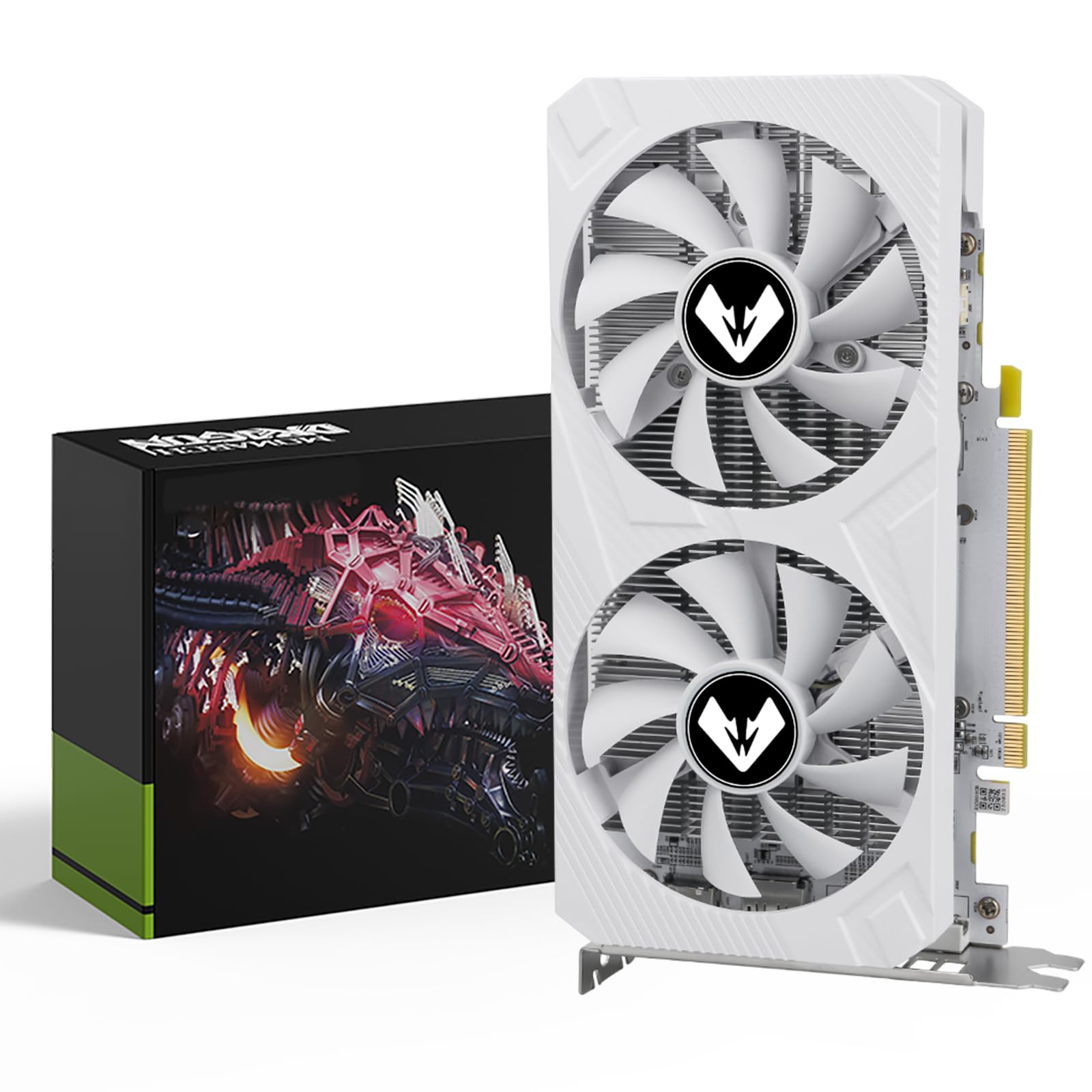
A classic 8GB card from a bygone era that still handles modern 1080P games while staying affordable.
The MOUGOL RX 580 is a solid budget pick that offers 8GB of GDDR5 memory on a 256-bit bus — a memory bus width that is actually wider than most modern cards at this price. It runs at a GPU clock of 1244 MHz and has a memory clock speed of 7000 MHz. The card uses a dual-fan cooling system to keep things cool, and it supports DirectX 12, OpenGL 4.6, and Vulkan for compatibility with the latest games and software.
Shoppers say that the card runs “pretty quiet” and “doesn’t overheat,” with one user saying it “ran their LG OLED monitor at 3440×1440 240 Hz” just fine for general use. Another reviewer noted it is a “good price to performance” option that plays nicely with Linux distributions like Bazzite. The card requires a 6-pin power connector, which is a standard requirement even for older power supplies.
Compared to the ZER-LON GTX 1660 Super, the RX 580 has a slower GPU clock (1244 MHz vs 1530 MHz) and uses older GDDR5 memory instead of GDDR6, meaning the 1660 Super delivers noticeably higher frame rates in most games. The 8GB RX 580 does hold the advantage in total VRAM, which can help with the latest texture-heavy titles.
What Makes It Worth It
- 8GB VRAM on a 256-bit bus — great for texture-heavy games
- Dual-fan cooling is quiet and effective
- Works well with Linux and older systems
- Good price-to-performance ratio
Areas It Lags
- Older architecture lacks modern features (no ray tracing, no DLSS)
- Slower GPU clock (1244 MHz) than newer budget cards
- Shell design can block motherboard PCIe release tabs
Best for the budget-conscious gamer: If you want the most VRAM for your dollar in a reliable card that handles 1080p gaming well, the RX 580 is a solid entry-level choice.
Consider something newer if: You want maximum frame rates in competitive shooters; the GTX 1660 Super is faster and costs about the same.
8. msi Gaming GeForce GT 1030 4GB DDR4 LP OC

A tiny, low-power savior that fixes video stutter on decade-old office PCs.
The msi GT 1030 is not built for modern gaming at high settings, but it is an absolute champion at reviving an old office PC. It has 4GB of DDR4 memory on a 64-bit bus and a boost clock of 1430 MHz, and it draws so little power it runs entirely off the motherboard slot. One buyer verified that it “fixed an i5 desktop’s 1440p gaming/video stutter,” calling it a upgrade that saved them versus buying a new PC.
The card comes in a low-profile design that fits into small cases, and it includes one DisplayPort 1.4a and one HDMI 2.0b output. It has a maximum resolution of 4K UHD (3840×2160) and supports DirectX 12, making it capable of driving a 4K display for media consumption and desktop use. It is an incredibly easy install with auto-detecting drivers, and multiple buyers describe it as a “good video card at a reasonable price” for Linux systems and general use.
Compared to every other card on this list, the GT 1030 is underpowered for gaming. Its 4GB of DDR4 memory on a 64-bit bus is a far cry from the 6GB of GDDR6 on the ZER-LON GTX 1660 Super. But in its niche — giving an old PC a video output upgrade for smooth desktop work, video playback, and very light older games — it is an affordable and effective solution.
Where It Shines
- Very low power draw — works with any small PSU
- Extremely easy install on any desktop with a PCIe x16 slot
- Fixes video stutter and enables 4K media output
- Brilliant for Linux and office PC upgrades
Where It Falls Short
- 4GB DDR4 on a 64-bit bus is far too slow for modern gaming
- Older architecture; no ray tracing or modern features
- Easily outperformed by modern integrated graphics on newer CPUs
Perfect for the old-PC lifesaver: If you have a 10-year-old computer that stutters on 1080p video and you want a cheap, instant fix, the GT 1030 is your card.
Avoid for gaming: If you plan to play any modern 3D games, even at low settings, you need at least the RX 580 or GTX 1660 Super — this card is strictly for light desktop use and video playback.
Understanding the Specs
VRAM and Memory Bus Width
VRAM (Video RAM) is your card’s dedicated memory for textures and game data. For 1080p gaming, 4GB is the absolute minimum for modern titles, 6GB is a comfortable balance that handles high settings, and 8GB gives you headroom for ultra texture packs. The memory bus width (measured in bits) determines how much data the card can move at once — a 256-bit bus can transfer twice as much per clock cycle as a 128-bit one, directly affecting performance in high-resolution or texture-heavy scenes.
GPU Clock Speed and Boost Clock
The GPU clock speed (in MHz) tells you how fast the graphics processor core works. A higher boost clock generally means the card can render more frames per second. Cards with factory overclocks (a label like “OC” or “Boost”) run faster than standard models from the start. However, raw clock speed does not tell the whole story — newer architectures like the RDNA 3 and Blackwell series also increase efficiency and performance per clock cycle, so a lower-clocked newer card often beats a higher-clocked older one.
FAQ
Is 4GB of VRAM enough for 1080p gaming today?
What is the difference between GDDR5, GDDR6, and GDDR7 memory?
Do I need an external power connector for these graphics cards?
Will a modern card work in my 10-year-old computer?
Is ray tracing useful on an entry-level 1080p card?
What is DLSS and do I need it for 1080p?
Which card is best for Linux compatibility?
How long will a mid-range 1080p video card last?
Final Thoughts: The Verdict
For the majority of shoppers, the 1080p video card winner is the XFX Speedster SWFT210 RX 7600 because it delivers a perfect balance of high frame rates, modern features, quiet operation, and a reasonable price point. If you want the absolute latest features including DLSS 4 and GDDR7 memory, grab the GIGABYTE RTX 5060. And for the best value on a tight budget, the standout is the proven performance of the ZER-LON GTX 1660 Super.
How We Picked
We do not accept paid placement. Every pick is matched to a real buyer and a real use-case; we do not hands-on test units.
Sources & Methodology
Specifications: manufacturer listings and product documentation. Review insights: verified customer reviews, as of July 2026. Pricing: not shown on this page (it changes often); check the current price via the retailer link.
As an Amazon Associate, Gadgets Feed earns from qualifying purchases. This does not affect which products we feature.
Related Guides
Product prices and availability are accurate as of the date/time indicated and are subject to change. Any price and availability information displayed on Amazon at the time of purchase will apply to the purchase of this product. As an Amazon Associate I earn from qualifying purchases.
CERTAIN CONTENT THAT APPEARS ON THIS SITE COMES FROM AMAZON. THIS CONTENT IS PROVIDED "AS IS" AND IS SUBJECT TO CHANGE OR REMOVAL AT ANY TIME.
Amazon and the Amazon logo are trademarks of Amazon.com, Inc. or its affiliates.