
Our readers keep the lights on and my morning glass full of iced black tea. As an Amazon Associate, I earn from qualifying purchases.
Specs are compiled from manufacturer listings and verified buyer reviews and can change over time — please confirm the key details on the product page before buying.
You are adding cameras, access points, and devices all demanding more speed, and your old switch just does not have the ports or the power to keep up. A 20 port ethernet switch solves that by giving you room to grow and the bandwidth to actually use everything at once, without slowdowns. The trick is picking one that matches your gear — not all 20-port switches are built the same, and the difference depends on how much power each port delivers and if you need simple plug-and-play or deeper controls.
I’m Min — the founder and writer behind Gadgets Feed. This guide is built by comparing the manufacturers’ published specifications and the patterns across verified customer reviews, so you get each pick’s real strengths and trade-offs instead of marketing spin.
Whether you are wiring a surveillance system, upgrading to multi-gigabit speeds, or running a small business network, you need a 20 port ethernet switch that fits your exact setup without hidden costs or complexity.
Quick Picks
- TRENDnet 20-Port 2.5G/Multi-Gig Switch — Top Performer
- Tenda 20 Port Gigabit PoE Switch — Best for PoE
- Binardat 20 Port 2.5G Web Managed Switch — Full Control
How To Choose The Best 20 Port Ethernet Switch
Picking a 20-port switch depends on three main decisions: how much power you need for your devices, if you need simple setup or advanced network controls, and the speeds your gear actually supports. Here is a quick look at what each spec really means in practice.
PoE Power Budget and Per-Port Wattage
If you are powering cameras, access points, or phones through the ethernet cable itself, the total PoE (Power over Ethernet) budget is your most important number. This is the total wattage the switch can deliver across all ports at once. A 230W budget, for example, can run about seven to ten standard PoE cameras or several access points. Also check the per-port limit — 30W per port covers most devices, including higher-power ones like pan-tilt-zoom cameras or newer Wi-Fi 6 access points.
Managed vs. Unmanaged
An unmanaged switch simply passes traffic through with no configuration — plug in and everything works. A managed switch lets you create VLANs (virtual networks that separate traffic, like isolating guest Wi-Fi from your main network), set up link aggregation (combining ports for more bandwidth), and monitor traffic. If you are just adding more ports to a home network, unmanaged is fine. If you need to control traffic or segment devices, go managed.
Speed: Gigabit, 2.5G, and 10G Uplinks
Standard gigabit (1000Mbps) is enough for most internet connections and basic file transfers, but if you have a faster internet plan, run a NAS (network-attached storage), or move large files locally, look for 2.5G ports. They fit existing Cat5e cables and give 2.5 Gbps compared to 1 Gbps. For connecting switches together or linking to a server, 10G SFP+ ports provide the highest-speed backbone. The switch’s total switching capacity — 160Gbps on the faster models here — tells you the maximum data it can handle without bottlenecks.
Quick Comparison
| Model | Best For | PoE Budget | Port Speeds | Switch Type | Amazon |
|---|---|---|---|---|---|
| TRENDnet TEG-S50204 | Silent multi-gig upgrade | — | 16×2.5G + 4x10G SFP+ | Unmanaged | Amazon |
| Tenda TEG1120P | PoE camera and AP power | 230W | 16x1G PoE+ + 2x1G + 2x1G SFP | Unmanaged | Amazon |
| Binardat 2G20-16410GSM | Full network control & VLANs | — | 16×2.5G + 4x10G SFP+ | Managed (L3) | Amazon |
In‑Depth Reviews
1. TRENDnet 20-Port 2.5G/Multi-Gig Switch with 10G SFP+ Ports, TEG-S50204
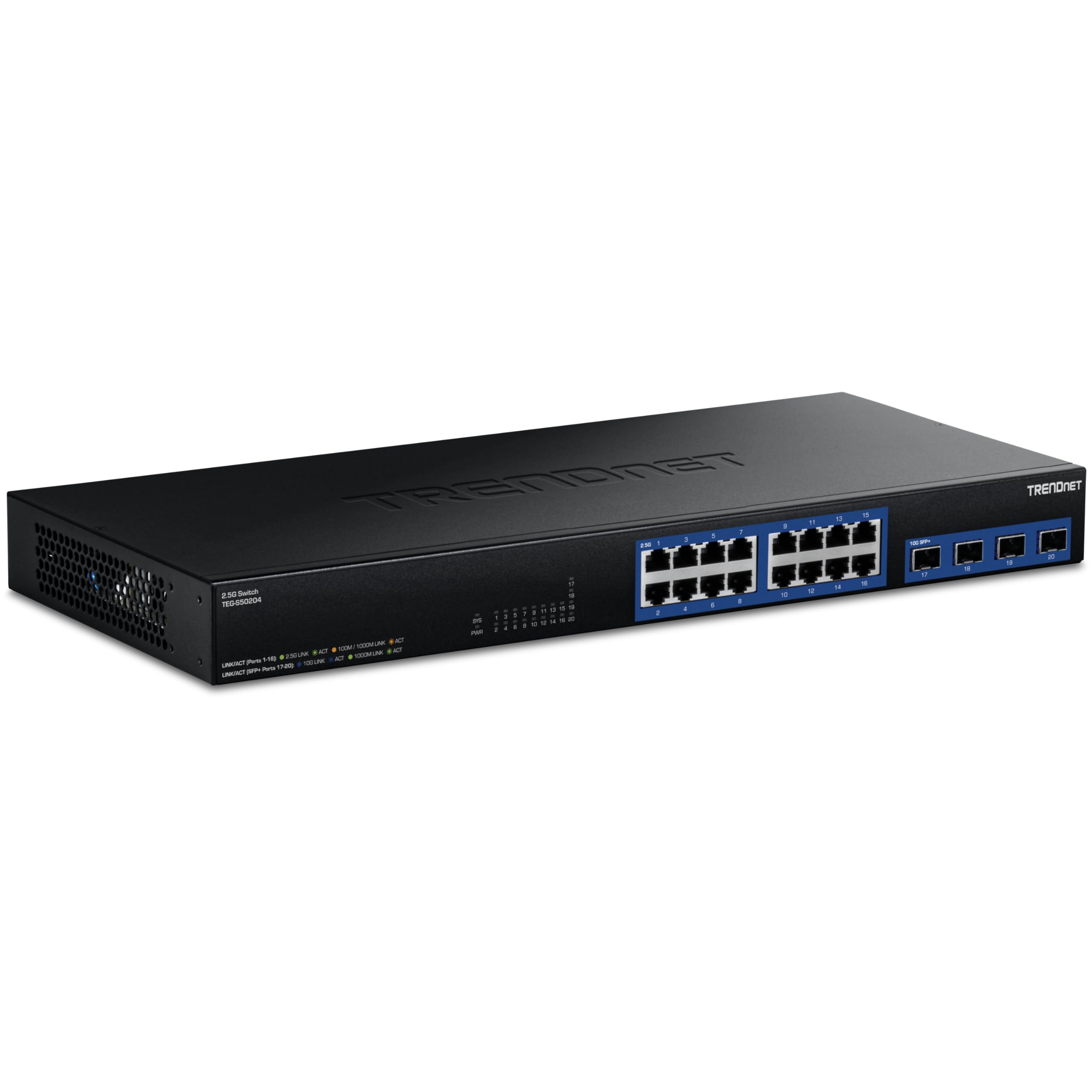
The quietest way to jump from gigabit to 2.5G without touching your cabling.
This switch gives you a silent network upgrade because it uses a fanless design (no internal fan means zero operating noise), making it ideal for a home office or a living room media center where hum is annoying. It packs 16 x 2.5G RJ-45 ports that run over your existing Cat5e cables and deliver up to 2.5Gbps per port — a big jump from standard gigabit without rewiring. On top of that, you get 4 x 10G SFP+ slots for connecting to a faster core switch or a NAS (network-attached storage) at 10 Gbps compared to 1 Gbps. The total switching capacity hits 160Gbps, so all ports can run at full speed at once.
Buyers report it has been “stable and fast” with near line-speed performance, and one reviewer noted it runs fairly cool despite the metal rackmount housing that measures 17.36 inches wide. It is unmanaged, meaning you plug everything in and it just works — no configuration, no software, no VLAN setup. The TRENDnet Lifetime Protection covers the unit, and it is NDAA and TAA compliant (a certification that meets government security standards in the U.S. and Canada). Unlike the Binardat managed switch below, you cannot create VLANs or segment traffic at the port level.
The main thing to be aware of is that it is a long switch at 17.36 inches, so check your rack depth or shelf space. Also, SFP+ modules are sold separately and can be expensive.
What really stands out
- Fanless design runs completely silent — no hum or fan noise in quiet rooms
- Supports 2.5G speeds over regular Cat5e cables, so no rewiring needed
- Lifetime manufacturer protection included
One trade-off to note
- No PoE support — does not power cameras or access points over ethernet
- Unmanaged — cannot create VLANs or set up link aggregation
Reach for this if: you want a silent, high-speed upgrade from 1G to 2.5G for your home network, and do not need PoE or advanced management.
Look elsewhere if: you need to power PoE cameras or phones, or require VLAN support to separate network traffic.
2. Tenda 20 Port Gigabit PoE Switch | Rackmount PoE Ethernet Switch | 16*PoE+ Port & 2*Gigabit Uplink & 2*SFP Slot (TEG1120P)
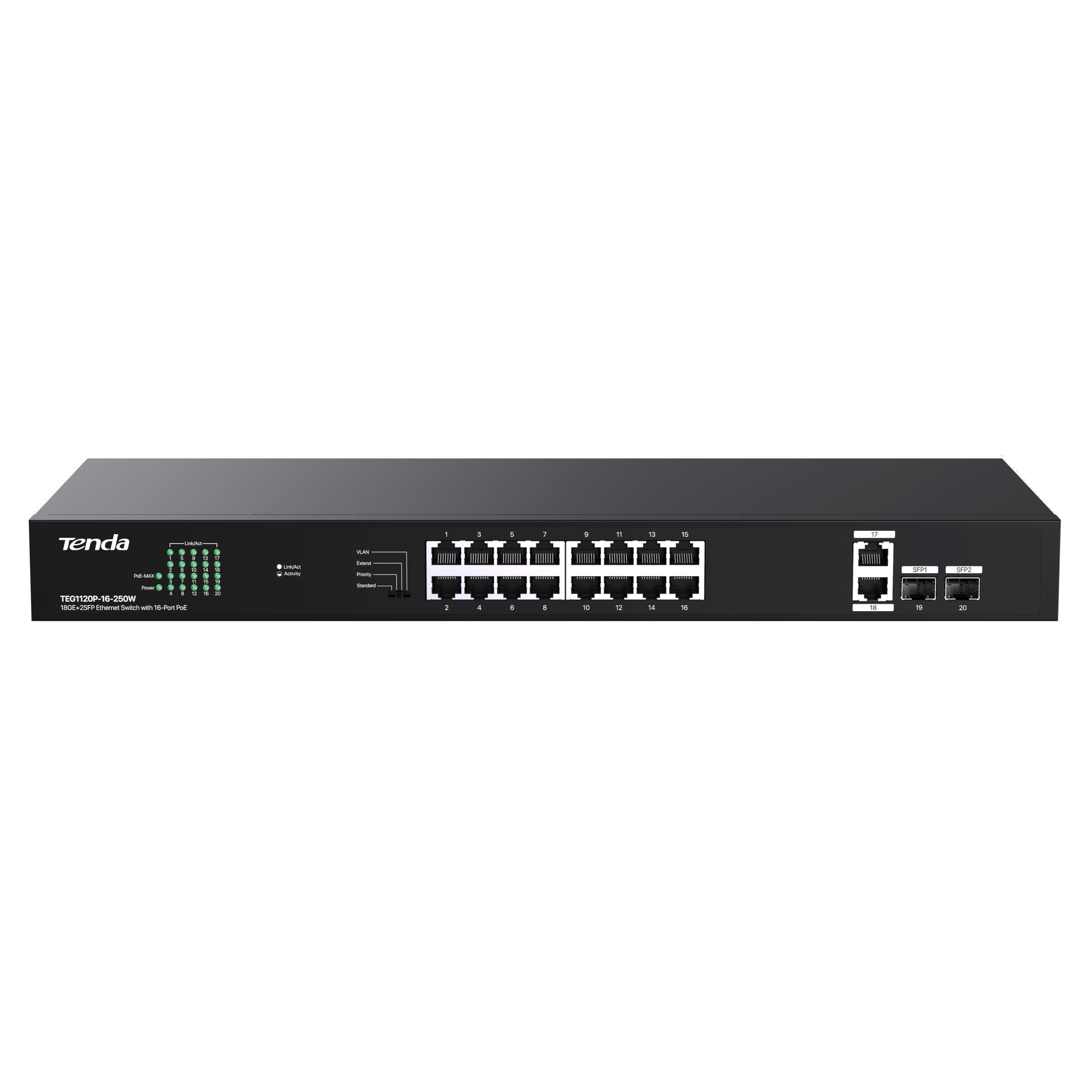
The workhorse that powers your cameras and access points through a single cable each.
This Tenda switch delivers a combined PoE power budget of 230W (up to 30W per port across the 16 PoE+ ports), which means you can plug in multiple PoE cameras, Wi-Fi 6 access points, and even a Ring Elite doorbell without needing separate power adapters. The port layout gives you 16 x PoE+ gigabit RJ45 ports, plus 2 additional gigabit uplink ports and 2 gigabit SFP slots for fiber connections — so you are not using a PoE port just to link back to your router.
Owners mention it works perfectly with Reolink PoE cameras, and one buyer mentioned the fan noise is more acceptable than a TP-Link switch they returned. A handy feature is the One-Key VLAN mode: with the press of a button, ports 1-16 isolate from each other while staying connected to ports 17-20, protecting against broadcast storms and DHCP spoofing (unwanted network traffic that can slow things down or cause security issues). There is also an Extend Mode that pushes data and power up to 250 meters on ports 9-16 (though speed drops to 10Mbps beyond 100 meters, typical for surveillance runs).
The catch is that this is an unmanaged switch — you cannot configure individual port settings, QoS (quality of service for prioritizing traffic), or link aggregation. The smart power management automatically shuts off lower-priority ports if the total draw exceeds 230W, which is good for safety but means you need to plan your device connections accordingly. It also lacks the 2.5G and 10G speeds of the TRENDnet and Binardat switches above, so if you are moving large files locally, those faster options are better suited.
The big wins
- 230W total PoE budget powers up to 16 cameras or access points through the same cable
- One-Key VLAN isolates devices with a single button press, protecting against network storms
- Extend Mode reaches up to 250 meters for long surveillance cable runs
The limits
- All ports are standard gigabit (1G) — no 2.5G or 10G speeds for fast local transfers
- Unmanaged, so no per-port configuration or advanced QoS
Best suited for: anyone building a surveillance system or running multiple PoE devices who needs a simple, reliable switch with one-button VLAN isolation.
Not for you if: you need multi-gigabit speeds or advanced network management features like VLANs and link aggregation.
3. Binardat 20 Port 2.5G Web Managed Switch, 16×2.5G Ethernet, 4×10 Gigabit SFP Ports
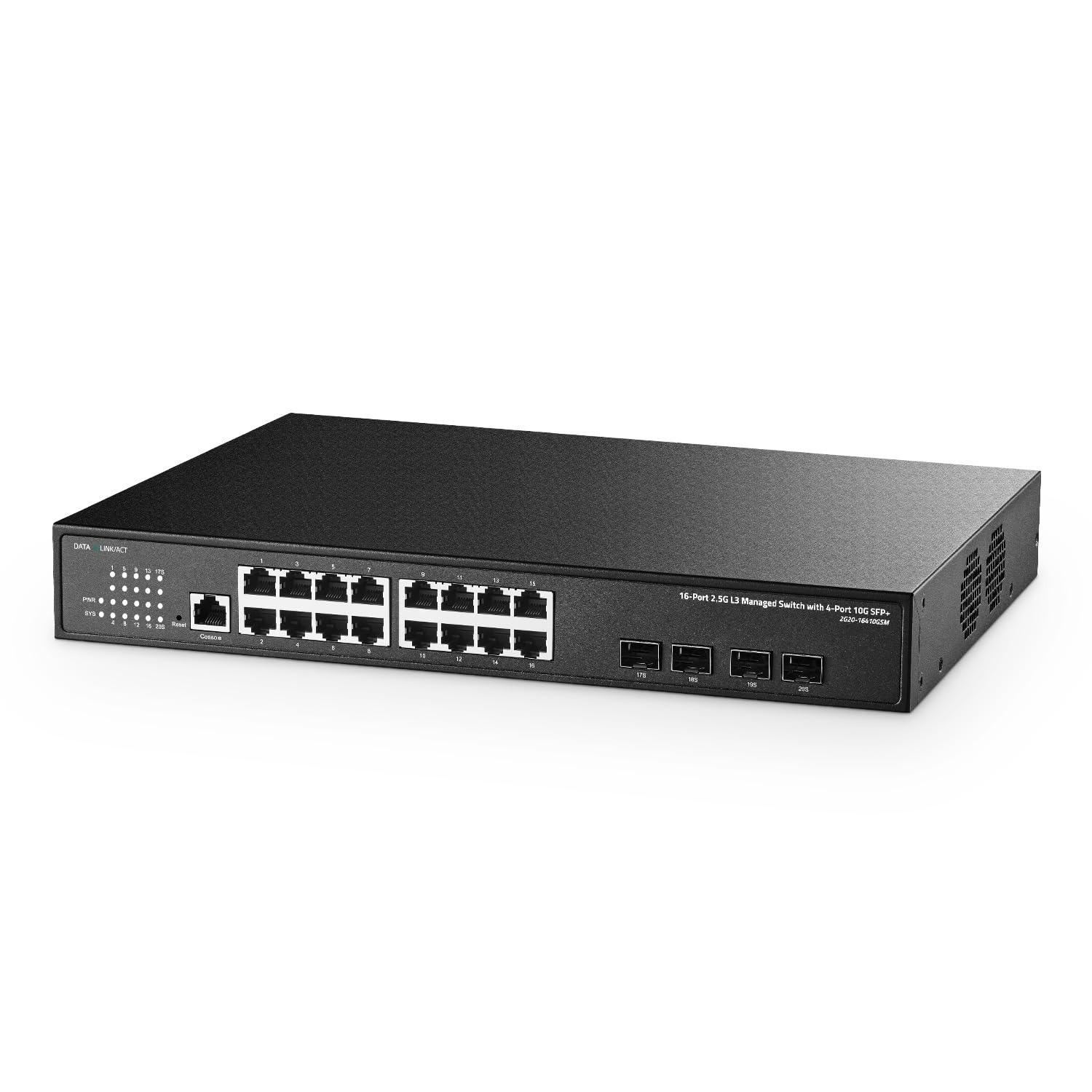
Full network-level control in a metal box, without the enterprise price tag.
This Binardat switch gives you L3 management (layer 3, meaning it can route traffic between different subnets like a basic router), so you can set up static routes, OSPF, RIP, and BGP4 routing protocols — features typically found in much more expensive gear. It has 16 x 2.5G ethernet ports and 4 x 10G SFP+ slots, with a total switching capacity of 160Gbps, matching the TRENDnet above on raw speed but adding deep configurability. You can create VLANs, set up link aggregation (combining multiple ports for up to 10Gb via LACP bonding on 4×2.5Gb ports), configure QoS (quality of service to prioritize video or VoIP traffic), and manage everything through a web browser, CLI (command-line interface), or Telnet/SSH.
One owner reported they were “still really surprised that this is handling a segmented VLAN for our trunked home network without a single minute of downtime over the past 3 months.” Another noted that setup requires an initial manual IP configuration through your computer’s network adapter settings, but after that you can reserve a static IP via DHCP. The metal case and industrial-grade fan keep it cool, and the desktop/1U rackmount design fits standard network racks.
The real-world trade-off is the setup complexity — unlike the plug-and-play TRENDnet or Tenda switches, this one requires learning how to save your configuration after changes (some buyers lost settings until they figured out the save command). It also runs warm, with one reviewer measuring 42-51°C idle, and there is no perforated case for extra airflow. If you just need more ports, the extra management features will feel like overhead you never use.
What you gain with management
- Full L3 management with VLAN, routing protocols, and link aggregation for advanced network segmentation
- Four 10G SFP+ ports provide direct high-speed uplinks to servers or core switches
- 160Gbps switching capacity handles all 20 ports at full bandwidth simultaneously
What you trade off
- Initial setup requires manual IP configuration and learning the web interface workflow
- Runs warm (42-51°C idle) and has no perforated case for passive cooling
- No PoE — cannot power cameras or access points through the switch
Go with this one if: you need full network control — VLANs, routing, and link aggregation — and are comfortable with initial setup via a browser interface.
skip it if: you want a simple plug-and-play experience or need PoE power for your devices.
Understanding the Specs
PoE Budget: Why Wattage Matters
PoE (Power over Ethernet) lets a single ethernet cable carry both data and electricity to devices like security cameras and wireless access points. The PoE budget is the total wattage the switch can supply at once. A 230W budget split across 16 ports gives you about 14W per port on average — enough for most standard cameras — but if you plug in several high-power devices that each draw 30W, you max out at around seven or eight of those simultaneously. Check both the total budget and the per-port limit (30W per port is the typical ceiling for PoE+) against your devices’ power requirements printed on their specs.
Switching Capacity and Backplane Speed
Switching capacity, measured in Gbps (gigabits per second), tells you the maximum data the switch can handle across all ports at once. For a 20-port switch, 160Gbps is the current ceiling and means every port can run at full speed simultaneously with no bottleneck. A lower number means ports may have to share bandwidth in certain traffic patterns. The packet forwarding rate (measured in Mpps, or million packets per second) gives a more real-world read of how fast the switch can actually move small data packets — higher is better for latency-sensitive tasks like gaming or video calls.
FAQ
Will a 20 port switch work with my existing router?
How much PoE power do I need for security cameras?
What is the difference between an unmanaged and a managed switch?
Can I use a 20 port switch for a home network or is that overkill?
What is the difference between a gigabit and a 2.5G port?
Do I need a 10G SFP+ port on my switch?
How do I mount a 20 port switch in a rack?
What does VLAN mode do on a PoE switch?
Can a 20 port switch be placed on a desk or does it need a rack?
Final Thoughts: The Verdict
For most people building a home or small office network, the 20 port ethernet switch that balances speed and simplicity best is the TRENDnet TEG-S50204 because it upgrades you to 2.5G speeds silently with zero setup. If you need to power PoE cameras and access points through the switch, grab the Tenda TEG1120P with its 230W budget and one-button VLAN. And for full network control with VLANs and routing, the standout is the Binardat 2G20-16410GSM at this price tier.
How We Picked
We do not accept paid placement. Every pick is matched to a real buyer and a real use-case; we do not hands-on test units.
Sources & Methodology
Specifications: manufacturer listings and product documentation. Review insights: verified customer reviews, as of July 2026. Pricing: not shown on this page (it changes often); check the current price via the retailer link.
As an Amazon Associate, Gadgets Feed earns from qualifying purchases. This does not affect which products we feature.