
Our readers keep the lights on and my morning glass full of iced black tea. As an Amazon Associate, I earn from qualifying purchases.
Specs are compiled from manufacturer listings and verified buyer reviews and can change over time — please confirm the key details on the product page before buying.
The biggest letdown in a video call is not the connection — it is a blurry, dark, or grainy image that makes you look unprofessional no matter what you say. A good camera for PC fixes that by giving you sharp video, clear audio, and a setup that works without drivers or fuss. This guide cuts through the specs to show you which models deliver a clean image in real rooms, which have microphones you can rely on, and where your money makes a real difference.
I’m Min — the founder and writer behind Gadgets Feed. This guide is built by comparing the manufacturers’ published specifications and the patterns across verified customer reviews, so you get each pick’s real strengths and trade-offs instead of marketing spin.
You need a webcam for remote work, streaming, or staying in touch with family. The best camera for pc is the one that matches your lighting, your desk setup, and your budget without forcing you to tweak settings every time you join a call.
Our Picks at a Glance


How To Choose The Best Camera For PC
Picking a webcam seems simple, but a few specs make a huge difference in how you look and sound. Here is what to focus on.
Resolution: 1080p vs 4K
1080p Full HD (1920 x 1080 pixels) is the balance for most people — it gives you a sharp, clear image on calls without bogging down your internet or computer. 4K (3840 x 2160 pixels) is noticeably sharper, which is great for recording or streaming, but many video-call apps like Zoom and Teams limit you to 1080p anyway. For daily meetings, a good 1080p sensor with proper lighting beats a 4K camera in a dark room every time.
Autofocus vs Fixed Focus
Autofocus (a motor that shifts the lens to keep your face sharp as you move) keeps you sharp as you shift or lean in, which matters for dynamic presentations or demos. Fixed-focus cameras are simpler and cheaper, but they require you to sit at a specific distance (often 20 to 30 inches) to stay in focus. If you move around while you talk, an autofocus webcam will look more professional.
Microphone Quality
Most built-in webcam mics work fine for quick chats, but only dual noise-cancelling microphones effectively filter out room hum and keyboard clicks. If you speak in a noisy home office, look for a model with dual mics or budget for a separate USB microphone.
Quick Comparison
| Model | Best For | Resolution | Microphone | Autofocus | Amazon |
|---|---|---|---|---|---|
| Logitech C920★ Best Overall | All-around reliability | 1080p (15 MP still) | Dual stereo mics | Yes | $68.00Amazon |
| EMEET C60EDual Lenses | Streaming with dual cameras | 4K (8 MP) | Dual omnidirectional mics | Yes (PDAF) | $53.99$69.99Ends inAmazon |
| NexiGo N930AF | Software tweaking | 1080p (2 MP) | Single noise-cancelling mic | Yes | $33.99$39.99Limited time dealAmazon |
| AOC 4K Webcam | 4K on a budget | 4K (8 MP) | Single noise-reducing mic | No (fixed) | $29.99$39.99PrimeAmazon |
| RUWBY Pro HD | Tripod + monitor use | 1080p (2 MP) | Dual noise-cancelling mics | Yes | $29.99Amazon |
| Acer 1080p Webcam | Budget value | 1080p | Dual noise-reduction mics | No (fixed) | $26.99$29.99Limited time dealAmazon |
| NexiGo N60 | Short-distance clarity | 1080p (2.07 MP) | Single noise-cancelling mic | No (fixed) | $27.99$39.99Amazon |
In‑Depth Reviews
1. Logitech HD Pro Webcam C920
Our pick — over 4.5★ from 32,500+ verified ratings; the strongest balance of quality and price.
You get professional-looking video straight from the start with the proven workhorse that thousands rely on.
The Logitech HD Pro Webcam C920 delivers crisp 1080p video at 30 frames per second recorded via hardware H.264 compression (a video format that your computer’s graphics hardware handles, saving processing power), so your computer does not have to work as hard to keep the stream smooth. Buyers report “Sharp 1080p video at 6000kbps/30fps via H.264 hardware compression,” which explains why it feels so much more fluid than cheaper webcams that rely on software encoding — you see less stutter during calls.
The effective still resolution of 15 MP versus the NexiGo N60’s 2.07 MP, though that interpolated number (a software-estimated pixel count, not true optical detail) matters more for photos than live video. The 3x digital zoom (versus the NexiGo N60’s 4x) means you lose slightly less quality when zooming in, so a close-up of a document stays readable. The RightLight feature adjusts exposure automatically so you do not look like a silhouette in a dim room. The stereo mics do a decent job, though several reviews note the audio can be slightly washed out and picks up reverb — an external mic is a solid upgrade if sound matters.
Why it earned the top spot: The C920 is not flashy, but it has been the standard for years because it simply works — the 4.6-star average from over 32,000 reviews is hard to argue with. The autofocus range is tight at 1.4 to 14 inches, so you will want to sit within that window, and there is no horizontal pivot, only a 45° vertical tilt.
Reach for this if: you want a proven, reliable webcam for daily video calls and do not want to gamble on a lesser-known brand. The trade-off is that the auto white balance leans blue and the autofocus has some latency, so pick a model with manual controls if you are particular about color.
2. EMEET C60E Dual-Camera 4K Webcam
Streamers get a webcam with two physical cameras that share one 4K sensor for smooth switching.
The EMEET C60E uses a dual-camera system — a wide-angle lens for panoramic room shots and a telephoto lens for detailed close-ups — both feeding into a single 1/2.8″ CMOS 4K sensor (a type of image sensor that captures light and converts it to a digital signal). You can switch between full-scene and close-up views or use the up-to-11x hybrid zoom for smooth transitions, all managed by PDAF autofocus (phase-detection autofocus that locks focus faster than standard contrast-detect autofocus). This means you stay sharp during a demo even if you move quickly.
Owners mention it is a “bang for your buck” webcam for streaming, with an RGB lighting strip that can glow red, green, or blue to set a mood or show status. The remote control and EMEET STUDIO software let you adjust zoom, color, and exposure without reaching for the camera. Two omnidirectional mics (mics that pick up sound from all directions) capture sound within a 9.8-foot radius, which is wider than most single-mic webcams — so your voice reaches the mic from across the desk.
What it does well
- True dual-camera setup with wide and telephoto lenses for flexibility — unlike the single-lens Logitech C920
- 11x hybrid zoom maintains detail better than digital zoom alone
- RGB lighting adds personality and visual cues
The drawbacks
- Zoom does not work in 4K, 60fps, or YUY2 modes (a raw video format with less compression)
- Some customers note needing to adjust Windows privacy settings before it works — not fully plug-and-play for everyone
Ideal for: streamers, educators, or product demonstrators who need to switch between a wide room view and a close-up without physically moving the camera. skip it if you just want a simple one-trick webcam for basic Zoom calls, because the dual-camera complexity is overkill.
3. NexiGo N930AF Webcam with Microphone

You get autofocus you can turn off and a privacy cover that sticks to the lens — unlike many competitors.
The NexiGo N930AF gives you a proper autofocus system with a 7-centimeter (about 2.8 inches) starting point, meaning it can lock onto your face even when you are close to the lens — and you can disable the autofocus entirely if you prefer a fixed focal point. That is a big advantage over fixed-focus cameras like the Acer budget pick that force you to stay at a specific distance. At 1080p resolution from a 2 MP CMOS sensor, the video is sharp for calls, and the built-in noise-cancelling microphone helps cut ambient sound — so your keyboard clicks are less noticeable.
Reviewers point out the privacy cover comes in a separate bag as a self-adhesive plastic slider, not a built-in shutter, and it can be “hard to grip” and may leave fingerprints. The ball-socket mount has limited tilt range, so it works best set and left in place. The optional NexiGo Webcam Software lets you adjust settings in real time while using Zoom, Teams, or Skype — a level of control the cheaper N60 lacks.
Where it fits: The N930AF is a smart upgrade if you want autofocus without jumping to a premium price, but plan to use an external mic because the built-in one is weak for streaming.
Best for: users who want autofocus and software control at a mid-range price, especially if you already use a separate microphone. The catch is that the autofocus can lose lock during movement and needs a manual reset — not ideal if you pace during calls.
4. AOC 4k Webcam for PC with Microphone

You get 4K video for under thirty bucks, but check your operating system first.
At an effective still resolution of 8 MP, this AOC webcam records in genuine 4K Ultra HD (3840 x 2160 pixels) — a real step up from the 1080p crowd, giving you four times the detail on a large monitor. The 90-degree field of view (FOV — how much of the scene the camera sees) is wide enough for two people side by side, and the lens offers 180-degree tilt and 360-degree swivel so you can angle it exactly where needed. It includes a sliding physical privacy cover and comes with a USB-A to USB-C adapter for compatibility with modern laptops.
Shoppers say the video is “crisp” in moderate light and the mic is clear, making it “flawless for Zoom/video calls.” However, one reviewer noted a “green tint when used with Windows 11” that settings could not fix — so you may need to test it with your specific PC. The fixed focus means you need to sit at the right distance for a sharp image, and the single noise-reducing microphone is less effective than dual-mic setups like the Logitech C920’s.
What stands out
- True 4K resolution at a price that undercuts most competitors
- Physical sliding lens cover and universal USB-A/C adapter included
Important caveats
- Some users experience a green tint on Windows 11 — not universal but real
- Fixed focus, no autofocus — you must sit in the camera’s balance
Grab this if: you want 4K resolution for occasional recording or meetings and are willing to test compatibility with your specific system. Look elsewhere if you rely on Windows 11 or need autofocus for movement.
5. RUWBY Pro HD 1080p Webcam with Tripod

You get the complete desk kit — camera, tripod, and dual mics at a mid-range price — so nothing else to buy.
This RUWBY webcam bundles everything you need to get set up: the 1080p camera itself, a folding aluminum tripod with a universal 1/4-inch screw (the same size as most camera tripods), and a 5-foot USB cable. The 2 MP CMOS sensor delivers crisp video with autofocus that a buyer says “works well and keeps up with my hands” during tutorials. The dual noise-cancelling microphones capture sound from up to 10 feet away, which beats the single-mic competition at this tier — the Logitech C920’s dual mics are comparable but lack the included tripod.
The 360-degree rotation and low-light correction mean you can adjust the angle easily and still look presentable in dimmer rooms. Reviews note there is no way to turn off the autofocus, which is frustrating if you prefer a fixed focal length, but the tripod and clear video make it a strong value for desk-based use.
The verdict: The tripod alone makes this worth considering if you do not own one — most webcams leave that out. The dual mics are a real upgrade over single-mic cameras, though an external mic still beats them for professional audio.
Best for: remote workers or content creators who need a flexible desk setup with a tripod and do not want to buy accessories separately. The limitation is that you cannot disable the autofocus, which can be annoying if it hunts in a busy background.
6. Acer 1080p Webcam with Noise Cancellation Microphones
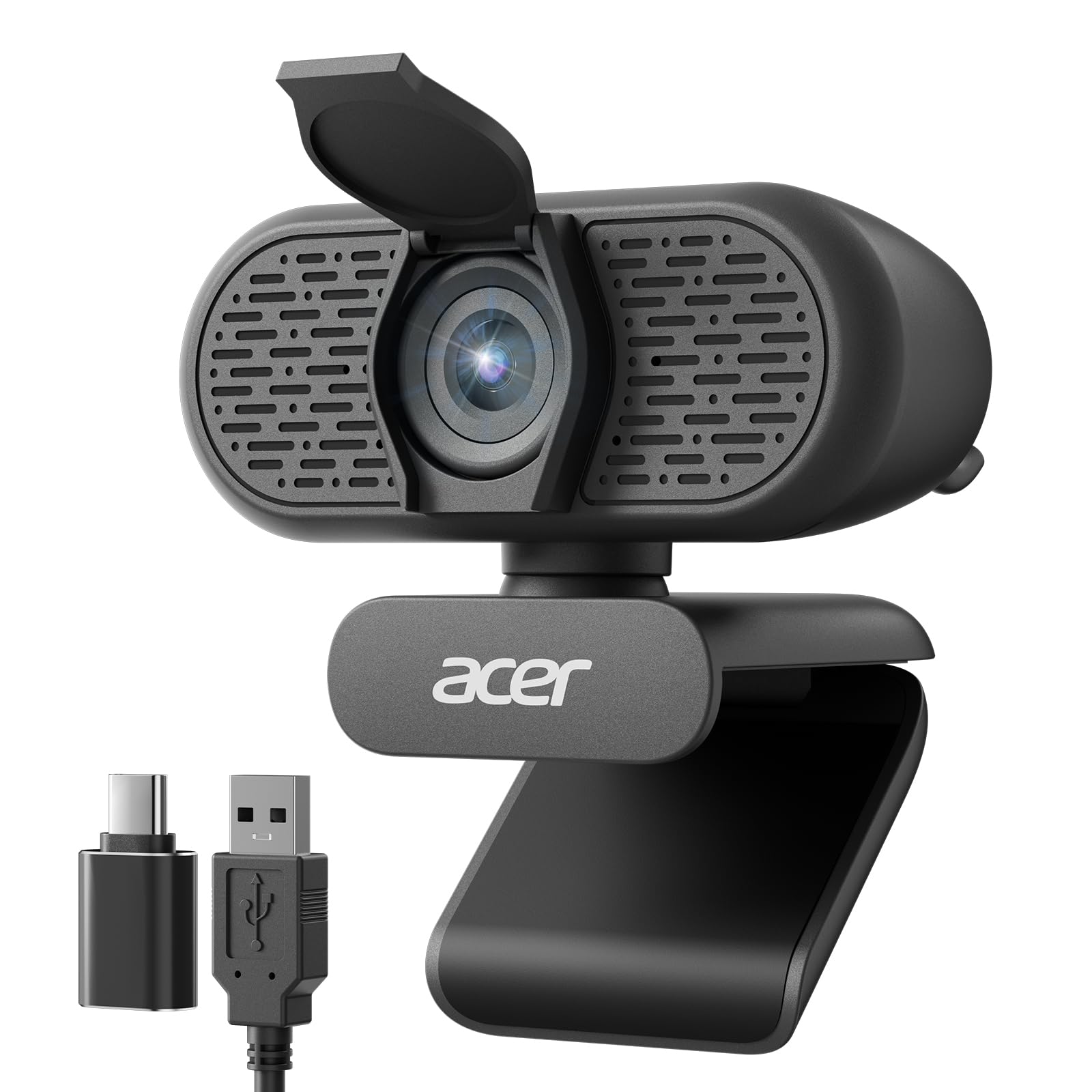
You get a no-fuss entry-level webcam that does the basics right for daily calls while staying affordable.
This Acer webcam keeps things simple: a new CMOS sensor delivers 1080p Full HD video, dual noise-reduction microphones reduce background hum, and the built-in privacy cover slides down to block the lens when you are off-camera. The 100-degree field of view is wider than many budget cameras, so you can fit a small group or a bit of your desk in the frame, and the 360-degree rotation helps you find the right angle without moving the base.
Buyers report “clear 1080p video with wide-angle view” and that it is “perfect for daily work.” The automatic low-light correction helps in dim rooms, though it is not as effective as on more expensive models like the Logitech C920. The included USB-A to USB-C adapter means it works with newer laptops without a separate dongle, and the plug-and-play setup requires no software.
Where it delivers: This is the no-regret entry-level pick — it does zoom calls and remote meetings reliably while staying affordable. The dual mics are a surprise at this tier, though they are not as crisp as dedicated microphones. The 2-year warranty mentioned in reviews adds confidence.
Reach for this if: you need a straightforward, affordable webcam for everyday video calls and want the reassurance of a brand-name warranty. Pass if you need autofocus or 4K resolution — this is a fixed-focus 1080p camera.
7. NexiGo N60 1080P Webcam with Microphone

You get a sharp fixed-focus webcam tune for a very specific distance range — sit still and it looks great.
Unlike the autofocus models above, the NexiGo N60 specifies exactly where it works best: between 19.6 inches and 13 feet. The 3.6mm glass lens at the heart of its 2.07 MP CMOS sensor is tuned for that range, so text and faces stay crisp as long as you sit within it — making it a reliable choice for a fixed desk position.
The 1080p video at 30fps is solid for the price, and the built-in noise-cancelling microphone reduces ambient noise. The privacy cover blocks the lens when you are not using it. However, owners mention the wide field of view cannot be narrowed, and the privacy flip cover loosens over time. The plug-and-play setup works with USB 2.0 and 3.0 on Windows, Mac, Linux, and Chrome OS — but not on Xbox, PS4, or PS5.
What works
- Glass lens provides sharp detail at the right distance
- 4x digital zoom gives more reach than similar-priced rivals
- Extensive OS compatibility
What to consider
- Fixed focus means blur if you get too close or far
- Privacy cover loosens with repeated use
Ideal for: anyone who sits at a consistent distance from their monitor and wants a reliable, budget-friendly 1080p webcam with a crisp lens. Not for users who move around during calls or need autofocus — the fixed focus is a real limit.
Understanding the Specs
Resolution (1080p vs 4K)
Resolution refers to how many pixels the camera captures per frame. 1080p (1920 x 1080 pixels) is the standard for high-definition video calls. 4K (3840 x 2160 pixels) has four times the pixels, which means much sharper detail on large monitors or when recording, but most video-call apps compress it down to 1080p anyway. For 90% of users, a good 1080p sensor with proper autofocus (a motor that shifts the lens to keep your face sharp) and lighting beats a 4K camera that struggles in dim rooms.
Autofocus vs Fixed Focus
Autofocus uses a motor to shift the lens and keep your face sharp as you move closer or farther from the camera. Fixed focus locks the lens at one distance (typically around 20-30 inches) and relies on you staying in that balance to stay sharp. Autofocus is better for dynamic movement (presentations, demos, leaning in), while fixed focus is simpler and rarely hunts for focus. Some cameras, like the NexiGo N930AF, let you turn autofocus off — the best of both worlds.
FAQ
What resolution do I need for Zoom and Teams calls?
Will a webcam work with a Mac and a PC?
How important is the built-in microphone on a webcam?
What does field of view (FOV) mean and what angle should I pick?
Is a privacy cover necessary?
Can I use a webcam with a tripod?
What is the difference between digital zoom and optical zoom on a webcam?
Will a webcam work with Nintendo Switch 2?
How long does a typical webcam last?
Final Thoughts: The Verdict
For the majority of shoppers, the best camera for pc is the Logitech HD Pro Webcam C920 because it delivers consistent 1080p video with hardware compression and a proven track record across over 32,000 reviews. If you want a dual-camera system with 4K resolution and remote control for streaming, grab the EMEET C60E. And for a solid entry-level choice that includes a tripod and dual microphones, the RUWBY Pro HD 1080p Webcam delivers strong value without requiring extra accessories.
How We Picked
We do not accept paid placement. Every pick is matched to a real buyer and a real use-case; we do not hands-on test units.
Sources & Methodology
Specifications: manufacturer listings and product documentation. Review insights: verified customer reviews, as of July 2026. Pricing: not shown on this page (it changes often); check the current price via the retailer link.
As an Amazon Associate, Gadgets Feed earns from qualifying purchases. This does not affect which products we feature.
Related Guides
Product prices and availability are accurate as of the date/time indicated and are subject to change. Any price and availability information displayed on Amazon at the time of purchase will apply to the purchase of this product. As an Amazon Associate I earn from qualifying purchases.
CERTAIN CONTENT THAT APPEARS ON THIS SITE COMES FROM AMAZON. THIS CONTENT IS PROVIDED "AS IS" AND IS SUBJECT TO CHANGE OR REMOVAL AT ANY TIME.
Amazon and the Amazon logo are trademarks of Amazon.com, Inc. or its affiliates.