
Our readers keep the lights on and my morning glass full of iced black tea. As an Amazon Associate, I earn from qualifying purchases.
Specs are compiled from manufacturer listings and verified buyer reviews and can change over time — please confirm the key details on the product page before buying.
Picking the right calculator for your classes is less about buying the most expensive model and more about matching the tool to the actual exam restrictions and the math you’re doing today. A science student with integrals needs something very different from a middle schooler learning fractions, and grabbing the wrong one means either getting blocked on test day or paying for features you never touch.
I’m Min — the founder and writer behind Gadgets Feed. This guide is built by comparing the manufacturers’ published specifications and the patterns across verified customer reviews, so you get each pick’s real strengths and trade-offs instead of marketing spin.
After lining up seven of the most popular models side by side, this guide pinpointing the best calculator for student is the TI-30XS MultiView because it balances exam approval, a multi-line screen that shows your work, and a price that won’t make you wince.
Our Picks at a Glance


How To Choose The Best Calculator For Student
The right student calculator is a balance of exam approval, screen readability, and raw function count. Here is what to look at before you click buy.
Exam Approval is Non-Negotiable
The SAT, ACT, AP, and GED all have strict lists of approved calculators. If a model is not on that list, you cannot bring it into the room. Stick to models that explicitly say “SAT/ACT approved” or have a history of passing those checks.
Screen Type: Single Line vs Multi-Line
An old-school single-line display shows your last input and the result. A 2-line or 4-line screen (often called a “MultiView” or “Natural Textbook Display”) lets you see your typed equation above and the answer below, making it way easier to spot a typo before you write down a wrong answer.
Function Count vs Actual Use
A number like “240 functions” or “417 functions” sounds impressive, but the core features you really use are trigonometry (sin, cos, tan), logarithms (log, ln), fractions, exponents, and basic statistics. Go above that only if you are taking calculus, physics, or advanced engineering.
Quick Comparison
| Model | Best For | Functions | Display Lines | Power Source | Amazon |
|---|---|---|---|---|---|
| TI-30XIISAlso Great | Budget durability champ | — | 2-line | Solar + Battery | Amazon |
| TI-30XS MultiView★ Best Overall | Exam-proof all-rounder | — | 4-line | Solar + Battery | Amazon |
| Casio fx-115ES Plus 2 | Advanced calculus/engineering | 280+ | 4-line | Battery (LR44) | Amazon |
| IPepul Purple 417 | Highest function count | 417 | 4-line | Solar + Battery | Amazon |
| ROATEE 82MS with Notepad | Built-in note-taking | 240 | 2-line | Solar + Battery | Amazon |
| Franklin FGC-100BK | Budget graphing | — | Graphing screen | Battery | Amazon |
| Red Star Tec SC-216 | Entry-level economy | 240 | 2-line | Battery (2x AAA) | Amazon |
In‑Depth Reviews
1. Texas Instruments TI-30XIIS Scientific Calculator, Black with Blue Accents
The one you buy when you want it to survive your entire school career and then some.
It has a 2-line display that shows your entry on top and the result below, which is a huge step up from old single-line models. It handles 1- and 2-variable statistics, three angle modes (degrees, radians, grads), and engineering notation modes. Solar and battery powered, so even if the battery dies mid-exam, the sun keeps it running.
Owners mention past experience showing “13+ years durability” — one reviewer bought three because the quality was so good at the price. At 6.12 inches long by 3.23 inches wide, it is more compact than the TI-30XS MultiView, fitting into a standard pencil case without a struggle. It is also approved for the SAT, ACT, and AP exams, making it a safe bet for middle school through high school.
The only real trade-off is that single-line display — you can see your last entry and the result, but you do not get the stacked-fraction textbook view of the MultiView or the 4-line scrolling. It is a workhorse, not a showhorse.
The lasting appeal
- Proven 13+ year lifespan in verified reviews.
- Compact size (6.12″ x 3.23″) fits any pencil case.
- Solar + battery hybrid power.
- SAT, ACT, and AP approved.
The screen limitation
- Only 2-line display – no stacked fractions visible.
- Less versatile than the 4-line MultiView for complex checking.
Grab this for: a no-frills, tank-like calculator that will last through four years of high school and into early college without dying.
Pass if: you need the multi-line textbook view to keep your equations straight during heavy test work.
2. Texas Instruments TI-30XS MultiView Scientific Calculator
The heir apparent to the TI-30 throne that shows your work without showing off.
You get a 4-line screen that lets you enter and view calculations in common math notation — stacked fractions, exponents, and exact square roots all look like they do on the page. That MathPrint mode means you spot a missing parenthesis before you hit equals, not after. The toggle key flips fractions to decimals in one tap, so you are not squinting at the display doing mental conversions.
At 7.22 inches long by 3.27 inches wide, it is slightly longer than the TI-30XIIS, which measures 6.12 inches long by 3.23 inches wide, but that extra space makes the 16-digit LCD comfortable to read. Buyers report that as a former engineering student, one reviewer was told they needed a calculator for exams that was not a graphing model; this fit the bill perfectly and was an “absolute steal” for high school and college use. It is also approved for the SAT, ACT, and AP tests.
The catch is that the shift key lives on the upper left while the previous-answer function sits on the bottom right — a few buyers found that four-keystroke dance tedious compared to a single-key recall on older Casio models. If that muscle-memory rhythm matters to you, test the layout before you commit.
Why students love it
- 4-line MultiView screen simplifies checking complex equations.
- MathPrint mode shows fractions and exponents like a textbook.
- Solar plus battery backup – never dead before a final.
- Approved for SAT, ACT, AP, and GED.
What takes getting used to
- Shift key placement makes recalling previous answers slower than some.
- Slightly longer body than the older TI-30XIIS.
Reach for this if: you want an exam-safe, multi-line workhorse with textbook-style output for general high school math through college accounting.
Look elsewhere if: your daily rhythm depends on one-tap previous-answer recall and that extra keystroke would drive you nuts.
3. Casio fx-115ES Plus 2nd Edition – Advanced Scientific Calculator

The calculus-friendly Casio that brings integrals and derivatives into non-graphing territory.
With over 280 functions, this calculator handles derivatives, integrals, and summations – subjects that typically nudge you toward a graphing model. The 16-digit, 4-line LCD uses a Natural Textbook Display so fractions, exponents, and integrals look exactly how they do in your textbook. It has 9 memory variables (A through F, X, Y, M) and 40 built-in constants, which is a serious time-saver in physics and engineering.
Customers note it is the “best calculator for its money” and that it handles integrals, derivatives, and more features than the TI-30 series. It works for calculus up through Calculus I and II. At just 6.05 ounces, it is light enough to carry in a pocket, though the plastic body feels a bit lighter than the metal-plastic hybrid of the TI models.
On the downside, the screen can feel small and has a blue-on-blue color scheme that creeps into eye-strain territory in dim rooms. It also lacks a dedicated change-sign key and a scientific notation toggle, which means extra button presses for certain routines. One reviewer noted the display is less readable than a TI-30Xa.
Where it excels
- Handles derivatives and integrals without graphing.
- Natural Textbook Display for clear visual feedback.
- 9 memory variables and 40 built-in physical constants.
- Lightweight at 6.05 ounces.
Where it stumbles
- Blue-on-blue display is hard to read in low light.
- Lacks dedicated scientific notation toggle and change-sign key.
- Plastic body feels less premium than TI alternatives.
Best suited for: high school and early college students tackling calculus, physics, and engineering who need a non-graphing calculator with advanced math functions.
Skip if: you work in mixed lighting conditions or need a screen you can glance at quickly without squinting.
4. Scientific Calculators, IPepul Purple Math Calculator with 417 Functions

A purple powerhouse with 417 functions that quietly out-specs most calculators in its price tier.
The headline number here is 417 built-in functions, covering trigonometry, exponential functions, calculus, statistics, and even complex number, matrix, and vector calculations. That puts it ahead of most non-graphing scientific calculators in raw feature count. The 4-line display supports natural display mode, so complex formulas appear on screen as they would in a textbook, and you can adjust the brightness using the SHIFT-MODE-SETUP sequence.
It uses dual power — a solar panel plus a durable coin battery — that one buyer says worked perfectly for two years without a single problem: “After buying it for two years I am now leaving a review. Works perfectly, no problem at all.” At 6.5 inches long and 3.27 inches wide, it fits easily into a pocket, and the purple color makes it easy to spot in a crowded backpack.
The main weakness is that some reviewers point out the buttons stick just a little bit — nothing that breaks functionality, but the tactile feel is not as crisp as a Casio or TI. Also, the manual is a bit cryptic, and the company directs you to contact them for an electronic user guide rather than including a clear one in the box.
What 417 functions get you
- Massive function count including matrix and vector math.
- 4-line display with brightness adjustment.
- Solar + battery dual power for long-term use.
- Compact and visually distinctive purple design.
The button feel issue
- Some units have slightly sticky buttons.
- Manual is unclear – need to request electronic guide separately.
Ideal for: college students in statistics, algebra, or basic engineering who want the maximum function set without stepping up to a graphing calculator.
Not for: anyone who needs ultra-crisp tactile feedback on every button press.
5. Scientific Calculator for Students with Notepad, ROATEE 82MS Foldable
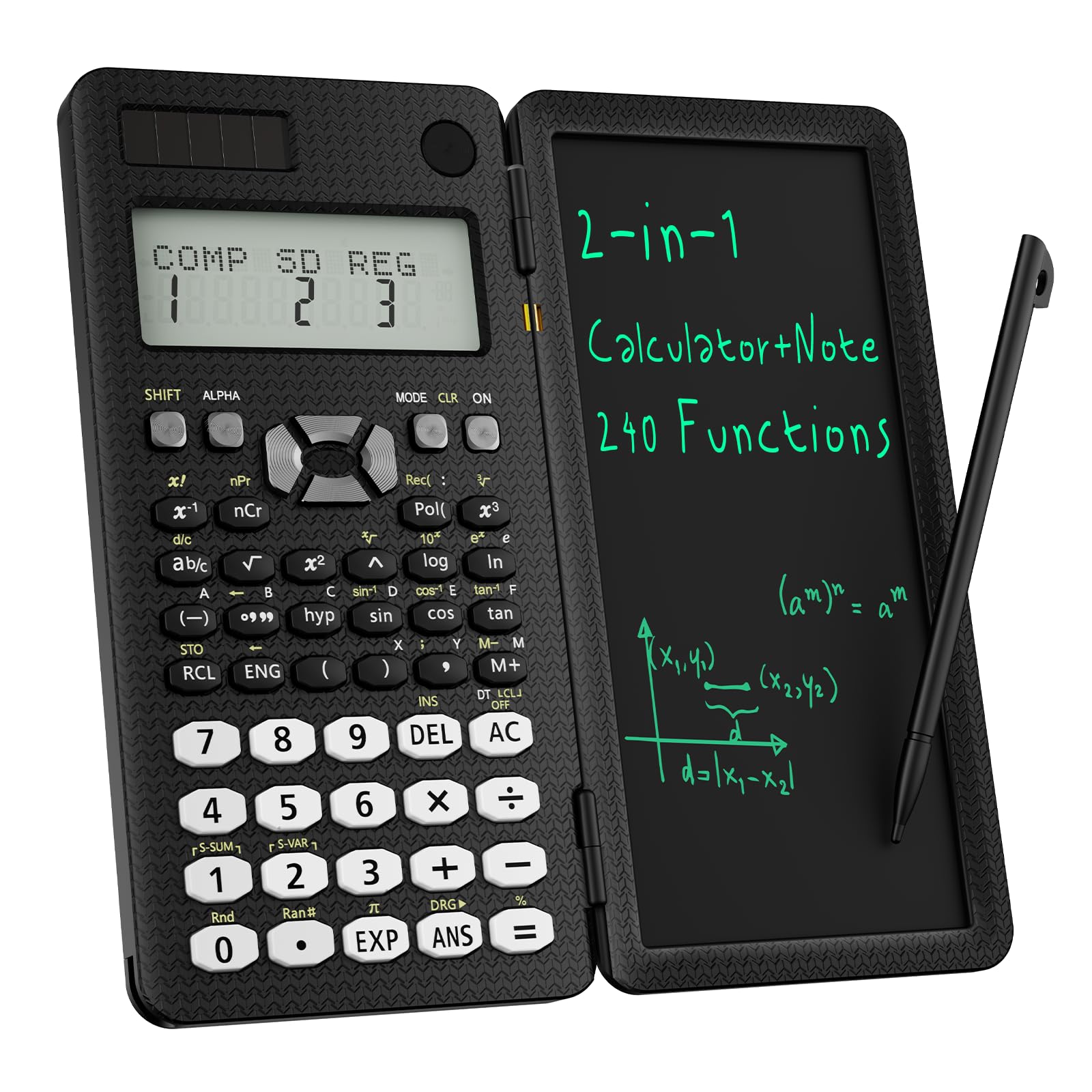
A 2-in-1 calculator and erasable notepad that keeps your scratch work from eating your backpack space.
This one stands out because it integrates a 240-function scientific calculator with an LCD writing tablet and a stylus pen. You can scribble intermediate steps or draw a quick graph without needing a separate piece of paper. The multi-view display shows 2 calculations on screen at once, which improves computational efficiency when you are comparing results. Note: you have to open up the lock key to make the writing area and erase button work — it is a small quirk but important to know before you panic that the notepad is broken.
At only 5 ounces and foldable, it is lighter than most competitor models, and the anti-drop body design means a tumble off a desk is less likely to crack the casing. One buyer mentioned it “looks basically like a smartphone with a case on it” and that the erasable notepad was something they “never thought I needed but now finally have.” It runs on both a solar panel and a replaceable coin battery.
The trade-off is that the writing tablet is not as responsive as paper — it is a basic LCD notepad, fine for quick numbers but not for detailed drawings. The 2-line display is also a step down from the 4-line models if you are doing heavy multi-step algebra.
The standout feature
- Integrated LCD writing tablet with stylus for scratch work.
- 240 functions cover standard high school math.
- Anti-drop body and foldable design for durability and portability.
- Only 5 ounces, lighter than most scientific calculators.
The notepad limitations
- LCD notepad is basic – not as crisp as paper.
- 2-line display limits multi-step equation visibility.
- Lock key must be open up for writing tablet to work.
Perfect for: middle and high school students who always lose their scratch paper and want a lightweight, drop-resistant main calculator.
Not ideal for: students who need a 4-line display for complex equation checking or heavy calculus work.
6. Franklin Scientific Graphing Calculator with 3 Operating Modes
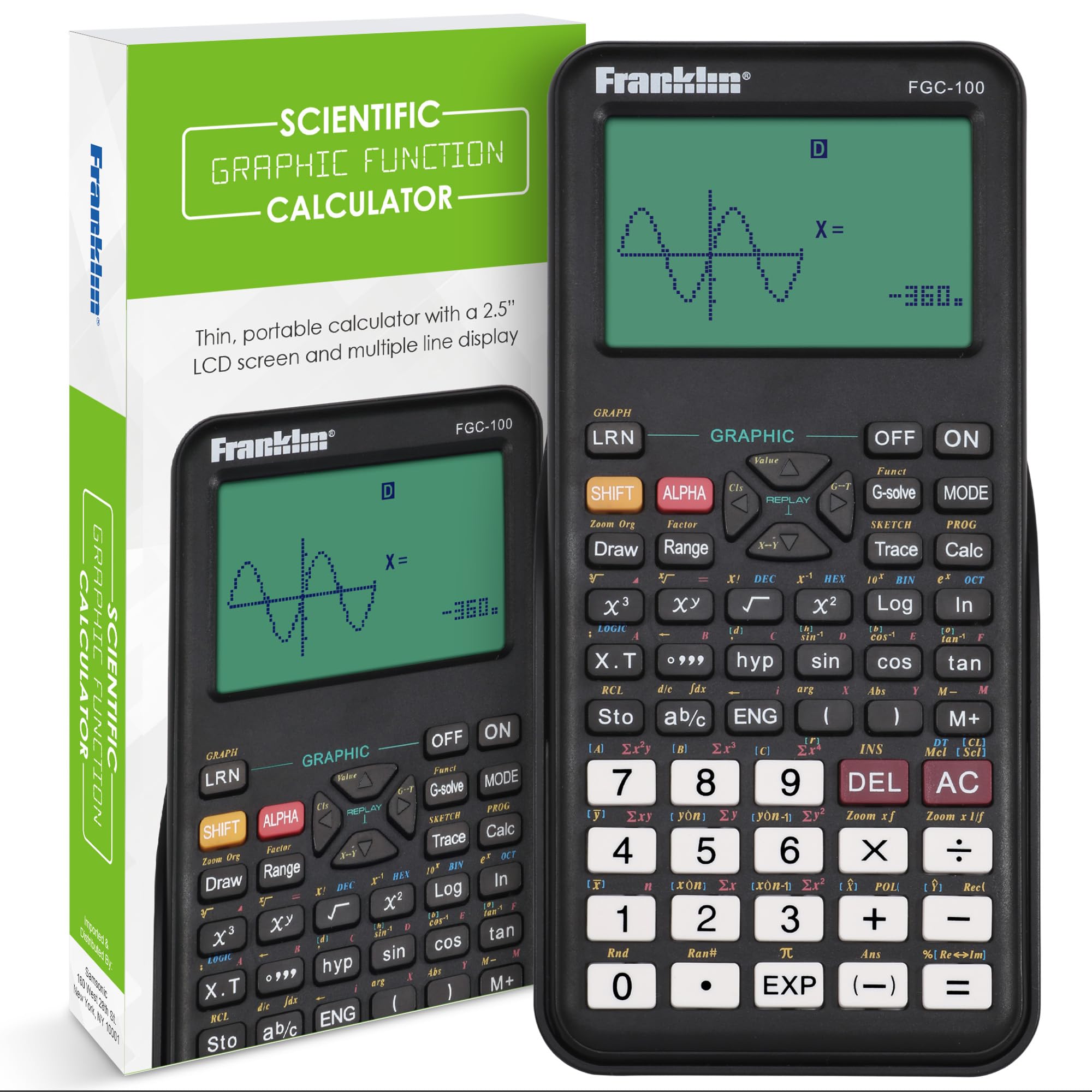
A budget-priced graphing calculator that gets you visual plots without the TI-84 price tag.
At 7.12 inches long by 4.5 inches wide, the screen is larger than most standard scientific calculators, and it comes with 20 built-in graphs so you can visualize equations instantly. It has three operating modes and supports algebra simplification, fractions, statistics, probability, and geometry. For a non-TI graphing model, it is a solid entry point for students who are moving beyond pure arithmetic into visual math.
Buyers call it an “affordable alternative to the TI-84.” One owner reported that for a high school geometry class, it exceeded what their daughter needed and that “her classmates have all purchased one.” The downside, echoed by several buyers: the manual is micro-print, and there are no instructional videos, so you either read the tiny font or you already know your way around a scientific calculator. Another reviewer said there are “too many operating modes for the first user” – so if you are brand-new to scientific calculators, expect a learning curve.
It is battery powered (no solar backup), so you will need to keep spare batteries handy. The plastic casing is standard for this price band, but it lacks the metal-reinforced feel of the TI models.
Why it is a bargain
- 20 built-in graphs for visual equation plotting.
- Much cheaper than a TI-84 or comparable graphing calculator.
- Large 2.5-inch screen compared to standard scientific models.
- Covers algebra, statistics, probability, and geometry.
The learning curve
- No instructional videos – dense micro-font manual only.
- Too many operating modes can overwhelm first-time users.
- Battery only – no solar power backup.
Choose this for: high school students who need basic graphing capability for geometry or algebra without spending on a premium graphing model.
Pass if: you are a first-time scientific calculator user or need something straightforward from the start.
7. SC-216 Scientific Non-Graphing Calculator by Red Star Tec

The entry-level calculator that proves you do not need to spend much to pass your final exam.
With 240 functions covering trigonometry, statistics (1-2 variable calculations), three angle modes (degrees, radians, grads), and engineering modes, this covers pretty much everything a middle or high school student needs. The 2-line display shows entries and results side by side, so you can review your input before writing down the answer. It uses 2 AAA batteries and comes with a hard cover for protection.
One buyer put it simply: “Thanks for helping me pass my final exam.” Another said it is “ideal for math classes” and that the price is excellent. The Red Star Tec SC-216 is arguably the most bare-bones option on this list, but that is exactly its appeal — no fluff, no confusing modes, just the core functions you need for standard high school math up through basic statistics.
The catch is that at this price tier, the build is all plastic and a bit lighter than the TI models. The 2-line display is fine for homework but does not give you the textbook stack view of more expensive units. It is also battery-only (no solar backup), so you will want to carry spare AAAs.
What it does right
- 240 functions cover high school math and science.
- 2-line display with clear entry/result view.
- Hard cover included for protection.
- Truly budget-friendly – a no-brainer for basic needs.
Where it cuts corners
- Battery only – no solar backup if batteries die.
- All-plastic build feels less durable than TI options.
- No textbook-style display for stacked fractions.
Buy this if: you need a straightforward, affordable calculator for middle school through early high school math without any extra features you will never use.
skip it if: you plan on taking calculus or physics courses where a 4-line display and solar backup become genuinely useful.
Understanding the Specs
Display Lines: 2-Line vs 4-Line
A 2-line display shows your typed equation on top and the answer on bottom, which is plenty for basic algebra and trigonometry. A 4-line display (often called MultiView or Natural Textbook Display) lets you see more context — stacked fractions, multiple previous entries, and longer expressions. If your homework involves multi-step equations or you frequently check for input errors, spring for the 4-line.
Function Count: How many do you need?
Most basic scientific calculators offer 240 to 280 functions, which covers trig, logs, exponents, fractions, and basic statistics. The IPepul goes up to 417, adding matrix and vector math. The rule of thumb: if you are in standard high school math, 240 is plenty. If you are in calculus, physics, or engineering, look for 280+ or models that explicitly support derivatives and integrals.
FAQ
Can I use any scientific calculator on the SAT?
What is the difference between a graphing and a non-graphing calculator?
How many functions do I really need for high school math?
Is solar power necessary on a student calculator?
What does MathPrint mode do?
Which calculator is best for college engineering?
How long does a student calculator typically last?
Can I take a calculator with a writing tablet into an exam?
Final Thoughts: The Verdict
For the majority of shoppers, the best calculator for student winner is the Texas Instruments TI-30XS MultiView because its 4-line textbook display and exam approval make it the safest, most versatile bet from middle school through early college. If you want a tank that will survive a decade plus, grab the TI-30XIIS. And for calculus or physics students who need derivatives and integrals without spending on a graphing model, the standout is the Casio fx-115ES Plus 2nd Edition.
How We Picked
We do not accept paid placement. Every pick is matched to a real buyer and a real use-case; we do not hands-on test units.
Sources & Methodology
Specifications: manufacturer listings and product documentation. Review insights: verified customer reviews, as of July 2026. Pricing: not shown on this page (it changes often); check the current price via the retailer link.
As an Amazon Associate, Gadgets Feed earns from qualifying purchases. This does not affect which products we feature.