
Our readers keep the lights on and my morning glass full of iced black tea. As an Amazon Associate, I earn from qualifying purchases.
Specs are compiled from manufacturer listings and verified buyer reviews and can change over time — please confirm the key details on the product page before buying.
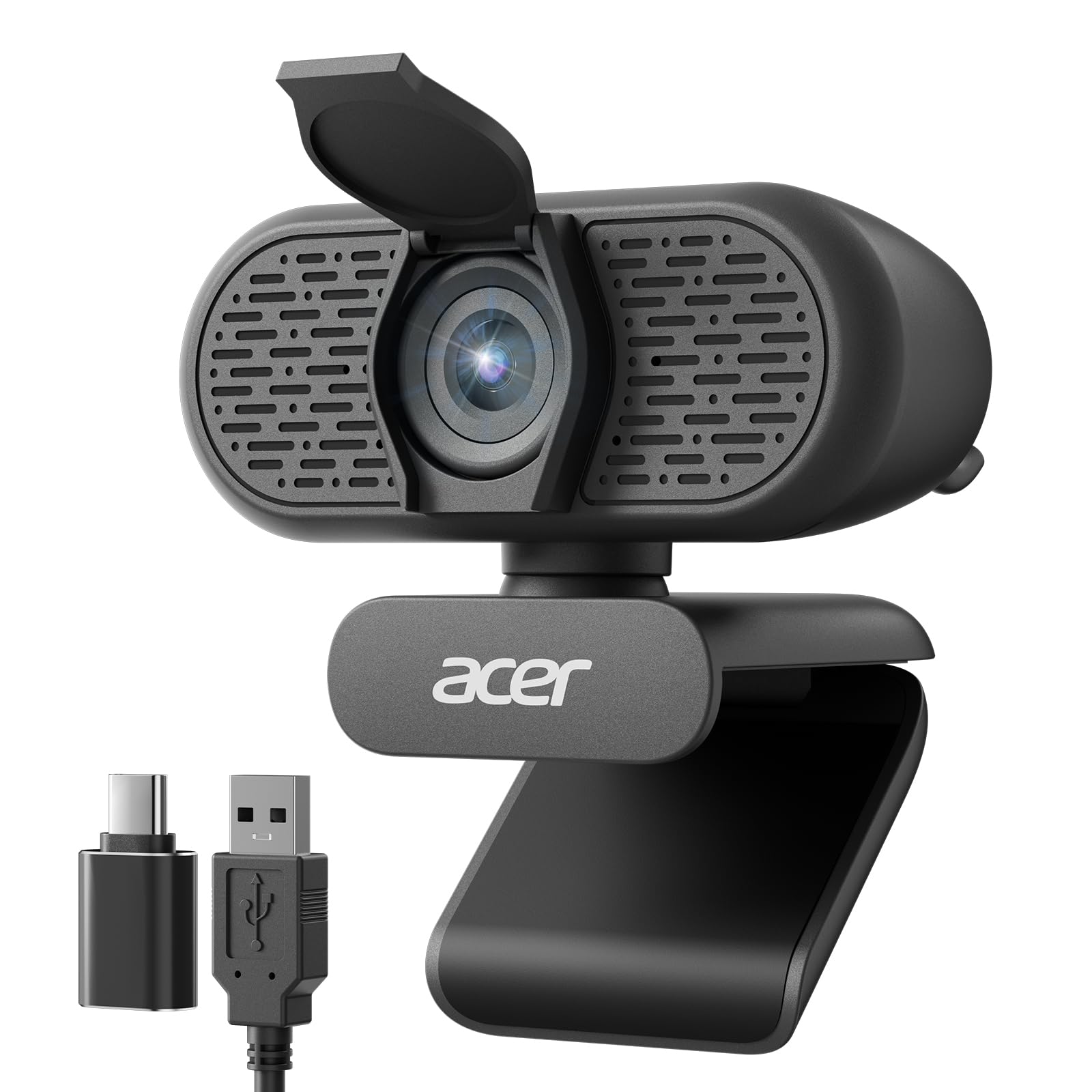
Spending a ton on a webcam feels wrong when you just need a clear face on a Zoom call, not a cinema rig. But cheap ones can make you look like a fuzzy blob with garbled audio, which is worse than your laptop’s built-in camera. The Acer 1080p Webcam is the pick to beat here: it delivers sharp 1080p video (1,920 by 1,080 pixels) at a wide 100° field of view (the angle of the scene the camera captures) so you see more of your desk without looking tiny, plus dual noise-reduction mics that filter out keyboard clatter and room hum so your voice stays clear.
I’m Min — the founder and writer behind Gadgets Feed. This guide is built by comparing the manufacturers’ published specifications and the patterns across verified customer reviews, so you get each pick’s real strengths and trade-offs instead of marketing spin.
You are here because you need a budget webcam for a home office, virtual classes, or quick video calls. The key is knowing which specs actually matter — here is what you need to know before you click “buy.”
Our Picks at a Glance

How To Choose The Best Budget Webcam
A budget webcam is a straightforward tool, but a few key specs separate the ones that make you look professional from the ones that make you look like a pixelated ghost. Focus on these factors to get the best value for your money.
Resolution and Frame Rate
Almost every budget webcam claims “1080p” resolution, but the frame rate (measured in frames per second, or fps) determines if your video is smooth or choppy. A 1080p webcam at 30fps is the baseline for clear and fluid video calls — any slower and motion can look stuttery, especially if you move around.
Microphone Quality and Noise Cancellation
Your voice matters as much as your video. A webcam with built-in noise-cancellation microphones filters out background hums, fans, and keyboard clatter, so your voice sounds clear. Look for webcams that specify “dual noise-reduction microphones” or “noise-canceling” to avoid sounding distant or muffled.
Privacy Cover and Field of View
A privacy cover gives you confidence by physically blocking the lens when you are not on a call, preventing accidental or unwanted recording. The field of view (FOV), measured in degrees, tells you how much of the room the camera sees — a 90° to 100° FOV is wide enough for one person or a tight group shot without making you look like a tiny figure in a big room.
Quick Comparison
| Model | Best For | Resolution | Field of View | Microphone | Amazon |
|---|---|---|---|---|---|
| Acer 1080p Webcam★ Best Overall | Plug-and-Play Simplicity | 1080p Full HD | 100° FOV | Dual noise-reduction mics | $26.99$29.99Limited time dealAmazon |
| NexiGo N930AFAutofocus Pick | Autofocus Flexibility | 1080p @ 30fps | — | Noise-canceling mic | $33.99$39.99Limited time dealAmazon |
| EMEET C960 | Streaming & Work Calls | 1080p Full HD | 90° FOV | 2x noise-reduction mics | $37.99$39.99Amazon |
| RUWBY Pro HD Webcam | Included Tripod Setup | 1080p @ 30fps | Wide-angle | Dual noise-cancelling mics | $29.99Amazon |
| NexiGo N60 | Software Control on a Budget | 1080p @ 30fps | — | Noise-canceling mic | $27.99$39.99Amazon |
In‑Depth Reviews
1. Acer 1080p Webcam
The quiet star that nails 1080p, wide-angle, and noise cancellation without asking you to think.
The Acer 1080p Webcam is the kind of purchase you stop thinking about after plugging it in, and that is exactly what a budget webcam should be. It delivers 1080p Full HD video through a new CMOS sensor (a modern image-capture chip), and reviewers point out an “easy plug-and-play setup” along with clear video and great audio. Its 100° field of view is noticeably wider than the 90° on the EMEET C960, so you can fit more of your desk or a second person into the frame without the camera feeling cramped.
Dual noise-reduction microphones help keep your voice clear during calls, and the built-in privacy cover gives you confidence when you step away. It comes with both a Type-A to Type-C adapter, so it works with modern laptops that lack USB-A ports — a detail that saves you from buying a separate adapter. The automatic low-light correction adjusts exposure so you look professional even when your room is not perfectly lit.
Compared to the NexiGo N60, which has an effective still resolution of 2.07 MP, the Acer’s effective video resolution is 1080p — a match in practical terms. The Acer also includes a 2-year warranty, which is a nice bonus at this price level.
What it does well
- 100° wide field of view fits more in the frame than most budget picks
- Includes a Type-A to Type-C adapter for modern laptops
- Dual noise-reduction mics and automatic low-light correction built in
What it lacks
- No dedicated software for manual adjustments
- Fixed focus — you must stay within a specific distance range
- No tripod thread or included stand
Reach for this if: You want the widest angle and simplest setup with no extra accessories needed.
Pass if: You need software controls or autofocus — this is a true set-and-forget webcam.
2. NexiGo N930AF Webcam
Autofocus that keeps you sharp without forcing you to sit at a fixed distance.
The NexiGo N930AF is for anyone who hates being tied to one spot during a call. Its autofocus feature starts at just 7 cm from the lens (about 2.7 inches), meaning you can lean in to show a document or lean back in your chair, and the camera adjusts to keep you crisp — something fixed-focus budget webcams simply cannot do. You can even turn autofocus off and set a manual focal point if you prefer, giving you control most cameras at this level lack.
Buyers report that the video quality is excellent for live streaming and that it is truly plug-and-play — no drivers needed, ready to use in under a minute. The built-in noise-canceling microphone helps reduce ambient noise, though some owners mention the built-in mic is poor and recommend using an external microphone for the best audio quality. The N930AF also comes with a privacy cover, but a few owners mention the shutter is a user-applied sticker that can be hard to slide.
At 2 MP effective still resolution, it matches the exact spec of the EMEET C960 below, but the autofocus here gives it a noticeable edge if your setup involves movement. Unlike the NexiGo N60, which has a fixed focus and requires you to stay within a specific distance window, this model adapts to you.
What stands out
- Autofocus with a 7 cm starting point keeps you sharp as you move
- Plug-and-play with optional software for advanced settings
- 6.5 ft USB cord gives plenty of placement room
Watch out for
- Built-in microphone quality is weak — an external mic is a better bet
- Privacy cover is a sticker, not a built-in slider
- Ball socket mount has limited up/down range
Pick this for: Anyone who moves around during calls and wants autofocus to keep them in frame at a budget price.
Look elsewhere if: You need strong built-in audio — the mic here won’t replace a dedicated headset or external mic.
3. EMEET 1080P Webcam C960

Two microphones and a 5-layer lens that make you look and sound better than your laptop ever could.
The EMEET C960 is built for the person who wants a clear, reliable webcam for both work calls and casual streaming without fussing over settings. It delivers a realistic 1920 x 1080p Full HD video through a 5-layer anti-glare lens, which helps reduce weird reflections if you have a bright window behind you. The fixed focal length is tune between 11.8 and 118.1 inches, so as long as you are sitting at a typical desk distance, the image stays sharp.
The dual omnidirectional noise-reduction microphones are a standout — they pick up your voice and filter out background noise, making you sound clear even if your office is a bit noisy. Customers note that the installation is plug-and-play with no software needed, and the 90° wide-angle lens accommodates more than one person in the frame without that fisheye look. One reviewer on a Mac Mini M1 noted that the image was initially grainy, but improved after installing the EMEETLINK software to adjust sharpness and contrast.
Automatic low-light correction helps you look decent even in dim lighting, though the same reviewer mentioned low-light performance is still poor. Unlike the Acer webcam’s 100° FOV, the EMEET’s 90° angle is a bit tighter, which means less background clutter but also a slightly narrower group shot.
The appeal
- Two noise-reduction mics deliver clear voice pickup
- 90° wide-angle lens fits groups without distortion
- Automatic low-light correction helps in dim rooms
The trade-off
- Low-light quality is still below average — not great for dark rooms
- USB-A only, no USB-C cable included
- Needs a separate stand to sit securely on some monitors
Best suited for: Home office workers and streamers who want solid mic quality and a clean wide shot from the start.
skip it if: Your workspace is often very dim — the low-light correction helps, but it is not a night vision camera.
4. RUWBY Pro HD 1080p Webcam with Tripod

A webcam that comes with its own tripod, so you are not stuck clipping it to a monitor.
The RUWBY Pro HD Webcam solves a common problem for people who sit at a desk without a monitor to clip to, or who want the freedom to place the camera on a desk or shelf at the perfect height. It includes a telescopic aluminum tripod with a universal 1/4-inch screw, so you get a stable base that folds down for travel. The webcam itself delivers 1080p resolution at 30 frames per second, and the dual noise-cancelling microphones capture sound up to 10 feet away, according to the manufacturer.
Shoppers say that the plug-and-play setup is instant, and the picture is “crisp” with natural color and no stuttering. The autofocus is fast, though one reviewer noted they could not find a way to turn it off, which could be an issue if you prefer a fixed focus. The 360° rotation makes it easy to point the camera exactly where you need it, whether that is at your face, a whiteboard, or a physical product during a demo.
Compared to the Acer webcam above, the RUWBY comes with the tripod and a privacy shutter, while the Acer relies on a monitor clip. The 5-foot USB cable is long enough for most setups, but shorter than the NexiGo N930AF’s 6.5-ft cord.
Why it wins
- Included tripod with a 1/4-inch screw for flexible positioning
- 360° rotation lets you aim anywhere
- Dual noise-cancelling mics pick up clear audio at distance
What to know
- Autofocus cannot be turned off, which may frustrate some users
- No dedicated software for customizing settings
- Tripod is aluminum but not heavy-duty — best for desk use
Ideal for: People who need a freestanding webcam for presentations, product demos, or desk-less setups.
Not for: Anyone who prefers fixed focus and wants to control the autofocus manually.
5. NexiGo N60 1080P Webcam

A 2.07 MP sensor that beats the standard 2 MP by a hair, plus software tweaks you can actually use.
The NexiGo N60 is the budget pick that understands you might want to tweak a setting or two. Its effective still resolution is 2.07 MP (megapixels — a measure of how many million tiny pixels make up a picture) — a 3% edge over the typical 2 MP found on the RUWBY Pro HD, meaning slightly more detail if you are doing things like product photos or showing documents. The 3.6 mm glass lens (the diameter of the front lens element) is tune for distances between 19.6 inches and 13 feet, which covers a typical desk-to-sofa range for most indoor use.
One buyer mentioned it as an “excellent webcam with clear 1080p video and great sound quality,” and the plug-and-play setup requires no drivers. The built-in noise-canceling microphone reduces ambient noise, and the privacy cover blocks the lens when not in use. A recurring note in reviews is that the wide field of view cannot be narrowed via zoom, and the flip cover loosens over time — some users prefer a sliding design.
Unlike the EMEET C960, which has dual mics, the N60 has a single noise-canceling mic, but it still delivers clear audio for calls. The 4x digital zoom is available if you are using software that supports it, but it is a digital crop (the camera simply zooms into the existing image), not an optical zoom that would keep the same sharpness.
What you gain
- Slightly higher 2.07 MP effective still resolution for sharper images
- Works with major platforms like Zoom, Teams, and Skype
- Privacy cover and low-light correction included
What you give up
- Single microphone instead of dual mics
- Wide FOV cannot be narrowed via zoom in the camera itself
- Flip privacy cover may loosen over time
Pick this for: A slight image quality edge over the cheapest options, plus the ability to adjust settings via NexiGo software.
Skip if: You need dual microphones for better audio pickup — go for the EMEET or Acer instead.
Understanding the Specs
1080p Resolution at 30fps
This is the baseline for a good webcam experience. 1080p means 1,920 by 1,080 pixels, which gives you sharp, detailed video for calls or streams. 30fps (frames per second) means the video updates 30 times every second, which is smooth enough for talking and slight movement without that jittery effect. Anything lower than 1080p can look blurry on modern monitors.
Field of View (FOV)
Measured in degrees, FOV tells you how much of your background the camera sees. A 90° FOV is good for a single person sitting at a desk — it shows your face and shoulders cleanly. A 100° FOV is wider, fitting a second person or more of your desk into the shot. Too wide (over 110°) can create a fisheye distortion that makes things look curved.
FAQ
Will a budget webcam work with my Mac or Windows laptop?
Do I need a webcam with autofocus for work calls?
What does a privacy cover do and why should I care?
How important are noise-cancelling microphones in a webcam?
Can I use a budget webcam for live streaming on Twitch or YouTube?
What is the difference between 2 MP and 2.07 MP resolution?
Will a budget webcam work with my Switch 2 or gaming console?
How long does a typical budget webcam last?
What field of view is best for one person on video calls?
Can I mount a budget webcam on a tripod?
Final Thoughts: The Verdict
For the majority of shoppers, the budget webcam winner is the Acer 1080p Webcam because it blends a wide 100° FOV, dual noise-reduction mics, and a Type-A to Type-C adapter at a price that feels like a steal. If you want autofocus that adapts to your movement, grab the NexiGo N930AF. And for a freestanding setup with a tripod included, the RUWBY Pro HD Webcam gives you the most flexible positioning for the money.
How We Picked
We do not accept paid placement. Every pick is matched to a real buyer and a real use-case; we do not hands-on test units.
Sources & Methodology
Specifications: manufacturer listings and product documentation. Review insights: verified customer reviews, as of July 2026. Pricing: not shown on this page (it changes often); check the current price via the retailer link.
As an Amazon Associate, Gadgets Feed earns from qualifying purchases. This does not affect which products we feature.
Related Guides
Product prices and availability are accurate as of the date/time indicated and are subject to change. Any price and availability information displayed on Amazon at the time of purchase will apply to the purchase of this product. As an Amazon Associate I earn from qualifying purchases.
CERTAIN CONTENT THAT APPEARS ON THIS SITE COMES FROM AMAZON. THIS CONTENT IS PROVIDED "AS IS" AND IS SUBJECT TO CHANGE OR REMOVAL AT ANY TIME.
Amazon and the Amazon logo are trademarks of Amazon.com, Inc. or its affiliates.