
Our readers keep the lights on and my morning glass full of iced black tea. As an Amazon Associate, I earn from qualifying purchases.
Specs are compiled from manufacturer listings and verified buyer reviews and can change over time — please confirm the key details on the product page before buying.
You want a clean, clutter-free workspace without a bulky tower under your desk, but you also need real performance for your daily tasks. That is exactly what an all-in-one desktop delivers — it packs the computer, screen, and speakers into one neat package. The hard part is picking the right one from the dozens out there, because the processor, screen size, and memory decide if it will feel snappy or sluggish a year from now.
I’m Min — the founder and writer behind Gadgets Feed. This guide is built by comparing the manufacturers’ published specifications and the patterns across verified customer reviews, so you get each pick’s real strengths and trade-offs instead of marketing spin.
These picks focus on real-world performance, screen quality, and everyday usability to help you find the right aio desktop computers for home, school, or a small office.
Our Picks at a Glance



How To Choose The Best AIO Desktop Computers
The right all-in-one depends on what you do with it. For heavy multitasking and demanding apps, you need a higher-tier processor and more RAM. For web browsing and streaming, a budget model with a good screen will serve you well. Pay close attention to the processor generation, the amount of RAM, and the screen size — these define your daily experience.
Processor (CPU) and Memory
The processor is the brain. For basic tasks like email and browsing, an Intel N200 or N100 works fine. For demanding work, look for an Intel Core i5/i7 or an AMD Ryzen 7. RAM matters for multitasking — 8 GB is the minimum, 16 GB gives you comfortable room for several apps, and 32 GB handles heavy workloads without stuttering.
Screen Size and Display Quality
Size dictates your workspace: 21.5 inches is compact for small desks, 23.8 inches is the popular balance, and 27 inches gives you a spacious view. A Full HD (1920×1080) IPS panel with anti-glare coating is ideal for comfortable long sessions. Touchscreens add convenience for navigation.
Quick Comparison
| Model | Best For | Screen Size | RAM | Storage | Amazon |
|---|---|---|---|---|---|
| Dell 24 (ec24250)★ Best Overall | Best Value + Great Reviews | 23.8-inch FHD | 8 GB DDR5 | 512 GB SSD | from $999.99Amazon |
| Dell Inspiron 7730Top Performer | Premium Touch + Expandability | 27-inch FHD Touch | 32 GB DDR4 | 1 TB SSD | $1,749.00Amazon |
| ASUS V470Smart Value | Touch + Fast DDR5 RAM | 27-inch FHD Touch | 16 GB DDR5 | 1 TB SSD | $949.99Amazon |
| HP 27 Touch (AMD Ryzen 5) | Touch + Windows 11 Pro | 27-inch FHD Touch | 16 GB LPDDR5 | 1 TB SSD | $989.99Amazon |
| HP 24 Touch (Intel N100) | Touch + Home/School Use | 23.8-inch FHD Touch | 16 GB DDR4 | 1 TB PCIe SSD | $669.99Amazon |
| HP 24 (AMD Ryzen 7) | Powerful Ryzen Performance | 23.8-inch FHD | 16 GB DDR4 | 512 GB SSD | $846.71Amazon |
| Lenovo IdeaCentre 24 (32GB) | Massive RAM + Storage | 23.8-inch FHD IPS | 32 GB DDR4 | 1 TB PCIe SSD | $999.99$1,299.00Amazon |
| Lenovo IdeaCentre 24 (N100) | Budget-Friendly Everyday | 23.8-inch FHD IPS | 8 GB DDR4 | 512 GB PCIe SSD | $529.99$749.99Amazon |
| HP 21.5 (N200) | Entry-Level Budget | 21.45-inch FHD | 8 GB DDR4 | 512 GB SSD | $499.00Amazon |
In‑Depth Reviews
1. Dell 24 All-in-One Desktop ec24250
Our pick — over 4.5★ from 200+ verified ratings; the strongest balance of quality and price.
The crowd-favorite that does everything well while staying affordable.
This is the most popular pick on the list by ratings volume — over 225 ratings with a 4.6/5 score. It comes with an Intel Core 3 processor 100U that pushes up to 4.7 GHz (a 38% higher max speed than the Lenovo IdeaCentre 24), 8 GB of DDR5 RAM, and a 512 GB SSD. The FHD IPS display features 99% sRGB and 50% higher contrast within a narrow border. Buyers consistently say it is “fast for research, good storage, performs well, easy setup, handles games well.”
The Dell ComfortView Plus reduces harmful blue light for eye comfort, and the 5MP+IR camera with HDR adjusts to challenging lighting so you look your best on calls. It even includes Dolby Atmos spatial sound through dual Bluetooth speakers. The 1-year Onsite Service means a technician comes to your home if something breaks, which is a major plus for confidence.
The 8 GB of DDR5 RAM is a starting point — enough for office work and streaming, but you may feel the limit with heavy multitasking. It has no dedicated graphics and no touchscreen. For a reliable, well-supported, everyday all-in-one, it is the best value in the list.
The reliable workhorse: Rock-solid Dell quality, 4.6/5 rating from 225+ buyers, DDR5 RAM, and a fast Intel Core 3 processor make this the top value choice.
Best for: most people wanting a trustworthy, well-reviewed machine for daily work, school, and streaming.
Consider an upgrade if: you plan to run many heavy apps simultaneously — 8 GB RAM fills up quickly.
2. Dell 27 All-in-One Desktop ec27250
A giant touchscreen with enough RAM to last a decade.
The Inspiron 7730 features the same expansive 27-inch FHD touchscreen with four-side narrow borders as its sibling, but it uses 32GB of DDR4 RAM and a 1TB SSD to keep everything moving fast. The Intel Core 7-150U processor alongside an NVIDIA GeForce MX570A 2GB GPU means it can handle video calls, office suites, and even some creative software without complaining. Owners mention the “fast boot and responsive on Ethernet,” though one mentioned “screen colors hard to adjust.”
Where this model differs from the ec27250 is its inclusion of ComfortView Plus to reduce low blue light while keeping colors accurate — helpful if you stare at the screen all day. The innovative stand tucks the keyboard underneath, freeing up desk space. Buyers also appreciate the 1-year Dell Premium Support, which gives priority access to experts even when traveling internationally, plus the 6-month Dell Migrate tool for easy file transfer.
The main drawback is that some units have arrived with missing parts or a broken leg, according to a few reviews, though the computer itself runs smoothly with the correct 130W adapter. The 32GB DDR4 is still a powerful amount of memory, even if not the newest generation, and the dedicated graphics card separates it from many competitors.
The spacious champ: Massive 27-inch touchscreen with four-side narrow borders. 32GB DDR4 RAM, NVIDIA GeForce MX570A, and ComfortView Plus eye care make it a future-proof workhorse.
Grab this for: a large interactive screen with premium support and dedicated graphics for creative or office work.
Consider another if: you need the absolute latest DDR5 RAM or are uneasy about potential packaging issues.
3. ASUS V470 All-in-One Desktop
A large touchscreen with fast DDR5 RAM you can actually afford.
The ASUS V470 offers a 27-inch Full HD anti-glare touchscreen combined with 16GB of DDR5 RAM and a 1TB SSD — a rare combination at this tier. It is powered by an Intel Core i5-13420H processor (8 cores, up to 4.6 GHz) with 12 MB of cache, which is double the cache of the 6 MB found in many budget Lenovo and HP models. This means it handles multitasking and media streaming without any lag. Customers note it is “quiet, fast and good looking.”
You get modern connectivity including Wi-Fi 6E (802.11ax) and Bluetooth 5.3, plus a 1080p Full HD camera with AI noise-canceling technology for clear calls. The built-in camera tucks away when not in use, a privacy feature missing on many competitors. Dolby Atmos speakers and a 16:9 aspect ratio make it a solid pick for entertainment too.
Some users mention the height is not adjustable and note that ASUS includes some bloatware. The side I/O ports (including a Kensington lock and USB 2.0) are convenient, but the lack of a height-adjustable stand is a drawback for ergonomic setup.
Touch-friendly workhorse: 27-inch FHD anti-glare touch, 16GB DDR5, 1TB SSD, Wi-Fi 6E, and a retractable 1080p camera make this a compelling, modern all-in-one.
Choose this if: you want a large touchscreen with modern DDR5 RAM and Wi-Fi 6E without paying top dollar.
Keep looking if: you require a height-adjustable stand or prefer a completely bloatware-free experience.
4. HP 27 inch All-in-One Desktop PC (AMD Ryzen 5)

A touchscreen professional that arrives with Windows 11 Pro ready.
If you need Windows 11 Pro for business security features (like BitLocker and Remote Desktop), this HP model is a direct fit. It has a 27-inch FHD touch IPS display with 99% sRGB for vibrant colors, powered by an AMD Ryzen 5 7520U processor with 4 MB of cache and 16 GB of LPDDR5-5500 MHz RAM. The 1 TB PCIe NVMe SSD provides fast boot times. Reviewers point out it is “fast and easy to setup and use.”
The integrated AMD Radeon Graphics handle 4K streaming and everyday tasks smoothly, and the HP True Vision 1080p FHD IR tilt privacy camera with noise reduction is excellent for professional calls. It comes with a wireless keyboard and mouse, keeping your desk clean. One reviewer noted their wife “with macular degeneration can watch videos and read emails” now, highlighting the clear display quality.
A critical report of a motherboard failure after a few months is a concern, though most reviews are very positive. The on-board LPDDR5 RAM is not user-expandable, so what you buy is what you stick with. For a business-ready machine with touch, this is a strong contender.
Business-class perks
- Windows 11 Pro for advanced business security
- 27-inch FHD touch IPS display with 99% sRGB
- 16GB LPDDR5-5500 MHz RAM
Considerations
- Non-expandable onboard RAM
- Reported early motherboard failure in some units
- Higher price point
Perfect for: professionals and small businesses needing Windows 11 Pro with a large touchscreen.
Look elsewhere if: you want user-upgradable RAM or are on the tightest budget.
5. HP 24 Touchscreen All-in-One Desktop

A touchscreen all-in-one with plenty of memory for a reasonable price.
This HP delivers a 23.8-inch IPS Full HD touch screen with anti-glare technology, making it a joy for the whole family — from homework to streaming. It is powered by an Intel Processor N100 (4 cores, max 3.40 GHz) with 6 MB of cache, paired with 16 GB of DDR4 RAM and a 1 TB PCIe NVMe M.2 SSD. The 16 GB RAM is double what you get on the entry-level models (like the HP 21.5 at 8 GB), giving you comfortable headroom for multiple open apps. Buyers love it: “the touch screen is amazing,” and “sounds great and so easy to set up.”
It includes an HP True Vision 720p HD privacy camera with temporal noise reduction and dual array microphones for clear video calls. The connectivity is solid with Realtek Wi-Fi 6 and Bluetooth 5.3, plus plenty of ports including USB Type-C and RJ-45. It is among the most popular models in this range, with over 250 ratings and a 4.4/5 score, often praised for its excellent sound quality and professional design.
The Intel N100 is fine for everyday tasks but will slow down on heavy creative software. The starting price is a balance for a touchscreen model, making it a fantastic value pick for home use.
Family favorite: A popular, well-reviewed 23.8-inch touchscreen with 16GB RAM, a 1TB SSD, and Wi-Fi 6, offering excellent value for home and school.
Best for: families or students who want a touchscreen with good RAM and storage at a friendly price.
Not for: heavy video editing or gaming — the N100 processor has limits.
6. HP 24 inch All-in-One Desktop PC (AMD Ryzen 7)

The AMD Ryzen 7 muscle that outperforms Intel N models by a wide margin.
This is the pick when you need serious processing power without moving to a 27-inch screen. The AMD Ryzen 7 7730U processor has 16 MB of cache, a 2.7x gap over the 6 MB in Intel N200/N100 models, and the 16 GB of RAM gives you 2.0x more memory than the Dell 24’s 8 GB. It handles heavy spreadsheet work, programming, and creative software with ease. One buyer mentioned being “very happy with the purchase” after a month, loving the “speed and screen size.”
The 23.8-inch FHD display has an ultra-slim three-sided micro-edge design with up to 89% screen-to-body ratio for an rich view. It includes a tiltable pop-up privacy camera (a feature not found on the Dell 24), HP Video Controls, dual array microphones, and advanced noise reduction for professional-looking video calls. Windows 11 Home is included, but unlike the HP 27 above, this runs the standard Home version unless you upgrade.
Some shoppers say the speakers are mediocre and the stand is not adjustable. One unit arrived completely defective, though the return process worked. The 512 GB SSD is smaller than the 1 TB found in many competitors at a similar price, but the Ryzen 7’s processing power justifies the cost for power users.
Processor powerhouse
- AMD Ryzen 7 7730U with 16 MB cache
- 16 GB RAM (2x the Dell 24)
- Pop-up privacy camera
Trade-offs
- Standard 512 GB SSD (not 1 TB)
- Mediocre built-in speakers
- Non-adjustable stand
Reach for this if: you need potent Ryzen 7 processing power for multitasking and professional apps in a compact 24-inch size.
Consider an upgrade if: you need a larger 1 TB drive or a height-adjustable screen.
7. Lenovo IdeaCentre 24 AIO (32GB)
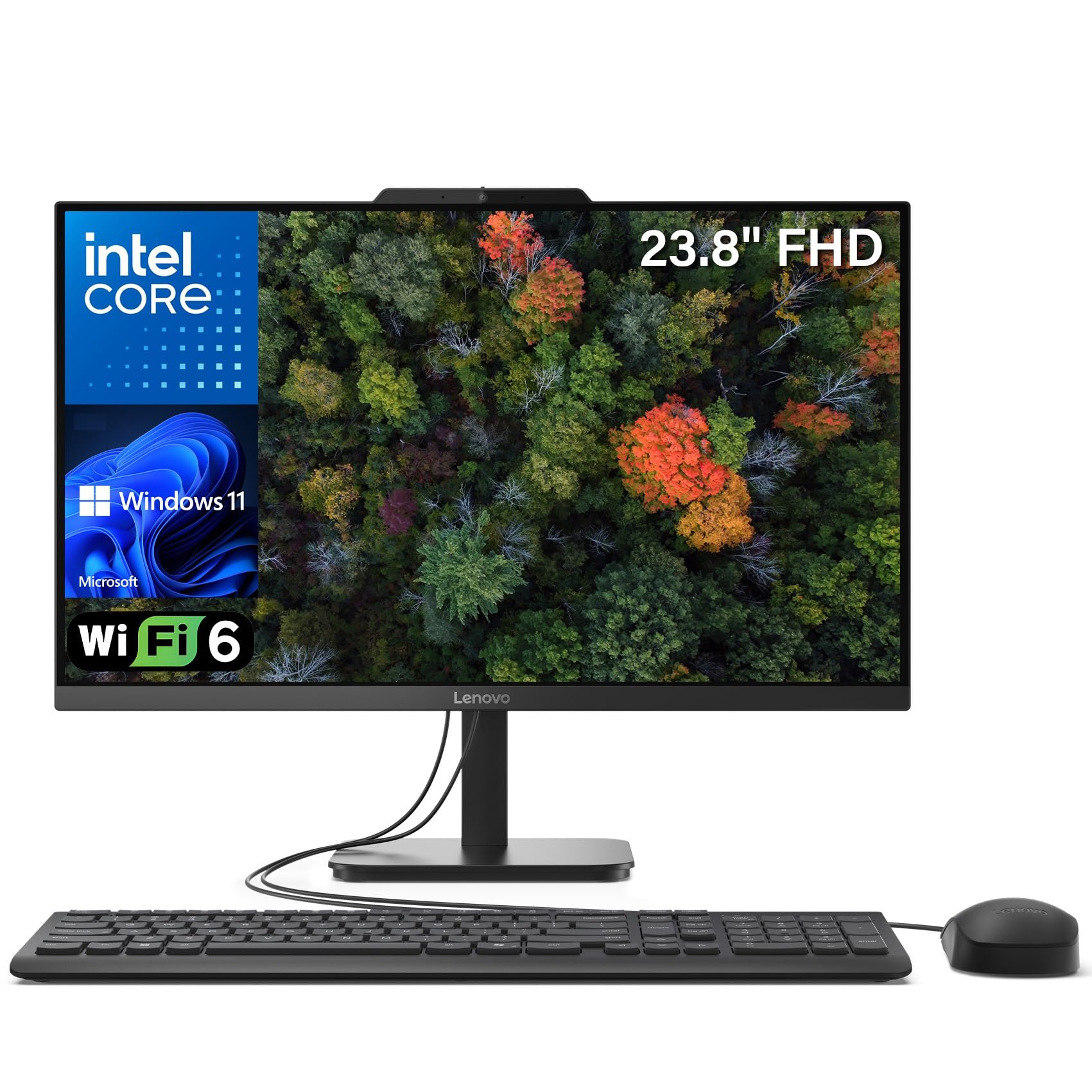
32GB of RAM and a 1TB SSD make this a multitasking monster.
If you run dozens of browser tabs, photo editing software, and office apps simultaneously without closing anything, this Lenovo is your answer. It packs 32GB of DDR4 RAM (four times the 8 GB found in entry-level models) and a 1TB PCIe NVMe SSD for lightning-fast storage. The Intel N100 processor (4 cores, up to 3.4GHz) with 6 MB of cache is the same found in budget models, so raw processing power is not as high as the Core i7 models — but the massive RAM makes real-world multitasking feel smooth. Buyers report it is “fast for browsing, streaming, and office.”
The 23.8-inch FHD IPS anti-glare display with 99% sRGB and 250 nits brightness reduces eye strain. The anti-glare coating is a practical feature for offices with overhead lights. It also comes with Office 365 web apps, a keyboard and mouse, and Windows 11 Home. Owners mention the easy Bluetooth setup for peripherals.
A common complaint is the USB ports are located at the center back, making them “hard to access” and inconvenient for connecting thumb drives. The N100 processor limits this machine for heavy creative workflows, but for everyday multitasking with massive memory, it is a standout.
Storage kingdom
- 32GB DDR4 RAM for heavy multitasking
- 1TB PCIe NVMe SSD for fast storage
- 23.8-inch FHD IPS anti-glare display
Annoyances
- USB ports at the back center are inconvenient
- N100 processor is not a high-performer
- Included wired peripherals are cheap
Great for: users who need tons of memory for running many apps at once without spending on a high-end CPU.
Not ideal for: power users needing raw CPU performance for video editing or 3D rendering.
8. Lenovo IdeaCentre All-in-One Desktop (N100)

An anti-glare IPS screen at a price that leaves room in your budget.
This Lenovo is among the most affordable ways to get a 23.8-inch Full HD IPS anti-glare display. The screen quality is a standout — 250 nits brightness and 99% sRGB for sharp detail and true-to-life colors — better than the VA panel found on the HP 21.5. It is powered by an Intel N100 processor (4 cores, up to 3.4 GHz) with 6 MB of cache, 8 GB of DDR4-3200 RAM, and a 512 GB PCIe SSD. For basic home and office tasks, it is perfectly capable. Customers note it is “fast and easy set up” and a “great buy.”
You get modern connectivity with Intel Wi-Fi 6 AX203 and Bluetooth 5.2, plus a variety of ports including USB-C 10Gbps and HDMI-out 1.4b. The slim Carbon Black design looks professional on any desk. It includes a USB Calliope keyboard and has firmware TPM 2.0 for security.
The processor is entry-level, so heavy multitasking will push its limits. Buyers frequently mention that the “location of the USB ports” is challenging to access, which is a real annoyance when plugging in peripherals. For the price, the Lenovo offers an excellent screen and solid basics.
Value highlights
- 23.8-inch Full HD IPS anti-glare display
- Wi-Fi 6 and Bluetooth 5.2
- 512 GB PCIe SSD for fast boot times
Cost-savings trade-offs
- N100 processor is slow for demanding tasks
- USB ports are hard to access
- Only 8 GB DDR4 RAM
Pick this if: your priority is an excellent screen and modern connectivity for basic tasks on a strict budget.
Look elsewhere if: you need snappy performance for heavy multitasking or frequent peripheral plugging.
9. HP 21.45 inch All-in-One Desktop PC (N200)
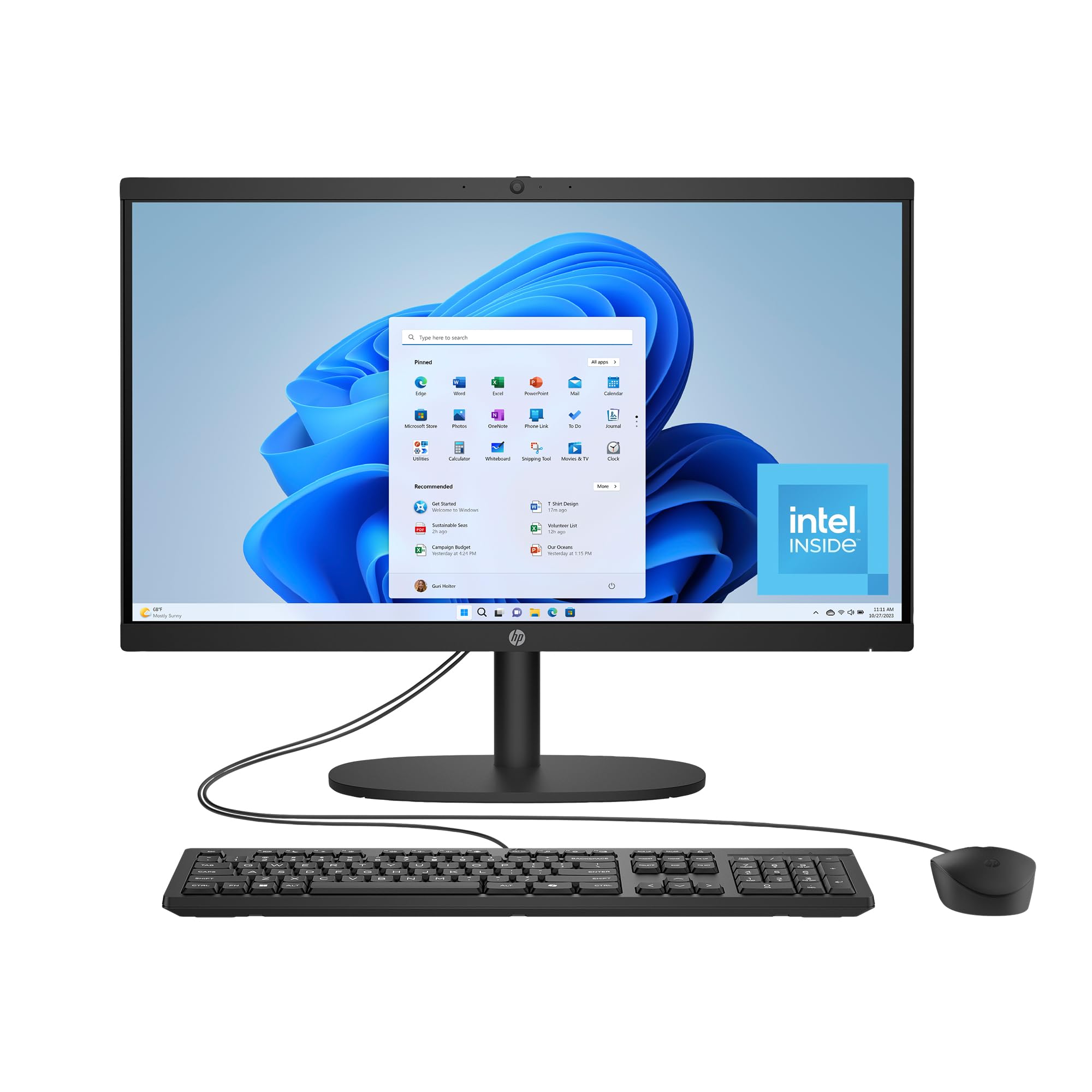
The smallest screen and lowest price make this a true entry point.
This is the most affordable all-in-one on the list, with a 21.45-inch FHD display — 12% smaller than the 24-inch models. It uses an Intel Processor N200 (max 3.7 GHz) with 6 MB of cache (a 2.7x gap vs the 16 MB in the HP Ryzen 7), 8 GB of RAM, and a 512 GB SSD. It is designed for the absolute basics: email, web browsing, and light document work. One owner reported it is “easy to set up” with a “nice looking” design.
The machine includes Intel UHD Graphics for smooth 4K content playback and 720p gaming. It has a manual camera shutter for privacy, AI-noise reduction for calls, and a flicker-free DC Dimming technology for eye comfort. It is also EPEAT Gold Registered and ENERGY STAR Certified, made with recycled plastics.
Compared to the Dell 24 which has a faster Core 3 processor (4.7 GHz max) and DDR5 RAM, the HP N200 is noticeably slower for any heavy work. One customer observed a “defective mouse after 2 weeks with erratic scrolling.” The small VA display sacrifices some viewing angles compared to IPS panels found on Lenovo models, but for the lowest entry price, it gets you into the all-in-one ecosystem.
Budget-friendly basics
- Lowest entry price for an AIO
- Manual camera shutter for privacy
- EPEAT Gold and ENERGY STAR Certified
Compromises you take
- Smaller 21.45-inch VA display
- Slow N200 processor vs competitors
- Reported defective mouse in some units
Ideal for: an absolute budget-first buyer who needs just the basics in the smallest possible all-in-one form.
Save up for: a better model if you need a larger screen, faster performance, or more reliable peripherals.
Understanding the Specs
Processor (CPU) and Cache
The processor is the engine. A higher cache memory size (like 16 MB or 24 MB) lets the processor access frequently used data much faster than a smaller cache (like 6 MB). This makes a big difference in daily smoothness. An Intel Core i7 or AMD Ryzen 7 will handle heavy multitasking, while an Intel N200 or N100 is fine for light use.
RAM and Storage
RAM is your short-term memory for open apps. 8 GB is the minimum for basic work, 16 GB is the balance for multitasking, and 32 GB is future-proof for heavy workloads. Storage: a 512 GB SSD is fine for average users, but a 1 TB SSD gives room for photos, videos, and large files without worry. DDR5 RAM is faster and more efficient than DDR4.
FAQ
Can I upgrade the RAM in an all-in-one desktop?
Is a touch screen worth it on an all-in-one PC?
How long do AIO desktop computers typically last?
Can I use an all-in-one as a secondary monitor with a laptop?
What is the difference between an IPS and a VA display?
Do all-in-ones come with a keyboard and mouse?
Which is better for an AIO, Intel or AMD processor?
How important is the cache memory size in a processor?
Final Thoughts: The Verdict
Across the board, the aio desktop computers winner is the Lenovo IdeaCentre 27 because it combines the most powerful Intel Core i7 processor, 32GB of fast DDR5 RAM, and a large 27-inch FHD IPS display. If you want a large touchscreen with dedicated graphics, grab the Dell 27 (ec27250). And for the best value in a popular, well-reviewed everyday machine, the standout is the Dell 24 (ec24250).
How We Picked
We do not accept paid placement. Every pick is matched to a real buyer and a real use-case; we do not hands-on test units.
Sources & Methodology
Specifications: manufacturer listings and product documentation. Review insights: verified customer reviews, as of July 2026. Pricing: not shown on this page (it changes often); check the current price via the retailer link.
As an Amazon Associate, Gadgets Feed earns from qualifying purchases. This does not affect which products we feature.
Related Guides
Product prices and availability are accurate as of the date/time indicated and are subject to change. Any price and availability information displayed on Amazon at the time of purchase will apply to the purchase of this product. As an Amazon Associate I earn from qualifying purchases.
CERTAIN CONTENT THAT APPEARS ON THIS SITE COMES FROM AMAZON. THIS CONTENT IS PROVIDED "AS IS" AND IS SUBJECT TO CHANGE OR REMOVAL AT ANY TIME.
Amazon and the Amazon logo are trademarks of Amazon.com, Inc. or its affiliates.