
Our readers keep the lights on and my morning glass full of iced black tea. As an Amazon Associate, I earn from qualifying purchases.
Specs are compiled from manufacturer listings and verified buyer reviews and can change over time — please confirm the key details on the product page before buying.
Choosing a 5080 graphics card today is less about hunting for raw power and more about finding the one partner that delivers that power without a constant racket from your PC case or a price tag that feels like a second mortgage. The question isn’t whether the RTX 5080 is fast — it is — but which specific model gives you the cooling, the frame rates, and the confidence for the money you’re about to spend.
I’m Min — the founder and writer behind Gadgets Feed. This guide is built by comparing the manufacturers’ published specifications and the patterns across verified customer reviews, so you get each pick’s real strengths and trade-offs instead of marketing spin.
No matter if you are building a new rig from scratch or finally retiring a tired RTX 3080, this breakdown of the 5080 landscape walks you through the eleven most compelling models and gives you a straight answer on which one belongs in your case.
Our Picks at a Glance


How To Choose The Best 5080
Every 5080 card shares the same core NVIDIA Blackwell GPU and 16GB of GDDR7 memory, so the real differences come down to how each maker cools that chip, how fast they set the clock from the start, and how much physical space the cooler demands. Your case size, your tolerance for fan noise, and your budget — not raw specs — will point you to the right model.
Cooling Design: Air vs. Liquid
Most 5080s use a multi-fan air cooler with a large heatsink, and that works well for almost everyone. The premium air coolers, like the ASUS TUF Gaming’s 3.6-slot design or the ZOTAC Solid CORE’s vapor chamber, keep the card quiet even under a heavy 4K gaming load. Liquid-cooled cards like the MSI SUPRIM Liquid run cooler and quieter still, but they require radiator space in your case — a trade-off in complexity for lower temperatures.
Clock Speed and Overclocking Headroom
Factory overclocked cards come with a slightly higher boost clock from the start, but the difference between the slowest and fastest stock clocks across the 5080 lineup is small — the PNY Epic-X at 2775 MHz and the ASUS TUF at 2730 MHz. The bigger story is how far a card can go if you push it yourself: some models, like the Gigabyte Gaming OC, routinely hit 3150 MHz with a manual overclock thanks to their sturdy cooling.
Physical Size and Case Fitment
The 5080 comes in very different physical shapes. The ZOTAC Solid CORE measures just 11.9 inches long and 2.2 inches wide, while the PNY Triple Fan stretches to 16.1 inches long and 4.3 inches wide — a difference of more than 4 inches in length. Always check your case’s maximum GPU length and width before buying, especially if you plan to use a small form factor (SFF) build.
Quick Comparison
| Model | Best For | Boost Clock | Cooling Solution | Length | Amazon |
|---|---|---|---|---|---|
| ASUS TUF Gaming OC★ Best Overall | Rock-solid durability | 2730 MHz | 3.6-slot air, 3x Axial-tech fans | 13.7″ | $1,595.99$1,699.99Amazon |
| ZOTAC Solid CORE OCBest Value | Silent 4K gaming | — | 2.5-slot, IceStorm 3.0, vapor chamber | 11.9″ | $1,249.99Amazon |
| PNY Triple FanBudget Pick | Stock performance without premium tax | — | 3-slot air, 3x fans | 16.1″ | $1,293.00Amazon |
| PNY Epic-X ARGB OC | Highest stock clock + RGB | 2775 MHz | 2.99-slot air, ARGB fans | — | $1,319.99Amazon |
| Gigabyte WINDFORCE OC SFF | Small form factor builds | 2670 MHz | WINDFORCE, Dual BIOS | 11.97″ | $1,339.99Amazon |
| Gigabyte Gaming OC | Easy overclocking | 2.73 GHz | WINDFORCE, 3x fans | 13.46″ | $1,449.99Amazon |
| MSI SUPRIM Liquid SOC | Ultra-quiet, best thermals | 2760 MHz | Liquid cooling, 240mm radiator | — | $1,799.99$2,049.99Amazon |
| MSI Gaming Trio OC | Premium air cooling | 2.7 GHz | TRI FROZR 4, 3x STORMFORCE fans | — | $1,869.99Amazon |
| NVIDIA Founders Edition | Compact, original design | 2806 MHz | Dual-slot, dual-axial fan | — | $1,949.99Amazon |
In‑Depth Reviews
1. ASUS TUF Gaming GeForce RTX™ 5080 16GB GDDR7 OC Edition Graphics Card
Our pick — over 4.5★ from 200+ verified ratings; the strongest balance of quality and price.
The tank-like 5080 that stays cool and quiet when your gaming sessions run long.
This is the card you buy when you want low-maintenance 4K gaming and a build that feels like it will outlast your next two PC upgrades. The 3.6-slot design sounds massive, and it is — but that huge fin array and those three Axial-tech fans mean the GPU sits at idle temperatures around 25°C and rarely breaks 60°C even during a demanding game, according to buyers. It is built with military-grade components and a protective PCB coating (a special layer that guards against short circuits from moisture or dust), so it shrugs off the dust and humidity that can kill a lesser card over years of use.
The factory overclock runs at a 2730 MHz boost clock, while the highest stock clock in this lineup is 2775 MHz, and buyers report there is plenty of headroom to push further. One reviewer upgraded from an RTX 3060 and called the 4K Ultra performance in Cyberpunk 2077, Battlefield 6, and Resident Evil Requiem “massive.” Another noted the card is absolutely not worth buying at the inflated prices above MSRP — a fair warning in the current market — but when found near its target price, it is the most balanced package on this list.
Why it stands out
- Extremely quiet and cool under load — owners mention idle temps of 25°C and gaming temps under 60°C
- Protective PCB coating resists moisture and dust, adding long-term reliability
- Solid factory overclock with headroom for manual tuning
The real trade-off
- Very large at 13.7 inches long and 5.7 inches wide — check your case clearance first
- Premium pricing makes it a poor buy if prices are spiked well above MSRP
The pick for: Anyone who wants a durable, whisper-quiet 5080 for long 4K gaming sessions and is building in a full-tower or mid-tower case with enough room.
The hesitation: If your case is small or your budget is tight and you cannot wait for prices to settle, the ZOTAC Solid CORE offers similar quiet performance in a much smaller footprint.
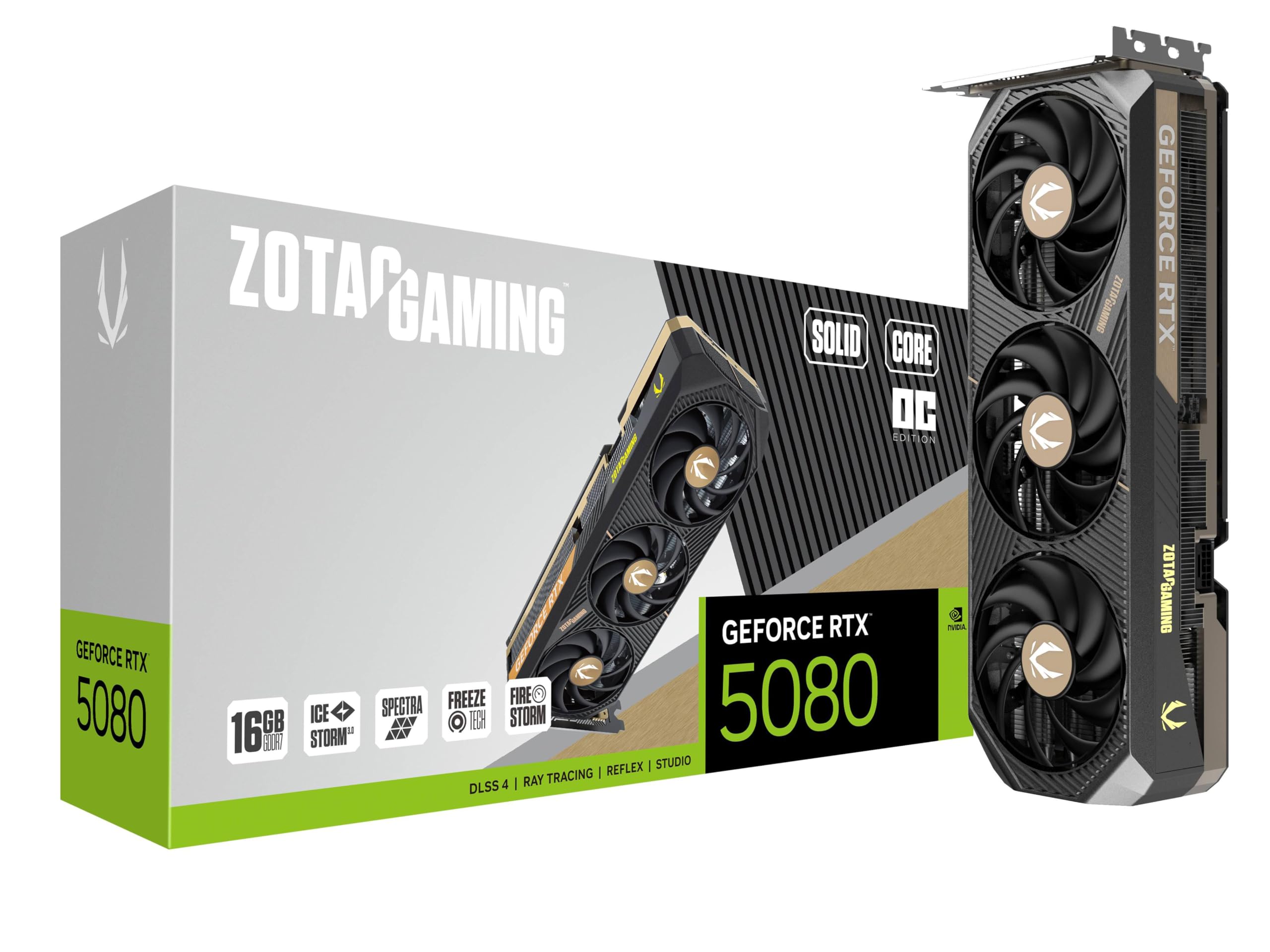
2. ZOTAC Gaming GeForce RTX 5080 Solid CORE OC DLSS 4 16GB GDDR7 256-bit 30 Gbps PCIE 5.0 Gaming Graphics Card
The compact 5080 that delivers 4K Cyberpunk 2077 at 66-88 FPS and stays whisper quiet.
If you want the best balance of price and performance in the current 5080 market, this ZOTAC card is it. At just 11.9 inches long and 2.2 inches wide, it is the most compact air-cooled card on this list — the PNY Triple Fan measures 16.1 inches long by 4.3 inches wide, which makes it a much easier fit in standard mid-tower cases. It still packs a vapor chamber cooling system (a sealed metal chamber that spreads heat evenly across the card) and three 90mm blade-link fans, so customers note it stays “whisper quiet” even during heavy gaming.
The real story is the performance. One reviewer noted Cyberpunk 2077 at 4K resolution with ray tracing on Ultra and DLSS enabled running between 66 and 88 FPS — that is smooth, real-world 4K gaming on today’s most demanding title. It also includes a GPU support stand in the box to prevent the card from sagging over time. Multiple buyers noted that it somehow maintained its original retail price, making it a rare “good buy” in a market where most 5080s are heavily marked up.
What makes it a value
- Excellent 4K gaming performance — Cyberpunk 2077 at 66-88 FPS with ray tracing
- Compact 2.5-slot design fits in smaller cases without sacrificing cooling
- Often available closer to MSRP than other models, according to buyers
The trade-off
- No factory overclock listed — you are paying for the stock 5080 speed with better cooling
- Some buyers had to wait for delivery due to high demand
Reach for this if: You prioritize value and want a card that fits in a standard case, runs quiet, and plays any game at 4K without the huge size or price of premium models.
Look elsewhere if: You want the absolute highest factory overclock or you are building a small form factor PC that needs an even shorter card.
3. PNY GeForce RTX™ 5080 Triple Fan
The reliable stock-speed 5080 that avoids the premium tax but requires a cavernous case.
This is the no-frills 5080 that focuses on delivering the core NVIDIA Blackwell experience without an extra factory overclock or fancy RGB. It uses a straightforward 3-fan air cooler that PNY secures to the I/O bracket with three screws — a design choice that reviewers point out makes the card feel more solid and less prone to droop than some other models. It is a straight-up 5080 that does 5080 things, as one reviewer put it, and for a lot of people that is exactly what they need.
The catch is size — at 16.1 inches long and 4.3 inches wide, this is the longest card on the list by a wide margin. You will need a full-tower case with serious clearance. There is also a notable noise concern: one buyer mentioned that the fans began “roaring like jet engines” when a graphically intensive game started, drowning out the game audio. Other buyers said the card was “almost 0 noise” and “top tier,” so that experience may be a defective unit, but it is worth knowing before you buy.
What you get
- Stock 5080 performance without paying for an overclock you may not need
- Three-screw I/O bracket design reduces card sag, per reviewer feedback
- Supports DLSS 4, Reflex, and NVIDIA Studio for creators
What to watch for
- Extremely long at 16.1 inches — verify your case can fit it
- Isolated reports of very loud fan noise under heavy gaming load
Works well for: Anyone who wants a pure, no-overclock 5080 at a more accessible price and has a large case with plenty of room.
skip it if: Your build is in a mid-tower or smaller case, or if you cannot risk the potential fan noise issue.
4. PNY NVIDIA GeForce RTX™ 5080 Epic-X™ ARGB OC Triple Fan, Graphics Card (16GB GDDR7, 256-bit, Boost Speed: 2775 MHz)

The showpiece 5080 that runs at 2775 MHz from the start and hits 3000 MHz with ease.
This is the fastest factory-clocked card on our list — the PNY Epic-X boosts to 2775 MHz right from the start, while the ASUS TUF Gaming OC runs at 2730 MHz. It is not a huge gap in real-world FPS, but it means this card is binned and ready for those who want to push further. One owner reported that it overclocked to 3000 MHz “with ease,” which is impressive for an air-cooled card. It also comes with a 2.99-slot design that is slightly slimmer than the ASUS TUF but still offers sturdy cooling.
The ARGB lighting on the fans is fully customizable, so it fits well in a showcase build with a glass side panel. Buyers also praise the included GPU anti-sag holder — a small support bracket that prevents the heavy card from bending over time. The thermal performance is excellent: one customer observed the card gets down toward 20°C at idle and hits up over 50°C under load, which is remarkably cool. The only downside is that like many 5080s right now, the price is high and may feel steep for the performance gain over a stock card.
The best parts
- Highest stock boost clock at 2775 MHz among reviewed models
- Easy manual overclock to 3000 MHz, per buyer reports
- Runs very cool — idle temps near 20°C and load temps around 50°C
The catch
- Premium price for a relatively small factory overclock gain
- Length not listed — likely similar to the PNY Triple Fan at over 16 inches
Built for: Enthusiasts who want the highest stock clock and enjoy the look of ARGB lighting in a glass case.
Not for: Budget-focused builders or anyone who does not care about a few extra MHz and wants to save money.
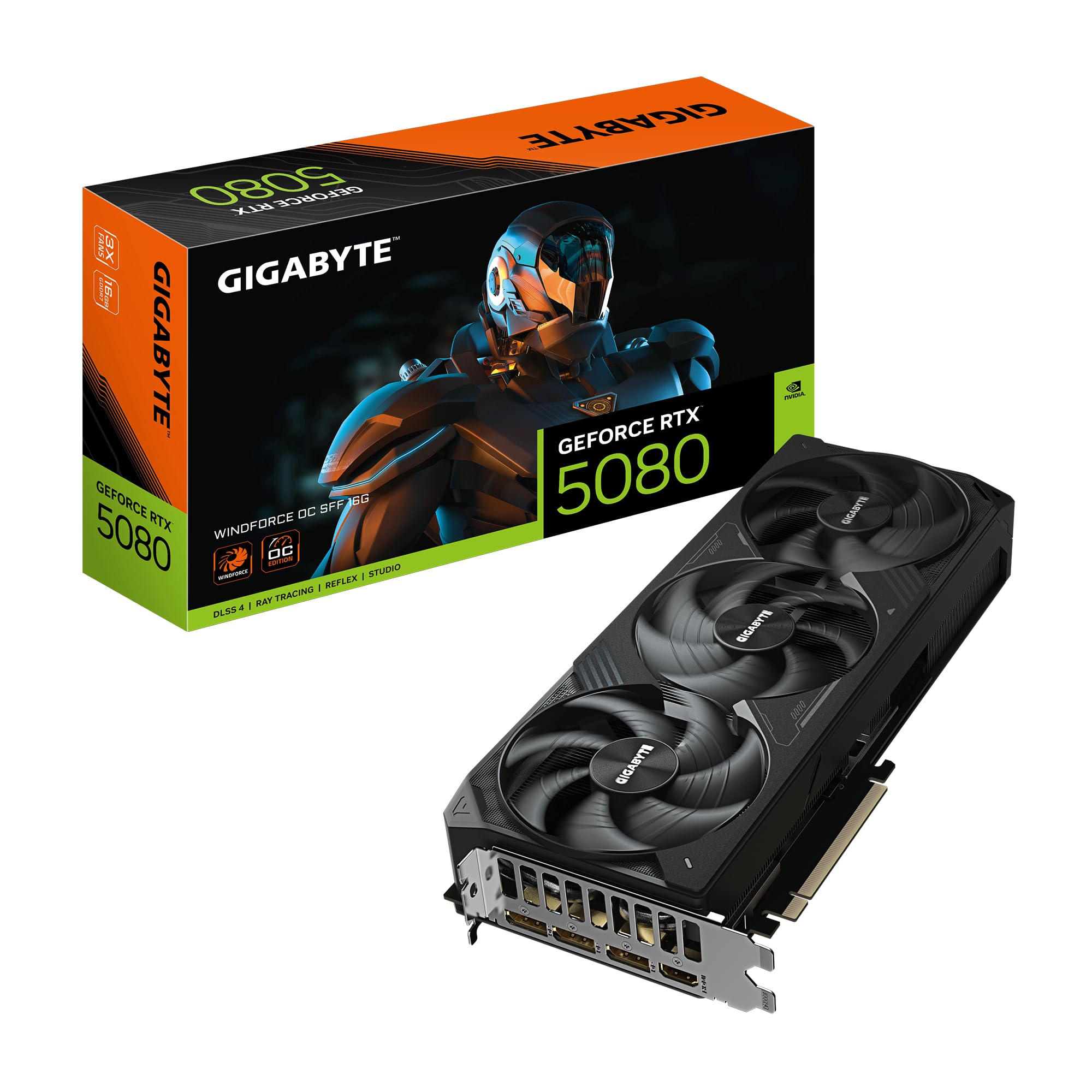
5. Gigabyte GeForce RTX 5080 WINDFORCE OC SFF 16G Graphics Card
The small form factor warrior that runs 4K path tracing at 60°C without breaking a sweat.
If you are building a compact PC and want a 5080 that fits without a fight, this is your card. At 11.97 inches long and 4.96 inches wide, it complies with NVIDIA’s SFF (Small Form Factor) spec, meaning it is designed to slide into smaller cases that usually struggle with today’s massive GPUs. One buyer installed it in a Fractal Terra — a famously tight case — and reported it ran at 70°C while maintaining its boost clocks, with only a quiet low-pitched hum as noise.
It ships with a 2670 MHz core clock and includes a Dual BIOS switch, so you can toggle between Performance mode (full fan speed for maximum cooling) and Silent mode (quieter fans with slightly warmer temps). Another reviewer said they undervolted their card to just 0.975 volts while hitting 3200 MHz, and it performed like a 4090 while staying at 55-60°C. That kind of headroom is rare in a card this compact, and it makes the WINDFORCE OC SFF a top pick for anyone who values space efficiency without sacrificing performance.
Why it fits
- Complies with NVIDIA’s SFF spec for easy installation in compact cases
- Dual BIOS lets you choose between quieter fans or maximum cooling
- Excellent undervolt potential — one buyer hit 3200 MHz at 55-60°C
The trade-off
- Plastic fan shroud feels less premium than metal alternatives
- Lower factory clock than the PNY Epic-X or ASUS TUF
The one for: Anyone building a small form factor (SFF) PC who wants 5080-class performance without needing a full tower.
Not ideal if: You prefer a heavier, all-metal build and do not mind a larger case that can fit a bigger card.
6. GIGABYTE GeForce RTX 5080 Gaming OC 16G Graphics Card, WINDFORCE Cooling System

The 5080 that overclocks to 3150 MHz easily and runs at 60°C under full load.
This Gigabyte Gaming OC card occupies the balance between price and overclocking potential. It comes with a 2.73 GHz factory clock, and buyers report that it overclocks to 3150 MHz on the GPU core and 3000 MHz on the memory without any trouble. That is significant — it means the cooler is well-engineered enough to handle a lot more heat than the stock settings generate. One reviewer described it as a “solid improvement” over their 3090 Ti and noted it fits easily in a Hyte Y70 case.
Staying cool is its superpower. Multiple buyers said the card sits around 60°C at full load and rarely needs its fans to spin at maximum speed, making it very quiet during gaming. Even in a warm room at 85°F, one user highlighted it only hit 65°C after a long session. It includes a versatile VGA holder and a 12V-2×6 power adapter. The only drawbacks are its size — 13.46 inches long — and the fact that the RGB lighting is described as “lackluster” by one owner, though that is a minor nitpick for a card that performs this well.
What impresses
- Easy manual overclock to 3150 MHz GPU and 3000 MHz memory
- Stays around 60°C under full load with very quiet fans
- Includes a versatile VGA holder for support
The drawbacks
- At 13.46 inches, it is longer than the SFF models — check clearance
- RGB lighting is less impressive than some alternatives
Best suited for: Enthusiasts who plan to manually overclock their card and want a cooler that can handle the extra heat without getting loud.
Not for: Anyone who wants a compact card for a small form factor build.
7. msi Gaming RTX 5080 16G SUPRIM Liquid SOC Graphics Card

The liquid-cooled 5080 that runs so cool and quiet you would forget it is inside your PC.
This MSI SUPRIM Liquid card is the most thermally advanced option available for the 5080. It uses a closed-loop liquid cooler with a 240mm radiator, so the GPU chip stays far cooler than any air cooler can manage. The trade-off is that you need space in your case for the radiator and its fans — but if you have the room, the payoff is huge. Buyers describe it as “the best 5080” and praise its “barely audible” fans even under heavy load. One reviewer called it a “room heater” in terms of how much heat it pulls from the card, but added that the GPU temps stay perfectly stable.
Performance is top-tier. With a 2760 MHz boost clock, it is one of the fastest cards from the start, and customers note minimums of 120 FPS and averages above 200 FPS in most AAA games. The liquid cooler also means it never throttles — even after hours of gaming, the card runs at its rated speed without any thermal slowdown. The main barrier is the price and the effort of installing the radiator, but for those who want the absolute best thermals and quietest operation, this is the undisputed choice on this list.
The advantages
- Liquid cooling keeps GPU temps very low and fans barely audible
- Extreme performance — reviewers point out 120 FPS minimum in AAA games
- Consistent clock speed without thermal throttling
The requirements
- Needs a 240mm radiator mounting space in your case
- Higher price than air-cooled models
The pick for: Enthusiasts who want the coolest and quietest 5080 possible and have a case that accommodates a liquid cooler.
pass on it if: You have a small case without radiator support, or you want to keep the build simple without extra cooling components.
8. MSI GeForce RTX 5080 16G Gaming Trio OC Graphics Card

The top-tier air-cooled 5080 that is all any gamer truly needs, according to one buyer.
This MSI Gaming Trio OC is a premium air-cooled card that offers excellent build quality and a sturdy cooling system called TRI FROZR 4, which uses three STORMFORCE fans to move air through a dense fin array. It runs at a 2.7 GHz boost clock and is designed for users who want high performance without the complexity of liquid cooling. The card supports both a Gaming mode and a Silent mode, letting you prioritize frame rates or noise levels depending on your mood.
One reviewer offered a blunt and insightful take: the 5080 is really all anyone needs for pure gaming. They argued that the 5090’s 32GB of VRAM provides no benefit to games and wastes power, so the 5080 is the sensible pick for gamers who do not also use their PC for professional work. Another buyer upgraded from an RTX 2060 and called it a “major upgrade,” noting they also upgraded their power supply from 650W to 1000W as a safety precaution. The only consistent complaint is the inflated market price, but the card itself earns high marks for style, stability, and quiet operation.
The strengths
- Excellent TRI FROZR 4 cooling keeps it quiet and cool
- Gaming and Silent mode options for flexibility
- Strong build quality and attractive design
The drawbacks
- Premium pricing, especially in the current market
- Maximum resolution listed as 4K (3840×2160), not 8K like many other 5080s
Great for: Gamers who want a premium air-cooled 5080 with excellent build quality and do not need the extra VRAM of a 5090.
Not for: Those who need 8K resolution support or want to save money on a more budget-friendly model.
9. NVIDIA GeForce RTX 5080 Founders Edition

NVIDIA’s own 5080 that packs a 2806 MHz boost clock into a surprisingly compact package.
The Founders Edition is NVIDIA’s own design, and it stands apart from the partner cards by prioritizing a compact, dual-slot form factor. It has the highest stock boost clock on this list at 2806 MHz, which is a small but distinct advantage over even the fastest partner cards. At just 2 pounds, it is also significantly lighter than the massive triple-fan coolers from other makers, and one reviewer noted that they did not feel the need for a GPU support bracket despite its bulk.
Performance is exactly what you expect from an NVIDIA-built card: excellent. One reviewer upgraded from an RTX 3080 Founders Edition and said performance is “great” and temperatures are “great” when playing graphically demanding games. Another upgraded from an RTX 4070 Founders Edition and called the difference “massive,” reporting consistent FPS of 200 on most games at high settings. The main downside is that it uses a PCI Express 4.0 interface instead of the newer 5.0 standard, and its maximum resolution is 3840×2160 rather than 7680×4320 like many partner cards. It is also frequently priced well above MSRP due to demand.
The benefits
- Highest stock clock on the list at 2806 MHz
- Compact dual-slot design fits in more cases than most 5080s
- Lightweight at 2 pounds — less stress on the motherboard slot
The limitations
- Uses PCIe 4.0 instead of the newer 5.0 standard
- Maximum resolution is 4K (3840×2160), not 8K
- Often listed at a high premium above MSRP
Choose this if: You want NVIDIA’s own design, the highest stock clock, and a card that fits in a wider range of cases without sag.
Consider another if: You need PCIe 5.0 support or 8K resolution output, or you want to avoid the premium price of the Founders Edition.
Understanding the Specs
Clock Speed (MHz)
Clock speed, measured in megahertz (MHz), tells you how fast the GPU core can process instructions per second. Every RTX 5080 chip is built on NVIDIA’s 4N process, so the core performance is similar across all models. The real difference is the “boost clock,” which is the speed the card targets under load. A higher number — like the Founders Edition’s 2806 MHz — means slightly more raw computing power, but the difference between the slowest and fastest stock clocks is small. Manual overclocking can push any 5080 well past its stock limit if the cooler can handle the heat.
Memory (GDDR7 and Capacity)
The 5080 uses 16GB of the latest GDDR7 memory across a 256-bit interface. This means the card can access a large pool of very fast memory, which is critical for 4K gaming and for running AI or creative workloads. GDDR7 is newer and faster than the GDDR6X found on the previous generation, so it moves data more quickly between the GPU and the frame buffer. The 16GB capacity is enough for today’s most demanding games at max settings, and for light professional work like video editing or 3D rendering, but power users who do heavy simulation work may want 24GB or more (which exists on the 5090).
FAQ
Does every RTX 5080 model have the same performance?
What is DLSS 4 and should I care about it?
Can my power supply handle a 5080?
Will a 5080 fit in my current PC case?
Is the RTX 5080 worth upgrading from an RTX 3080?
What is the difference between a factory-overclocked card and a stock card?
Should I get an air-cooled or liquid-cooled 5080?
Does the RTX 5080 support PCIe 5.0?
What is the G-Sensor on a 5080?
What safety features do these 5080 cards have?
Final Thoughts: The Verdict
For most buyers, the 5080 winner is the ASUS TUF Gaming OC because it combines a sturdy 3.6-slot cooling solution with a solid factory overclock and military-grade durability, all while staying whisper quiet. If you want the best value in a compact, whisper-quiet package that fits standard cases easily, grab the ZOTAC Solid CORE OC. And for the enthusiast who demands liquid-cooled silence and extreme overclocking headroom, the standout is the MSI SUPRIM Liquid SOC.
How We Picked
We do not accept paid placement. Every pick is matched to a real buyer and a real use-case; we do not hands-on test units.
Sources & Methodology
Specifications: manufacturer listings and product documentation. Review insights: verified customer reviews, as of July 2026. Pricing: not shown on this page (it changes often); check the current price via the retailer link.
As an Amazon Associate, Gadgets Feed earns from qualifying purchases. This does not affect which products we feature.
Related Guides
Product prices and availability are accurate as of the date/time indicated and are subject to change. Any price and availability information displayed on Amazon at the time of purchase will apply to the purchase of this product. As an Amazon Associate I earn from qualifying purchases.
CERTAIN CONTENT THAT APPEARS ON THIS SITE COMES FROM AMAZON. THIS CONTENT IS PROVIDED "AS IS" AND IS SUBJECT TO CHANGE OR REMOVAL AT ANY TIME.
Amazon and the Amazon logo are trademarks of Amazon.com, Inc. or its affiliates.