
Our readers keep the lights on and my morning glass full of iced black tea. As an Amazon Associate, I earn from qualifying purchases.
Specs are compiled from manufacturer listings and verified buyer reviews and can change over time — please confirm the key details on the product page before buying.
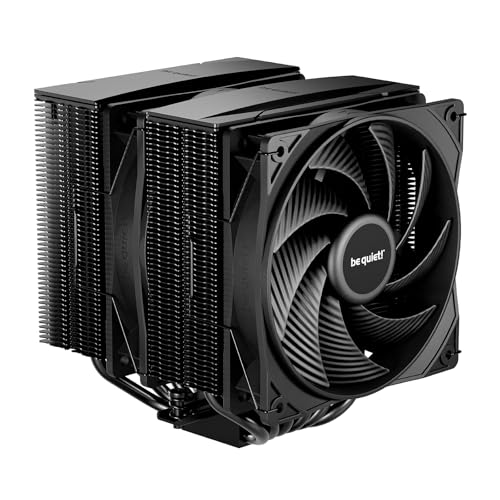
If you have just picked up a Ryzen 7 9800X3D, you already know it runs hot—especially when gaming or rendering. A proper air cooler is the smartest, most reliable way to keep those 3D V-Cache temperatures in check without the worry of a pump failing or a liquid loop leaking. But not every air cooler can handle the concentrated heat output of a high-end AMD chip, so you need one with enough heat pipes, surface area, and quiet fan control to do the job right.
I’m Min — the founder and writer behind Gadgets Feed. This guide is built by comparing the manufacturers’ published specifications and the patterns across verified customer reviews, so you get each pick’s real strengths and trade-offs instead of marketing spin.
You need an air cooler for 9800x3d that keeps your CPU from throttling under load without sounding like a jet engine. These seven picks balance cooling capacity, noise levels, and case compatibility so you can pick the right one for your build.
Our Picks at a Glance

How To Choose The Best Air Cooler For 9800X3D
Picking an air cooler for a high-end CPU like the 9800X3D is straightforward once you know the three key specs that separate a capable cooler from one that will leave your fans screaming. Here is what to look for.
Heat Pipes and Fin Stack Density
The number of heat pipes—usually six or more—is the first clue to how well a cooler can pull heat away from the processor. A denser fin stack (the array of aluminum fins that dissipate that heat) also matters. A cooler with 6 x 6mm heat pipes and a tall, tightly packed fin tower, for example, handles sustained loads like Cinebench runs far better than a basic single-tower with four pipes.
Noise Level and Fan Quality
A cooler that runs at 34 decibels (dB) under full load is noticeably louder than one at 25 dB. For a 9800X3D, you want fans that move enough air (measured in cubic feet per minute, or CFM) without sounding like a vacuum cleaner. A fluid-dynamic bearing or S-FDB bearing fan will stay quiet for years.
RAM and Case Clearance
A double-tower cooler can overhang your RAM slots—if your memory sticks have tall heat spreaders, you need a cooler with an offset design that shifts the tower away from the motherboard. Also measure your case width (most of these coolers run 154-168 mm tall) to make sure the side panel closes.
Quick Comparison
| Model | Best For | Heat Pipes | Noise Level | Max Fan Speed | Amazon |
|---|---|---|---|---|---|
| be quiet! Pure Rock Pro 3★ Best Overall | Mid-Range Quiet Cooling | 6 | 34.8 dB | 2000 RPM | Amazon |
| Noctua NH-D15 G2Top Performer | Ultimate Air Performance | 8 | 24.8 dB | 1500 RPM | Amazon |
| be quiet! Dark Rock 5 | Silent Premium Builds | 6 | 29.8 dB | 2100 RPM | Amazon |
| Thermalright Phantom Spirit 120SE | Best Value Performance | 7 | 25.6 dB | 1500 RPM | Amazon |
| Scythe Mugen 6 | Compact Single Tower | 6 | — | 2000 RPM | Amazon |
| Cooler Master Hyper 620S | Budget Dual Tower | 6 | 27.2 dB | 1750 RPM | Amazon |
| Thermalright Peerless Assassin 120 SE ARGB | White Builds / Value | 6 | 25 dB | 1550 RPM | Amazon |
In‑Depth Reviews
1. be quiet! Pure Rock Pro 3
Our pick — over 4.5★ from 4,500+ verified ratings; the strongest balance of quality and price.
A solid mid-range dual-tower that runs cooler than stock—but not as quietly as its premium sibling.
The Pure Rock Pro 3 is a well-built double-tower air cooler with 6 high-performance copper heat pipes and a nickel-plated base for efficient heat transfer. Its Pure Wings 3 120mm PWM fan reaches 2000 RPM and pushes a good amount of air, though the 34.8 dB noise level is noticeably louder than the Dark Rock 5’s 29.8 dB. One verified buyer with an AM4 3800X saw temperatures drop from 84°C before installation to 72°C after a one-hour stress test—a solid 12-degree improvement.
The offset design increases RAM and VRM cooler compatibility, and the height of the front fan can be adjusted if you need extra clearance for tall memory modules. Owners mention the pin-and-socket mounting system can be a bit fiddly to seat compared to the metal mounting bridge on the Dark Rock series. However, the pre-applied thermal paste and self-explanatory kit speed up the install if you are doing a fresh build.
What works well
- Dual-tower design with 6 copper heat pipes handles overclocked CPUs
- Offset mounting option for AM5 centers the base over the CPU hotspot
- Adjustable front fan height improves RAM clearance flexibility
What to note
- At 34.8 dB it is the loudest cooler in this lineup at full speed
- Installation is trickier than competitors with tool-free mounting bridges
Who it is for: A builder who wants reliable dual-tower cooling and a solid brand name at a mid-range price point, and does not mind slightly higher fan noise.
Consider instead: If noise is your top priority, the Phantom Spirit 120SE offers similar performance at a 9 dB lower rating for about the same cost.
2. Noctua NH-D15 G2
The air-cooling king returns—bigger, quieter, and packing eight heat pipes to keep your 9800X3D frosty.
The second-generation NH-D15 does not just rest on its legendary reputation; it genuinely improves the formula. With 8 heat pipes and 20% more surface area than the original, it handles even the hottest AMD chips without breaking a sweat. A buyer running an Intel Core Ultra 9 285K reported the cooler holds that 250-watt CPU at a steady 80-81°C under full load—so a 9800X3D will feel like an easy afternoon.
The included NF-A14x25r G2 140mm fans top out at just 24.8 decibels, making this one of the quietest high-performance coolers you can buy. The offset design clears the top PCIe slot on most motherboards, and you get 59mm of RAM clearance when running a single fan—though you will have only 32mm if you keep both fans. The SecuFirm2+ mounting kit includes its own screwdriver and the excellent NT-H2 thermal paste.
What makes it special
- 8 heat pipes and 20% more fin area than the previous NH-D15
- Extremely quiet at 24.8 dB maximum noise level
- Includes NT-H2 thermal paste and a Torx screwdriver for easy install
The trade-offs
- Massive size—requires a full-size case and careful RAM planning
- Premium price, some all-in-one liquid coolers cost less
- In dual-fan mode, RAM clearance drops to 32mm
Who it fits: Anyone building a no-compromise AM5 rig who wants the absolute best air cooling available, with silence as a bonus.
The one catch: Its size and price make it overkill for a budget build or a small chassis—measure your case twice.
3. be quiet! Dark Rock 5

Asymmetrical design, premium silence, and ceramic-coated fins make this the refined choice for a quiet powerhouse.
The Dark Rock 5 keeps your CPU cool with 6 copper heat pipes and a dense aluminum fin array coated in black ceramic particles for better heat transfer. Its Silent Wings 4 120mm PWM fan (a fan that adjusts speed automatically) uses a fluid-dynamic bearing and a 6-pole motor to push air at up to 2100 RPM while staying at just 29.8 decibels—noticeably quieter than the Pure Rock Pro 3’s 34.8 dB rating. Buyers report it cools a Ryzen 7800X3D without fuss, and the offset design leaves RAM slots completely unrestricted so you can use any memory height.
Installation is made easier by a preinstalled mounting bridge and an included long-neck screwdriver—a small touch that saves frustration. The magnetic mesh top cover hides the heat pipe ends, giving the build a clean, professional look. If your 9800X3D runs with a high-quality case fan setup, this cooler pairs perfectly.
Why it stands out
- Asymmetrical offset gives full RAM clearance regardless of memory height
- Ceramic-coated fins improve heat transfer between the heat sink and air
- Includes a long-neck screwdriver, preinstalled mounting bridge
Considerations
- Air flow capacity of 55 CFM is lower than some competitors
- Single fan included; a second fan must be added separately for extra performance
- 2.2-pound weight may require checking motherboard backplate strength
Best suited for: A quiet-focused build where noise matters more than raw fan speed, and you need unrestricted RAM slots.
skip it if: You want maximum air flow without adding a second fan—other options like the Phantom Spirit move more air at stock.
4. Thermalright Phantom Spirit 120SE

Seven heat pipes and a whisper-quiet fan curve for a price that feels almost too good to be true.
The Phantom Spirit 120SE keeps surprising buyers with its performance. It uses 7 x 6mm heat pipes with Thermalright’s AGHP 4.0 technology (a design that prevents performance loss when the cooler is mounted vertically or horizontally), and its twin TL-C12B V2 fans push 66.17 CFM of air at just 25.6 decibels. Compared to the Scythe Mugen 6, it moves air (66.17 CFM vs 60.29 CFM) while running at a lower 1500 RPM.
The 154mm height fits a wide variety of cases, and the offset design clears the top PCIe slot. A few buyers mention the stock fans can develop a slight noise after months of use, but swapping them for Arctic P12 or Noctua fans is straightforward given the standard 120mm size. The included mounting kit supports both AM4 and AM5 sockets without extra purchases.
The strong points
- 7 heat pipes in a dual-tower design at an entry-level price
- Very quiet under load—25.6 dB max
- AGHP 4.0 technology works well in both horizontal and vertical orientations
Potential drawbacks
- Stock fans may develop bearing noise after extended use for some owners
- Rival coolers offer slightly lower max noise levels for ultra-quiet setups
Reach for this if: You want near-flagship cooling performance without spending flagship money—this is the best dollar-per-degree value today.
Look elsewhere if: You prefer a single-tower simpler install or need a cooler guaranteed to fit under a low-profile case.
5. Scythe Mugen 6

A single-tower champion that packs 45% more fins into its height than the previous generation.
The Mugen 6 series from Scythe stands out for its dense fin stack: a 45% increase in fin count over its predecessor, packed into a 154mm tall single-tower heatsink. Six nickel-plated copper heat pipes draw heat away from the CPU, and the Wonder Tornado 120mm fan spins up to 2000 RPM. One verified reviewer running a Ryzen 9850X3D reported stress test temps in the high 90s°C, never crossing the 100°C threshold—solid evidence that this compact cooler can handle the 9800X3D under heavy load. The offset design keeps the front RAM slots and VRM heatsinks completely clear.
The 5th-generation H.P.M.S. spring-loaded mounting system is easy to work with and works on both AMD AM5 and Intel LGA1700 from the start. At 60.29 CFM it moves less air than the Phantom Spirit 120SE’s 66.17 CFM, but it runs quieter than the Pure Rock Pro 3 thanks to a more refined fan blade design. If your case cannot accommodate a double-tower beast, this single-tower is a smart compromise.
Why it works
- Denser fin array (45% more fins) in a compact single-tower size
- Offset design provides excellent RAM and VRM clearance
- Reliable spring-loaded mounting system simplifies installation
Limitations
- Air flow at 60.29 CFM is lower than the top dual-tower options
- Fan noise becomes perceptible at max 2000 RPM, per some reviews
Ideal for: A mid-tower or compact build where you want strong cooling but cannot fit a large dual-tower cooler.
Not ideal if: You need the absolute lowest noise levels—the Phantom Spirit 120SE runs quieter at comparable air flow.
6. Cooler Master Hyper 620S

A dual-tower cooler with six heat pipes and a noise rating that undercuts many pricier alternatives.
The Hyper 620S from Cooler Master brings a classic dual-tower design with 6 silver nickel-plated copper heat pipes and two 120mm PWM fans that spin from 650 to 1750 RPM. At 27.2 decibels, it is quieter than the Pure Rock Pro 3 despite being a similar form factor. It is designed to handle AMD R9 and Intel i7 processors, so a 9800X3D is within its comfort zone. One buyer with an overclocked 11700KF (all-core 5.1 GHz) reported it worked just fine without issues.
The 154.9mm height fits most mid-tower cases, but the front fan can overhang your RAM slots—reviewers mention having to offset the fan slightly to clear tall memory modules. The redesigned brackets and simplified mounting process make installation on AM5 and LGA1700 much more straightforward than older Cooler Master kits. ARGB lighting on the fan adds a subtle glow for builders who want a bit of color.
Pros
- Dual-tower setup with 6 copper heat pipes at a budget-friendly price
- PWM fans adjust from 650 to 1750 RPM for flexible noise/performance
- Redesigned brackets simplify installation on AM5 and LGA1700
Cons
- RAM clearance requires moving or raising the front fan
- ARGB version may not suit a no-RGB stealth build
Grab this for: A value-focused build where dual-tower cooling and low noise matter, and you are fine adjusting the fan position for RAM clearance.
Pass if: You need guaranteed RAM access without moving fans—look at the Scythe Mugen 6 or be quiet! Dark Rock 5 instead.
7. Thermalright Peerless Assassin 120 SE ARGB White

A white-themed dual-tower that delivers massive cooling for less than many single-tower alternatives.
The Peerless Assassin 120 SE ARGB White uses 6 x 6mm heat pipes with AGHP technology (designed to prevent gravity-related performance loss in any orientation) and a dual-tower aluminum fin array. Its two TL-C12C-S 120mm fans spin up to 1550 RPM, push 66.17 CFM each, and max out at just 25 decibels—the quietest rating in this list alongside the Phantom Spirit. A buyer with a Ryzen 7800X3D reported temps in the 70s under load, calling it a ridiculously good cooler for under.
This version adds colorful ARGB lighting to the fan hubs, which you can sync with your motherboard. The white finish matches all-white builds cleanly. Note that tall RAM modules may require moving the front fan upward by about 3/4 inch—there is a recessed mounting position for that. The Y-splitter cable includes one 4-pin and one 3-pin slave connector, so both fans get power but only the master reports speed.
Highlights
- White ARGB aesthetic for coordinated themed builds
- Quiet operation at 25 dB maximum noise level
- Same cooling core as the standard Peerless Assassin at a lower price
Caveats
- RAM clearance may require lifting the front fan for tall modules
- ARGB header cable is short; an extension may be needed for some motherboards
Best for: A white-themed AM5 build where you want great cooling and subtle ARGB without overspending.
Consider otherwise: If you do not care about color or lighting, the standard Phantom Spirit 120SE costs about the same and runs even quieter.
Understanding the Specs
Heat Pipes and TDP
The number of heat pipes—typically 6 or 8—directly affects how fast heat moves from the CPU base to the fins. More is usually better for a high-wattage chip like the 9800X3D. A cooler with 7 or 8 pipes handles sustained loads better than one with 6, but the fin density and fan quality also matter. Look for at least 6 pipes with 6mm diameter for this processor.
Noise Level in Decibels (dB)
Every 10 dB increase sounds about twice as loud to your ears. A cooler running at 34.8 dB (the Pure Rock Pro 3) will be noticeably audible in a quiet room, while one at 24.8 dB (the NH-D15 G2) is nearly whisper-quiet. Pay attention to this number if you game without headphones or keep your PC on your desk.
FAQ
Will a single-tower air cooler handle a 9800X3D?
Do I need a dual-tower or is a single-tower enough?
How tall can my RAM be with these coolers?
Will these coolers fit in a mid-tower case?
How often do I need to replace thermal paste?
Is an air cooler safer than liquid cooling for AM5?
What does offset mounting mean for AM5?
Can I reuse my current cooler from an Intel build on AM5?
Final Thoughts: The Verdict
Across the board, the air cooler for 9800x3d winner is the Thermalright Phantom Spirit 120SE because it delivers 7 heat pipes, near-silent 25.6 dB operation, and excellent 66.17 CFM air flow at a fraction of the cost of premium options. If you want uncompromising cooling with legendary build quality, grab the Noctua NH-D15 G2. And for a clean white build with ARGB and quiet fans, the Thermalright Peerless Assassin 120 SE ARGB White is tough to top.
How We Picked
We do not accept paid placement. Every pick is matched to a real buyer and a real use-case; we do not hands-on test units.
Sources & Methodology
Specifications: manufacturer listings and product documentation. Review insights: verified customer reviews, as of July 2026. Pricing: not shown on this page (it changes often); check the current price via the retailer link.
As an Amazon Associate, Gadgets Feed earns from qualifying purchases. This does not affect which products we feature.