
Our readers keep the lights on and my morning glass full of iced black tea. As an Amazon Associate, I earn from qualifying purchases.
Specs are compiled from manufacturer listings and verified buyer reviews and can change over time — please confirm the key details on the product page before buying.
Finding a HOTAS that doesn’t cost more than your gaming rig is the real challenge in flight simming. A good stick and throttle setup pulls you into the cockpit, but the premium price tags on many setups can keep that experience out of reach. You want responsive controls and enough buttons to manage a complex aircraft without spending hundreds of dollars.
I’m Min — the founder and writer behind Gadgets Feed. This guide is built by comparing the manufacturers’ published specifications and the patterns across verified customer reviews, so you get each pick’s real strengths and trade-offs instead of marketing spin.
Whether you are landing an airliner in Microsoft Flight Simulator or dogfighting in War Thunder, this roundup of the best budget hotas options helps you find the controls that fit your wallet and your flying style.
Our Picks at a Glance


How To Choose The Best Budget HOTAS
A HOTAS (Hands On Throttle And Stick) puts the essential flight controls right under your fingers. For a budget-oriented buyer, the key is finding a unit that gives you enough axes and buttons for your chosen sim without unnecessary extras that drive up the price. Focus on compatibility, the number of programmable inputs, and the quality of the joystick mechanism.
Compatibility with Your Platform
The first filter is what you intend to play on. Some HOTAS setups are built strictly for PC, while others come with official licenses for Xbox. If you play on a console, look for the explicit compatibility tags like “Xbox Series X|S” or “Officially Licensed by Microsoft.” Plug-and-play support on your platform saves you hours of fiddling with driver software.
Programmable Buttons and Axes
The number of buttons and axes determines how many in-game functions you can control without reaching for your keyboard or mouse. A typical entry-level HOTAS offers around 14 buttons and 4 or 5 axes (for pitch, roll, yaw, and throttle). More advanced sims, like DCS World, benefit from a higher button count — closer to 16 or more — so you can map things like landing gear, flaps, and weapon systems independently.
Build Quality and Adjustability
Budget HOTAS units are often made of plastic, but good internal mechanics make the difference between a stick that feels precise and one that feels sloppy. Adjustable resistance in the joystick lets you tune the feel for different aircraft types. A stable base with suction cups or a weighted design prevents the unit from sliding across your desk during aggressive maneuvers.
Quick Comparison
| Model | Best For | Buttons | Platform | Weight | Amazon |
|---|---|---|---|---|---|
| Thrustmaster T-Flight HOTAS One★ Best Overall | Best Overall Budget Pick | 14 | Xbox / PC | — | Amazon |
| Thrustmaster MSFS 2024 Collector EditionCollector’s Pick | Best for MSFS 2024 | 14 | Xbox / PC | 2040 g | Amazon |
| Logitech G X52 Pro | Best for PC Customization | 16 | PC | 5.1 lbs | Amazon |
| HORI HOTAS Flight Stick | Best for Console Gamers | 16 | Xbox / PC | 2.59 kg | Amazon |
| Logitech G X56 (Renewed) | Best for Hardcore Sims | 16 | PC | — | Amazon |
| PXN-2119Pro | Budget Entry-Level | 16 | PC | 1.92 kg | Amazon |
In‑Depth Reviews
1. Thrustmaster T-Flight Hotas One Flight Stick & Throttle – XBOX & PC
The Thrustmaster T-Flight Hotas One gives you console and PC compatibility without the usual premium price tag.
You get a full HOTAS setup with a detachable throttle, so you can place it together on a desk or split it apart for a more realistic cockpit feel. The 14 programmable buttons and the hat switch let you map landing gear, views, and weapons without reaching for a keyboard. A key feature here is the adjustable joystick resistance — it lets you stiffen the stick for a fighter jet or loosen it for a commercial airliner.
Buyers report the stick feels substantial and responsive for the price, though one reviewer noted the price dropped right after ordering and had to cancel and reorder. The throttle can feel a bit loose, barely staying in place for some users. You also get a connection port for the Thrustmaster TFRP rudder pedals, so you have an upgrade path later without replacing the whole unit.
What Shines
- Works on both Xbox and PC with plug-and-play setup
- Detachable throttle gives flexible placement options
- Adjustable resistance lets you tune the feel per aircraft type
The Trade-Offs
- All-plastic construction may slide under heavy use at the gimbal limit
- Throttle tension is loose for some users, barely staying where set
Who it fits: The best all-around budget starter for anyone playing flight sims on Xbox or PC who wants a proven, widely-supported stick.
The one catch: The throttle lacks friction, so you may need to mod it for stable position hold during long flights.
2. Thrustmaster T-Flight Hotas One MSFS 2024 Collector Edition – XBOX & PC
This Collector Edition is tuned for Microsoft Flight Simulator 2024 and offers a white finish that stands out on any desk.
It packs 10-bit precision across 5 axes, including a Z-axis rudder control that lets you steer on the ground and coordinate turns in the air without needing separate pedals. The 14 action buttons and rapid trigger map directly to the aircraft systems in MSFS 2024. You get the same detachable throttle module as the standard T-Flight One, so you can place the throttle and stick wherever works for your setup. Its package dimensions are 9.53 x 10.43 x 10.39 inches, making it significantly more compact than the standard unit which measures 20.47 x 11.42 x 22.24 inches.
Owners mention that the throttle moves smoothly and gives good control during takeoff, cruising, and landing. One reviewer described it as a “great entry-level HOTAS” that is plug and play for MSFS 2024 on Xbox Series X and PC. The dual rudder system — controlling yaw via the joystick twist or an integrated lever on the throttle — gives you options depending on the aircraft you are flying.
What Shines
- Officially licensed for Microsoft Flight Simulator 2024
- 10-bit precision with dual rudder control options
- True plug-and-play setup on Xbox and PC
The Trade-Offs
- Priced slightly higher than the standard T-Flight One for the same core mechanics
Perfect for: MSFS 2024 fans who want a matching licensed controller and prefer the compact white design.
Look elsewhere if: You need rudder pedal support from day one, as this unit uses Z-axis and lever rudders only.
3. Logitech G Saitek X52 Pro Flight Control System
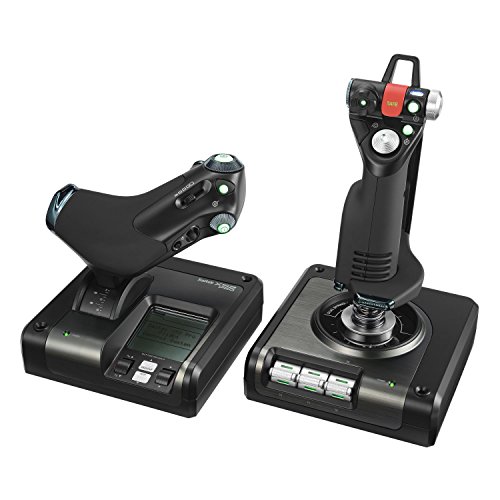
The X52 Pro brings a PC-focused feature set with an LCD screen and illuminated buttons for late-night flying sessions.
This is a step up in functionality for flight sim enthusiasts on Windows. You get 16 programmable buttons, a progressive throttle with adjustable resistance and detents for Afterburner and Idle positions, and a multi-function LCD display that shows game data. The stick uses a contact-less technology on the X and Y axes with a constant spring force, which means smoother, more durable precision than cheaper potentiometer-based sticks. The 5-position handle adjustment system lets you fit the grip to your hand size, which is a welcome detail for longer sessions.
One reviewer called it an “amazing HOTAS” that does the job flawlessly for Elite Dangerous. Customers note that it needs lubricant from the start to fix a slight grinding feel in the spring mechanism, which is a common DIY fix. The software requires some configuration, specifically disabling clutch mode and pinkie trigger settings for titles like Elite Dangerous and War Thunder. At 5.1 lbs it is a substantial desk presence that stays put.
Why It Stands Out
- LCD multi-function display shows game data without alt-tabbing
- Contact-less centering mechanism for long-term precision
- Adjustable throttle detents for idle and afterburner zones
Potential Downsides
- Requires driver installation and software tweaking for some games
- Some units have reported stick drift or button defects from the start
Tops for: PC simmers who want an advanced feature set — including an LCD screen and adjustable throttle detents — for under.
Not for: Console gamers; this is strictly a PC peripheral with no Xbox or PlayStation support.
4. HORI HOTAS Flight Stick Designed for Xbox Series X|S, Xbox One and PC

HORI delivers an officially licensed Xbox stick with a separate throttle and an integrated headset jack for clear comms mid-flight.
If you are primarily on Xbox Series X|S or Xbox One, this HORI stick gives you full HOTAS controls — a separate joystick and throttle unit — without any compatibility guesswork. The 16 buttons are laid out for console-friendly access, and the adjustable sensitivity settings let you dial in the response curve for different aircraft. The integrated headset jack is a console-native feature that lets you plug your gaming headset directly into the controller for in-game chat.
Reviewers are split. One buyer says their son is “well pleased” and calls it “very well designed.” But another reviewer flags a major limitation: there is no twist function for rudder control, so you cannot yaw the aircraft without buying separate rudder pedals. Some users also report compatibility issues with specific titles like Ace Combat 7, so check your game library before buying. The unit weighs 2.59 kilograms, giving it a heavy desk presence but also requiring space.
Console Perks
- Officially licensed by Microsoft for guaranteed Xbox compatibility
- Integrated headset jack for in-game chat
- Separate throttle and stick for a genuine HOTAS layout
Console Drawbacks
- No twist rudder control; you must buy separate pedals for yaw
- Some plastic buttons on the throttle are non-functional and permanently glued
Reach for this if: You are an Xbox-first gamer who wants a heavy, licensed HOTAS with a headset jack and doesn’t mind missing twist rudder.
Look elsewhere if: You play Ace Combat 7 or need twist rudder for helicopters — this stick lacks both.
5. Logitech G X56 H.O.T.A.S Throttle and Joystick (Renewed)

The X56 is built for deep immersion with over 189 programmable controls and a 4-spring system for adjustable stick force.
This renewed unit is aimed at the serious PC simmer. You get 16-bit precision on the aileron and elevator axes thanks to hall-effect sensors (magnetic position sensors that last longer than mechanical contacts). The twin throttles have a friction adjuster and a lock, letting you control separate engines in multi-engine aircraft or use one throttle for collective and one for thrust in helicopters. The 4-spring system in the stick lets you swap between light and heavy resistance. The X56 also features a mini analog stick on the throttle for controlling pitch, roll, and yaw independently, which is ideal for space sims like Star Citizen.
One reviewer found the refurb unit excellent, noting the throttle resistance is excellent for fine RPM control in DCS World. Another mentioned the stick has a slight right bias and some clicking during quick maneuvers, but no in-game effect. The RGB backlighting can be customized via software to match your gaming rig. Reviewers advise downloading drivers for Windows 10 instead of 11 to avoid setup issues.
High-End Features
- Hall-effect sensors for precise, long-lasting tracking
- Twin throttles with friction adjuster for multi-engine control
- 4 interchangeable springs for custom stick force
Renewed Risks
- Some units arrive dusty, dented, or with stick drift and ghost buttons
- Large, tall bases require significant desk space and may be uncomfortable
Best for: DCS World and Star Citizen pilots who want a high-button-count setup with hall-effect sensors on a budget.
Not for: First-time buyers or anyone wary of refurbished electronics — quality control is inconsistent across units.
6. PXN-2119Pro Flight Simulator Controls Flight Stick with Vibration
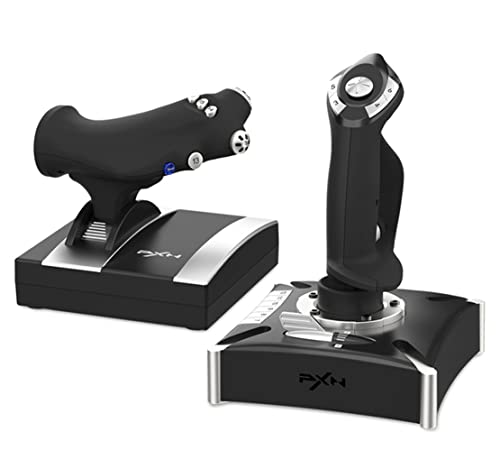
The PXN-2119Pro tries to undercut everyone with a low price and dual-vibration motors for engine feedback.
You get 16 programmable function keys, an 8-way POV hat switch (a directional control you push with your thumb), a rapid-fire trigger, and a separate throttle control with a damping feel. The built-in dual vibration motors aim to simulate airflow, turbulence, and engine feedback for a more rich experience. The heavy-duty base uses strong suction cups to lock it to your desk. It works with PC (Windows 7/8/10) and most flight sims including X-Plane, War Thunder, and Lock On: Flaming Cliffs 3.
Reviewers point out significant driver and safety issues. One reviewer stated “Windows 10 and Norton determined the driver is HARMFUL,” calling it malware. The driver installation process is convoluted — you must go to the PXN official website, download a separate driver, and follow a multi-step process. Multiple reviews mention the unit is not supported by Microsoft Flight Simulator 2020 from the start. The included DVD has instructions in Chinese, and the hardware often fails to be recognized by games.
Budget Lures
- 16 programmable buttons for the lowest price
- Dual vibration motors for turbulence feedback
- Suction cups on the base for desk stability
Critical Flaws
- Drivers flagged as harmful by Windows Defender and Norton
- Not compatible with many modern flight sims without manual configuration battles
Only consider if: You are comfortable with extremely manual driver setups, can verify the hardware works with your specific sim, and are willing to risk security flags on the software.
Skip this if: You want a plug-and-play experience, a safe download process, or anything resembling modern compatibility — this is a gamble.
Understanding the Specs
Programmable Buttons & Axes
The number of programmable buttons determines how many in-game functions you can map directly to your HOTAS without reaching for the keyboard. More buttons mean you can assign landing gear, flaps, weapon systems, and view controls to individual switches. The number of axes (usually 4 or 5) controls pitch, roll, yaw, and throttle — a fifth axis is often used for a secondary throttle or a slider for propeller pitch in aircraft like the Cessna.
Joystick Mechanism & Resistance
The mechanism inside the joystick base defines how the stick feels. Budget sticks use a spring-and-centering mechanism with a rubber gimbal or a plastic ball joint. Adjustable resistance lets you tighten or loosen the spring force, which helps you tune the stick for different flight models. High-end options like the Logitech X56 use hall-effect sensors — magnetic sensors that track position without physical contact, giving longer life and smoother movement than cheaper potentiometer-based systems.
FAQ
Will a PC HOTAS work with my Xbox Series X?
What is the difference between 5 axes and 4 axes on a budget HOTAS?
Do I need rudder pedals with a budget HOTAS?
How many buttons do I need for Microsoft Flight Simulator 2024?
Can I use a budget HOTAS for space sims like Star Citizen?
Is a twist-grip rudder better than a throttle lever rudder?
How long does a budget HOTAS typically last?
Does a budget HOTAS work with PlayStation 5?
What does “detachable throttle” mean for my desk setup?
Why do some budget HOTAS sticks have a blue or white wire?
Final Thoughts: The Verdict
Across the board, the best budget hotas winner is the Thrustmaster T-Flight Hotas One because it balances Xbox and PC compatibility with 14 programmable buttons and a detachable throttle at a very accessible price. If you want a PC-focused setup with an LCD screen and more advanced features, grab the Logitech G X52 Pro. And for the deepest control surface count and hall-effect sensors without paying full retail, the renewed Logitech G X56 is a solid choice for hardcore simmers.
How We Picked
We do not accept paid placement. Every pick is matched to a real buyer and a real use-case; we do not hands-on test units.
Sources & Methodology
Specifications: manufacturer listings and product documentation. Review insights: verified customer reviews, as of July 2026. Pricing: not shown on this page (it changes often); check the current price via the retailer link.
As an Amazon Associate, Gadgets Feed earns from qualifying purchases. This does not affect which products we feature.