
Our readers keep the lights on and my morning glass full of iced black tea. As an Amazon Associate, I earn from qualifying purchases.
Specs are compiled from manufacturer listings and verified buyer reviews and can change over time — please confirm the key details on the product page before buying.
Staring at a single laptop screen while juggling spreadsheets, stock tickers, and a Zoom call is a productivity nightmare. A 3 screen docking station solves this by letting you plug one USB-C cable into your laptop and instantly drive three external monitors, plus all your peripherals, with stable power and wired internet. The challenge is picking the right one — especially since many laptops, particularly Apple Silicon Macs, natively limit you to one external display.
I’m Min — the founder and writer behind Gadgets Feed. This guide is built by comparing the manufacturers’ published specifications and the patterns across verified customer reviews, so you get each pick’s real strengths and trade-offs instead of marketing spin.
Whether you run a MacBook Air M1 or a Dell XPS, this roundup of the 3 screen docking station market breaks down the top performers by their port counts, charging power, and real-world reliability so you can finally ditch the adapter tangle.
Our Picks at a Glance


How To Choose The Best 3 Screen Docking Station
Not all triple-monitor docks are created equal. The biggest divide is whether the dock uses DisplayLink technology (which adds extra displays through software) or relies on your laptop’s native display outputs (often limited to one or two screens). For most MacBooks with M-series chips, DisplayLink is a must. For Windows laptops with full-featured USB-C ports, native support is more common. You also need to check the dock’s power delivery wattage — 100W is ideal for charging a 16-inch MacBook Pro or Dell XPS at full speed.
Port Count and Layout
A dock with a higher port count like 18 or 15 may sound better, but you also want those ports to be usefully placed. Look for at least one USB-C data port on the front for quickly plugging in a flash drive, plus a dedicated Ethernet port for stable internet. The number of video ports (HDMI and DisplayPort) determines your monitor setup flexibility — 3x HDMI is common, but having a mix of HDMI and DisplayPort (like 2x HDMI + 1x DP) gives you more cable options.
Power Delivery and Charging
The dock’s included power adapter supplies electricity to both the dock and your laptop. A 120W adapter typically provides 100W of Power Delivery (PD) to your laptop, which is enough to charge most ultrabooks and MacBooks at full speed. Docks with only 60W or 85W PD may charge a smaller machine like a MacBook Air, but they might slowly drain a larger Pro model under heavy load. The wattage of the power adapter itself (not just the laptop charging port) matters for overall stability — 120W or 130W adapters give you headroom so the dock doesn’t drop connections when fully loaded.
Compatibility and Driver Requirements
If you use a Mac with an M1, M2, M3, or M4 chip, most triple-display docks require installing the free DisplayLink driver from the manufacturer. Without it, macOS limits you to one external screen. Windows laptops with a USB-C port that supports DisplayPort Alt Mode can often run three monitors natively without extra software. However, both platforms share one important catch: DisplayLink-based docks cannot play protected streaming content from services like Netflix or Hulu due to HDCP restrictions — so this setup is for productivity, not binge-watching.
Quick Comparison
| Model | Best For | Total Ports | Charging Power (PD) | Video Ports | Amazon |
|---|---|---|---|---|---|
| TobenONE (120W)★ Best Overall | Most ports & features | 18 | 100W (96W certified) | 3x HDMI + 3x DP | Amazon |
| Plugable 12-in-1Also Great | Max resolution (Triple 4K 60Hz) | 12 | 100W | 3x HDMI + 3x DisplayPort | Amazon |
| WAVLINK 15-in-1Speed Focus | Fast data (10Gbps USB-C) | 15 | 100W | 3x HDMI + 2x DP | Amazon |
| Belkin Universal | Brand reliability | 15 | 85W | 3x HDMI + 2x DP | Amazon |
| Anker Nano 13-in-1 | Detachable travel hub | 13 | 100W | 2x HDMI + 1x DP | Amazon |
| 4URPC 14-in-1 | Budget-friendly triple HDMI | 14 | 100W (120W adapter) | 3x HDMI | Amazon |
| TobenONE (14-in-1) | M1-M5 Mac compatibility | 14 | 100W | 3x HDMI | Amazon |
| j5create JCD543 | Laptop stand integration | 13 | 100W PD 3.0 | 2x HDMI + 1x DP + 1x VGA | Amazon |
| OREI SplitXtend | Lightest weight (3.99 oz) | 8 | 85W (requires 100W charger) | 3x HDMI | Amazon |
In‑Depth Reviews
1. TobenONE DisplayLink Docking Station 3 Monitors with 120W Power Adapter
Our pick — 4.5★ from 950+ verified ratings; the strongest balance of quality and price.
An 18-port powerhouse that turns a single USB-C cable into a full workstation command center.
This dock packs 18 total ports — including 3x HDMI, 3x DisplayPort, 2x USB-C, 4x USB 3.2, and SD/TF card slots — which is more than any other pick here. The 120W power adapter delivers up to 100W (96W certified) to your laptop and an additional 18W to charge your phone via the front USB-C port. On Windows, it supports up to 4 monitors if your laptop’s USB-C port supports video output; on macOS, you get three external displays. It uses DisplayLink technology, so you need to install the driver. Owners mention it works well for 6 months on macOS with triple monitors, running cool with an easy setup, though one buyer mentioned an HDMI port losing signal after months of use.
Compared to the OREI SplitXtend which has 8 ports, this TobenONE offers 18 ports for peripherals like external drives, printers, and card readers. It also weighs 17.6 ounces, which is noticeably heavier than the 3.99-ounce OREI, reflecting the larger power adapter and more sturdy build. The dock is ideal for stock trading (multi-screen monitoring), OBS content creation, video production, and software development — any workflow where every extra port saves you from reaching behind your desk.
The Port Bounty
- 18 ports is the highest count in this roundup — 3x HDMI + 3x DP give massive display flexibility
- 120W power adapter with 100W laptop charging (96W certified) and 18W phone charging
- 4x USB 3.1 ports with 10Gbps data transfer speed
- Supports up to 4 monitors on Windows with video-output USB-C laptops
The Trade-Offs
- Can’t watch Netflix or other paid streaming services due to HDCP restrictions
- Some units had HDMI 3 signal loss after extended use
- Heavier than most competitors at 17.6 ounces
Pick this if: you need the maximum number of ports (18) and the ability to charge both your laptop and phone from the dock.
skip it if: you plan to watch Netflix or Hulu on your external monitors — DisplayLink blocks protected content.
2. Plugable 12-in-1 USB C Triple Monitor Docking Station
The triple-4K specialist that leaves nothing on the table for demanding multitaskers.
This is the dock to reach for when you need every monitor running at full 4K at 60Hz — it comes with 3x HDMI ports and 3x DisplayPort ports, so you can pick your preferred cable type without an adapter. That flexibility matters when your monitors have different inputs. It supplies 100W Power Delivery to your laptop, meaning you leave your original charger in the bag. Buyers report it works well switching between a Dell desktop and laptop with two monitors each, and that it has enough powered USB ports for all peripherals. One reviewer noted the 100W PD was insufficient for a 240W gaming laptop, so check your machine’s power draw if you run a high-power workstation.
The dock supports full-featured USB-C, USB4, and Thunderbolt systems on Windows 10/11, macOS 11+, and ChromeOS 100+. Mac users (including M1/M2/M3/M4/Neo) must install the free DisplayLink drivers to get triple displays — you can find the walkthrough video in the product gallery. Plugable backs this with a 2-year defect coverage and lifetime support from their North American-based team, which is a solid safety net.
The Resolution Champion
- 3x HDMI and 3x DisplayPort ports — connect any monitor setup
- Triple 4K 60Hz output is the top spec in this class
- 100W PD charges most laptops at full speed
- 2-year warranty plus lifetime support from a US-based team
The Power Caveat
- 100W PD may not charge high-power gaming laptops (240W+ machines)
- Requires DisplayLink driver on macOS for triple displays
- Some reviewers experienced intermittent third monitor issues
Reach for this if: you want the best possible triple 4K 60Hz resolution and the flexibility to use either HDMI or DisplayPort cables without adapters.
Look elsewhere if: you own a gaming laptop that draws more than 100W under load — you might still need the original power brick.
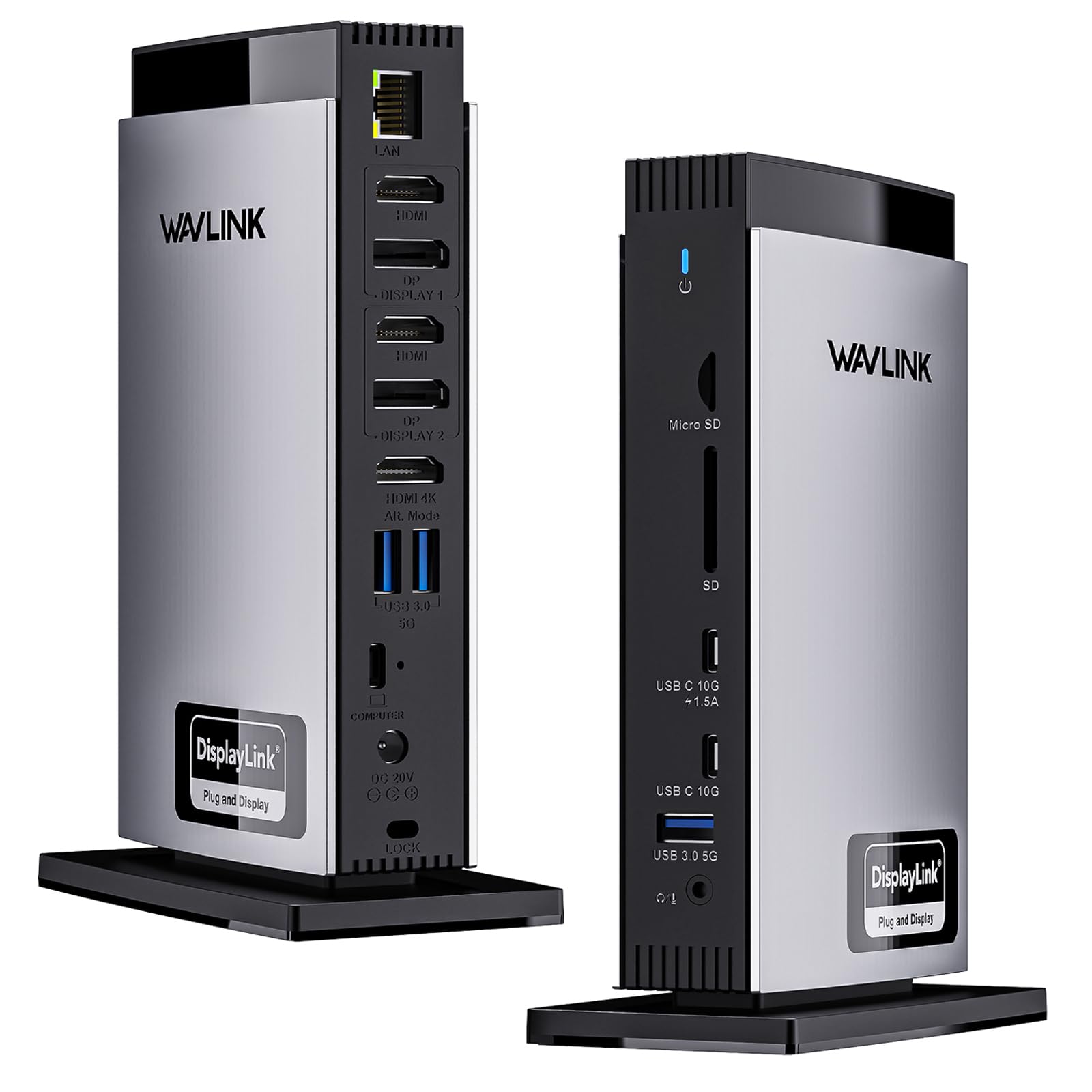
3. WAVLINK Docking Station 3 Monitors
Fast file transfers meet triple 4K60 output in a 15-port dock built for creators.
If you regularly move large video files or photo libraries, the WAVLINK stands out with 2x USB-C ports running at 10Gbps and 3x USB-A ports at 5Gbps. Those 10Gbps USB-C ports let you transfer a 1GB file in under a second. The dock also includes SD and TF card slots with transfer speeds up to 104MB/s, making it a natural fit for photographers and videographers. It uses a DisplayLink 6950 chipset to deliver dual 4K@60Hz on the Display 1/2 ports, while one HDMI Alt Mode port also hits 4K@60Hz — so you can run triple 4K 60Hz simultaneously on both Mac and Windows.
It comes with a 130W power adapter that supplies 100W charging to your laptop. The port layout includes 3x HDMI, 2x DisplayPort, and 2x USB-C (10Gbps), which gives you more high-speed data options than most competitors. Buyers on MacBook Air M4 and M2 units report it works perfectly with the DisplayLink driver, but one Windows user noted a wake-from-sleep bug that requires signing out and back in. Note: only one of the HDMI and DisplayPort ports can be selected at a time for the Alt Mode connection, so check the manual for your specific setup.
Data Speed First
- 2x USB-C ports with 10Gbps data transfer speed — fastest in this roundup
- SD/TF card slots with 104MB/s read speed for photographers
- 130W power adapter provides 100W PD to the laptop
- Triple 4K@60Hz output works on Mac and Windows
Compatibility Quirks
- Requires DisplayLink driver pre-installation before connecting the dock
- Only includes a USB-C to USB-C cable — need an adapter for USB-A video ports
- Some Windows users report a wake-from-sleep display bug
Go for this if: you’re a photographer, videographer, or anyone who moves big files daily and wants the fastest USB-C data speeds (10Gbps).
Pass on it if: you prefer a true plug-and-play experience without downloading drivers before first use.
4. Belkin Docking Station Universal USB C Triple Display Docking Station
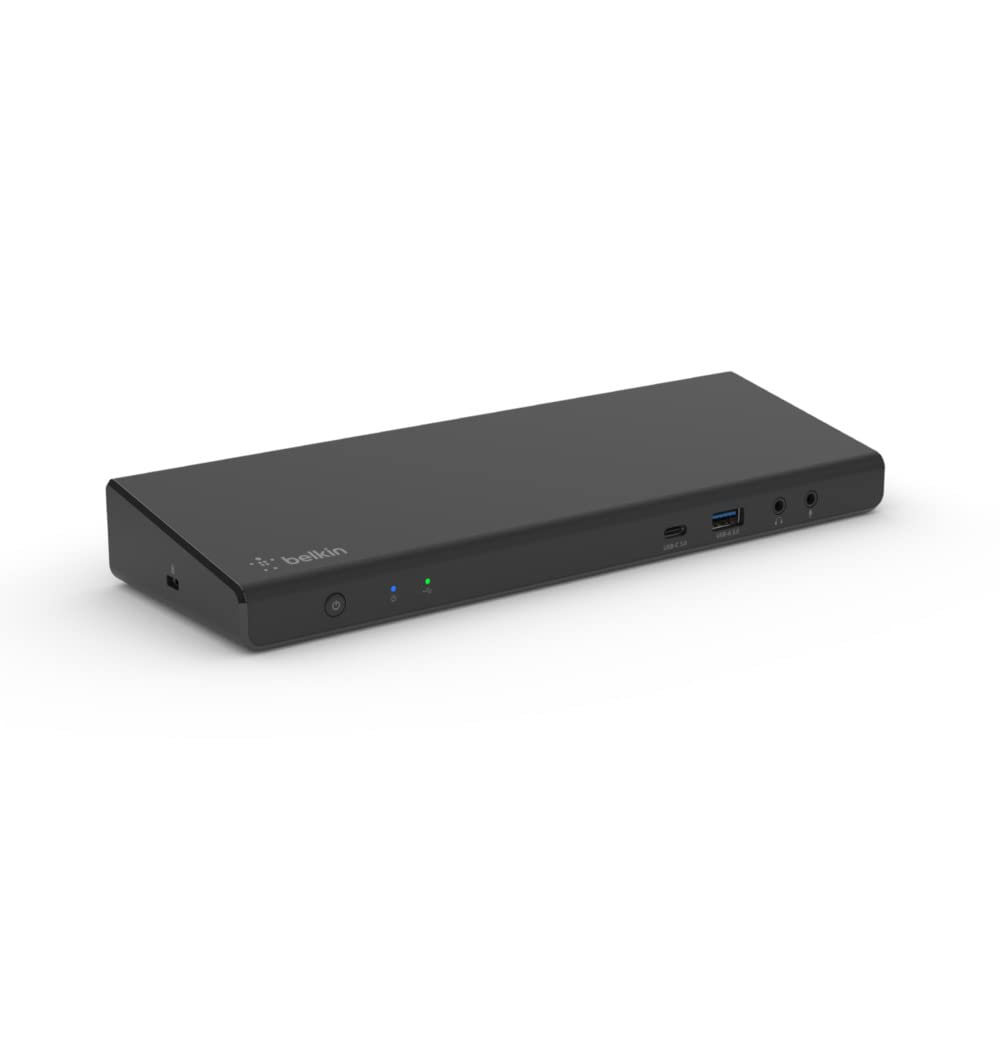
Belkin’s triple-display dock brings brand confidence and universal compatibility to your desk.
Belkin is a name many buyers trust for reliable accessories, and this dock lives up to that with 15 ports including 3x HDMI, 2x DisplayPort, 5x USB-A, a USB-C port, Gigabit Ethernet, and audio in/out. It connects via a single USB-C cable and uses DisplayLink technology to work universally with MacBook, Chromebook, and Windows laptops — including M2 and M2 Max MacBooks. The included 150W power supply delivers up to 85W Power Delivery to your laptop, which is enough for most ultrabooks and MacBooks, though not as high as the 100W PD offered by the Plugable or WAVLINK.
Buyers on MacBook Air M2 report it works smoothly to extend to 3 external monitors with no lag, even for cloud gaming. The dock supports data transfer speeds up to 5Gbps. One owner reported the power connector detaches easily with cable tension, so position the brick carefully. It supports up to 4K resolution on the external displays. The Belkin dock includes both the 150W power supply and a USB-C to USB-C cable, so you have everything you need from the start.
Brand confidence
- 15 ports with 3x HDMI and 2x DisplayPort for flexible monitor setups
- 150W power supply included provides stable operation
- Universal compatibility across MacBook, Chromebook, and Windows
- Customers note smooth triple-display performance on MacBook Air M2
The Limits
- 85W PD is lower than the 100W offered by competitors — may not fully charge larger laptops under heavy load
- Power connector detaches easily if the cable is under tension
- Some units reportedly arrived missing cables
Choose this if: you prioritize brand reliability and universal compatibility across Mac, Windows, and Chromebook — and 85W charging is enough for your laptop.
pass on it if: you need the full 100W PD to keep a 16-inch MacBook Pro charged during intensive tasks.
5. Anker Nano 13-in-1 Laptop Docking Station with Detachable 6-in-1 Hub
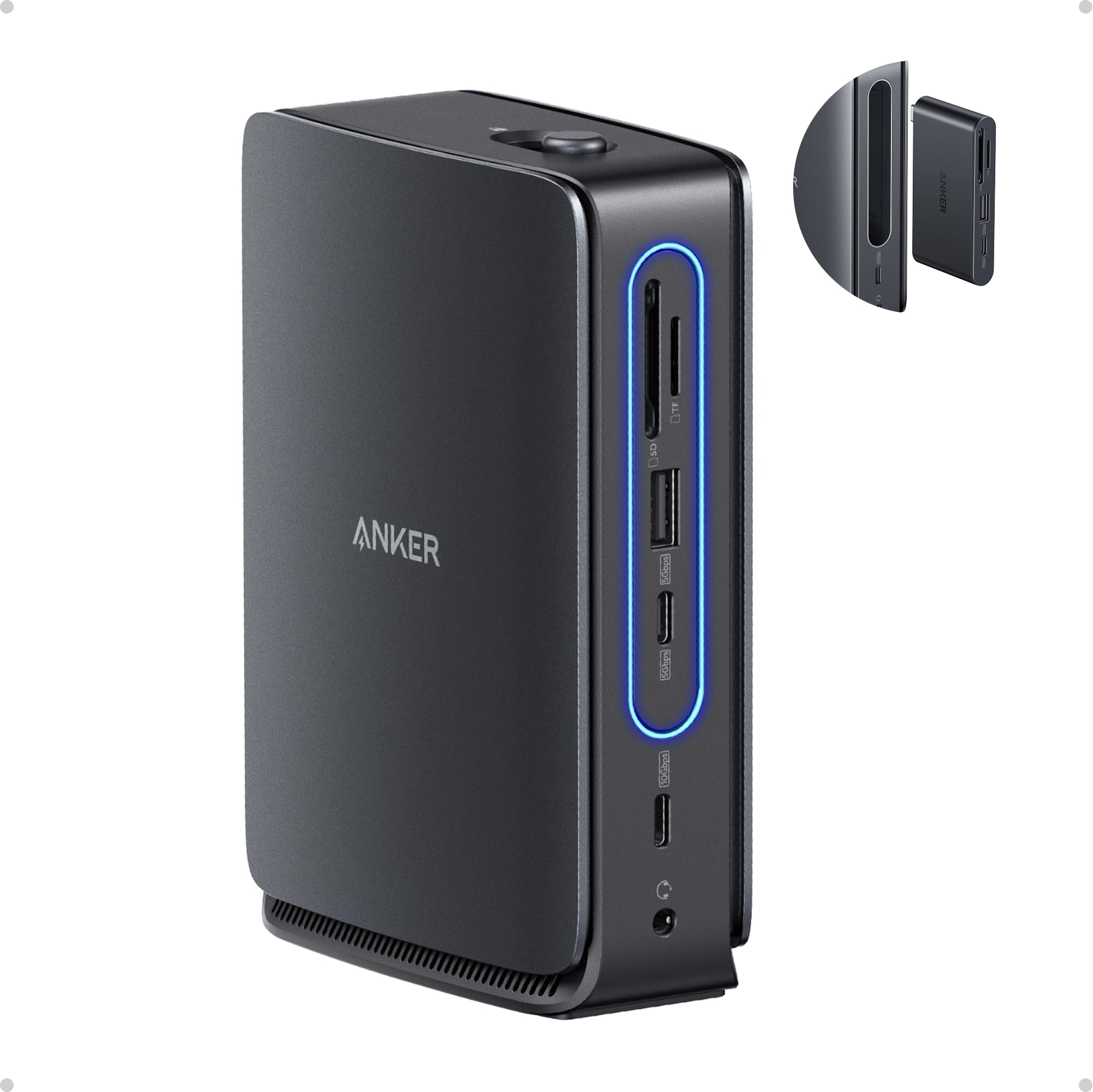
The only dock that splits into a portable hub, so your desk stays tidy and your bag stays light.
This is the most versatile design in the lineup: a 13-in-1 desktop docking station with a detachable 6-in-1 portable hub that snaps off for on-the-go use. You get one device for both your home office and travel kit, without buying separate units. At the desk, it connects up to 3 monitors via 2x HDMI ports and 1x DisplayPort, supporting up to 4K@60Hz (single display), dual 2K@60Hz, or triple 1080P@60Hz. The 100W Power Delivery charges your laptop while the included 140W power adapter ensures stable performance under full load. One USB-C Data port runs at 10Gbps for fast file transfers.
The port selection includes 1x USB-C upstream, 2x USB-C Data (5Gbps and 10Gbps), 3x USB-A, 2x HDMI, 1x DisplayPort, 1x Gigabit Ethernet, 1x 3.5mm audio, and SD/TF card slots. Reviewers point out easy setup with stable connections and that it runs cool. A key limitation for Mac users: macOS supports mirrored mode only on multiple external displays, so you can’t have independent extended desktops on each screen — you’ll see the same content on all external monitors. The dock also has a blue light strip that only activates when a laptop is connected via the upstream port.
The Dual-Life Design
- Detachable 6-in-1 hub snaps off for portable use — replaces two devices
- 100W PD with a 140W power adapter for stable full-load operation
- 10Gbps USB-C Data port for fast file transfers
- Compact and stays cool during use, per buyer reports
macOS Mirror Limit
- macOS only supports mirrored mode (identical displays) on multiple external monitors — not extended desktops
- All-plastic build feels less premium than aluminum alternatives
- Mini dock pops out of the base more easily than some would like
Get this if: you travel frequently and want one dock that handles both your home desk and your mobile setup through the detachable hub.
Look elsewhere if: you use a Mac and need independent extended desktops across three external monitors — this only mirrors on macOS.
6. 4URPC Displaylink Docking Station 3 Monitors with 120W Power Adapter
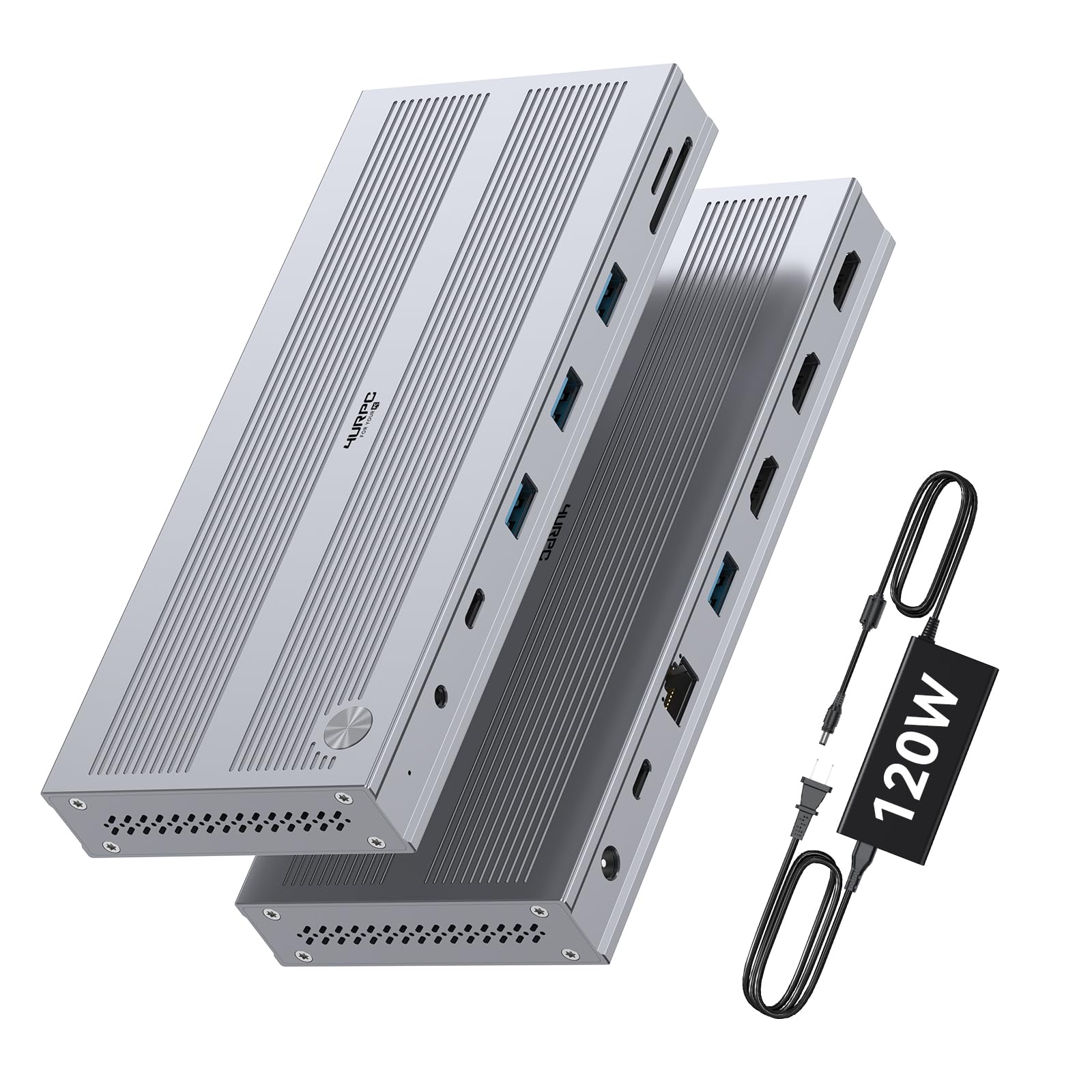
Three HDMI ports and a 120W adapter at a budget-friendly price that doesn’t cut corners on build.
This 14-in-1 dock from 4URPC delivers 3x HDMI ports for triple monitor output — HDMI 1 runs at up to 4K@60Hz, while HDMI 2 and 3 support up to 2560×1440@60Hz. That makes it a solid choice for multi-tasking with spreadsheets and video editing, though the two secondary monitors are limited to 2K resolution rather than full 4K. It comes with a dedicated 120W power adapter providing reliable charging for your laptop and peripherals. The dock has 5 USB ports (5Gbps each), Gigabit Ethernet, a 3.5mm audio jack, and SD/MicroSD card slots for photographers.
It works with Windows 10+, macOS 11+, and ChromeOS 100+ — including M1/M2/M3/M4 MacBooks — but requires a DisplayLink driver installation before use. One important caveat: HDCP is not supported, so protected streaming content won’t display. Shoppers say it works flawlessly with Apple M-series Macs, with fast USB 3.0 transfers (a 3GB file in 60-120 seconds) and Ethernet speeds over 600Mbps. The dock comes with a 24-month warranty and lifetime technical support, which is excellent assurance at this price tier.
The Value Proposition
- 3x HDMI ports — one at 4K@60Hz, two at 2560×1440@60Hz
- 120W power adapter provides reliable charging for laptop and peripherals
- 2-year warranty and lifetime technical support
- Buyers report excellent performance with M-series Macs and fast data transfer
The Resolution Gap
- Only HDMI 1 supports 4K@60Hz — the other two are limited to 2560×1440@60Hz (2K)
- HDCP not supported — cannot play Netflix, Hulu, or other protected streaming content
- Large power brick takes up desk space
Buy this if: you want three HDMI monitors on a budget and don’t need 4K on every screen — the 2560×1440 resolution on two displays is fine for documents and spreadsheets.
Pass if: you need all three monitors at full 4K 60Hz — the Plugable or WAVLINK are better suited.
7. TobenONE USB C Laptop Docking Station 3 Monitors (14-in-1)
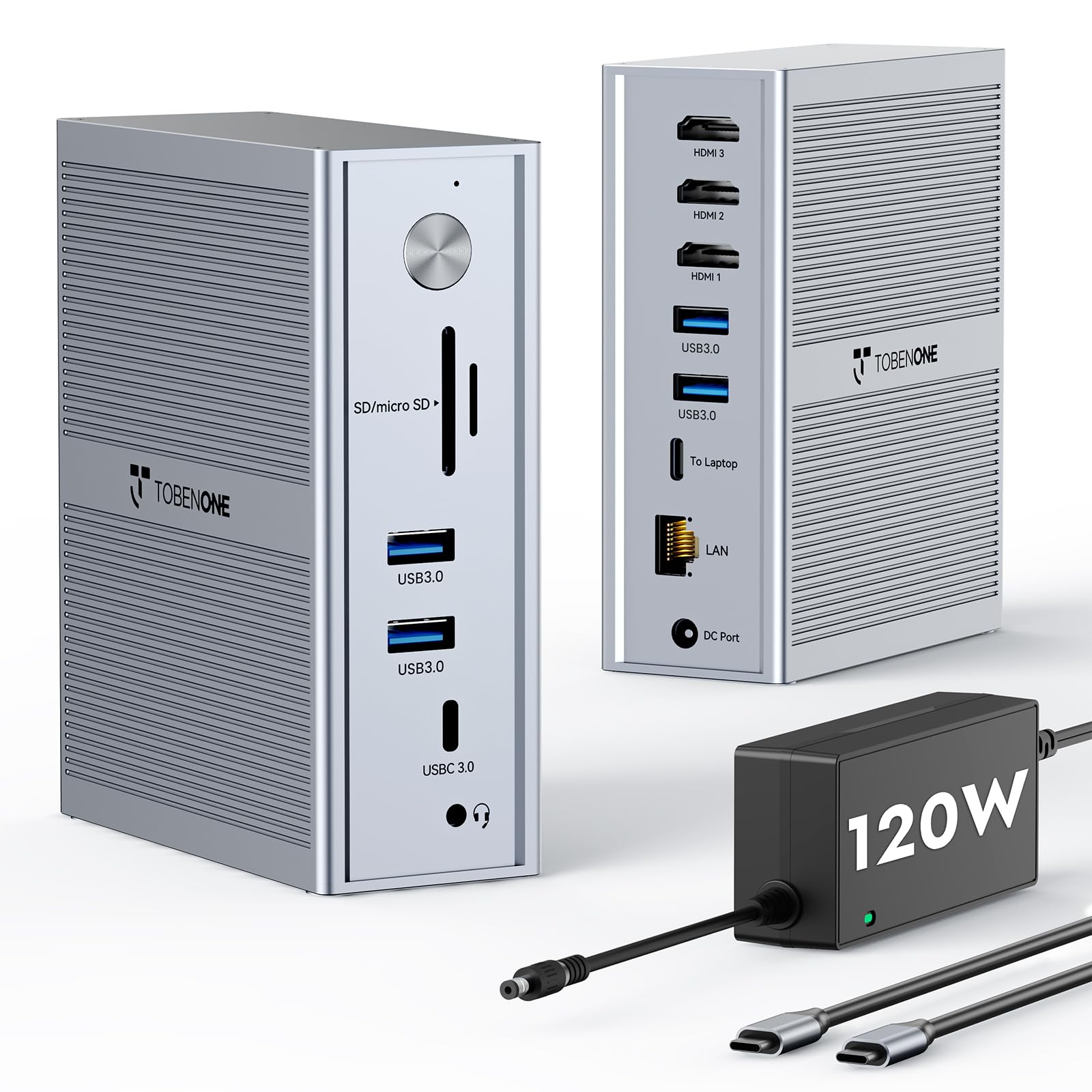
Built from the ground up for M1 through M5 MacBooks, with a 120W adapter that keeps them charged.
This 14-in-1 TobenONE dock is explicitly designed for Apple Silicon Macs — it supports the full M1, M2, M3, M4, and even M5 lineup, plus Intel Macs. It connects 3x HDMI displays at 4K@30Hz plus 2x 1920×1200@60Hz via DisplayLink technology. That’s a lower resolution on the primary monitor (4K@30Hz) compared to the 4K@60Hz competitors, but the 1920×1200@60Hz on the secondaries is fine for document work and code. The included 120W power adapter delivers 100W PD to your laptop, so you can leave your Apple charger in the bag.
The dock features 5 high-speed USB ports (USB-C + USB-A at 5Gbps each), Gigabit Ethernet, and SD/MicroSD slots. Owners mention it works flawlessly with an M2 MacBook Pro after a quick DisplayLink driver install, and one user has been running it reliably for 1.5 years with 3 computers, 2 multi-TB drives, and 2 monitors. A common limitation: DisplayLink blocks Netflix and YouTube TV streaming on Mac. The dock comes with a 24-month warranty and lifetime technical support, and the brand explicitly positions it as a perfect gift for programmers, designers, and dads who work from home.
Mac-First Design
- Explicitly listed as compatible with M1, M2, M3, M4, and M5 MacBooks
- 120W power adapter with 100W PD — matches Apple’s charger wattage
- 5 USB ports plus Gigabit Ethernet for a clean desk setup
- 2-year warranty and lifetime support with responsive customer service
Resolution Trade-Off
- Primary display limited to 4K@30Hz (most competitors offer 4K@60Hz)
- DisplayLink blocks Netflix/YouTube TV streaming on Mac
- No rear USB-C port, which some users prefer for cable management
Choose this if: you own a modern M-series Mac (M1 through M5) and want a dock that’s been tested across every chip generation with included 100W laptop charging.
it’s not for you if: you need full 4K@60Hz on your main monitor — the Plugable or WAVLINK deliver smoother resolution.
8. j5create USB C Docking Station JCD543

A laptop stand with a dock built in — it saves desk space and keeps your machine cool.
This is the only dock on the list that doubles as a laptop stand, designed to slide under your computer with a built-in NB stand that assists with heat dissipation. It measures 14.09 inches long and 3.48 inches wide. The dock supports up to 3 external displays through a mix of HDMI (2 ports), DisplayPort, and VGA, which is useful if you have an older monitor with a VGA input. It provides 100W PD 3.0 charging via the USB-C port and has one USB Type-A port supporting BC1.2 fast charging for a smartphone or tablet.
The dock includes 13 ports total: USB 3.1, SD/microSD card slots, and Gigabit Ethernet. It’s compatible with Windows 10 and macOS 10.11 or later, but requires a USB-C 3.1 5Gbps port with DisplayPort Alt Mode and Power Delivery. Customers note it works great with 3 monitors and a 4-port USB extender with webcam, but one customer observed burn-out after extended use on two units. The DisplayPort port on some units reportedly didn’t work, so check your cables. The flexible USB-C cord adjusts to the location of your laptop’s USB-C port.
Space-Saver Design
- Doubles as a laptop stand to improve airflow and save desk space
- 2x HDMI + 1x DisplayPort + 1x VGA covers older and newer monitors
- 100W PD 3.0 charges laptops via USB-C
- Flexible USB-C cable adjusts to your laptop’s port location
Durability Concerns
- Some units reportedly burn out over time — two buyers reported failure
- DisplayPort port may not work on some units
- Runs warm during extended use
Choose this if: you have minimal desk space and want your dock to also improve and cool your laptop — the VGA port is a bonus for older monitors.
Look elsewhere if: you need long-term durability without risk of burn-out — the Plugable or Belkin have stronger warranty records.
9. OREI SplitXtend USB C Docking Station Triple Monitor with 3xHDMI Ports

The lightest triple-monitor dock on the list — small enough to toss in any bag without thinking.
At just 3.99 ounces, the OREI SplitXtend is incredibly portable — compare that to the TobenONE 18-port dock at 17.6 ounces. It has 8 ports total, including 3x HDMI for triple monitors, USB-A 3.0 ports, and one USB-C port with 5Gbps data transfer. It requires a 100W charger (not included) to deliver up to 85W Power Delivery to your laptop. The dock uses SiliconMotion driver installation for multi-display support — it’s not plug-and-play on most systems. Note: it’s not recommended for gaming, design work, or HDCP-protected content like Netflix and Hulu.
Reviewers point out it works with a 2019 MacBook Air to run 3 external 32-inch curved monitors plus the laptop screen (5 total) after a simple setup. One user highlighted a brief flicker on wake from sleep. Compared to the TobenONE with 18 ports, the OREI has 8 ports so it’s best for minimalists who only need three monitors and basic USB connectivity. The power cord is noted to be short, so you may need to position it close to an outlet.
Featherweight Traveler
- Weighs only 3.99 ounces — the lightest triple-monitor dock here
- 3x HDMI ports let you run 3 external displays from one USB-C cable
- Compact and easy to set up, per buyer reports
- Can run 3 external 32-inch curved monitors plus laptop screen on MacBook Air
Minimalist Trade-Offs
- Only 8 ports — no Ethernet, no SD card slot, no DisplayPort
- Requires a separate 100W charger (not included) for full PD capability
- Not recommended for gaming, design work, or HDCP streaming content
- Power cord is short — may limit placement next to an outlet
Grab this if: portability is your top priority — at 3.99 ounces it disappears into a bag, and three HDMI ports get the job done for basic productivity.
Pass if: you need Ethernet, SD card slots, or more than 8 ports — the j5create or 4URPC give you far more connectivity for similar money.
Understanding the Specs
DisplayLink Technology
DisplayLink is a software-based video technology that lets you add extra monitors beyond what your laptop’s hardware natively supports. Most MacBooks with Apple Silicon (M1, M2, M3, M4 chips) are limited to one external display by default. A dock with DisplayLink bypasses that by using a chip inside the dock to compress the video signal, which your computer then decompresses using a free driver. The trade-off: it doesn’t play nice with HDCP-protected content like Netflix or Hulu. You also need to install the driver before connecting the dock.
Power Delivery (PD)
Power Delivery is the charging standard over USB-C that determines how fast a dock can charge your laptop. Most 3-screen docks deliver between 85W and 100W. A 100W PD dock can fully charge a 14-inch MacBook Pro at full speed, while 85W may be enough for a MacBook Air but could slowly deplete a 16-inch MacBook Pro under heavy load. The wattage of the dock’s included power adapter (often 120W or 130W) is higher than the PD output because the dock also needs to power itself, its ports, and any connected peripherals.
FAQ
Can a 3 screen docking station work with a MacBook Air M1 or M2?
Do I need to install drivers to use a triple-monitor docking station?
Will a 3 screen docking station charge my laptop?
Can I watch Netflix or Hulu on external monitors through a triple-display dock?
What is the difference between 3x HDMI and a mix of HDMI and DisplayPort?
How many USB ports do I really need on a triple-monitor dock?
Is a 120W or 130W power adapter better than a standard 100W one?
Can I use a 3 screen docking station with a Windows laptop that has a full-featured USB-C port?
What does “HDCP not supported” mean for a docking station?
Which 3 screen docking station is best for a multi-monitor stock trading setup?
Final Thoughts: The Verdict
For the majority of shoppers, the 3 screen docking station winner is the Plugable 12-in-1 because it delivers the highest resolution — triple 4K 60Hz — with flexible HDMI and DisplayPort options, all backed by a 2-year warranty and lifetime support. If you want the port count king with 18 connections and the ability to charge both your laptop and phone, grab the TobenONE 120W dock. And for the traveler who needs one dock for both desk and bag, the standout is the Anker Nano 13-in-1 with its detachable hub.
How We Picked
We do not accept paid placement. Every pick is matched to a real buyer and a real use-case; we do not hands-on test units.
Sources & Methodology
Specifications: manufacturer listings and product documentation. Review insights: verified customer reviews, as of July 2026. Pricing: not shown on this page (it changes often); check the current price via the retailer link.
As an Amazon Associate, Gadgets Feed earns from qualifying purchases. This does not affect which products we feature.