
Our readers keep the lights on and my morning glass full of iced black tea. As an Amazon Associate, I earn from qualifying purchases.
Specs are compiled from manufacturer listings and verified buyer reviews and can change over time — please confirm the key details on the product page before buying.
You want a Bluetooth gaming mouse that feels as fast and reliable as a wired one, without the cord getting in the way. The latest sensors and wireless tech now deliver that experience, but only if you pick the right one. This guide breaks down the specs that actually make a difference so you get a mouse that keeps up in intense matches, not one that lags or dies on you.
I’m Min — the founder and writer behind Gadgets Feed. This guide is built by comparing the manufacturers’ published specifications and the patterns across verified customer reviews, so you get each pick’s real strengths and trade-offs instead of marketing spin.
Your final choice depends on sensor accuracy, battery life, and weight. We cover every top bluetooth gaming mouse on the list, so you can match the right one to your gaming style.
Our Picks at a Glance


How To Choose The Best Bluetooth Gaming Mouse
A Bluetooth gaming mouse is a balance of three main things: a sensor that reacts instantly, a battery that keeps you playing, and a weight that lets you flick and track without wearing out your wrist. Here is what to look for.
Sensor and DPI: The Core of Your Aim
The sensor is what tracks your hand movement and translates it into cursor motion on the screen. DPI (dots per inch) is the number that tells you how many pixels the cursor moves for every inch you move the mouse. A higher DPI, like 26,000, allows for faster flicks, while a lower DPI, like 800, gives you pixel-precise control for sniping. Modern sensors also matter for tracking speed, measured in IPS (inches per second). A 650 IPS sensor, for example, can keep up with a fast swipe across a large mousepad without the cursor spinning out.
Battery Life: How Often You Have to Plug In
Battery life in gaming mice varies wildly, from about 70 hours to over 450 hours. This number is usually measured with 2.4GHz wireless mode and without RGB lighting active. If you play a few hours daily, a 70-hour battery might need charging every week or two, while a 450-hour battery could last months between charges.
Weight and Shape: Comfort Over Long Sessions
A mouse’s weight, measured in grams, directly affects how tiring it is to use. Mice under 60 grams are considered ultralight and allow for rapid, easy movement, while models between 80 and 100 grams feel more substantial and stable. Shape is personal: an ergonomic, right-handed design supports your palm better for long hours, while an ambidextrous shape is symmetrical and works for either hand.
Quick Comparison
| Model | Best For | DPI | Battery Life | Weight | Amazon |
|---|---|---|---|---|---|
| Redragon M914★ Best Overall | Customization / 9 Buttons | 12,000 | 70 Hours | — | Amazon |
| ASUS ROG Strix Impact IIIAlso Great | Longest Battery Life | 36,000 | 450 Hours | 57g | Amazon |
| HyperX Pulsefire Haste 2 Mini | Small Hands / Compact Setup | 26,000 | 100 Hours | 59g | Amazon |
| Logitech G309 Lightspeed | AA Battery Convenience | 25,000 | 300+ Hours | 86g | Amazon |
| Darmoshark M3 | Larger Hands / Value | 26,000 | 100 Hours | 58g | Amazon |
| ATTACK SHARK X3 | Ultra-Light Weight | 26,000 | — | 49g | Amazon |
| ATK VXE Dragonfly R1 SE+ | Budget Entry-Level | 18,000 | 70 Hours | 55g | Amazon |
In‑Depth Reviews
1. Redragon Wireless Gaming Mouse M914
Our pick — 4.5★ from 950+ verified ratings; the strongest balance of quality and price.
The most buttons for the least money — a macro-lover’s dream on a tight budget.
The Redragon M914 offers 9 fully programmable buttons for a price that is significantly lower than the ASUS ROG or Logitech G309. The 70-hour battery life (RGB off, 2.4G mode) is decent, but reviewers point out that in real-world use with the RGB on, battery life is closer to around 20 hours and “needs nightly charging,” as one reviewer put it. That is the biggest practical difference from the 100-hour Darmoshark M3. The tri-mode connectivity (Bluetooth, 2.4G, and wired) means it works with PCs, laptops, and tablets. The RGB lighting offers 6 preset effects and over 16.8 million colors, customizable through the Redragon driver software. A significant caveat across multiple reviews is that the driver software only supports 2.4G wireless and wired mode (not Bluetooth) and is hard to find on the official website — you may need to search for “Red Dragon M914 driver” specifically. The all-plastic build also feels less premium than the HyperX Pulsefire Haste 2 Mini.
High Points
- 9 programmable buttons offer massive customization for MMOs and work
- Full RGB lighting with many color options to match your setup
- Very budget-friendly price for the feature set
Downsides
- Real-world battery life is much shorter, around 20 hours with RGB on
- Driver software is hard to find and only works in 2.4G/wired mode
- All-plastic build feels less premium than the HyperX or ASUS
Who it’s for: Gamers on a strict budget who need a lot of programmable buttons and do not mind plugging in the mouse more frequently.
Who should look elsewhere: Anyone who values long battery life, a premium build, or a high-end sensor — the Darmoshark M3 or HyperX Pulsefire Haste 2 Mini offer better value in those areas.
2. ASUS ROG Strix Impact III Wireless Gaming Mouse
The endurance king that runs for months without a single charge.
The ASUS ROG Strix Impact III is built around its ROG AimPoint optical sensor, which delivers 36,000 DPI sensitivity with less than 1% deviation — so your cursor lands exactly where you aim, every time. It uses dual wireless connectivity: an ultrafast 2.4 GHz RF mode for competitive gaming and a Bluetooth mode that lets you pair up to three devices. ROG SpeedNova wireless technology gives you low-latency performance with high energy efficiency, which is how it reaches its headline 450-hour battery life — the longest of any pick here, more than six times the 70-hour battery on the Redragon M914. At just 57 grams, the compact ambidextrous form factor is light enough for fast flicks but still feels solid thanks to its matte plastic finish. It also features replaceable switches, so if a click starts to feel worn, you can swap it out yourself instead of tossing the whole mouse.
If you prioritize never having to think about charging over everything else, this is the one to beat. With only 4 buttons, players who rely on a lot of side macros will find the options limited compared to the Redragon M914. Buyers report the battery lasts for months of daily play, matching the claim completely.
The No-Compromise Runner: The 450-hour battery life means you can charge it once and practically forget about it, making it the only pick in this roundup that truly competes with a wired mouse’s uptime.
Who it fits: Gamers who play daily and hate being interrupted by a dead battery — this mouse solves that problem completely.
Worth noting: It has only 4 buttons, so macro-heavy players should look at the Redragon M914 instead.
3. HyperX Pulsefire Haste 2 Mini – Wireless Gaming Mouse

A tiny titan that punches above its weight for gamers with smaller hands.
The HyperX Pulsefire Haste 2 Mini is a natural fit for claw or fingertip grip users. It uses the HyperX 26K Sensor, capable of up to 26,000 DPI natively and tracking speeds up to 650 IPS (inches per second) — so your in-game flicks and tracking are equally sharp. Owners mention the build quality feels premium and sturdy despite the 59-gram weight, and the included grip tape adds a nice tactile feel without adding bulk. One reviewer noted their wife loves it for her small hands, specifically calling out the high-quality feel of the grip stickers.
Dual wireless connectivity gives you a 2.4GHz dongle for zero-lag gaming and Bluetooth for casual use or travel. Battery life reaches up to 100 hours on a full charge, and you can keep playing while it charges via the included USB-C cable — a convenience that beats having to wait for a recharge. At 59 grams, it weighs the same as the Darmoshark M3 (58g) but is noticeably more maneuverable than the 86-gram Logitech G309. A common criticism in reviews is that the side grips can get slippery when your hands get sweaty, so you may want to keep the included grip tape applied. Also, this is a mini mouse — if you have large hands, the size might feel cramped over long sessions.
Likes
- Premium build quality with a solid, non-creaky shell
- 100-hour battery life that lasts for weeks of daily use
- Fast 26,000 DPI sensor with high tracking speed
Watch For
- Side grips can get slippery with sweaty hands
- Too small for gamers with larger hands
Best for: Players with small to medium hands who want a premium, compact mouse that feels high-end for its price.
Consider something else if: You have large hands or need more than 6 programmable buttons for complex macros.
4. Darmoshark M3 Wireless Gaming Mouse

The budget-conscious pick that delivers flagship-tier sensor performance.
The Darmoshark M3 pairs a top-tier PAW3395 optical sensor — hitting 26,000 DPI, 650 IPS tracking speed, and 1000Hz response speed — with a price that undercuts many competitors. Its pure right-handed ergonomic design is noticeably larger than the compact ATTACK SHARK X3 and the ATK VXE Dragonfly R1 SE+, making it the best fit here for gamers with larger hands who use a palm grip. One experienced reviewer described the sensor as “top tier” and noted the motion sync makes the mouse extremely responsive and accurate. Buyers consistently report that “the battery lasts forever” for them, referencing the 100-hour battery life.
It supports tri-mode connectivity — 2.4GHz, Bluetooth, and USB-C wired — and can connect up to three devices simultaneously. The down side, as multiple buyers point out, is that the software and firmware updates are not on an official website; you have to request them directly from the seller. There is also a very small amount of creaking in the shell if you grip it very hard, though most users will never notice it in normal use. If you want a high-end sensor and a spacious shape without paying a premium, this is a strong contender between the budget-focused Redragon M914 and the more expensive ASUS ROG Strix Impact III.
The Smart Value Play: You get a PAW3395 sensor found in mice costing twice as much, plus a comfortable large shape that suits palm grippers — a rare combo at this price point.
Reach for this if: You have larger hands, use a palm grip, and want sensor accuracy that matches top-tier competition without the top-tier price.
Worth noting: The firmware software is not on a standard website — you will need to email the seller for the download link.
5. ATTACK SHARK X3 Lightweight Wireless Gaming Mouse
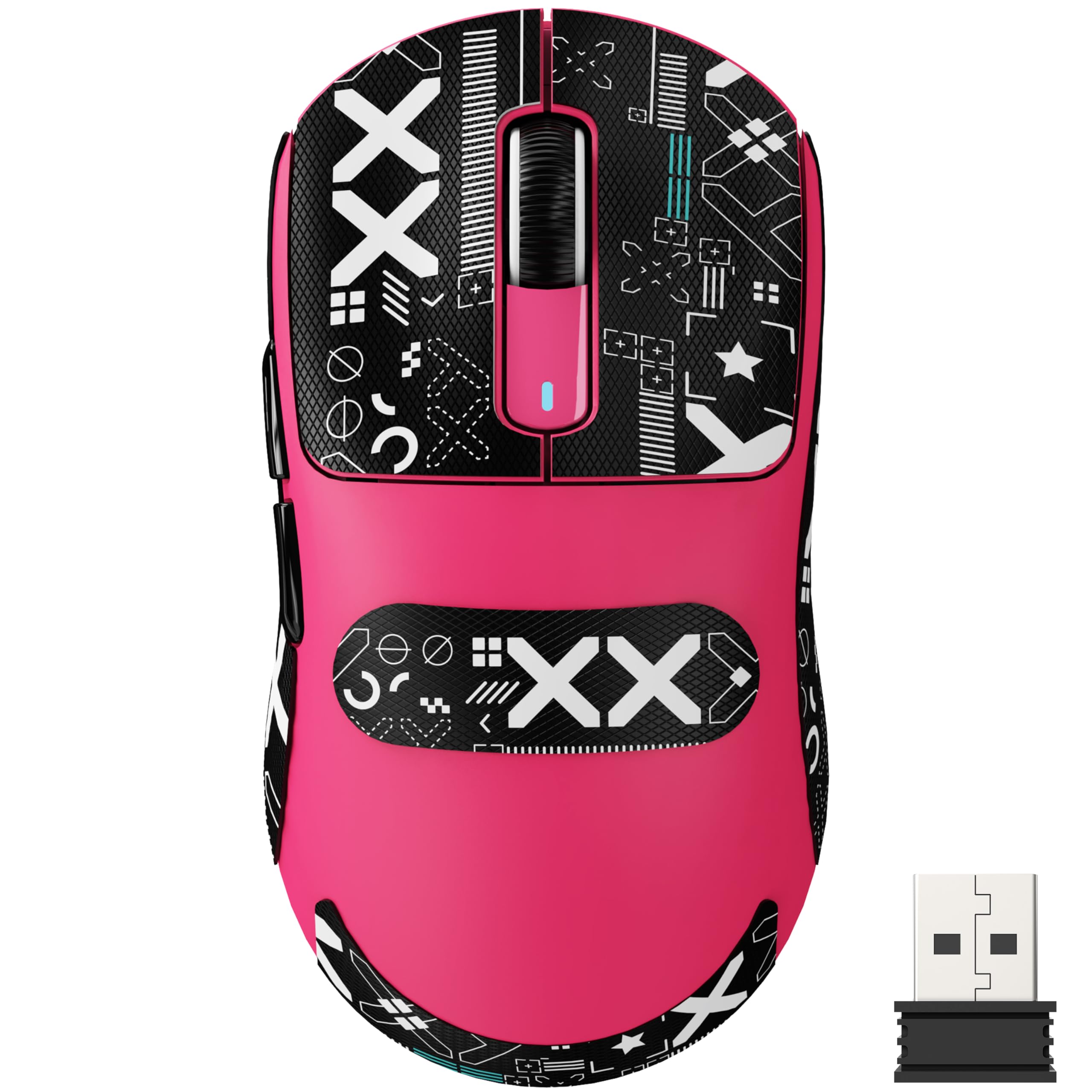
The lightest mouse in the roundup, weighing less than a standard egg.
At 49 grams, the ATTACK SHARK X3 is 9 grams lighter than the Darmoshark M3 and 10 grams lighter than the HyperX Pulsefire Haste 2 Mini. That weight difference helps you change direction faster during a flick shot or lift and reposition the mouse with less effort. It is powered by the same Pixart PAW3395 flagship optical sensor found in the Darmoshark M3, offering 6-level adjustable DPI up to 26,000 with 650 IPS tracking and 1000Hz response speed. Kailh Black Mamba GM8.0 switches give every click a crisp, snappy sound with an 80 million click lifespan, so the buttons are built to outlast many gaming sessions.
The tri-mode connection (USB-C wired, 2.4GHz, and Bluetooth 5.2) supports up to four devices simultaneously, which is one more than most competitors here. It comes with grip tape included, and customers note it feels soft and comfortable. One buyer pointed out it is “lighter and 1/3 the price of Logitech G Pro Superlight,” making it a direct value-focused alternative. However, there is no dedicated app for customization — DPI adjustment is done via a button under the mouse. Also, the mouse is smaller and shorter than a standard G Pro shape, so larger hands may find it less comfortable for palm grip.
Highlights
- Incredible 49-gram weight reduces wrist fatigue significantly
- Flagship PAW3395 sensor with 26,000 DPI and fast tracking
- Excellent value compared to big-brand ultralight mice
Watch For
- No dedicated app for customizing buttons or DPI
- Smaller shape may not suit gamers with large hands
Ideal for: Competitive FPS players who want the fastest, lightest mouse they can find and prefer a smaller form factor.
skip it if: You need a lot of programmable buttons or prefer a larger, fuller-shaped mouse for palm grip.
6. Logitech G309 Lightspeed Wireless Gaming Mouse

A no-fuss workhorse powered by a standard AA battery you can swap instantly.
The Logitech G309 runs on a single AA battery, giving you over 300 hours of use, and when it dies, you just pop in a fresh battery — no waiting for a recharge. This makes it the most travel-friendly option here, especially for users who hate managing another USB-C cable. It features the HERO 25K sensor, which Logitech claims tracks with sub-micron precision and zero smoothing. LIGHTFORCE hybrid switches combine optical speed with a mechanical feel. One reviewer described its pointer precision as “excellent” even on high-refresh-rate displays.
It weighs 86 grams with the included AA battery, which is heavier than the ultralight picks (the Darmoshark M3 is 58g), but it is still lighter than a traditional wired gaming mouse. The 6 programmable buttons are managed through Logitech G Hub, which offers deep customization, though some users find the software a bit clunky. A unique trick is that it is compatible with Logitech’s POWERPLAY wireless charging system — if you own the charging mousepad, the mouse weighs just 68 grams and has unlimited battery life. Buyers love the replaceable battery, calling it the “best feature” of the mouse.
The Practicality Pick: 300+ hours on a single AA battery means you can toss a spare in your backpack and never worry about power on a trip — no other mouse here offers that kind of freedom.
Go for it if: You value long battery life and the convenience of a swappable AA battery over the lightest possible weight.
Worth noting: At 86 grams, it is noticeably heavier than the 58g Darmoshark M3 or the 49g ATTACK SHARK X3, which may matter for competitive play.
7. ATK VXE Dragonfly R1 SE+ Wireless Gaming Mouse
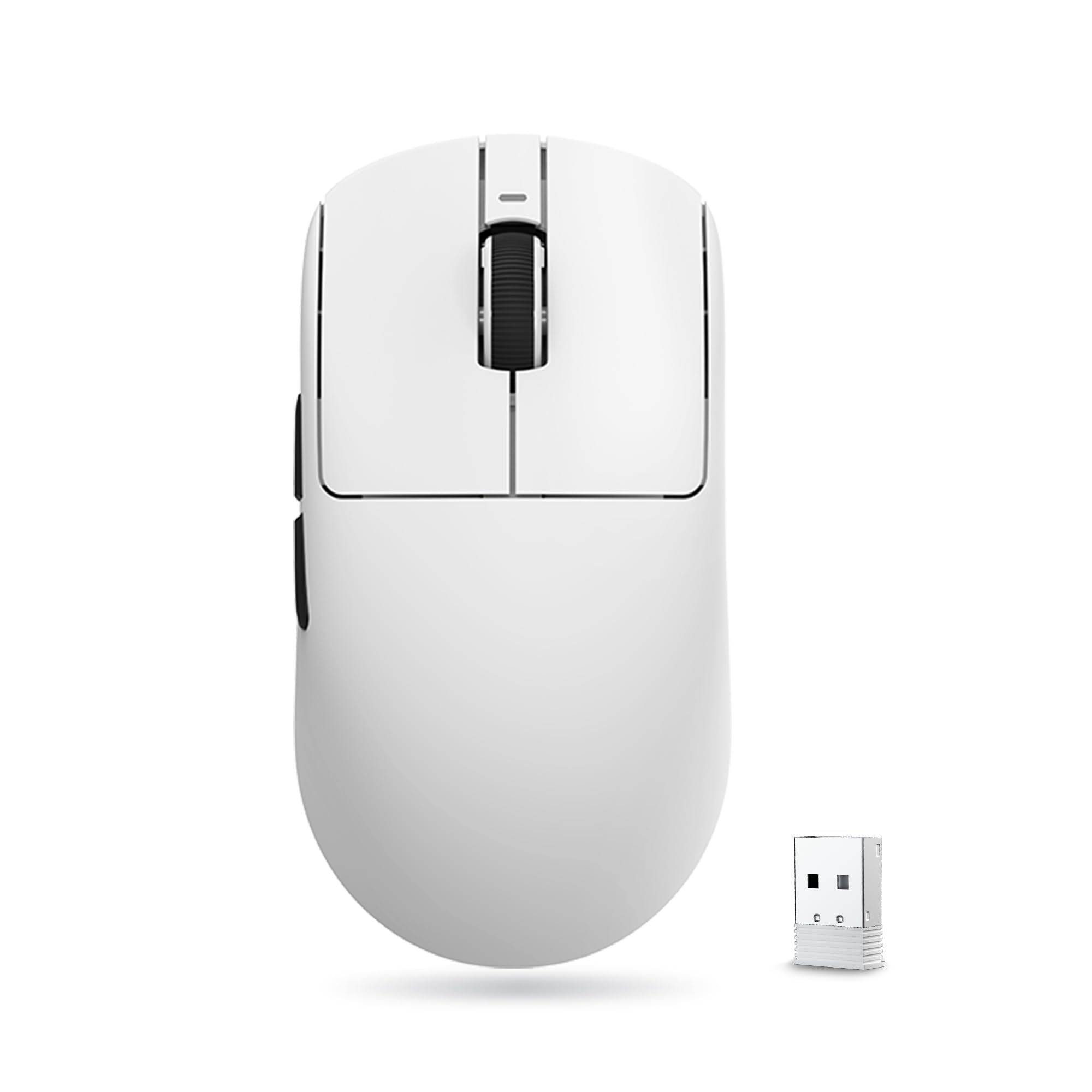
A no-frills ultralight that removes the risk of trying a high-end sensor for the first time.
The ATK VXE Dragonfly R1 SE+ offers a PAW3395 SE gaming sensor with an adjustable DPI range from 10 to 18,000 and a 55-gram ultralight body. That is just 3 grams lighter than the Darmoshark M3 (58g) and 1 gram lighter than the HyperX Pulsefire Haste 2 Mini (59g), so the weight difference is marginal, but the price is significantly lower. It uses Huano Blue Glow V2 microswitches, which shoppers say have a crisp rebound that helps avoid double-click issues. One happy buyer reported that “1 charge 3 weeks of use no problem,” which matches the 70-hour battery life claim. The tri-mode connection (wired, 2.4G, and Bluetooth) supports a standard 1K polling rate (reporting position 1,000 times a second) for stable, low-latency performance.
It also comes with Swift PTFE mouse feet that glide smoothly on a mousepad. The compact size (120.6mm x 64.1mm x 37.6mm) is designed for medium and small hands. Users coming from a larger mouse like a Logitech G402 mentioned it is “smaller, flatter, and shorter,” which took some adjustment for games like Dota 2. The ATK Hub software is highly customizable, but one buyer mentioned it requires a Google Translate extension, which adds a small barrier. If you are looking for your first ultralight gaming mouse and want the sensor performance of the PAW3395 family without spending much, the Dragonfly R1 SE+ is a fantastic starting point.
Best First Mouse: The 55-gram weight and responsive Huano switches make this an excellent introduction to the ultralight gaming mouse world, especially for players with smaller hands.
Perfect for: Budget-conscious players who want an ultralight mouse with a high-quality sensor and are comfortable with a compact, flatter shape.
Not ideal for: Gamers with large hands who prefer a fuller palm grip shape — the Darmoshark M3 is a better fit for that use case.
Understanding the Specs
DPI: How Fast Your Cursor Moves
DPI stands for dots per inch. It is the number of pixels your cursor moves on screen for every inch you physically move the mouse. A higher DPI (like 26,000) means a small hand movement produces a large cursor movement, which is great for fast flicks. A lower DPI (like 800) means you have to move the mouse further for the same cursor distance, giving you pixel-perfect control for aiming. You adjust this on the fly via a button on the mouse to switch between profiles for different games.
Polling Rate: How Often the Mouse Reports
Polling rate is measured in Hertz (Hz) and tells you how many times per second the mouse sends its position to your computer. A 1000Hz polling rate means it reports 1,000 times per second, which translates to a 1-millisecond delay. This is standard for modern gaming mice and feels instant. Some high-end mice offer 2000Hz or 4000Hz (0.5ms or 0.25ms delay), but the difference from 1000Hz is usually not noticeable in game.
Battery Life: Real-World Expectations
Battery life is typically measured with the 2.4GHz connection and RGB lighting turned off. A 70-hour battery means about two weeks of moderate daily gaming (5 hours/day) before recharging. A 450-hour battery (like the ASUS ROG Strix Impact III) can last several months. The type of battery matters too: built-in rechargeable batteries are convenient but eventually wear out, while swappable AA batteries (like the Logitech G309) can be replaced instantly and never degrade in capacity.
Weight: The Impact on Your Aim
Weight is measured in grams and directly affects how quickly you can start, stop, and change direction with the mouse. Mice under 60g are considered ultralight and require almost no effort to flick, making them popular in competitive shooters. Mice in the 80g-100g range offer a more stable, deliberate feel that some gamers prefer for precision. Heavier mice also tend to feel more solid and less cheap in the hand, but they can cause wrist fatigue over extended play sessions.
FAQ
Is a Bluetooth gaming mouse as responsive as a wired one?
What is the difference between 2.4GHz and Bluetooth on a gaming mouse?
How long does the battery last on a Bluetooth gaming mouse?
Can I use a Bluetooth gaming mouse with a laptop or iPad?
What does a higher DPI actually do for my gaming?
Is a lighter mouse always better for gaming?
How many programmable buttons do I need?
Can I charge and use a Bluetooth gaming mouse at the same time?
Final Thoughts: The Verdict
For most buyers, the bluetooth gaming mouse winner is the ASUS ROG Strix Impact III because it combines a top-tier 36,000 DPI sensor with a class-leading 450-hour battery life in a lightweight 57-gram body. If you want a compact premium feel for smaller hands, grab the HyperX Pulsefire Haste 2 Mini. And for the best value with a flagship sensor and a comfortable larger shape, reach for the Darmoshark M3.
How We Picked
We do not accept paid placement. Every pick is matched to a real buyer and a real use-case; we do not hands-on test units.
Sources & Methodology
Specifications: manufacturer listings and product documentation. Review insights: verified customer reviews, as of July 2026. Pricing: not shown on this page (it changes often); check the current price via the retailer link.
As an Amazon Associate, Gadgets Feed earns from qualifying purchases. This does not affect which products we feature.