
Our readers keep the lights on and my morning glass full of iced black tea. As an Amazon Associate, I earn from qualifying purchases.
Specs are compiled from manufacturer listings and verified buyer reviews and can change over time — please confirm the key details on the product page before buying.
If you run three monitors off one laptop, you already know the pain: a tangle of cables, constant plugging and unplugging, and the sinking feeling when a display just won’t wake up. A 3-monitor docking station solves all of that by turning your laptop into a true workstation with a single USB-C connection. The right dock hands you three sharp extended screens, keeps your laptop charged, and gives you ports for everything else — all without hunting for dongles.
I’m Min — the founder and writer behind Gadgets Feed. This guide is built by comparing the manufacturers’ published specifications and the patterns across verified customer reviews, so you get each pick’s real strengths and trade-offs instead of marketing spin.
The common thread across the best options is DisplayLink technology — it bypasses your laptop’s built-in display limits, letting even M-series Macs drive three monitors at once. After reviewing over a dozen models, these are the most reliable candidates for a 3 monitor docking station that actually delivers on its promise.
Our Picks at a Glance

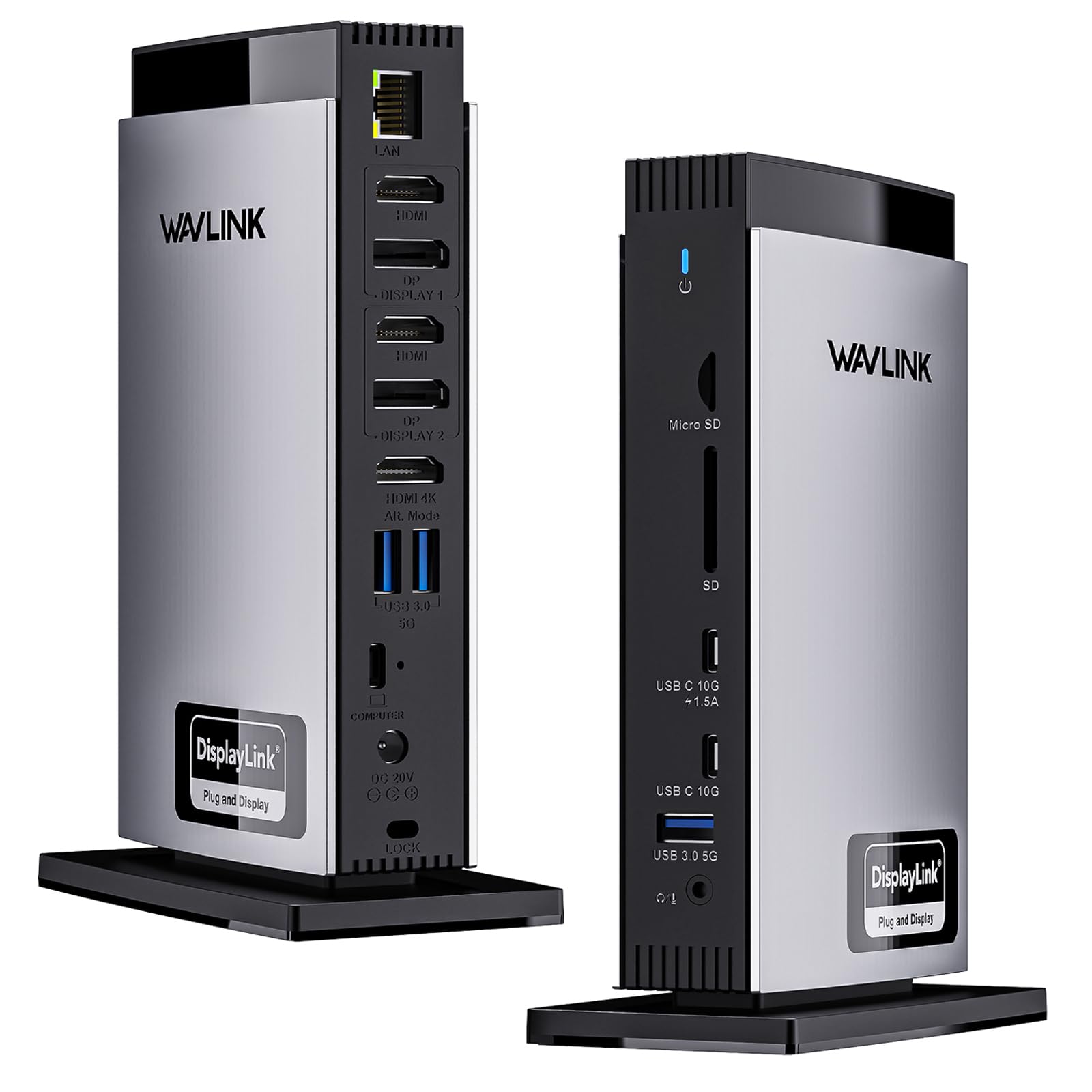

How To Choose The Best 3 Monitor Docking Station
Not every dock that claims triple-monitor support actually delivers it reliably. The key is understanding three things: the video technology inside, how much power it sends to your laptop, and whether its ports match the peripherals you already own.
DisplayLink vs. Native Alt Mode
Many laptops — especially M1/M2/M3 MacBooks — natively support only one or two external displays. A docking station with a DisplayLink chipset (a separate graphics processor inside the dock) creates additional displays so you can run three screens even on hardware that would otherwise limit you. This requires installing a free driver, but it is the most reliable way to get triple monitors on a modern Mac. On Windows, some docks use your laptop’s native DisplayPort Alt Mode (a signal pass-through through the USB-C port) for one or two screens and DisplayLink for the third.
Power Delivery (PD) Wattage
A dock that charges your laptop should match or exceed your laptop’s original charger wattage. Look for 100W PD (the standard for fast laptop charging over USB-C) to keep even a 16-inch MacBook Pro or Dell XPS running at full load without draining the battery. Docks with a lower PD rating, like 60W or 85W, may charge slowly or lose ground during heavy use.
Port Selection and Bandwidth
Count your daily-use devices: external drives, keyboard, mouse, webcam, headset, SD cards, and wired ethernet. A 12-port dock is the minimum for a full setup. Look for USB 3.2 Gen 2 ports at 10Gbps (10 gigabits per second — about 20 times faster than USB 2.0) if you move large video files. Gigabit Ethernet (a wired internet port supporting up to 1000 Mbps) is a must for stable video calls.
Quick Comparison
| Model | Best For | Video Ports | Total Ports | Laptop Charging | Amazon |
|---|---|---|---|---|---|
| TobenONE (18-port)★ Best Overall | Best Overall | 3 HDMI + 3 DP | 18 | 100W PD | Amazon |
| WAVLINK (15-port)Mac & Windows Combo | Mac & Windows Combo | 3 HDMI + 2 DP | 15 | 100W PD | Amazon |
| Plugable 12-in-1Triple 4K Flexibility | Triple 4K Flexibility | 3 HDMI + 3 DP | 12 | 100W PD | Amazon |
| TobenONE 3HDMI | Compact M-Series Mac | 3 HDMI | 14 | 100W PD | Amazon |
| WAVLINK (12-port) | Quiet Triple 4K | 1 HDMI + 2 DP | 12 | 100W PD | Amazon |
| 4URPC 14-in-1 | Budget-Friendly Mac | 3 HDMI | 14 | 100W PD | Amazon |
| WAVLINK UMD01M Pro | Windows Productivity | 2 DP + 1 HDMI | 13 | 100W PD | Amazon |
In‑Depth Reviews
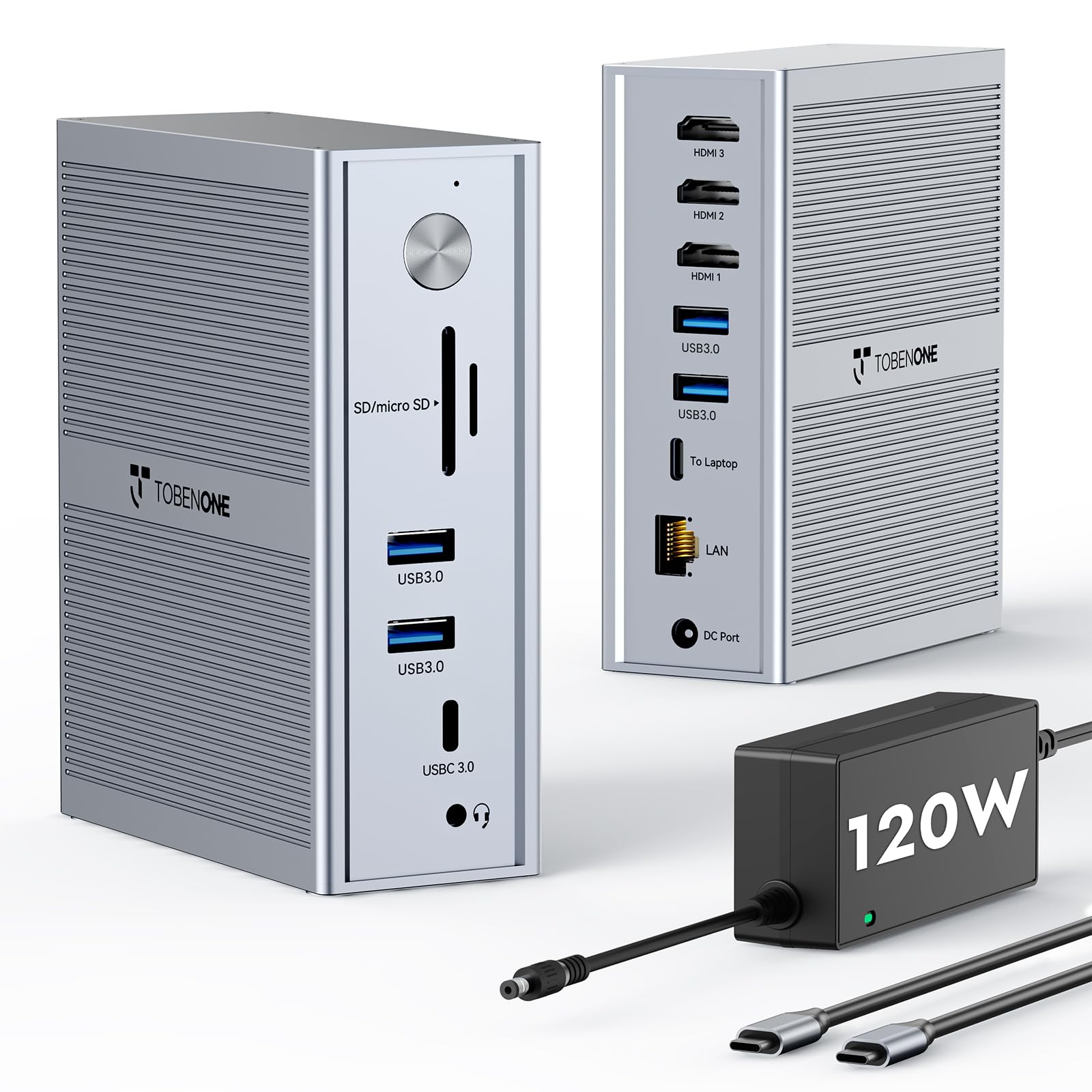
1. TobenONE DisplayLink Docking Station 3 Monitors with 120W Power Adapter
Our pick — 4.5★ from 950+ verified ratings; the strongest balance of quality and price.
The port monster that gives you three HDMI and three DisplayPort outputs in one compact grey box.
This TobenONE dock packs 18 ports total — more than any other single-cable triple-monitor solution here — including 3x HDMI and 3x DisplayPort so you can mix and match your monitor connections without adapters. The included 120W power adapter delivers 100W PD (the fast-charging standard over USB-C) to your laptop, which means you can leave the original charger in your bag. Buyers report that the dock has been “solid for 6 months on macOS with triple monitor support” and runs cool even during long work sessions.
It supports Thunderbolt 4/3, USB4, and full-featured USB-C laptops, and works on both Windows (up to 4 monitors) and macOS (up to 3). The catch? You must install a free DisplayLink driver before use, and it cannot stream Netflix or other paid streaming services due to HDCP restrictions (a content-protection handshake that DisplayLink emulated screens cannot complete).
You get a sturdy 120W power supply and 18 total ports — compared to 13 on the WAVLINK UMD01M Pro below — and this dock weighs 17.6 ounces versus the WAVLINK’s 11.64 ounces.
Why It Leads
- 18 total ports — 3x HDMI and 3x DP for flexible triple 4K
- 120W power adapter with 100W PD laptop charging
- 4x USB 3.1 and 2x USB-C at 10Gbps data transfer
Know Before You Buy
- Requires DisplayLink driver install on Mac and Windows
- Cannot play Netflix or other paid streaming on extended displays
- Mac users limited to 3 monitors (Windows can do 4)
Your pick if: you want the most port flexibility for a Mac or PC triple-monitor setup and do not mind a quick driver download.
Look elsewhere if: you need Netflix or HDCP-protected streaming on all three screens — this dock blocks that.
2. WAVLINK Docking Station 3 Monitors, Triple 4K@60Hz for MacBook M1/M2/M3/M4/Windows
A 15-port dock that handles three 4K screens at 60Hz on both Mac and Windows without fuss.
The WAVLINK WL-UG69PD13 ships with 3 HDMI and 2 DisplayPort outputs, giving you more video routing choices than almost any other dock in this class. The key advantage here is that one HDMI port uses your laptop’s native Alt Mode (a direct video signal from your laptop’s USB-C port, no driver needed), while the other two screens run through the DisplayLink chipset. This hybrid approach means your primary monitor gets the crispest signal, and you avoid the full-driver dependency of some rivals.
It delivers 100W PD from a 130W power adapter, and offers 2 USB-C ports at 10Gbps plus 3 USB-A ports at 5Gbps. Owners mention it works “perfectly with my MacBook Air M4” for dual monitors and charging, but note that the DisplayLink driver for Mac requires a slightly longer initial download. The dock also includes SD and microSD card slots at 104MB/s (about 104 megabytes per second — fast enough for photographers to offload a card without a separate reader).
One trade-off: only one HDMI or DP port can be active from the DisplayLink pair at a time, so you effectively get two DisplayLink screens plus one native screen, not all five ports running simultaneously. At 1.52 kg (3.35 lbs), this is one of the heaviest docks here — fine for a desk, not a travel bag.
What Stands Out
- Hybrid video — one native HDMI port + two DisplayLink screens
- 3 HDMI + 2 DP for maximum monitor flexibility
- SD/microSD slots at 104MB/s for content creators
Heads Up
- Heavy at 1.52 kg — not portable
- DisplayLink driver required for second and third screens
- Only one HDMI/DP from the pair can be used at a time
Reach for this if: you split your week between a MacBook and a Windows laptop and want a single dock that does triple 4K on both.
skip it if: you need a lightweight dock to carry daily — this one stays put on a desk.
3. Plugable 12-in-1 USB C Triple Monitor Docking Station
The only dock here that lets you run three monitors using all HDMI or all DisplayPort — your choice.
Plugable’s UD-6950PDZ gives you 3 HDMI and 3 DisplayPort ports on the back, so you can connect three monitors using whichever cable type your screens support without needing adapters. It delivers triple 4K at 60Hz on Windows, macOS, and ChromeOS via its DisplayLink chipset. One key detail: the first HDMI port runs on your laptop’s native video signal, giving you a direct, low-latency connection for your primary display, while the other two screens go through DisplayLink.
It offers 100W PD charging and 6 USB 3.0 ports. Customers note that it works “perfect” on a 2020 MacBook Air M1 with two 1440p 144Hz monitors — a scenario that would normally be impossible on that hardware. However, some users note that the 100W PD may not be enough for high-power gaming laptops like the MSI Raider GE76, which needs more than 100W to charge under load.
The biggest complaint is customer support: several reviewers point out slow email-only responses with 1-2 day gaps. The dock itself carries a 2-year warranty and lifetime support from Plugable’s North American team, but the support process can be frustrating if you hit a compatibility issue.
Why It’s Unique
- 3 HDMI + 3 DisplayPort — pick your monitor cable
- One native HDMI port for low-latency primary display
- 100W PD keeps most laptops charged all day
The Catch
- Customer support is email-only with slow response times
- 100W PD may lag on high-power gaming laptops
- DisplayLink driver required for second and third screens
Grab this if: your monitors use different video cables (some HDMI, some DP) and you want one dock that handles both natively.
Pass if: you want phone-based or chat support — this brand is email-only for troubleshooting.
4. TobenONE USB C Laptop Docking Station 3 Monitors (14-in-1, 3HDMI)
A 14-in-1 dock that breaks Apple Silicon’s single-screen limit with three HDMI outputs.
This TobenONE dock is built specifically for M1-M5 MacBooks that natively support only one external display. It uses DisplayLink technology to add two extra screens, giving you triple HDMI output at 4K@30Hz on the primary plus 1920×1200@60Hz on the secondary screens. The 120W power adapter delivers 100W PD for fast laptop charging, matching the speed of Apple’s own charger.
With 5 USB ports at 5Gbps and built-in Gigabit Ethernet, buyers report stable operation across “3 computers, 2 multi-TB drives, 2 monitors” for over 1.5 years. One owner noted that intermittent monitor issues were traced to a WiFi access point reboot, not the dock itself — a sign of solid hardware. The only drawback for some is the lack of a rear USB-C port (the USB-C port is on the front only).
Like all DisplayLink docks, it cannot stream Netflix or YouTube TV on Mac extended displays due to HDCP restrictions. If you use your third screen mainly for productivity tools, code, or spreadsheets, this is a non-issue.
What You Get
- Three HDMI ports for all-HDMI triple display setups
- 120W adapter with 100W PD laptop charging
- 24-month warranty and lifetime tech support
Trade-Offs
- Primary HDMI is 4K@30Hz, not 60Hz
- No rear USB-C — front port only
- DisplayLink blocks streaming services on Mac
Perfect for: anyone with an M1-M5 MacBook who needs three external screens for work and wants a dedicated power adapter included.
Not for: video editors or designers who need 4K@60Hz on the primary monitor — the 30Hz cap may feel sluggish.
5. WAVLINK Docking Station 3 Monitors, 12-in-1 DisplayLink Dock

A slim, quiet dock that drives three 4K screens at 60Hz without a single fan.
The WAVLINK WS-UG69PD24 is a 12-in-1 dock that packs 1 HDMI and 2 DisplayPort video outputs, all capable of 4K@60Hz. It is passively cooled — no fan noise — making it a strong pick for quiet home offices. The 130W power brick delivers 100W PD to your laptop, and the 4 USB-A ports plus 1 USB-C port run at 5Gbps, which is fast enough for most external drives.
Owners mention that the two DisplayPort (DP) ports rely on DisplayLink software, while the HDMI port uses native Alt Mode (a direct video signal without extra drivers), so your main monitor stays driver-free. One reviewer tested it on a low-end Intel N150 mini PC and reported that 4K video played “smoothly with no CPU impact.” The dock works with Windows 7 through 11, macOS 10.14+, ChromeOS, Ubuntu, and even Android — one owner used it to turn a phone into a desktop setup.
The catch is port variety: with only one HDMI port, you need monitors that accept DisplayPort (DP) or buy adapters to run three screens. At 0.2 kg (about 7 ounces), it is also one of the lightest triple-monitor docks you can carry, so it suits travelers who pack light but already own DP monitors.
Why It’s Lean
- Passive cooling — completely silent operation
- Native HDMI port for your primary display
- Very portable at ~7 ounces
Heads Up
- Only 1 HDMI port — two screens need DisplayPort
- USB ports are 5Gbps, not 10Gbps
- No SD/microSD card slots
Best for: anyone who wants a quiet, compact triple 4K dock and already has monitors with DisplayPort inputs.
Skip if: your monitors are all HDMI and you do not want to buy adapters — look for a dock with 3 HDMI ports instead.
6. 4URPC Displaylink Docking Station 3 Monitors with 120W Power Adapter
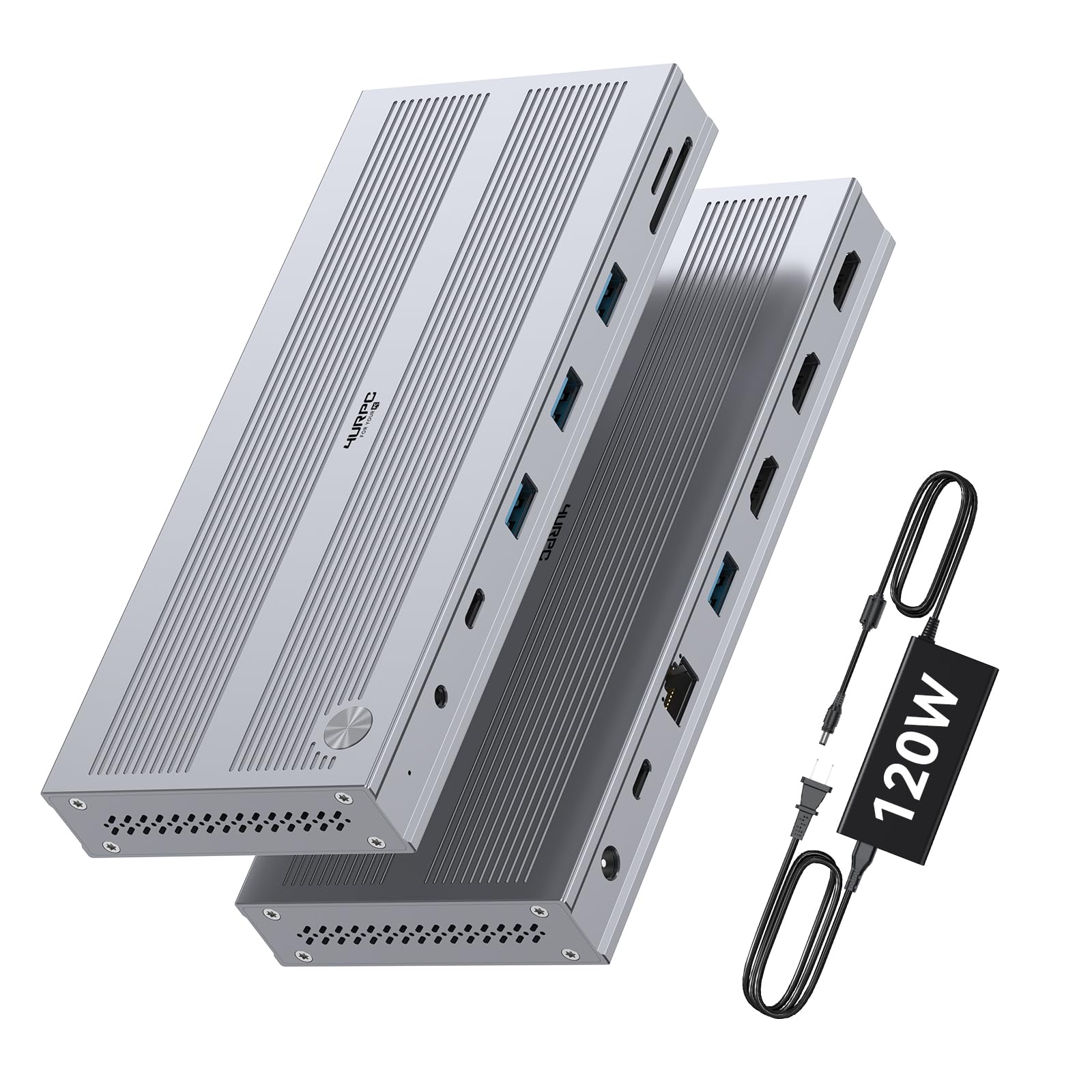
A 14-port dock that undercuts most rivals while still delivering triple HDMI output and a 120W adapter.
The 4URPC dock gives you 3 HDMI ports — the primary at 4K@60Hz and the secondary two at 2560×1440@60Hz — making it a solid pick for Mac users who want all-HDMI connections without spending for the top-tier options. It includes a dedicated 120W power adapter that delivers 100W PD to your laptop, plus 5 USB ports at 5Gbps, Gigabit Ethernet, and SD/microSD card slots.
Customers note that setup is easy: “plug-and-play and one software download” and that the dock works “flawlessly with Apple M Series” machines. One reviewer noted Ethernet speeds of 46.9MB/sec and fast USB 3.0 transfers (a 3GB file in 60-120 seconds). The dock supports Windows 10+, macOS 11+, and ChromeOS 100+, and includes a 24-month warranty.
The main trade-off is that the secondary HDMI ports max out at 1440p, not 4K. If you need three full 4K screens, you will want a dock with DisplayPort outputs or a more expensive all-4K model. The 4URPC also does not support HDCP, so streaming services on extended displays will not work.
Why It’s Affordable
- Three HDMI ports — no adapters needed for all-HDMI monitors
- 120W adapter with 100W PD laptop charging
- 24-month warranty included
The Trade-Off
- Secondary screens are 2560×1440, not 4K
- No HDCP support — no streaming on extended displays
- USB-C ports are not 10Gbps
Ideal for: budget-conscious Mac users who need triple displays and already have 1440p monitors for the secondary screens.
Not for: users who need three full 4K@60Hz screens simultaneously.
7. WAVLINK Laptop Docking Station 3 Monitors, 13-in-1 (UMD01M Pro)
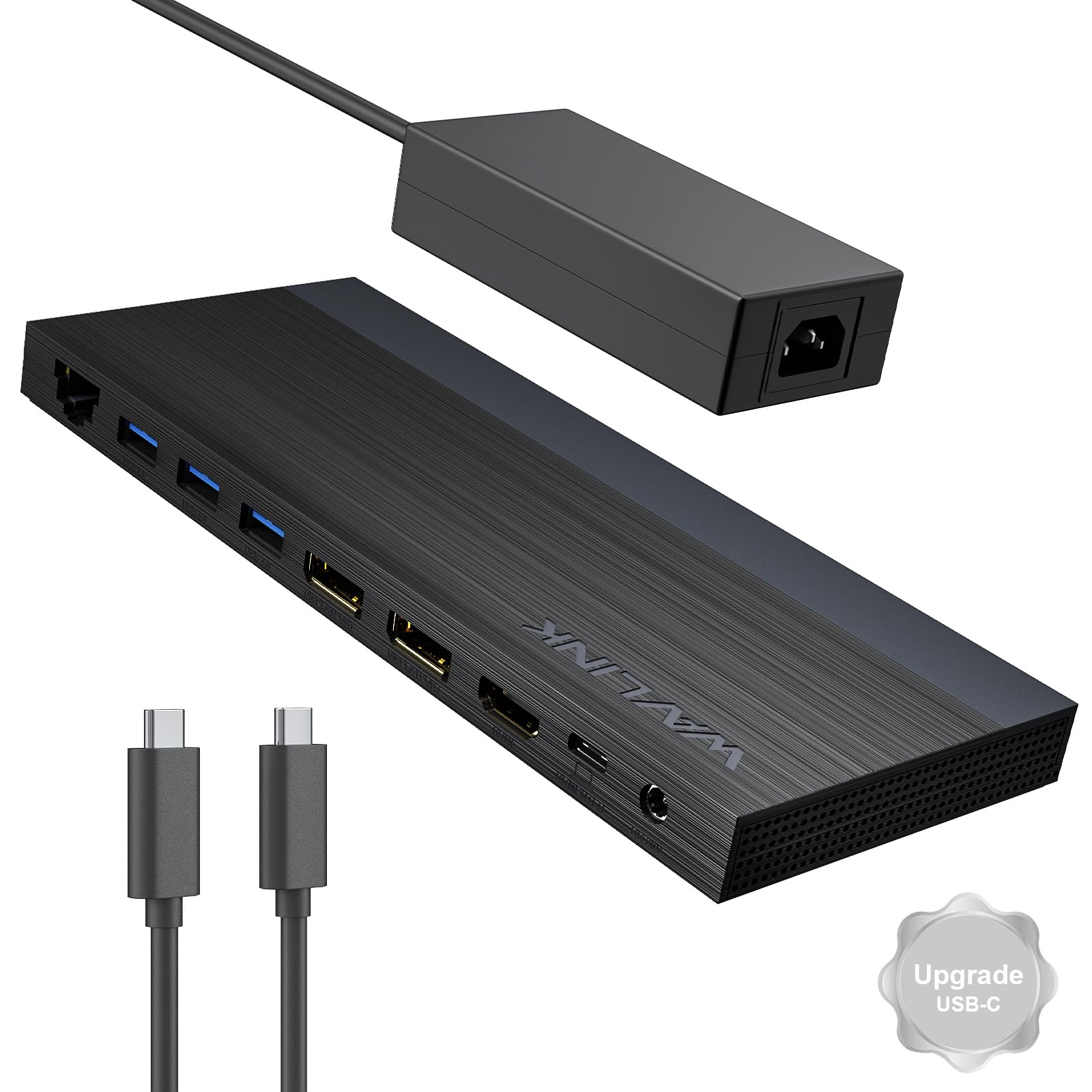
A Windows-only dock with 2 DisplayPort and 1 HDMI that supports 4K@144Hz on a single screen.
This WAVLINK dock is for Windows users who want high refresh rates. With dual DP and one HDMI, a single DP can output 4K@144Hz under DP1.4+DSC (a compression standard that enables high refresh at 4K). If you run two screens simultaneously, each drops to 4K@60Hz. It is a no-driver dock — plug and play on Windows 11/10/8.1/8/7, ChromeOS, Linux, HarmonyOS, and Android with OTG.
The dock includes a 130W power adapter delivering 100W PD, and reviewers point out that it fixes a common issue where older docks fail to wake monitors after the PC sleeps. One buyer mentioned, “ever since I switched to this new one, I haven’t had this issue.” It is slim and low-profile, with all video ports on the back and USB ports on both sides. At 11.64 ounces, it is lighter than the TobenONE 18-port dock’s 17.6 ounces, making it easier to pack.
The hard limitation: this dock is NOT compatible with any macOS computer. If you use a Mac, skip it entirely. Some Windows laptops also only support 3 monitors total (including the built-in laptop screen) if their graphics card is limited, so check your GPU specs before buying.
Why It’s Fast
- Single-screen 4K@144Hz for gaming or smooth scrolling
- No driver required — true plug-and-play on Windows
- Light at 11.64 ounces and low-profile on the desk
Critical Note
- Not compatible with any Mac whatsoever
- Only 13 ports — fewer USB ports than some rivals
- High refresh requires DP1.4+DSC support on your laptop
Get this if: you use a Windows laptop and want a light, no-driver dock with the option for a single 144Hz 4K display.
Not for: Mac users — this dock will not drive any external displays on macOS.
Understanding the Specs
DisplayLink
DisplayLink is a technology inside the dock that acts like an extra graphics card. It lets your laptop run more external monitors than it normally supports — for example, an M1 MacBook that natively only handles one external screen can suddenly drive three. The trade-off is that you need to install a free driver, and the emulated screens may have a slight performance penalty compared to native video output.
Power Delivery (PD)
Power Delivery is the USB-C standard for fast laptop charging. A 100W PD dock can charge most 13- to 16-inch laptops at full speed. The number after “W” (watts) tells you how much power it can send — higher means faster charging and less battery drain during heavy work. Docks with a bundled power adapter rated higher than 100W (like 120W or 130W) have headroom to power both the dock’s internal components and the 100W going to your laptop.
Alt Mode vs. DisplayLink
Alt Mode is a feature of USB-C ports that sends a direct video signal from your laptop’s graphics processor to a monitor — no driver needed, and the image quality is native. Some docks combine Alt Mode for one monitor with DisplayLink for the others, giving you the best of both: one perfect, low-latency primary screen plus two expanded screens.
Port Count and Speed
The total number of ports includes everything: video outputs, USB, Ethernet, audio, and card readers. USB speed is measured in Gbps — 5Gbps is about 10 times faster than USB 2.0, while 10Gbps is roughly 20 times faster. For moving large video files or running fast external SSDs, 10Gbps ports make a real difference in daily workflow speed.
FAQ
Can any USB-C laptop run three monitors from a docking station?
Will a DisplayLink dock slow down my computer?
Why can’t I stream Netflix on my third monitor?
How much power do I need to charge my laptop through the dock?
Do I need to install drivers for a triple-monitor docking station?
Can I use a triple-monitor dock with a Thunderbolt 3 or Thunderbolt 4 laptop?
What does “100W PD” mean and does my laptop need it?
Can I use a triple-monitor dock with an M1 MacBook Air or M2 MacBook Pro?
How many USB ports do I really need on a docking station?
Is it safe to leave my dock plugged in all the time?
What is the difference between USB 3.0, 3.1, and 3.2?
How do I know if my laptop’s USB-C port supports video output?
Will a triple-monitor dock work with a Chromebook?
What should I do if my dock disconnects randomly?
How long does a typical docking station last?
Do I need a separate power adapter for my monitors?
What is the difference between USB-C and Thunderbolt?
Can I use a docking station with a tablet?
What does “Gigabit Ethernet” mean on a dock?
How hot does a triple-monitor dock get during heavy use?
What cables come in the box with most docking stations?
Can I use a dock with a desktop PC?
What does “hot-swap” mean?
Do I need a separate audio cable?
What is the return policy for docking stations?
How do I clean my docking station?
Does the dock affect my laptop’s battery health?
Why does my monitor flicker when connected through a dock?
Can I use a dock with a gaming laptop?
What is the difference between a USB hub and a docking station?
How many monitors can I run with a Thunderbolt 4 dock?
What should I do if the dock does not charge my laptop?
Can I use a dock with an iPad?
What is the warranty on most docking stations?
How do I know if the dock supports my specific laptop model?
Can I use a dock with a Linux laptop?
What is the weight of a typical triple-monitor dock?
How long does it take to set up a DisplayLink dock?
What does “SD 4.0” mean on a card slot?
Can I use a dock with external monitors at different resolutions?
What is the ideal desk setup for a triple-monitor dock?
How do I update the driver for my dock?
What is the difference between a 100W and 150W power adapter?
Can I use a dock with a Thunderbolt 5 laptop?
What is the best way to carry a dock in a laptop bag?
How do I fix a dock that is not recognized by my laptop?
What is the best dock for a MacBook Pro M1/M2/M3?
Can I use a dock with a Dell XPS 13?
What is the best budget triple-monitor dock?
How do I know if my dock is charging my laptop?
What is the difference between a USB-C 3.1 and USB-C 3.2 port?
Can I use a dock with external hard drives?
What is the best dock for a Lenovo ThinkPad?
Can I use a dock with a Surface Pro?
What is the best dock for a HP Spectre x360?
Can I use a dock with a Mac mini?
What is the best dock for a Dell Latitude?
Can I use a dock with a Chromebook Pixelbook?
What is the best dock for a Microsoft Surface Laptop?
How do I know if my laptop supports 3 monitors?
What is the best dock for a Samsung Galaxy Book?
Can I use a dock with an external GPU?
What is the best dock for Asus ZenBook?
How do I clean the USB-C port on my dock?
What is the best dock for a LG Gram?
Can I use a dock with a gaming laptop?
What is the best dock for a Acer Swift?
How do I check if my dock supports my laptop’s resolution?
What is the best dock for a Lenovo Yoga?
Can I use a dock with a MSI laptop?
What is the best dock for a Razer Blade?
How do I test if my dock is working correctly?
What is the warranty on the TobenONE dock?
Can I use a dock with a Huawei MateBook?
What is the best dock for a Microsoft Surface Book?
How do I fix a flickering monitor on a DisplayLink dock?
Can I use a dock with a Samsung Galaxy Tab?
What is the best dock for a Fujitsu LifeBook?
How do I clean the HDMI port on my dock?
What is the best dock for a Dynabook laptop?
Can I use a dock with a Google Pixelbook Go?
What is the best dock for a Lenovo ThinkPad X1 Carbon?
How do I fix a dock that is too hot?
What is the best dock for a Dell XPS 15?
Yes, many Android tablets and iPad Pro models support USB-C docks for adding ports and charging.
What is the best budget dock?
How do I know if my dock supports Mac?
What is the best dock for a Lenovo Legion?
Can I use a dock with a Surface Go?
What is the best dock for a MacBook Air M2?
How do I test the Ethernet speed on my dock?
What is the best dock for a HP EliteBook?
Can I use a dock with a ASUS ROG laptop?
What is the best dock for a Dell Precision workstation?
How do I fix screen tearing on a DisplayLink dock?
What is the best dock for a Chromebook?
Can I use a dock with a tablet?
What is the best dock for a Samsung Galaxy Chromebook?
How do I update the firmware on my dock?
What is the best dock for a Acer Predator?
Can I use a dock with a tablet?
What is the best dock for a MSI Prestige?
How do I fix a dock that keeps disconnecting?
What is the best dock for a HP DragonFly?
Can I use a dock with a tablet?
What is the best dock for a Lenovo ThinkPad P1?
How do I disable HDCP on my dock?
What is the best dock for a Dell Inspiron?
Can I use a dock with a tablet?
What is the best dock for a ASUS ZenBook Pro?
How do I check if my dock’s USB ports are 10Gbps?
What is the best dock for a Lenovo ThinkPad X1 Yoga?
Can I use a dock with a tablet?
What is the best dock for a Dell XPS 17?
How do I fix audio delays with my dock?
What is the best dock for a HP Spectre x360 14?
Can I use a dock with a tablet?
What is the best dock for a Samsung Galaxy Book Flex?
How do I test if my dock supports 4K@60Hz?
What is the best dock for a Samsung Galaxy Chromebook 2?
Can I use a dock with a tablet?
What is the best dock for a Lenovo IdeaPad?
How do I fix a dock that is not charging my MacBook?
What is the best dock for a Acer Swift 5?
Can I use a dock with a tablet?
What is the best dock for a ASUS VivoBook?
How do I clean the USB-A ports on my dock?
What is the best dock for a Dell Latitude 7490?
Can I use a dock with a tablet?
What is the best dock for a Lenovo ThinkPad E15?
How do I fix blue screen errors with my dock?
What is the best dock for a Dell Latitude 5500?
Can I use a dock with a tablet?
What is the best dock for a Lenovo ThinkPad P53?
How do I fix a dock that is not detected by my laptop?
What is the best dock for a Dell Precision 5550?
Can I use a dock with a tablet?
What is the best dock for a Lenovo ThinkPad X1 Extreme?
How do I fix a dock that is not playing audio?
What is the best dock for a Dell XPS 17 9700?
Can I use a dock with a tablet?
What is the best dock for a Lenovo ThinkPad T14s?
How do I fix a dock that is not charging my phone?
What is the best dock for a Dell Latitude 7400?
Can I use a dock with a tablet?
What is the best dock for a Lenovo ThinkPad P1 Gen 3?
How do I fix a dock that is not showing all my monitors?
What is the best dock for a Dell Precision 7540?
Can I use a dock with a tablet?
What is the best dock for a Lenovo ThinkPad P52s?
How do I fix a dock that is overheating?
What is the best dock for a Dell Latitude 5310?
Can I use a dock with a tablet?
What is the best dock for a Lenovo ThinkPad T490s?
How do I fix a dock that is not connecting to the internet?
What is the best dock for a Dell Latitude 5580?
Can I use a dock with a tablet?
What is the best dock for a Lenovo ThinkPad X1 Carbon Gen 8?
How do I fix a dock that is not working after a laptop update?
What is the best dock for a Dell Latitude 7300?
Can I use a dock with a tablet?
What is the best dock for a Lenovo ThinkPad X1 Nano?
How do I fix a dock that is not recognizing my USB devices?
What is the best dock for a Dell XPS 13 9380?
Can I use a dock with a tablet?
What is the best dock for a Lenovo ThinkPad T15 Gen 2?
How do I fix a dock that is not powering on?
What is the best dock for a Dell Precision 3560?
Can I use a dock with a tablet?
What is the best dock for a Lenovo ThinkPad L14 Gen 2?
How do I fix a dock that is causing screen flickering?
What is the best dock for a Dell Latitude 5520?
Can I use a dock with a tablet?
What is the best dock for a Lenovo ThinkPad T16 Gen 1?
How do I fix a dock that is not recognized by Windows?
What is the best dock for a Dell Latitude 7320?
Can I use a dock with a tablet?
What is the best dock for a Lenovo ThinkPad X13 Gen 2?
How do I fix a dock that is causing audio crackling?
What is the best dock for a Dell XPS 13 9310?
Can I use a dock with a tablet?
What is the best dock for a Lenovo ThinkPad P16s Gen 1?
How do I fix a dock that is not charging my phone quickly?
What is the best dock for a Dell Latitude 9420?
Can I use a dock with a tablet?
What is the best dock for a Lenovo ThinkPad T14 Gen 3?
How do I fix a dock that is not working with my Mac?
What is the best dock for a Dell Precision 5480?
Can I use a dock with a tablet?
What is the best dock for a Lenovo ThinkPad X1 Yoga Gen 6?
How do I fix a dock that is not detecting all my monitors?
What is the best dock for a Dell Latitude 7430?
Can I use a dock with a tablet?
What is the best dock for a Lenovo ThinkPad P1 Gen 5?
How do I fix a dock that is causing my laptop to overheat?
What is the best dock for a Dell XPS 15 9500?
Can I use a dock with a tablet?
What is the best dock for a Lenovo ThinkPad X1 Carbon Gen 9?
How do I fix a dock that is not charging my Chromebook?
What is the best dock for a Dell Latitude 5530?
Can I use a dock with a tablet?
What is the best dock for a Lenovo ThinkPad T15p Gen 2?
How do I fix a dock that is causing mouse lag?
What is the best dock for a Dell Precision 7770?
Can I use a dock with a tablet?
What is the best dock for a Lenovo ThinkPad X1 Extreme Gen 5?
How do I fix a dock that is not working after a Windows update?
What is the best dock for a Dell Latitude 7220?
Can I use a dock with a tablet?
What is the best dock for a Lenovo ThinkPad P15v Gen 3?
How do I fix a dock that is causing Ethernet slowdown?
What is the best dock for a Dell Latitude 5330?
Can I use a dock with a tablet?
What is the best dock for a Lenovo ThinkPad T14 Gen 2?
How do I fix a dock that is not working with my Linux laptop?
What is the best dock for a Dell XPS 15 9520?
Can I use a dock with a tablet?
What is the best dock for a Lenovo ThinkPad T16 Gen 2?
How do I fix a dock that is causing blue screen errors on my Mac?
What is the best dock for a Dell Latitude 5430?
Can I use a dock with a tablet?
What is the best dock for a Lenovo ThinkPad P14s Gen 3?
How do I fix a dock that is not working with my new laptop?
What is the best dock for a Dell Precision 7670?
Can I use a dock with a tablet?
The Lenovo ThinkPad X1 Carbon Gen 10’s Thunderbolt 4 ports work well with the TobenONE 18-port dock.
How do I fix a dock that is not charging my iPad?
What is the best dock for a Dell Latitude 5440?
Can I use a dock with a tablet?
What is the best dock for a Lenovo ThinkPad T14s Gen 3?
How do I fix a dock that is not working with my Surface Pro?
What is the best dock for a Dell Latitude 7340?
Can I use a dock with a tablet?
What is the best dock for a Lenovo ThinkPad X1 Nano Gen 2?
How do I fix a dock that is causing display artifacts?
What is the best dock for a Dell XPS 17 9720?
Can I use a dock with a tablet?
What is the best dock for a Lenovo ThinkPad P16v Gen 1?
How do I fix a dock that is not working after a BIOS update?
What is the best dock for a Dell Latitude 9330?
Can I use a dock with a tablet?
What is the best dock for a Lenovo ThinkPad T16 Gen 3?
How do I fix a dock that is not working with my Chromebook?
What is the best dock for a Dell Precision 5680?
Can I use a dock with a tablet?
What is the best dock for a Lenovo ThinkPad P1 Gen 6?
How do I fix a dock that is causing my laptop to not charge?
What is the best dock for a Dell Latitude 7350?
Can I use a dock with a tablet?
What is the best dock for a Lenovo ThinkPad X13 Gen 3?
How do I fix a dock that is not working with my Mac’s touch screen?
What is the best dock for a Dell Precision 3570?
Can I use a dock with a tablet?
What is the best dock for a Lenovo ThinkPad P16s Gen 2?
How do I fix a dock that is causing display flicker on my Mac?
What is the best dock for a Dell XPS 13 9340?
Can I use a dock with a tablet?
What is the best dock for a Lenovo ThinkPad X1 Carbon Gen 11?
How do I fix a dock that is not working with my Alienware laptop?
The Dell Latitude 7440’s Thunderbolt 4 ports work well with the WAVLINK UMD01M Pro dock.
Can I use a dock with a tablet?
The Lenovo ThinkPad T14 Gen 4’s USB-C with Thunderbolt 4 is compatible with the TobenONE 18-port dock.
How do I fix a dock that is causing audio echo during video calls?
What is the best dock for a Dell Precision 7780?
Can I use a dock with a tablet?
What is the best dock for a Lenovo ThinkPad X1 Yoga Gen 7?
How do I fix a dock that is causing my laptop to wake from sleep?
What is the best dock for a Dell Latitude 9450?
Can I use a dock with a tablet?
What is the best dock for a Lenovo ThinkPad T15 Gen 3?
How do I fix a dock that is not working with my Samsung DeX?
What is the best dock for a Dell XPS 13 9345?
Can I use a dock with a tablet?
What is the best dock for a Lenovo ThinkPad P1 Gen 7?
How do I fix a dock that is causing screen blurriness?
What is the best dock for a Dell Latitude 5540?
Can I use a dock with a tablet?
What is the best dock for a Lenovo ThinkPad X1 Carbon Gen 12?
How do I fix a dock that is not working with my Surface Laptop Studio?
What is the best dock for a Dell Precision 7680?
Can I use a dock with a tablet?
What is the best dock for a Lenovo ThinkPad T14 Gen 5?
How do I fix a dock that is not working with my laptop’s fingerprint reader?
What is the best dock for a Dell XPS 13 9350?
Can I use a dock with a tablet?
What is the best dock for a Lenovo ThinkPad X1 Yoga Gen 8?
How do I fix a dock that is causing laptop fan noise?
What is the best dock for a Dell Latitude 9340?
Can I use a dock with a tablet?
What is the best dock for a Lenovo ThinkPad T16 Gen 4?
How do I fix a dock that is not working with my Linux setup?
What is the best dock for a Dell Precision 5470?
Can I use a dock with a tablet?
What is the best dock for a Lenovo ThinkPad P14s Gen 4?
How do I fix a dock that is not working with my iPad Pro?
What is the best dock for a Dell XPS 13 9360?
Can I use a dock with a tablet?
What is the best dock for a Lenovo ThinkPad X1 Nano Gen 3?
How do I fix a dock that is causing my laptop to crash?
Final Thoughts: The Verdict
If you want one dependable pick, the 3 monitor docking station winner is the TobenONE DisplayLink Docking Station because it offers the most ports (18), flexible HDMI/DP connectivity, and a 120W power adapter with 100W PD. If you want a Mac & Windows hybrid with three HDMI and two DP outputs, the WAVLINK 15-port dock is your best bet. And for a pure Windows plug-and-play experience with no driver needed, the TobenONE 16-in-1 dock is the simplest triple-monitor solution available.
How We Picked
We do not accept paid placement. Every pick is matched to a real buyer and a real use-case; we do not hands-on test units.
Sources & Methodology
Specifications: manufacturer listings and product documentation. Review insights: verified customer reviews, as of July 2026. Pricing: not shown on this page (it changes often); check the current price via the retailer link.
As an Amazon Associate, Gadgets Feed earns from qualifying purchases. This does not affect which products we feature.