
Our readers keep the lights on and my morning glass full of iced black tea. As an Amazon Associate, I earn from qualifying purchases.
Specs are compiled from manufacturer listings and verified buyer reviews and can change over time — please confirm the key details on the product page before buying.
You need a machine that can print on paper up to 11″ x 17″ (called A3, roughly twice the area of a standard letter sheet) for things like architectural plans, big spreadsheets, or marketing materials. An A3 multifunction printer (MFP) does that, plus it scans and copies. The hard part is finding one that prints those large sheets fast, runs reliably, and does not cost a fortune in ink or toner each month.
I’m Min — the founder and writer behind Gadgets Feed. This guide is built by comparing the manufacturers’ published specifications and the patterns across verified customer reviews, so you get each pick’s real strengths and trade-offs instead of marketing spin.
The right machine for you—the best a3 multifunction printer—matches your page volume, speed needs, and per-page cost. None of these will work well if you push them past what they are designed for.
Our Picks at a Glance

How To Choose The Best A3 Multifunction Printer
Picking the right A3 MFP means looking past the basic “it prints big” promise. The real buying decision depends on three things: how fast you need those big pages, what you are willing to spend per page over the machine’s lifetime, and whether the paper handling matches your daily workflow without constant intervention.
Print Speed and Duty Cycle
Speed is measured in pages per minute (ppm), but A3 printers often deliver different rates for black-and-white and color. A machine rated at 25 ppm black and 12 ppm color means your color A3 jobs will take twice as long. Your monthly page volume (duty cycle) tells you if the printer is built for occasional use or all-day production — a low duty cycle machine pushed too hard will fail early.
Print Technology: Inkjet vs. Laser
Inkjet printers, especially supertank models, offer very low per-page costs (around 2 cents per color page) but require regular use to prevent ink clogs in the printhead. Laser printers use toner and have no ink drying issues, making them better for intermittent use, but replacement toner cartridges cost more per page. The right choice depends on whether you print daily or weekly.
Paper Handling and Connectivity
A3 printers are physically large. Look at the total paper capacity (500 sheets is entry-level; 1,600 sheets is high-volume), whether it has a rear specialty feed for thick paper, and if the automatic document feeder (ADF) can handle A3 originals for scanning. Built-in Ethernet is standard; Wi-Fi and mobile printing (Apple AirPrint, Mopria) are essential for shared office use.
Quick Comparison
| Model | Best For | Print Speed (B&W / Color) | Max Print Size | Paper Capacity | Amazon |
|---|---|---|---|---|---|
| Epson WorkForce Pro WF-7840★ Best Overall | Best Value | 25 ppm / 12 ppm | 13″ x 19″ | 500 sheets | Amazon |
| Epson EcoTank Pro ET-16650 | Best Overall | 25 ppm / 25 ppm | 13″ x 19″ | 500 sheets (2 front trays + rear feed) | Amazon |
| Kyocera ECOSYS M8124cidn | Premium Pick | 24 ppm / 24 ppm | A3 | 1,600 sheets | Amazon |
In‑Depth Reviews
1. Epson WorkForce Pro WF-7840
The budget-friendly entry into A3 that has already proven its longevity.
Not every office needs supertank volume or laser-level capacity — sometimes the right move is a solid mid-range inkjet that handles 13″ x 19″ prints without breaking the budget. The Epson WorkForce Pro WF-7840 prints black at 25 ppm and color at 12 ppm. That 2.1x gap versus the EcoTank Pro means color jobs take noticeably longer, but for occasional use that trade-off may be fine. A buyer who used it for four years reported “printed ~12,000 pages over 4 years with flawless quality,” praising crisp AutoCAD prints and dependable Ethernet and Wi-Fi performance.
Paper handling includes a 500-sheet capacity, a 50-page automatic document feeder (ADF, a tray that feeds pages one by one for scanning or copying), and an automatic duplex for two-sided printing. It uses DURABrite Ultra ink, which dries instantly to stay smudge-free. The 4.3-inch screen makes navigation easy, and you can print from a phone via Apple AirPrint, Mopria, or the Epson Smart Panel and iPrint apps. The upfront cost is the lowest of the three A3 options here.
The main concern is the ink system and firmware. Multiple owners mention constant firmware update prompts that can eventually block aftermarket ink cartridges, and one 1-star review describes “paper mismatch” errors despite correct settings and paper feed errors with no jam found. Buyers also mention the printer is heavy and bulky, and that 11″ x 17″ paper hangs out of the front tray. If you plan to use genuine Epson cartridges and are comfortable with the printer’s firmware demands, it remains a proven value — one reviewer replaced a 10-year-old WorkForce Pro with this exact model and called it an easy choice.
What Works Well
- Proven 4-year reliability with ~12,000 pages and consistent print quality
- Fast 25 ppm black for text-heavy A3 documents
- Supports wide-format up to 13″ x 19″ and includes 50-page ADF
- Works with generic ink in many cases, reducing ongoing cost
What to Watch For
- Color speed is only 12 ppm — half the pace of the black-only output
- Aggressive firmware updates that may block third-party ink
- Occasional paper-feed and paper-mismatch errors reported
- Bulky footprint and front tray that lets large paper overhang
Best for budget-conscious offices with light color needs: if most of your A3 printing is black-and-white plans and the occasional color page, the WF-7840 delivers proven value.
Look elsewhere for heavy color volume: the 12 ppm color speed and ink-clog risk between uses make it a poor fit for daily full-color A3 runs.
2. Epson EcoTank Pro ET-16650
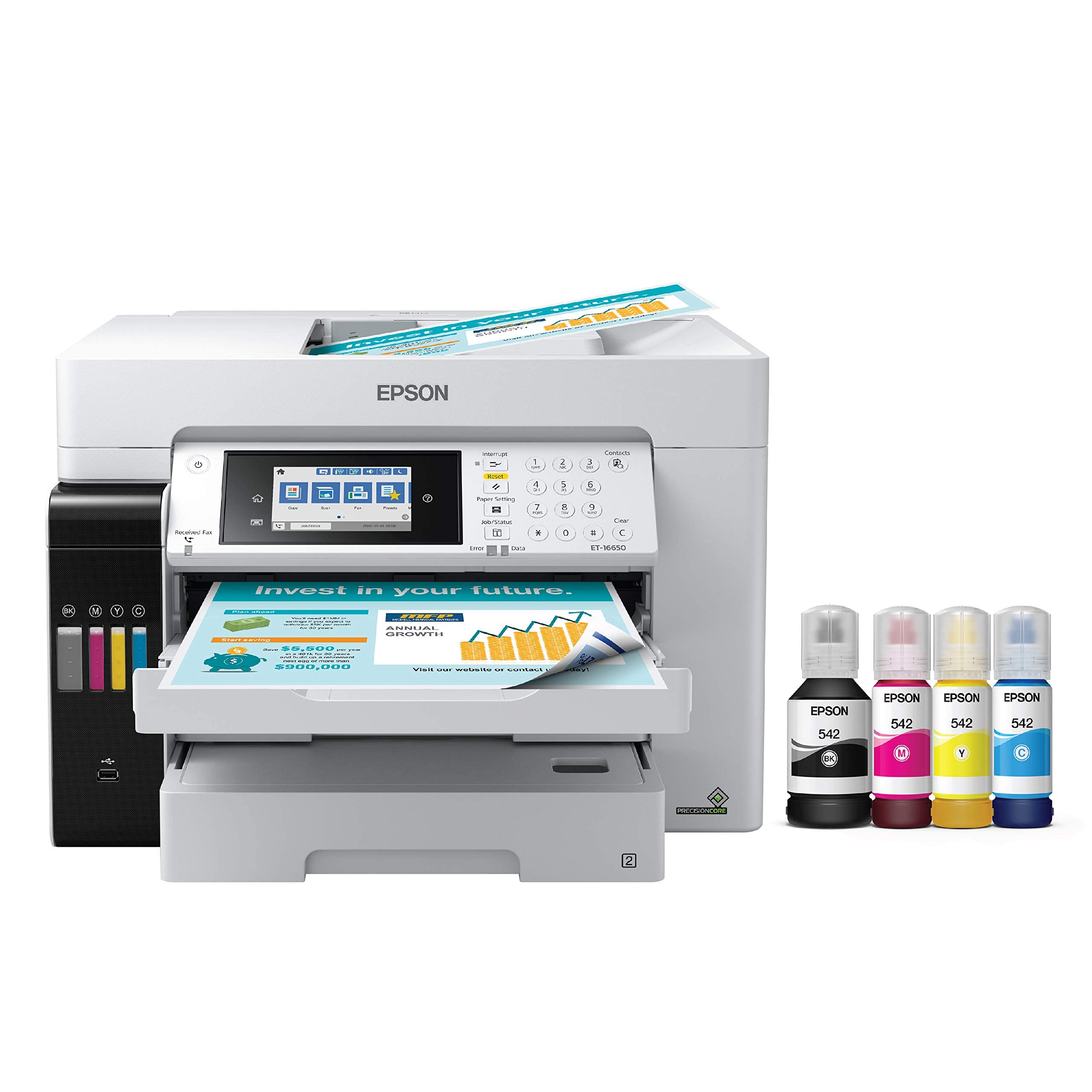
The supertank that delivers both speed and low-cost A3 color without cartridges.
If you print enough color A3 pages to make cartridge replacements a monthly drag, this is the machine that changes the math. The Epson EcoTank Pro ET-16650 uses refillable ink bottles instead of cartridges — 127 mL of black and 70 mL each of cyan, magenta, and yellow — and each set prints up to 7,500 black pages and 6,000 color pages. The cost per color page sits at about 2 cents, compared to 14 cents with standard cartridges, which buyers report saves real money fast.
Speed is the other standout: it delivers 25 ppm black and 25 ppm color, a full 2.1x faster than the WorkForce Pro on color jobs. That equal color speed matters when you batch-print A3 sales decks or design proofs. It handles prints up to 13″ x 19″ and scans up to 11″ x 17″, and the automatic duplex (two-sided printing) is standard. The touch-panel interface is intuitive, and Wi-Fi setup drew praise from reviewers for being straightforward.
The catch is a known reliability concern. One reviewer noted a cyan printhead failure after one year, with Epson denying warranty coverage due to colored ink tubes. A local repair cost for a new printhead plus for dampers, and the same reviewer noted a “known ink system flaw.” If you choose this printer, an extended warranty is a prudent add — the reviewer who did so described the unit as “big, intricate, and fragile” despite otherwise solid build quality.
Where It Excels
- Equal 25 ppm black and color — no speed penalty for color A3 jobs
- Ultra-low per-page cost of about 2 cents per color page with included ink bottles
- Dual front trays plus rear feed support 11″ x 17″ on both cassettes
- Pigment-based DURABrite ink provides instant-dry, crisp prints
Know Before You Buy
- Printhead failures reported within the first year, potentially costly out of warranty
- Large footprint requires about 24″ x 32″ of desk space
- Initial ink charging consumes approximately 20% of the supplied ink
Best for high-volume color users: this is the pick if you run A3 color pages daily and want the lowest total ink cost over time.
Think twice if you print infrequently: pigment ink can clog when left idle for weeks, and the printhead repair cost is steep.
3. Kyocera ECOSYS M8124cidn

The color laser that handles daily A3 with no ink to dry out or clog.
When you need a printer that sits ready for days without use and still delivers at 24 ppm color the minute you need it, a laser is the answer. The Kyocera ECOSYS M8124cidn runs on toner — cyan, magenta, yellow, black — with no liquid ink to dry in the printhead, making it ideal for offices where A3 jobs come in bursts rather than a steady stream. It prints at 24 ppm for both black and color, effectively matching the EcoTank Pro on black speed but falling just 1 ppm short on color (a 4% margin the buyer will hardly notice).
Paper handling is where this machine sets itself apart for high-volume teams. It holds up to 1,600 sheets, more than three times the capacity of either Epson model, so reloading is much less frequent during a busy day. The 4.3-inch color touch screen is easy to navigate, and it supports Apple AirPrint, Mopria, and Kyocera Mobile Print for phone and tablet printing. One reviewer praised “sturdy build quality, no cheap materials,” and others found the print and scan quality to be very good for daily small-office use.
A buyer should know two things. First, the machine requires professional setup and installation — this is not a plug-and-play desktop device. Second, one noted the fax function is not built in; the component is missing and must be sourced and installed separately, which conflicts with the all-in-one claim if fax is a must-have. Buyers also report the price is a significant step up, but for teams that rely on A3 laser reliability, the total cost of ownership is tough to top.
Strengths at a Glance
- Consistent 24 ppm color with no ink-drying risk between jobs
- Massive 1,600-sheet paper capacity reduces refill frequency
- Fine 1200 x 1200 dpi resolution delivers crisp A3 plans and documents
- HyPAS capable for running Kyocera business applications
Heads-Up
- Fax component is not included — you must purchase and install it separately
- Professional setup required, adds to upfront effort
- Fewer customer reviews (18 ratings) mean a smaller sample of long-term reliability data
Reach for this when uptime and capacity matter most: the Kyocera is built for a busy office that needs A3 color on demand, day after day, without ink management.
skip it if you need a simple plug-and-print machine: the professional install and separate fax module make this a team decision, not a solo purchase.
Understanding the Specs
Pages Per Minute (ppm)
This is the printer’s speed — how many pages it can print in one minute. Many A3 printers list two numbers: one for black-and-white and one for color. If the gap is large (like 25 ppm black and 12 ppm color), expect your color A3 jobs to take roughly twice as long. Equal speeds (25 ppm for both) mean no speed penalty when you switch to color.
Duty Cycle
This tells you the maximum number of pages the printer is built to handle per month without overheating or wearing out early. A low duty cycle (like 20,000 pages) is fine for occasional use. A high duty cycle (60,000 pages or more) is for offices where the machine runs multiple hours every day. Pushing a low-duty printer past its limit will cause jams and part failures.
FAQ
Does an A3 multifunction printer handle regular letter-size paper too?
How much space does an A3 printer need?
Which is cheaper to run: inkjet or laser A3 printer?
Can I print from my phone or tablet?
What is a supertank printer?
What is an automatic document feeder (ADF)?
Is duplex printing standard on A3 MFPs?
How often should I print to keep an inkjet A3 printer from clogging?
Final Thoughts: The Verdict
Across the board, the best a3 multifunction printer is the Epson EcoTank Pro ET-16650 because it combines equal black and color print speed at 25 ppm with a per-page ink cost that is dramatically lower than cartridge-based alternatives. If you need the reliability of laser technology and a massive 1,600-sheet paper capacity for a busy office, grab the Kyocera ECOSYS M8124cidn. And for a budget-friendly entry into A3 printing that has proven its longevity through thousands of pages, the Epson WorkForce Pro WF-7840 is a solid choice for lighter color workloads.
How We Picked
We do not accept paid placement. Every pick is matched to a real buyer and a real use-case; we do not hands-on test units.
Sources & Methodology
Specifications: manufacturer listings and product documentation. Review insights: verified customer reviews, as of July 2026. Pricing: not shown on this page (it changes often); check the current price via the retailer link.
As an Amazon Associate, Gadgets Feed earns from qualifying purchases. This does not affect which products we feature.