
Our readers keep the lights on and my morning glass full of iced black tea. As an Amazon Associate, I earn from qualifying purchases.
Specs are compiled from manufacturer listings and verified buyer reviews and can change over time — please confirm the key details on the product page before buying.
You want 10-gigabit speeds on your home network without spending a fortune. The good news is that the days of paying thousands for a 10Gb switch are over, and there are now several solid options under the premium radar that deliver real multi-gig performance for your NAS, gaming PC, or media server. This guide cuts through the noise to find the ones that actually work reliably while staying affordable.
I’m Min — the founder and writer behind Gadgets Feed. This guide is built by comparing the manufacturers’ published specifications and the patterns across verified customer reviews, so you get each pick’s real strengths and trade-offs instead of marketing spin.
if you need copper ports for a quick upgrade or SFP+ for a fiber backbone, these models represent the best affordable 10Gb switch choices for 2025 based on real-world data and buyer feedback.
Our Picks at a Glance


How To Choose The Best Affordable 10Gb Switch
The right switch for you depends mostly on your devices’ port types and how many devices you need to wire up at full speed. Two key decisions will shape your choice.
Copper (RJ45) vs SFP+ Fiber
Copper (RJ45) ports use the same standard Ethernet cables you already have (Cat6a or better is needed for full 10Gb). They are the most straightforward option for connecting a desktop PC, a NAS, or a gaming console directly without buying extra adapters. SFP+ ports use small plug-in modules and fiber optic cables (or a direct-attach copper cable). SFP+ switches like the MokerLink are the standard for longer runs, lower power, and interconnecting equipment in a rack, but they require you to buy SFP+ modules separately.
Managed vs Unmanaged
An unmanaged switch is pure plug-and-play — you connect power and cables, and it works. Perfect for home networks where you just want more speed. A managed switch lets you configure settings like VLANs (virtual networks to separate traffic), QoS (quality of service to prioritize certain data), and port monitoring. You should consider a managed switch only if you need to segment a home lab or office network.
Number of Ports and Switching Capacity
Count the devices you actually need at 10Gb speeds. A 5-port switch is usually enough for a home office with a NAS and one or two workstations. The switching capacity (measured in Gbps) is the total data the switch can handle at once. A switch with a higher capacity, like the NICGIGA’s 80Gbps or MokerLink’s 160Gbps, will not bottleneck your traffic when every port is maxed out.
Quick Comparison
| Model | Best For | Ports | Switching Capacity | Management | Amazon |
|---|---|---|---|---|---|
| YuanLey (6 Port)★ Best Overall | Entry-level 10G/2.5G upgrade | 6 | 60 Gbps | Unmanaged | Amazon |
| TP-Link TL-SX105Also Great | Reliable, quiet 10Gb copper | 5 (all 10G RJ45) | 100 Gbps | Unmanaged | Amazon |
| NICGIGA (10 Port) | High-port-count 2.5G/10G mix | 10 | 80 Gbps | Unmanaged | Amazon |
| MokerLink (8 Port SFP+) | Fiber backbone | 8 (all SFP+) | 160 Gbps | Unmanaged | Amazon |
| Davuaz (8 Port) | Mix of RJ45 and SFP+ | 8 | 160 Gbps | Unmanaged | Amazon |
| Real HD (5 Port Managed) | VLAN / home lab / office | 5 (all 10G RJ45) | 100 Gbps | Managed | Amazon |
| NICGIGA (5 Port) | All 10Gb copper for a small setup | 5 (all 10G RJ45) | 100 Gbps | Unmanaged | Amazon |
In‑Depth Reviews
1. YuanLey 6-Port 10 Gigabit Network Switch
The entry-level ticket to 2.5G and 10G networking at a shockingly low price.
This is the most affordable switch on the list, and it delivers real value for the money. It combines 2 x 10Gb RJ45 ports and 4 x 2.5Gb RJ45 ports in a fanless metal case with a 60 Gbps switching capacity. A standout feature for an unmanaged switch this cheap is the one-key VLAN button, which isolates the 2.5G ports from each other while keeping them linked to the 10G uplinks — useful for security cameras or guest networks. One buyer reports getting “full 2.5Gbps across my wired devices” and linking it to their router via a 10Gb SFP uplink.
The brand is less established, but the overwhelmingly positive reviews (4.5 / 5 stars from 488 ratings) suggest the quality is solid.
Low-Cost Upgrade
- Fanless and silent metal housing
- One-key VLAN for security or cameras
- Plug-and-play with no setup
Entry-Level Limits
- Only 2 true 10G ports
- Lower total switching capacity (60 Gbps)
Best for the budget-conscious upgrader: If you want to dip your toes into 2.5G / 10G speeds for a NAS and a single workstation without spending much, this is the most affordable foot in the door.
Look elsewhere if: You need more than two 10G ports or plan to saturate all ports simultaneously — step up to the NICGIGA 10-port or MokerLink.
2. TP-Link TL-SX105
The quiet, reliable 5-port copper switch that just works without any fuss.
The TP-Link TL-SX105 earns the top spot because it runs completely silently — no fan noise at all — while the NICGIGA 5-port below uses a 5000 RPM fan. You get five 10Gb RJ45 ports that automatically negotiate down to 2.5G, 5G, 1G, or 100M, so your older devices still work perfectly. With a 100 Gbps switching capacity, it keeps every port running at full speed without slowing down. Buyers report it is “fast, reliable, fanless” and appreciate the simple plug-and-play nature. One reviewer warns that under sustained heavy load it can overheat and stall traffic briefly. It is also smaller than you might expect at 8.9″ long and 5.2″ wide.
Compared to the NICGIGA 5-port model right below, the TP-Link runs cooler and is backed by a 3-year warranty and free tech support. That makes it the safer long-term bet for a home office or living room setup.
Quiet and Capable
- Fanless and silent operation
- Auto-negotiates across 5 speeds
- 3-year warranty with solid support
Noted Limitations
- Can overheat under sustained heavy load
- 5 ports may be limiting for some setups
Best for the quiet home office: Anyone who wants a dependable, fanless 10Gb switch from a trusted brand with a 3-year warranty.
Look elsewhere if: You need more than 5 ports or expect non-stop 24/7 heavy file transfers — consider the NICGIGA or MokerLink instead.
3. NICGIGA 10 Port 10Gbps Network Switch
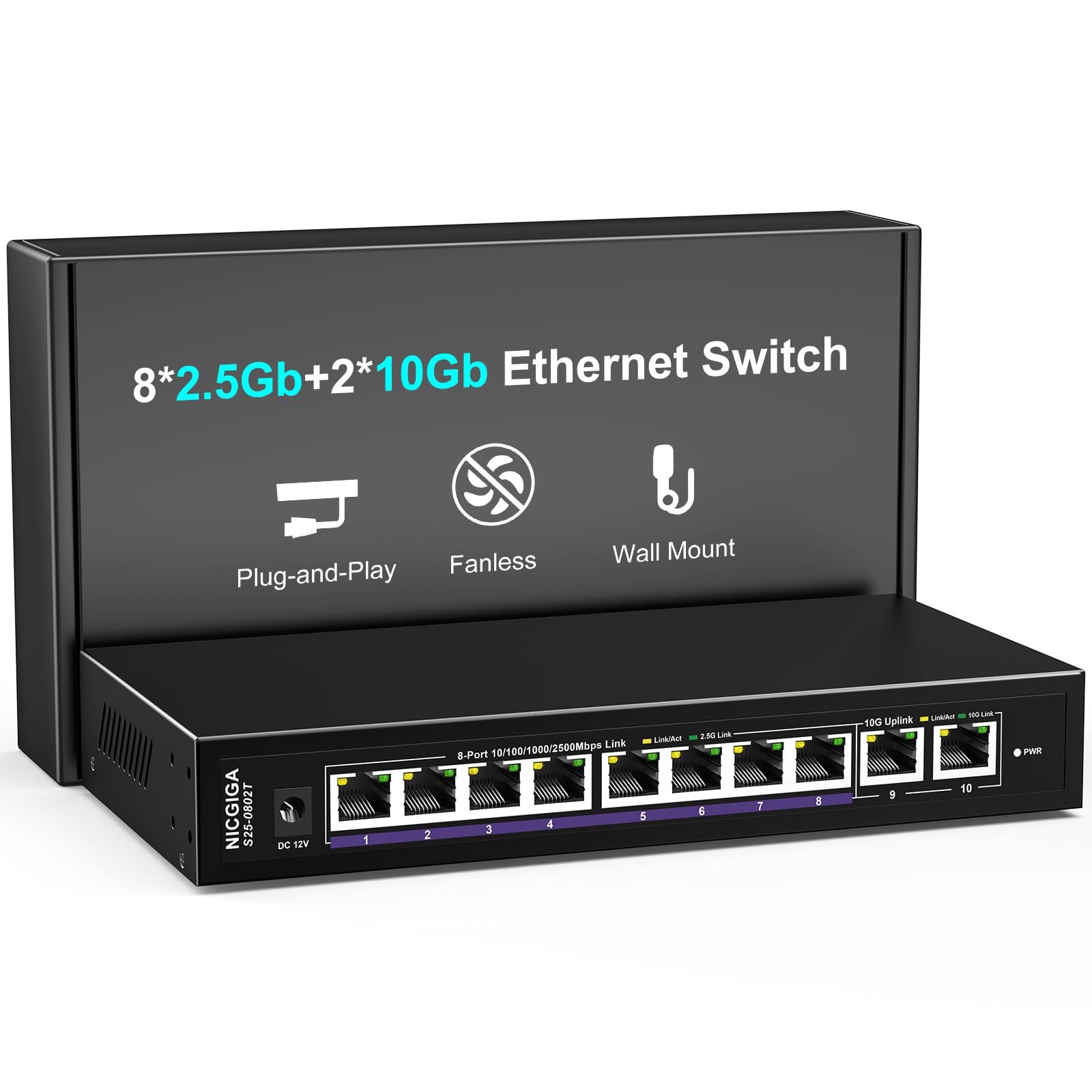
Ten ports — eight at 2.5G and two at 10G — for the price of a basic 5-port switch.
This NICGIGA switch solves a common problem: you have a few devices that truly need 10Gb (your NAS and main PC) plus many others that would love a 2.5G upgrade (laptops, game consoles, access points). It gives you 8 x 2.5Gb RJ45 ports and 2 x 10Gb RJ45 ports, all in a fanless metal case. Owners mention sustained real-world speeds of 1.12 GB/s (9.4 Gbps) when copying large video files between a 10G desktop and Synology NAS.
It offers 67% more ports than the YuanLey 6-port switch below. You do not have to move to fiber to get them — everything uses standard RJ45 cables. That makes this the single best value for a growing home network where cost per port matters most.
Port Flexibility
- 10 total ports (8×2.5G + 2x10G)
- Fanless and silent
- 4KV lightning protection for safety
A Couple of Trade-offs
- Only two 10G ports — not ideal if you need three or more full 10Gb devices
- Build quality is a no-name OEM (customers note it may be a rebadge)
Reach for this if: You want the most ports for the money and need a mix of 2.5G and 10G connectivity for a growing homelab.
skip it if: Every device you connect needs full 10Gb — the NICGIGA 5-port or TP-Link is a better fit.
4. MokerLink 8 Port 10G SFP+ Unmanaged Fiber Switch
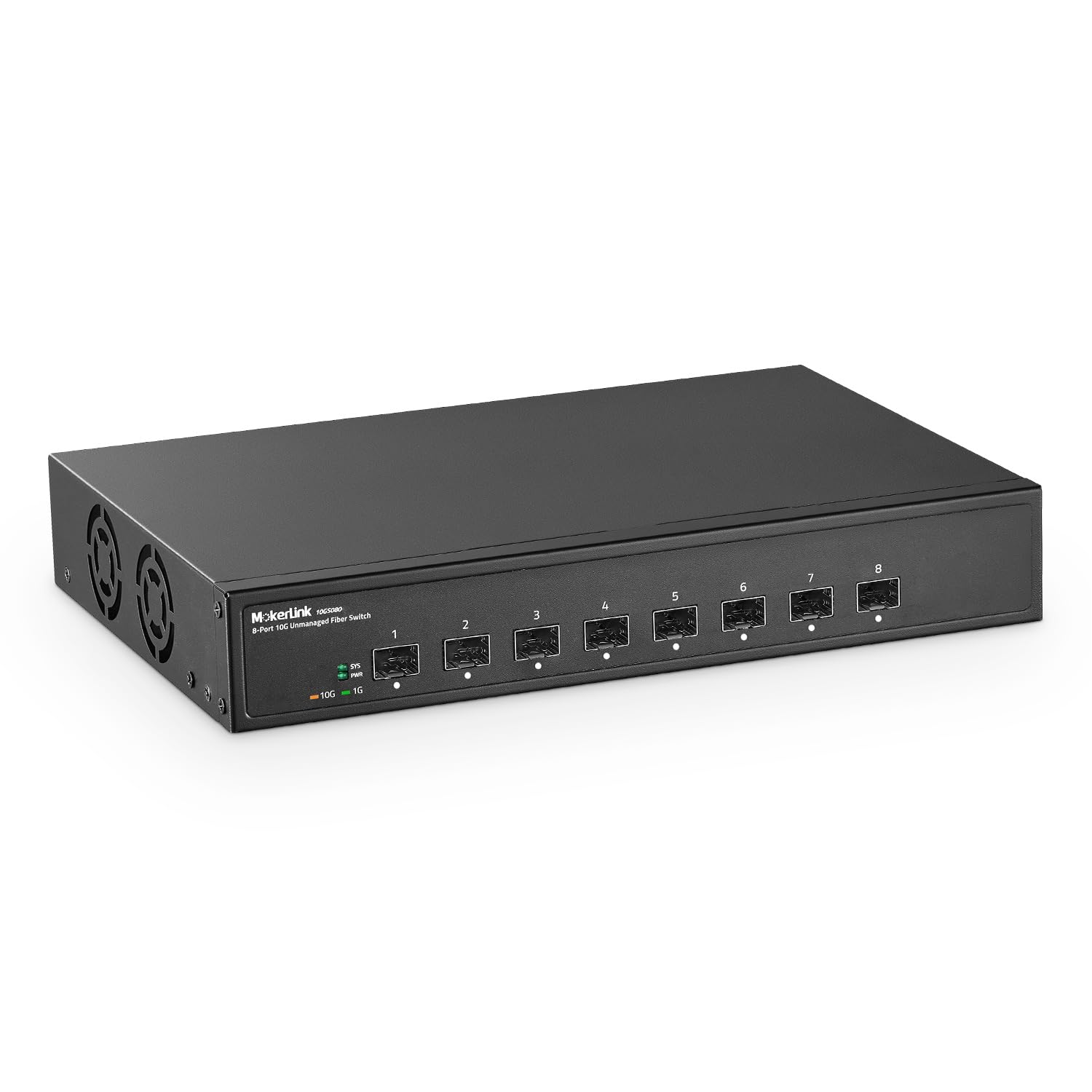
Eight full 10G SFP+ ports with a massive 160 Gbps switching capacity at a fiber-friendly price.
This is the switch to pick when you want to build a fiber backbone. Each of the 8 SFP+ slots supports 10G or 1G modules, and the 160 Gbps switching capacity is more than double the NICGIGA 10-port model. That means it will never bottleneck your traffic, even with every port maxed out. The bandwidth is 2.7 times greater than the YuanLey’s 60 Gbps switching capacity, which makes this particularly capable in high-throughput environments. You do need to buy SFP+ modules separately, and there are no RJ45 copper ports. Reviewers point out they set it up in “less than 5 minutes,” and the desktop/wall-mount metal case with a built-in fan keeps it cool in environments up to 55°C.
It is not silent — it has an industrial-grade fan — so it is better suited for a rack, garage, or basement than a quiet living room. But for pure SFP+ performance per dollar, this is the winner.
Fiber Ready
- 8 x 10G SFP+ slots — no shared bandwidth
- 160 Gbps switching capacity
- Works up to 55°C, good for attic/garage
Fiber Trade-offs
- No copper RJ45 ports included
- Built-in fan makes noise — not for a silent home office
Best for the fiber backbone builder: If you already use SFP+ modules or are ready to switch to fiber for long runs and low latency, this delivers the most full-speed ports for the least money.
Not for you if: You need plug-and-play copper connections or a fanless, silent setup.
5. Davuaz 10G Unmanaged Ethernet Switch (8 Port)
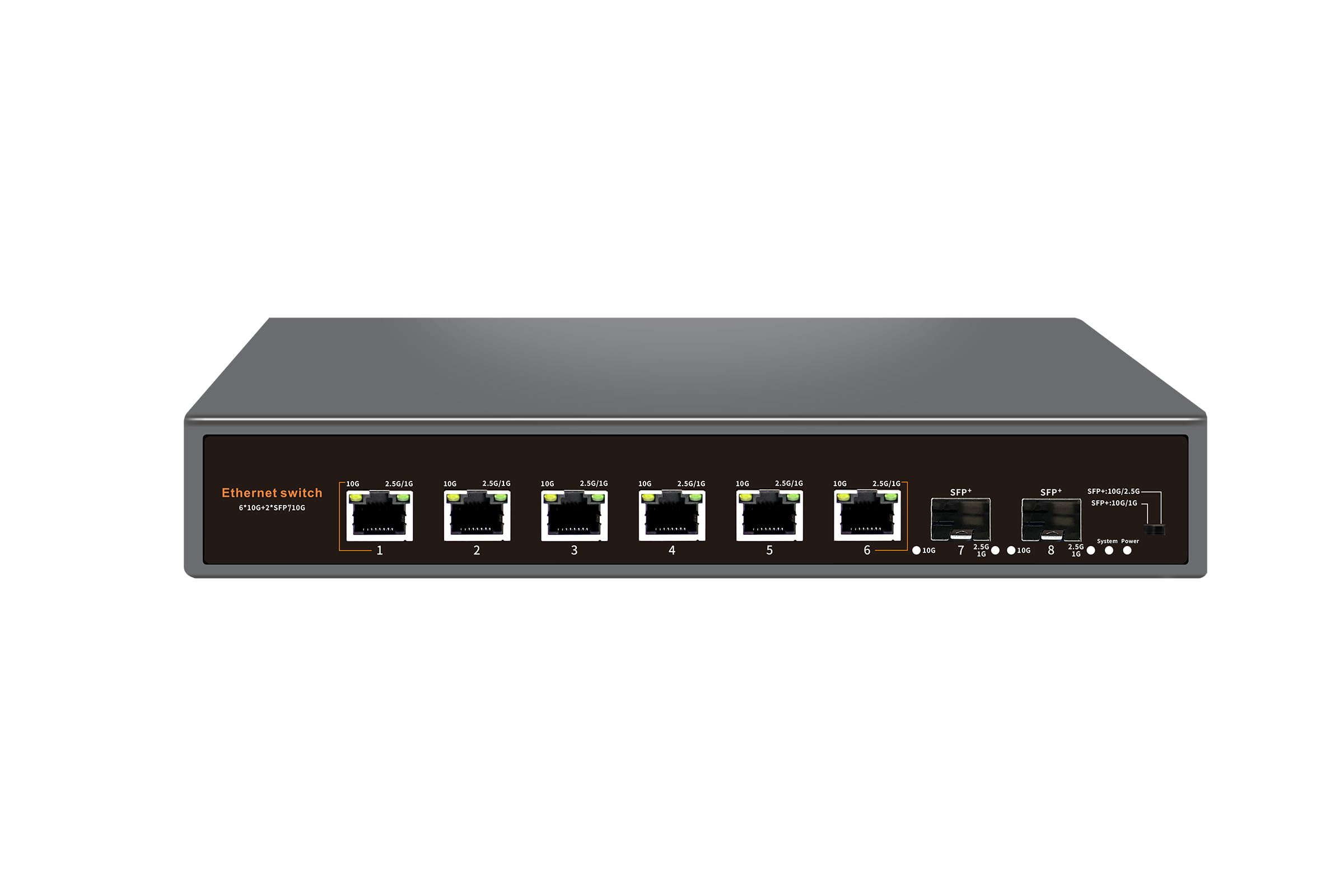
Six 10G copper ports plus two SFP+ uplinks in one fanless metal box.
This is the rare switch that gives you the best of both worlds — common RJ45 copper connections for your desktop and NAS, plus SFP+ slots for a fiber uplink to your router or core switch. All 8 ports are 10G-capable (the copper ones also negotiate down to 2.5G and 1G). The 160 Gbps switching capacity ties the MokerLink above. It includes 6KV lightning protection, which adds confidence for homes in storm-prone areas. The entire unit is fanless and entirely silent in operation.
One note: this is an unmanaged switch, so you get zero VLAN or QoS controls. But if you just want a one-box solution that handles both copper and fiber at full 10G speed, the Davuaz fits that niche perfectly.
Copper + Fiber flexibility: Six 10G RJ45 ports plus two 10G SFP+ uplinks make this an all-in-one solution for a home network that mixes wired desktops with a fiber backbone. A single fanless unit stays quiet.
The single trade-off: No management features at all — if you need VLANs or QoS, skip this and look at the Real HD managed switch below.
Reach for this if: You want one switch to handle your copper devices today and a fiber upgrade path for tomorrow, all in a silent fanless chassis.
pass on it if: Management features or a brand name with more support history matter to you.
6. Real HD 5 Port 10Gb Web Managed Switch

True 10G web management and VLAN support for a lab or segmented office network.
This is the only managed switch in the list. It gives you VLANs, QoS, SNMP, and a web interface for configuration. You get five 10Gb RJ45 ports with a 100 Gbps switching capacity and a built-in fan for cooling. Buyers in homelab environments say “VLAN works” and speeds via iperf are expected. The metal casing supports 19-inch rack mounting. However, a few owners caution that the web interface is clunky, the documentation is poor, and firmware updates are not publicly available — and one reviewer could not get transfer speeds above 400 Mbps, though that conflicts with other verified performance reports.
Compared to the totally unmanaged YuanLey and NICGIGA models, this is the pick if you need traffic segmentation or network monitoring. The support team is Chicago-based, which is a plus for North American buyers.
Management Features
- Full VLAN and QoS configuration via web interface
- 5 x 10G copper ports with rackmount bracket
- US-based tech support (9 am–5 pm CST)
Software Caveats
- Web interface described as clunky with poor documentation
- Some config persistence issues reported (requires double save)
Best for the homelab owner: If you need VLANs to isolate traffic or SNMP for monitoring, this is the cheapest 10G managed switch available.
Look elsewhere if: You want a low-maintenance plug-and-play experience — the unmanaged options above are simpler and more reliable.
7. NICGIGA 5 Port 10G Ethernet Switch

Five full 10G RJ45 ports with a 100 Gbps switching capacity and rackmount ears included.
This is the closest direct competitor to the TP-Link TL-SX105. Both have 5 x 10G copper ports and roughly the same switching capacity. The NICGIGA uses a small 5000 RPM fan (rated at 24dB), so it is not silent like the TP-Link — but it does include 19-inch rackmount brackets, which the TP-Link does not. Buyers are very positive, with reports of it “working flawlessly” with 8Gb internet connections and dual 10G Mac Studios. The 4KV lightning protection is a welcome safety feature.
The catch is the fan. While one buyer says they “don’t really hear it,” another reports the fan started making noise shortly after the return window closed. If you plan to rack this in a basement or closet, the fan is no issue. For a desktop in a quiet room, the TP-Link is a better choice.
Full 10G Connectivity
- 5 x 10G RJ45 ports — every port runs full speed
- Includes 19-inch rackmount ears
- Affordable entry point for all-10G copper
Fan Noise Risk
- Fan may become noisy over time (reported by some buyers)
- Not fanless — not ideal for a silent room
Reach for this if: You need a rackmountable 10G copper switch and do not mind a small fan hum in an equipment closet.
Not for you if: Silence is a priority — the TP-Link TL-SX105 is a better fanless choice.
Understanding the Specs
Switching Capacity (Gbps)
Switching capacity is the total amount of data your switch can handle simultaneously across all ports. It is your safeguard against slowdowns. A switch with a 60 Gbps capacity will start to choke if all ports try to push 10Gb at full blast, while a 160 Gbps switch like the MokerLink has plenty of headroom. Think of it as a highway — you want enough lanes for all the traffic you plan to send at once.
SFP+ vs RJ45 (Copper)
An RJ45 port uses standard Ethernet cables (Cat6a or Cat7 for full 10Gb). It is the easiest interface to use — just plug in a cable. An SFP+ port is a small cage that accepts a hot-pluggable module. You can put in a fiber module for long-distance runs (hundreds of meters) or a direct-attach copper cable for a short, low-latency link in a rack. SFP+ is typically used to connect switches together or for runs longer than 100 meters.
FAQ
Do I need a managed or unmanaged 10Gb switch for my home?
Can I use a 10Gb switch with my older 1Gb/s devices?
What cable do I need for a 10Gb copper (RJ45) connection?
Will these switches fit in a standard 19-inch server rack?
What is a VLAN switch and do I need it?
Can I use SFP+ modules from any brand with these switches?
How loud is a 10Gb switch with a fan?
How long should a 10Gb switch last before needing replacement?
Final Thoughts: The Verdict
For most people, the affordable 10gb switch winner is the TP-Link TL-SX105 because it combines a fanless silent design, auto-negotiating 10G copper ports, and a 3-year warranty from a major brand — a combination of trust and performance that is tough to top. If you need more ports and are fine with a mix of 2.5G and 10G, grab the NICGIGA 10-port switch. And for fiber backbone setups, the standout is the pure SFP+ value of the MokerLink 8-port switch.
How We Picked
We do not accept paid placement. Every pick is matched to a real buyer and a real use-case; we do not hands-on test units.
Sources & Methodology
Specifications: manufacturer listings and product documentation. Review insights: verified customer reviews, as of July 2026. Pricing: not shown on this page (it changes often); check the current price via the retailer link.
As an Amazon Associate, Gadgets Feed earns from qualifying purchases. This does not affect which products we feature.