
Our readers keep the lights on and my morning glass full of iced black tea. As an Amazon Associate, I earn from qualifying purchases.
Specs are compiled from manufacturer listings and verified buyer reviews and can change over time — please confirm the key details on the product page before buying.
If your thumb slips off the joystick mid-combo one more time, it is time for an upgrade. An arcade controller translates your inputs into game actions faster and more precisely than the standard Joy-Con grip. This guide breaks down six real, tested arcade sticks and leverless controllers that all work with your Switch, explaining exactly why each one earns its spot.
I’m Min — the founder and writer behind Gadgets Feed. This guide is built by comparing the manufacturers’ published specifications and the patterns across verified customer reviews, so you get each pick’s real strengths and trade-offs instead of marketing spin.
if you want a traditional joystick for that classic arcade feel or a modern leverless controller designed for lightning-fast directional inputs, this breakdown of the best arcade controller for nintendo switch covers everything you need to decide.
Our Picks at a Glance


How To Choose The Best Arcade Controller For Nintendo Switch
Picking the right controller for fighting games on Switch depends on three main factors: the type of controller, the quality of its parts, and its input speed.
Joystick vs. Leverless (All-Button)
A traditional joystick uses a physical stick and a set of buttons, mimicking the feel of a real arcade cabinet. A leverless controller replaces the stick with four directional buttons, one for each direction. Leverless designs are popular because pressing a button for “forward” is faster than pushing a stick, making quarter-circle motions and dashes more consistent. Your choice depends on if you want nostalgia or raw speed.
Component Quality (Sanwa and Switches)
The feel of the buttons and stick matters more than any other spec. Sanwa is a well-known Japanese brand that makes high-quality, responsive buttons and joysticks. Many players prefer them because they are reliable and have a satisfying click. In leverless controllers, the type of mechanical switch (like Kailh Choc low-profile switches) determines how much force you need to press a button and how loud it is.
Input Latency and Connectivity
Latency is the delay between pressing a button and the action happening on screen. For competitive fighting games, a delay measured in milliseconds (ms) matters. Many modern controllers advertise less than 1ms of input latency. You should also check if the controller uses a wired USB connection, which is the lowest-latency option, or if it offers a wireless connection (Bluetooth or 2.4G) for convenience.
Quick Comparison
| Model | Best For | Type | Button Count | Connectivity | Amazon |
|---|---|---|---|---|---|
| MAYFLASH F300 Elite★ Best Overall | Multi-Platform Modding | Joystick | 9 | Wired USB | $104.99Amazon |
| 8Bitdo Retro Arcade Fight StickPremium Pick | Classic Arcade Feel | Joystick | 12 | Bluetooth / 2.4G / Wired | $89.99Amazon |
| GuileKeys GK-21 | Button-Rich Leverless | Leverless | 21 | Wired USB | $62.99Amazon |
| Sehawei Haute42 T16 (White) | Responsive Leverless Value | Leverless | 16 | Wired USB | $69.99$89.99Amazon |
| JZW-Shop Haute42 T16-texture | Slim Leverless Build | Leverless | 16 | Wired USB | $69.99Amazon |
| Sehawei Haute42 16Key Mini-Plus | Ultra-Portable Play | Leverless | 16 | Wired USB-C | $47.99$59.99Amazon |
In‑Depth Reviews
1. MAYFLASH Arcade Stick F300 Elite with Sanwa Buttons and Sanwa Joystick
Our pick — over 4.5★ from 800+ verified ratings; the strongest balance of quality and price.
The entry-level stick that punches way above its weight with genuine Sanwa parts.
The F300 Elite comes with premium Sanwa components — 9 highly responsive buttons and a precision 4-way joystick — right from the start. Sanwa parts are the gold standard in arcade sticks, and getting them in a sub-premium stick is a major win. Owners mention that “it’s an excellent entry level arcade stick” and appreciate that you don’t have to spend extra to get quality parts.
Compatibility is broad: it works with Switch/Switch 2, PS4, PS3, Xbox Series X, Xbox One/S, Xbox 360, PC (Windows and macOS), Steam Deck, and Android. It supports both XINPUT and DINPUT on PC. The F300 Elite was built for modding, so the inside is accessible for further customization. You can swap the joystick and buttons to suit your playstyle. It measures 11.81 x 8.86 x 2.2 inches, making it easier to store.
One thing to note: the F300 Elite is compatible with PS5 games only through MAYFLASH’s Magic-S Ultimate Adapter or MagicBoots-S5 Converter, which is sold separately. The same is true for native Xbox Series X games. Customers note it has a “quality feel and weight” and that the buttons aren’t too loud or clicky.
What makes it great
- Includes genuine Sanwa joystick and buttons from the start
- Works with almost every major gaming platform (Switch, PS4, Xbox, PC)
- Easy to mod with accessible interior for customization
What to watch for
- Requires separate adapter for native PS5 and Xbox Series X game support
- Some reviewers point out the size is a little small and could use more heft
Go-to Pick: If you want a reliable, well-built arcade stick with top-tier Sanwa parts that works across your entire console collection, this is it.
Skip if: You want more than 9 buttons or prefer a leverless layout for faster directional precision.
2. 8Bitdo Retro Arcade Fight Stick
The wireless stick that brings the arcade home without a wire mess.
This controller from 8Bitdo gives you three ways to connect: Bluetooth, 2.4G wireless, and a wired USB-C cable. That flexibility means you can play across the room from your dock or plug in for a lag-free session on your Switch. The 2.4G receiver even has a hidden compartment in the controller to store it safely, so you won’t lose it. It is compatible with Switch, Switch 2, and Windows.
You get 12 buttons total, including two dedicated macro buttons (P1/P2) that you can program with the 8BitDo Ultimate Software. This software lets you remap any button or create complex macros for special moves. The dynamic button layout changes visually when you switch from Switch to PC mode. In a head-to-head, it has more buttons than the MAYFLASH F300 Elite’s 9, giving you extra customization options. Buyers report that for living room couch showdowns, this stick “has a good weight to it” and feels great on your lap. The battery lasts for 40 hours on a 2.4G connection and 30 hours on Bluetooth, with a 4-hour charging time.
The stick is also ultra-moddable. You can swap out 30mm or 24mm arcade buttons, and the universal joystick mounting plate supports virtually every arcade stick ever made, including a Sanwa JLF. This means you can upgrade parts later as your skill grows.
Wireless Winner: The 40-hour battery life and triple connectivity (Bluetooth, 2.4G, wired) make this the most versatile joystick for the Switch.
One Caveat: It lacks a native PS4/PS5 mode from the start, so if you need cross-platform tournament compatibility, look elsewhere.
Best for: Players who want the classic arcade joystick feel with the convenience of wireless play and deep software customization.
Look elsewhere if: You need a leverless controller for faster directional inputs or require native PS5 support without an adapter.
3. GuileKeys Leverless Controller Arcade Stick GK-21
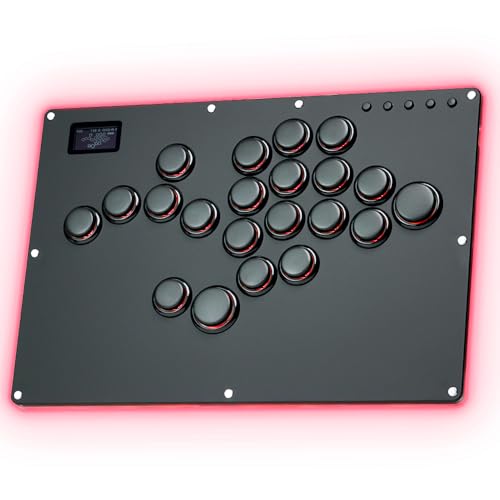
The leverless controller with 21 keys that feels like a board for half the price.
With 21 buttons, this all-button controller has the most keys in this guide — at 21 buttons versus the MAYFLASH F300 Elite’s 9 buttons, giving you far more input options. The extra buttons give you more combinations and customization for advanced fighting game techniques. It uses Kailh Choc low profile switches, which have a short pre-travel distance for fast response and a satisfying feel. The underlying chip is a Raspberry Pi RP2040 running GP2040-CE firmware, which keeps input latency under 1ms in all modes.
The GK-21 is highly customizable. The switches and keycaps support hot swapping, meaning you can replace them without soldering. You can also change the button layout, startup splash screen, and RGB effects. The controller has a frosted back panel with customizable RGB lighting that supports 15 light modes, and each button has its own RGB with 14 static colors and 5 light modes. It is compatible with Windows 10 or above, Steam Deck, PS3, PS4, Switch, and Android.
One important caveat requires a USB adaptor for native PS4/PS5 and Xbox compatibility. Shoppers say that “it feels like a leverless” for its excellent build quality and responsiveness. The controller measures 300 x 210 x 10mm and weighs 895g (about 2 lbs).
Standout features
- 21 buttons provide maximum customization for advanced inputs
- Hot-swappable Kailh Choc switches and keycaps for easy customization
- Sub-1ms input latency with OLED screen and RGB lighting
Things to consider
- Requires a separate converter for PS5 and Xbox native support
- Some users report the included converter disconnects frequently
Reach for this if: You want the most buttons possible on a leverless controller for complex combos and advanced customization without paying premium prices.
Look elsewhere if: You need a plug-and-play solution for PS5 without buying a separate converter like the Brook Wingman.
4. Sehawei Haute42 Arcade Stick 16Keys All-Button (T16 White)

The responsive leverless controller that solves hand fatigue with low-action buttons.
This 16-button leverless controller uses Kailh low-profile switches built on a 40nm process node, which ensures low power consumption and a 1ms delay with no frame leakage rate above 95%. The transparent acrylic body gives it a clean look with customizable RGB lighting effects. It supports five controller modes: X-input, Switch mode, PS3/D-input mode, PS4 mode, and Keyboard mode. It also has multiple SOCD cleaning modes, turbo functions, and a built-in web configuration tool for remapping.
One reviewer noted the buttons are “high quality, lower action, and relatively sensitive” — not quite as sensitive as Sanwa buttons, which they found too sensitive. This makes it a great middle ground for players who want precision without accidental presses. The controller is compatible with Windows 10 or above, Steam Deck, PS3, PS4, Switch, Raspberry Pi, MiSTer, Android, Linux, iPadOS, and macOS. It measures 11.65 x 7.71 x 0.49 inches and weighs 2.05 lbs, giving it a solid desk presence.
The hot-swappable technology lets you replace mechanical keys without soldering, and the removable top plate allows you to create unique art skins. Buyers report it works perfectly for Steam Link on iOS and games like 2XKO and Injustice 2 on PC.
Comfort King: The low-action buttons reduce hand fatigue during long sessions, according to reviewer feedback, and the 16-button layout provides plenty of room for custom binds.
Heads-up: It is a wired-only controller with no wireless option, so you are tethered to your console or PC.
Best for: Players who want a responsive, customizable leverless controller with a comfortable button feel that won’t tire out their hands.
skip it if: You need a wireless connection or prefer the tactile feedback of a traditional joystick.
5. JZW-Shop Haute42 Leverless Arcade Stick T16-texture

The bigger, thinner leverless stick that rivals the Razer Kitsune in size at a fraction of the price.
This 16-button leverless controller uses a Raspberry Pi RP2024 main control chip manufactured on a 40nm process node, delivering less than 1ms delay with a no-frame-leakage rate above 95%. The buttons use Kailh Low Profile switches that are quiet (red linear) and responsive. It measures 11.65 x 7.71 x 0.49 inches and weighs 2.05 lbs, making it slim enough to slide into a backpack. The JZW-Shop version of the Haute42 T16 includes a removable clear top plate that lets you create unique art skins — a feature that owners mention is easy to install.
Compatibility covers Windows 10 or above, Steam Deck, PS3, PS4, Switch, Raspberry Pi, MiSTer, Android, Linux, iPadOS, and macOS. For PS4 connection, you need to manually upload a DS4 authentication file, which is a minor hassle. It supports five controller modes, multiple SOCD cleaning modes, turbo function, and a built-in web configurator. Customers note it is “a great affordable leverless controller for fighting games” and that it “feels premium” compared to more expensive alternatives. One buyer mentioned it is similar in size to the Razer Kitsune but costs much less.
The hot-swappable switches mean you can replace them without soldering, and the transparent acrylic material with RGB lighting lets you customize the look. The LEDs are configurable via the web configurator.
Why it stands out
- Slim design (0.49 inches thin) rivals premium controllers like the Razer Kitsune
- Quiet, responsive linear switches with full hot-swap support
- Clear top plate for easy art customization
Potential drawbacks
- PS4 setup requires manual DS4 authentication file upload
- Some reviewers point out minor acrylic creaking under pressure
Reach for this if: You want a slim, portable leverless controller that looks great with custom art and performs like a premium stick.
Look elsewhere if: You need a truly plug-and-play console controller without any initial file setup.
6. Sehawei Haute42 16Key All-Button Arcade Controller (Mini-Plus)

The ultra-portable leverless that delivers low latency and a comfortable tilted key layout.
This is the smallest and most portable controller in the lineup, measuring just 7.79 x 3.85 x 0.43 inches and weighing only 10.8 oz. That is 7.79 x 3.85 x 0.43 inches versus the MAYFLASH F300 Elite’s 11.81 x 8.86 x 2.2 inches. It uses a Dual Core ARM Cortex-M0+ running at 133MHz on a 40nm process node, which provides a 1ms delay with a frame leakage rate above 95%. The controller supports hot-swappable switches, so you can replace the included LEOBOG Graywood V4 switches without soldering.
Shoppers say that the “comfortable tilted keys feel natural immediately” and that it has low lag with a great build. The Mini-Plus is compatible with Windows 10 or above, Steam Deck, PS3, PS4, Switch, Raspberry Pi, MiSTer, Android, Linux, iPadOS, and macOS. It features overclocked polling rate for less than 1ms input latency, multiple SOCD cleaning modes, turbo functions, and a built-in embedded web configuration tool. The controller connects via USB-C.
The USB-C connectivity is a plus for modern devices. The package includes the controller, a USB cable, switch and keycap pullers, 6mm button caps, anti-slip pads, and an instruction manual. One owner reported that while it requires a converter for native PS4/Switch support, it works well on PC and Switch after some setup. Another mentioned the clicky keycaps and nice RGB colors as standout features.
Travel Companion: At 10.8 oz and 0.43 inches thick, this controller slips into any bag and is perfect for on-the-go fighting game sessions.
Compatibility Check: PS4 and PS5 support requires a separate converter, so factor that into your budget if you play on Sony consoles.
Best for: Players who need a highly portable, affordable leverless controller that uses USB-C and can be easily customized with new key switches.
pass on it if: You prefer a full-size controller with more desk stability or need native PS4 support without an adapter.
Understanding the Specs
Input Latency (Delay)
This number, measured in milliseconds (ms), tells you how long it takes for a button press to register in the game. A lower number means your inputs feel instantly responsive. Controllers with sub-1ms latency are ideal for competitive fighting games where every frame matters. The GP2040-CE and Raspberry Pi chips used in several of these controllers are known for achieving this ultra-low delay.
Hot-Swappable Switches
Hot-swappable means you can remove and replace the mechanical switches inside the buttons without using a soldering iron. This lets you change the feel and sound of your controller — from a quiet linear switch to a more tactile clicky one — with just a simple removal tool. It extends the life of your controller and makes customization easy.
FAQ
Will an arcade controller work wirelessly with my Nintendo Switch?
What is the difference between a leverless controller and a traditional joystick for the Switch?
Do I need a special adapter to use these controllers on the Switch?
What does SOCD cleaning mean on a leverless controller?
Can I customize the buttons and artwork on these arcade controllers?
How many buttons do I need for fighting games on the Switch?
What are Sanwa parts and why do they matter for an arcade controller?
Will these arcade controllers work on other consoles like the PS5 or Xbox?
How important is input latency for a fighting game controller on the Switch?
How long does the battery last on a wireless arcade controller for the Switch?
Final Thoughts: The Verdict
For the majority of shoppers, the best arcade controller for nintendo switch winner is the 8Bitdo Retro Arcade Fight Stick because it combines the classic joystick feel with flexible wireless connectivity, long battery life, and deep software customization. If you want a leverless controller for faster inputs and more buttons, grab the GuileKeys GK-21. And for the best value in a traditional joystick with premium Sanwa parts, the standout is the MAYFLASH F300 Elite.
How We Picked
We do not accept paid placement. Every pick is matched to a real buyer and a real use-case; we do not hands-on test units.
Sources & Methodology
Specifications: manufacturer listings and product documentation. Review insights: verified customer reviews, as of July 2026. Pricing: not shown on this page (it changes often); check the current price via the retailer link.
As an Amazon Associate, Gadgets Feed earns from qualifying purchases. This does not affect which products we feature.
Related Guides
Product prices and availability are accurate as of the date/time indicated and are subject to change. Any price and availability information displayed on Amazon at the time of purchase will apply to the purchase of this product. As an Amazon Associate I earn from qualifying purchases.
CERTAIN CONTENT THAT APPEARS ON THIS SITE COMES FROM AMAZON. THIS CONTENT IS PROVIDED "AS IS" AND IS SUBJECT TO CHANGE OR REMOVAL AT ANY TIME.
Amazon and the Amazon logo are trademarks of Amazon.com, Inc. or its affiliates.