
Our readers keep the lights on and my morning glass full of iced black tea. As an Amazon Associate, I earn from qualifying purchases.
Specs are compiled from manufacturer listings and verified buyer reviews and can change over time — please confirm the key details on the product page before buying.
A hot 3D print needs a steady, precise breeze to lock in each layer before the next one slumps. The right cooling fan stops stringing, sharpens overhangs, and banishes those blobby corners that ruin a perfect model — but the wrong one just adds noise without the airflow your hotend actually needs. This guide compares the top contenders, from whisper-quiet drop-in replacements to high-RPM blowers, so you know which fan truly matches your printer and your print quality goals.
I’m Min — the founder and writer behind Gadgets Feed. This guide is built by comparing the manufacturers’ published specifications and the patterns across verified customer reviews, so you get each pick’s real strengths and trade-offs instead of marketing spin.
Finding the best 3d print cooling fan for your machine means matching three things: the airflow (CFM, or cubic feet per minute), the voltage your printer board delivers (24V is most common), and the connector type that fits your mainboard’s header.
Our Picks at a Glance

How To Choose The Best 3D Print Cooling Fan
Picking the right fan for your printer is about three things: where it mounts (hotend vs part cooling), the voltage your board delivers (usually 24V), and if you want silence or raw airflow. Axial fans push air straight through and are great for hotend heat sinks, while blower fans concentrate airflow into a narrow duct for precise part cooling.
Airflow (CFM) vs Static Pressure
CFM (Cubic Feet per Minute) tells you how much air the fan moves in a minute, which directly affects how fast it cools the filament. Blower fans typically have lower CFM but higher static pressure — meaning they push air through a narrow nozzle or duct without losing force. For a direct hotend replacement, look for at least 6 CFM; for a part-cooling blower, 3-5 CFM is normal and effective.
Noise Level and Bearings
Fan noise is measured in decibels (dBA), and every 10 dBA doubles the perceived loudness. A fan at 20 dBA is barely audible in a quiet room, while 35 dBA sounds like a quiet conversation. Dual ball bearing fans last longer (50,000 hours or more) but can be slightly noisier than hydraulic or sleeve bearings — the trade-off is lifespan versus silence.
Connector and Voltage Compatibility
Most 3D printers run on 24V DC, so always check the voltage rating. Connectors vary: 2-pin fans run at full speed whenever the printer is on, while 4-pin PWM (Pulse Width Modulation) fans let the mainboard adjust speed based on temperature. Common connector types include XH2.54 and JST (Japan Solderless Terminal), but some Creality machines use a custom JST SM — verify your printer’s header before ordering.
Quick Comparison
| Model | Best For | Airflow (CFM) | Speed (RPM) | Noise (dBA) | Amazon |
|---|---|---|---|---|---|
| Noctua NF-A4x10 24V★ Best Overall | Silent hotend upgrade | — | 5000 | 19.6 | $15.95Amazon |
| WINSINN 40mm 24V 2-PackBest Value 2-Pack | Value dual ball bearing drop-in | 6.4 | 5700 | 25.3 | $11.99Amazon |
| GDSTIME 4020 24V 2-Pack | High-volume 20mm thick cooling | 6.78 | 6000 | 24.6 | $12.99Amazon |
| Wathai DC 4010 Blower 2-Pack | High-RPM blower for part cooling | 3.62 | 9500 | 35 | $13.99$17.99Amazon |
| Official Creality 3-Pack 4010 | Genuine Creality kit (3 fans) | — | 7000 | 50 | $16.99Amazon |
| GDSTIME 5015 Blower 12V | Powerful blower for 12V systems | 5.36 | 6000 | 38.7 | $21.99Amazon |
In‑Depth Reviews
1. Noctua NF-A4x10 24V PWM
Our pick — over 4.5★ from 700+ verified ratings; the strongest balance of quality and price.
The near-silent hotend swap that fixes stringing without sounding like a tiny turbine.
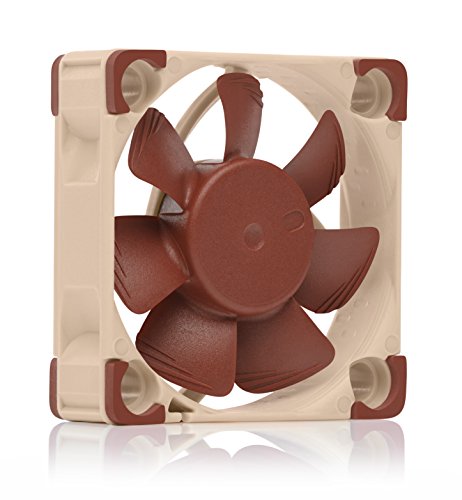
This Noctua runs at 5000 RPM and produces only 19.6 decibels (dBA, a measure of sound pressure) — that is barely audible in a quiet room, a huge step down from the whiny stock fans on most Creality machines. The 4-pin PWM (Pulse Width Modulation) connector lets your printer’s mainboard automatically speed it up or slow it down based on temperature, so it stays almost silent at low loads. Buyers report a “direct fit on Ender 3 V2 hot-end fan terminal” and note that “included adapters avoid wire stripping,” which saves a lot of fiddling. Its airflow ceiling is shy of the GDSTIME 4010 Dual Ball 2-Pack, which pushes 8.29 CFM; Noctua does not publish a CFM figure for this model, so treat it as a hotend specialist rather than a raw-volume part cooler.
Noctua backs this with a premium SSO2 (Self-Stabilising Oil-pressure) bearing rated for over 150,000 hours, plus safety certifications from UL (Underwriters Laboratories) and TÜV (Technischer Überwachungsverein, a German testing body). The SSO2 bearing handles heat better than sleeve bearings, so it lasts years longer in an enclosure. The 4-pin PWM control means you get automatic speed ramping — it stays quiet at low temps and ramps up only when the hotend needs it. The downside is that its maximum air movement is modest compared to competitors like the Wathai 4010 blower (3.62 CFM), so it is best for hotend cooling where silence matters most rather than aggressive part cooling that needs raw volume. The fibre-glass reinforced PBT (Polybutylene Terephthalate) frame feels built to outlast the printer itself.
Near-Silent Operation
- Class-leading 19.6 dBA noise floor — you will forget it is running
- Comes with NA-AC9 adaptor for Creality JST XHP-2 2.5mm headers
- PWM automatic speed control matches cooling to demand
- 150,000-hour SSO2 bearing is overkill reliable
Modest Airflow Ceiling
- Lower maximum air movement than higher-RPM axial fans
- Premium price for silence may not suit pure performance builds
Reach for this if: you want the quietest possible hotend upgrade without sacrificing print quality — perfect for a bedroom or office printer.
Not the pick if: you need maximum part-cooling airflow for overhang benchmarks; grab a blower instead.
2. WINSINN 40mm Fan 24V, Ender 3 Fan Upgrade
A reliable, affordable two-pack that covers both hotend and motherboard slots with minimal fuss.
At 25.3 dBA it is louder than the Noctua’s 19.6 dBA but still much quieter than the 50 dBA Creality factory fans, and the dual ball bearings are rated for 50,000 hours of continuous operation. One buyer whose Ender 3 Pro controller fan died “replaced noisy Ender 3 Pro controller fan (oil residue found)” and found the dual ball bearing version “virtually silent; had to visually verify operation.” The fan delivers a solid 6.4 CFM at 5700 RPM, so it moves enough air for hotend duty without the noise of the Creality 3-pack (7000 RPM, 50 dBA).
The catch is the 2-pin connector — it runs at full speed all the time, so you get no temperature-based fan control unless you add a separate controller. It also uses an XH2.54 connector, which may not match every printer’s header (one reviewer noted a mismatch with the Anycubic Vyper’s PH-2.0, though the fix was a quick solder). For the price of a single premium fan, you get two units that cover the hotend and motherboard on most Creality and CR-10 series machines. WINSINN backs them with a 5-year warranty. If you value confidence and a quick drop-in replacement over PWM control, this budget-friendly two-pack is the clear pick over the Noctua, which costs more for a single fan.
Reliable workhorse: Great value for two dual ball bearing fans that outperform stock Creality parts at a budget-friendly price — just check your connector type before ordering.
Best for: Ender 3/Pro/V2 and CR-10 owners who need a quiet, durable fan upgrade in a single affordable pack.
Plan for: The fixed-speed 2-pin setup means no PWM control; fine for hotend duty, less ideal for variable part cooling.
3. GDSTIME 40mm Brushless Cooling Fan, 40x40x20mm 24V DC
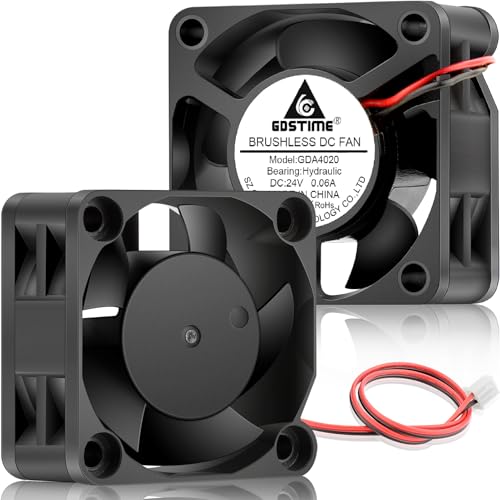
The 20mm thick axial fan that packs noticeably more airflow into the same 40mm footprint.
Most 40mm fans are 10mm thick — this GDSTIME is 20mm, which lets it move 6.78 CFM at 6000 RPM while staying at a moderate 24.6 dBA noise level. It pushes 6.78 CFM versus the Wathai 4010 blower fan at 3.62 CFM because the extra depth creates more blade surface area without needing to scream at 9500 RPM. Buyers confirm this works well beyond hotend duty: one owner wrote “I bought two of these to use as bed fans in my Voron Trident 300 and they are working flawlessly and didn’t increase the noise level too much.” The hydraulic bearing is rated for 40,000 hours — slightly less than the dual ball bearings in the WINSINN (50,000 hours) but quieter in operation.
The trade-off is that the 20mm thickness may not fit every printer’s existing shroud or duct. You will likely need a custom printed fan mount to accommodate the extra 10mm. The 2-pin JST XH connector with standard 2.54mm spacing makes wiring straightforward, and the pack includes a 1-meter extension cable plus mounting screws. At 1 watt power consumption, it is extremely efficient for the airflow it delivers — good for enclosures where heat buildup is a concern. Compared to the Wathai blower, this axial fan offers less directed air pressure but higher volume at 6.78 CFM versus the Wathai’s 3.62 CFM, at a lower noise level, so weigh your cooling style.
Thick = More Air
- 6.78 CFM is among the highest for a 24V axial fan at this size
- Quieter than a 9500 RPM blower (24.6 vs 35 dBA) while moving comparable air through a duct
- Hydraulic bearing stays whisper-quiet; good for enclosed printers
Fitment Check
- 20mm depth may not clear stock Ender shrouds — you may need a printed adapter
- 2-pin fixed speed; no PWM control for variable cooling
Grab it for: Voron or custom builds where you can print a mount and want high airflow at low noise — bed fans, electronics enclosures, and hotend duty.
Measure first: the extra 10mm depth means it won’t drop into every stock printer shroud without modification.
4. Wathai DC 4010 Blower Fan 24V Dual Ball High Speed
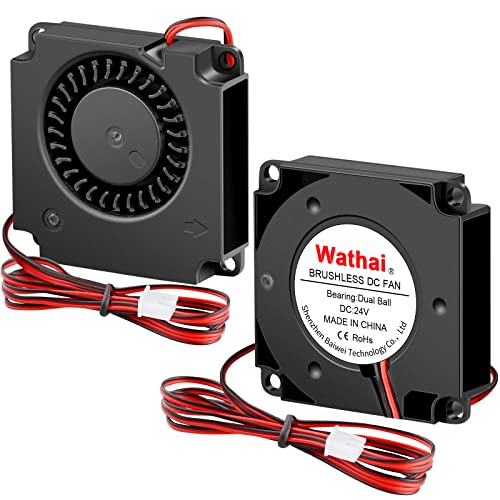
A small, fast blower that shoots concentrated air exactly where your part needs it most.
This is a centrifugal (blower) fan, not an axial fan — it pulls air in from the side and pushes it out through a narrow slot, which gives you directed airflow perfect for part cooling ducts. At 9500 RPM it moves 3.62 CFM, which is low compared to axial fans, but the static pressure (0.68 In H2O, or inches of water column, a unit for air pressure) is much higher, meaning the air keeps its force even when pushed through a long duct or a narrow nozzle. At 9500 RPM versus the Noctua’s 5000 RPM, and at 35 dBA versus the Noctua’s 19.6 dBA — you will hear it clearly. One buyer mentioned it was “louder but more efficient blower fan for 3D printer; required 25% speed reduction to prevent print warping,” which shows both its power and the need to dial it in.
The dual ball bearings are rated for 50,000 hours, and the 1000mm (3.3 ft) wire length gives plenty of slack for routing to the mainboard. The 2-pin connector means full speed always, but many users run it at a lower voltage or with a buck converter (a small circuit that steps voltage down) to tame the noise and avoid over-cooling. It fits most Ender 3 series printers and the Anycubic Mega S as a drop-in blower replacement for the stock part-cooling fan. The plastic build feels adequate but not premium — acceptable for the price point and performance it delivers. If you print overhangs and bridges regularly, this focused blower is a more effective upgrade than a general axial fan like the GDSTIME 4010.
Directed Blast
- Centrifugal design provides high static pressure for ducted part cooling
- 9500 RPM moves serious air through narrow nozzles
- Long 1m cable simplifies wiring in larger frames
Noise and Tuning
- 35 dBA is loud — expect to hear it in the same room
- Over-cooling can warp prints; most users reduce speed by 25%
Pick this for: part-cooling ducts that need concentrated airflow — overhangs and bridges improve dramatically once you dial in the speed.
skip it if: you want a quiet printer or need a drop-in fan that does not require speed tuning.
5. Official Creality Ender 3 Fan Upgrade 4010 Fan 24V Set (3PCS)
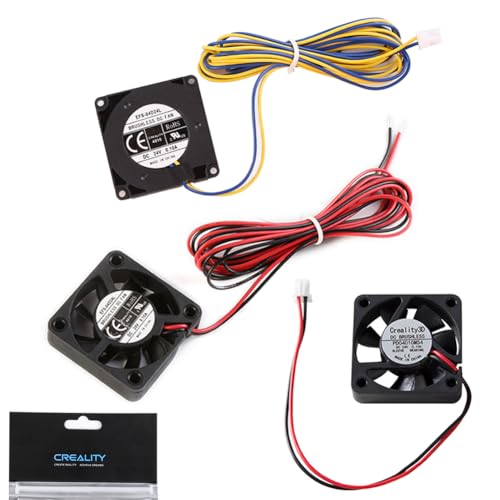
The official Creality three-fan set that covers every slot — hotend, motherboard, and part cooling.
This kit includes two 4010 axial cooling fans (one for the motherboard and one for the hotend) plus a 4010 blower fan with a terminal for hotend part cooling. At 7000 RPM, the axial fans move solid air, but the 50 dBA noise rating is the loudest among the fans in this guide — noticeably louder than the WINSINN (25.3 dBA) and the GDSTIME 4010 (29.8 dBA). The 3-pin connector means you get a tachometer signal (a speed feedback wire) but still no PWM speed control; the fan runs at full speed whenever power is on. Buyers on Ender 6 machines reported “motherboard fan incompatible with Ender 6; no bracket or instructions included,” so double-check fitment for non-Ender 3 series printers. The blower’s terminal connector simplifies wiring compared to generic fans that need crimping — a real time-saver if you are replacing all three fans at once.
The upside is 100% original Creality quality assurance — these are the exact fans the printer was designed around, so screw holes and frame dimensions match perfectly. If you own an Ender 3, 3 Pro, 3 V2, or Ender 5 series, this is a simple one-and-done kit. A cautious buyer should budget for a separate quiet axial fan (like the WINSINN) for the hotend if noise bothers you, because at 50 dBA this set is a “replace broken stock parts” solution rather than a “quiet upgrade.”
OEM simplicity: Perfect fit for Creality printers with zero guesswork, but the 50 dBA noise makes it a better “replace broken stock parts” than a “quiet upgrade” choice.
Right for you if: you want guaranteed compatibility and three fans in one box for a full printer refresh — no adapter hunting.
Not the pick for: silent operation; consider separately replacing the axial fans with quieter units.
6. GDSTIME 2-Pack 50mm x 15mm Blower Fan 12V 5015

The wide 50mm blower that floods your print with air — built for 12V printers and custom duct setups.
This is the only 12V fan in the roundup, designed for printers and electronics that run on 12V rails rather than the common 24V. At 6000 RPM it pushes 5.36 CFM through a centrifugal blower design, and the large 50x15mm outlet provides a wider air stream than the 40mm blowers. The dual ball bearings are rated for an impressive 67,000 hours — longer than any other fan here. Noise hits 38.7 dBA, which is the loudest alongside the Creality 3-pack, but owners mention “these things are NOT quiet at full speed, but they push A LOT of air” and “at full speed I was getting GREAT overhangs, but my layer adhesion was suffering.” Most users cut fan speed to 50-75% for best results, meaning you will likely pair this with a buck converter to drop voltage and noise.
The 3.28-foot (100cm) cable with XH2.54-2Pin connector gives plenty of slack for any printer frame. The operating voltage range of 7 to 13.5V means it can run at reduced speed with lower voltage for quieter operation. One buyer warned the polarity is inverted for some applications (Xbox 360 power adapter repair), but for 3D printers the red/black wiring is standard. The included mounting screws are basic, and the plastic housing feels durable enough for daily printing. If your printer runs on 12V and you want a serious part-cooling upgrade with the longest bearing life in this guide, this is the obvious choice — just budget the time to tune the speed.
Class-Leading Durability
- 67,000-hour dual ball bearings outlast every other fan in this guide
- Wide 50mm outlet provides broader coverage for part cooling
- Long 3.3 ft cable simplifies wiring in large frames
Loud at Full Speed
- 38.7 dBA is the loudest — expect to hear it from another room
- Requires speed tuning to avoid over-cooling thin layers
Choose this for: 12V printers (like Anet or older Creality) or custom builds where you want a durable, high-volume blower for part cooling.
Skip if: your printer runs 24V or you need a quiet fan — this one needs speed control to be tolerable.
Understanding the Specs
CFM — How Much Air It Moves
Cubic Feet per Minute tells you the raw volume of air the fan pushes. Higher CFM means faster cooling, which is critical for part cooling to set bridges and overhangs. Axial fans typically move more CFM than blowers of the same size, but blowers have higher static pressure to push air through a duct. For hotend cooling, 5-8 CFM is sufficient; for part cooling, a 3-5 CFM blower with good pressure often works better.
Noise (dBA) — How Loud It Gets
Decibels measure sound pressure. Every 10 dBA increase sounds about twice as loud to the human ear. A 20 dBA fan is library-quiet; 30 dBA is a quiet conversation; 40+ dBA is noticeable and can be annoying in a bedroom or office. Dual ball bearings are durable but slightly louder than hydraulic/sleeve bearings. If noise matters, look for fans at or below 25 dBA.
FAQ
Will a 12V fan work on a 24V printer?
What is the difference between an axial fan and a blower fan for 3D printing?
How do I know which connector my printer needs?
What does PWM mean on a 4-pin fan?
How long do dual ball bearing fans last in a 3D printer enclosure?
Why is my new fan louder than the stock one?
Can I use a computer case fan as a 3D printer cooling fan?
What CFM do I need for good part cooling?
How do I install a 2-pin fan on a 4-pin motherboard header?
What is the difference between 4010 and 4020 fans?
Final Thoughts: The Verdict
If you want one dependable pick, the best 3d print cooling fan winner is the Noctua NF-A4x10 24V PWM because it delivers near-silent operation, reliable PWM speed control, and premium build quality that outlasts the printer itself. If you want maximum airflow for part cooling with a blower, grab the Wathai DC 4010 Blower 2-Pack and tune the speed. And for a budget-friendly two-pack that keeps an Ender 3 running smoothly, the standout is the WINSINN 40mm 24V 2-Pack{“@context”: “https://schema.org”, “@graph”: [{“@type”: “ItemList”, “name”: “7 Best 3D Print Cooling Fan”, “url”: “https://gadgetsfeed.com/best-3d-print-cooling-fan/”, “numberOfItems”: 6, “itemListElement”: [{“@type”: “ListItem”, “position”: 1, “name”: “Noctua NF-A4x10 24V PWM”, “url”: “https://gadgetsfeed.com/best-3d-print-cooling-fan/#product-1”}, {“@type”: “ListItem”, “position”: 2, “name”: “WINSINN 40mm Fan 24V, Ender 3 Fan Upgrade”, “url”: “https://gadgetsfeed.com/best-3d-print-cooling-fan/#product-2”}, {“@type”: “ListItem”, “position”: 3, “name”: “GDSTIME 40mm Brushless Cooling Fan, 40x40x20mm 24V DC”, “url”: “https://gadgetsfeed.com/best-3d-print-cooling-fan/#product-3”}, {“@type”: “ListItem”, “position”: 4, “name”: “Wathai DC 4010 Blower Fan 24V Dual Ball High Speed”, “url”: “https://gadgetsfeed.com/best-3d-print-cooling-fan/#product-4”}, {“@type”: “ListItem”, “position”: 5, “name”: “Official Creality Ender 3 Fan Upgrade 4010 Fan 24V Set (3PCS)”, “url”: “https://gadgetsfeed.com/best-3d-print-cooling-fan/#product-5”}, {“@type”: “ListItem”, “position”: 6, “name”: “GDSTIME 2-Pack 50mm x 15mm Blower Fan 12V 5015”, “url”: “https://gadgetsfeed.com/best-3d-print-cooling-fan/#product-7”}]}, {“@type”: “Product”, “position”: 1, “name”: “Noctua NF-A4x10 24V PWM”, “image”: “https://m.media-amazon.com/images/I/41DrJLSpuqL.jpg”, “brand”: {“@type”: “Brand”, “name”: “Noctua”}, “url”: “https://www.amazon.com/dp/B0CN39MCPL/?tag=gadgetsmin-20”, “offers”: {“@type”: “Offer”, “url”: “https://www.amazon.com/dp/B0CN39MCPL/?tag=gadgetsmin-20”}}, {“@type”: “Product”, “position”: 2, “name”: “WINSINN 40mm Fan 24V, Ender 3 Fan Upgrade”, “image”: “https://m.media-amazon.com/images/I/41fbVQEjC0L.jpg”, “brand”: {“@type”: “Brand”, “name”: “WINSINN”}, “url”: “https://www.amazon.com/dp/B08R9L9YR2/?tag=gadgetsmin-20”, “offers”: {“@type”: “Offer”, “url”: “https://www.amazon.com/dp/B08R9L9YR2/?tag=gadgetsmin-20”}}, {“@type”: “Product”, “position”: 3, “name”: “GDSTIME 40mm Brushless Cooling Fan, 40x40x20mm 24V DC”, “image”: “https://m.media-amazon.com/images/I/41jtonbbTsL.jpg”, “brand”: {“@type”: “Brand”, “name”: “GDSTIME”}, “url”: “https://www.amazon.com/dp/B07S9Q3FHW/?tag=gadgetsmin-20”, “offers”: {“@type”: “Offer”, “url”: “https://www.amazon.com/dp/B07S9Q3FHW/?tag=gadgetsmin-20”}}, {“@type”: “Product”, “position”: 4, “name”: “Wathai DC 4010 Blower Fan 24V Dual Ball High Speed”, “image”: “https://m.media-amazon.com/images/I/51CMWjSoNmL.jpg”, “brand”: {“@type”: “Brand”, “name”: “Wathai”}, “url”: “https://www.amazon.com/dp/B0BYSLTHBB/?tag=gadgetsmin-20”, “offers”: {“@type”: “Offer”, “url”: “https://www.amazon.com/dp/B0BYSLTHBB/?tag=gadgetsmin-20”}}, {“@type”: “Product”, “position”: 5, “name”: “Official Creality Ender 3 Fan Upgrade 4010 Fan 24V Set (3PCS)”, “image”: “https://m.media-amazon.com/images/I/41xACcqA1ML.jpg”, “brand”: {“@type”: “Brand”, “name”: “Official”}, “url”: “https://www.amazon.com/dp/B0994R1CQY/?tag=gadgetsmin-20”, “offers”: {“@type”: “Offer”, “url”: “https://www.amazon.com/dp/B0994R1CQY/?tag=gadgetsmin-20”}}, {“@type”: “Product”, “position”: 6, “name”: “GDSTIME 2-Pack 50mm x 15mm Blower Fan 12V 5015”, “image”: “https://m.media-amazon.com/images/I/41AcsvdQF-L.jpg”, “brand”: {“@type”: “Brand”, “name”: “GDSTIME”}, “url”: “https://www.amazon.com/dp/B08T189FX2/?tag=gadgetsmin-20”, “offers”: {“@type”: “Offer”, “url”: “https://www.amazon.com/dp/B08T189FX2/?tag=gadgetsmin-20”}}, {“@type”: “FAQPage”, “mainEntity”: [{“@type”: “Question”, “name”: “Will a 12V fan work on a 24V printer?”, “acceptedAnswer”: {“@type”: “Answer”, “text”: “No, do not connect a 12V fan directly to a 24V power supply — it will spin at dangerously high speed and likely burn out within minutes. You need either a 24V fan or a buck converter (a small circuit that steps voltage down) to drop the voltage to 12V.”}}, {“@type”: “Question”, “name”: “What is the difference between an axial fan and a blower fan for 3D printing?”, “acceptedAnswer”: {“@type”: “Answer”, “text”: “An axial fan pushes air straight through its blades, like a desk fan. It is best for hotend heat sinks where you need general airflow. A blower (centrifugal) fan draws air in from the side and expels it through a narrow slot, creating high static pressure — ideal for part-cooling ducts that need to direct air precisely at the print nozzle.”}}, {“@type”: “Question”, “name”: “How do I know which connector my printer needs?”, “acceptedAnswer”: {“@type”: “Answer”, “text”: “Check your printer’s motherboard or hotend fan header. Common types include JST XH 2.54mm (2-pin, white housing) on Ender 3 series, JST SM (2-pin, gray or black) on some Ender 5/6 models, and standard 4-pin PWM headers on boards like the SKR or Duet. Measure the pin spacing with a ruler — 2.54mm is standard for most 3D printer fans.”}}, {“@type”: “Question”, “name”: “What does PWM mean on a 4-pin fan?”, “acceptedAnswer”: {“@type”: “Answer”, “text”: “Pulse Width Modulation is a signal that tells the fan to spin faster or slower based on temperature. A 4-pin fan uses one pin for power, one for ground, one for the tachometer (speed feedback), and one for the PWM control signal. On a 2-pin fan, you only get power and ground, so the fan runs at full speed always.”}}, {“@type”: “Question”, “name”: “How long do dual ball bearing fans last in a 3D printer enclosure?”, “acceptedAnswer”: {“@type”: “Answer”, “text”: “Dual ball bearing fans are rated for 50,000 to 67,000 hours of continuous operation, which translates to roughly 5-7 years of 24/7 printing. They handle heat and vibration better than sleeve bearings, making them the preferred choice for enclosed printers that run long prints.”}}, {“@type”: “Question”, “name”: “Why is my new fan louder than the stock one?”, “acceptedAnswer”: {“@type”: “Answer”, “text”: “A replacement fan may spin at higher RPM (e.g., 7500 RPM vs 5000 RPM stock) or use dual ball bearings that transmit more vibration to the frame. Check if 3D printed mounts or rubber anti-vibration pads can reduce noise. If the fan is 2-pin and always runs at full speed, adding a buck converter to lower voltage can quiet it down.”}}, {“@type”: “Question”, “name”: “Can I use a computer case fan as a 3D printer cooling fan?”, “acceptedAnswer”: {“@type”: “Answer”, “text”: “Yes, if the voltage matches (most 3D printers use 24V, while computer fans are often 12V) and the size fits (40mm, 50mm, 60mm, 80mm are common). However, computer fans usually have lower static pressure and may not cool a hotend or part effectively. Stick to fans designed or recommended for 3D printing.”}}, {“@type”: “Question”, “name”: “What CFM do I need for good part cooling?”, “acceptedAnswer”: {“@type”: “Answer”, “text”: “For axial fans on a hotend heat sink, 5-7 CFM is enough. For blower fans used in part-cooling ducts, 3-5 CFM with high static pressure (0.5 to 0.7 In H2O) typically provides clean overhangs up to 60 degrees without over-cooling the nozzle.”}}, {“@type”: “Question”, “name”: “How do I install a 2-pin fan on a 4-pin motherboard header?”, “acceptedAnswer”: {“@type”: “Answer”, “text”: “Plug the 2-pin fan’s red wire to the 24V (positive) pin and black wire to the ground (negative) pin on the 4-pin header. The remaining tachometer and PWM pins stay unused. The fan will run at full speed because the motherboard cannot control speed without a PWM signal. This is safe and common for hotend fans.”}}, {“@type”: “Question”, “name”: “What is the difference between 4010 and 4020 fans?”, “acceptedAnswer”: {“@type”: “Answer”, “text”: “4010 means 40mm x 40mm x 10mm thick; 4020 means 40mm x 40mm x 20mm thick. The 4020 fan has twice the depth, which allows larger blades and higher airflow (often 6-8 CFM) at lower RPM than a 4010. But the extra 10mm may not fit in tight printer shrouds without a custom mount.”}}]}]}
Related Guides
Product prices and availability are accurate as of the date/time indicated and are subject to change. Any price and availability information displayed on Amazon at the time of purchase will apply to the purchase of this product. As an Amazon Associate I earn from qualifying purchases.
CERTAIN CONTENT THAT APPEARS ON THIS SITE COMES FROM AMAZON. THIS CONTENT IS PROVIDED "AS IS" AND IS SUBJECT TO CHANGE OR REMOVAL AT ANY TIME.
Amazon and the Amazon logo are trademarks of Amazon.com, Inc. or its affiliates.