
Our readers keep the lights on and my morning glass full of iced black tea. As an Amazon Associate, I earn from qualifying purchases.
Specs are compiled from manufacturer listings and verified buyer reviews and can change over time — please confirm the key details on the product page before buying.
Most e-readers trap you inside one bookstore. You buy a Kindle and you are stuck in Amazon’s world. Buy a Kobo and you are stuck in theirs. An Android e-reader fixes that completely — it runs the Kindle app, the Kobo app, Libby, Nook, and any other reading app you want, all on one device. This guide helps you pick the right one without wasting money on a screen that is too dim, too small, or a battery that dies too fast.
I’m Min — the founder and writer behind Gadgets Feed. This guide is built by comparing the manufacturers’ published specifications and the patterns across verified customer reviews, so you get each pick’s real strengths and trade-offs instead of marketing spin.
if you want color comics, a lightweight travel companion, or a large-screen notepad, you will find a great android e reader here that matches your exact reading habits.
Our Picks at a Glance

How To Choose The Best Android E Reader
Picking an Android e-reader means choosing between screen size, color or black-and-white, storage, and how much you want to tinker with settings. Here are the three factors that matter most for your everyday reading.
Screen Size And Color
Smaller 6-inch screens are light and slip into a bag easily — great for reading on the go. Larger 7-inch or 10.3-inch screens are better for PDFs, note-taking, and reading at home. Color e-ink (Kaleido 3) adds vibrant hues for comics and magazines, but the screen is slightly darker than black-and-white models. If you only read novels, a black-and-white screen gives you the sharpest text.
Storage And Memory
32 GB holds thousands of books, and 64 GB holds even more — plus room for apps and manga. RAM matters for how smoothly the device runs. Models with 2 GB RAM work fine for reading, but 4 GB or 6 GB RAM help when you switch between apps or browse the web. An extra microSD card slot is a bonus for expanding storage.
Android Version And App Support
Newer Android versions (like Android 13, 14, or 15) give you access to the latest apps and security updates. All Android e-readers let you install third-party apps from the Google Play Store. That means you can use Kindle, Kobo, Libby, Nook, and even web browsers on the same device.
Quick Comparison
| Model | Best For | Screen Size | Storage | RAM | Amazon |
|---|---|---|---|---|---|
| OBOOK6 eReader★ Best Overall | Budget-friendly entry | 6 inches | 32 GB | — | Amazon |
| BOOX Go Color 7 Gen IIAlso Great | Color manga & apps | 7 inches | 64 GB | 4 GB | Amazon |
| BOOX Note Air 5 C | Note-taking & large screen | 10.3 inches | 64 GB | 6 GB | Amazon |
| Bigme B6 Color | Budget color reading | 6 inches | 32 GB | 2 GB | Amazon |
| Musnap Neo C | Big storage on a budget | 6 inches | 64 GB | 4 GB | Amazon |
In‑Depth Reviews
1. OBOOK6 eReader (32G)
A simple, black-and-white e-reader that gets Android reading done cheaply.
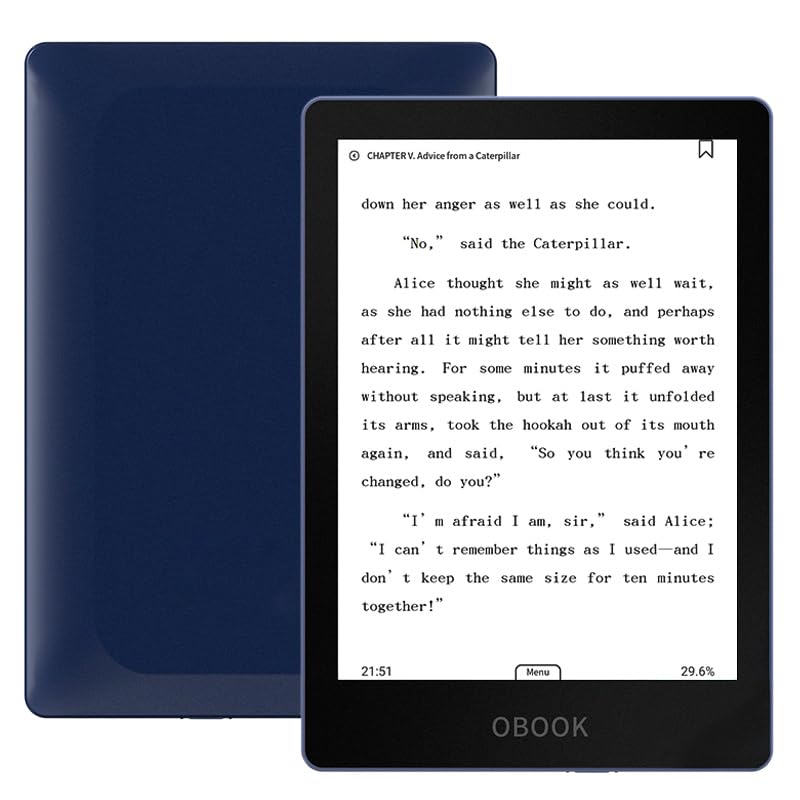
The OBOOK6 is the entry point to Android e-reading. It has a 6-inch 300 ppi glare-free display — that is the same sharpness as the big names, just in black and white. The 32 GB storage holds plenty of books, and the adjustable front light lets you read comfortably in the dark. It runs Android, so you can install Kindle, Kobo, Nook, and Libby apps easily. One owner reported all those apps “worked perfectly” on this device.
Battery life is a highlight here. Shoppers say it lasts 3-4 days with heavy reading in airplane mode, and it charges quickly via USB-C. One reviewer called it the “cheapest basic e-ink reader with backlight” and said it was responsive enough for page turns. It also fits easily in a purse or bag. The trade-off is speed — one customer observed that it is faster than the MEEBOOK M6 but still not as snappy as premium models. The default boot page shows local books, and there is no quick backlight toggle; you have to go into settings.
A couple of buyers had issues: one said Audible and Kindle did not work on their unit, though another confirmed both worked fine. The color option is only dark blue, which one reviewer returned for that reason. If you want a no-frills Android reader that just works for text, this is the cheapest way in. It is the budget buyer’s pick over the Bigme B6 Color when color is not needed.
Why It Works
- Sharp 300 ppi black-and-white screen for crisp text
- Very affordable entry into Android reading
- Long battery life with fast USB-C charging
What You Give Up
- No color — black-and-white only
- Slower processor and fewer settings shortcuts
Best for: the budget-conscious reader who just wants to read text books from any app on a crisp screen. It proves you do not need to spend a lot for a functional Android reading experience.
2. BOOX Tablet Go Color 7 Gen II
A 7-inch color e-reader that runs any Android app without feeling sluggish.
This BOOX model earns the top spot because it delivers a sharp color screen for comics and crisp black-and-white text for novels — all in one device. The 7-inch Kaleido 3 screen gives you 4096 colors at 150 ppi (pixels per inch) and black text at 300 ppi. That means comics look vibrant, while novels stay razor-sharp. The octa-core processor and 4 GB of RAM make page turns fast and app switching smooth — a major step up from the slower 2 GB Bigme B6.
With 64 GB of storage (the Bigme B6 offers 32 GB), you get room for thousands of books and heavy apps. Buyers report the screen is comfortable for long reading sessions, but they also note that color e-ink is inherently darker than LCD screens. You simply turn on the front light for a better view — it is a trait of all e-ink, not a defect. The device supports an active stylus (sold separately) for notes, and the USB-C port works with OTG accessories or as an audio jack.
One reviewer who has used the device for months said they “love this ereader,” calling the screen perfect and the battery long-lasting. They added that the setup requires some adjustments, but watching a few setup videos solves that quickly. The only real downside is that you cannot run many apps simultaneously — this is an e-reader first, not a tablet for video. skip it if you want a pocket-sized device for throwing in a small bag; the 6-inch Bigme B6 is more portable.
Why It Wins
- 7-inch color screen with 300 ppi black-and-white sharpness
- 64 GB storage and 4 GB RAM outperform most budget models
- Google Play gives you any reading app you want
One Trade-Off
- Color screens are darker than black-and-white — you will use the front light often
Ideal for: the reader who wants one device for novels, color comics, and Android apps while staying affordable. The 7-inch screen strikes a balance between portability and page real estate that the 6-inch models cannot match.
3. BOOX Tablet 10.3″ Note Air 5 C
A large color e-ink tablet built for serious note-taking and reading.
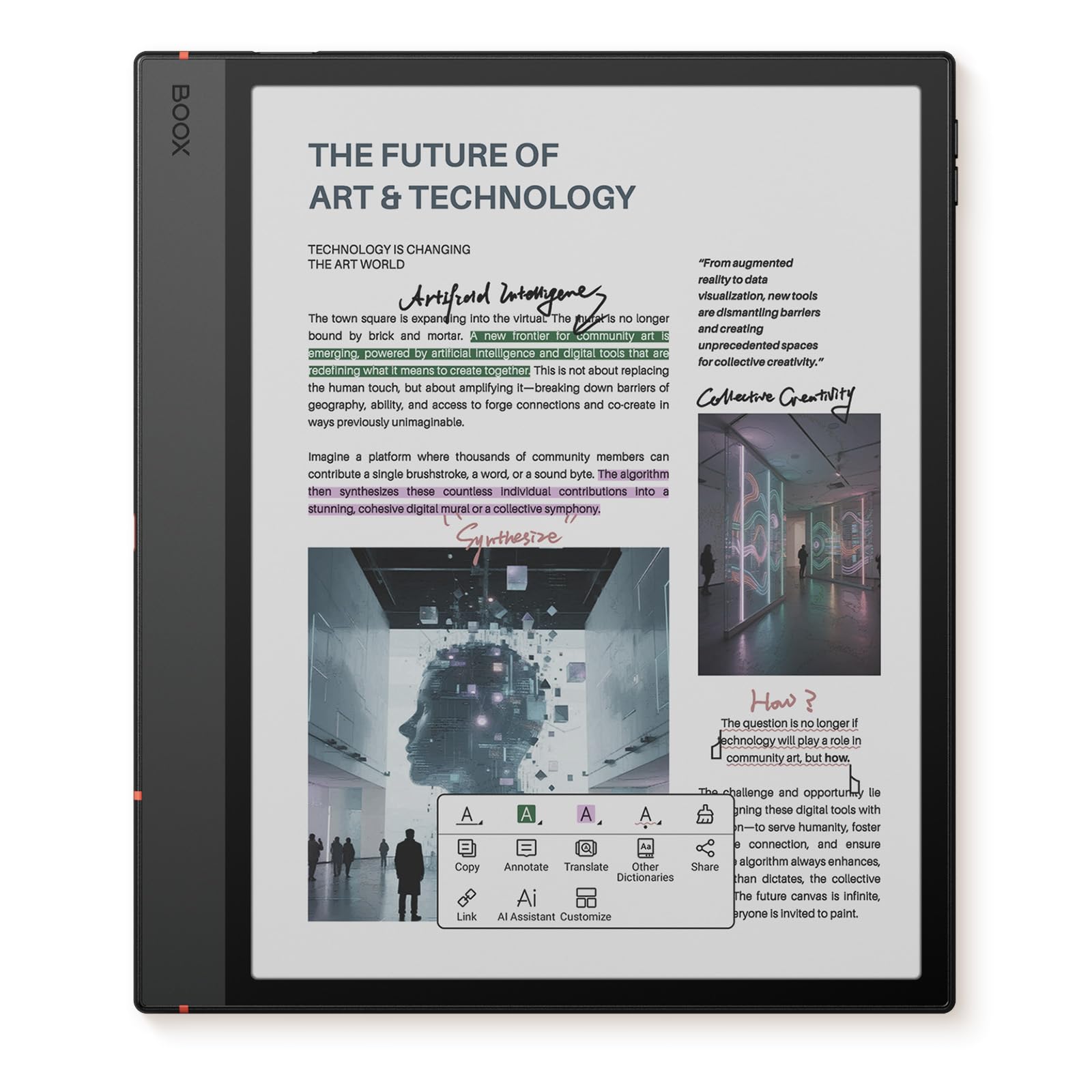
If you want to replace a paper notebook and read in color, this is the powerhouse. The 10.3-inch Kaleido 3 screen is huge — it shows full magazine pages and PDFs without zooming. The black-and-white resolution stays at 300 ppi, and the color hits 150 ppi. It weighs 430 grams (15.2 oz) and is just 5.8 mm thick, so it is lighter than most tablets despite the big screen. The octa-core processor with 6 GB RAM and 64 GB storage makes multitasking smoother than any other e-reader here, including the 4 GB BOOX Go Color 7.
One insight from a reviewer who compared it directly to the Supernote Nomad: the fit and finish are excellent, and the access to the Google Play Store makes it feel more productive than the Remarkable. The stylus with 4,096 pressure levels is included in the box. Owners mention the color display works well for news apps and web browsing, and the dual speakers with a microphone add versatility. The battery is a 3,700mAh unit — decent, but customers note it drains faster than pure black-and-white readers because the color screen uses more power.
Unlike the smaller BOOX Go Color 7, this device supports a fingerprint reader built into the power button for security. It runs Android 15, the newest version here. A common piece of advice from owners: adjust your expectations for color e-ink. The screen is not as bright as an iPad, but it is far gentler on the eyes for hours of reading. Pick this over the Go Color 7 if note-taking and PDFs are central to your workflow; reach for the Go Color 7 if you prioritize pocketability.
Big Screen Benefits
- 10.3-inch display shows full PDFs and magazine spreads
- 6 GB RAM handles multiple apps smoothly
- Includes a 4,096-level pressure stylus
The Catch
- Battery life is shorter than smaller color models due to the larger screen
Grab this if: you need a large-screen e-reader for note-taking, PDFs, and color reading with fast performance. It is the choice for the student or professional who wants a single device for reading and jotting ideas.
Look elsewhere if: you want a pocket-sized device for reading novels on the commute — 6-inch models are more portable.
4. Bigme B6 Color Ebook Reader

A compact color e-reader that keeps battery going for weeks.
The Bigme B6 Color is a smart pick if you want color on a budget without sacrificing battery life. It has a 6-inch electronic ink display and runs Android 14. Reviewers point out the battery lasts 2-3 weeks with 1-2 hours of reading each night. That is impressive for a color reader — the lower-power processor helps here. Its 32 GB storage and 2 GB RAM are less than the 64 GB storage and 4 GB RAM of the BOOX Go Color 7, so expect slower app switching.
One reviewer called it “small, mighty, versatile” and noted that it is smaller than a Kindle Paperwhite yet more customizable. The color display works well for Manga and news apps, especially outdoors where there is no glare. However, owners say the color layer can look a bit fuzzy compared to black-and-white screens. One reviewer even said the color mode was “unusable” like first-generation color e-ink. That is a fair warning if you need vibrant graphics — this is an entry-level color experience.
Unlike the Musnap Neo C below, the Bigme B6 has a protective case included in the box and physical page-turn buttons. The buttons are reprogrammable, which is a nice touch. A few buyers mentioned the auto light adjustment is finicky, so you may need to tweak brightness manually. Overall, for its price, it is a solid gateway into color Android reading. If your budget allows, the BOOX Go Color 7 gives you a sharper and larger color screen for not much more.
What Works
- Battery lasts 2-3 weeks with daily reading
- Runs Android 14 with Google Play access
- Includes a protective case and physical buttons
What Doesn’t
- Color layer can look fuzzy — better for text than comics
Pick this if: you want a color e-reader on a budget and you mainly read text with occasional Manga. For the money, it delivers the core Android experience without costing as much as a flagship.
5. Neo C 64GB+4GB Colour eBook Reader
Tons of storage and RAM for a low price, but some reliability risks.
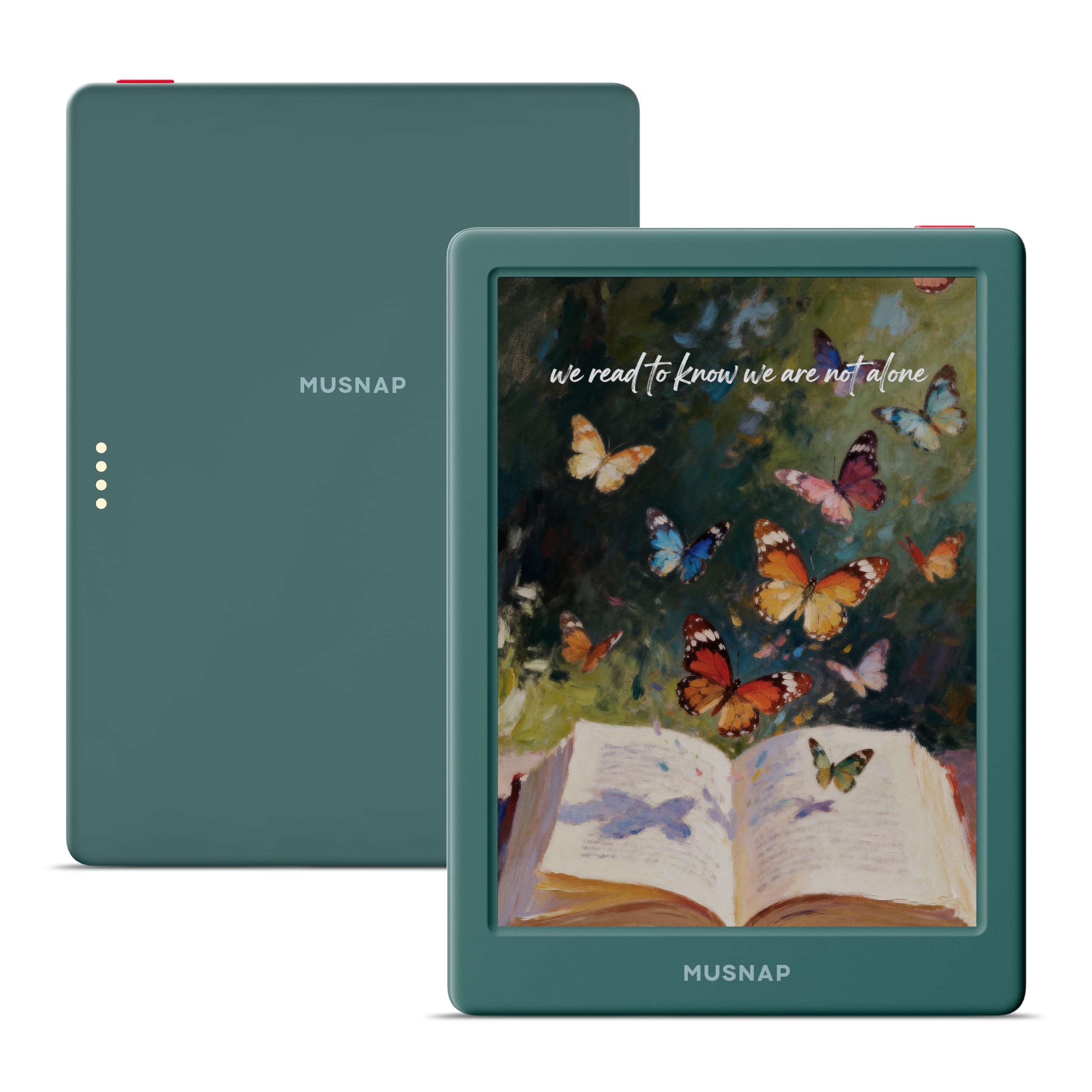
The Musnap Neo C packs a 64 GB storage and 4 GB RAM combo that is rare at this price point. For reference, that provides 64 GB of storage, versus the Bigme B6 Color’s 32 GB, and on par with the premium BOOX Go Color 7. The 6-inch Kaleido 3 color display delivers 4096 colors, and the 2.0 GHz quad-core processor keeps things moving. It runs Android, so you can install Kindle, Kobo, Libby, and more.
Buyers love the “perfect size/weight” and the responsive touch screen with adjustable backlight. One reviewer noted they could fit 500+ books on it easily. However, there is a serious warning: several owners reported the device bricking — going to a blank screen — after a couple of days. One buyer mentioned: “Device died after 2 days (blank screen).” The manufacturer has disabled ADB and recovery, so there is no fix if this happens. That is a real risk you take with this model.
On the positive side, when it works, it is a great value. The front light adjusts automatically, and the USB-C charging is fast. A couple of buyers mentioned the file browser has some Chinese text errors, and there is no smart case available. If you want the storage and RAM but need more reliability, the BOOX Go Color 7 is a safer bet. The Neo C is best for the tinkerer who is okay with a gamble for the sake of specs.
Best Features
- 64 GB storage and 4 GB RAM for under a premium price
- Color e-ink with adjustable front light
- Google Play access for all reading apps
Risks to Know
- Some units brick after a few days with no fix available
Reach for this if: you need maximum storage on a budget and are willing to accept potential reliability issues. If consistent reliability is your priority, spend a bit more on the BOOX Go Color 7.
Understanding the Specs
Screen Size And PPI
Screen size is measured diagonally in inches. A 6-inch screen is compact and portable — it fits in a jacket or small bag. A 7-inch screen gives you more text per page without being bulky. A 10.3-inch screen is for PDFs and note-taking; it is closer to a sheet of paper. PPI (pixels per inch) tells you how sharp text looks. 300 PPI is the gold standard for e-readers — text looks as crisp as a printed book. Color e-ink screens often drop to 150 PPI in color mode, which is fine for comics but less sharp for fine text.
RAM And Storage
RAM (random access memory) controls how many apps you can have open at the same time. 2 GB RAM is enough for opening one book at a time. 4 GB or 6 GB RAM helps when you switch between reading apps, a browser, and note-taking. Storage is where your books live. 32 GB can hold thousands of ebooks. 64 GB is generous for heavy readers who also download manga, audiobooks, and apps. Some models let you add a microSD card for even more space.
Color Vs. Black-and-White E-Ink
Black-and-white e-ink screens (like Carta or Pearl) are the sharpest and have the best contrast. They are ideal for novels. Color e-ink uses a technology called Kaleido 3, which layers a color filter over the black-and-white screen. This adds 4096 colors for comics, magazines, and web browsing. The trade-off is that color screens are naturally darker and have a slight gray tint. Both types are glare-free and easy on the eyes in direct sunlight. You just need to turn on the front light more often with color models.
Battery Life
E-ink screens only use power when the page changes, so battery life is measured in weeks, not hours. A black-and-white reader with Wi-Fi off can last 3-4 weeks depending on use. Color readers and those with Wi-Fi or Bluetooth on will drain faster — expect 2-3 weeks for color models and less if you use apps heavily. Front light usage also reduces battery life. All modern e-readers use USB-C for charging, which is convenient and fast.
FAQ
Can I install the Kindle app on an Android e-reader?
How long do color e-ink screens last?
Is a 6-inch screen too small for reading?
Can I take notes on an Android e-reader?
Do I need 4 GB of RAM on an e-reader?
Will an Android e-reader work with library apps like Libby?
What is the difference between the BOOX Go Color 7 and the BOOX Note Air 5 C?
Are color e-readers good for reading Manga?
How fragile are Android e-readers?
Can I use Bluetooth headphones with an Android e-reader?
Final Thoughts: The Verdict
Across the board, the android e reader winner is the BOOX Go Color 7 Gen II because it gives you a sharp color screen, fast performance, and ample storage without the high price of larger models. If you want a large note-taking device, grab the BOOX Note Air 5 C. And for the best value color experience on a budget, reach for the Bigme B6 Color.
How We Picked
We do not accept paid placement. Every pick is matched to a real buyer and a real use-case; we do not hands-on test units.
Sources & Methodology
Specifications: manufacturer listings and product documentation. Review insights: verified customer reviews, as of July 2026. Pricing: not shown on this page (it changes often); check the current price via the retailer link.
As an Amazon Associate, Gadgets Feed earns from qualifying purchases. This does not affect which products we feature.