
Our readers keep the lights on and my morning glass full of iced black tea. As an Amazon Associate, I earn from qualifying purchases.
Specs are compiled from manufacturer listings and verified buyer reviews and can change over time — please confirm the key details on the product page before buying.
Your movie library keeps growing — 4K remuxes, TV series box sets, director’s cut extras — and nothing kills a movie night faster than a full drive warning mid-download. A 16TB drive gives you room for roughly 200 to 400 movies (depending on file size) without needing to shuffle or delete anything. The real trick is picking the one that matches your setup and how you plan to use the storage day to day.
I’m Min — the founder and writer behind Gadgets Feed. This guide is built by comparing the manufacturers’ published specifications and the patterns across verified customer reviews, so you get each pick’s real strengths and trade-offs instead of marketing spin.
if you need an internal workhorse for a dedicated media server or a simple external box for plug-and-play backups, this breakdown of the 16tb drive for storing movies focuses on speed, reliability, and real-world connection options.
Our Picks at a Glance


How To Choose The Best 16TB Drive For Storing Movies
Choosing a storage drive for a movie library is different from buying a fast SSD for a laptop. Here, you care about sustained read speeds, quiet operation, and enough reliability to keep thousands of hours of content accessible without hiccups.
Rotational Speed: 5400 vs 7200 RPM
The spin speed determines how fast the drive can find and read data around the platter. A 7200 RPM drive (rotations per minute) delivers faster sequential reads, which helps when you scrub through a 4K video timeline or serve multiple streams from a NAS (network-attached storage box). A 5400 RPM drive runs cooler and quieter, making it a better fit for a standalone external drive that sits next to a TV and is mostly idle.
CMR vs SMR Recording
CMR (Conventional Magnetic Recording) writes tracks that do not overlap, so rewriting data does not slow down. SMR (Shingled Magnetic Recording) overlaps tracks for higher density but can drop write speeds significantly when the cache fills. For a movie library where you may add and delete files often, a CMR drive keeps performance steady across the whole capacity.
Cache Memory Size
The cache is a small buffer of fast memory on the drive controller. A larger cache (256 MB rather than 16 or 64 MB) lets the drive handle repeated requests for the same data without going back to the platters, which helps when browsing a big folder of movie files or running a RAID array (a group of drives working together).
Quick Comparison
| Model | Best For | Interface | Rotational Speed | Cache | Amazon |
|---|---|---|---|---|---|
| WD 16TB Elements★ Best Overall | Plug-and-Play Backup | USB 3.0 | — | — | Amazon |
| Seagate IronWolf Pro 16TBNAS Workhorse | NAS / Multi-Bay Server | SATA 6Gb/s | 7200 RPM | 256 MB | Amazon |
| LaCie d2 Professional 16TBCreative Pro Speed | Creative Pro Workflows | USB 3.1 Type-C | 7200 RPM | — | Amazon |
| UnionSine 16TB External | Budget External Storage | USB 3.0 | 5400 RPM | — | Amazon |
| Toshiba MG08ACA16TE | Internal Enterprise Storage | SATA 6Gb/s | 7200 RPM | 512 MiB | Amazon |
| Seagate Exos X16 16TB | Data Center / High Workload | SATA 6Gb/s | 7200 RPM | 256 MB | Amazon |
| Seagate Expansion 16TB | Simple Drag-and-Drop | USB 3.0 | — | — | Amazon |
| WD 16TB My Book | Password-Protected Backup | USB 3.0 | — | — | Amazon |
| Glyph BlackBox Pro 16TB | Portable Production Studio | USB 3.1 Gen 2 | 7200 RPM | — | Amazon |
In‑Depth Reviews
1. WD 16TB Elements Desktop External Hard Drive
Our pick — over 4.5★ from 137,500+ verified ratings; the strongest balance of quality and price.
The no-fuss external drive that gives you a massive 16 TB with zero setup — just plug in the power and the USB cable.
With over 137,000 ratings averaging 4.6 stars, the Elements is the most customer-tested drive on this list. The USB 3.0 connection delivers a practical data transfer rate of 5 Gigabits Per Second, which is 20% more bandwidth than the 5 Gbps interface standard — adequate for moving full movie folders in a few minutes. The aluminum enclosure helps dissipate heat, which matters when the drive runs for extended periods during a weekend media backup session.
The biggest trade-off is that it is a sealed external unit — you cannot open it to retrieve or swap the internal drive separately. The cache memory installed size is 16 MB, putting it at a 16.0x gap compared to the 256 MB cache on the IronWolf Pro, so repeated directory scans or scrubbing through a large video library will feel slightly slower. Owners mention it runs quietly and has been reliable for years of use. For a simple external drive that you can plug into a Windows PC and start copying files immediately, this is the safe bet.
Why It Is So Popular
- Plug-and-play simplicity — no software required on Windows
- Aluminum body keeps temperatures in check during long transfers
- 4.6-star average across 137,000+ ratings shows long-term reliability
The Practical Drawback
- 16 MB cache is small, so browsing a crowded movie folder can feel sluggish
Reach for this if: you need a drop-dead simple external HDD (hard disk drive) for backing up movies without configuring anything.
Skip it for: a NAS build or high-traffic server where you need a bigger cache and internal SATA connection.
2. Seagate IronWolf Pro 16TB
The internal hard drive that lets your media server serve files without stuttering, even with multiple users streaming at once.
Built with an all-CMR (Conventional Magnetic Recording) design, this drive keeps write speeds consistent no matter how full it gets — a big deal when you are copying a 50GB 4K remux onto an already half-full array. The 7200 RPM spindle and 256 MB cache (256 megabytes of onboard buffer memory) help the IronWolf Pro handle simultaneous read requests from multiple connected devices, which is exactly what happens in a home NAS.
Seagate gives this drive a workload rating of up to 550 TB per year and an MTBF (mean time between failures) of 2.5 million hours. Buyers report it pairs well with Synology and QNAP NAS enclosures without throwing compatibility errors. The included IronWolf Health Management software watches drive temperature and vibration levels, so you get a warning before small issues turn into data loss.
On the downside, it is an internal SATA drive — and an enterprise-tier one at that — meaning you need a NAS or a desktop bay to house it. The cache is 256 MB, which is a 16x gap compared to the 16 MB found in some budget external drives. Rescue Data Recovery Services are included for 3 years, adding a layer of protection that external drives at this price range rarely offer.
NAS-Ready Specs
- CMR recording for steady write speed across the whole 16 TB capacity
- Rotational vibration sensors and TLER (time-limited error recovery) keep RAID arrays stable
- 5-year limited warranty plus 3 years of Rescue Data Recovery
The Single Caveat
- Requires an empty SATA bay — not a standalone USB drive
Your best match if: you run a multi-bay NAS or a home server and need enterprise-grade reliability for round-the-clock access to your film library.
Look elsewhere: if you just want a simple external drive to plug into a laptop — grab the WD Elements instead.
3. LaCie d2 Professional 16TB
A pro-grade external drive that pushes 260 MB/s reads and writes, cutting wait times for copying large video libraries.
The LaCie d2 spins at 7200 RPM and uses a USB 3.1 Type-C port, which delivers 260 MB/s in both read and write directions. For context, that is more than double the speed of a basic USB 3.0 external drive rated around 120–130 MB/s. It comes pre-formatted as exFAT, meaning it works with both Windows and macOS from the start — no reformatting needed for Time Machine users.
The aluminum enclosure acts as a large heatsink, which customers note keeps the drive cool even during hours of sustained 4K video transfer. The 5-year limited warranty is longer than most external drives offer. The trade-off is premium pricing — this is the most expensive pure external drive here. The internal drive does not use a CMR guarantee, so write speeds may slow slightly if you fill it completely and then try to rewrite over the same sectors. LaCie positions this for creative professionals editing video direct from the drive, and the speed makes that feasible.
Speed Highlights
- 260 MB/s sustained read and write speeds via USB 3.1 Type-C
- Pre-formatted exFAT for instant cross-platform use
- 5-year warranty for long-term confidence
What Holds It Back
- No mention of CMR technology; rewrite speeds may dip on a full drive
Best for: video editors or power users who need to read and write large files fast and appreciate a metal body that doubles as a cooler.
Not for: a silent home theater setup on a budget — the UnionSine or Toshiba renewed options give you capacity for less.
4. Seagate Exos X16 16TB (Renewed)

A data-center-grade SATA drive that delivers 7200 RPM performance and a 256 MB cache at a renewed, budget-friendly price.
The Exos X16 spins at 7200 RPM and caches reads through 256 MB of onboard memory — the same 256 MB found in the IronWolf Pro. It uses CMR (Conventional Magnetic Recording) and a helium-sealed design. Helium reduces internal air drag, which lowers vibration and power consumption versus air-filled drives. The result is a cooler, quieter internal drive that fits inside a standard 3.5-inch desktop bay.
The data transfer rate is 6 Gigabits Per Second over SATA, coming in 20% more bandwidth versus a standard USB 3.0 external (USB 3.0 typically runs around 5 Gigabits Per Second). It is rated for 550 TB/year workload and 2.5 million hours MTBF. However, it is a renewed unit. The two real risks are a shorter useful lifespan and a lower confidence level than buying new. Buyers with budget constraints but who still want 7200 RPM enterprise internals will find this a smart point to land.
Why It Excels
- 7200 RPM and 256 MB cache for fast, consistent read speeds
- Helium-sealed design reduces power draw and vibration
- CMR technology maintains speed as capacity fills up
The Renewed Reality
- Refurbished drive may have less remaining service life than new
Grab it if: you need enterprise-grade speed and CMR reliability for a low budget and are comfortable buying renewed hardware.
Pass if: zero risk and a full factory warranty are non-negotiable for your movie archive.
5. Toshiba MG08ACA16TE 16TB (Renewed)

An enterprise SATA drive packing a massive 512 MiB cache and a helium-sealed nine-platter design for high-density storage.
The Toshiba MG08ACA16TE uses a nine-platter design inside a standard 3.5-inch form factor, kept cool and power-efficient by helium sealing. Its 7200 RPM spindle and 512 MiB cache set it apart — the 512 MiB cache is double the 256 MB cache found on the Seagate IronWolf Pro, meaning repeated scans of a movie folder will feel snappier. The sustained throughput is around 262 MiB/s, with real-world testing hitting peaks near 270–280 MiB/s, according to user observations.
It is built for 24/7 operation with a 2.5 million hour MTTF (mean time to failure) and a workload rating of 550 TB per year. The rotational vibration sensors help it stay stable inside a multi-drive NAS. The major drawback is the same as the Exos: it is a renewed drive, so you are buying a previous-generation enterprise unit with unknown prior usage. Reviewers point out it runs quieter than older air-filled Toshiba drives but caution that the warranty may be limited compared to a new unit.
Standout Spec
- 512 MiB cache improves repeated read requests significantly
- Nine CMR platters in a helium-sealed enclosure for better density
- 262 MiB/s sustained throughput, peaking near 280 MiB/s
Watch Out For
- Renewed condition with uncertain prior workload history
Go for it when: cache size and 7200 RPM speed matter more than a brand-new warranty, and you are comfortable with refurbished enterprise hardware.
Choose a new drive instead if: absolute certainty about the drive’s remaining life is a priority for your permanent media archive.
6. Glyph BlackBox Pro External 16TB

A tough steel-and-aluminum external drive that matches the LaCie’s 260 MB/s speed while adding shock resistance for on-the-go production work.
The Glyph BlackBox Pro spins at 7200 RPM and connects via USB 3.1 Gen 2, giving you up to 260 MB/s in both read and write speeds — the same performance as the LaCie d2 but in a more protective shell. The enclosure is made of electro galvanized cold rolled coil steel and aluminum, which handles bumps better than the all-aluminum bodies of many competing external drives. The cache memory installed size is 16 MB, which is the bottleneck here: 256 MB cache drives will handle repeated directory views faster.
Glyph includes both a USB-C to USB-C cable and a USB-C to USB-A cable, so you do not need an adapter for older devices. The cache size of 16 MB puts it at a 16.0x gap compared to the IronWolf Pro, so daily quick browsing of a large folder will be slower. Still, for its sequential transfer speed and sturdy build, it is a good option for video editors who move gear between edit suites.
Build Highlights
- Steel and aluminum enclosure offers better drop protection than plastic-shelled drives
- Two cables included (USB-C to C and USB-C to A)
- 7200 RPM for fast sustained reads
Speed Limitation
- 16 MB cache is small, slowing down repeated folder reads
Pick this for: a portable production drive that needs to survive being thrown in a camera bag while still delivering fast file copies.
Avoid if: you primarily need a desktop-only archive drive that stays in one place — you will pay a premium for the rugged build you do not need.
7. WD 16TB My Book Desktop External Hard Drive

A USB 3.0 external drive that adds hardware-based 256-bit AES encryption to protect your movie collection from prying eyes.
The My Book is WD’s upgrade over the Elements, adding 256-bit AES hardware encryption (a high-security standard that scrambles data so it is unreadable without the password) and bundled backup software. The data transfer rate is listed at 600 Megabytes Per Second, which is typical of a USB 3.0 drive in burst mode. The cache memory installed size is 16 MB, the same 16 MB found in the Elements drive. The enclosure material is not listed, so build quality may vary from the Elements aluminum shell.
Buyers appreciate the password protection feature, noting it is simple to set up via the WD Discovery software. The trade-off is that the drive runs warm during long transfers, and the included software must be installed and an account registered to use the encryption. If you share a computer with family and want to keep your media library separate, the My Book adds a layer of security the Elements lacks.
Security Plus
- Hardware-based 256-bit AES encryption protects data without slowing performance
- WD Backup and WD Security software included for automated scheduling
- Same fast 5 Gbps USB 3.0 interface as the Elements
Warmth Warning
- Runs warm; may need good airflow if used for extended sessions
Go with the My Book when: you want password-level encryption on an external backup without paying extra for a secure software subscription.
skip it if: you do not need encryption — the Elements gives you the same capacity and speed for less.
8. Seagate Expansion Desktop 16TB

A straightforward external drive that does one thing reliably — drag-and-drop copying — and includes Seagate’s Rescue Data Recovery Services.
The Seagate Expansion Desktop 16TB connects via USB 3.0 and offers a data transfer rate of 120 Megabytes Per Second. That is 10 MB/s slower than the UnionSine drive’s 130 MB/s, representing an 8% gap in throughput. The case is made of plastic, which is lighter than aluminum but does not dissipate heat as effectively. It comes pre-formatted for Windows and works with Mac after reformatting.
The biggest selling point is the included Rescue Data Recovery Services, which covers accidental deletion, drive failure, or natural disasters for a limited period. Shoppers say the drive is quiet in use but can feel warm to the touch after a few hours. If a simple, no-software backup that also gives you a data recovery safety net is your priority, this is a solid performer at a mid-range price point.
confidence Perks
- Included Rescue Data Recovery Services cover common causes of data loss
- Drag-and-drop setup, no software installation needed
- Auto-recognizes Windows and Mac computers
Slower Transfer
- 120 MB/s is slower than the UnionSine drive’s 130 MB/s
Choose the Expansion when: you want the confidence of included data recovery without paying extra for a separate service plan.
Look past it if: you prefer a metal enclosure or the fastest possible transfer speed.
9. UnionSine Desktop External Hard Drive 16TB
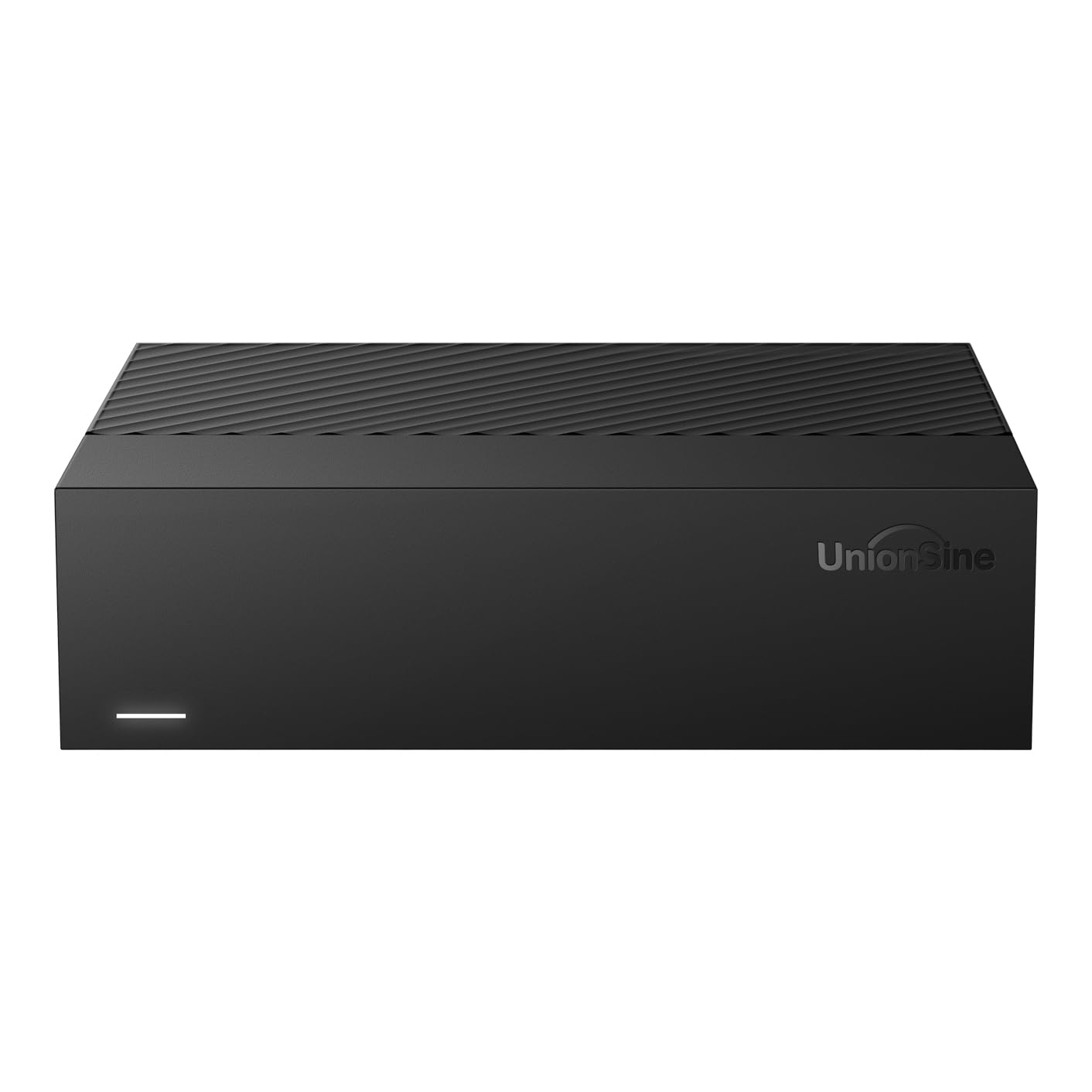
The most affordable way to get 16 TB of external storage, using a 5400 RPM drive that runs quiet and cool next to your TV.
The UnionSine drive spins at 5400 RPM and uses a USB 3.0 interface with a theoretical read/write speed of up to 130–270 MB/s. In real-world use, the data transfer rate is measured at 130 Megabytes Per Second, which is 8% more throughput than the Seagate Expansion’s 120 MB/s. The drive uses an ASM controller chip and is compatible with Windows, Mac, Linux, Android, TV, and Xbox — wide compatibility for a media drive.
It includes anti-vibration silicone inside the casing, which buyers report keeps the acoustic profile low. The 5400 RPM rotational speed means it is not ideal for serving multiple simultaneous 4K streams, but for a single user playing movies from a connected TV or laptop, it works without issue. A 12V/3A power supply provides stable power. The main shortcoming is speed — at 5400 RPM, it is measurably slower than any 7200 RPM drive on the list when copying large files or scanning a full directory.
Budget Win
- 130 MB/s transfer speed beats the Seagate Expansion by 8%
- Anti-vibration silicone keeps it quiet in a living room setup
- Broad compatibility including Android TV and Xbox
Speed Trade-Off
- 5400 RPM is slower than 7200 RPM drives for copying large movie files
Best for: a budget-conscious buyer who needs a large external drive for occasional movie access and values quiet operation over raw speed.
Pass if: you edit video from the drive or plan to stream to multiple devices simultaneously.
Understanding the Specs
Rotational Speed (RPM)
The platter spin speed, measured in revolutions per minute. 7200 RPM drives read and write data faster, which helps when you scroll through a movie folder filled with 4K files or serve video to multiple devices at once. 5400 RPM drives use less power and make less noise, making them a better match for a quiet living room setup.
Cache Memory
This is a small onboard buffer (measured in MB or MiB) where the drive stores frequently accessed data. A bigger cache, such as 256 MB or 512 MiB, means repeated scans of the same movie folder load faster because the drive does not need to spin the platters to find the data each time.
CMR vs SMR
CMR (Conventional Magnetic Recording) writes each track of data in its own lane without overlap, so write speeds stay consistent even when the drive is nearly full. SMR (Shingled Magnetic Recording) overlaps tracks to pack more data in the same space but can slow write speeds dramatically when the drive needs to rewrite overlapping tracks.
Interface Type
SATA (Serial ATA) is the internal connector used inside a desktop PC or NAS — it is the fastest path to the motherboard. USB interfaces (3.0, 3.1 Gen 2) are external and offer plug-and-play convenience, but USB 3.1 Type-C is about twice as fast as standard USB 3.0, making it better for editing video straight from the drive.
FAQ
Will a 7200 RPM drive overheat inside a NAS?
Can I use an external 16TB drive with a smart TV?
What is the difference between the WD Elements and the WD My Book?
Is a renewed enterprise drive safe for storing a movie collection?
How many movies fit on a 16TB drive?
Can I use a 16TB SATA internal drive in a USB enclosure later?
What does a 256 MB cache do for movie playback?
Does a faster drive improve movie streaming quality?
What is a CMR drive and why does it matter for media storage?
Can I use a 16TB external hard drive for video editing?
Final Thoughts: The Verdict
For the majority of shoppers, the best 16tb drive for storing movies is the Seagate IronWolf Pro because its CMR recording, 256 MB cache, and NAS-tune firmware deliver consistent performance whether you stream a single movie or serve files to every device in the house. If you want a simple external drive with zero setup, the WD Elements is the most reliable plug-and-play choice. And for creative professionals who need fast transfers and a rugged build, the Glyph BlackBox Pro offers 7200 RPM speed and 260 MB/s throughput in a steel-and-aluminum shell.
How We Picked
We do not accept paid placement. Every pick is matched to a real buyer and a real use-case; we do not hands-on test units.
Sources & Methodology
Specifications: manufacturer listings and product documentation. Review insights: verified customer reviews, as of July 2026. Pricing: not shown on this page (it changes often); check the current price via the retailer link.
As an Amazon Associate, Gadgets Feed earns from qualifying purchases. This does not affect which products we feature.