
Our readers keep the lights on and my morning glass full of iced black tea. As an Amazon Associate, I earn from qualifying purchases.
Specs are compiled from manufacturer listings and verified buyer reviews and can change over time — please confirm the key details on the product page before buying.
A cramped desk turns every firefight into a wrestling match with your mouse cord. You need a compact 60% setup that shrinks the keyboard footprint without ditching the arrow keys or the responsiveness your shots depend on. The right combo frees forearm space for mouse movement while keeping keystrokes quiet enough for late-night use.
I’m Min — the founder and writer behind Gadgets Feed. This guide is built by comparing the manufacturers’ published specifications and the patterns across verified customer reviews, so you get each pick’s real strengths and trade-offs instead of marketing spin.
These picks suit both competitive shooters and long typing sessions without sacrificing desk space. This is the practical guide to finding the best 60 gaming keyboard and mouse for your exact desk and play style.
Our Picks at a Glance

How To Choose The Best 60 Gaming Keyboard And Mouse
A 60% keyboard removes the number pad and most function keys to give your mouse more desk space. Not all compact combos offer equal responsiveness. Prioritize switch type, DPI range, and rollover support to avoid mid-game frustration.
Mechanical vs. Membrane Switches
Mechanical switches use individual springs and contacts under each key, giving you a distinct tactile bump or click every time you press. Membrane keys use a single rubber sheet underneath, which feels mushier and can wear out faster. For competitive gaming, mechanical switches — especially linear ones — provide faster, more reliable actuation.
DPI and Polling Rate
DPI (dots per inch) tells you how far the cursor moves per inch of physical mouse movement. A wide adjustable DPI range (e.g., 200–12800) lets you slow down for sniping and speed up for building. Polling rate (measured in Hz) determines how often the mouse reports its position — 1000Hz means the game gets an update every millisecond.
Anti-Ghosting and N-Key Rollover
Anti-ghosting ensures the keyboard registers multiple simultaneous presses, so crouch, strafe, and reload all register. N-key rollover (NKRO) goes further by handling every single key press at once — crucial for complex combos in fighting or MMO games. A board with only 19- or 26-key anti-ghosting still covers the usual gaming cluster of WASD and nearby modifiers.
Quick Comparison
| Model | Best For | Keyboard Type | Max DPI | Weight | Amazon |
|---|---|---|---|---|---|
| Redragon S101-3 PRO★ Best Overall | Software customization & value | Membrane | 7200 DPI | 0.98 kg | Amazon |
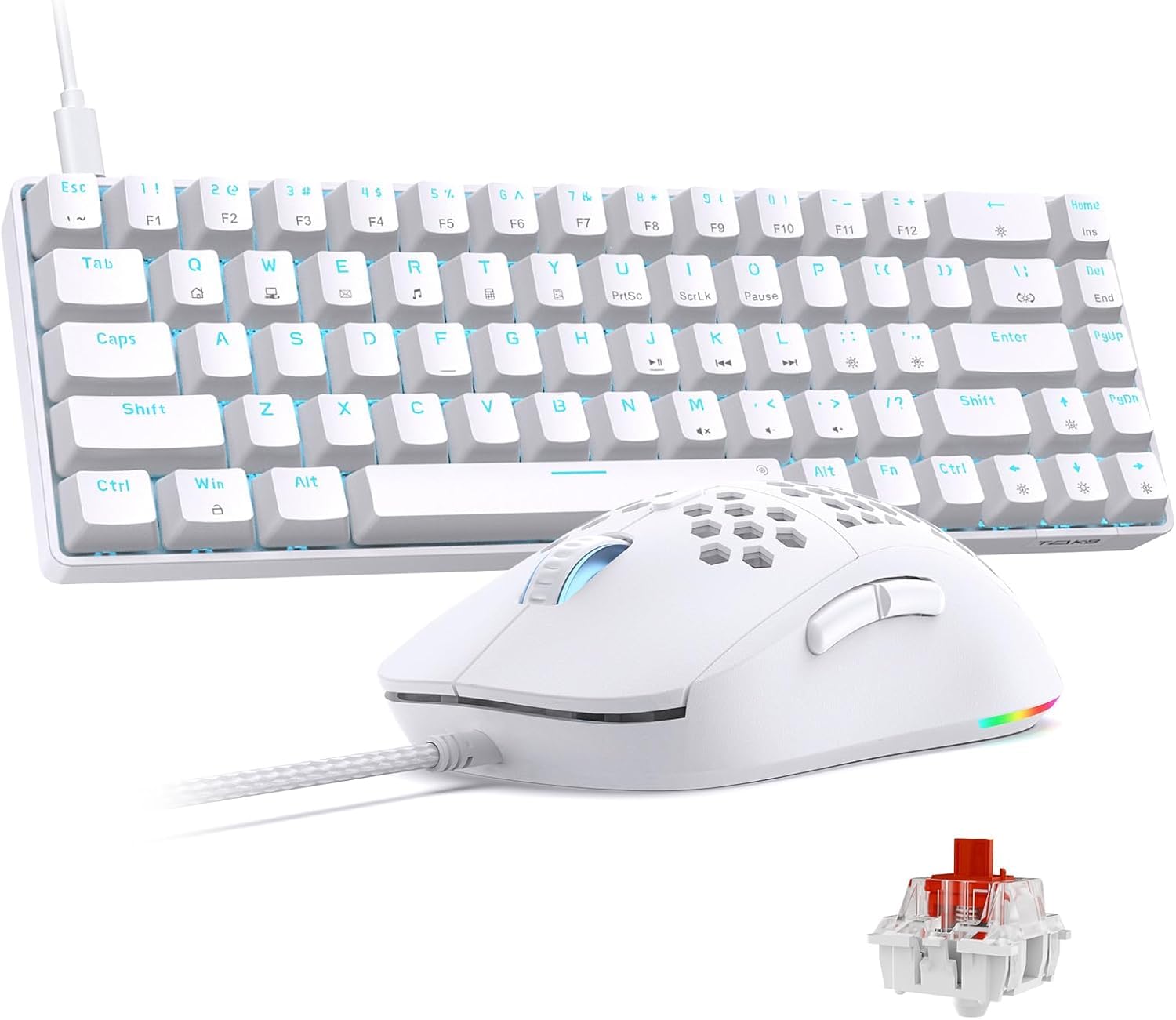
| TMKB Falcon M1SE & T68SETop Performer | Mechanical precision | Mechanical (Red Switch) | 12800 DPI | — | Amazon |
| MSI Forge GK110 Combo US | Brand reliability & volume roller | Membrane | 12800 DPI | — | Amazon |
| RedThunder 60% Mini Combo | Ultra-compact desk setup | Membrane | 7200 DPI | 65g (mouse) | Amazon |
| MageGee K1 | Wide system compatibility | Membrane | 3200 DPI | 2 lbs | Amazon |
| CHONCHOW Pink Combo | Style-focused PC setup | Membrane | 3600 DPI | 0.98 kg | Amazon |
In‑Depth Reviews
1. Redragon S101-3 PRO Gaming Keyboard and Mouse
Our pick — 4.5★ from 51,000+ verified ratings; the strongest balance of quality and price.
Over 51,000 ratings back this full-size membrane combo with sturdy software macro recording.
The Redragon S101-3 PRO is a full-size keyboard, not a true 60% board, but it earns a spot here for its deep customization at a friendly price point. The keyboard features 6 backlight modes and 5 dedicated macro keys that you can program through Redragon’s downloadable software. The mouse provides 10 lighting effects and an on-the-fly DPI button that cycles through 800 to 7200 DPI, matching the RedThunder’s top speed.
At 0.98 kilograms the full-size board is heavier than the CHONCHOW pink combo (0.88 kg), but the ergonomic wrist rest and quiet membrane keys make it comfortable for marathon sessions. The anti-ghosting keyboard ensures WASD presses register simultaneously. Buyers frequently mention the software as the differentiator — the ability to record complex command sequences and save them to the hardware memory means your macros survive a PC restart, something the cheaper combos cannot do.
Customization King
- 5 dedicated macro keys with downloadable software for complex sequences
- Onboard hardware memory saves lighting and DPI settings after restart
- Proven reliability with over 51,000 ratings and a 4.5-star average
Full-Size, Not 60%
- Standard full-size keyboard takes up more desk space than a 60% layout
- Membrane keys lack the tactile feedback of mechanical switches
Ideal for the macro-minded: if you play MMOs or strategy games where programmable keystrokes give an edge, the dedicated macro keys and software support make this the best value pick for complex inputs.
Skip it for space: if your main goal is to reclaim desk real estate for mouse movement, a full-size board is working against you — look at the 61-key or 68-key options instead.
2. TMKB Falcon M1SE and T68SE Combo
The one combo that brings true mechanical switches and a massive DPI ceiling to the compact layout.
The star here is the T68SE keyboard, which keeps 68 keys including the arrow cluster so you are not losing movement control for the sake of space. It uses linear red switches that require a light, direct press with no tactile bump — great for rapid double-taps in shooters. The keyboard supports full N-key rollover, meaning every simultaneous key press registers, and that covers complex combos the 19-key anti-ghosting boards cannot touch.
You get finer control for sniping because the mouse uses a high-precision optical sensor with a range of 200 to 12800 DPI (dots per inch, a measure of cursor speed) — a 36.0x gap over the RedThunder combo’s 7200 DPI. The honeycomb shell keeps the mouse lightweight, and it includes 6 programmable buttons with four onboard profiles so you can store macros and rapid-fire commands. Buyers report the compact 60% layout takes a couple of days to adjust to, but once you adapt, the extra desk room for the mouse is a clear win over a full-size membrane board.
Mechanical Muscle
- True linear mechanical switches for faster, more responsive keystrokes
- 12800 DPI mouse sensor handles both slow precision and fast flicks
- Full N-key rollover means zero missed inputs during complex moves
Compact Trade-Off
- Fixed-key backlighting, not per-key RGB — less customization than some expect
- Linux gaming support is limited to basic input and office use only
Reach for this if: you want a true mechanical switch experience in a space-saving 60% layout without sacrificing mouse performance — the 12800 DPI sensor and full N-key rollover put it a tier above membrane combos.
Look elsewhere if: you need per-key RGB or rely on Linux for gaming, since this combo’s backlighting is fixed and Linux support is restricted to input tasks.
3. MSI Forge GK110 Combo US
A polished membrane combo from a trusted gaming brand with a mouse that matches the TMKB on raw DPI.
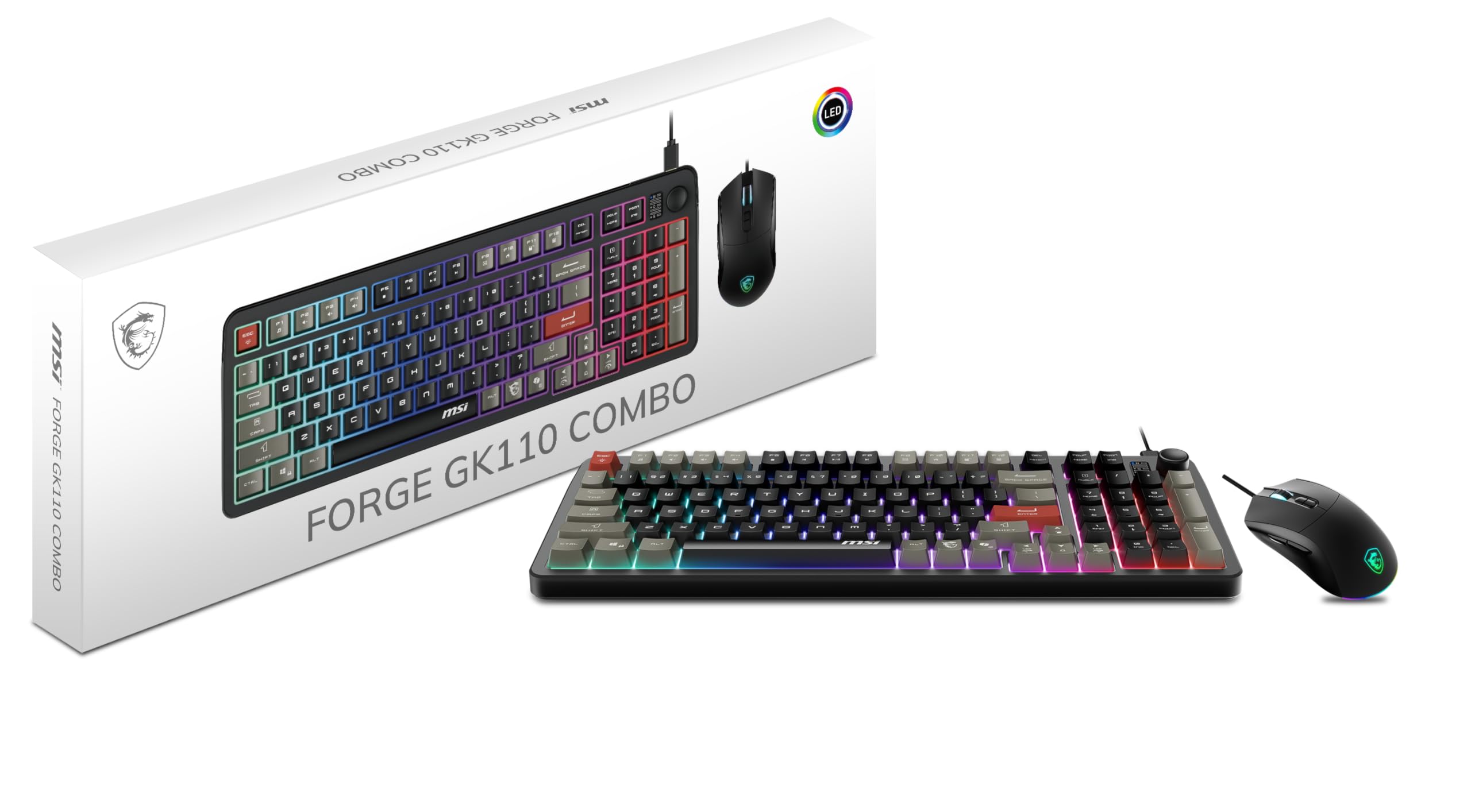
MSI brings the same 12800 DPI optical sensor you find on the TMKB mouse, but pairs it with a full-size membrane keyboard. The keys are quiet and responsive for typing sessions, and the dedicated volume scroll wheel on the top right is a convenience you do not get on the 60% boards — you adjust audio on the fly without tabbing out of a game. The keyboard offers 26-key anti-ghosting (prevents missed key presses when multiple keys are hit at once), which covers the WASD cluster and surrounding modifiers, though it stops short of full N-key rollover (every key registering simultaneously).
The mouse switches are rated for over 20 million clicks, which suggests solid long-term durability compared to unbranded budget mice. RGB lighting on both the keyboard and mouse uses predefined effects rather than per-key customization. Owners mention that the membrane keyboard feels softer than mechanical options, but the trade-off is a near-silent typing experience that suits shared rooms or late-night sessions without disturbing others.
Polished Package
- Volume scroll wheel gives instant audio control mid-game
- Mouse switches rated for over 20 million clicks for lasting reliability
- 12800 DPI sensor matches the top-end optical sensor found on pricier combos
Membrane Limits
- Membrane keyboard lacks the crisp actuation of mechanical switches
- No full N-key rollover — limited to 26-key anti-ghosting
Best for quiet gamers: the quiet membrane keys and dedicated volume roller make it a strong choice for shared living spaces where mechanical clacking would be a problem.
skip it if: you are looking for a true 60% layout to save desk space — this is a full-size keyboard, so your mouse will not get the extra runway a 60% board provides.
4. RedThunder 60% Mini Gaming Keyboard and Mouse Combo

The smallest footprint in this list, purpose-built for FPS players who want maximum mouse space.
This 61-key layout strips everything except the essentials, giving your mouse arm more freedom than any full-size board in this lineup. The keyboard uses membrane switches with a water-resistant design and a braided USB cable, so a tipped drink does not end your session. The mouse features a honeycomb shell weighing only about 65 grams, making it noticeably lighter than the 0.98 kg Redragon combo’s bulkier peripherals.
The optical sensor runs at 7200 DPI with a 1000Hz polling rate and can withstand 40G acceleration. That is half the maximum DPI of the TMKB or MSI combos, but still ample for most gamers who play at 1600-3200 DPI. The mouse is ambidextrous and works for left or right hands. Customers note the compact layout takes real adjustment if you rely on a number pad, but the trade-off is obvious the first time you flick your mouse across the full width of your desk cloth.
Space Champion
- 61-key layout saves maximum desk space for mouse movement
- Water-resistant keyboard and braided cable add durability for daily use
- Lightweight honeycomb mouse (~65g) reduces fatigue during long sessions
Compact Trade-Offs
- No number pad or dedicated arrow keys — you will need to retrain muscle memory
- 7200 DPI is half the ceiling of the TMKB and MSI combos
For the FPS purist: if your priority is clearing every inch of desk clutter so your mouse has a straight fast lane, this is the most effective layout in the guide.
Not for number crunchers: losing the numpad means data entry or spreadsheet work becomes a constant reach for the top row — consider a 68-key board if you game and work in the same seat.
5. MageGee K1 Gaming Keyboard and Mouse Combo

A versatile membrane combo that works across Windows, macOS, and Linux without driver fuss.
The MageGee K1 plugs and plays with Windows XP through Windows 11, macOS, and Linux, making it the most system-agnostic pick here. The full-size keyboard has 8 light colors across 5 modes, and the double-shot injection molding means the legends on the keycaps will not fade or rub off over time. The mouse offers 6 selectable speed levels from 600 to 3200 DPI — a narrower range than the 7200 DPI RedThunder or Redragon combos, but still enough for everyday gaming and office work.
The keyboard includes a gold-plated USB interface and an anti-interference magnet ring to keep data transmission stable, and the floating keycaps are removable for cleaning. At 2 pounds, this is the heaviest single keyboard in the lineup, but the ergonomic tilt legs and non-slip pads keep it planted on the desk. Reviewers point out the RGB lighting is vivid in the dark, and the ability to lock a favorite mouse color with the side button plus middle button is a welcome shortcut.
Cross-Platform Workhorse
- Broad operating system compatibility covers Windows, macOS, and Linux
- Double-shot keycap legends resist fading from hours of use
- Gold-plated USB and anti-interference ring for stable wired connection
Modest Mouse Specs
- 3200 DPI maximum is noticeably lower than the 7200-12800 DPI competitors
- Heaviest keyboard in the comparison at 2 pounds
Reach for this if: you switch between a Windows desktop, a Mac laptop, or a Linux machine and want a single wired combo that works on all three without driver installation.
Look elsewhere if: you need high-DPI precision above 3200 for competitive shooters or graphic design work where fine cursor control is critical.
6. CHONCHOW Wired Pink Gaming Keyboard and Mouse Combo

The pink aesthetic combo that prioritizes visual harmony across your desktop while delivering solid membrane performance.
This is the only full-pink set in the guide, with an RGB backlit membrane keyboard that has 3 dynamic lighting modes and a wired mouse with 7-color breathing effects. The keyboard is full-size with 104 keys, including dedicated media function keys for volume and playback control. The mouse offers 4 adjustable DPI presets (1200, 1800, 2400, 3600) — less flexible than the RedThunder’s 7200 DPI range but adequate for casual gaming and creative work.
The keyboard includes 19-key anti-ghosting, a Windows key lock to prevent accidental tab-outs, and instant WASD-to-arrow-key switching. It works with Windows, macOS, Linux, PS4, PS5, and Xbox. At 0.98 kilograms, it weighs the same as the Redragon S101-3 PRO (0.98 kg). Shoppers say the pink color is consistent across the keyboard and mouse, making it a coherent match for pastel or white-themed setups, though the plastic build feels less dense than the MSI or Redragon options.
Desktop Coordination
- Unique pink color scheme stands out for aesthetic-focused builds
- Multi-platform compatibility includes PS4, PS5, and Xbox consoles
- 12 multimedia shortcuts give quick access to volume and playback controls
Performance Ceiling
- 3600 DPI max is the lowest among the six combos reviewed here
- Right-handed only mouse design excludes left-handed users
For the style-minded gamer: if the visual cohesion of a pink setup matters more than peak DPI or mechanical switches, this is the only combo that delivers that aesthetic from the start.
Not for left-handed users: the ergonomic mouse is sculpted for the right hand only, so lefties should look at the ambidextrous options from RedThunder or TMKB.
Understanding the Specs
DPI Range
DPI (dots per inch) tells you how many pixels the cursor moves for every inch you slide the mouse. A higher DPI means the cursor zips across the screen with a tiny wrist flick. A wide range from 200 up to 12800 lets you slow the sensor down for precise sniper shots or speed it up for fast building edits. The TMKB and MSI combos both reach 12800 DPI, while budget picks top out at 3600 or 7200 DPI.
Anti-Ghosting and N-Key Rollover
Anti-ghosting means the keyboard can handle several key presses at once without missing an input. A 19-key or 26-key anti-ghosting board covers the WASD cluster and common modifier keys. N-key rollover (NKRO) takes it further by registering every single key pressed simultaneously — essential for complex combos in fighting games or MMOs. The TMKB T68SE is the only mechanical combo here offering full N-key rollover.
FAQ
What does 60% mean for a gaming keyboard?
Will a 60% keyboard work for typing or office tasks?
Is a mechanical keyboard always better than membrane for gaming?
How much DPI do I actually need for gaming?
Can I use a 60% keyboard and mouse combo with a console?
What is the difference between wired and wireless for a gaming combo?
How much desk space does a 60% setup save compared to a full-size keyboard?
Does RGB lighting on the keyboard drain performance?
Can I program macros on a budget gaming combo?
How do I clean a 60% gaming keyboard?
Final Thoughts: The Verdict
Across the board, the best 60 gaming keyboard and mouse combo is the TMKB Falcon M1SE and T68SE because it delivers true mechanical red switches, full N-key rollover (every key registers simultaneously), and a 12800 DPI sensor that out-specs every other option here. If you want the most compact desk footprint possible, grab the RedThunder 60% Mini Combo and reclaim five inches of mouse space. And for a brand-name membrane setup with a volume roller and proven durability, the MSI Forge GK110 Combo is the polished choice that still matches the TMKB on maximum DPI.
How We Picked
We do not accept paid placement. Every pick is matched to a real buyer and a real use-case; we do not hands-on test units.
Sources & Methodology
Specifications: manufacturer listings and product documentation. Review insights: verified customer reviews, as of July 2026. Pricing: not shown on this page (it changes often); check the current price via the retailer link.
As an Amazon Associate, Gadgets Feed earns from qualifying purchases. This does not affect which products we feature.