
Our readers keep the lights on and my morning glass full of iced black tea. As an Amazon Associate, I earn from qualifying purchases.
Specs are compiled from manufacturer listings and verified buyer reviews and can change over time — please confirm the key details on the product page before buying.
You spend hours dialing in a print, only to have the bottom corners curl up and peel off the build plate before it finishes. That single failure — the first-layer lift — is almost always a heated bed that cannot hold temperature evenly across the entire surface. A stable, properly matched heated bed is the difference between prints that stick and prints you throw in the trash.
I’m Min — the founder and writer behind Gadgets Feed. This guide is built by comparing the manufacturers’ published specifications and the patterns across verified customer reviews, so you get each pick’s real strengths and trade-offs instead of marketing spin.
Choosing the right 3d printer heated bed depends on matching the voltage, power, and physical size to your frame and power supply without guessing.
Our Picks at a Glance

How To Choose The Best 3D Printer Heated Bed
The right heated bed does more than just get warm. It must reach your filament’s required bed temperature, hold that temperature across the entire surface, and fit mechanically into your printer’s frame. Three specs matter above all others: physical size, electrical power, and the build surface material.
Physical Size and Your Printer Frame
Measure your printer’s build volume and the mounting holes on the Y-axis carriage. A bed that is too large will collide with the frame or the Z-axis uprights. A bed that is too small shrinks your usable print area. Sizes range from a compact 200x200mm for Voron and Prusa-style builds up to 400x400mm for the Creality CR-10 S4 — the same physical dimension matters for fit and for heat-up speed, because a larger area takes more power to warm evenly.
Voltage, Wattage, and Your Power Supply
Your printer’s power supply delivers a fixed voltage (12V or 24V are common; 110V or 120V beds are for mains-powered silicone pads). A 12V bed plugged into a 24V supply will burn out instantly. A 220W bed on a 12V line draws roughly 18 amps — check that your supply and wires can handle that current. For mains-voltage silicone pads (110-120V), the wattage tells you how fast it heats: a 500W pad will reach printing temperature in a couple of minutes, while a 220W aluminum bed takes five to ten minutes. The trade-off is that mains-voltage pads require a solid-state relay and careful wiring to stay safe.
Build Surface Material
The top layer of your heated bed determines how prints stick and how easily they release. PEI-coated spring steel (like the QIDI-compatible plate rated to 70°C) gives excellent adhesion for PLA and PETG, and the flexible steel pops off by bending. Bare aluminum beds (like the Creality CR-10 original) need painter’s tape or glue stick for adhesion but handle high temperatures without degrading. Silicone heater pads are the heat source underneath, not the build surface itself — you mount them under a glass or aluminum plate with the high-temp adhesive backing.
Quick Comparison
| Model | Best For | Size (mm) | Power (Watts) | Voltage | Amazon |
|---|---|---|---|---|---|
| Creality CR-10 Aluminum Bed★ Best Overall | Stock CR-10 / CR-10S replacement | 310x310x3 | 220W | 12V | Amazon |
| Ancubic Kobra 3 Heated BedAlso Great | Drop-in OEM replacement | Custom for Kobra 3 | — | Printer integrated | Amazon |
| USA Import 200x200mm Silicone Pad | Voron/RepRap builds | 200×200 | 500W | 110V | Amazon |
| BCZAMD 235x235mm Silicone Pad | Ender 3 / Ender 5 upgrade | 235×235 | 500W | 120V | Amazon |
| BCZAMD 300x300mm Silicone Mat | Ender 3 Max high-heat builds | 300×300 | 750W | 120V | Amazon |
| QIDI 300x250mm PEI Plate | QIDI X-Max/X-CF owners | 300×250 | — | Printer integrated | Amazon |
| USA Material CR-10 S4 Silicone Pad | Oversized CR-10 S4 builds | 400×400 | — | 120V | Amazon |
In‑Depth Reviews
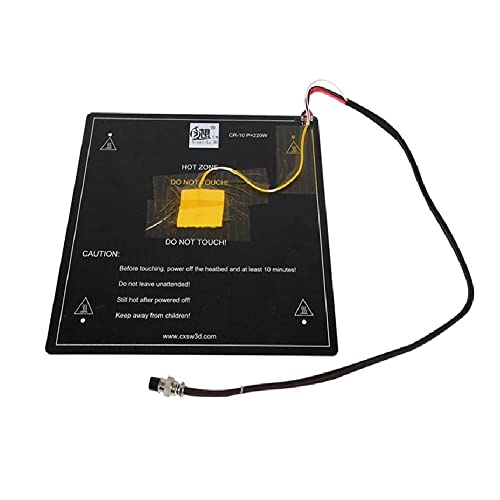
1. Creality CR-10 Heated Bed 310x310x3mm 12V Aluminum
Our pick — over 4★ from 60+ verified ratings; the strongest balance of quality and price.
The direct factory replacement that brings a dead CR-10 back to printing — no wiring changes needed.
This is the bed you buy when the stock aluminum plate on your Creality CR-10 or CR-10S develops a dead short or a gouge in the surface. It is a 310x310x3mm aluminum hot bed that runs on 12V and draws 18A at 220W. The package includes the hotbed cable and an insulation mat that sticks to the bottom to reduce heat loss and speed up warm-up. At 2.18 pounds, it is a heavy plate — the mass helps temperature stability but means your printer’s bed leveling knobs and springs need to handle the weight. The major difference between this and the silicone pads in this list is the power source. 220W at 12V is comparatively slow to heat: while the 500W or 750W silicone pads reach printing temperature in under three minutes, this aluminum bed takes closer to eight to ten minutes to reach 110°C for ABS. That is fine for overnight prints where heat-up time is not critical, but it is a real drag if you print multiple materials in one session. The 310x310x3mm size also limits the maximum usable print area slightly because the glass or build surface usually overhangs the edge. Reviewers point out that the manufacturer HICTOP markets this as plug-and-play for CR-10 and CR-10S, and it is — you screw it into the Y-carriage, plug the pre-crimped cable into the mainboard, and it works. Reviews note that the flatness was acceptable from the start, with less than 0.5mm bow across the corners. If your current bed is bent or the PCB trace has burned out, this is the simplest swap you can make.
Why you might grab this
- Direct drop-in replacement for CR-10 / CR-10S — no drilling or adapter plates
- Insulation mat included reduces heat-up time slightly and improves temperature stability
- 3mm aluminum thickness resists moderate bending forces during leveling
Where it falls short
- 220W at 12V is slow compared to 500W+ silicone pads on mains voltage
- No PEI or spring steel coating — you need glue or tape for adhesion
Best for: CR-10 / CR-10S owners who need a fast, no-fuss OEM replacement to get printing again.
skip it if: you want faster heat-up times or you are building a custom machine that can handle mains-voltage silicone pads.
2. ANYCUBIC 3D Printer Heating Bed Platform for Kobra 3
The drop-in bed that solves warped first layers for Anycubic Kobra owners.
You get a rigid flat aluminum substrate that resists thermal expansion (a common cause of bowed beds on long prints) and a high-temperature magnetic sheet pre-applied so flexible build surfaces snap on and off without screws. The uniform heat distribution covers the entire platform, which buyers report eliminates the corner-lift problem that stock beds often develop after a few months of use. At 3.08 pounds, this is a noticeably heavier assembly than the lightweight silicone pads in this list — the extra mass helps hold temperature steady during cold drafts but means your printer’s Y-axis motor works a bit harder. It is custom-sized and wired for Kobra 3 and Kobra 3 Combo models only, so measure your frame before ordering. The magnetic layer is rated for high temperatures and held up through repeated ABS and PETG cycles, according to early reviews. The strong magnetic sticker base layer means you can swap between a smooth PEI sheet and a textured one in seconds. Owners mention that the flatness from the start was consistent across all four corners, which is the main reason prints release cleanly without flexing the base. If you own a Kobra 3, this is the only bed that fits without drilling or rewiring.
Why owners stick with it
- Flat aluminum substrate resists warping under high heat cycle after cycle
- Pre-applied magnetic sheet makes surface swaps fast without tools
- tune power specs for safe rapid heating to target temperature
The one limitation
- Exclusive compatibility — only fits Kobra 3 and Kobra 3 Combo frames
- Heavier than standalone silicone pads, adding to Y-axis mass
Snap it on if: you own a Kobra 3 or Kobra 3 Combo and want a factory-fit bed that stays flat.
Look elsewhere if: you need a universal silicone pad for a custom frame or a different printer brand.
3. USA Import Material 200X200mm 500W 110V Silicone Heater
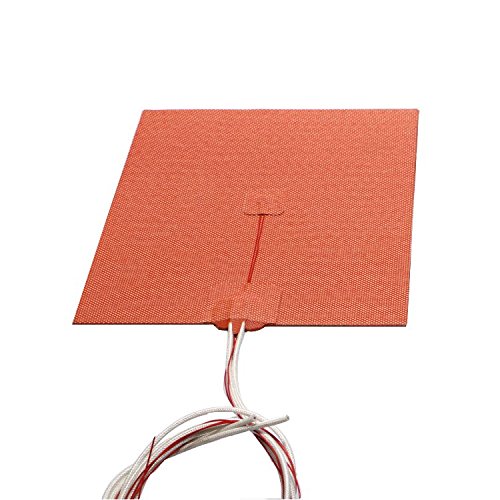
The 500W silicone pad that hits 150°C quickly for demanding filaments — lighter than the 300x300mm option.
When you print high-temperature materials like polycarbonate or nylon, a 220W aluminum bed (like the Creality CR-10 bed) simply cannot reach the required bed temp quickly. This USA Import pad delivers 500W at 110V into a compact 200x200mm area, and the manufacturer states it can heat past 150°C easily. That means you go from a cold start to a ready-to-print state at 500W versus a stock 12V bed’s 220W. At 9.1 ounces, it is also lighter than the 13.4-ounce BCZAMD 300×300 pad — 9.1 ounces versus 13.4 ounces, a difference that matters on fast-moving Y axes. The silicone heater pad comes with a 1-meter NTC 100K 3950 thermistor (a temperature sensor that your mainboard reads to control heat) for temperature control, plus two pieces of 1-meter power wire already attached. You still need to wire this into a solid-state relay (an electronic switch that handles mains current) on your printer’s mains circuit — it is not a plug-and-play replacement for a 12V bed. The self-adhesive backing sticks to an aluminum build plate, but the manufacturer warns: “please heat only after being mounted onto the plate. Do not heat without proper heat-sink.” The red silicone body is made from Arlon silicone rubber, a material that handles repeated thermal cycling (heating and cooling) without cracking.
Why it earns its place
- 500W into a small 200x200mm area delivers extreme heat-up speed for high-temp materials
- 9.1 oz weight keeps moving mass low for fast print speeds
- NTC 100K 3950 thermistor is widely supported in Marlin firmware (Sensor 1)
Before you buy
- 110V mains voltage requires a solid-state relay and proper electrical enclosure
- Self-adhesive install is permanent — misalignment means buying a new pad
Reach for this if: you are building a Voron or RepRap and need a lightweight, fast 200x200mm heat source for high-temp filaments.
Pass if: you want a drop-in replacement for a 12V or 24V printer — this needs mains wiring.
4. BCZAMD 120V 500W Silicone Heating Pad 235×235mm

The 235mm silicone pad that upgrades Ender 3 and Ender 5 machines to mains-speed heating — faster than the 220W Creality bed.
This BCZAMD pad delivers the same 500W at 120V as the 200x200mm pad above, but spreads that power across a 235x235mm area, which closely matches the standard Ender 3 and Ender 5 build plates. Customers note that the strong adhesive backing sticks firmly to the aluminum bed and that the NTC 100K thermistor (temperature sensor) works from the start with Creality’s stock firmware after selecting Sensor 1 in Marlin (the open-source printer firmware). At 10.4 ounces, it is only about 1.3 oz heavier than the 200x200mm pad, so the weight penalty is minimal for the extra print area. The key trade-off is that this is a non-holed pad — there are no pre-drilled mounting holes for screws. You rely entirely on the adhesive backing to keep it in place against the aluminum build plate. Buyers suggest clamping the sandwich together during the first heat cycle so the adhesive bonds at full temperature. The silicone rubber construction handles repeated thermal expansion without peeling, as long as you do not bend the pad during installation. If you compare this to the Creality CR-10 aluminum bed, the difference is night and day: 500W versus 220W means this silicone pad heats up faster, and it runs on mains voltage instead of 12V, which keeps the current draw off your printer’s mainboard.
Smart upgrade reasons
- 500W mains-powered heating is dramatically faster than stock 220W 12V beds
- 235x235mm size matches Ender 3 and Ender 5 build plates perfectly
- NTC 100K thermistor simplifies temperature firmware configuration
Installation catch
- No pre-drilled holes — the adhesive bond alone holds it in place
- 120V wiring means it is not a simple plug-and-play upgrade for stock printers
Ideal for: Ender 3 or Ender 5 owners who want mains-speed heating without moving to a 300x300mm footprint.
Not for: anyone uncomfortable wiring a mains-voltage component into their printer — you need a relay and a safe enclosure.
5. BCZAMD 3D Printer Heating Plate Adhesive Silicone Heated Mat 120V 750W 300x300mm
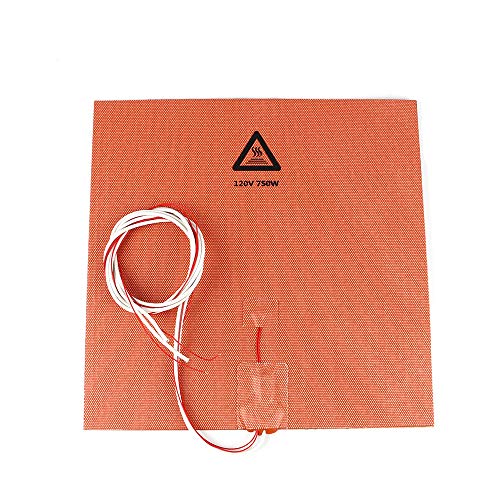
The 750W monster that turns a cold 300x300mm plate into a ready surface in record time — higher wattage than the 500W mid-size pads.
This is the pad you choose when 500W is not enough to handle a big build plate in a cold room. The BCZAMD 300x300mm silicone mat runs at 120V and 750W, making it the highest-wattage option in this list. At 13.4 ounces, it is roughly 3 oz heavier than the 500W 235x235mm pad — 13.4 ounces versus 10.4 ounces — but that extra mass comes from the larger silicone rubber area and the thicker conductor layer needed to handle the current. The 300x300mm size is designed for the Creality Ender 3 Max and similar large-format printers where a standard 235mm pad would leave cold edges. The heat-up advantage is dramatic: 750W across 300x300mm means you can bring a cold plate to 110°C quickly. The NTC 100K thermistor is included and works with Marlin’s default sensor table. Shoppers say that the strong adhesive backing holds the pad firmly against the aluminum build plate even through repeated thermal cycling from room temperature to 120°C and back. The pad has no pre-cut holes, so you mount it relying on the adhesive alone — the same caution applies as with the 235x235mm BCZAMD pad: do not bend the silicone sharply during install. The real-world trade-off is that 750W on a 120V circuit draws about 6.25 amps, which is safe for a standard 15-amp household circuit but means your solid-state relay and wiring must be rated for at least 10-15 amps continuous. If you are still running a stock 12V power supply on your Ender 3 Max, this pad requires you to switch to a mains-powered heating setup with a relay connected to the mainboard’s bed output.
Why this pad dominates
- 750W delivers extreme heat-up speed for large 300x300mm print areas
- Adhesive backing with silicone construction handles high-temp cycling without delamination
- NTC 100K thermistor simplifies firmware integration
Keep in mind
- 120V mains wiring required — this is an electrical project, not a plug-in upgrade
- No mounting holes means you must trust the adhesive alignment on the first stick
Perfect for: large-format printers like the Ender 3 Max where you need fast, uniform heat across a 300x300mm plate.
Not for: stock 12V printers or anyone who wants a quick drop-in replacement without modifying the electrical system.
6. 300x250mm Black Build Plate for QIDI X-Max/X-CF/SV01/SV02
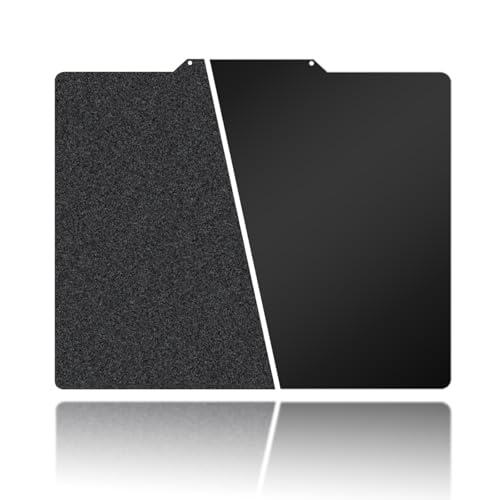
The PEI-coated spring steel plate that pops prints off with a simple bend — lighter than the 3.08-pound Anycubic bed.
This is not a heater pad — it is the build surface that sits on top of your existing heated bed. The 300x250mm plate is made from high-quality stainless steel with a double-sided coating: textured PEI (polyetherimide, a durable adhesive surface) on one side and smooth PEI on the other. You choose the side based on your filament. The flexible spring steel base allows easy model removal by simply peeling it from the heat bed and gently bending it, which buyers report releases even large ABS prints without prying or scraping. The PEI surface can withstand temperatures up to 70°C, and the manufacturer advises that PETG printing on this plate is limited to a maximum bed temperature of 70°C — above that, the PEI can degrade. At only 12.3 ounces, this is much lighter than a full aluminum bed (compare to the Creality CR-10’s 2.18 pounds), so it adds almost no inertia to your Y-axis. The build plate is specifically compatible with QIDI X-Max, X-CF, SV01, and SV02 printers, so measure your frame before buying. Buyers recommend cleaning the PEI surface with 75% alcohol or a mild soap solution before first use to remove factory residues, and after each print, allowing the plate to cool to room temperature before removal to avoid damaging the coating.
Adhesion advantages
- Double-sided PEI gives you both textured and smooth surface options in one plate
- Flexible spring steel pops prints off without tools, reducing bed damage risk
- Lightweight 12.3 oz design minimizes Y-axis mass for faster printing
Temperature limit
- PEI coating rated to only 70°C — unsuitable for ABS and high-temp filaments
- Specific QIDI printer compatibility: will not fit standard Ender or Creality frames
Grab this if: you own a QIDI X-Max or X-CF and mostly print PLA and PETG, wanting easy part release.
Pass if: you regularly print ABS or higher-temp materials that need a 100°C+ bed surface.
7. USA Material CR10 S4 Silicone Heater Pad 400 x 400mm for CR-10 S4

The 400x400mm silicone pad that brings massive CR-10 S4 build surfaces up to heat uniformly — the largest pad in the list.
This is the largest silicone heater pad in the list, designed specifically for the Creality CR-10 S4’s 400x400mm build plate. At 1.34 pounds, it is significantly lighter than the Anycubic Kobra bed’s 3.08 pounds (1.34 pounds versus 3.08 pounds), which helps keep the total moving mass down despite the huge surface area. The pad uses four pre-drilled screw holes that match the CR-10 S4’s aluminum plate exactly, so you screw it down rather than relying only on adhesive. The maker warns not to poke new holes anywhere — the whole pad is a circuit, and any extra hole “will 100% damage the circuit.” The heating pad runs on 120V mains power and includes a 1.2-meter NTC 100K 3950 thermistor (temperature sensor) for temperature control, which you select as Sensor 1 in the Marlin firmware. Compared to the 200x200mm USA Import pad above, this is larger: 400x400mm versus 200x200mm. The wattage is not published in the data for this pad, but given the size, it likely draws enough power to require a solid-state relay rated for at least 15-20 amps on the 120V circuit. Owners mention that the adhesive backing plus the screw holes provide a secure mount that does not shift during thermal expansion, and the high-temp silicone construction handles the 100°C+ temperatures required for ABS printing on the full 400mm plate with no cold spots along the edges. The trade-off is that this is the most expensive option in the list — a premium-tier price reflects the large size, the pre-drilled holes, and the specific CR-10 S4 compatibility. It is also strictly a raw heater pad with no built-in thermal fuse or over-temp protection, so you must configure your firmware’s thermal runaway protection properly.
Why this pad leads large builds
- 400x400mm size matches the massive CR-10 S4 build area with uniform heat distribution
- Pre-drilled screw holes secure the pad without relying solely on adhesive
- 1.34 lb weight keeps Y-axis inertia low despite the large footprint
The catch
- Exclusive to CR-10 S4 screw pattern — not easily adapted to other printer frames
- Premium price tier reflects the specialty size and OEM-specific design
Made for: CR-10 S4 owners who need a reliable, screw-mounted silicone upgrade for the full 400x400mm build plate.
Skip if: you have a standard CR-10 or any printer that does not match the 400mm square hole pattern.
Understanding the Specs
Voltage and Power Supply Matching
The voltage your heated bed requires must match your power source exactly. 12V aluminum beds like the Creality CR-10 option plug directly into your printer’s mainboard and use the stock power supply. 110V or 120V silicone pads draw power straight from the wall outlet through a solid-state relay controlled by your mainboard. A 12V bed on a 24V supply burns out in seconds. A mains-voltage pad without a relay stays on constantly and can start a fire. Always confirm your supply voltage before buying. The wattage tells you how fast it heats: higher wattage means faster heat-up but also higher current draw, which requires thicker wires and bigger relays.
NTC Thermistors and Firmware Configuration
Almost every heated bed in this list includes an NTC thermistor, a temperature sensor that the mainboard reads to regulate heat. The most common type is “NTC 100K 3950” — the 100K means the resistance at 25°C is 100,000 ohms, and the 3950 is the beta coefficient that defines the temperature curve. In Marlin firmware (open-source printer control software), you select this sensor by setting the correct thermistor table number (usually “1” or “5”) so the temperature readings are accurate. Using the wrong thermistor table can cause your bed to underheat by 20°C or overshoot to dangerous temperatures, so match the sensor type to your firmware’s predefined table.