
Our readers keep the lights on and my morning glass full of iced black tea. As an Amazon Associate, I earn from qualifying purchases.
Specs are compiled from manufacturer listings and verified buyer reviews and can change over time — please confirm the key details on the product page before buying.
A server rack can get crowded fast, and constantly swapping between machines wastes time you’d rather spend on real work. The solution is a single drawer that tucks a screen, keyboard, and mouse into one compact unit — letting you control multiple computers from one spot without taking up extra space. This guide focuses on the models that fit a standard 19-inch rack and pack enough features to handle serious IT setups.
I’m Min — the founder and writer behind Gadgets Feed. This guide is built by comparing the manufacturers’ published specifications and the patterns across verified customer reviews, so you get each pick’s real strengths and trade-offs instead of marketing spin.
Whether you are outfitting a data center or a home lab, knowing the resolution and connectivity options helps you choose the right 19 rack mount monitor for your specific setup.
Our Picks at a Glance
How To Choose The Best 19 Rack Mount Monitor
Picking the right unit is simpler when you focus on a few key specs that directly affect your daily workflow. Here is what matters most.
Resolution and Screen Clarity
The maximum resolution determines how much detail you see on a small 19-inch panel. Higher resolutions like 1440 x 900 or 1920 x 1080 let you read console text and configuration menus without squinting. Lower resolutions such as 1280 x 1024 are still usable but may require more scrolling.
Built-in KVM Switch vs. Console Only
A unit with an integrated KVM switch lets you control multiple servers from one keyboard, mouse, and screen without extra boxes or messy cables. Console-only models need a separate external switch. If you manage more than one computer, an integrated switch saves rack space and simplifies setup.
Mounting Depth and Rail Compatibility
Not all racks are the same depth. Check the mounting depth range listed in the specs — most units fit between roughly 23 and 32 inches. Slide rails with auto-lock features make installation easier and keep the drawer stable when pulled out for use.
Quick Comparison
| Model | Best For | Max Resolution | Integrated KVM | Weight | Amazon |
|---|---|---|---|---|---|
| Crystal Image RM-131-19W-801★ Best Overall | High-res KVM all-in-one | 1440 x 900 | 8-port VGA/USB | 28 lb | $1,619.00Amazon |
| Kinan 1U KVM ConsoleSpace Saver | Mid-range KVM with wide OS support | 1280 x 1024 | 8-port VGA | — | $936.34Amazon |
| TRIPP LITE B021-000-19-HD2 | 1080p with DVI input | 1920 x 1080 | Console only | 27.8 lb | $1,423.49Amazon |
| Tripp Lite B021-000-19 | Entry-level console-only | 1280 x 1024 | Console only | — | $865.26Amazon |
| MT-VIKI LT-1908UL | 19″ KVM with slide rails | 1280 x 1024 | 8-port VGA | — | $699.00Amazon |
In‑Depth Reviews
1. Crystal Image Technologies RM-131-19W-801
A 28-pound drawer that crams an 8-port KVM switch behind a sharp 1440 x 900 screen.
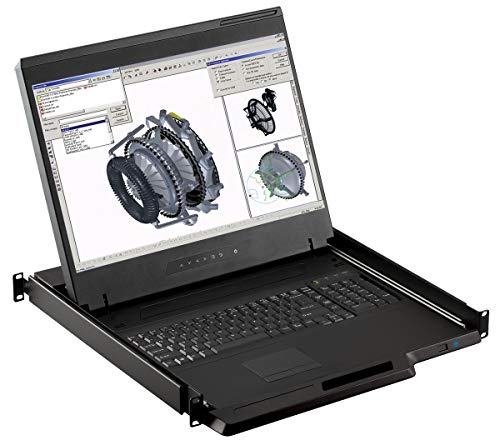
You get a complete control station in a single 1U drawer. The 19-inch LED panel delivers a 1440 x 900 resolution — noticeably sharper than the 1280 x 1024 found on most competitors, giving you roughly 12% more screen real estate for reading console output. An integrated 8-port KVM switch lets you manage eight computers using the built-in keyboard and touchpad, and the package includes eight 6-foot VGA and USB cables so you do not have to hunt for extras.
The mounting brackets are designed for single-person install, which buyers report makes rack setup much less frustrating. The company holds a BBB A+ rating and claims over 5,000 monitors sold, adding confidence for a long-term deployment.
Aspect ratio is 1.60:1, and the anti-glare surface with 3H hardness means the display stays readable under bright server-room lights. If you prefer a DVI input, note that this model only includes VGA — the manufacturer lists an optional model for Cat5e/Cat6 integration if you need that.
Standout feature: The 1440 x 900 resolution is the highest native resolution among the KVM-integrated picks here, making text noticeably clearer for day-to-day server work.
One catch: At 28 pounds it is heavier than some alternatives, and the DVI input is not included — you will rely on VGA cables for all eight connections.
Best for serious setups: If you manage multiple machines and want a single drawer that handles both switching and display at a high resolution, this is the one.
Look elsewhere if: You need a DVI or 1080p connection, or you are on a tighter budget that cannot stretch to this premium integrated unit.
2. Kinan 1U Rack Mount KVM Console
An 8-port KVM drawer with a 19-inch screen, steel build, and auto-lock slide rails.
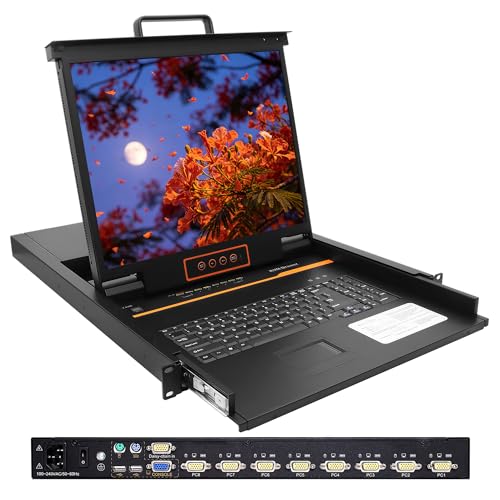
The Kinan unit combines a 19-inch LCD monitor, a standard keyboard layout, a touchpad, and an 8-port VGA KVM switch in a single 1U drawer. The screen runs at 1280 x 1024 resolution with a 1000:1 contrast ratio and a 5ms response time, which owners mention is perfectly adequate for server monitoring. You get three switching methods — front panel buttons, keyboard hotkeys, and an on-screen display (OSD) — so you can jump between eight connected computers without needing a separate switch box.
Mount depth ranges from 28.2 to 32.5 inches, fitting standard 19-inch wide rack cabinets. The drawer includes auto-lock slide rails: you pull it out until the rails lock, and push a release to slide it back in. The KVM console comes with international certifications including UL, FCC, CE, CB, and RoHS2.0, and a 2-year warranty backs the purchase. Unlike the Crystal Image unit above, this one includes DVI support alongside VGA for more flexible cabling.
Customers note that the OSD menu includes an Auto Scan feature for cycling through connected computers and a BRC Mode for watching multiple machines at once. The LCD module tilts up to about 110 degrees, which helps if your rack is mounted higher or lower than eye level.
Switching versatility: Three control methods (buttons, hotkeys, and OSD) give you flexibility when managing a crowded server room without hunting for a mouse.
Depth check needed: The required mounting depth of 28.2 to 32.5 inches is deeper than some budget racks allow, so measure your cabinet carefully.
Reach for this if: You want a solid mid-range KVM console with DVI support, auto-lock rails, and a 2-year warranty.
skip it if: Your rack is shallower than 28 inches, or you need a higher resolution than 1280 x 1024.
3. MT-VIKI LT-1908UL
A full 19-inch KVM drawer that fits shallow racks thanks to a 23.6-inch minimum mount depth.
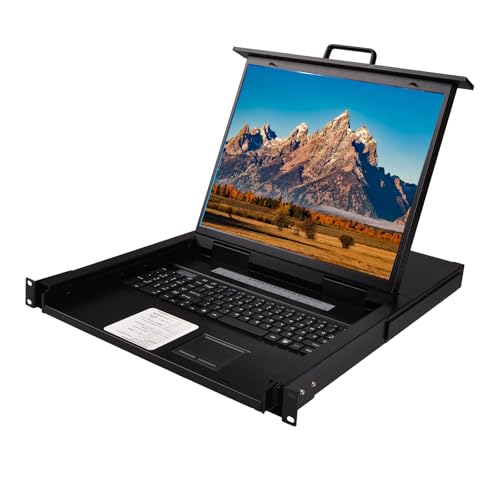
This MT-VIKI model packs a 19-inch LCD monitor, keyboard, touchpad, and an 8-port VGA KVM switch into a 1U space. The screen resolution is 1280 x 1024 at 60Hz, matching the Kinan and Tripp Lite options above, but the key difference is the mounting flexibility. The product dimensions are 18.9 x 23.6 x 1.77 inches, and the mount depth spans 23.6 to 31.8 inches, making it one of the few full-size 19-inch units that can fit into shallower network cabinets.
You get three switching methods: OSD menu, keyboard hotkeys, and a button on the front. It also includes an external USB mouse port, and reviewers point out that the included slide rails slide smoothly. The unit is compatible with Windows, Linux, Mac, and Sun operating systems. Unlike the Crystal Image model at the top, this one uses VGA-only connections, so check that your servers or KVM cabling match.
The IP63 rating offers basic dust and water spray protection, which is unusual for a rack console and could matter in an industrial or warehouse environment. The unit comes with eight USB VGA KVM cables, a power adapter, and a manual right in the box.
Shallow-rack friendly: A minimum mount depth of 23.6 inches lets this 19-inch unit fit in cabinets where other full-size drawers cannot.
VGA only: There is no DVI or HDMI input, so you will need VGA connections on all your machines or an adapter.
Best for compact racks: If your cabinet is on the shallower side but you still want a full 19-inch screen, this is your best option.
Not for you if: You need a digital video input like DVI or HDMI, or you prefer a higher resolution than 1280 x 1024.
4. TRIPP LITE B021-000-19-HD2

The only 19-inch console here that pushes beyond 1080p, with a DVI-I port for digital or analog signals.
You get the sharpest image of any monitor here — 1920 x 1080 (1080p) resolution — but only if you already own a separate KVM switch (a keyboard-video-mouse switch that lets you control multiple servers from one console). This TRIPP LITE console is a no-switch unit: it acts purely as a display, keyboard, and touchpad drawer. The DVI-I port accepts both digital DVI signals and analog VGA signals (a DVI-to-VGA adapter is included), so you have flexible cabling options that the VGA-only units lack. Shoppers say the crisp text makes server management easier at a glance.
The drawer mounts in 1U of space in EIA-standard 19-inch 2-post and 4-post racks. It weighs 27.8 pounds, slightly under the Crystal Image unit’s 28 pounds, and includes a numeric keypad alongside the standard keyboard and touchpad. TRIPP LITE backs it with a 1-year limited warranty. Buyers report that the 1080p resolution is a real advantage for reading dense server logs and configuration screens that look cramped on 1280 x 1024 panels.
The included KVM cable kit comes with a DVI-I cable and a USB cable, plus mounting brackets and a 6-foot AC power cord with a NEMA 5-15P connector. The unit operates at 50/60Hz input frequency. Because there is no built-in switch, you save money compared to the all-in-one Crystal Image, but you will spend extra on an external KVM if you need multi-server control.
Sharpest display: 1080p resolution beats every other 19-inch unit here, and the DVI-I port supports both digital and analog inputs.
No integrated KVM: This is a console-only drawer — you will need a separate KVM switch to control more than one computer.
Choose this for clarity: If display sharpness matters most and you already have a KVM switch, this gives you the best picture in a 19-inch format.
Pass if you need an all-in-one: The lack of a built-in switch means extra cost and cabling for multi-server setups.
5. Tripp Lite B021-000-19

A straightforward 19-inch console with a touchpad, numeric keypad, and a USB pass-through for flash drives.
If you already own a KVM switch, this basic console-only drawer gives you a 19-inch LCD display plus keyboard, numeric keypad, and touchpad — no built-in KVM switch to pay for. It supports video resolutions up to 1280 x 1024, matching the Kinan and MT-VIKI units above. You pull it out, use the monitor, and tuck it back when done. It works with most PS/2 and USB KVM switches, so integration is straightforward. Owners mention the touchpad is responsive, though the 1280 x 1024 resolution looks noticeably softer than the TRIPP LITE’s 1080p.
A handy feature is the USB 2.0 pass-through port, which lets you plug in a flash drive, CAC card reader, or other USB peripheral without reaching behind the rack. The unit is TAA-compliant for GSA schedule purchases, and it runs on 120/240 VAC power. At a 3.9 average rating from 31 reviews, it is the most-reviewed console here, giving you a wider base of buyer feedback to trust. Owners note that the build quality is solid for the price, though some wish it included a higher-resolution panel.
This is a good match if you already have a KVM switch and just need a clean, space-saving console without paying for an integrated switch you do not need.
USB convenience: The USB 2.0 pass-through port saves you from crawling behind the rack to connect a flash drive or card reader.
Lower resolution: 1280 x 1024 is functional but less crisp than the 1080p panel on the TRIPP LITE HD2 model above.
Reach for this if: You have an existing KVM switch and simply need a reliable console drawer with USB pass-through.
Look elsewhere if: You want a higher-resolution display or a built-in KVM switch for multi-server control.
Understanding the Specs
Resolution and Pixel Count
The maximum resolution tells you how much detail the screen can show. Higher numbers like 1440 x 900 or 1920 x 1080 mean sharper text and more room for server windows. Lower resolutions like 1280 x 1024 are still usable but may require more scrolling. The aspect ratio (the width relative to the height) also affects how content fits — a 5:4 ratio like 1280 x 1024 looks squarer than a wider 16:9 panel.
Integrated KVM vs. Console Only
An integrated KVM switch lets you control multiple computers from one keyboard, mouse, and screen without extra hardware. Console-only units just provide the display and input devices — you need a separate KVM switch to manage more than one machine. If you are setting up a new rack from scratch, an integrated unit saves space and reduces cable clutter. If you already own a KVM switch, a console-only option may be more affordable.
FAQ
Will a 19 rack mount monitor fit in any standard server rack?
What resolution do I need for server monitoring?
Can I use a rack mount monitor without a KVM switch?
What is the difference between a 17-inch and 19-inch rack mount monitor?
How do I switch between computers on an integrated KVM console?
Are rack mount monitors compatible with all operating systems?
Do I need a separate power supply for the rack mount monitor?
How heavy are 19 rack mount monitors and do I need help installing them?
Final Thoughts: The Verdict
If you want one dependable pick, the 19 rack mount monitor winner is the Crystal Image Technologies RM-131-19W-801 because it combines the sharpest resolution (1440 x 900) with an integrated 8-port KVM switch and includes all necessary cables, making setup truly all-in-one. If you want a 1080p display and already own a KVM switch, grab the TRIPP LITE B021-000-19-HD2. And for budget-conscious multi-server control on a smaller screen, the MT-VIKI 17″ KVM costs less than the Crystal Image while still giving you an integrated KVM switch.
How We Picked
We do not accept paid placement. Every pick is matched to a real buyer and a real use-case; we do not hands-on test units.
Sources & Methodology
Specifications: manufacturer listings and product documentation. Review insights: verified customer reviews, as of July 2026. Pricing: not shown on this page (it changes often); check the current price via the retailer link.
As an Amazon Associate, Gadgets Feed earns from qualifying purchases. This does not affect which products we feature.
Related Guides
Product prices and availability are accurate as of the date/time indicated and are subject to change. Any price and availability information displayed on Amazon at the time of purchase will apply to the purchase of this product. As an Amazon Associate I earn from qualifying purchases.
CERTAIN CONTENT THAT APPEARS ON THIS SITE COMES FROM AMAZON. THIS CONTENT IS PROVIDED "AS IS" AND IS SUBJECT TO CHANGE OR REMOVAL AT ANY TIME.
Amazon and the Amazon logo are trademarks of Amazon.com, Inc. or its affiliates.