
Our readers keep the lights on and my morning glass full of iced black tea. As an Amazon Associate, I earn from qualifying purchases.
Specs are compiled from manufacturer listings and verified buyer reviews and can change over time — please confirm the key details on the product page before buying.
You want a 10-inch digital picture frame that your family actually uses, not one that sits in a drawer. The key is how photos get onto it without hassle. A good frame lets relatives send pictures from their phones, so the frame updates itself and everyone stays connected without a computer or USB cable.
I’m Min — the founder and writer behind Gadgets Feed. This guide is built by comparing the manufacturers’ published specifications and the patterns across verified customer reviews, so you get each pick’s real strengths and trade-offs instead of marketing spin.
Whether you are buying for a grandparent, a college-bound kid, or your own living room, the best 10 inch digital picture frame makes sharing memories feel easy and keeps the family loop going strong every single day.
Our Picks at a Glance


How To Choose The Best 10 Inch Digital Picture Frame
Match the frame to the person who will see it daily. Some frames need a phone app for every upload, others let you send photos by email or web browser, and a few include built-in storage so you skip monthly fees. Focus on three things: setup ease for the recipient, photo storage method, and screen resolution (pixels per inch) that keeps images sharp up close.
Setup Simplicity
The best frame sets up in under five minutes without a manual. Most modern models let you connect to WiFi and start receiving photos via a free app. If you are gifting the frame to someone who lives far away, pre-load photos before you ship it so the recipient sees a slideshow the moment they plug it in.
Storage and Sharing
Some frames include generous internal memory — around 32GB holds tens of thousands of photos — while others rely entirely on cloud storage. A frame with unlimited cloud storage and no subscription is ideal for a large family that will keep sending pictures for years. A frame that accepts SD cards or USB sticks gives you a backup plan if the WiFi ever acts up.
Display Quality
Screen specifications make a real difference. A 1280×800 resolution is good for basic slideshows. A 1080p or higher resolution (2048×1536 on a 4:3 screen) shows fine detail — text on a birthday card, the expression on a face — without any graininess. An IPS screen keeps the image vivid even when you view the frame from an angle, which matters when it sits on a sideboard or a kitchen counter.
Quick Comparison
| Model | Best For | Resolution | Internal Storage | Screen Aspect | Amazon |
|---|---|---|---|---|---|
| Aura 10″ HD WiFi★ Best Overall | Overall ease and unlimited cloud | 1080p | Unlimited Cloud (free) | 16:9 | Amazon |
| RCA 10.1″ WiFiBest Value | Budget value with big storage | 1280×800 | 32GB | 16:10 | Amazon |
| Frameo 10.1″ by QOCEN | Reliable sharing on a tight budget | 1280×800 | 32GB | 16:10 | Amazon |
| PhotoSpring 10″ | Long video playback and flexibility | — | 32GB | 16:10 | Amazon |
| ApoloSign Neon 10″ | Stunning 2K display and smart lighting | 2048×1536 | 32GB | 4:3 | Amazon |
In‑Depth Reviews
1. Aura 10″ HD WiFi Digital Picture Frame
Our pick — over 4.5★ from 14,500+ verified ratings; the strongest balance of quality and price.
The crowd favorite that gets family photos onto the screen without a single subscription.
This Aura frame is the one that Wirecutter, WIRED, and Oprah Daily have all pointed to, and the reason is simple: it removes every barrier between a photo on your phone and a photo on the wall. Setup takes about a minute. You download the free Aura app, connect to WiFi, and start sharing. There is no subscription fee, no tiered plan, no upselling — you get unlimited cloud storage from day one.
The 10.1-inch display runs at 1080p resolution with an auto-brightness sensor that adjusts the screen to your room’s lighting. Photos look rich and detailed. The frame supports iOS live photos and up to 30 seconds of video with sound. A touch bar on the frame lets you swipe through images. One small point owners note: the minimum slideshow display time is 15 seconds, so you cannot speed through photos faster than that.
The Aura groups related photos together in the slideshow (portrait pairing), and you can invite family to send pictures from anywhere using the app, email, text, iCloud, or Google Photos. Buyers report that pre-loading photos before gifting works smoothly, making it a zero-fuss present for parents or grandparents. The most-discussed upside across thousands of owners is ease of use, with picture quality right behind it. The Aura’s 16:9 aspect ratio matches most smartphone screens. It cannot be wall mounted, and if Aura ever discontinues cloud support, the frame would lose its core function — two things worth weighing if you want a frame for a fixed wall spot or plan to rely on it for many years.
What wins everyone over
- No subscription — completely free unlimited cloud storage
- 1-minute setup, intuitive touch bar navigation
- Auto on/off with light sensor saves energy and screen burn
- Invite unlimited family members to share via app or email
Trade-offs to know
- Minimum 15-second display time per photo
- Cannot be wall mounted (tabletop only)
- Relies on Aura’s cloud — frame loses function if service ends
Reach for this if: you want the most proven, universally praised digital frame that works for the whole extended family without ever asking for a credit card.
Look elsewhere if: you need to mount it on a wall or want the freedom to shuffle photos faster than 15 seconds.
2. RCA 10.1” WiFi Digital Picture Frame
Lots of built-in memory and an HD IPS screen at a price that feels like a steal.
The RCA frame brings something unusual at this price point: 32GB of internal storage, which the maker says holds over 60,000 photos. You can also add a USB stick or SD card for another 64GB if you somehow fill that. The 10.1-inch IPS touchscreen runs at a 1280×800 resolution and supports auto-rotate, so you can stand the frame vertically or horizontally and your photos automatically flip to match.
Setup runs through the free Uhale app on Android or iOS. You can also upload photos directly from a computer through the Uhale website — no app required if the recipient is less comfortable with phones. The touchscreen lets you adjust brightness, set sleep mode, choose single or loop playback, and hide specific images without needing a separate remote. For wall mounting, the frame includes a detachable stand and hangs flush against the wall.
Its smaller footprint (10 inches by 6.85 inches) compared to bulkier frames makes it a natural fit for a nightstand or a kitchen counter. Photos come through clearly and the display gets bright enough to compete with natural light. The most common knocks are that the QR code linking process can be confusing — a few owners recommend using the 10-digit code instead — and the slideshow offers only three transition effects. But for the storage and screen quality you get, this is an easy frame to recommend to anyone watching their spending.
Why it stands out
- 32GB internal storage holds tens of thousands of photos
- Expandable via USB or SD up to 64GB
- HD IPS touchscreen with auto-rotate for portrait or landscape
- Wall-mountable with detachable stand
Points to consider
- QR code linking can be tricky — use the 10-digit code instead
- Only 3 slideshow transition effects available
- Plastic frame build, not as premium-feeling as pricier options
Perfect if: you want the most storage per dollar and a frame that sits on a desk or mounts on a wall without extra accessories.
Think twice if: you need a wood-frame finish or more than three transition styles for the slideshow.
3. Frameo 10.1 inch Digital Picture Frame (QOCEN)

A narrower bezel gives this frame more screen and less plastic for the same 10-inch size.
The QOCEN frame runs the Frameo app — a popular, GDPR and CCPA-compliant platform that makes photo sharing a two-tap process. The 10.1-inch IPS touchscreen delivers a 1280×800 resolution, and the frame’s design uses thinner bezels than most competitors, so a larger percentage of the front face is actually picture. You get 32GB of built-in memory and can expand it with a micro SD card up to 64GB, which the maker says holds up to 80,000 photos and videos.
Sharing happens through the Frameo app on Android and iOS. You can send up to 10 photos at a time, each with a text caption, and your family can use the “React” feature to send emoji responses back — a small touch that makes the frame feel more interactive. The frame supports auto-rotate, so you can set it in portrait or landscape mode and your photos follow. Unlike the Aura, this frame also offers wall mounting with a flat-back design that sits flush against the wall.
Where this model falls short is a small but real one: the slideshow sorts photos by date added and lacks a true random shuffle, so the same order repeats. Brightness is adjustable and owners mention the screen is sharp enough for bedside or mantelpiece viewing. But if you want your slideshow to feel fresh each time, the fixed order may bug you after a few weeks.
What works
- Thinner bezels — more screen, less frame
- Frameo app is simple and supports emoji reactions
- 32GB internal storage plus micro SD expansion
- Can be wall-mounted flush to the wall
What doesn’t
- No random shuffle — photos play in date-added order
- No built-in battery; must stay plugged in to operate
- Setup instructions could be clearer for non-tech users
Best for: someone who wants a minimal bezel and interactive reactions from family via the Frameo app.
Skip if: a random shuffle slideshow is important to you — the date-based order is repetitive.
4. PhotoSpring 10in WiFi Digital Picture Frame

Uploads video clips up to five minutes long — more than any other frame on this list.
While most digital frames limit video to 15 or 30 seconds, the PhotoSpring frame accepts MP4 files up to 1GB, which works out to around five minutes of footage. That matters if you want to share a child’s school concert, a wedding toast, or a vacation montage without cutting it into tiny pieces. You can upload videos (and photos) via email, the PhotoSpring app, a web browser, or a USB stick — no cloud subscription to pay.
The 10-inch display uses a 16:10 aspect ratio, and the frame itself is built with a wood frame rather than plastic, giving it a furniture-like look that blends into a living room or office. The touchscreen interface handles orientation, display duration, album sorting, and scheduled on/off. You can also import photos from a USB stick directly, which is handy for anyone who keeps their photo collection on a flash drive.
That said, owners point out a couple of limitations. The random shuffle algorithm tends to repeat photos from the same album, so your slideshow can feel repetitive. There is no remote control or app-based management — you must walk up to the frame to change settings. Audio from videos is on the quiet side, and there is no motion sensor to wake the screen when someone walks by. Customer service, however, gets high marks — several owners describe being upgraded to a newer model or having issues fixed remotely when the frame got stuck on an update.
What stands out
- Plays video clips up to 5 minutes long
- Wood frame material — looks nicer than plastic
- Upload via email, app, web, or USB — no WiFi needed for USB
- No subscription fees at all
What to note
- Random shuffle tends to repeat from the same album
- No remote control or app-based settings
- Video sound is low compared to other frames
Grab this if: you want to share longer video clips and prefer the look of a real wood frame over plastic.
Think twice if: you want to control slideshow settings from your phone — you have to use the frame’s touchscreen directly.
5. ApoloSign 10″ Neon Light Digital Picture Frame
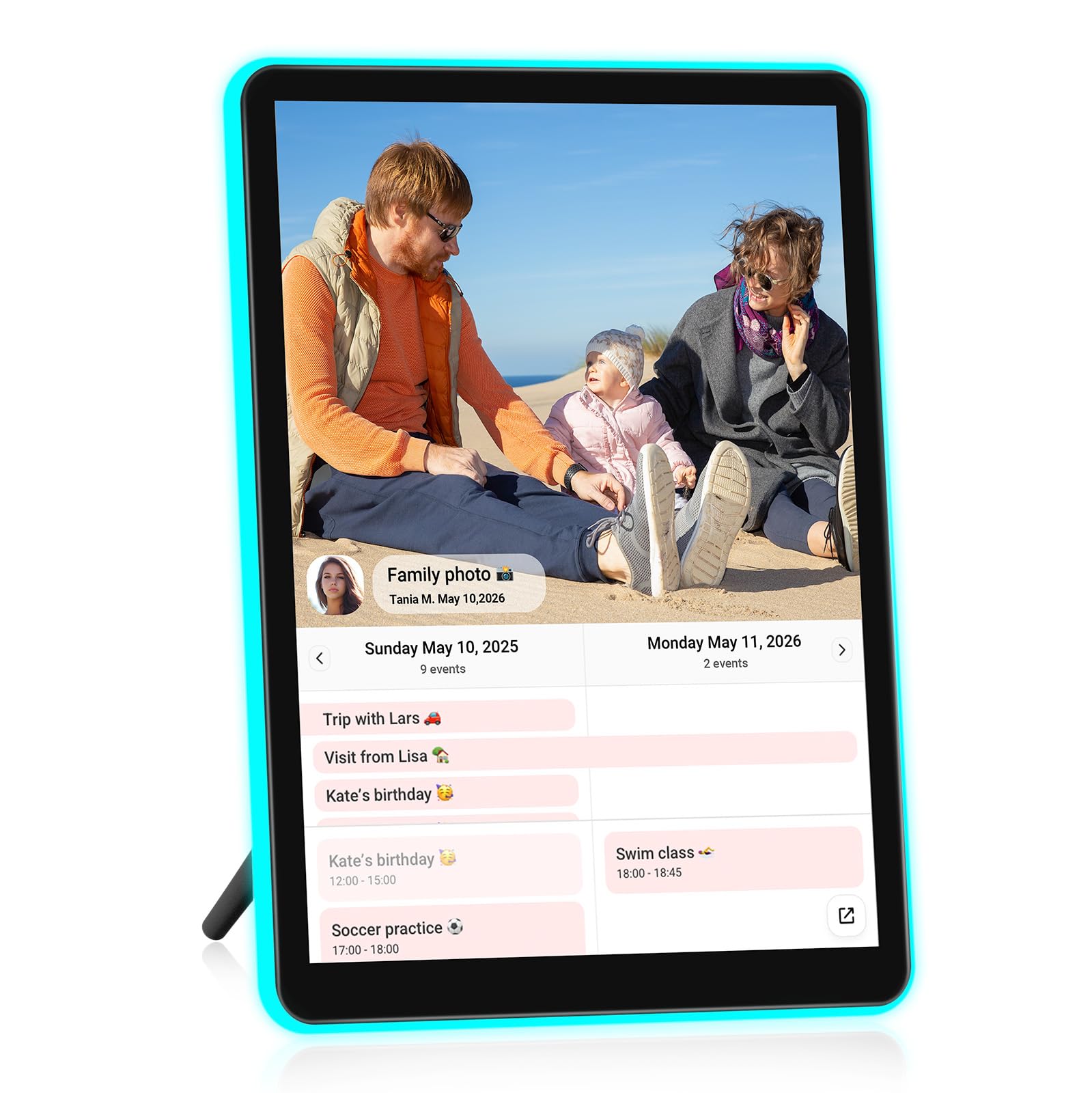
A 2K screen and color-changing neon border turn every photo into a little art piece.
The ApoloSign frame has the sharpest display of any 10-inch model here. Its native 4:3 aspect ratio matches the shape of most standard photos, reducing unwanted cropping. The resolution hits 2048×1536 — nearly 2K full HD — and the 2.5D glass touchscreen uses lamination technology that boosts brightness and color vibrancy. Text and fine details (a handwritten sign, a distant mountain ridge) come through with noticeably more clarity than a 1280×800 screen can manage.
The feature that gets the most attention is the AI-powered neon LED border. A 3W system reads the dominant colors of whatever photo is on screen and shifts the frame’s edge lighting to match — a warm amber for a sunset, a cool blue for a snowy landscape. It is subtle enough to look classy rather than gimmicky. The frame also doubles as a smart calendar: connect your Google, Outlook, or iCloud calendar through the Frameo app, and your schedule syncs to the display in real time.
Owners largely praise the hardware but note that the initial learning curve is steeper than simpler frames. A few found adding the first photos took several hours due to a confusing first-sync. The frame lacks WPA3 WiFi support, which could be an issue on the newest routers. And some buyers triggered a subscription screen that caused confusion — though the frame requires no ongoing payment. If you are buying for someone who is not comfortable troubleshooting, the Aura above is an easier gift. If you are buying for yourself or a photo enthusiast, the ApoloSign’s display quality is genuinely a step above.
Why it impresses
- 2K display (2048×1536) — crisp photos and text
- AI neon light auto-matches photo colors for a unique glow
- Smart calendar syncs with Google, Outlook, or iCloud
- 4:3 aspect ratio fits most photos without cropping
Points of friction
- Initial setup can be confusing — first photo sync may take hours
- No WPA3 WiFi support
- Steeper learning curve for non-tech-savvy users
Pick this if: you care about display quality above all else and want the conversation-starting neon light effect.
skip it if: you are gifting to someone who needs a truly plug-and-play experience — the setup is less forgiving than simpler frames.
Understanding the Specs
Screen Resolution
Resolution determines how sharp your photos look when you view them up close. A 1280×800 screen (HD) is perfectly fine for casual viewing from an arm’s length away. A 1080p or 2K (2048×1536) screen keeps details crisp even when you lean in to read small text or see facial expressions. Higher resolution matters more if the frame sits on a desk or counter where you pass by it closely.
Internal Storage & Expansion
Building 32GB of internal memory into a frame means you can store tens of thousands of photos without ever paying for cloud storage. Some frames let you add a micro SD card or USB drive to expand the capacity further. Other frames use unlimited cloud storage with no subscription, which is convenient but ties the frame’s function to the company’s servers staying online. Consider how long you want the frame to work independently.
WiFi Connectivity & Sharing
Every WiFi-enabled frame lets you send photos from a phone app, but the method varies. Some accept photos only through their own app, which means everyone you invite must download it. Others accept uploads via email or a web browser, which lowers the barrier for less tech-savvy family members. Check whether the frame supports the latest WiFi standards (WPA3) if you have a newer router.
Auto-Rotate and Wall Mounting
Auto-rotate uses a built-in sensor to flip your photos from portrait to landscape when you physically turn the frame. This matters if you want to display a mix of vertical phone photos and horizontal camera shots. Wall mounting is a feature some frames include as a standard bracket, while others are strictly tabletop. If you know the frame will sit on a shelf, auto-rotate matters more than wall mounts, and vice versa.
FAQ
Can I send photos to a digital picture frame from a different state or country?
Do these frames require a monthly subscription fee?
What video formats can these frames play, and how long can the clips be?
Can I mount a 10-inch digital picture frame on the wall?
What happens to the frame if the company stops supporting the app or cloud service?
How many people can send photos to one frame?
Do these frames work without WiFi?
What screen resolution should I look for to avoid blurry photos?
Can I pre-load photos before giving the frame as a gift?
What is the difference between a digital picture frame with a touchscreen and one with physical buttons?
Final Thoughts: The Verdict
For the majority of shoppers, the 10 inch digital picture frame winner is the Aura Wireless Frame because it removes every obstacle — no subscription, one-minute setup, free unlimited cloud storage — and has the highest owner satisfaction at scale. If you want generous built-in storage for the lowest price, grab the RCA Frame. And for the sharpest display and a smart neon border that turns your photos into decor, the ApoloSign Neon Frame is the one to reach for.
How We Picked
We do not accept paid placement. Every pick is matched to a real buyer and a real use-case; we do not hands-on test units.
Sources & Methodology
Specifications: manufacturer listings and product documentation. Review insights: verified customer reviews, as of July 2026. Pricing: not shown on this page (it changes often); check the current price via the retailer link.
As an Amazon Associate, Gadgets Feed earns from qualifying purchases. This does not affect which products we feature.