
Our readers keep the lights on and my morning glass full of iced black tea. As an Amazon Associate, I earn from qualifying purchases.
Specs are compiled from manufacturer listings and verified buyer reviews and can change over time — please confirm the key details on the product page before buying.
A 3D print is only as functional as its weakest joint — and nothing ruins a carefully dialed-in part faster than a screw hole that strips on the first turn. The real trick to making prints that feel like manufactured goods lies in a handful of small, smart additions: threaded brass inserts that melt into plastic, a hotend that won’t clog mid-job, and a build surface that grabs the first layer and doesn’t let go. This guide looks at the 3D print parts that actually move a print from hobby-grade to reliable — the kind you reach for when a part has to hold together.
I’m Min — the founder and writer behind Gadgets Feed. This guide is built by comparing the manufacturers’ published specifications and the patterns across verified customer reviews, so you get each pick’s real strengths and trade-offs instead of marketing spin.
Whether you are chasing better first-layer adhesion or a cleaner way to add threads, these are the best 3d print parts to upgrade your workflow and stop wasting time on prints that don’t hold up.
Our Picks at a Glance


How To Choose The Best 3D Print Parts
The right upgrade part solves a specific problem: compatibility, material quality, and real-world durability. But with so many options — from hotends to build plates to inserts — the choice depends on one thing: what problem are you solving? Focus on compatibility first (will this fit my specific printer model?), then the material quality (brass vs steel, PEI vs cobalt coating), and finally the reviews that reveal real-world durability.
Heat-Set Inserts: The Key to Reusable Threads
Screwing directly into plastic works once, maybe twice. Heat-set brass inserts create a permanent metal thread inside your part — you embed them with a soldering iron, and they grip the plastic with a knurled exterior. Look for brass construction (good heat conduction) and a wide size range like M2, M3, M4, and M5 so you can match the screw to the job.
Hotend Upgrades: Consistency Over Everything
A clogged or leaky hotend is the leading cause of failed prints. When choosing a replacement or upgrade, you want a fully assembled unit that is a drop-in fit for your printer model. The key specs are the heating element power (watts) and voltage (usually 24V), plus a silicone sock to keep temperatures stable. An all-metal heat break also lets you print higher-temperature materials without the PTFE tube degrading.
Build Plates: First Layer is Everything
The build plate determines first-layer adhesion and print success. A good one offers strong adhesion when hot and easy release when cool. Materials vary: textured PEI gives a matte finish and works with many filaments, while specialty plates with cobalt oxide coatings can offer exceptional grip at lower bed temperatures. The key is finding one that matches your printer’s size and has a consistent surface finish across the entire bed.
Quick Comparison
| Model | Best For | Key Material | Total Pieces | Compatibility | Amazon |
|---|---|---|---|---|---|
| Kadrick Threaded Inserts★ Best Overall | Adding reusable threads | Brass | 520 | Universal (M2-M5) | Amazon |
| 3D Printer Tools KitBest Value | Complete maintenance | Steel / Brass | 34 | FDM / SLA | Amazon |
| FLASHFORGE PETG ProTop Performer | Strong, durable prints | PETG Pro | 1 kg spool | 1.75mm FDM | Amazon |
| HICTOP Ender 3 Hotend | Ender 3 replacement | Brass / Aluminum | Full assembly | Ender 3/Pro | Amazon |
| Creativity Hotend Upgrade | Upgrade with extras | Stainless Steel | Full assembly + 4 nozzles | Ender 3/Pro/S | Amazon |
| BIQU CryoGrip Pro Glacier | Bambu Lab adhesion | Cobalt oxide coating | 1 plate | Bambu P1S/X1C/A1 | Amazon |
| ruthex Threaded Inserts | Precision brass inserts | Brass | 270 | Universal (M2-M5) | Amazon |
| YOOPAI Filament Storage Box | Moisture protection | Impact-resistant plastic | 6 | 1kg spools | Amazon |
| Creality Direct Drive Kit | Flexible filament printing | All-metal | Full kit | Ender 3/Pro/V2 | Amazon |
In‑Depth Reviews
1. Kadrick 520Pcs M2 M3 M4 M5 Threaded Inserts Assortment Kit
Our pick — over 4.5★ from 450+ verified ratings; the strongest balance of quality and price.
The 520-piece brass insert kit that makes every screw hole feel like a machined part.
A functional 3D print lives or dies by its fastening points — and this Kadrick kit solves the problem with sheer breadth: 520 pieces spanning M2, M3, M4, and M5 sizes, with heights from 3mm up to 12mm. The brass knurled exterior grips the surrounding plastic tighter than a straight-thread insert would, so you get a joint that takes repeated assembly and disassembly without stripping. The plastic box keeps each size in its own labeled compartment, which removes the guesswork when you reach for the right one mid-build.
Every insert is cleanly formed — no malformed threads across 520 pieces. Owners note that they “work great and very easy to use,” creating threads in PLA that feel rock-solid. The size selection is deliberately tuned to what 3D printing enthusiasts actually need, so you are not paying for obscure diameters you will never touch. The kit covers M2, M3, M4, and M5 — the four most common sizes — and buyers report that even hobby-level heat-set tools push them in cleanly.
At 520 pieces, this kit is for long-term use, not a single project. The Kadrick holds 520 pieces versus the ruthex kit’s 270 pieces, making it the better stock-up option for anyone who prints functional parts regularly. Kadrick backs it with a 24-month warranty — a confidence window that outlasts most spools you will go through.
Why owners reach for it
- Every insert is cleanly formed — no burrs or malformed threads across 520 pieces
- The organized case with labeled compartments saves time during assembly
- Knurled brass design delivers a stronger hold in plastic than straight-sided inserts
Who should think twice
- 520 pieces is a lot — if you only need a handful of M3s for one project, this is overkill
- Some M2 and M5 sizes may see less use depending on your project types
Reach for this if: you print functional parts that need to be assembled and disassembled repeatedly — this kit covers you for years.
Look elsewhere if: you only need a small batch of one specific size for a single project; a smaller pack would be more economical.
2. 3D Printer Tools Kit, 34pcs 3D Printer Accessories
The complete starter kit that replaces a drawer full of mismatched tools with one organized bag.
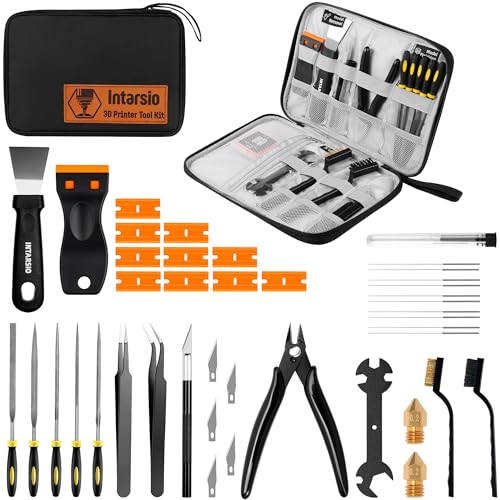
If you have ever stopped a print mid-job to hunt for a scraper or a cleaning needle, this 34-piece kit is the fix. It includes two MK8 brass nozzles (0.2mm and 0.4mm), five nozzle cleaning needles from 0.2mm through 0.4mm, metal and nylon brushes, a heavy-duty steel scraper, a razor spatula with 11 blades, five files, an engraving knife, tweezers, and a wire cutter. Everything packs into a black canvas bag with individual tool holders so you can grab the exact thing you need without rummaging.
The two scraper types are particularly well thought out — the heavy-duty stainless steel blade gives you leverage for PETG and ABS prints, while the smaller razor spatula handles delicate miniatures. The cleaning needles cover the most common nozzle diameters, which means you can clear a clog without removing the hotend.
The brass brush can warp during hot nozzle cleaning. Owners note exactly that: “Only downside is the brass brush started to warp when cleaning nozzle.” It still works, but it softens after repeated contact with a 200°C+ nozzle. For the price point, the rest of the kit holds up well — the files, scrapers, and wrench are solid, and the bag keeps everything from scattering across your workbench.
The one-sentence take: The best all-in-one grab-and-go toolkit for anyone tired of buying individual tools — beginners especially get a complete shop in one purchase.
Best for: beginners who need every tool for printer maintenance in one box, and experienced users who want a clean grab-and-go bag.
3. FLASHFORGE PETG Pro Filament 1.75mm Black
The PETG that combines ABS toughness with PLA ease — and actually resists moisture.
FLASHFORGE’s PETG Pro sits in a balance between ABS and PLA: it offers the impact resistance and low warp of ABS without the fumes, and the printability of PLA without the brittleness. The filament diameter holds to 1.75mm with a deviation of only ±0.02mm — measured by an advanced CCD system before packaging — so you do not get random under-extrusion spots. Each spool is dried for 24 hours and vacuum-sealed, which is why even users in high-humidity environments report minimal stringing.
Where this filament really shines is surface finish. The semi-transparent quality makes it ideal for lampshades and display items, and the strength holds up for mechanical parts and outdoor use. Users report excellent bed adhesion at 240°C nozzle and 80°C bed. The hydrophobic nature means you do not need to baby it with sealed storage, unlike nylon or standard PETG that degrades within days of opening. One owner noted printing roughly 100kg of this material with zero failures — a durability benchmark that speaks for itself.
Color accuracy varies — photos may differ from the actual shade. The bed adhesion is also a divided topic — some find it perfect at the right temps, others struggle with first-layer stick. If you hit the temperature balance, it is remarkably consistent.
Verdict: Reliable, strong, and humidity-resistant — the go-to PETG for parts that need to hold up outside or endure regular handling.
Reach for this if: you need functional parts that see weather, impact, or repeated assembly — this filament handles all three.
Look elsewhere if: you need exact color matching from the box photo; order based on the filament color name, not the stock image.
4. HICTOP Ender 3 Hotend 24V 40W Full Assembled Extruder Kit

A drop-in replacement that turns a spongy, under-extruding Ender 3 back into a precision machine.
When the stock hotend starts printing sponge-like parts, the problem is often a degraded PTFE tube or a loose heat break. This HICTOP kit fixes it with a fully assembled replacement: 24V 40W heating element, two fans with covers, heat block, cooling block, nozzle, throat pipe, thermistor, and a silicone cover — everything pre-wired. You unscrew the old assembly, plug this one in, and you are printing again. It fits Ender 3 and Ender 3 Pro but not the Neo variant.
The 24V high-speed fan pulls heat away fast, which keeps the cold end cool and prevents heat creep. The nozzle and tube connect smoothly, which means no leaking or blocking at the joint. Owners consistently call it a “perfect replacement” that brings back print quality instantly. The silicone cover also stabilizes the temperature across the hotend, reducing fluctuations that cause layer inconsistency.
A small number of units report thermal runaway or a noisier fan, but most find it reliable. The 62 positive mentions for reliability outweigh the durability concerns, which sit at 28. Pre-tighten all screws before install and double-check your thermistor connection — standard practice for any hotend swap.
The short of it: The most straightforward Ender 3 hotend fix available — plug-and-play construction that saves you the headache of sourcing each part separately.
Ideal for: Ender 3 owners whose prints have turned spongy or inconsistent — this swap restores OEM-level quality.
Not for: Ender 3 Neo users, as the data explicitly excludes that model.
5. Creativity Full Assembled Ender 3 Hotend Upgraded Kit with Nozzles

An all-metal hotend that reaches 260°C from the start, with four spare nozzles you do not have to buy separately.
The Creativity hotend upgrade is built with a stainless steel nozzle throat and a heating element that pushes up to 260°C (500°F), which is high enough for PETG, ABS, and nylon without worrying about melting a PTFE coupler. The whole assembly arrives pre-built — plug it into your Ender 3, Ender 3 Pro, or Ender 3S, and it is ready. The 24V fan runs at high speed to pull heat away from the cold side, preventing jams from heat creep.
The standout here is the extra hardware: you get four additional nozzles and a black silicone sleeve free in the package. That means you have spares on hand for different nozzle diameters without placing another order. The one-for-one replacement design means you can swap the entire assembly in minutes. Owners call it a “100% worth the upgrade” move, noting that it fixed clogging issues and brought print quality back to new-printer levels.
The main thing to watch is the wiring — the new hotend has an extra wire compared to the stock assembly. Owners who took a photo of the original wiring before removal had no issues, but those who depended on memory reported confusion. Also, a small minority report no heat reaching the nozzle on first power-up, which suggests double-checking the thermistor plug alignment at the board end. Once dialed in, it prints “like a dream.”
The bottom line: A budget-friendly all-metal hotend that punches above its price with included extras, but demands careful wiring attention on install.
Best for: Anyone wanting to print higher-temp materials on an Ender 3 without spending Creality OEM money — the included nozzles sweeten the deal.
Think twice if: you prefer a wiring harness that matches the original pin-for-pin without consulting a diagram first.
6. BIQU CryoGrip Pro Glacier 257x257mm Panda Build Plate for Bambu Lab Printers

A build plate that grips cold at 25°C — no glue, no brim, no first-layer drama.
The BIQU CryoGrip Pro Glacier uses a seven-layer cobalt oxide coating sandwiched between the base plate, base coat, intermediate coating, and top coat. That construction gives it two rare abilities: it provides “outstanding first layer adhesion” at low bed temperatures (25-30°C for PLA), and it is impact- and corrosion-resistant. For Bambu Lab X1C, P1S, P1P, X1E, X2D, and A1 owners, this means you can start a print without waiting for the bed to fully heat, and the part stays put through complex shapes that would normally warp.
The hollow-out handle design is a practical touch — the plate stays cool enough at the edges to handle immediately after a 100°C bed finishes. You can swap plates mid-session without grabbing an oven mitt. The AR code printed on the surface works with the X1C’s LIDAR calibration, so your first-layer scan sees the correct plate type and adjusts the z-offset automatically. Owners mention “flawless lidar compatibility” and note the plate survives hundreds of hours without showing wear on the surface texture.
The mixed feedback centers on adhesion: some owners say absolutely nothing sticks, while others describe it as too grippy. The difference often depends on cleaning — the plate needs soap and water only (no acetone), and it comes from the factory with a protective film that must be fully removed. The adhesion is also filament-dependent: it works best with PLA and PETG, but the maker notes it is not as strong as their Frostbite version for those materials. For ABS and PA, it delivers outstanding grip.
What makes it special
- Cold printing adhesion at 25-30°C eliminates corner warping on large PLA parts
- LIDAR-friendly AR code keeps Bambu printer calibration accurate without error codes
- The 7-layer cobalt coating resists peeling even after repeated flexing
What to watch for
- Adhesion strength varies — too strong for TPU, which can fuse to the coating; skip that material
- A small percentage report the coating peeling after first use; clean with warm water and dish soap only, never acetone
Reach for this if: you want to start prints faster on your Bambu Lab machine and hate dealing with glue sticks and brims.
Look elsewhere if: you print mostly TPU or need a surface that works universally across all filaments without caveats.
7. ruthex Threaded Inserts M2 + M3 + M4 + M5 Assortment Box

A German-engineered insert set that delivers consistent torque resistance across PLA, PETG, and ABS.
If your projects demand a thread that survives repeated tightening and loosening, the ruthex assortment is the precision choice. The box contains 70 M2x4mm, 100 M3x5.7mm, 50 M4x8.1mm, and 50 M5x9.5mm brass inserts — a total of 270 pieces. The opposing spiral-shaped knurling gives a high balanced tightening and loosening torque, which means the insert resists spinning out even under load. The maximum shear strength is rated at 275 MPa, giving you a solid engineering baseline.
These inserts work with any thermoplastic — PLA, PETG, ABS, PPS, PP. The heat from a soldering iron or ultrasound melts the plastic around the brass sleeve, and as it cools, the knurled geometry locks it in place. The exterior spark-eroded finish on the knurling provides a tight mechanical grip that needs no adhesive. Customers note that sizes match the description perfectly and that the inserts create “strong connections” that are a “lot better to screw into vs plastic.”
The practical assortment box lists the design parameters on the container, so you can reference the correct hole size and insert depth without searching online. The main disadvantage is cost — at around 5 to 10 times more per insert than generic alternatives, you are paying for consistency. Some owners also note that very small inserts can pull out under heavy cyclic load, and the M2 size has limited torque capacity due to its small diameter (roughly 0.6 cm).
One sentence: If your print’s structural integrity depends on the threads holding, the premium per insert is insurance against a failed part.
Best for: Robotic parts, RC vehicles, and any load-bearing assembly where a stripped thread means the whole part is scrap.
Think twice if: you need bulk quantity for high-volume projects — the Kadrick kit offers twice as many inserts.
8. YOOPAI Filament Storage Box – 6 Pack
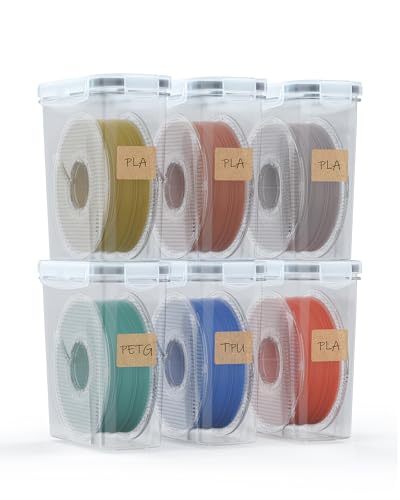
The clear storage container that lets you see which spool is which without popping every lid.
Moisture is the silent killer of print quality — PETG goes brittle, PLA gets stringy, and nylon becomes unprintable. The YOOPAI six-pack solves that with individual containers, each featuring a silicone-sealed flip lid and four side latches that clamp down tight. Each box holds a standard 1kg spool of 1.75mm filament (PLA, ABS, PETG, TPU), and the clear plastic body means you see the spool color at a glance without opening the seal. The kit includes two 500g desiccant boxes and six snow veil bags to start absorbing moisture right away.
The box itself is impact-resistant and sturdy enough for workshop handling. The stackable design lets you build a small filament wall on a shelf without the lids bowing under weight. Owners call them “hefty” and “well-made,” noting that the four-latch system keeps a tight seal that maintains stable humidity levels over weeks of storage. The included desiccant packs are large enough for the initial setup, and the color-changing indicator tells you when they need recharging.
The durability caveat is real — a minority of reviewers point out the lids breaking on the first use, particularly the hinges. This seems to be a batch-quality issue rather than a design flaw, and the seller has been responsive about replacements. The tapered walls also waste some shelf space if you pack multiple boxes side-by-side, and some slightly oversized spools can be a tight fit. For the price per box, it beats the common cereal-bin hack for looks and seal integrity.
The verdict: A practical, organized way to keep six different filaments dry and visible — just handle the latches gently on the first open.
Best for: anyone with more than two open spools who wants to avoid re-drying filament before every print.
Not ideal if: you need a printed filament-feed setup — the lid hole is large and lets air in during printing.
9. Creality Original Ender 3 Direct Drive Upgrade Kit

The direct drive conversion that finally open up reliable TPU printing on an Ender 3.
Bowden setups struggle with flexible filament — the long tube between the extruder and hotend lets TPU buckle and jam. The Creality Direct Drive Upgrade Kit moves the 42-40 stepper motor and extruder right onto the hotend assembly, cutting that filament path to a few inches. The result is smooth, jam-free feeding of 1.75mm TPU, PLA, and other flexible materials. The kit includes a longer connecting cable, all necessary hardware, tools, and a diagram-based instruction sheet that walks through the conversion.
The difference in print quality is immediate: the shorter filament path eliminates the spongy retraction behavior that causes stringing in Bowden setups. You will need to drop your retraction distance from around 6mm to 1mm or less in your slicer to avoid jams. Once that is dialed in, shoppers say “no stringing” and noticeably improved surface finish. The all-metal hotend is durable and wear-resistant, and the integrated structure keeps wiring clean and accessible.
The installation is rated as “easy” by most, but a notable number hit a snag: the set screws on the extruder gear can loosen during long prints, causing the filament to slip mid-print. Owners recommend tightening all set screws on arrival before the first use. The extra weight on the gantry also shifts the center of gravity; a dual Z-axis upgrade helps, though plenty of users run it successfully with a single Z without issues. The direct drive kit is OEM Creality, so compatibility and fit are exact — no shimming or custom brackets needed.
Why it transforms the printer
- Smooth, consistent TPU extrusion — no more filament buckling mid-print
- All-metal hotend supports higher temperatures without PTFE degradation
- Buyers report the change “brought my print failure rate down drastically”
Watch these points
- Set screws on the extruder gear can loosen — pre-tighten them before first use
- The added weight on the print head can cause ringing at high speeds; reducing acceleration helps
Grab this for: making flexible filament printing a reality on your Ender 3 — it is the single upgrade that open up TPU.
Hold off if: you never print anything softer than PLA and the retraction tuning feels like overkill.
Understanding the Specs
Heat-Set Threaded Inserts
A threaded insert is a brass knurled nut that you embed into a plastic part using the heat from a soldering iron or an ultrasonic welder. The knurling (a roughened, cross-hatched outer surface) grips the softened plastic as it cools, creating a permanent metal thread. The key specs are the internal thread size (M2, M3, M4, M5) and the insert length (usually 3-12mm), which determines how much plastic it has to grab. The brass material conducts heat well — it transfers the soldering iron’s heat quickly through the insert so the surrounding plastic melts evenly. Higher-end inserts have a spark-eroded knurling that creates sharper edges for better grip.
Hotend Power and Temperature
The hotend’s power rating (measured in watts) determines how fast it can bring the nozzle up to temperature and how well it holds that temperature during a fast layer change. A 40W hotend on a 24V system is standard for most Creality-style printers and can reach typical printing temperatures (200-260°C) within a few minutes. The maximum temperature is set by the heater cartridge and thermistor — higher limits (like 260°C or 300°C) allow you to print materials like PETG, ABS, and nylon. A silicone sock fits over the heater block to insulate it, keeping the heat where it belongs and reducing fluctuations that cause layer adhesion issues.
FAQ
How do I install heat-set threaded inserts into a 3D print?
Will the Ender 3 direct drive kit fit my Ender 3 V2?
What bed temperature should I use for the BIQU CryoGrip build plate?
How long does a 1kg spool of PETG filament last?
Can I use the 3D Printer Tools Kit on SLA resin printers?
Are M3 inserts the most common size for 3D printing?
Why is my Ender 3 printing sponge-like parts and how does a new hotend fix it?
Can I store multiple spools in one YOOPAI box?
Final Thoughts: The Verdict
For most buyers, the best 3d print parts upgrade is the Kadrick Threaded Inserts Kit because it solves the single most common weak point in functional prints — the interface where hardware meets plastic — with 520 brass inserts that heat-set cleanly and hold strong. If you are fighting first-layer adhesion on a Bambu Lab printer, grab the BIQU CryoGrip Pro Glacier for its cold-grip coating that starts printing before the bed fully warms. And for anyone stuck with an Ender 3 that cannot extrude flexible material, the Creality Direct Drive Kit is the one upgrade that turns TPU from a nightmare into a daily material.
How We Picked
We do not accept paid placement. Every pick is matched to a real buyer and a real use-case; we do not hands-on test units.
Sources & Methodology
Specifications: manufacturer listings and product documentation. Review insights: verified customer reviews, as of July 2026. Pricing: not shown on this page (it changes often); check the current price via the retailer link.
As an Amazon Associate, Gadgets Feed earns from qualifying purchases. This does not affect which products we feature.