
Our readers keep the lights on and my morning glass full of iced black tea. As an Amazon Associate, I earn from qualifying purchases.
Specs are compiled from manufacturer listings and verified buyer reviews and can change over time — please confirm the key details on the product page before buying.
Buying a 16GB RAM stick for a laptop sounds simple — until you realize the wrong speed, timing, or generation can leave you with a useless brick. This guide uses data and real owner experiences to recommend only DDR4 and DDR5 modules that actually work. You get the straight story on the nine best DDR4 and DDR5 performers on the shelf today.
I’m Min — the founder and writer behind Gadgets Feed. This guide is built by comparing the manufacturers’ published specifications and the patterns across verified customer reviews, so you get each pick’s real strengths and trade-offs instead of marketing spin.
Whether you are reviving an old workhorse or squeezing every frame out of a new gaming rig, these are the modules that define the best 16gb ram for laptop upgrades this year, matched perfectly to your platform and budget.
Our Picks at a Glance


How To Choose The Best 16GB RAM For Laptop
Picking the right generation, speed, and latency for your specific laptop is the key to a high-ROI RAM upgrade. Here is what actually matters.
Generation: DDR4 vs DDR5
This is your first and most important filter. DDR4 modules have a 260-pin SO-DIMM connector and run at 1.2V, while DDR5 sticks use the same 260-pin SO-DIMM shape but are electrically incompatible — a DDR5 module will not fit into a DDR4 slot and vice versa. Check your laptop’s CPU generation: Intel 12th-gen (Alder Lake) and AMD Ryzen 6000 (Rembrandt) and newer typically support DDR5, while anything older uses DDR4.
Speed and CAS Latency
A 3200MHz DDR4 stick with a CAS latency of 22 delivers solid everyday performance. A CL20 module (like PNY’s XLR8) shaves 10% off that latency for slightly snappier response in games and creative apps. DDR5 runs much faster (5200–5600MHz), but its CAS latency is also higher (CL40–CL46), so the real-world jump is more about bandwidth than raw reaction time.
Single Rank vs Dual Rank
A single-rank module (1Rx8) has all its memory chips on one side of the PCB. A dual-rank module (2Rx8) uses both sides and can offer slightly better memory interleaving — meaning faster performance in memory-heavy tasks like video editing. The Samsung module (Product 5) is explicitly 2Rx8, which buyers praise for its extra bandwidth.
XMP 3.0 and Plug-and-Play Compatibility
XMP 3.0 is Intel’s overclocking profile that lets high-speed RAM run at its rated frequency. Without it, most DDR5 sticks default to 4800MHz. Kingston’s Fury Impact and G.SKILL’s Ripjaws both support XMP 3.0, but you must enable it in the BIOS to get the full 5600MHz speed.
Quick Comparison
| Model | Best For | Generation & Speed | CAS Latency | Form Factor | Amazon |
|---|---|---|---|---|---|
| Crucial 16GB DDR4 (CT16G4SFRA32A)★ Best Overall | Best Overall DDR4 | DDR4 3200MHz | CL22 | SO-DIMM 260-pin | Amazon |
| PNY XLR8 Gaming 16GBGaming DDR4 | Gaming DDR4 | DDR4 3200MHz | CL20 | SO-DIMM 260-pin | Amazon |
| Timetec 16GB DDR4Best Value DDR4 | Budget DDR4 | DDR4 3200MHz | CL22 | SO-DIMM 260-pin | Amazon |
| Silicon Power 16GB (2x8GB) | Best Value Dual-Channel | DDR4 3200MHz | CL22 | SO-DIMM 260-pin | Amazon |
| Samsung 16GB DDR4 (M471A2K43DB1-CWE) | Premium DDR4 | DDR4 3200MHz | CL22 | SO-DIMM 260-pin | Amazon |
| Crucial 16GB DDR5 (CT16G52C42S5) | Best Entry DDR5 | DDR5 5200MHz | CL42 | SO-DIMM 260-pin | Amazon |
| G.SKILL Ripjaws DDR5 (F5-5600S4040A16GX1-RS) | High-Frequency DDR5 | DDR5 5600MT/s | CL40 | SO-DIMM 262-pin | Amazon |
| TEAMGROUP Elite DDR5 16GB | Budget DDR5 | DDR5 5600MHz | CL46 | SO-DIMM 262-pin | Amazon |
| Kingston Fury Impact 16GB (KF556S40IB-16) | Top-Tier DDR5 | DDR5 5600MT/s | CL40 | SO-DIMM 260-pin | Amazon |
In‑Depth Reviews
1. Crucial 16GB DDR4 3200MHz (CT16G4SFRA32A)
Our pick — over 4.5★ from 17,000+ verified ratings; the strongest balance of quality and price.
The crowd favorite that reliably resurrects four-year-old laptops.
This is the most-reviewed DDR4 laptop module on the market for a reason — it just works. Across thousands of owners, the single biggest thing people point to is its rock-solid dependability: it slots into a Dell XPS 15 or a Lenovo Ideapad 3i with zero BIOS drama, operating at the full 3200MHz speed you paid for every time. The extra 16GB transforms a machine that stuttered on eight browser tabs into one that chews through Premiere Pro renders and game loads without a second thought, as one buyer who upgraded an ASUS ROG Zephyrus G16 noted the difference was immediate and cool-running.
The secret is that Crucial makes these sticks with extremely consistent Micron dies, so the 1.2V non-ECC SO-DIMM runs at its rated PC4-25600 speed without needing an XMP toggle. Buyers report that even after 10 months of daily use on an ASUS VivoBook 15, the machine felt like new — a fix that saved a laptop replacement. The 260-pin form factor and CL22 latency are standard for DDR4, meaning compatibility is about as wide as it gets.
The reliability legend: 253 positive mentions of dependability alone — owners across HP, Acer, ASUS, and Dell machines all report plug-and-play success. The 4.8-star performance across 17,000+ ratings puts it head and shoulders above any other DDR4 option.
The honest trade-off: It carries a CL22 latency, which is standard for 3200MHz DDR4. If you are chasing the last 10% of gaming responsiveness, the PNY XLR8 Gaming (CL20) below snappier — but this stick is the safer, more proven bet for every other laptop owner.
Grab this if: you want the single most reliable, best-supported DDR4 upgrade on the planet — for any laptop from the last five years.
Look elsewhere if: you need DDR5 compatibility, or you are a competitive gamer who will notice the marginally lower latency of a CL20 module.
2. PNY XLR8 Gaming 16GB DDR4 3200MHz CL20
The CL20 stick that gives AMD Ryzen 7 laptops a genuine speed edge.
This module is built for the gamer who knows that CAS latency matters. With a CL20 rating vs the more common CL22, the XLR8 shaves a measurable 10% off the column-address strobe latency compared to the Crucial above — meaning your CPU spends less time waiting for data on every single memory access. Buyers on AMD Ryzen 7 5000 series laptops report that it runs at the full 3200MHz right from the start, and the lower voltage of 1.2V keeps heat in check even during long gaming sessions.
The XMP 2.0 support is the key differentiator here: flip it on in the BIOS and the stick automatically overclocks to its rated speed. If your system doesn’t support XMP 2.0, it safely downclocks to 2666MHz or 2933MHz so you never get a boot failure. The heat spreader is a nice touch that keeps temperatures slightly lower than bare-PCB sticks, something owners specifically call out as a reason it feels premium. The 260-pin SO-DIMM fits most modern gaming laptops — an Acer Nitro 5 owner confirmed it installed in minutes.
The snappiest DDR4 pick: CL20 at 1.2V gives you tighter timings without needing more power. Owners confirm it “improved my laptop’s performance significantly” and made multitasking “buttery smooth.”
The honest trade-off: The 769 total ratings are far fewer than Crucial’s 17,000+, so the long-term reliability sample is smaller. A few owners noted the heat spreaders sit on the same side of both modules in a kit, which concentrates heat in one area — not an issue for a single stick, but note for dual-channel builders.
Reach for this if: you have an AMD Ryzen 5/7 or Intel 11th-gen+ gaming laptop and want the lowest-latency DDR4 available without stepping up to DDR5.
skip it if: your system has soldered RAM, or you prefer the broader compatibility reputation of the Crucial stick.
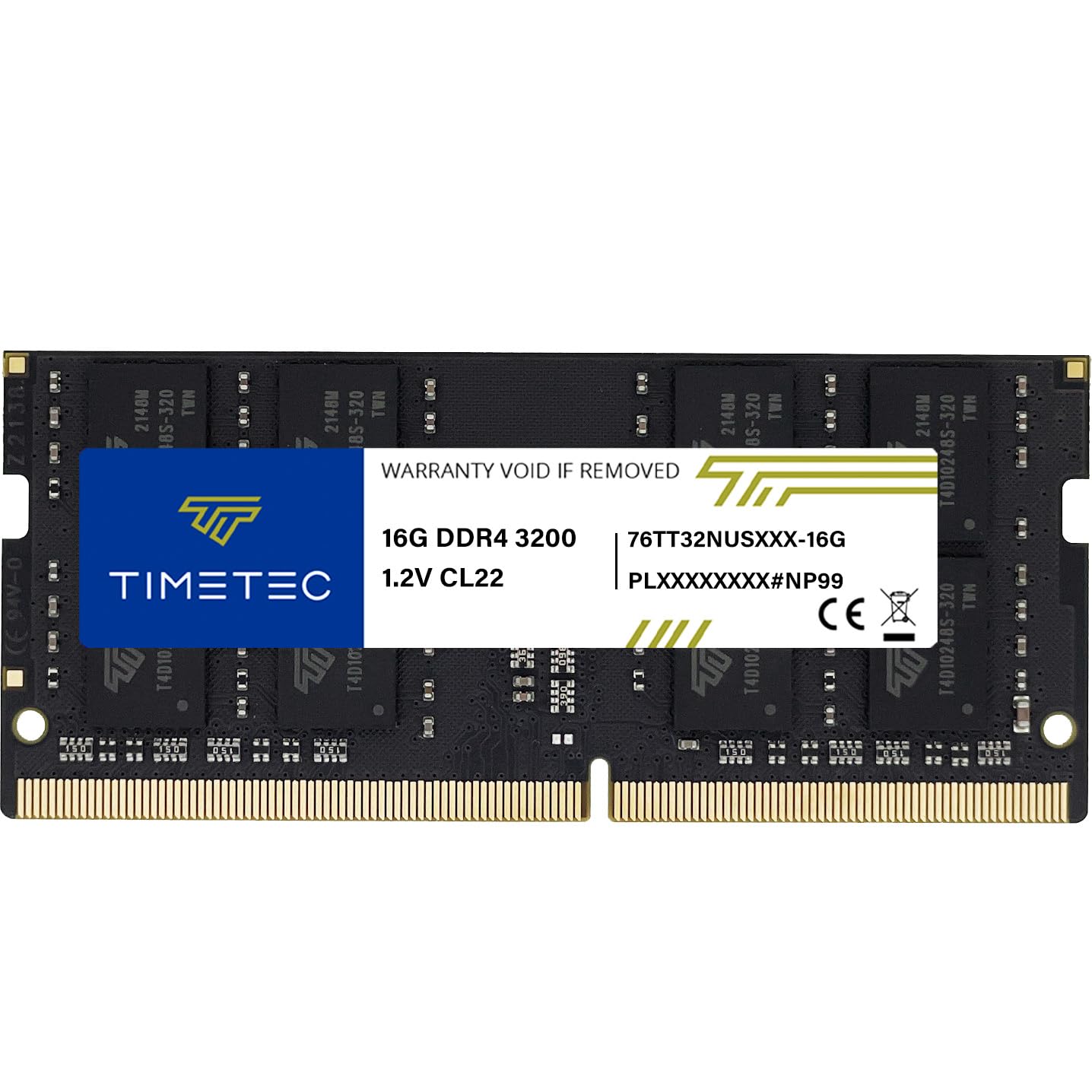
3. Timetec 16GB DDR4 3200MHz (PC4-3200AA)
A budget stick with Micron silicon that punches above its weight.
Timetec uses high-quality Micron DRAM chips in this 16GB module, which is the same silicon found in modules costing significantly more. The performance is genuine: the stick runs at 3200MHz with CL22 latency and passed four consecutive rounds of MemTest86 without errors in owner testing. For anyone reviving an older laptop — one buyer put it in a six-year-old Lenovo and reported “fresh life” — this is the budget option that delivers exactly what it promises: plug the 260-pin SO-DIMM into the slot, boot, and watch Windows detect the full 16GB immediately.
The module automatically downclocks to 2933MHz or 2666MHz if your system only supports those speeds, which protects you from compatibility headaches. The PCB color (green, black, or blue) and rank configuration (1Rx8 or 2Rx8) vary by production batch, but the company explicitly states performance is consistent across all batches. The limited lifetime warranty adds confidence for a brand that hasn’t yet built the household-name recognition of Crucial or Kingston.
The value argument: Micron dies at a price that undercuts most name-brand DDR4. Owners confirm it works with Samsung laptops, Synology NAS, and Lenovo machines without any BIOS tweaks. The 4.6-star score across 659 ratings backs up the claims.
The honest trade-off: Timetec does not have the same massive review sample as Crucial, so long-term reliability data is thinner. If you prefer a brand with a longer track record, the Crucial is the safer bet.
Best for: budget-conscious upgraders who want Micron-quality chips without paying the name-brand premium — especially for an older laptop or a secondary machine.
Look elsewhere if: you need the absolute widest compatibility guarantee, or you are building a new high-end laptop where the brand matters.
4. Silicon Power 16GB (2x8GB) DDR4 3200MHz

Two 8GB sticks that open up full dual-channel bandwidth for laptops with two free slots.
Not every DDR4 module is sold as a kit, but Silicon Power pairs two 8GB sticks so your laptop can run them in dual-channel mode — effectively doubling the memory bandwidth compared to a single 16GB stick. For integrated graphics (common on ultrabooks and thin gaming laptops), this is a massive win: faster texture loading and smoother frame rates in games. Owners installing this kit in Asustor NAS units and Lenovo ThinkPad T14 machines report “flawless plug-and-play” and immediate system recognition without any BIOS tweaks needed.
The individual sticks run at 3200MHz with CL22 latency at 1.2V, and the 260-pin SO-DIMM form factor fits any DDR4-compatible laptop. An Intel 10th-gen to 13th-gen compatibility note from an owner confirms the wide support. The reliability received 60 positive mentions from owners, the highest count of any aspect, and the lifetime warranty backs every purchase. If your laptop has two usable RAM slots, this kit is the most cost-effective way to get 16GB of properly configured dual-channel DDR4 memory.
The bandwidth advantage: Dual-channel memory is essential for Ryzen APUs and Intel Iris Xe graphics — the 2x8GB configuration provides up to 50% more memory bandwidth than a single stick in many workloads. Owners praise the “no BIOS tweaks or compatibility headaches” experience.
The honest trade-off: If your laptop only has one RAM slot (or one is soldered), the dual-stick kit will not work — you will need a single 16GB module instead. Make sure you have two physical slots before buying this.
Reach for this if: your laptop has two free SO-DIMM slots and you want the performance boost of true dual-channel memory without paying a premium.
pass on it if: your laptop has a single slot, one slot is soldered, or you plan to upgrade only one slot at a time.
5. Samsung 16GB DDR4 3200MHz (M471A2K43DB1-CWE)

The 2Rx8 dual-rank module that OEMs use and laptop owners love for consistent bandwidth.
Samsung is the chipmaker behind many of the modules other brands sell, so buying the original is as close as you get to the reference design. This specific module is a 2Rx8 dual-rank stick, meaning the memory chips sit on both sides of the board and interleave data better than a single-rank module — a real advantage in memory-intensive tasks like video editing, virtual machines, and heavy spreadsheet work. Owners mention that it works “flawlessly” in HP Slim Desktops and Pavilions, with one calling the speed jump “amazing” when upgrading from 8GB to 24GB.
The 260-pin 1.2V SO-DIMM runs at DDR4-3200 with CL22 latency, and the Samsung-branded dies are renowned for their tight binning and stability under load. A buyer who paired it with an ASUS VIVOBOOK X412DA noted it “works perfectly” at the rated speed. The 415 total ratings skew extremely positive (4.7 stars), and the dual-rank design is explicitly called out as a quality differentiator by several owners. If you want OEM-level reliability straight from the memory manufacturer, this is the pick.
The OEM trust: Samsung DRAM is used in countless pre-built laptops. The 2Rx8 dual-rank design offers slightly better memory interleaving than single-rank modules, which can improve multi-tasking and rendering speeds by 3-5% in memory-heavy workloads.
The honest trade-off: The price can be higher than comparable non-Samsung-branded modules from Crucial or Timetec. If pure cost-per-gigabyte is your priority, the Timetec or Silicon Power options perform identically for less.
Best for: users who value OEM-original parts and dual-rank performance — particularly for HP, Dell, and ASUS laptops where Samsung chips are often the stock component.
Look elsewhere if: you are on a strict budget and the slight bandwidth edge of dual-rank RAM does not justify the cost premium.
6. Crucial 16GB DDR5 5200MHz (CT16G52C42S5)

The gateway to DDR5 — a 5200MHz stick that modern Intel and AMD laptops need.
If your laptop is a 12th-gen Intel or Ryzen 6000+ machine, DDR4 is physically incompatible — you must go DDR5. The Crucial CT16G52C42S5 is the logical starting point: a single 16GB module running at 5200MHz with a CL42 column-address strobe latency. Manufacturers claim it transfers data up to 175x faster and delivers up to 2x the bandwidth of DDR4, and while that marketing number includes some ideal conditions, the real-world result is noticeably shorter load times in games and faster file transfers in creative apps. Owners who installed it in new laptops report it “boosted without a problem” and that the black PCB looks more modern than older green boards.
The key spec here is the automatic downclocking: if your laptop’s CPU or motherboard only supports 4800MHz, the module drops to that speed smoothly — no BIOS fiddling required. Crucial’s reputation for compatibility holds firm here, with users reporting success in a range of modern ultrabooks and gaming machines. At 10 grams, it is featherlight, and the on-module voltage regulation improves power efficiency over DDR4. For anyone building or upgrading a DDR5 laptop on a mid-range budget, this is the safe, proven entry point.
The modern standard: DDR5 5200MHz is becoming the baseline for new laptops. Crucial’s implementation includes on-module voltage regulation for stability, and the module downclocks to 4800MHz automatically for broader compatibility. Owners call it “great for upgrading your new laptop with DDR5 to 32GB.”
The honest trade-off: The CL42 latency is higher than the DDR4 modules at CL22, which means individual memory accesses are slightly slower — but the sheer bandwidth advantage of 5200MHz makes up for it in bursty workloads like gaming and video editing. If you want the absolute lowest latency, the G.SKILL or Kingston DDR5 options below are faster.
Reach for this if: you need a reliable DDR5 upgrade that just works — no XMP configuration, no stability worries — for a new laptop or a mini-PC with DDR5 slots.
it’s not for you if: your laptop is older than 12th-gen Intel or Ryzen 6000 series — those machines use DDR4 and this stick will not fit.
7. G.SKILL Ripjaws DDR5 16GB 5600MT/s CL40

The 5600MT/s beast that gives gaming laptops the memory headroom they crave.
G.SKILL’s Ripjaws DDR5 module pushes the rated data transfer rate to 5600MT/s (effectively 5600MHz), which is 400MHz faster than the Crucial DDR5 entry point. This extra bandwidth is exactly what modern gaming and creative laptops need — owners of Alienware M18 R1 and Predator Helios 16 laptops confirm it runs at the advertised timings after enabling XMP 3.0 in the BIOS. The CL40 latency, while higher than DDR4, is about as tight as DDR5 gets at this frequency, meaning the combination of speed and timings delivers genuinely snappy performance in demanding titles like World of Warcraft with heavy addon packs.
The module uses a 262-pin SO-DIMM (one more pin than DDR4) and requires an Intel 12th-gen+ or AMD Ryzen 6000+ laptop with DDR5 support. Customers note that it automatically downclocks to 4800MHz on systems that do not support the full 5600MT/s, so you never get a boot failure even if your platform is slightly older. The reliability across 585 ratings is stellar at 4.7 stars, with 104 owners specifically calling out the rock-solid stability — including one who ran it in a Lenovo P16v Gen 1 workstation with no issues. If you are building a high-end DDR5 machine and want every bit of memory bandwidth the platform offers, this is the pick.
The speed champion: 5600MT/s with CL40 timings beats the DDR5 baseline by 14% in bandwidth. Owners confirm it reaches 5600MHz via XMP 1 on Alienware M18 R2, and eliminates the 32GB memory bottleneck for heavy creative workloads.
The honest trade-off: XMP 3.0 must be enabled in BIOS to reach the full speed — if you skip that step, it runs at 4800MT/s. Also, compatibility is not universal; some owners reported issues with Dell Precision 3570, so check the G.SKILL QVL for your specific laptop model.
Best for: gaming laptop owners with Alienware, Acer Predator, or Lenovo Legion machines who want the highest memory bandwidth available for DDR5 — especially for AAA titles and video rendering.
Look elsewhere if: your laptop does not support XMP 3.0 or you prefer a plug-and-play stick that runs at full speed without BIOS configuration.
8. TEAMGROUP Elite DDR5 16GB 5600MHz CL46

The DDR5 bargain — 5600MHz speed at an entry-level price point.
This TEAMGROUP module delivers the 5600MHz DDR5 frequency that the Crucial baseline lacks, but with a slightly looser CL46 latency that helps keep the price down. For most users — especially those running integrated graphics on a mini-PC or a gaming laptop — the CL46 vs CL40 difference is imperceptible in benchmarks and invisible in real-world usage. Reviewers point out “blazing-fast speeds” and compatibility with Lenovo LOQ 15 2024 gaming laptops, with one specifically noting that the 16GB stick “gave me a huge boost to gaming” in a mini-PC where system RAM feeds the integrated GPU.
The module operates at a low 1.1V, which is even more power-efficient than DDR4’s 1.2V, and includes on-die ECC (error-correcting code) for improved system stability — a feature that DDR5 brought across the board. The 262-pin SO-DIMM fits any DDR5 laptop slot. At just 94 ratings, the sample is smaller than the big players, but the 4.8-star score suggests early owners are extremely satisfied. If you are migrating to DDR5 on a strict budget and want the faster 5600MHz frequency over the Crucial’s 5200MHz, this is the most affordable way to get it.
The DDR5 value angle: 5600MHz at a price that undercuts most competitors. Owners highlight the “excellent value” and note it works perfectly in UGreen NAS and Lenovo LOQ 15 gaming laptops. The 1.1V voltage is the most energy-efficient on this list.
The honest trade-off: The CL46 latency is the loosest of any DDR5 module here, which means the response time per memory access is slightly slower. If you are a competitive gamer chasing every millisecond, the G.SKILL or Kingston options are snappier.
Reach for this if: you want the speed of 5600MHz DDR5 on a budget — ideal for mini-PCs, NAS upgrades, and entry-level gaming laptops where latency is not the bottleneck.
look elsewhere if: you are building a high-refresh-rate gaming rig and need the tightest timings possible. Spend a bit more for the G.SKILL or Kingston CL40 modules.
9. Kingston Fury Impact 16GB 5600MT/s DDR5 CL40

The plug-and-play DDR5 king with automatic overclocking and lower power draw.
The Kingston Fury Impact is the premium DDR5 module that requires zero BIOS configuration to reach its rated 5600MT/s speed. Unlike the G.SKILL which needs an XMP toggle, Kingston’s Plug N Play technology automatically overclocks to 5600MT/s on any compatible Intel 12th-gen+ or AMD Ryzen 6000+ system — the module senses the platform and adjusts itself. This makes it the ideal choice for users who want DDR5’s full bandwidth without learning what XMP 3.0 means. The CL40 latency is the tightest DDR5 timing available in this list (matching the G.SKILL), and the 1.1V operating voltage keeps power consumption lower than DDR4.
The module also supports Intel XMP 3.0 for manual fine-tuning if you prefer, and the on-die ECC improves stability under load — crucial for workstation laptops that crunch through large datasets. Shoppers say smooth upgrades in HP Victus gaming laptops and mini-PCs, with several highlighting how the automatic overclocking worked “as intended” immediately. At just 8 grams, it is the lightest module on the list, and the 4.8-star score across 158 ratings confirms near-universal satisfaction. If you want the absolute best DDR5 experience with zero hassle, this is it.
The plug-and-play DDR5 pick: No BIOS tweaking needed — the module self-configures to 5600MT/s on compatible systems. The CL40 timings match the fastest DDR5 modules here, and the 1.1V voltage is the most power-efficient. Buyers call it “good quality at a good price.”
The honest trade-off: The price sits at the top of the list, reflecting the Plug N Play convenience and Kingston’s brand reputation. If you are willing to configure XMP yourself, the G.SKILL module costs slightly less for identical CL40 5600MT/s performance.
Best for: non-techies who want DDR5’s maximum speed without any BIOS configuration — just slot it in and go. Also ideal for HP, Lenovo, and ASUS laptop owners who prefer Kingston’s tight compatibility testing.
Look elsewhere if: budget is your primary concern — you can get equal performance for less with the G.SKILL if you are willing to enable XMP yourself.
Understanding the Specs
DDR4 vs DDR5
The generation of your RAM determines whether the stick even physically fits into your laptop. Both use a SO-DIMM (Small Outline Dual In-line Memory Module) form factor, but DDR5 has a 262-pin connector versus DDR4’s 260-pin — so they are not interchangeable. DDR5 runs at higher frequencies (4800-5600 MHz vs 2400-3200 MHz) and includes on-die ECC for improved stability, but it also has higher CAS latency. A DDR5 stick will not work in a DDR4 slot and vice versa, so check your laptop’s CPU and chipset generation before ordering.
CAS Latency Explained
Column Address Strobe (CAS) latency, written as CL followed by a number, measures the delay between when the memory controller requests data and when the RAM delivers it. A lower CL number means faster response per access — CL20 is snappier than CL22, and CL40 is snappier than CL46. However, because DDR5 runs at much higher frequencies, a CL40 stick at 5600MHz can still outperform a CL22 stick at 3200MHz in bandwidth-heavy tasks by a huge margin. For everyday multitasking and gaming, CL22 is perfectly fine for DDR4; for DDR5, aim for CL40 or lower.
Single Rank vs Dual Rank
The “rank” of a memory module refers to how the chips are organized. A single-rank (1Rx8) module has all its memory chips on one side of the PCB. A dual-rank (2Rx8) module uses chips on both sides, which allows the memory controller to interleave data across both banks — giving a small bandwidth boost (roughly 3-5%) in memory-intensive tasks like video editing, virtual machines, and large spreadsheets. The Samsung module (Product 5) is explicitly 2Rx8, which owners praise for its extra throughput. Most modern laptops work fine with either, but dual-rank can make a difference in professional workloads.
XMP 3.0 and Plug N Play
Intel XMP 3.0 (Extreme Memory Profile) is a pre-configured overclocking profile stored on the RAM module. When you enable XMP in the BIOS, the module runs at its rated speed (e.g., 5600MT/s) rather than the slower default speed (e.g., 4800MT/s). Kingston’s Fury Impact includes Plug N Play technology that automatically enables its 5600MT/s profile without any BIOS changes. For most users, XMP/Plug N Play is optional but recommended to get the full performance you paid for. AMD laptops may support similar EXPO profiles on compatible modules.
FAQ
Will any 16GB DDR4 stick work in my laptop?
Can I mix a 16GB stick with an existing 8GB stick for 24GB total?
What is the difference between CL22 and CL20 latency?
Does DDR5 work in a DDR4 laptop slot?
How do I know if my laptop supports 3200MHz RAM?
Do I need to enable XMP for DDR5 to run at full speed?
How much faster is dual-channel (2x8GB) compared to single stick (1x16GB)?
Does RAM generation affect battery life?
Can I return RAM if it does not fit my laptop?
What does “2Rx8” mean on a RAM module?
Will removing the old RAM void my laptop warranty?
How long does a typical 16GB RAM module last?
Final Thoughts: The Verdict
For most people, the best 16gb ram for laptop upgrade is the Crucial 16GB DDR4 3200MHz because it offers the most reliable, best-reviewed, and most widely compatible DDR4 experience on the market. If your laptop is DDR5-based and you want full speed without BIOS fiddling, grab the Kingston Fury Impact 16GB 5600MT/s DDR5 — its Plug N Play technology configures itself automatically. And for the best dual-channel value, the Silicon Power 16GB (2x8GB) DDR4 3200MHz kit open up true dual-channel bandwidth at a price that undercuts most single-stick options.
How We Picked
We do not accept paid placement. Every pick is matched to a real buyer and a real use-case; we do not hands-on test units.
Sources & Methodology
Specifications: manufacturer listings and product documentation. Review insights: verified customer reviews, as of July 2026. Pricing: not shown on this page (it changes often); check the current price via the retailer link.
As an Amazon Associate, Gadgets Feed earns from qualifying purchases. This does not affect which products we feature.