
Our readers keep the lights on and my morning glass full of iced black tea. As an Amazon Associate, I earn from qualifying purchases.
Specs are compiled from manufacturer listings and verified buyer reviews and can change over time — please confirm the key details on the product page before buying.
A monitor arm for a 32-inch screen has one job: hold your big display exactly where you put it, without sagging or wobbling over time. But the minute you start looking, you realize weight limits, desk thickness, and gas spring (a sealed cylinder that uses compressed gas to counterbalance the monitor so you can lift or lower it with one hand) tension all matter in ways the product photos never reveal. This guide breaks down five real options — from a colorful single arm to a triple-screen workstation solution — so you can match the arm to your actual setup, not just your budget.
I’m Min — the founder and writer behind Gadgets Feed. This guide is built by comparing the manufacturers’ published specifications and the patterns across verified customer reviews, so you get each pick’s real strengths and trade-offs instead of marketing spin.
The right arm turns a screen that drifts into one that stays locked in place for years of daily use. The one that does that best for most people is the Pixio PS1S Wave White, because it combines all-metal build, easy install, and a 19.8-pound capacity that fits nearly every standard 32-inch monitor.
Our Picks at a Glance


How To Choose The Best 32 Inch Monitor Arm
Your 32-inch monitor is heavy — typically 12 to 18 pounds — so the arm you pick needs to handle that weight and stay easy to move. The three things that matter most are the weight rating, the VESA pattern (the hole pattern on the back of your monitor), and the clamp type (how it attaches to your desk). A few other details separate an arm you will love from one you will adjust every week.
Weight Rating and Gas Spring Tension
Every arm has a maximum weight capacity, and for a 32-incher you want something rated well above your actual monitor’s weight — at least a 4-pound buffer so the gas spring (a sealed cylinder of compressed gas that counterbalances the screen, letting you lift or lower it with one hand) does not struggle. The gas spring needs tuning to your specific monitor: if it is too loose, the screen drops; too tight, it floats up. Look for arms that let you adjust tension with a simple Allen key or screw, which all five picks here allow.
VESA Mounting Pattern
The VESA pattern (the square of screw holes on the back of your monitor) is almost always 100x100mm (about 4 inches apart) for a 32-inch screen. Some smaller or older models use 75x75mm (about 3 inches apart). Every arm in this guide supports both patterns, but double-check your monitor’s spec before you order — an arm with the wrong plate simply will not attach.
Clamp vs. Grommet Mount
A C-clamp grips the back edge of your desk, which works on most desks 0.5 to 3 inches thick. A grommet mount feeds the arm through a hole in the desktop, ideal if your desk already has a cable management grommet. The catch: some desks have a lip, a metal support beam, or a curved edge where a clamp cannot get a full grip. The Acer mount warns against such surfaces, so measure your desk edge before you commit.
Quick Comparison
| Model | Best For | Weight Capacity | Screen Range | Mount Type | Amazon |
|---|---|---|---|---|---|
| Pixio PS1S Wave White★ Best Overall | Single monitor, colored finish | 19.8 lbs | 17″–32″ | C-clamp or grommet | Amazon |
| HUANUO Dual MountDual-Mount Powerhouse | Two 32-inch monitors | 22 lbs per arm | 17″–32″ | C-clamp or grommet | Amazon |
| Acer Single Mount | Ultra-wide 34-inch screens | 19.8 lbs | 17″–34″ | C-clamp or grommet | Amazon |
| VIVO STAND-V001Q | Premium gas spring feel | 20 lbs | up to 32″ | C-clamp | Amazon |
| MOUNT PRO Triple Mount | Three-screen workstations | 19.8 lbs per arm | 13″–32″ | C-clamp or grommet | Amazon |
In‑Depth Reviews
1. Pixio PS1S Wave White Single Monitor Arm
Our pick — over 4.5★ from 400+ verified ratings; the strongest balance of quality and price.
The single arm that brings color and rock-solid stability to a 32-inch desk setup, backed by a 4.7-star customer rating.
This Pixio arm supports monitors up to 32 inches and 19.8 pounds, which covers most 32-inch screens. The two-segment articulated arm (an arm with two hinged sections that let you move the screen in a wider arc without hitting the base) gives you real range — pull the monitor close for detailed work, push it back when you need the desk clear. The all-metal construction feels durable, and built-in plastic cable trays keep cords tidy without extra clips, according to buyers. The C-clamp fits desks from about half an inch to well over two inches thick, and a grommet-mount option is included. What owners praise most is the adjustability: the springs can be tuned so the monitor stays exactly where you set it, which is the whole point of a good arm.
The finish gets the most comments — a soft milky pink called “Wave White” that owners say brings “tons of joy every time i look at it.” The color is a real differentiator in a black-only market. A 34-inch curved monitor sits without sag, and the VESA plate (the bracket that screws into the back of your monitor using 75x75mm or 100x100mm patterns) is simple to detach for setup. The trade-off: if you are an artist who needs the screen nearly flat on the desk, the lowest height may still be too tall. The HUANUO Dual Mount, by comparison, offers a higher 22-pound per-arm capacity for dual setups, but for a single 32-inch monitor, the Pixio’s balance of looks, stability, and owner satisfaction is class-leading here.
What owners love: The arm moves freely into position and stays there once set, with clear instructions making installation under thirty minutes.
The honest trade-off: The lowest height is not low enough for artists who need the screen nearly flat on the desk, and some find the tension adjustment instructions a little vague on first read.
Reach for this if: You want a single-arm solution that looks great, supports a 32-inch monitor at full range, and has the most consistent owner satisfaction in this category.
Look elsewhere if: Your monitor is heavier than 19.8 pounds or you need the screen to sit very low (under 4 inches from the desk) for drawing or drafting work.
2. HUANUO Dual Monitor Mount for 2 Monitors up to 32 inches
The dual-arm workhorse that holds two 32-inch monitors with the highest weight capacity in this roundup: 22 pounds per arm.
Each arm extends out 17.5 inches from the desk and raises up to 17.5 inches above it — identical reach to the Acer but through a different internal mechanism. You get ±90° swivel (spin the screen side to side), +90°/-35° tilt (angle it up and down), and 360° rotation (landscape or portrait mode). This means you can point both screens toward a shared center line for a true wraparound feel, something the single-arm Pixio cannot do.
Reviewers who outfit entire offices with this mount note: “Bought six for office; excellent quality, easy install, sturdy, no sagging.” Setup takes about ten minutes per pair with the included tools, and stability holds up over months. The C-clamp fits desks 0.39″ to 2.56″ thick, and the grommet option works up to 2.17″. The trade-off: some LG monitors with recessed VESA mounting holes (where the screw holes sit deep inside a cavity) need longer M4 25mm screws not included. Also, while most owners find it rock-solid, a minority report drift if tension is not dialed in perfectly — unlike the Pixio, which owners praise for staying put with less fuss.
Where it excels
- Highest per-arm weight capacity in this list at 22 lbs — handles heavy 32-inch monitors without sagging
- Easy to install with clear instructions, supported by the most-positive owner aspects
- Full motion range (swivel, tilt, rotate, height) for ergonomic positioning of two large screens
Where it stumbles
- Some LG monitors with recessed VESA holes need longer screws (M4 25mm) not included in the box
- Stability is mixed — most find it solid, but a few buyers report drift unless tension is carefully adjusted
Best for: Anyone running two 32-inch monitors who wants the highest weight capacity (22 lbs per arm) and a setup that takes ten minutes per mount.
Skip if: Your desk has a very thin top (under 0.39″) or you own LG monitors with deeply recessed VESA plates and do not want to buy extra screws.
3. Acer Single Monitor Mount, Fully Adjustable
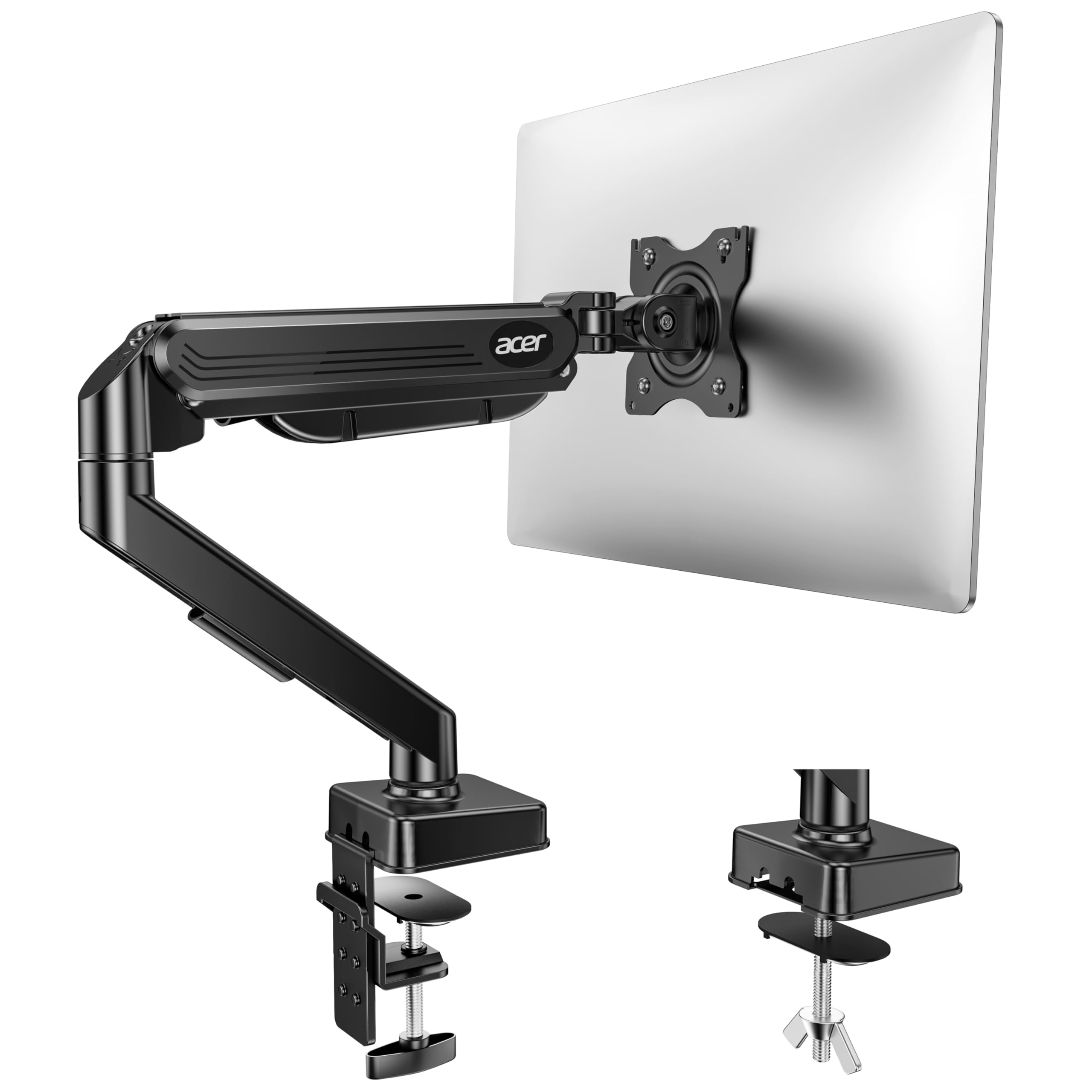
The single arm that supports monitors up to 34 inches, covering ultra-wide displays most single-arms cannot touch.
While every other single arm here maxes out at 32 inches, this Acer mount officially supports screens from 17 to 34 inches — a full 6% larger maximum than the Pixio’s 32-inch limit. That makes it the only pick here that fits a 34-inch ultra-wide curved display without moving to a dual-arm setup. The gas spring arm (a pneumatic cylinder that counterbalances the screen weight so you lift and lower it with one finger) has a 19.8-pound capacity and passed 20,000 motion tests during development, according to the manufacturer. The height adjustment range is the tallest here: the monitor can be raised up to 18.1 inches from the desk, beating the VIVO and HUANUO single-arm equivalents by a noticeable margin.
Buyers using it with HP Omen 34-inch monitors report the trick is installing the VESA plate on the monitor first, then snapping the arms together — the instructions suggest a different order that can be difficult. The one-piece design claims a five-minute install, though the gas spring tension screw needs fine-tuning based on your monitor’s actual weight (tighten if it drops, loosen if it rises). The desk thickness range is the widest here (0.59″ to 3.15″), but Acer warns against desks with double shelves, enclosed back panels, or curved front edges. The VIVO arm, by comparison, has a simpler C-clamp but also lacks the Acer’s 34-inch screen compatibility, making this the go-to for ultra-wide owners with a flat-edged desk.
What it does best: Covers the widest screen range (17″–34″) of any single arm in this roundup, with the tallest maximum height (18.1″) and a gas spring that has passed 20,000 motion tests, according to the maker.
The fit caveat: Not recommended for desks with double shelves, enclosed back panels, or curved edges — the clamp needs a flat, clear rear edge to grip properly.
Reach for it if: You have a 34-inch ultra-wide display and want a single arm that officially supports that size without stepping up to a dual-arm or heavy-duty mount.
Look elsewhere if: Your desk has a curved front edge, double-layer top, or enclosed back panel, or if you need a zero-installation-fuss arm (the gas spring tuning takes a few minutes).
4. VIVO Premium Aluminum Height Adjustable Single Monitor Arm (STAND-V001Q)

The gas-spring single arm that feels premium because its design resembles one costing much more — buyers call it a clone of the Herman Miller.
This VIVO arm offers tool-less height adjustment: you push the screen up or down with one hand and it stays. The gas spring handles the counterbalance, and the 20-pound capacity covers most 32-inch monitors comfortably. You get 90° tilt, 90° swivel, and support for both portrait and landscape orientations, all through a heavy-duty C-clamp that fits desks 0.5″ to 3″ thick. The detachable VESA face plate is a real convenience — you mount the plate to the monitor first, then clip the whole assembly onto the arm, which avoids balancing the monitor while you tighten screws. The Pixio also has this feature, but the VIVO’s gas spring gives it a smoother one-handed height adjustment feel.
The sturdiness and quality are the two aspects owners praise most, with over 160 combined mentions calling it solid and well-made. Some have used this arm for three years without any sag or drift. The honest limitation: the tilt joint is not as sturdy as the rest of the arm, and the monitor can droop slightly unless the joint is cranked very tight. A few owners solved this by adding a nylon washer for more friction. The base clamp can also leave imprints on soft wood desks, so a desk pad is worth considering. If you want a gas spring experience that rivals premium arms at a mid-range price, and you are fine tightening one joint firmly, this is a terrific buy.
What it nails
- Gas spring height adjustment is genuinely tool-less — push the screen up or down, it stays where you leave it
- Build quality (aluminum construction) is excellent, with three-year reliability reported by owners
- Detachable VESA face plate makes single-person installation significantly easier
Where it compromises
- Tilt joint is weaker than the rest of the arm — monitor may droop unless the joint is cranked very tight
- C-clamp can leave imprints on softer wooden desktops; a desk pad is recommended for protection
Best for: The buyer who wants a gas-spring single arm that feels premium and has proven longevity, and is willing to crank one tilt joint for stability.
Skip if: You need an arm with zero friction at the tilt joint, or if your desk is made of soft wood and you cannot use a protective mat under the clamp.
5. MOUNT PRO Triple Monitor Mount for 3 Screens up to 32 Inch

The three-armed solution that turns a cluttered desktop into a professional command center, holding up to three 32-inch screens.
Each arm on this MOUNT PRO triple mount supports 19.8 pounds — identical per-arm capacity to the Pixio but spread across three screens. The two outer arms use gas springs for smooth height adjustment, while the center arm is fixed to the pole (a common triple-mount design: the middle screen stays at a set height, and the outer screens raise or lower independently). The arms swivel 180° (point the outer screens toward you for a wraparound view), tilt up to 90° in either direction, and rotate 360° for portrait or landscape. It fits desks 0.39″ to 3.15″ with the C-clamp, and 0.39″ to 1.97″ with the grommet mount.
Owners mention excellent build quality — mainly high-grade aluminum with corrosion resistance — and smooth gas spring movement. One buyer who has used it for two years with three 27-inch monitors calls it “reliable” with only a “slight wobble when desk bumped.” The honest challenge: this is a heavy assembly (the mount plus three screens can hit about 50 pounds), so you absolutely need a second person for installation. The center monitor alignment can be tricky — one owner notes the left screen sits about a quarter-inch higher than the center and could not be adjusted to perfect alignment. Unlike the HUANUO dual mount, which is simpler for two screens, this triple setup requires patience and a helper. For anyone building a three-screen productivity or trading station, it delivers stability.
What stands out: Three 32-inch monitors held by gas-spring outer arms with full articulation — no other mount here can support three big screens at once.
The one real pain: Assembly is time-consuming and the mount is heavy; you need a helper, and aligning the center screen with the outer monitors may require some patience.
Reach for this if: You run three monitors for work or trading and want a single-pole mount with gas-spring support on the outer arms, all rated for 32-inch displays.
Look elsewhere if: You have a thin desk (under 0.39″) and cannot use the optional reinforcement plate (ASIN B0B7BS4TBX), or if you need perfect pixel-level alignment from the start with no tweaking.
Understanding the Specs
Weight Capacity and Gas Spring Tension
The most important number is how many pounds the arm can hold — every one here falls between 19.8 and 22 pounds per arm, which is the balance for a standard 32-inch monitor (typically 12 to 18 pounds). The gas spring (a sealed cylinder of compressed gas that counterbalances the screen) does the work: you raise or lower the monitor with one hand and it stays put. You adjust tension via a small screw or Allen key; if the screen drifts down, tighten it; if it floats up, loosen it. A few minutes of tuning separate an arm that feels easy from one that annoys you daily.
VESA Pattern Compatibility
VESA is the standard pattern of four screw holes on the back of your monitor. The two sizes are 75x75mm (about 3 inches apart) and 100x100mm (about 4 inches apart). Almost every 32-inch monitor uses 100x100mm, but some budget or older models use 75x75mm. All the arms here include plates for both sizes, but check your monitor’s manual before buying — an arm that does not match your VESA pattern is useless from the start.
Mounting Options: C-Clamp vs Grommet
A C-clamp grips the back edge of your desk like a giant paperclip — it works on desks from about half an inch to over three inches thick. A grommet mount feeds the arm’s base through a pre-drilled hole (usually 1.5 to 2 inches in diameter) and secures it under the desk, which looks cleaner if your desk already has a cable grommet. Both are sturdy, but check your desk’s edge: curved, beveled, or double-shelf edges can prevent a C-clamp from gripping fully, which is why the Acer mount warns against such surfaces.
Articulation: Single vs Dual vs Triple
Single arms give you one screen with full height and tilt adjustment. Dual arms (like the HUANUO) hold two monitors on separate arms from one base — each moves independently, so you can orient one in portrait and one in landscape. Triple mounts (like the MOUNT PRO) use a central pole with one fixed center arm and two gas-spring outer arms. More arms means more weight on the base, so triple mounts need a very solid clamp and a desk thick enough to handle the leverage.
FAQ
Will any 32 inch monitor arm fit my monitor?
What does gas spring mean in a monitor arm?
Is a C-clamp or a grommet mount better for a 32 inch monitor?
How do I adjust the tension on a gas spring arm so my monitor does not drop?
Can I use a dual monitor arm with one 32 inch screen and one smaller screen?
Is a 32 inch curved monitor compatible with these arms?
How thick does my desk need to be for a monitor arm?
Can I rotate my monitor to portrait mode with these arms?
Will a single monitor arm hold a 34 inch ultra-wide safely?
How do I stop my monitor arm from wobbling when I type?
Final Thoughts: The Verdict
For most buyers, the 32 inch monitor arm winner is the Pixio PS1S Wave White because it combines a 4.7-star customer rating, easy installation, and enough adjustability to handle nearly any 32-inch monitor at a reasonable price. If you run two 32-inch screens, the HUANUO Dual Mount is the strongest option with its 22-pound-per-arm capacity and proven office-track record. And for a premium single-arm experience with gas-spring convenience and years of reported reliability, the VIVO STAND-V001Q is the one to reach for.
How We Picked
We do not accept paid placement. Every pick is matched to a real buyer and a real use-case; we do not hands-on test units.
Sources & Methodology
Specifications: manufacturer listings and product documentation. Review insights: verified customer reviews, as of July 2026. Pricing: not shown on this page (it changes often); check the current price via the retailer link.
As an Amazon Associate, Gadgets Feed earns from qualifying purchases. This does not affect which products we feature.