
Our readers keep the lights on and my morning glass full of iced black tea. As an Amazon Associate, I earn from qualifying purchases.
Specs are compiled from manufacturer listings and verified buyer reviews and can change over time — please confirm the key details on the product page before buying.
You have a laptop, a PS5, or an Xbox, but your monitor only accepts DisplayPort (DP). A regular HDMI cable will not work — the signal travels the wrong direction. An active converter is the one fix, and the difference between a cable that works instantly and one that leaves you staring at a black screen depends on the adapter’s chipset and power delivery.
I’m Min — the founder and writer behind Gadgets Feed. This guide is built by comparing the manufacturers’ published specifications and the patterns across verified customer reviews, so you get each pick’s real strengths and trade-offs instead of marketing spin.
Here is the breakdown of the best active hdmi to displayport adapter options for every setup, from a simple office connection to a high-refresh-rate gaming rig.
Our Picks at a Glance
How To Choose The Best Active HDMI To DisplayPort Adapter
An HDMI to DisplayPort adapter is always “active” — it uses a chip to translate the HDMI signal into a language your DP monitor understands. The key is not whether it is active, but whether it supports the resolution and refresh rate your specific monitor and source device need, and whether it needs extra power via USB.
Resolution and Refresh Rate
Your adapter’s max resolution and refresh rate must match or exceed your monitor’s. A 4K 60Hz adapter works for most office and media setups. If you game at 120Hz or 144Hz, you need an adapter built for HDMI 2.1 to DisplayPort 1.4. An 8K 30Hz spec in the data tells you the chip can handle extremely high pixel counts, but at a lower refresh rate.
Power Requirement
Nearly all active adapters require you to plug a micro-USB cable into a USB port for stable output. Without it, many adapters flicker, drop signal, or refuse to show the full resolution. Checking this requirement is the single most common mistake first-time buyers make.
Direction: Unidirectional Only
These cables work one way — only from an HDMI source (laptop, console) to a DisplayPort display (monitor). If you need to send a DP signal into an HDMI monitor, you need a different cable. Every product here is unidirectional, so confirm your setup’s flow before buying.
Quick Comparison
| Model | Best For | Resolution / Refresh | Length | Connector Type | Amazon |
|---|---|---|---|---|---|
| Reborn HDMI to DP Cable★ Best Overall | Budget plug-and-play | 4K 60Hz / 1080p 120Hz | 3 Feet | Male to Male | Amazon |
| UANTIN HDMI to DP Adapter | Console to monitor | 4K 60Hz / 1080p 120Hz | 23.62 Inches | Male to Female | Amazon |
| fairikabe HDMI 2.1 to DP 1.4 Cable | High-refresh gaming | 8K 30Hz / 4K 144Hz | 6 Feet | Male to Male | Amazon |
| Club 3D CAC-1335 Adapter | Versatile 4K 120Hz | 4K 120Hz / 8K 30Hz | 2.83-Inch body | Male to Female | Amazon |
In‑Depth Reviews
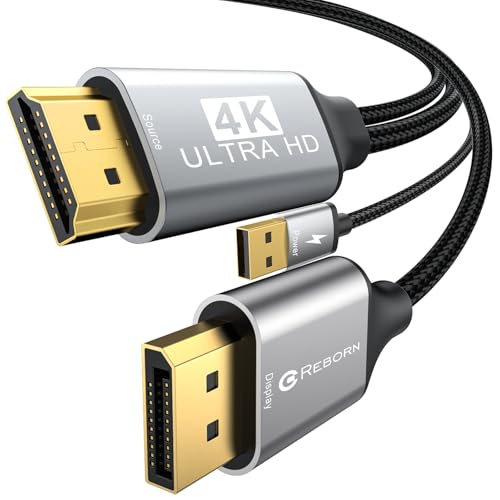
1. Reborn Active HDMI to DisplayPort Cable 3FT
Our pick — over 4★ from 150+ verified ratings; the strongest balance of quality and price.
The crowd-favorite fix that owners say “worked flawlessly” where three others failed.
This cable covers the most common use case without overcomplicating things. You get 4K UHD at a smooth 60Hz (a sharp, flicker-free desktop or movie experience) and it is backward compatible with 1080p at 120Hz if you are gaming on a lower-resolution monitor. The crowd of over 150 owners has made it the most-rated pick here for a reason — the thing everyone raves about is that it just works, with many calling it easy to connect and praising the solid braided build. Reviews across the board call it a “plug and play” solution that needs a power cable connected for best results.
That makes setup cleaner for a laptop-to-monitor or PS5-to-monitor connection. The recurring gripe is heat — the cable runs warm when active, which is common for active chips but note if your cable will sit against a heat-sensitive surface.
What owners love
- “Three other cables failed; this one worked flawlessly” — buyers report it is the reliable fix after trying passive ones
- Solid build quality with a braided exterior that feels durable
- Crisp picture and easy instant setup with no driver install
The honest trade-off
- The cable runs noticeably warm during use; keep it away from tight bundles or sensitive gear
- 3-foot length is short — works best for a laptop right next to a monitor, not across a desk
- Requires a micro-USB power connection for the best display, so you lose one USB port
Grab this for: a simple, proven cable that does 4K 60Hz without hassle for a laptop, PS5, or Xbox.
Think twice if: you need to reach across a desk — the 3-foot cord is short and the heat output could be an issue in cramped spaces.
2. UANTIN HDMI to DisplayPort Adapter

The adapter that owners mention “worked when everything else failed” for their Apple TV and Acer curved display.
This is the most versatile form factor in the list — a compact male-to-female dongle that turns an HDMI port into a DisplayPort female jack. You plug it into your laptop or console, then connect any standard DP cable to your monitor. It supports 4K UHD at 60Hz and 1080p at 120Hz, and it is HDCP 2.2 compliant (meaning it handles copy-protected 4K content from streaming services and game consoles without a black screen).
The catch you need to plan for is the perpendicular micro-USB power plug. Several owners note that on a laptop dock or the back of a Mac, the power adapter sticks out at a right angle and can block adjacent ports. The adapter also runs warm — buyers mention it is “normal” but be aware of ventilation. On the positive side, many report it works without needing the USB power at all on certain setups, though the maker recommends plugging it in for the best effect.
The standout points
- Male-to-female design means you can use any length or quality of DisplayPort cable you already own
- Works great with PS5 and multiple monitors for a “super clear picture” with vivid colors, per owners
- Compact “small footprint” that is easy to tuck behind a monitor stand
Before you buy
- The perpendicular power adapter placement can block other USB ports on laptops or docks; check clearance
- Runs a bit hot during extended use, which is typical but worth managing
- Compatibility with Universal docking stations is a mixed bag — some customers note it does not work through a dock
Reach for it when: you need a flexible dongle that lets you pick your own DP cable length and you are plugging into a PS5 or laptop where the perpendicular power plug fits.
Look elsewhere if: your monitor or dock is in a tight space where the side-facing USB plug cannot sit comfortably.
3. fairikabe 4K@144Hz HDMI 2.1 to DisplayPort 1.4 Cable 6FT
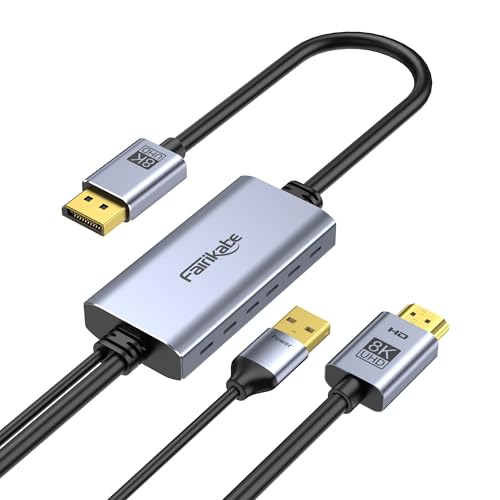
The high-refresh specialist that open up 4K 144Hz and even 8K 30Hz for serious gamers.
This is the cable you reach for when standard 60Hz feels sluggish. It supports HDMI 2.1 to DisplayPort 1.4, which means it can handle 4K at 144Hz (silky smooth for competitive gaming) or 8K at 30Hz for extreme pixel density. It is backward compatible with 1080p at 120Hz and 1440p at 240Hz, giving you headroom for virtually any gaming monitor’s peak refresh rate. Owners running an Xbox Series X paired with a Samsung G5 Ultrawide 34″ monitor report achieving UHD 4K at 120fps — something a standard HDMI connection could not do.
The trade-off is that achieving those high refresh rates depends on your monitor’s DisplayPort version. The cable is 6 feet long (more reach than the Reborn’s 3 feet) and it absolutely requires its USB-A power cable connected. It is also strictly unidirectional and will not work through any hub, KVM, or docking station — it must connect directly from the HDMI PC to the DP monitor. Owners note the build quality is excellent and the connection is driver-free.
The firepower
- Supports up to 4K 144Hz and 8K 30Hz — the next highest is 4K 120Hz on the Club 3D
- 6-foot length offers flexibility for desktop setups where the console or PC sits under the desk
- Enables Xbox Series X to hit 4K 120fps on DP-only monitors, solving a common console FPS cap
The setup demands
- USB-A power cable must be plugged in at all times; the adapter does not work without it
- Does not work with any dock, hub, splitter, or extension cable — direct connection only
- Xbox Series X owners need a monitor with a DP 1.4 port that supports 4K 144Hz, or the full resolution will not be available
Perfect for: gamers who own a high-refresh-rate DP monitor (144Hz or higher) and want to drive it from an HDMI 2.1 laptop or console like the Xbox Series X.
skip it if: your monitor is older than DP 1.4 or you need to run the adapter through a dock — it will not work.
4. Club 3D HDMI 2.1 to DisplayPort 1.4 Active Adapter CAC-1335
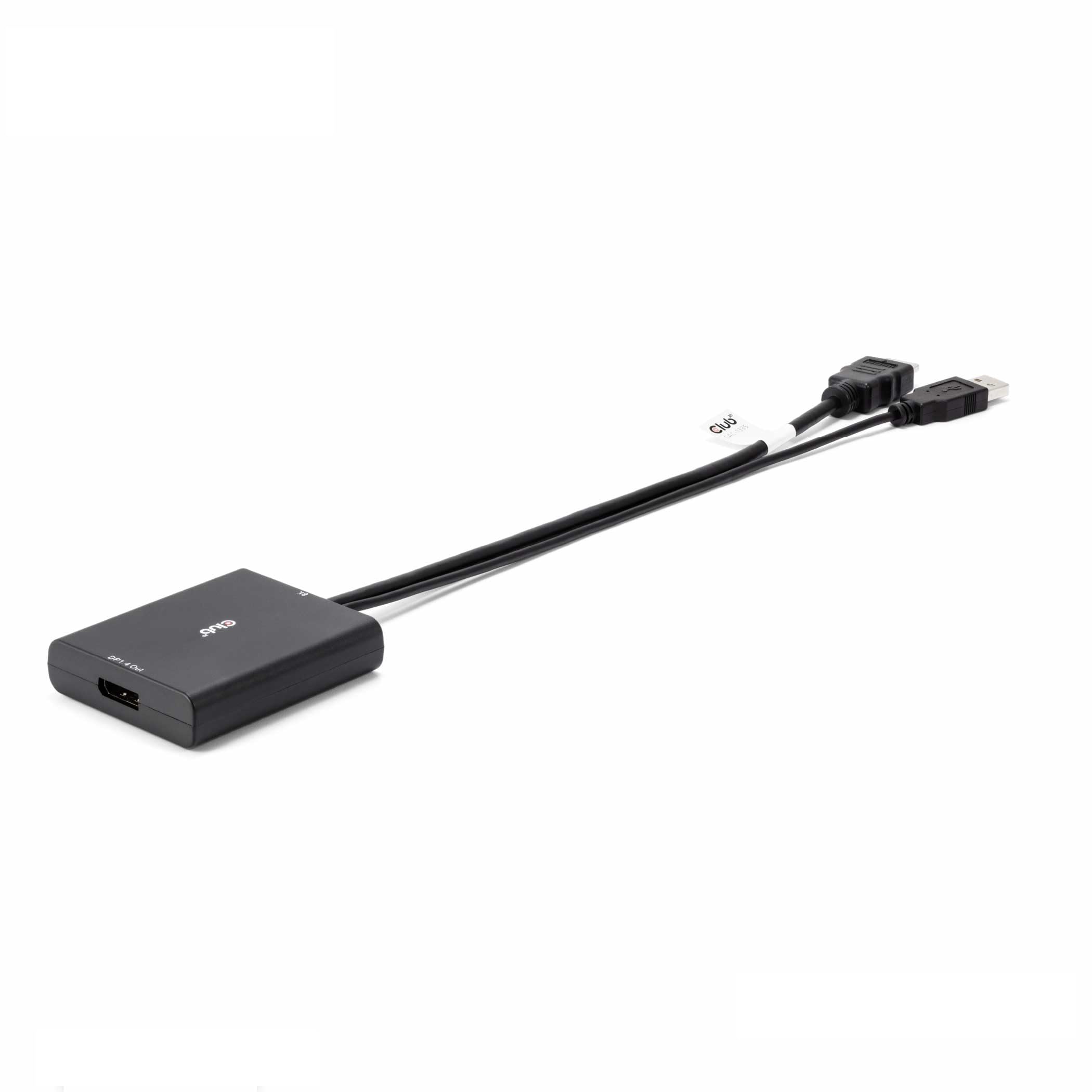
The name-brand adapter with a 2-year warranty that handles 4K 120Hz and works across Windows and macOS.
Club 3D has been making display adapters for years, and this model brings HDMI 2.1 to DisplayPort 1.4 conversion with a reputation for stable signal. It outputs 4K at 120Hz or 8K at 30Hz, and as a male-to-female dongle it lets you use your own DP cable. Owners describe it as plug-and-play, with one noting it “worked right from the start” for a PS5 to TV connection. It is also RoHS, FCC, and CE certified, plus comes with a 2-year manufacturer warranty and lifetime technical support — the best safety net of any pick here.
The honest picture is that compatibility is a mixed bag. While it works well for 1080p 120Hz and basic 4K 60Hz, some reviewers point out it does not reliably hit 4K 120Hz on every monitor, and PS5 Pro support is absent. Screen flickering is mentioned by several owners, particularly during startup. One buyer with a Samsung Odyssey G5 and Xbox Series S reported it enabled full 165Hz but noted FreeSync blocked refresh rate adjustment initially, requiring extra setup. It requires USB power connected to your motherboard or a power source, not just a hub.
The advantages
- Full certification (RoHS, FCC, CE) and a 2-year manufacturer warranty — rare in this category
- Supports 4K 120Hz and 8K 30Hz for high-end monitors and next-gen consoles
- Compact male-to-female design works with any DP cable you choose; no need to buy a new one
The fine print
- Some shoppers say screen flickering and a 10-second dropout once per session on PS5
- Does not support 4K 120Hz for every monitor — verify your display’s DP 1.4 specs before buying
- Does not work with PS5 Pro; Mac and laptop compatibility requires the USB plugged directly into the motherboard
Best suited for: buyers who want a brand they recognize, a warranty, and 4K 120Hz capability from a console to a DP monitor — especially if you are willing to tinker with settings.
Not ideal for: anyone who needs guaranteed plug-and-play on a PS5 Pro or expects flawless 4K 120Hz on every monitor without testing cables.
Understanding the Specs
HDMI 2.0 vs 2.1
HDMI 2.0 handles up to 4K at 60Hz, which is plenty for movies, work, and casual gaming. HDMI 2.1 doubles the bandwidth to support 4K at 120Hz or even 8K at 30Hz — essential for next-gen consoles and high-refresh PC gaming. An adapter labeled HDMI 2.1 can still work with an HDMI 2.0 source, but will be limited to that source’s max output.
DisplayPort 1.2 vs 1.4
DisplayPort 1.2 maxes out at 4K 60Hz and is found on most mid-range monitors. DP 1.4 nearly doubles the bandwidth, enabling 4K at 120Hz or 144Hz and 8K at 30Hz. If you plug a DP 1.4 adapter into a DP 1.2 monitor, you get DP 1.2 speeds — the monitor is the bottleneck, not the cable.
Male-to-Male vs Male-to-Female
A male-to-male cable is a one-piece solution — plug both ends and you are done. A male-to-female dongle converts your source’s HDMI port into a female DisplayPort jack, letting you attach any standard DP cable. The dongle is more flexible (use a longer, existing DP cable) but adds one more connection point that could loosen over time.
Micro-USB Power
An active chip needs electricity to translate the HDMI signal. Every adapter here has a micro-USB port for external power. Plugging it into a USB port on your laptop, console, or wall adapter is required for stable output at the listed resolution. Without power, many adapters flicker or output only a lower resolution.
FAQ
Can I use a regular HDMI cable for HDMI to DisplayPort?
Will an active HDMI to DisplayPort adapter work with a KVM switch?
Why does my adapter need a USB power cable?
Does this adapter work with a PS5 or Xbox Series X?
What is the difference between active and passive DisplayPort adapters?
Can I use a DisplayPort to HDMI adapter in reverse?
Will a 6-foot adapter work with a monitor 3 feet away?
Why is my screen flickering with a new adapter?
Does the adapter support 1440p at 144Hz?
Will these adapters work with a MacBook or Apple TV?
Final Thoughts: The Verdict
For most people, the best active hdmi to displayport adapter is the Reborn 3FT Cable because it is the most proven fix for standard 4K 60Hz setups, backed by the most owner feedback here. If you need to hook a PS5 or Xbox to a monitor at high refresh rates, grab the fairikabe 6FT Cable for its 4K 144Hz headroom. And for a flexible dongle that lets you use your own DP cable at a value price, the UANTIN Adapter is the one to reach for.
How We Picked
We do not accept paid placement. Every pick is matched to a real buyer and a real use-case; we do not hands-on test units.
Sources & Methodology
Specifications: manufacturer listings and product documentation. Review insights: verified customer reviews, as of July 2026. Pricing: not shown on this page (it changes often); check the current price via the retailer link.
As an Amazon Associate, Gadgets Feed earns from qualifying purchases. This does not affect which products we feature.