
Our readers keep the lights on and my morning glass full of iced black tea. As an Amazon Associate, I earn from qualifying purchases.
Specs are compiled from manufacturer listings and verified buyer reviews and can change over time — please confirm the key details on the product page before buying.
A radiator fan has one job: push air through the dense metal fins of a liquid cooler. A case fan that moves lots of air freely can choke completely once mounted against a radiator. The right 120mm radiator fan fights resistance — it needs high static pressure (the force that shoves air through tight gaps) and a noise level you can live with at your desk, not just numbers on a box. This guide picks the nine fans that actually deliver that pressure without sounding like a small vacuum.
I’m Min — the founder and writer behind Gadgets Feed. This guide is built by comparing the manufacturers’ published specifications and the patterns across verified customer reviews, so you get each pick’s real strengths and trade-offs instead of marketing spin.
You are about to see the tightest competition in PC cooling — where a 1 dB difference or a 100 RPM range separates the right fit from the one that leaves your loop running warm. After reading, you will know exactly which 120mm radiator fan earns a spot on your build.
Our Picks at a Glance


How To Choose The Best 120mm Radiator Fan
A radiator is a restriction. The fan you bolt onto it must create enough pressure difference to pull or push air through every channel. Here is what actually separates a good radiator fan from a noisy, disappointing one.
Static Pressure — The Force That Matters Most
Airflow (CFM) measures how much air a fan moves with zero resistance. Static pressure (mmH₂O) measures how much force it can apply against a restriction. On a radiator, you need the second number. A fan with high CFM but low static pressure sounds fast but moves almost no air through the fins — your coolant stays hot and your ears suffer. Look for a fan that lists its static pressure spec, ideally above 1.5 mmH₂O for a 120mm radiator fan.
Noise Level — The Real-World Limit
Every fan lists its noise rating in decibels (dB(A)). The catch is that a fan is only as quiet as its speed curve lets it be. A fan rated at 22.5 dB at 1800 RPM is vastly different from one hitting 36 dB at 2400 RPM. A good radiator fan has a wide PWM range (ideally 300-2000+ RPM) so you can set a low-speed idle curve that is virtually silent and let it ramp up only when the coolant temperature demands it.
Bearing Type and Lifespan
The bearing determines how the blade spins. Fluid Dynamic Bearings (FDB) use a thin layer of oil and are the quietest, longest-lasting option on the market — they commonly last 60,000 to 300,000 hours. Rifle bearings are a budget-friendly alternative but wear faster. Magnetic levitation bearings are excellent in ASUS ROG fans, reaching 400,000 hours. For a fan that will run 24/7 on a radiator, FDB or MagLev is worth the money over a sleeve bearing.
Quick Comparison
| Model | Best For | Static Pressure | Noise | Speed Range | Amazon |
|---|---|---|---|---|---|
| Noctua NF-P12 redux-1700★ Best Overall | Balanced all-rounder | — | 25.1 dB | Up to 1700 RPM | Amazon |
| Thermalright TL-C12C-S X3Best Value | Budget multi-pack | 1.53 mmH₂O | 25.6 dB | Up to 1550 RPM | Amazon |
| be quiet! Pure Wings 3 High-SpeedHigh-Speed Workhorse | High-speed silence | — | 30.9 dB | Up to 2100 RPM | Amazon |
| ASUS ROG Strix XF120 | Whisper-quiet premium | — | 22.5 dB | 250-1800 RPM | Amazon |
| NZXT F120P | Radiator static pressure | — | 30 dB | Up to 2000 RPM | Amazon |
| ARCTIC P12 Pro PST 5-Pack | Maximum cooling potential | — | — | 600-3000 RPM | Amazon |
| be quiet! Silent Wings 4 | Premium build + quiet | — | 31.2 dB | Up to 2500 RPM | Amazon |
| Noctua NF-A12x25 G2 PWM | No-compromise engineering | — | 22.5 dB | 360-1800 RPM | Amazon |
| Corsair iCUE Link LX120 RGB | RGB + daisy-chain hub | 5.22 mmH₂O | 36 dB | Up to 2400 RPM | Amazon |
In‑Depth Reviews
1. Noctua NF-P12 redux-1700 PWM
Our pick — over 4.5★ from 19,500+ verified ratings; the strongest balance of quality and price.
The quiet crowd favorite that just works on any radiator.
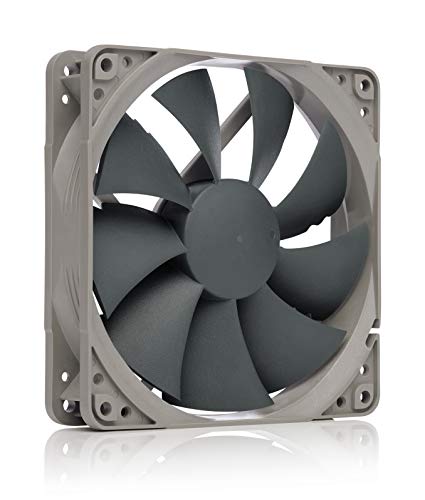
This is the fan thousands of builders reach for when they don’t want to think about their radiator fans again. The NF-P12 redux-1700 runs at a maximum of 1700 RPM and produces just 25.1 dB of noise — a level owners describe as “low noise even under load.” Its pressure-optimised blade design pushes strong CFM through the tight fins of a water cooling radiator, and the 4-pin PWM connector lets your motherboard automatically drop the speed to near-silent when the system is idle. The crowd favorite — 4.8 stars across 19,000+ ratings — tells you this is not a gamble.
The redux edition strips away the premium packaging and coloured anti-vibration mounts to hit a better price, but keeps the same glass-fibre reinforced PBT frame and the over-150,000-hour MTTF bearing. It is a 120mm radiator fan built to outlive your current build and the one after it. Buyers on the review pages sum it up: “it’s quiet, yet still powerful. In my personal builds I won’t put anything else in my PC’s.”
Budget PWM workhorse: The noise level earns the most owner praise by a wide margin — you get near-silent operation under load and the confidence of Noctua’s reliability. The catch is the 1700 RPM ceiling: it does not spin as fast as the be quiet! Pure Wings 3 (2100 RPM) or the ARCTIC P12 Pro (3000 RPM), so if you need extreme cooling for a high-heat CPU loop you may want a faster option.
Value pick: You want a proven, quiet, reliable fan that works on radiators without drama or high cost.
High-airflow builds: Your radiator needs every last degree of thermal headroom and you are willing to trade noise for speed.
2. Thermalright TL-C12C-S X3
Three ARGB fans that cost less than one premium single.
If you are equipping a full loop or a case that needs multiple radiator fans, this triple-pack changes the math completely. Each TL-C12C-S pushes 66.17 CFM of air at a maximum of 1550 RPM and a noise level of 25.6 dB. That airflow of 66.17 CFM is higher than the be quiet! Pure Wings 3 at 59.6 CFM, even at a significantly lower top speed. The S-FDB bearing (a fluid dynamic bearing variant) keeps the fan quiet at mid-range speeds and extends the lifespan.
The ARGB lighting uses high-brightness LED atomizing blades that soften the effect, and up to 17 modes are available when synced through a compatible motherboard. The daisy-chain connector and included screws make installation quick. The crowd is sold: the top owner praise is value for money, with buyers calling them “stellar for the price” and noting strong temperature drops. Just be aware the noise level gets mixed feedback at higher RPM — one owner notes they “get EXTREMELY loud when put close to 75%.”
Triple-pack value: You get three good 120mm radiator fans with ARGB for less than one premium fan. The trade-off is noise control: above 75% speed the fans become loud, so plan on a sensible fan curve to keep them in the quiet zone.
Budget bundle: You need multiple fans for a radiator or case and want ARGB plus solid airflow without spending big.
Silent builds: You need the quietest possible operation at full speed and are willing to pay more per fan.
3. be quiet! Pure Wings 3 120mm PWM High-Speed
Spins faster than most without sounding like it.
Here is the fan you pick when your radiator needs serious air movement but you can’t stand the whine of typical high-speed fans. The Pure Wings 3 reaches 2100 RPM, while the Thermalright TL-C12C-S reaches 1550 RPM — yet its maximum noise rating stays at 30.9 dB. That is louder than the Noctua NF-P12 redux-1700 (25.1 dB), but far quieter than what most 2100 RPM fans produce. Owners describe it as “near-silent operation even under load” and report CPU temperature drops of up to 10°C.
The fan frame is designed specifically for radiators — the outlet shape optimises pressure against the dense fin stack. The rifle bearing is rated for 80,000 hours. It is also noticeably heavier than the Thermalright at 180 grams vs 100 grams, which speaks to the stiffer polycarbonate construction. One owner who replaced the fans on a Thermalright AIO noted “improved airflow and noise; CPU temps 2-3°C lower.”
Quiet high-speed: You get 2100 RPM of radiator-pushing power that most owners call quiet. The rifle bearing is fine but has a shorter lifespan than the FDB bearings in the Silent Wings 4 or NF-P12 — not a concern for most builds, but note for 24/7 servers.
Silent airflow: You have a thick radiator or high-heat CPU and want a fan that can push hard at high speed without annoying you at your desk.
Radiator duty: You need absolute silence at high RPM — the Silent Wings 4 (31.2 dB) or ASUS ROG Strix XF120 (22.5 dB) are quieter options for less demanding loops.
4. ASUS ROG Strix XF120

The most silent fan here — and built to run for decades.
At just 22.5 dB maximum noise, the XF120 is tied with the Noctua NF-A12x25 G2 for the quietest fan in this lineup. But where the Noctua uses a conventional SSO2 bearing, the XF120 uses a magnetic levitation (MagLev) bearing that stabilises the rotor and virtually eliminates friction. The result is a rated lifespan of 400,000 hours — that is over 45 years of continuous operation. For a radiator fan that sits in your system 24/7, that is effectively permanent.
The XF120 moves 62.5 CFM at its peak 1800 RPM, and its operating range stretches from 250 RPM to 1800 RPM, giving you massive flexibility in tuning a quiet fan curve. The fan frame and blades are aerodynamically designed to minimise turbulence, and the included anti-vibration pads prevent rattling. One owner reported gaming temperatures dropped by about 10°C (from 80-90°C down to 70-80°C on a 7900X).
Premium bearing: Noise level is the top praise from owners — it is genuinely whisper-quiet even at full load. The MagLev bearing is the longest-lasting in this guide at 400,000 hours. The only catch is the limited CFM at 1800 RPM: it pushes less air than the NZXT F120P (73.47 CFM) or the Silent Wings 4 (76.7 CFM), so it is best on slim radiators or as a case exhaust.
Quiet performance: Silence is your top priority and you want a fan that will outlast every other component in your case.
Budget builds: You need maximum CFM for a high-heat loop — the Silent Wings 4 (76.7 CFM) or the ARCTIC P12 Pro (77 CFM) push more air per spin.
5. NZXT F120P

Designed specifically to push air through dense resistance.
The F120P is an explicit static-pressure fan — its seven thick blades and chamfered frame are tuned to ram air through tight spaces like radiator fins and heatsinks. At 2000 RPM it delivers 73.47 CFM and 30 dB of noise, which puts it solidly in the high-performance tier without being overly loud. The fluid dynamic bearing has a 60,000-hour lifespan, which is shorter than the competing MagLev but still plenty for several years of daily use.
The non-RGB, all-black design makes it a clean choice for builders who want performance without lighting. One owner who replaced the stock fans on an NZXT 280mm AIO reported “an immediate improvement in my cooler’s performance with less noise.” The main note from owners is the fan can “get a bit loud at times” — but that is the trade-off for the higher static pressure needed for thick radiators.
Radiator tune: The high static pressure rating is exactly what a radiator needs. The 60,000-hour bearing is adequate but not class-leading. The noise level is fine for a mid-range build, but if you are chasing absolute silence the ASUS XF120 (22.5 dB) or the Noctua NF-A12x25 (22.5 dB) are noticeably quieter.
Liquid cooling: You have a thick, dense radiator that needs real static pressure to stay cool, and you want a simple non-RGB design.
Case fans: Your build sits on your desk and even moderate fan noise bothers you — the F120P at 2000 RPM is not silent.
6. ARCTIC P12 Pro PST 5-Pack

An insane speed range — from stopped to 3000 RPM.
This is the fan you grab when nothing else cools your loop enough. The P12 Pro PST has a PWM range from 0 RPM (it stops completely below 5% PWM) all the way up to 3000 RPM — a massive speed envelope that gives you total control. At full tilt it pushes 77 CFM of air, the highest airflow of any single fan in this guide. The high static pressure means it penetrates dense radiators easily, and the redesigned rotor blades balance performance and noise better than the previous P12 generation.
The five-pack includes Y-cable splitters for daisy chaining multiple fans. The fluid dynamic bearing runs smoothly and quietly. The catch, as owners make clear, is the noise at high speed: “Loud at full speed but they push tons of air into my case so I can’t be too mad,” one notes. At low speeds the fans are “almost silently” — you just need a sensible fan curve to keep them out of the loud zone unless you actually need that 3000 RPM cooling.
High static pressure: 3000 RPM and 77 CFM is the maximum thermal headroom you can get in a 120mm fan. The noise level is mixed — it is very quiet at low speeds but becomes loud near max RPM. The build quality and value for money are top-rated by owners, and the daisy-chain ability makes a multi-fan radiator setup clean.
Extreme cooling: You have a high-heat CPU loop that needs the maximum possible cooling, and you are comfortable tuning a fan curve to manage noise.
Quiet systems: You want a fan that stays quiet at all speeds — the P12 Pro at 3000 RPM is not that fan.
7. be quiet! Silent Wings 4 120mm PWM High Speed

A 6-pole motor and FDB bearing for near-silent 2500 RPM.
This is be quiet!’s flagship 120mm fan, and it shows in every detail. The Silent Wings 4 spins at up to 2500 RPM but produces only 31.2 dB — an impressive feat thanks to its 6-pole, 3-phase motor that reduces vibration and power consumption. The airflow reaches 76.7 CFM, which is class-leading for a 120mm fan and puts it ahead of the NZXT F120P (73.47 CFM) and the ASUS XF120 (62.5 CFM).
The fluid dynamic bearing is rated for an extraordinary 300,000 hours, and the fan comes with two mounting options: anti-vibration mounts for case use and plastic studs for radiators and heatsinks. The funnel-shaped frame reduces the gap between blade tips and frame to boost pressure. Owners praise the build quality — “one of the very best airflow fans on the market” — and note it handles demanding CPU/GPU upgrades with ease. The noise level is mixed: some call it “super quiet,” while others note it becomes audible at about 30% speed.
Top-tier quiet: At 76.7 CFM and 2500 RPM, this is a true high-airflow fan that stays impressively quiet given its speed. The FDB bearing at 300,000 hours and the quality construction justify the price. The noise level is mixed because at higher speeds it is audible — it is quiet for its class, but not as silent as the ASUS XF120 (22.5 dB).
Silent premium: You want premium build quality and the highest possible airflow from a 120mm fan while keeping noise reasonable.
Budget builds: You need absolute silence — the Silent Wings 4 at full speed is not the quietest fan here.
8. Noctua NF-A12x25 G2 PWM

The state-of-the-art 120mm fan — and it costs like it.
Noctua’s second-generation A12x25 is a ground-up reengineering of what a 120mm fan can be. It uses Sterrox LCP (liquid-crystal polymer) for the impeller, allowing an ultra-tight tip clearance that dramatically reduces air leakage past the blades. The result is 107.3 m³/h of airflow (roughly 63 CFM) and just 22.5 dB of noise at 1800 RPM — matching the ASUS XF120 for silence while offering a fan that can stop completely at 0% PWM for semi-passive operation.
The included accessory kit is class-leading: anti-vibration mounts, a full-size sealing gasket for radiators, a low-noise adaptor, an extension cable, and a Y-splitter for running two fans on one header. The SSO2 bearing is rated for over 150,000 hours and backed by UL and TÜV safety certifications. One owner who replaced an AIO stock fan reported “CPU temps dropped about 5°C under load.” The main drawback is the price — it costs more than some budget AIOs themselves.
Best engineering: The only fan in this guide that combines 22.5 dB noise, 1800 RPM speed, a semi-passive stop mode, and a Sterrox LCP frame. Owner praise for quiet operation is the top positive aspect. The value for money is mixed — you are paying for the absolute best, and if you don’t need that, the NF-P12 redux gets you 90% of the result for half the price.
Ultimate choice: You want the single best-performing, quietest 120mm radiator fan money can buy, and the price is not a barrier.
Value seekers: You are on a budget — the NF-P12 redux (25.1 dB, 1700 RPM) is a far better value for most builds.
9. Corsair iCUE Link LX120 RGB Triple Pack

Brilliant dual-loop RGB with real radiator static pressure.
Most RGB fans sacrifice static pressure for looks. The LX120 does not. It delivers 69.9 CFM with a static pressure of 5.22 mmH₂O at 2400 RPM, meaning it has real force behind the glow — enough to push through a thick radiator. The 18 LEDs per fan are split across an inner and outer loop for a bright, even light effect that syncs with any iCUE ecosystem device. At 36 dB, it is the loudest fan in this guide at full speed, but the Magnetic Dome bearing keeps it quiet at mid-range RPM.
The iCUE Link system is the real innovation. The included bridge connectors link fans directly to each other without a nest of individual wires — one cable runs from the bank to the System Hub, which supports up to 12 fans per port. Buyers report “night-and-day visual/performance upgrade” and note that the LX outperforms Corsair’s own QX120 in both airflow and static pressure. The price is high (the triple-pack sits at a premium level), and some find the iCUE software takes patience to set up, but the combination of serious radiator performance and stunning lighting is unique.
RGB + cooling: At 5.22 mmH₂O static pressure and 69.9 CFM, this is a genuine radiator fan, not just a pretty light show. The quality and ease of installation are the top owner praises. The noise is 36 dB at full speed — the highest in this guide — but at a sensible fan curve it is perfectly livable. The price is steep, but the triple-pack with the hub is the most efficient way to equip a full loop.
RGB performance: You want a full RGB build with real radiator performance and the cable-management benefits of the iCUE Link system.
No-LED builds: You are on a tight budget, you don’t care about RGB, or you need the absolute quietest operation at high speeds.
Understanding the Specs
Static Pressure (mmH₂O)
This is the force the fan can push air against a restriction. On a radiator, static pressure is the critical spec. A fan with high CFM but low static pressure will sound fast but barely push air through the dense fins. Look for at least 1.5 mmH₂O for a thin radiator and 3 mmH₂O or more for thick radiators. The Corsair LX120 leads here at 5.22 mmH₂O, while the Thermalright TL-C12C-S has 1.53 mmH₂O — better suited for slim radiators.
Noise Level (dB(A))
Decibels measure sound pressure. The dB scale is logarithmic, so a 3 dB increase is roughly twice the sound intensity. A 22.5 dB fan (like the ASUS XF120 or Noctua NF-A12x25) is whisper-quiet. A 31.2 dB fan (like the Silent Wings 4) is audible but not annoying. A 36 dB fan (like the Corsair LX120) is clearly noticeable at full speed. A good radiator fan lets you stay in the 22-30 dB range with a sensible fan curve.
PWM Speed Range (RPM)
Pulse Width Modulation allows your motherboard to adjust fan speed automatically based on temperature. A wide speed range means more control: the fan can run nearly silently at low load (300-800 RPM) and ramp up when the coolant heats up. The ARCTIC P12 Pro offers the widest range here — 0 RPM (stopped) to 3000 RPM. Noctua’s NF-A12x25 also offers a useful 360-1800 RPM range with a stop-at-0% PWM mode for zero-noise idle.
Bearing Type and Lifespan (Hours)
The bearing is the part that wears out. Fluid Dynamic Bearings (FDB) are the quietest and longest-lasting, with rated lifespans of 60,000-300,000 hours. Rifle bearings are cheaper and shorter-lived (80,000 hours in the Pure Wings 3). Magnetic levitation bearings (MagLev) in the ASUS XF120 offer a massive 400,000 hours by eliminating physical contact. For a fan that runs 24/7 on a radiator, FDB or MagLev is worth it.
FAQ
Can I use any 120mm case fan on a radiator?
How many 120mm radiator fans do I need for a typical AIO?
What is the difference between PWM and DC fan control?
Will a 120mm radiator fan fit any standard case?
Does a fan with higher RPM always cool better?
Can I daisy chain multiple 120mm radiator fans on one header?
How long does a 120mm radiator fan typically last?
Are ARGB radiator fans worth it for performance?
What is the quietest 120mm radiator fan I can buy?
Why does my radiator fan sound like a jet engine at full speed?
Final Thoughts: The Verdict
Across the board, the 120mm radiator fan winner is the Noctua NF-P12 redux-1700 PWM because it nails the most important trade-off — low 25.1 dB noise, proven pressure-optimised blade design, and an unbeatable 19,000+ rating track record at a price that does not make you flinch. If you want the maximum possible cooling from a single fan, the ARCTIC P12 Pro PST 5-Pack offers an insane 3000 RPM speed range and 77 CFM airflow for extreme loops. And for a premium silent build with class-leading noise figures, the Noctua NF-A12x25 G2 PWM (22.5 dB) or the ASUS ROG Strix XF120 (also 22.5 dB with a 400,000-hour bearing) are the quietest options you can buy — just be prepared for the higher price tag. Every fan in this guide will keep your radiator running cool; the right one depends on how much noise you tolerate and how much air you need.
How We Picked
We do not accept paid placement. Every pick is matched to a real buyer and a real use-case; we do not hands-on test units.
Sources & Methodology
Specifications: manufacturer listings and product documentation. Review insights: verified customer reviews, as of July 2026. Pricing: not shown on this page (it changes often); check the current price via the retailer link.
As an Amazon Associate, Gadgets Feed earns from qualifying purchases. This does not affect which products we feature.