
Our readers keep the lights on and my morning glass full of iced black tea. As an Amazon Associate, I earn from qualifying purchases.
Specs are compiled from manufacturer listings and verified buyer reviews and can change over time — please confirm the key details on the product page before buying.
A dead hard drive is the nightmare that wakes people up. You need storage that keeps your files safe, not one that turns a project or family photos into a recovery bill. This guide cuts through the noise to find the 300 GB hard drive that belongs in your machine or bag.
I’m Min — the founder and writer behind Gadgets Feed. This guide is built by comparing the manufacturers’ published specifications and the patterns across verified customer reviews, so you get each pick’s real strengths and trade-offs instead of marketing spin.
if you need a rugged portable drive for a gaming console or a high-speed internal workhorse for a workstation, these are the picks that define the best 300 gb hard drive options available right now.
Our Picks at a Glance


How To Choose The Best 300 GB Hard Drive
Choosing the right drive is about more than just capacity. Match the drive’s internal design to where you plan to use it. The key specs that separate a great fit from a frustrating one are interface type, rotational speed, and physical size.
Interface: SATA vs. SAS
The connector on the drive must match your computer or server. SATA is the standard for most home PCs, laptops, and game consoles. SAS is a different, more enterprise-focused interface usually found in servers and workstations that need higher reliability and performance. A SAS drive will not fit into a standard SATA port, so check your motherboard or enclosure first.
Spindle Speed: 5400, 7200, 10000, or 15000 RPM
This is how fast the platters spin. A faster speed means quicker access to your files. A 5400 RPM drive is for bulk storage where you don’t need speed. A 7200 RPM drive is a good middle ground for an OS and games. The 10,000 RPM and 15,000 RPM drives are designed for performance workstations and servers where every millisecond matters, though they run warmer and are louder than slower options.
Quick Comparison
| Model | Best For | Capacity | Interface | Spindle Speed | Amazon |
|---|---|---|---|---|---|
| Maxone 320GB★ Best Overall | Everyday Portable Storage | 320 GB | USB 3.0 | — | Amazon |
| WD VelociRaptor 300GBTop Performer | High-Performance Desktop OS | 300 GB | SATA III | 10000 RPM | Amazon |
| YOTUO 500GBGreat Value | Multi-Device Versatility | 500 GB | USB 3.0 & USB-C | — | Amazon |
| PILCNLA 250GB | Budget Console Storage | 250 GB | USB 3.0 | 7200 RPM | Amazon |
| Caraele 320GB | Compact Travel Drive | 320 GB | USB 3.0 | — | Amazon |
| Tianken 250GB | Basic File Backup | 250 GB | USB 3.1 Type-C | 5400 RPM | Amazon |
| Seagate 15K 300GB | Enterprise Server Use | 300 GB | SAS 12GB/s | 15000 RPM | Amazon |
| WD VelociRaptor 300GB (Bulk) | Enthusiast Workstation Build | 300 GB | SATA 3Gb/s | 10000 RPM | Amazon |
In‑Depth Reviews
1. Maxone 320GB Ultra Slim Portable External Hard Drive HDD USB 3.0
Our pick — over 4★ from 61,500+ verified ratings; the strongest balance of quality and price.
The pocket-sized aluminum drive that tens of thousands trust with their files.
You get a drive that is merely 0.4 inch thick, built from an all-aluminum anti-scratch shell that keeps it cool and quiet during long transfers. The USB 3.0 connection delivers transfer speeds up to 5 Gbit/s, which is what makes moving 4,000 photos in about an hour a reality — as buyers report. It runs plug-and-play on Windows 7 through 11 and works with both PCs and Macs without needing any extra software or external power supply.
The trade-off here is the port. Its slim design means the USB connector can be fragile if you toss the drive loosely into a bag. One reviewer noted the port broke after just two weeks when carried that way. The overall build quality is praised most by owners, with hundreds of comments about it feeling solid and reliable for daily use — just keep it in a sleeve or case when you travel.
Why it wins
- Slim aluminum body (0.4 inch) stays cool and looks sharp — ideal for a laptop bag.
- Plug-and-play setup recognized by Windows, Mac, PS4, and Xbox One without any software.
- Backed by a 3-year manufacturer warranty with free technical support.
Watch out for
- USB port can be vulnerable if the drive is tossed into a bag unprotected — treat it gently.
- Speed can feel slow on very large single file transfers beyond 70 GB.
Reach for this if: You need a slim, portable drive for everyday backups and file transfers that is proven by a huge owner base.
Not the best bet for: Rough-and-tumble daily carry without a case — the port is its Achilles’ heel.
2. WD VelociRaptor 300 GB Workstation Hard Drive (WD3000HLHX)
The enduring king of mechanical drives for an OS that refuses to retire.
This 3.5-inch internal drive spins at 10,000 RPM with a 32 MB cache and a SATA III interface, delivering a peak read speed around 145 MB/s. The crowd favorite here is reliability — hundreds of owners praise it for solid performance, with one long-time user noting its access time is half that of most standard drives. It runs quiet for its speed class, and buyers frequently say it is barely audible during regular operation.
The honest downside is that this is a niche product today. It is noticeably faster than a 7200 RPM drive for booting a system and loading applications, but it cannot match the instant access of an SSD. At 300 GB, the capacity is tight for a modern OS and a handful of games. The value proposition is strong if you need a fast mechanical drive for a legacy workstation or a RAID array where SSD wear is a concern, but for a standard PC build, you are better off with an SSD for this price.
Its superpower: 10K RPM spindle speed and 32 MB cache give you noticeably snappier boot and app loading than a typical desktop drive.
The honest call: If you already have an SSD for your OS, skip this. If you need a reliable, fast mechanical drive for a performance workstation or server, this is the one.
Best for: Enthusiasts and workstation builders who want the fastest mechanical drive money can buy for an OS or RAID 1 setup.
Think twice if: You are building a new PC — a budget SSD will outperform it in daily feel and has no moving parts to fail.
3. YOTUO 500GB External Hard Drive, Portable Storage Expansion HDD
The budget-friendly drive that doubles as a console expansion card.
This 500 GB portable drive uses a patented built-in silicone sleeve that acts like shock-absorbing armor, cushioning the hard disk against bumps and drops. That extra physical protection puts it a step ahead of many bare-metal portable drives like the Maxone 320GB for people who toss their tech in a backpack. It connects via USB 3.0 (5 Gbps speeds) and includes a cable with both standard USB and USB-C ends, making it compatible with everything from a MacBook to a PS5. Owners mention it works immediately with Windows 10 and can transfer thousands of photos without any hiccups.
The main reservation is reliability — it is the most-discussed aspect among owners, and it carries a mixed verdict. While many say it works perfectly for file backup and PS4 game storage, a small fraction report the drive becoming corrupt or unrecognized after transferring a large amount of data. It offers great value for the money, and the silicone sleeve gives you real confidence that a standard drive lacks, but treat it as a secondary backup drive, not your only copy of irreplaceable files.
What wins people over: The shock-absorbing silicone sleeve and dual USB-C/USB 3.0 cable make it the most versatile and physically protected portable drive on this list.
The trade-off: The occasional report of errors means you should keep a secondary backup of anything critical — do not rely on a single drive.
Grab this if: You need a durable external drive for gaming on a PS4 or Xbox One and want to also use it with a laptop — the dual cable is a huge convenience.
Pass it by if: You need to store your only copy of critical work files — invest in a drive with a stronger reliability record.
4. Caraele 320GB Ultra Slim Portable External Hard Drive USB3.0 HDD

The travel-friendly drive that fits in a back pocket and runs without a power brick.
This 320 GB drive is built with an ABS plastic and aluminum finish and measures just 0.47 inch thick — slim enough to slip into a jeans pocket. It claims a USB 3.0 Super Speed transfer rate of 10 Gbps, and the package includes a USB to Type-C adapter so you can plug it into modern laptops without a separate dongle. Setup is genuinely zero-effort: plug it in and it is ready, compatible with Windows, Mac, Linux, Android, and Chromebook.
The catch here is console compatibility. While it works on PCs and Macs smoothly, some customers note it does not connect to PlayStation consoles. The storage capacity and performance are praised most by owners — one buyer mentioned it holds all Sims 4 packs without issue. It runs straight from your device’s USB port with no external power needed, making it perfect for travel, but double-check your console’s compatibility before buying specifically for a PS4 or Xbox.
Why it stands out: The included USB-C adapter makes it low-maintenance for modern laptops, and the slim profile is genuinely pocketable.
Who it is for: Laptop users who want a small, light backup drive for documents, photos, and music — not for console gamers.
Best for: Students or travelers who need a compact, plug-and-play drive for backing up school work or media on a laptop.
Look elsewhere if: You primarily need storage for a PlayStation or Xbox — the compatibility is hit or miss.
5. Seagate Enterprise Performance 15K ST300MP0006 300GB

The server-grade spinner that chews through enterprise workloads at 15,000 RPM.
This 2.5-inch drive is built for enterprise servers, with a spindle speed of 15,000 RPM and a sustained transfer rate of 300 to 210 MB/s. It uses a SAS 12GB/s interface and a massive 256 MB cache, delivering an average latency of just 2.0 ms — that is the kind of speed that makes a database server feel responsive. Owners running homelab servers report it is reliable and fast for a conventional HDD, with one buyer noting the drive worked perfectly and could be registered for the full Seagate warranty.
The critical catch is that this is a SAS drive, not SATA. It will not plug into a standard consumer motherboard without a SAS controller or HBA card. The performance aspect is mixed among owners — while many love it for server use, the failure rate on some batches has been noted as above average in owner-driven reliability databases like Backblaze. At this price point, you are paying for enterprise-grade reliability and speed, but you absolutely need to verify your system supports SAS.
Its defining spec: 15,000 RPM spindle with a 256 MB cache and 2.0 ms latency — it is built to serve data faster than any standard desktop drive.
The reality check: Only buy this if you have a SAS controller. For a standard PC, it is incompatible and the wrong choice.
Perfect for: Homelab enthusiasts and IT pros building out a server or SAN that needs fast, reliable mechanical storage.
Not for: Anyone with a standard desktop or laptop — the SAS interface will not work without expensive additional hardware.
6. Western Digital 300 GB VelociRaptor SATA 3 Gb/s (WD3000HLFS)

The legacy enthusiast drive that still makes older desktops feel brand new.
This is the older generation of the VelociRaptor family, a 2.5-inch drive operating at 10,000 RPM with a 16 MB cache and a SATA 3 Gb/s interface. It comes with an exclusive IcePack mounting frame that keeps the drive cool while delivering maximum performance. Owners consistently say it is lightning-fast and much quieter than a typical 7200 RPM desktop drive. One buyer using two in RAID 0 reported a 40-second Windows 7 boot time and 6-second Starcraft 2 map loads — numbers that show its real-world kick.
The durability feedback is mixed. While many say it has been running flawlessly for years, a small number of reviewers point out failure after just weeks or months of use. The 5-year limited warranty offers some safety net. The SATA 3 Gb/s interface is slower than modern SATA III, but in practice the 10K RPM speed still makes it a fantastic boot drive upgrade for older desktop systems that do not support NVMe or SATA SSDs.
Its best trick: The IcePack mounting frame keeps temperatures low (shoppers say 25-30°C) even under sustained load — a rarity for a 10K RPM drive.
The catch: A small but notable fraction of buyers report early failures, so keep your backups tight.
Ideal for: Reviving a legacy desktop that only has SATA 3Gb/s ports — it is the fastest mechanical upgrade you can make.
skip it if: Your motherboard has SATA III ports — just buy a SATA SSD for less money and more speed.
7. PILCNLA 250GB Ultra Slim Portable External Hard Drive USB3.0
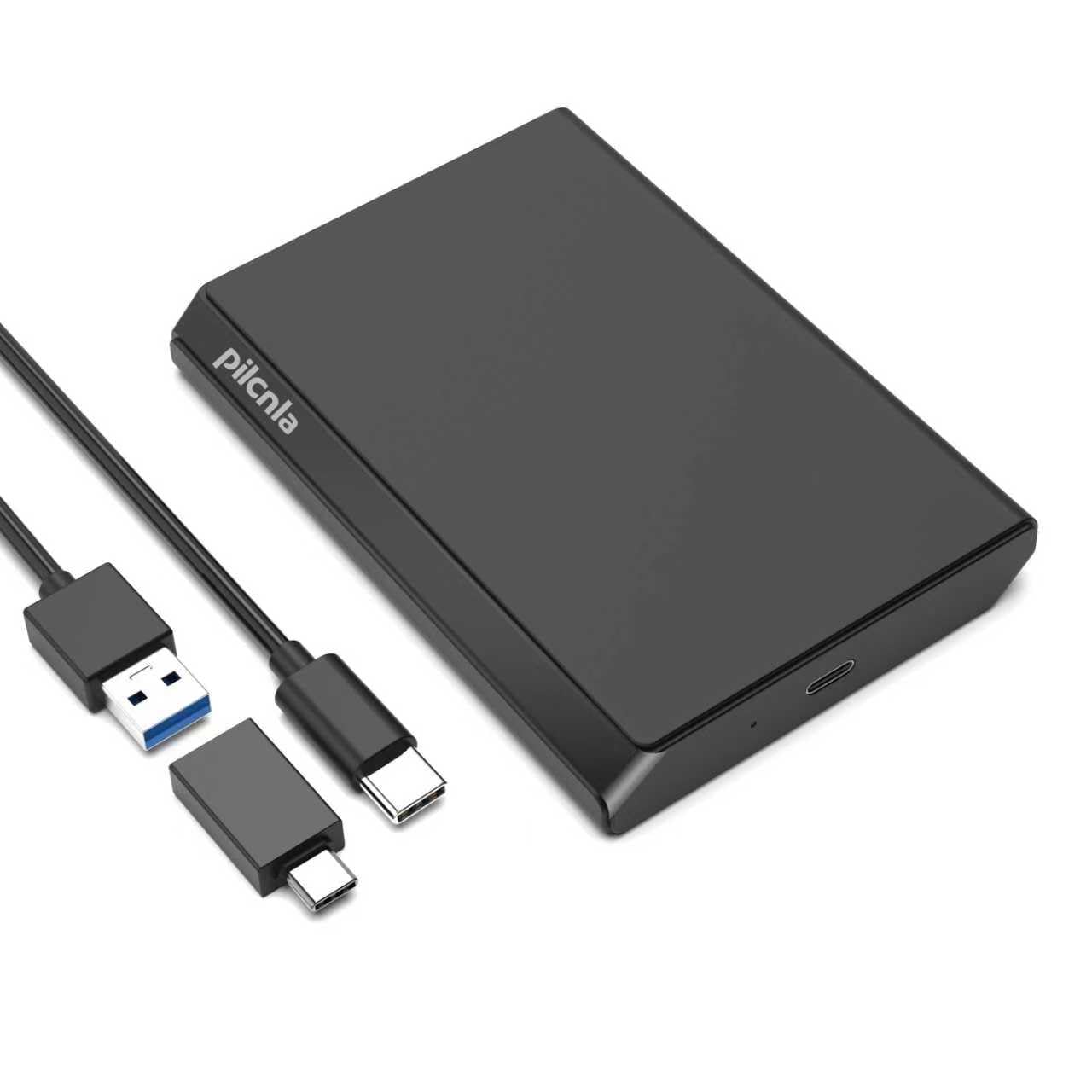
The entry-level console drive that punches above its weight for the price.
This 250 GB drive spins at 7200 RPM and transfers data at up to 5 Gbit/s over USB 3.0. It uses a patented silicone sleeve inside that wraps around the hard disk to protect it against shocks and drops — a rare feature at this price point. Owners confirm it works great for PS5, with one buyer saying they play Call of Duty on it all the time since the console only has 500 GB of internal storage. The drive is also compatible with Xbox One, Xbox 360, PS4, PC, Mac, and Chromebook.
The reason this sits at the budget-friendly end is reliability. The feedback is mixed — while many say it is fast and quiet for the price, a concerning number report the drive keeps disconnecting and reconnecting after about 20 minutes of use. The capacity is also the smallest on this list (250 GB, which formats to about 232.83 GB on Windows). It is a solid backup insurance policy, but the disconnection issue means it is not for anyone who needs guaranteed uptime.
What makes it interesting: The internal silicone shock sleeve and sub-premium price make it a low-risk entry point for external storage.
The honest take: It works great for basic PS4/PS5 game storage if you get a good unit, but the failure reports are real enough to treat it as expendable backup, not a primary work drive.
Reach for this if: You need a dirt-cheap external drive for storing old PS4 games or a casual file backup.
Look elsewhere if: You need a drive you can depend on for everyday work file transfers — the reliability is a gamble.
8. Tianken 250GB Ultra Slim Portable External Hard Drive 2.5” HDD USB 3.1 Type-C

The simple backup drive that is ready to go from the start for any device.
This 250 GB drive uses a USB 3.1 Type-C connection with a 2-in-1 cable that lets you plug into either a standard USB-A or a modern USB-C port, transferring data at up to 10 Gbps. It is pre-formatted and requires no software installation — just plug it in and save photos, movies, music, or games. The 2.5-inch form factor is lightweight at 0.16 kg, and it works with Windows, Mac, Linux, Android, Chromebook, Xbox One, PS4, and even TVs.
The catch is the spindle speed. At 5400 RPM, this is a slower drive meant for archiving files that you do not access frequently. It will feel sluggish if you try to run games or an operating system from it. The enclosure material is listed as aluminum, glass, or ceramic, which is a confusing spec — it looks like a standard plastic body in the product images. For basic photo and document backup where speed does not matter, it does the job reliably, as owners mention it holds a lot of pictures with good quality.
What it does well: The 2-in-1 USB-A and USB-C cable makes it genuinely universal — one cable works with almost any modern computer or console.
The limitation: A 5400 RPM spindle means it is slow for anything beyond basic file storage — do not expect to run apps or games from it.
Best for: Someone who just wants a simple, cheap drive to dump photo archives or old school projects onto and forget about.
Not for: Gamers or anyone who needs fast access to files — the 5400 RPM speed will frustrate you.
Understanding the Specs
Spindle Speed (RPM)
This is how fast the platters inside the drive spin. A higher number — 7,200, 10,000, or 15,000 RPM — means the drive can find and read data faster. For your operating system and games, a drive with a faster spindle speed (7200 RPM or more) will boot and load things noticeably quicker than a slow 5400 RPM drive.
Cache Memory
Think of the cache as the drive’s short-term memory for commonly used data. A larger cache (32 MB, 256 MB) allows the drive to store more frequently accessed data and speed up repeated file operations. It is especially useful when you are multitasking or running an OS from the drive.
FAQ
Can I use a 300 GB hard drive for my PS5 or Xbox Series X?
What is the difference between a SAS and a SATA hard drive?
Will a 250 GB or 320 GB portable drive work with a MacBook?
How long does a 300 GB hard drive typically last?
Why is my external hard drive not showing up on my computer?
Can I install a game directly onto an external hard drive?
Is a 250 GB or 320 GB drive enough for a home server?
What does “7200 RPM” mean for my daily use of a hard drive?
How can I protect my portable hard drive from physical damage?
Is it worth buying a 10,000 RPM hard drive in 2024?
Final Thoughts: The Verdict
For most people, the best 300 gb hard drive winner is the Maxone 320GB because it combines a slim, cool-running aluminum design with proven reliability across tens of thousands of owners at a price that undercuts most of the competition. If you need a durable portable drive for gaming and work that can handle a few bumps, grab the YOTUO 500GB for its shock-absorbing silicone sleeve and universal USB-C cable. And for enthusiasts building a fast workstation OS drive, the WD VelociRaptor 300GB is the one to reach for — as the crowd favorite for a reason.
How We Picked
We do not accept paid placement. Every pick is matched to a real buyer and a real use-case; we do not hands-on test units.
Sources & Methodology
Specifications: manufacturer listings and product documentation. Review insights: verified customer reviews, as of July 2026. Pricing: not shown on this page (it changes often); check the current price via the retailer link.
As an Amazon Associate, Gadgets Feed earns from qualifying purchases. This does not affect which products we feature.