
Our readers keep the lights on and my morning glass full of iced black tea. As an Amazon Associate, I earn from qualifying purchases.
Specs are compiled from manufacturer listings and verified buyer reviews and can change over time — please confirm the key details on the product page before buying.
You have two computers and one monitor taking up your desk. That means a tangle of cables, a keyboard and mouse for each machine, and a lot of wasted time plugging things back and forth. This guide compares the top-rated 2-computer 1-monitor switches that let you share a single screen, a single keyboard, and a single mouse between your work laptop and desktop PC with the press of a button.
I’m Min — the founder and writer behind Gadgets Feed. This guide is built by comparing the manufacturers’ published specifications and the patterns across verified customer reviews, so you get each pick’s real strengths and trade-offs instead of marketing spin.
You can stop crawling under your desk to swap cables between two computers. A 2-computer 1-monitor switch lets you share one screen, keyboard, and mouse between a work laptop and a personal PC, then switch with a single button press.
Our Picks at a Glance
How To Choose The Best 2-Computer 1-Monitor Switch
A KVM switch sounds simple—it lets two computers share one monitor—but the details matter more than you might think. The wrong pick means fuzzy text, sluggish USB ports, or a switch that simply doesn’t work with your laptop.
Resolution and Refresh Rate
Your monitor’s highest resolution and fastest refresh rate set the floor for the switch you need. A switch that maxes out at 4K@60Hz will handle standard office monitors and most 4K TVs. If you have a high-refresh gaming display (144Hz, 240Hz) or an 8K screen, you need a switch that explicitly supports those specs—like a DP 2.1 or HDMI 2.1 model.
USB Ports and Data Speed
You are not just sharing a monitor—you are sharing a keyboard, mouse, webcam, hard drive, and printer. Look for USB 3.0 ports (5Gbps) so file transfers stay snappy. The number of ports matters too: four shared ports let you keep everything plugged into the switch rather than swapping cables.
Power Delivery and Compatibility
Some switches can charge your laptop (up to 100W) through the USB-C cable, which means one less power brick on your desk. But that feature requires your laptop to have a Thunderbolt 3 or newer port that supports video output. Always check the fine print: a switch that says “USB-C” may not work with a plain USB-C data port—it may need Thunderbolt 3 or above.
Quick Comparison
| Model | Best For | Resolution | USB Ports | Switching Method | Amazon |
|---|---|---|---|---|---|
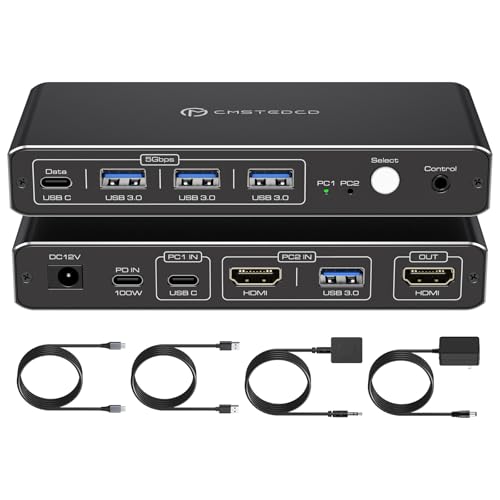
| ATLAHET KVM Switch★ Best Overall | Laptop + Desktop with 100W charging | 4K@60Hz | 3x USB-A 3.0 + 1x USB-C | Button & Remote | Amazon |
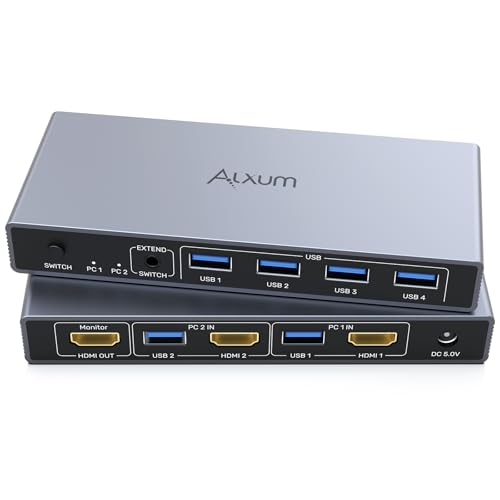
| Alxum HDMI KVM SwitchBest Value | Budget-conscious multitaskers | 4K@60Hz | 4x USB-A 3.0 | Button & Remote | Amazon |
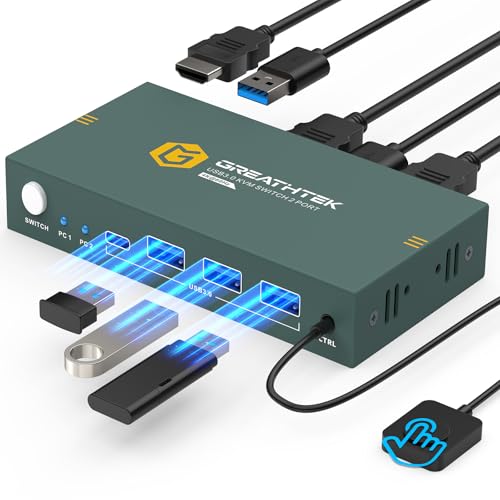
| GREATHTEK KVM SwitchReliability King | Reliability & plug-and-play simplicity | 4K@60Hz | 3x USB-A 3.0 | Button & Wired Remote | Amazon |
| BDFFLY KVM Switch | Easy setup with unexpected extras | 4K@60Hz | 3x USB-A 3.0 | Button & Wired Remote | Amazon |
| Hearvo USB 3.0 HDMI KVM Switch | Compact setup with extra USB-C port | 4K@60Hz | 3x USB-A 3.0 + 1x USB-C | Button & Wired Remote | Amazon |
| SUIDEK HDMI KVM Switch | Solid build with included power adapter | 4K@60Hz | 4x USB-A 3.0 | Button & Wired Remote | Amazon |
| KCEVE DisplayPort KVM Switch | High-refresh-rate gaming monitors | 8K@60Hz / 4K@240Hz | 4x USB-A 3.0 | Button & Wired Remote | Amazon |
| UGREEN HDMI KVM Switch | 8K-ready future-proofing | 8K@60Hz / 4K@240Hz | 3x USB-A 3.0 + 1x USB-C | Button & Desktop Controller | Amazon |
In‑Depth Reviews
1. ATLAHET KVM Switch 1 Monitors 2 Computers 4K@60Hz
Our pick — over 4.5★ from 70+ verified ratings; the strongest balance of quality and price.
The KVM that powers your laptop while switching your screen.
The ATLAHET leads this list because it solves the two biggest annoyances of a dual-computer desk: cable clutter and power bricks. It delivers up to 100W charging through its USB-C port, which means your laptop stays topped up without a separate charger. The video side handles 4K at 60Hz cleanly—buyers report the video output stays sharp at 4K60Hz with no flicker, using the exact words “no flicker” to describe the stability.
Setup is plug-and-play, but there is a hard requirement: your laptop must have a Thunderbolt 3, 4, or 5 port for video and power to work together. The switch packs three USB-A 3.0 ports and one USB-C data-only port, all running at 5Gbps. Switching happens via a button on the unit or an included remote control, though hotkeys are not supported. The aluminum case keeps things cool during long work sessions.
Compared to the Alxum below, the ATLAHET is a fraction of the volume—2.48 x 0.91 x 5.51 inches versus 5.75 x 2.44 x 0.81 inches (a roughly 2.3x size difference). It draws just 1 Amp versus the Alxum’s 2 Amps. The trade-off is an old one: some units arrive with a dud USB port, and a handful of owners mention the unit never powers on. For the everyday Thunderbolt-equipped laptop user who wants a single-cable docking experience, this is the button to press.
What owners love
- 100W power delivery keeps the laptop charged through the switch
- 4K@60Hz video is stable with no flicker, per owner reports
- Compact footprint saves desk space compared to bulkier alternatives
The fit note
- Requires Thunderbolt 3 or newer—not compatible with standard USB-C ports
- Must be plugged into a power source; it will not work bus-powered
Reach for this if: you have a Thunderbolt 3+ laptop and need a single switch that handles both video and laptop charging.
Think twice if: your laptop lacks Thunderbolt or you prefer a bus-powered switch that needs no wall wart.
2. Alxum HDMI KVM Switch 1 Monitor 2 Computers
The value pick that brings a wireless remote to the party.
The Alxum is the entry-level king for good reason—it works, it is cheap, and it comes with a remote control so you can hide the switch under your desk. It runs at 4K@60Hz and switches between two computers in about 2-4 seconds, which owners note is faster than toggling between monitor inputs manually. The USB 3.0 port hits 5Gbps, about ten times faster than USB 2.0, making it fine for keyboard, mouse, and a flash drive.
What wins people over is the functionality—14 owners single it out as a solid performer, and the quality gets its own praise from 9 more. It handles three wireless USB devices under 500mA without needing external power. At 5.75 x 2.44 x 0.81 inches it is the physically largest switch here, but the included remote means you can stash it away. The current rating is 2 Amps, double the 1 Amp of the ATLAHET, which suggests more headroom for power-hungry peripherals.
The catch: it feels lightweight and a bit plasticky, and one USB port may arrive dead on some units. HDMI cables must be your own—none are included. For anyone on a tight budget who just wants to share a keyboard, mouse, and monitor between two PCs without fuss, this is the pragmatic choice.
Biggest strengths
- Included remote lets you hide the switch and still switch with a click
- Handles three wireless USB devices without external power
- Switching is fast—customers note 2-4 seconds
Honest caveat
- Build feels lightweight and chintzy compared to aluminum alternatives
- No HDMI cables included; you need to supply your own
Best for: the budget-minded multitasker who wants remote switching without remote-switch pricing.
skip it if: you need a premium metal chassis or a switch that does not require external cables for each PC.
3. GREATHTEK USB3.0 KVM Switch 2 Port HDMI 4K@60Hz
The switch owners buy again when the cheaper ones fail.
The GREATHTEK earns its reputation on reliability—194 owners specifically praise its dependability, making it the most trusted switch in this roundup. It runs at 4K@60Hz and comes with a wired remote that stretches 1 meter, letting you bury the main unit behind your desk. Setup is truly plug-and-play: no power adapter, no driver software, just connect the two USB 3.0 cables and your HDMI cables (sold separately) and you are live.
It works with Windows, Mac, Linux, and even a PS4. The ink-blue metal case is solid, and the three USB 3.0 ports share peripherals between both computers without hiccups. Owners mention the button switching is quick, though a few note a 5-second blackout during the transition and the front connectors can make cable routing awkward.
Reviewers point out mixed connectivity: some say the keyboard lags for a moment during a switch, while others call it smooth. The switch draws 4 Amps, the highest current rating in this guide, meaning it can power more USB devices without dropping them. If you want a set-and-forget setup for your office desk, this is the one.
Why it wins trust
- 194 owners vouch for its reliability—more than any other switch here
- Lifetime warranty gives confidence long after purchase
- No external power needed, truly plug-and-play
The trade-off
- HDMI cables are not included; factor that into the final cost
- Switching can cause a 5-second blackout as it renegotiates the display
Ideal for: the low-maintenance user who prioritizes reliability above all else.
Not for: anyone who needs fast, instant switching without a screen dropout during the change.
4. BDFFLY 4K@60Hz HDMI KVM Switch 1 Monitors 2 Computers
Comes with DisplayPort cables even when the listing says it does not.
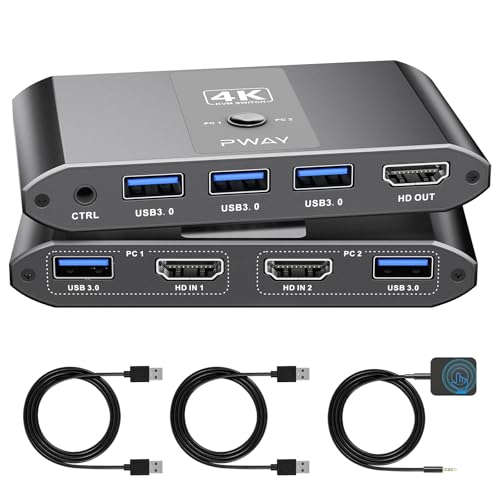
The BDFFLY is a straightforward plug-and-play KVM that surprised owners by including two DisplayPort cables in the box, even though the product description explicitly says DP cables are not included. That kind of over-delivery sets a positive tone. It runs at 4K@60Hz and serves three USB 3.0 ports for sharing a keyboard, mouse, printer, or flash drive between two computers.
Functionality is where this switch shines—17 owners highlight it as a solid performer, and 10 more praise the connectivity. The wireless keyboard and mouse work smoothly through the switch, and the remote button (attached via a standard audio connector) lets you click between computers. One owner notes the remote may require a moderately forceful insertion before it clicks into place.
The hitch: the included remote button did not work from the start for one owner, leaving the main unit stuck on the desk. For anyone who wants a switch that includes the cables you actually need for a DisplayPort setup, this is a rare find.
What stands out
- Comes with DisplayPort cables despite the listing saying otherwise
- Sharp 4K@60Hz picture with reliable USB connectivity
- Plug-and-play with no driver or power adapter required
The minor hitch
- The wired remote may need a firm push to seat properly
- Does not support ultra-wide monitors or hotkey switching
Go for it if: you are setting up a DP-based dual-PC desk and want cables included.
Look elsewhere if: you rely on a remote that works the first time without fuss.
5. Hearvo USB 3.0 HDMI KVM Switch for 2 Computers 1 Monitor

Small enough to disappear on your desk but big on USB ports.
The Hearvo gives you four USB 3.0 ports (three USB-A and one USB-C) in a chassis that measures just 5 x 2.4 x 0.8 inches—smaller than a smartphone. It runs at 4K@60Hz and supports HDCP 2.2, so it works with protected streaming content like Netflix or Disney+. Owners praise the instant switching and solid build, though it lacks the 4-Amp power draw of the previous pick for heavy USB devices.
Functionality is the biggest talking point—270 owners call it a winner, and 117 more highlight the easy setup. The wired remote and on-unit button give you two ways to switch. It requires no external power and no drivers; just plug in the included USB 3.0 cables and your own HDMI cables. The USB-C port adds future-proofing for newer peripherals.
The 60Hz refresh limit means it is not ideal for high-end gaming, and some shoppers say audio-switching quirks when using a shared headset. For the WFH warrior or casual gamer who needs a compact, four-port KVM that just works, the Hearvo is the quiet champion.
Why it is popular
- 270 owners praise the functionality—the most of any switch tested
- Four USB 3.0 ports (including USB-C) handle mice, keyboards, and drives
- Ultra-compact size fits in any desk nook
The limits
- 60Hz refresh cap means it is not for high-refresh gaming
- Audio switching can be finicky with shared headsets
Best for: the work-from-home pro who wants maximum USB ports in a minimum footprint.
pass on it if: you game on a 144Hz+ monitor and need the higher refresh rate.
6. SUIDEK HDMI KVM Switch 1 Monitors 2 Computers
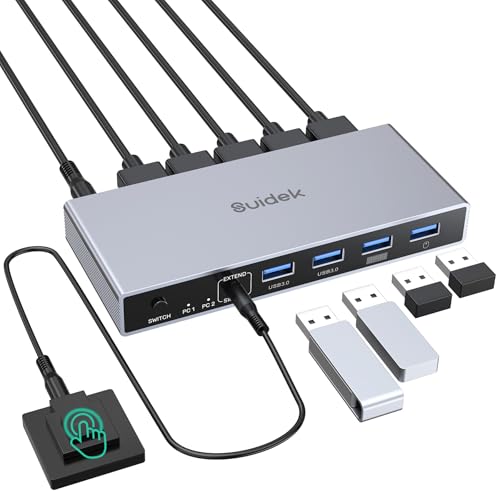
A solid metal switch that needs the included power adapter to run.
The SUIDEK takes a different approach: it ships with a DC 5V power adapter in the box, which means it stays powered and stable no matter how many USB devices you plug in. The aluminum shell feels premium, and owners describe the build as “sleek” and “well-built.” It runs at 4K@60Hz and packs four USB 3.0 ports on the front for easy access to flash drives.
Reliability is the headline—27 owners call it dependable, and the ease of use gets 8 mentions. Switching between computers is smooth, with the button and wired remote both responding instantly. The package includes two USB A-to-A cables and the desktop controller.
The biggest annoyance: no HDMI cables are included, so you must supply your own. And one owner found the front USB ports stopped working after a week—resolved by using the included USB cables rather than third-party ones. This is a minor note, but worth knowing. For anyone who wants a powered, aluminum switch that just works.
Solid points
- Includes a dedicated 5V power adapter for stable operation
- Aluminum shell feels premium and dissipates heat well
- 27 owners praise the reliability
Heads-up
- No HDMI cables included; budget for them
- Must use the included USB cables for best connectivity
Choose this if: you prefer a powered, metal switch that never wobbles when you unplug a drive.
Pass if: you want a truly all-in-one box that includes every cable you need.
7. KCEVE KVM Switch 2 Computer 1 Monitor DisplayPort 4K@240Hz

The only DisplayPort switch here that hits 4K@240Hz.
The KCEVE is for the gamer who refuses to compromise on refresh rate. It supports DisplayPort 2.1 and pushes up to 8K@60Hz or 4K@240Hz, making it the only switch here that keeps up with high-end gaming monitors. Switching takes 2-3 seconds, and the 1.5-meter wired remote lets you keep the unit hidden. The four USB 3.0 ports share your keyboard, mouse, and other peripherals at 5Gbps.
The biggest catch: it lacks EDID emulation, which means your windows may rearrange themselves every time you switch, and you may get a black screen if you do not switch before powering on the computers. Some owners found DP 2.1 support inconsistent with an RTX 5090 and DP80 cables. For DP 1.4 setups, it works great. For anyone with a super-ultrawide or a 240Hz display, this is the only KVM that does not bottleneck the signal.
At 1 Amp, the current rating is lower than some competitors, so power-hungry USB devices may need a separate hub. For the enthusiast who needs every frame on screen, the KCEVE is the specialist choice.
Why it is unique
- Supports 4K@240Hz and 8K@60Hz over DisplayPort 2.1
- Fast 2-3 second switching between computers
- 1.5m wired remote gives flexible placement
What to know
- No EDID emulation means window positions shift on each switch
- DP 2.1 support can be finicky with certain high-end GPUs
Perfect for: the gamer or creative pro with a high-refresh DisplayPort monitor.
Not for: anyone running standard 60Hz office monitors who does not need DP 2.1.
8. UGREEN HDMI KVM Switch 1 Monitor 2 Computers 8K@60Hz

The 8K HDMI switch that also handles 4K at 240Hz with HDR.
The UGREEN is the most future-proof HDMI switch here, supporting 8K@60Hz and backward-compatible with 4K@240Hz, 4K@60Hz, and 2560×1440@120Hz. Owners confirm it handles 4K@240Hz with HDR and G-Sync flawlessly, making it a rare HDMI KVM that does not bottleneck modern gaming monitors. The metal chassis houses four USB ports (three USB-A 3.0, one USB-C) all running at 5Gbps.
Setup is plug-and-play, and the switch works without a power adapter for standard peripherals—though USB-C power is recommended for high-power devices. The included two HDMI cables and two USB A-to-C cables get you started immediately. Reliability gets the highest praise, with 44 owners calling it rock-solid.
The downsides: it does not support EDID emulation, so the inactive computer loses its display signal entirely. And at 3440×1440, it is capped at 60Hz—it will not do 120Hz at that ultrawide resolution. For anyone who wants to plug a PS5, a gaming PC, and a laptop into one monitor with full HDMI 2.1 bandwidth, the UGREEN is the ticket.
Future-ready features
- 8K@60Hz and 4K@240Hz with HDR and G-Sync support
- Solid metal build with 44 owners praising reliability
- Includes two HDMI and two USB A-to-C cables
The limits
- No EDID emulation; inactive signal drops completely
- Capped at 60Hz at 3440×1440 ultrawide resolution
Buy it for: an 8K-ready setup or a 4K high-refresh gaming monitor that uses HDMI.
Look elsewhere if: you run a 3440×1440 ultrawide and need 120Hz+.
Understanding the Specs
Thunderbolt 3 vs USB-C
This is the single most common point of confusion. A switch that says “USB-C” may require a Thunderbolt 3 port or newer to transmit video and power. Thunderbolt 3 is a specific standard that carries both a display signal and data over the same USB-C shaped port. A plain USB-C port on a budget laptop may only carry data and charging—not video. Always check if your laptop’s port includes a lightning bolt icon (Thunderbolt) or a DisplayPort icon (DP Alt Mode) before buying a USB-C-based KVM.
EDID Emulation
Extended Display Identification Data (EDID) is the handshake between your computer and monitor that tells the computer what resolution and refresh rate your screen supports. A KVM switch with EDID emulation “remembers” this handshake for both computers, even when one is not actively connected. Without it, your inactive computer may reset its resolution to a default, causing windows to rearrange when you switch back. This is important for productivity users who keep precise window layouts.
FAQ
Can I use a 2-computer 1-monitor switch with a wireless keyboard and mouse?
Do I need to buy extra cables along with the switch?
Will a 2-computer switch work with a laptop plus a desktop PC?
Does the switch require a separate power adapter?
Can I charge my laptop through a KVM switch?
What is the difference between a KVM switch and a simple HDMI switcher?
Will these switches work with ultrawide or super-ultrawide monitors?
Does a KVM switch cause input lag or delay on the keyboard and mouse?
Final Thoughts: The Verdict
For most buyers, the 2-computer 1-monitor switch winner is the ATLAHET KVM Switch because it combines 4K@60Hz video, 100W laptop charging, and a compact footprint into one coherent package—provided your laptop has Thunderbolt 3+. If you want maximum reliability at a budget price, grab the GREATHTEK, the crowd favorite among 194+ owners who praise its dependability. And for high-refresh gaming, the KCEVE DisplayPort KVM is the only one here that keeps up with a 4K 240Hz monitor without dropping frames.
How We Picked
We do not accept paid placement. Every pick is matched to a real buyer and a real use-case; we do not hands-on test units.
Sources & Methodology
Specifications: manufacturer listings and product documentation. Review insights: verified customer reviews, as of July 2026. Pricing: not shown on this page (it changes often); check the current price via the retailer link.
As an Amazon Associate, Gadgets Feed earns from qualifying purchases. This does not affect which products we feature.