
Our readers keep the lights on and my morning glass full of iced black tea. As an Amazon Associate, I earn from qualifying purchases.
Specs are compiled from manufacturer listings and verified buyer reviews and can change over time — please confirm the key details on the product page before buying.
An adjustable DPI mouse means you can change how fast the cursor moves on screen with the press of a button. For gamers, that means snapping between a slow, pixel-precise aim for sniping and a lightning-fast flick for close quarters, all without opening any menus. For designers and everyday users, it means dialing in exactly the pointer speed that feels natural for your hand and screen setup. The key is finding a mouse that matches your hand size, grip style, and button needs — ignoring marketing fluff that doesn’t improve daily use.
I’m Min — the founder and writer behind Gadgets Feed. This guide is built by comparing the manufacturers’ published specifications and the patterns across verified customer reviews, so you get each pick’s real strengths and trade-offs instead of marketing spin.
if you need a competitive edge in shooters or a more responsive pointer for work, this roundup of nine adjustable DPI mice helps you find the right model for your needs and budget.
Our Picks at a Glance


How To Choose The Best Adjustable DPI Mouse
The most important thing to understand about an adjustable DPI mouse is that DPI stands for “dots per inch” — it measures how many pixels the cursor moves for every inch you physically move the mouse. A higher DPI setting means the cursor zips across the screen with a tiny hand movement, while a lower setting gives you fine control. The value of an adjustable mouse is that you get the choice, and picking the right one depends on matching your grip, your game, and your desk space.
Your Grip Style and Hand Size
Your hand dictates nearly everything. If you rest your whole palm on the mouse (palm grip), you need a larger, more sculpted shape like the Logitech G502 or Razer Basilisk V3. If you arch your palm and use your fingertips (claw or fingertip grip), a lighter, more compact mouse like the Lamzu Maya X or the ATTACK SHARK X3 will feel far more natural. A mouse that doesn’t fit your grip will cause fatigue before the battery dies, regardless of sensor quality.
Wired vs. Wireless and Latency
Wired mice offer zero-lag performance and never need charging, but the cable can drag on your desk. High-end wireless mice using 2.4GHz technology (like the Logitech G305 or the AULA SC580X) now match wired performance with a 1-millisecond report rate. Bluetooth is convenient for switching between devices, but adds a small amount of lag that competitive gamers will notice. Most wireless mice in this list also work wired via USB-C, giving you the best of both worlds.
Button Count and Software
More buttons aren’t always better — they’re only useful if you can reach them without looking. A mouse with 5 to 6 programmable buttons covers the essentials for most gamers (left click, right click, scroll wheel, and two side buttons). Mice with 11 or 13 buttons, like the Logitech G502 and Razer Basilisk V3, require learning where each button sits but let you map complex macros for MOBAs or MMOs. The software that controls these buttons varies: Logitech G Hub and Razer Synapse are powerful but can feel bloated, while Redragon and AULA offer simpler driver software that gets the job done without the overhead.
Quick Comparison
| Model | Best For | Max DPI | Weight | Connection | Amazon |
|---|---|---|---|---|---|
| Redragon M724★ Best Overall | Budget Ultra-Light Wired | 12,400 | 42g | Wired USB | Amazon |
| Logitech G502 HeroAlso Great | Customization Enthusiasts | 25,600 | Adjustable (5 x 3.6g) | Wired USB | Amazon |
| Logitech G305 LightspeedBattery Champion | Battery Life Champions | 12,000 | 99g (with battery) | 2.4GHz Wireless | Amazon |
| Razer Basilisk V3 35K | All-Day Comfort & Precision | 35,000 | 0.18 kg | Wired USB | Amazon |
| ATTACK SHARK X3 | Ultra-Light FPS Play | 26,000 | 49g | Tri-Mode (2.4G/BT/USB-C) | Amazon |
| GravaStar Mercury X Pro | Style & Performance Balance | 32,000 | 49g | Tri-Mode (2.4G/BT/USB-C) | Amazon |
| Lamzu Maya X | High-End Competitive Gaming | 30,000 | 47g | 2.4G Wireless | Amazon |
| ATTACK SHARK X11 | Budget Wireless with Dock | 22,000 | 62g | Tri-Mode (2.4G/BT/USB-C) | Amazon |
| AULA SC580X | Multi-Device Flexibility | 12,000 | 84g | Tri-Mode (2.4G/BT/USB-C) | Amazon |
In‑Depth Reviews
1. Redragon M724 Wired Gaming Mouse
Our pick — over 4.5★ from 750+ verified ratings; the strongest balance of quality and price.
The lightest mouse in this lineup at 42 grams, offering a wired connection that never needs charging.
The Redragon M724 prioritizes weight reduction above all else, coming in at just 42 grams — that is less than half the weight of the AULA SC580X (84g) and nearly 20 grams lighter than the Logitech G305. This extreme lightness makes it feel almost like an extension of your hand, allowing for rapid flicks and direction changes with minimal effort. The five dpi levels (1200/2400/3500/5500/12400) are adjustable on the fly, and owners specifically note that being able to change the DPI settings is useful because the presets may not suit everyone’s preference. The max DPI of 12,400 is the joint-lowest in this roundup alongside the AULA SC580X, but still more than enough for the vast majority of gamers.
The five programmable buttons are fully customizable via Redragon’s driver software, allowing you to map keybinds and macros for your favourite games. The ergonomic shape follows the natural contour of a right hand, and shoppers say it is comfortable for long gaming sessions. The wired USB connection means zero latency and no battery anxiety, but the cord can be a minor nuisance for some setups. The build quality is solid for the price point, though the lightweight plastic construction naturally does not feel as premium as a metal-framed mouse like the GravaStar.
Why It’s a Contender
- 42g weight is among the lightest wired gaming mice available — easy to move
- Five on-the-fly DPI levels with software support for finer adjustments
- Wired connection means zero battery anxiety and no latency
The Catch
- Max DPI of 12,400 is lower than most competitors in this list
- Wired cable can get in the way during fast-paced gaming, as some owners note
Reach for this if: you are on a strict budget and want the lightest possible wired mouse for competitive FPS or RTS games.
Look elsewhere if: you need wireless freedom, a higher max DPI, or prefer a heavier, more substantial feel in your hand.
2. Logitech G502 Hero Wired Gaming Mouse
This legend earned its place through versatility and a sensor that refuses to compromise.
The extreme tracking precision you need for split-second gaming comes from the HERO sensor here, which delivers up to 25,600 DPI with zero smoothing or acceleration. That means every flick and micro-adjustment translates exactly to your on-screen movement, with no artificial filtering in between. The real standout feature is the adjustable weight system — you can place up to five 3.6-gram weights inside the mouse to tune exactly how heavy or balanced it feels in your hand.
The G502 packs 11 programmable buttons, including a dual-mode hyper-fast scroll wheel that lets you toggle between a notched feel for precise browsing and a free-spin mode that flies through long documents. The build quality is widely praised, with the metal enclosure and mechanical switch button tensioning giving each click a crisp, defined response. It is a wired mouse, which means zero latency worries and no battery to manage, but the braided cable is flexible enough that it does not fight your movements during intense sessions.
The Specs That Shine
- Hero 25K sensor with 25,600 DPI — buttery smooth tracking across any surface
- Customizable weight tuning (5 x 3.6g) lets you dial in the perfect heft
- 11 programmable buttons with onboard memory for saving profiles
The Practical Downsides
- Heavier than many modern ultralights, which may tire some users during fast flicks
- Logitech G Hub software is powerful but can feel bloated; many prefer the Onboard Memory Manager tool
Your go-to if: you want total control over weight, button mapping, and DPI — this is the Swiss Army knife of gaming mice that adapts to you rather than the other way around.
Look elsewhere if: you need the lightest possible mouse for competitive FPS games and prefer a wireless setup.
3. Logitech G305 Lightspeed Wireless Gaming Mouse
A wireless workhorse that runs for months on a single AA battery with no perceptible lag.
The HERO sensor is the star here, delivering 12,000 DPI sensitivity and 400 IPS precision, but its real a neat extra is power efficiency — you get an incredible 250 hours of continuous gameplay from one AA battery. That is a massive advantage over the AULA SC580X, which offers 60 hours from its built-in rechargeable battery, meaning the G305 lasts more than four times longer between charges. The Lightspeed wireless technology provides a 1-millisecond report rate, so there is no perceptible delay between your click and the action on screen.
At 99 grams with the battery installed, it is not the lightest option, but it strikes a solid balance between durability and portability. The ambidextrous design fits a wide range of hand sizes and grip styles, and the built-in nano receiver stores inside the mouse for travel. The six programmable buttons are customizable via Logitech G Hub, and you can even switch to Endurance mode to stretch battery life up to nine months for office use. The main trade-off is the lack of RGB lighting, but for many, that is a fair sacrifice for the battery life.
Why it wins: The 250-hour battery life on a single AA battery is genuinely class-leading in this price range, making it the set-and-forget wireless mouse for gamers who hate cables but also hate charging docks.
Perfect for: competitive gamers who want reliable wireless performance without ever thinking about charging — just swap the AA and keep playing.
Skip if: you prefer rechargeable batteries or want a lighter, more modern shape with RGB lighting.
4. Razer Basilisk V3 35K Wired Ergonomic Gaming Mouse

This ergonomic powerhouse delivers pixel-perfect accuracy across 35,000 DPI steps.
The Razer Focus Pro 35K Optical Sensor Gen-2 is the defining feature here, offering tracking that works on a wide range of surfaces, including glass, with 1-DPI step adjustments for incredibly fine control. That means you can dial in sensitivity to the exact dot-per-inch that matches your crosshair placement, rather than jumping between preset steps. The HyperScroll tilt wheel adds another layer of versatility, letting you switch between tactile cycling for precise weapon selection and free-spin scrolling that zips through web pages or code.
With 13 customizable controls including a dedicated multi-function trigger, this mouse puts nearly every action at your fingertips without reaching for the keyboard. Razer Optical Mouse Switches Gen-3 provide a 90-million click lifecycle with zero double-clicking issues, actuating at a blistering 0.2 milliseconds. The 11-zone Chroma RGB lighting with full underglow can sync with over 200 games, adding immersion that goes beyond simple desk aesthetics. It is a wired mouse with a flexible Speedflex cable that minimizes drag, so the only real consideration is if you need the freedom of wireless.
The Highlights
- 35,000 DPI sensor with 1-DPI steps — the most granular adjustment in this roundup
- HyperScroll wheel with auto-switch between tactile and free-spin modes
- 13 controls with a well-placed sniper button that gamers love
The Catch
- Wired-only connection may not suit minimalists who hate cable management
- Weight is moderate; not an ultralight for hyper-fast flick shots
Reach for this if: you spend long hours at your desk — the ergonomic shape and HyperScroll wheel make it a dream for both gaming and all-day productivity.
Consider alternatives if: you insist on wireless freedom or want the absolute lightest mouse for competitive FPS.
5. ATTACK SHARK X3 Lightweight Wireless Gaming Mouse
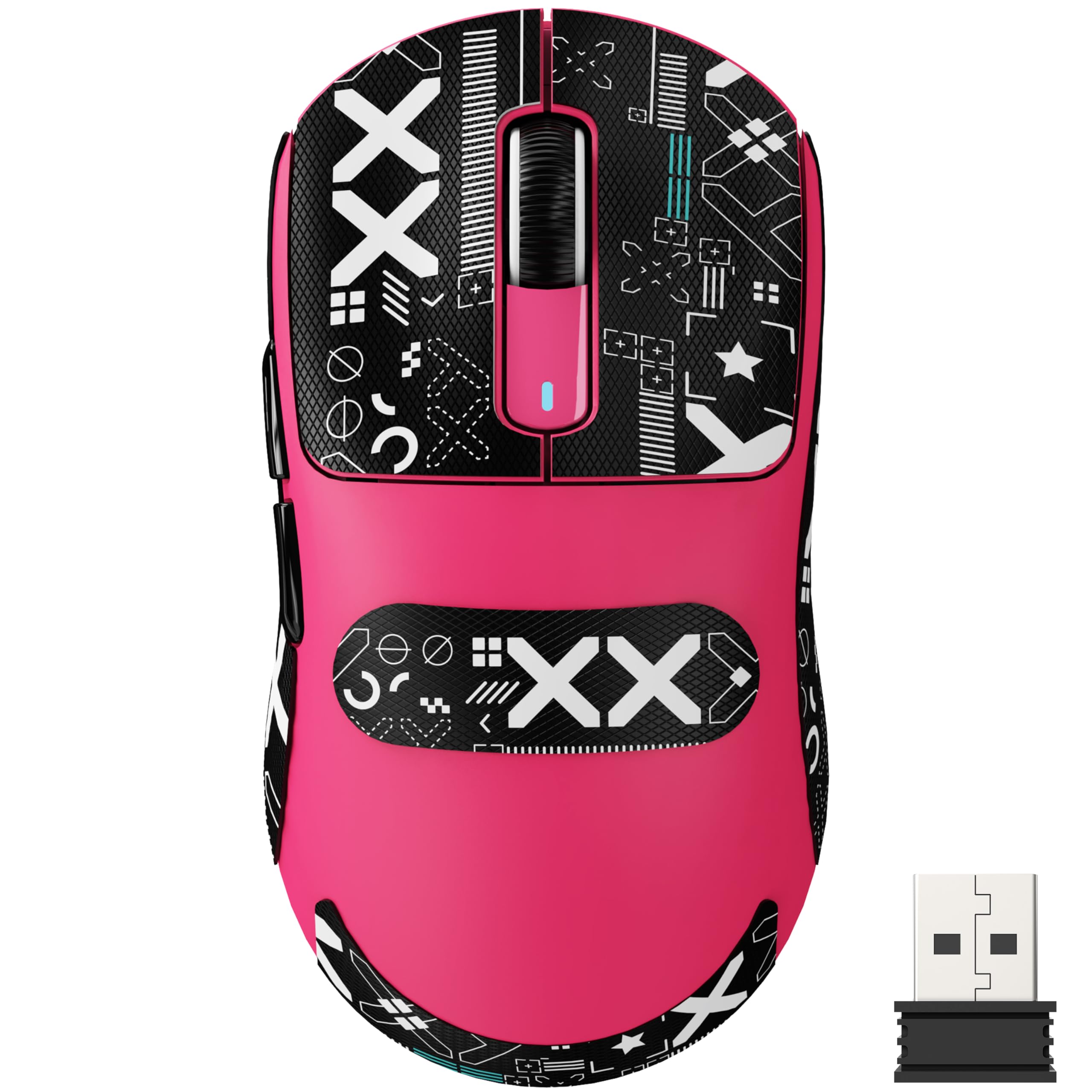
A 49-gram featherweight that brings flagship sensor performance at a more approachable price.
The Pixart PAW3395 flagship optical sensor inside the X3 delivers up to 26,000 DPI with six adjustable levels (800/1600/2400/3200/5000/26000), plus a 650 IPS tracking speed and 50G acceleration limit. For competitive FPS players, that translates to motions that are captured instantly, with zero smoothing that might otherwise mask your input. The weight is the real headline though — at just 49 grams, it is lighter than the Redragon M724 (42g) by 7 grams, making it one of the lightest wireless mice on the market. It feels almost weightless in the hand, allowing for easy flick shots and rapid direction changes.
Kailh GM8.0 Black Mamba switches handle up to 80 million clicks, providing a crisp, fast rebound with each press. The TTC scroll wheel encoder ensures precise positioning, which owners appreciate for both gaming and scrolling. The tri-mode connectivity (USB-C wired, 2.4G wireless, and BT 5.2) lets you connect up to four devices simultaneously, making it a practical choice for multi-device setups. The catch is its compact size — owners note it is smaller than a Logitech G Pro, so those with larger hands may find it best suited for claw or fingertip grips.
A real speed demon: the 49g build and PAW3395 sensor make this mouse feel incredibly responsive and direct — owners who switched from heavier mice report an immediate improvement in their aim, especially in fast-paced shooters.
Best for: gamers with small to medium hands who want a near-weightless wireless mouse with a top-tier sensor without paying premium-tier prices.
Not ideal if: you have large hands or prefer a palm grip — the shorter profile works best for claw or fingertip styles.
6. GravaStar Mercury X Pro Wireless Gaming Mouse

A magnesium-alloy skeleton that proves ultralight design and sturdy build can coexist beautifully.
The hollow magnesium alloy frame is the defining feature of the GravaStar Mercury X Pro, weighing just 49 grams while providing a rigid, durable shell that does not flex under pressure. The open skeleton design also boost airflow, keeping your hand cooler during long sessions — a detail that competitive players will appreciate. Under the hood, the PAW 3950 sensor delivers up to 32,000 DPI, and the included 8K dongle pushes the polling rate to 8,000Hz, meaning the mouse reports its position to your PC eight times per second for ultra-smooth tracking.
Tri-mode connectivity (Bluetooth, 2.4G wireless, or wired) makes it versatile across different setups, and the software allows full customization of DPI, polling rate, RGB lighting, and the five programmable buttons. Owners consistently praise how the lightweight magnesium frame makes the mouse feel solid yet easy to move. The battery life is dependable, but owners note it requires fairly frequent charging if you keep the RGB lighting on during long sessions. The aesthetic is polarizing — if you love the cyberpunk-inspired look with the exposed frame, you will adore it; if you prefer a clean, understated design, it may feel busy.
What Stands Out
- Magnesium alloy frame is both incredibly light (49g) and rigid — no flex even under hard use
- 8,000Hz polling rate via the included dongle for buttery-smooth tracking
- Tri-mode connection covers all your devices
What to Consider
- The hollow design collects dust over time and needs occasional cleaning
- Battery life with RGB on is moderate — expect to charge every few days with heavy use
Choose this for: a unique, head-turning design that also delivers top-tier performance — the magnesium frame is a genuine innovation in weight reduction without sacrificing durability.
Pass if: you prefer a classic, button-dense shape or need longer battery life between charges.
7. Lamzu Maya X Wireless Gaming Mouse

A 47-gram symmetrical shape that feels like an extension of your hand, built for zero-compromise wireless play.
The Lamzu Maya X is built around the Pixart PAW 3950 sensor, which supports up to 30,000 DPI and 750 IPS, and can achieve an 8,000Hz polling rate when used with the optional 8K dongle. For competitive gamers, that means every micro-movement is captured with elite precision, and the low click latency from the Omron optical switches gives a responsive feel that owners describe as “fast and crisp.” At just 47 grams, it is lighter than the ATTACK SHARK X3 (49g) and the GravaStar (49g), making it one of the very lightest mice in this roundup.
The symmetrical shape is designed for medium to large hands, accommodating palm, claw, and fingertip grips equally well. The Nordic 52840 MCU ensures power-efficient operation, delivering 80 hours of battery life from a single charge, which buyers report translates to about one to two weeks of daily use. The build quality is widely praised as “sturdy with no flex” despite the low weight, and the stock PTFE skates glide smoothly on most mousepads. The only notable omission is tri-mode connectivity — it supports 2.4G wireless and USB-C wired, but lacks Bluetooth, which may be a dealbreaker for multi-device users.
A near-perfect racing mouse: reviewers consistently describe the Maya X as having excellent click feel, smooth glides, and a shape that feels refined compared to other ultralight options — the main caveat is that 8kHz polling can eat CPU performance in some games.
Ideal for: competitive FPS gamers who value the lightest possible weight combined with a premium sensor and excellent switch feel.
Not for: anyone who needs Bluetooth connectivity or prefers a larger, palm-filling shape.
8. ATTACK SHARK X11 Wireless Gaming Mouse

A 62-gram wireless mouse that includes an RGB charging dock and grip tape at a price that feels like a steal.
The PAW3311 sensor in the X11 delivers up to 22,000 DPI, which is more than enough for high-sensitivity gaming, and the tri-mode connectivity (2.4GHz, Bluetooth 5.2, and USB-C wired) ensures compatibility with nearly any device. The real value here is the included RGB charging dock, which acts as both a stylish desktop accent and a convenient place to park the mouse and the 2.4GHz receiver. Owners note that the battery life lasts about a week of moderate use, and the charging dock means you never have to fumble with cables.
It weighs 62 grams, which is noticeably heavier than the X3 but still very competitive in the ultralight category. The ergonomic shape is designed to suit multiple grip styles (palm, claw, and fingertip), and the included grip tape adds extra control for sweaty hands. The HUYU switches and TTC encoder are rated for 20 million clicks, offering solid durability for the price point. The main trade-off is that the build quality, while good for the price, does not match the premium feel of the Logitech or Razer options.
Why It’s a Winner
- RGB charging dock keeps your desk tidy and your mouse always charged
- 22,000 DPI sensor and tri-mode connectivity cover all bases
- Included grip tape improves control for competitive play
The Trade-Offs
- 62 grams is light but not as featherweight as the 47-49g competition
- Build quality is adequate for the price but feels less premium than pricier mice
Grab this if: you want the complete package — wireless mouse, charging dock, and grip tape — without spending a fortune.
Think twice if: build quality is your top priority, or you need the absolute lightest mouse for competitive play.
9. AULA SC580X Wireless Gaming Mouse
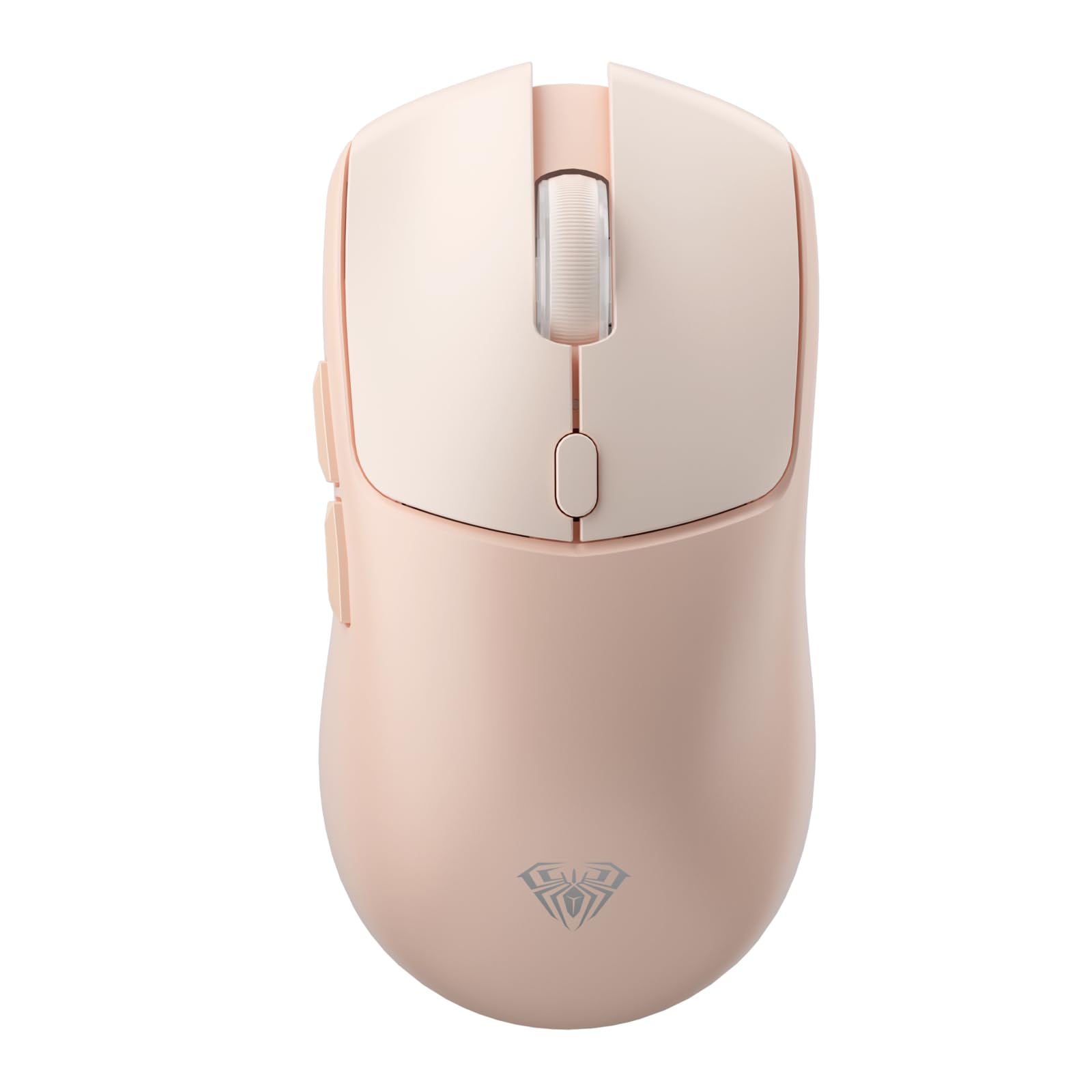
A budget-friendly tri-mode mouse that one owner charged just three times in six months of daily gaming.
The SC580X stands out for its exceptional battery efficiency — owners mention charging it only three times over six months of about four hours of gaming per day. The built-in 500mAh rechargeable battery can last 10-14 days with moderate use, and the low battery indicator flashes red when it is time to plug in. The tri-mode connectivity (2.4G, BT 5.0, and USB-C wired) supports up to four paired devices, making it easy to switch between a gaming PC, a work laptop, and a tablet.
The six adjustable DPI levels cover 800 to 12,000, which is plenty for most gamers, and the 1000Hz polling rate ensures low-latency performance. The ergonomic design is built for right-handed users, and the included non-slip stickers help maintain grip during sweaty sessions. At 84 grams, it is heavier than many dedicated gaming mice (the Redragon M724 is half its weight at 42g), which may be noticeable for competitive players who prefer ultra-light builds. The build quality is generally praised, though some customers note occasional reliability issues after several months of use.
The battery story: reviewers point out that the SC580X sips power so efficiently that a single charge can last nearly two months of casual gaming, making it a top pick for anyone who hates plugging in their mouse.
Perfect for: multi-device users who need a reliable wireless mouse that works across PC, Mac, and tablet without any setup fuss.
Not ideal for: competitive gamers who want an ultra-light weight (84g is on the heavier side) or the highest DPI available.
Understanding the Specs
DPI (Dots Per Inch)
This is the number that tells you how fast the cursor moves on your screen. A higher DPI means the cursor zips across with a tiny hand movement — useful for fast-paced shooters where you need to turn quickly. A lower DPI means you need to move the mouse more to cross the screen, giving you finer control for sniper rifles or design work. An adjustable DPI mouse lets you switch between these on the fly, so you can go from a slow, precise aim to a fast flick without changing settings in your game.
Polling Rate
Measured in Hz, this is how often the mouse reports its position to your computer. A standard mouse reports 125 times per second (125Hz), while gaming mice often hit 1,000Hz (once per millisecond). Higher-end mice like the GravaStar Mercury X Pro and Lamzu Maya X can reach 8,000Hz, which feels smoother but also uses more CPU resources. For most gamers, 1,000Hz is more than enough — the jump to 8kHz offers diminishing returns and can actually hurt performance in some games due to higher CPU load.
Sensor Type
The sensor is the heart of the mouse, and the two main types are optical and laser. Optical sensors use an LED to track movement and are generally preferred by gamers for their consistent, predictable response. The Pixart PAW3395 and PAW3950 found in the ATTACK SHARK X3 and Lamzu Maya X are among the best optical sensors available, offering high DPI, low latency, and excellent tracking on most surfaces. Logitech’s HERO sensor and Razer’s Focus Pro are also top-tier optical sensors, known for their power efficiency and accuracy.
Switch Type and Lifespan
Switches are the mechanical components under the left and right buttons that register your clicks. Mechanical switches (like the Kailh GM8.0 in the ATTACK SHARK X3) offer a crisp, tactile feel and can last up to 80 million clicks. Optical switches (like those in the Lamzu Maya X and Razer Basilisk V3) use light to register clicks, which eliminates the possibility of double-clicking issues and provides faster actuation (0.2ms). Optical switches typically last longer — up to 90 million clicks or more — but some gamers prefer the feel of a high-quality mechanical switch.
FAQ
What does adjustable DPI actually mean for everyday use?
Is a higher DPI always better?
Will an adjustable DPI mouse work with my Mac or Linux computer?
What is the difference between 2.4GHz wireless and Bluetooth?
How important is the weight of a mouse?
Does a wired mouse have less lag than a wireless one?
How many programmable buttons do I actually need?
What is polling rate and should I care about it?
Can I use a gaming mouse for office work?
How long does the battery last in a wireless gaming mouse?
Final Thoughts: The Verdict
For most people, the best adjustable dpi mouse winner is the Logitech G502 Hero because it offers the perfect mix of extreme sensor precision, customizable weight, and an unbeatable button layout that adapts to any game or workflow. If you want the longest wireless battery life in the business, grab the Logitech G305 Lightspeed. And for a near-weightless competitive advantage, the Lamzu Maya X or ATTACK SHARK X3 are the lightest, most responsive options for serious FPS players.
How We Picked
We do not accept paid placement. Every pick is matched to a real buyer and a real use-case; we do not hands-on test units.
Sources & Methodology
Specifications: manufacturer listings and product documentation. Review insights: verified customer reviews, as of July 2026. Pricing: not shown on this page (it changes often); check the current price via the retailer link.
As an Amazon Associate, Gadgets Feed earns from qualifying purchases. This does not affect which products we feature.