
Our readers keep the lights on and my morning glass full of iced black tea. As an Amazon Associate, I earn from qualifying purchases.
Specs are compiled from manufacturer listings and verified buyer reviews and can change over time — please confirm the key details on the product page before buying.
Your cameras, workstations, and smart devices all connect to one box. Pick the wrong 12 port Ethernet switch, and you get slow speeds, dropped connections, or a noisy fan humming in your office. The right one keeps everything running without a second thought. This guide shows you exactly which switch fits your setup, without the technical jargon.
I’m Min — the founder and writer behind Gadgets Feed. This guide is built by comparing the manufacturers’ published specifications and the patterns across verified customer reviews, so you get each pick’s real strengths and trade-offs instead of marketing spin.
Here are the best options for finding the right 12 port ethernet switch that actually matches your setup.
Our Picks at a Glance


How To Choose The Best 12 Port Ethernet Switch
Most buyers get stuck on one decision: do you need PoE (Power over Ethernet) or not? PoE delivers both data and power over a single cable, so you skip extra power adapters. That is essential for security cameras, wireless access points (the devices that broadcast Wi-Fi), and VoIP phones (internet-based phones). If you are just connecting computers and a printer, a plain gigabit switch costs less and runs cooler.
Unmanaged vs. Managed vs. Web Smart
An unmanaged switch is plug-and-play: no configuration, no login page, just data flowing. That is perfect for cameras and simple office networks. A web-managed (or smart) switch lets you split traffic into VLANs (virtual networks that separate, say, guest Wi-Fi from your main devices), prioritize gaming or video calls with QoS (Quality of Service), and monitor port activity through a browser. You only need a fully managed (Layer 2/3) switch if you run a business network with complex routing.
PoE Budget and Port Power
Every PoE switch has a total power budget (often 120W) and a per-port maximum (often 30W). A standard security camera pulls about 6-10W, a pan-tilt-zoom camera pulls up to 20W, and a high-power access point can draw the full 30W. Add up your devices before buying — if you plug eight cameras at 15W each, you need at least a 120W total budget.
Speed Tiers and Uplinks
Most 12 port switches give you eight gigabit PoE ports plus two gigabit uplink ports and two SFP (Small Form-factor Pluggable) slots, which accept removable modules for fiber-optic cables. That is plenty for a home network. If you have a fast internet plan or a NAS (network-attached storage — a dedicated file server on your network), look for models with 2.5G or 10G uplinks — those handle bigger file transfers without bottlenecking. The SFP slot lets you connect a fiber run, which is handy for long distances between buildings beyond the 100-meter limit of standard Ethernet cable.
Quick Comparison
| Model | Best For | PoE Budget | Speed Type | Weight | Amazon |
|---|---|---|---|---|---|
| Binardat 12 Port★ Best Overall | Plug-and-play cameras & speakers | 135W | Gigabit | 0.87 kg | Amazon |
| YuLinca PoE SwitchValue Pick | Budget-friendly surveillance setup | 120W | Gigabit | 1.28 kg | Amazon |
| MokerLink 12 Port | Remote locations & fiber runs | 120W | Gigabit | — | Amazon |
| Zyxel XGS1210-12 | Network control with VLANs | N/A | 2.5G / 10G SFP+ | 1.2 kg | Amazon |
| Zyxel XGS1250-12 | Multi-Gig & NAS workflows | N/A | Multi-Gig (10G) | — | Amazon |
| YuLinca 10G Managed | Full 10G backbone | N/A | 10G (SFP+ & RJ45) | — | Amazon |
| NETGEAR XS512EM | Pro-level 10G office network | N/A | Multi-Gig (10G) | 5.5 pounds | Amazon |
In‑Depth Reviews
1. Binardat 12 Port Gigabit POE Switch
Our pick — over 4.5★ from 450+ verified ratings; the strongest balance of quality and price.
The unmanaged switch that reviewers call truly plug-and-play — your devices appear on the network the instant you plug them in.
The Binardat earns its top spot because it offers the highest PoE (Power over Ethernet) budget in this list at 135W, at 135W, while the YuLinca and MokerLink switches each offer 120W. That extra power matters when you are running several pan-tilt-zoom cameras or high-power access points, each pulling close to the 30W per-port maximum. The fanless metal case keeps things silent — no whirring fan in your office or living room. The Binardat weighs 0.87 kg, and the YuLinca weighs 1.28 kg, so the Binardat is easier to wall-mount.
The trade-off is that the isolation mode (which separates traffic on ports 1-8 from ports 9-12) is all-or-nothing — it does not let you assign specific VLANs per port the way the Zyxel XGS1210-12 does. There is also no extended distance mode for running cable beyond 100 meters, and the package does not include mounting brackets or rubber feet. The lifelong technical support is a nice safety net, though.
Why it leads: Highest PoE budget in its class (135W), fanless and quiet, lightest weight at 0.87 kg, and owners consistently praise how fast devices pop up on the network.
The real-world catch: No extended-distance mode for long cable runs, and the traffic isolation is a blunt tool — it is either on or off, never granular.
Best for: Anyone setting up a camera system or office network who wants a reliable, silent switch that works from the moment they plug it in.
Think twice if: You need per-port VLAN control like the Zyxel offers, or plan to run Ethernet longer than 100 meters without adding an extender.
2. YuLinca 12 Port Gigabit PoE Switch
The budget-friendly switch that adds a 250-meter cable-extending trick for remote cameras.
The YuLinca matches the Binardat’s basic layout — 8 PoE+ ports, 2 uplink ports, and 2 SFP slots — but adds two features the Binardat lacks. Extended Distance Mode lets ports 7 and 8 push data up to 250 meters at 10Mbps, compared to the standard 100-meter limit, so you can reach a far corner of a warehouse. PoE Watchdog automatically restarts a port if the connected camera or access point stops responding, which is a real help for outdoor cameras you cannot physically reach. Reviewers running CCTV installations say it works great and stays silent — the fanless design makes it unobtrusive in a home office. The 120W total PoE budget with 30W per port covers most standard cameras and access points comfortably.
The catch: Extended Mode drops speed to 10Mbps, so it is fine for a single camera feed but not for data-heavy devices. At 1.28 kg, it is noticeably heavier than the Binardat’s 0.87 kg, so wall-mounting is a bit more work.
What makes it a value leader
- Extended Distance Mode reaches 250 meters on two ports — a rare feature at this price.
- PoE Watchdog auto-restarts dead camera links without manual intervention.
The honest trade-off
- The YuLinca weighs 1.28 kg, and the Binardat weighs 0.87 kg.
- Extended mode cuts speed to 10Mbps, so it is camera-only at that range.
Reach for this if: You need to run a camera 250 meters from the switch and want automatic port recovery when a device drops.
Look elsewhere if: Weight matters for a wall-mount install — the Binardat weighs 0.87 kg; the YuLinca weighs 1.28 kg.
3. MokerLink 12 Port Gigabit Ethernet Switch

One buyer had a remote church camera online within ten minutes of opening the box — that is the reputation this switch earns.
On paper the MokerLink is nearly identical to the YuLinca: same 8 PoE+ ports, same 120W budget, same extended mode on ports 7-8, and two SFP slots for fiber. The difference is in real-world reliability. Owners specifically note it integrates smoothly with fiber-fed remote setups. The two Gigabit SFP ports accept single-mode or multi-mode SFP modules, which is how you connect a building across a parking lot without signal loss. The metal housing and fanless design keep it quiet and cool. Some owners ran eight PoE cameras drawing a combined 60W for a month straight without any stability issues, and the switch handled concurrent UHD and HD video streams without stuttering.
The trade-off: some users say the LED layout is harder to read at a glance, and there are no per-port speed or PoE level indicators — minor but worth knowing if you plan to troubleshoot often. Unlike the NETGEAR XS512EM, this switch lacks link aggregation on the uplink ports.
The standout spec: 120W high output power with built-in power supply — no external brick to lose or replace.
An owner’s perspective: The review pages sum it up: “an excellent plug-n-play switch” that works with fiber-fed cameras and handles eight concurrent streams without a hiccup.
Best suited for: Remote camera installations and fiber connections where reliability and instant setup matter more than fancy management features.
Not ideal if: You need link aggregation on your uplinks or want individual port status LEDs.
4. Zyxel 12 Port Network Switch (XGS1210-12)
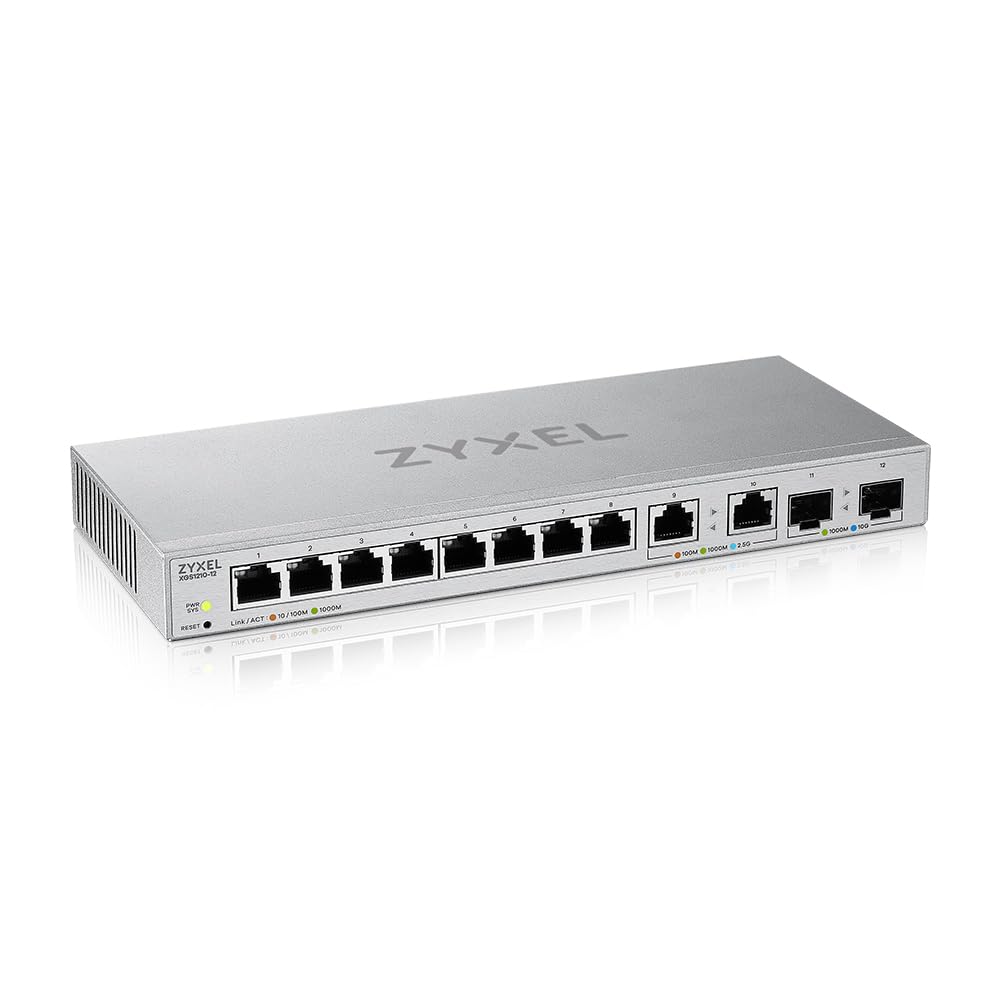
The web-managed switch that gives you VLANs, QoS, and a 10G fiber uplink without needing a command line.
This is where the category shifts from simple PoE switches to more capable networking hardware. The XGS1210-12 gives you 8 gigabit ports, 2 ports that support 2.5G (ideal for a Wi-Fi 6 access point or a fast workstation), and 2 SFP+ ports that hit 10G over fiber. There is no PoE here — this is a pure data switch for connecting computers, NAS drives, and servers. The web management interface is the real draw: through a browser you can set up VLANs (virtual networks to keep guest traffic separate from your main network), configure QoS (Quality of Service) to prioritize gaming or video calls, enable IGMP snooping for efficient video streaming, and set up static link aggregation to bond two ports for double the throughput to a NAS. The switching capacity is 66 Gbps with a 49 Mpps (million packets per second) forwarding rate — plenty of headroom for a busy office.
A few buyers report that 10G auto-negotiation can be finicky with certain network cards (NICs), occasionally requiring a manual speed setting on the connected device. The plastic case is lighter and less durable than the metal chassis on the other picks, but for a desktop switch that rarely moves, that is a minor concern.
The best features
- Two 10G SFP+ ports for a high-speed fiber link to a NAS or server.
- Browser-based management with VLAN, QoS, and link aggregation — no apps needed.
What to watch
- Some 10G NICs need manual speed setting; auto-negotiation is not always smooth.
- Plastic housing instead of metal — lighter but less rugged.
Perfect for: The home office user who wants to segment network traffic, prioritize streaming, and add a 10G fiber link to a NAS without a rack of enterprise gear.
skip it if: You need PoE for cameras or phones — this switch passes data only.
5. Zyxel 12 Port Network Ethernet Switch (XGS1250-12)

Three 10G copper ports mean you can connect a fast NAS and several workstations without a separate fiber run.
If you need to connect a 10G-capable NAS, a couple of fast workstations, and a Wi-Fi 6 access point all at once, the XGS1250-12 is built for that scenario. It offers three multi-gig RJ-45 ports (auto-negotiating from 100M all the way up to 10G) plus a dedicated 10G SFP+ fiber port and eight standard gigabit ports. The switching fabric runs at 96 Gbps with a 71.42 Mpps forwarding rate — that is a lot of headroom for simultaneous high-speed transfers, more than the XGS1210-12’s 66 Gbps.
The smart fan is a welcome feature: it adjusts its speed based on internal temperature, so it stays quiet during light use and only spins up when the switch is working hard. An ECO mode lets you turn off the port LEDs from the front panel or web GUI. The web interface includes VLAN, QoS, IGMP snooping, and static link aggregation, though it lacks a command-line interface and you cannot save or restore a configuration file — quirks that power users notice.
Reliability is the mixed story. Some owners mention the fan dying after about six months, leading to overheating (one measured 115°F internally) and port speed drops. Others say the switch runs warm by design — adding taller feet for better airflow is a common owner hack. The port availability and price for a 10G switch are the most-praised aspects.
The spec that stands out: 96 Gbps switching capacity and 71.42 Mpps forwarding rate — enough to saturate every port at full speed simultaneously.
The honest take: Owners love the port mix and the price for a 10G switch, but heat management and an occasional fan failure mean this is best for a well-ventilated spot where you can monitor it.
Ideal for: The enthusiast or small office that needs multiple 10G connections to a NAS and workstations and wants web management without a CLI.
Not for: Anyone who needs silent operation in a sealed cabinet — the smart fan can and does fail, and the chassis runs warm.
6. YuLinca 12 Port 10Gbps Managed Switch
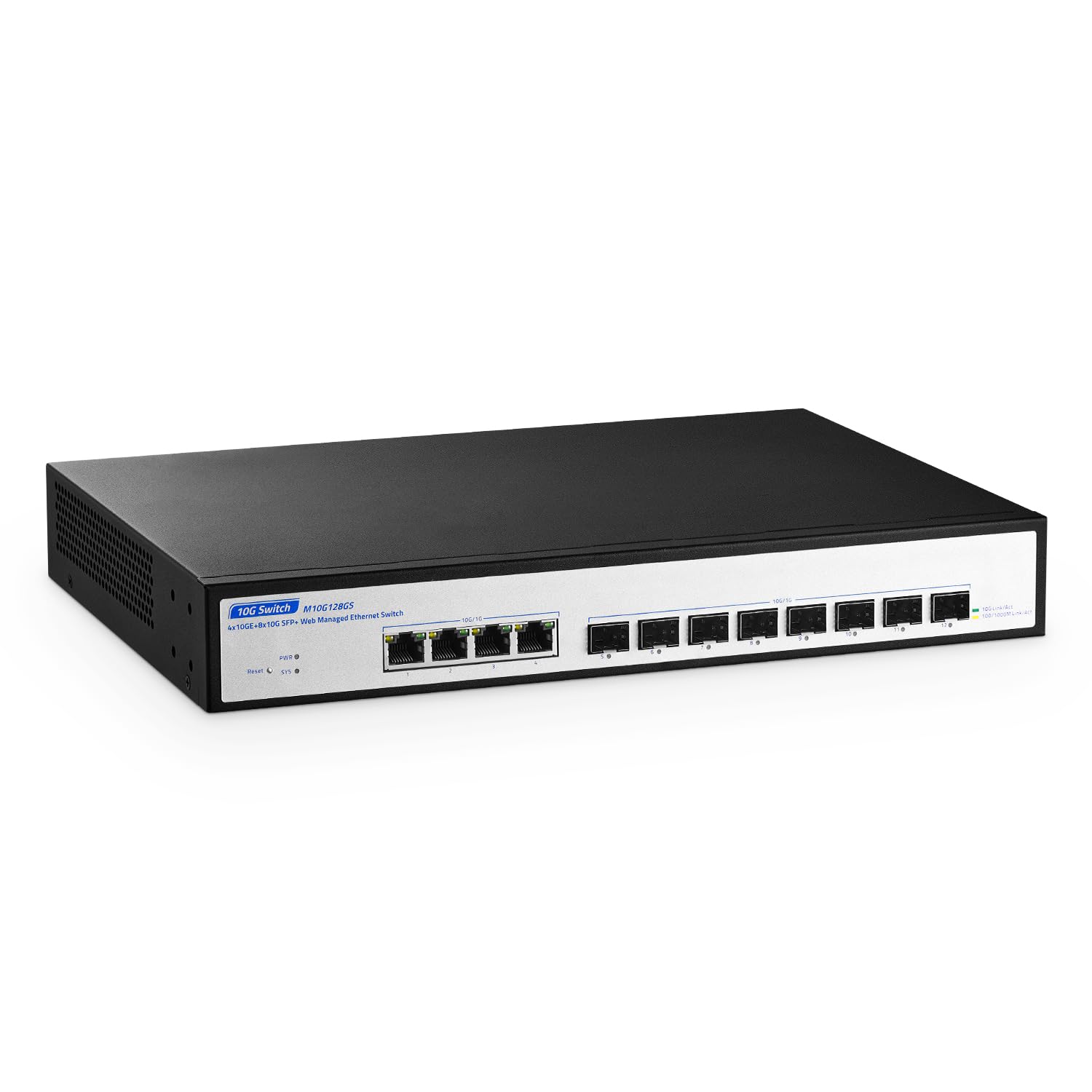
Full Layer 2 management with eight SFP+ slots for a pure 10G network backbone — no compromise on speed.
This is the switch you pick when your network runs at 10G and you need proper control. It has eight 10G SFP+ slots and four 10G RJ-45 ports, all auto-negotiating down to 100M. The switching capacity hits 160Gbps — enough for all 12 ports to forward at line speed without a single bottleneck. The web-managed interface gives you VLANs, QoS, link aggregation with LACP (Link Aggregation Control Protocol, an industry-standard way to combine ports), port mirroring, spanning tree, and broadcast storm suppression.
The build quality gets positive owner feedback — the metal case feels solid, and the industrial-grade fan keeps the internals cool. That fan, however, draws consistent complaints. Multiple owners describe a high-pitched whine or “dog whistle” tone that is noticeable in a quiet room. If the switch lives in a basement or wiring closet, the noise is manageable. In an open-plan office or a home desk setup, it may become irritating. Some owners also note that the vendor’s firmware page was down, firmware updates are unavailable, and the management interface lacks time configuration, SNMP (Simple Network Management Protocol, used for monitoring), or utilization graphs.
The high points
- Eight SFP+ and four RJ-45 10G ports with 160Gbps switching capacity — true 10G backbone potential.
- Metal case and strong build quality praised by owners.
The pain points
- Loud fan with a high-pitched tone that several owners find unbearable in quiet spaces.
- Limited firmware support and no downloadable updates from the vendor.
Best for: The prosumer or small business building a 10G backbone who can stash the switch in a ventilated closet and does not need frequent firmware updates.
Consider alternatives if: You need the switch on your desk or in a shared room where fan noise is a problem.
7. NETGEAR 12-Port 10G Multi-Gigabit Switch (XS512EM)

Full 10G on all twelve ports — the one switch that does not force you to pick which devices get the fast connections.
The NETGEAR XS512EM is the only switch in this list where every single port supports multi-gigabit speed (100M/1G/2.5G/5G/10G). There are no fixed gigabit-only ports — all twelve auto-negotiate up to 10G over standard RJ-45 cabling. Plus you get two dedicated 10G SFP+ ports for fiber uplinks. This is the switch you buy when you want to wire an entire office for 10G without compromise. Its switching capacity is not listed here, but with 12 multi-gig ports, it is designed for full line-rate throughput.
Performance is where this switch earns its reputation. Owners describe using it to connect a Synology NAS and multiple PCs at 10G, with file transfers running 3 to 10 times faster than a 1G network. The easy smart managed software provides VLANs, QoS, and link aggregation through a simple browser interface, which is easier to use than a full enterprise CLI but still offers real control. The quiet operation and energy-efficient design (IEEE 802.3az) mean it does not add much heat or noise to a workspace.
The biggest barrier is the weight — at 5.5 pounds, this is a substantial piece of hardware. It comes with a rack-mount kit, so it is clearly designed for a rack or sturdy shelf rather than a flimsy desk. Some users also note that the managed features are basic compared to a true Layer 3 switch — you get VLANs and aggregation, but not the deep routing controls that a network engineer might expect. For a small office or power-user home network, that is exactly the right balance.
The defining spec: All 12 ports are multi-gig (100M through 10G) — no fixed-speed ports, no bottlenecks.
Owner consensus: Performance and ease of setup are the most-praised aspects. As owners put it: this switch is “perfect for a small office of mixed computers and NAS systems.”
Designed for: A serious home lab or small office where every device benefits from 10G speeds — NAS, video editing workstations, and high-end access points.
Overkill if: You only need gigabit speeds or PoE for cameras — this switch is data-only and built for raw throughput.
Understanding the Specs
PoE Budget and Per-Port Power
PoE (Power over Ethernet) lets a switch send electrical power through the same Ethernet cable that carries your data. The total PoE budget (often 120W or 135W) is the maximum power the switch can deliver across all its PoE ports at once. Each port also has a per-port limit (usually 30W for PoE+). A standard security camera uses about 6-10W, a pan-tilt-zoom camera may pull 20W, and a high-power access point can use the full 30W. Add up your devices’ needs to make sure your total draw stays under the switch’s budget.
Switching Capacity and Forwarding Rate
Switching capacity (measured in Gbps) tells you the total data the switch can handle simultaneously across all ports. A simple gigabit switch with 12 ports typically has around 22-24 Gbps. A 10G switch can hit 160 Gbps or more. The forwarding rate (in Mpps, or million packets per second) tells you how many data packets the switch can process each second. You want these numbers to be high enough that your ports can all run at full speed without bottlenecking — look for “non-blocking” or “line speed” in the description to confirm that.
SFP and SFP+ Uplink Ports
SFP (Small Form-factor Pluggable) ports accept removable modules that let you connect fiber-optic or copper cables. Standard SFP handles up to 1G, while SFP+ handles up to 10G. These are uplink ports — you typically use them to connect your switch to a router, another switch, or a NAS in a different part of the building. Fiber runs can go much longer than the 100-meter limit of standard Ethernet cable, making SFP ports essential for campus or multi-building setups.
Unmanaged vs. Web-Managed vs. Smart
An unmanaged switch has no configuration at all — plug it in and it starts passing traffic. That is ideal for simple camera systems or basic office networks. A web-managed switch (also called a smart switch) gives you a browser interface to set up VLANs (virtual networks), QoS (traffic prioritization), and link aggregation (bonding ports for more speed). A fully managed (Layer 2 or Layer 3) switch adds deeper controls like dynamic routing and is typically used in enterprise networks. For most home and small office users, unmanaged or web-managed is all you need.
FAQ
Do I need a managed or unmanaged 12 port switch?
What is the difference between PoE and PoE+?
Can I use a 12 port switch for my home network?
What does SFP mean on a network switch?
Should I buy a fanless switch or one with a fan?
What does “Extended Distance Mode” do on a PoE switch?
Can I mix 1G and 10G devices on the same switch?
What is PoE Watchdog and do I need it?
How do I know how much PoE power I need?
Will a 12 port switch work with my existing router?
Final Thoughts: The Verdict
Across the board, the 12 port ethernet switch winner is the Binardat 12 Port Gigabit PoE Switch because it combines the highest PoE budget (135W), a fanless metal case, and a light 0.87 kg weight at a price that undercuts many competitors. If you need extended cable runs and auto-restart for remote cameras, grab the YuLinca with its 250-meter Extended Mode and PoE Watchdog. And for a pure 10G office network where every device gets multi-gig speed, the NETGEAR XS512EM is the one to reach for.
How We Picked
We do not accept paid placement. Every pick is matched to a real buyer and a real use-case; we do not hands-on test units.
Sources & Methodology
Specifications: manufacturer listings and product documentation. Review insights: verified customer reviews, as of July 2026. Pricing: not shown on this page (it changes often); check the current price via the retailer link.
As an Amazon Associate, Gadgets Feed earns from qualifying purchases. This does not affect which products we feature.