
Our readers keep the lights on and my morning glass full of iced black tea. As an Amazon Associate, I earn from qualifying purchases.
Specs are compiled from manufacturer listings and verified buyer reviews and can change over time — please confirm the key details on the product page before buying.
If you work in a 5S environment—sorting, setting in order, shining, standardizing, sustaining—a label printer isn’t a luxury; it’s the tool that makes the whole system hold together. The wrong label fades, peels off a tool shadow board, or smudges on a chemical bottle, and the system breaks. The right one prints crisp, permanent text on heat-shrink tubing, wire-wrap flags, and panel labels that stay readable for years. This guide cuts through the noise and lands on the nine most capable models for industrial, electrical, and commercial 5S workflows.
I’m Min — the founder and writer behind Gadgets Feed. This guide is built by comparing the manufacturers’ published specifications and the patterns across verified customer reviews, so you get each pick’s real strengths and trade-offs instead of marketing spin.
Whether you are wiring up a new panel, tagging inventory bins, or running a lean warehouse, the right 5s label printer saves you time and prevents mislabeled chaos — here is exactly which model fits your job.
Our Picks at a Glance


How To Choose The Best 5S Label Printer
Picking the wrong printer for a 5S system often means labels that fade, fall off, or simply won’t stick to the surface you need. Before you buy, focus on three things: the kinds of labels you need to print, where you will be using the printer, and how fast you need to work.
Print Technology: Direct Thermal vs. Thermal Transfer
Every printer on this list uses direct thermal technology (which means it uses heat to create an image on special paper, so you never buy ink or toner). This makes labels smudge-proof and fast to produce. For industrial 5S use, that is the right choice — no ribbons to swap, no ink to dry out.
Label Materials: Vinyl, Polyester, Heat-Shrink, and More
A 5S label on a chemical shelf needs to resist oil and cleaning sprays. A label on a wire running inside a panel needs to wrap tight and not peel. You need a printer that handles multiple tape types — standard vinyl for bins, self-laminating wraps for cables, and heat-shrink tubing for wires. Check the “compatible cartridges” spec to make sure the printer supports what your job demands.
Connectivity and Portability
If you are labeling panels in the field, a Bluetooth portable with a rechargeable battery is essential. If you run a warehouse and print hundreds of shipping labels a day, a desktop Ethernet-connected model is faster. A printer with USB-C is nice to have because it charges your tool and connects to a laptop with one cable.
Quick Comparison
| Model | Best For | Label Width | Connectivity | Speed (labels/min) | Amazon |
|---|---|---|---|---|---|
| Rollo USB Shipping Label Printer★ Best Overall | High-volume shipping & warehouses | 1.57″ to 4.1″ | USB | ~60 (4×6 labels) | Amazon |
| Brady M211 Portable BluetoothRugged Field Pick | Field service & cable ID | 0.75″ max | Bluetooth | 0.6 | Amazon |
| Brady M210 KitSelf-Contained Workhorse | Industrial on-the-go marking | 0.75″ recommended | On-device keypad | 0.39 | Amazon |
| Epson LW-PX700 Kit | Versatile industrial labeling | Up to 1″ (24mm) | USB | 30 | Amazon |
| Brother PT-E510VP | Electricians & panel builders | Up to 1″ (24mm) | USB-C | 1.2 | Amazon |
| Brother QL-820NWB | Network-connected offices | Up to 2.4″ (62mm) | USB, Ethernet, Wi-Fi, Bluetooth | 110 | Amazon |
| Brother QL-1110NWB | Wide-format shipping & barcodes | Up to 4″ | USB, Ethernet, Wi-Fi, Bluetooth | 69 | Amazon |
| Zebra ZD410 | Space-constrained desktop barcoding | Up to 2.25″ | USB 2.0 | 6 in/sec | Amazon |
| Epson LW-PX900 Kit | Extra-wide industrial & heat-shrink | Up to 1.5″ (36mm) | USB | Fast (exact not spec’d) | Amazon |
In‑Depth Reviews
1. Rollo USB Shipping Label Printer
Our pick — over 4.5★ from 16,000+ verified ratings; the strongest balance of quality and price.
The desk champion that replaced a Dymo and never looked back.
If your 5S zone involves shipping, receiving, or warehouse bin labeling, this is the machine that earns its spot on the bench. The Rollo uses direct thermal printing at 203 DPI and 150mm per second (about one 4×6 label per second) — which means you never touch ink or toner. It handles labels from 1.57 inches wide up to 4.1 inches, so a single printer covers shipping labels, product barcodes, and warehouse shelf markers. Setup is plug-and-play on both Windows and Mac, and it works with every major platform including Shopify, Etsy, eBay, and ShipStation.
What wins people over is the sheer reliability. Owners describe moving from a Dymo 4XL that “jammed after 3 months” to the Rollo and finding it faster, quieter, and jam-free. The build quality is the most-praised aspect among a massive customer base, followed closely by ease of use. There is a learning curve around print density settings, so you may need to dial those in for perfect barcode scanning — but the consensus is clear that this is a fantastic machine that works right from the start.
The honest trade-off: this is a wired desktop printer, not a portable. If you need to walk a job site labeling wires and panels, look at the Brady or Brother portables below. But for a fixed workstation doing high-volume shipping or warehouse labeling, the Rollo is the crowd favorite with well over 4.6 stars from thousands of owners.
Why it earns the top spot
- Ultra-fast speed at 150mm per second means no waiting on labels during a rush
- Versatile label width from 1.57″ to 4.1″ covers shipping, barcodes, and shelf tags
- Runs on any standard thermal label — no proprietary, costly cartridges to buy
Who should think twice
- Wired USB-only — no Bluetooth or Wi-Fi for mobile use
- Print quality can require a tweak in driver settings for perfectly crisp barcodes
- Not built for heat-shrink tubing or self-laminating wire wraps
Grab this for: A fixed warehouse, shipping desk, or office where speed and label-cost savings matter most.
Look elsewhere if: You need to print on industrial specialty materials like heat-shrink or wire-wrap tape.
2. Brady M211 Portable Bluetooth Label Printer
The tank you can drop from six feet and keep printing.
For a 5S program that follows you onto a factory floor, inside a panel, or up a ladder, the Brady M211 is purpose-built to survive. It is tested to withstand a 6-foot drop and a 250-pound crush — real-world numbers that tell you this is not a desk toy. It prints on pro-grade labels via a Bluetooth app for iOS and Android, and the app supports spreadsheet import and voice-to-text, which makes creating a dozen cable flags much faster than typing on a tiny keyboard.
The label quality and reliability are the two most-praised aspects, and owners confirm the all-day battery and USB-C charging are genuine conveniences. The auto-cut feature means you don’t tear labels by hand. The recurring observation, however, is that printing is slow at 0.6 pages per minute and the maximum label width is 0.75 inches — so this is not a shipping-label machine. It shines for wire marking, equipment tags, and panel IDs where readability and durability matter more than speed.
Compared to the Brady M210 below, the M211 adds Bluetooth and a more powerful app, but it is phone-dependent — you need your smartphone to operate it. The crowd favorite among electricians and network techs is clear: this is the one you carry in the truck.
Built for abuse
- 6-foot drop tested and 250-pound crush rated — survives real job site conditions
- Powerful app with spreadsheet import and voice-to-text saves typing time
- USB-C charging and all-day battery let you work a full shift without stopping
Pocket the trade-offs
- Slow print speed at 0.6 pages per minute; not for bulk label runs
- Maximum label width is 0.75″, too narrow for shipping or 2″ bin tags
- Runs off your phone — no onboard keyboard for when your device is dead or dirty
Reach for this if: You label wires, panels, and equipment in the field and need a printer that survives a ladder drop.
skip it if: Your labeling volume is high — the slow speed here will frustrate you.
3. Brady M210 Portable Label Printer Kit
No phone needed — just a keyboard and a tough rubber bumper.
Where the M211 is phone-dependent, the Brady M210 is a self-contained unit with a full QWERTY keypad and a backlit LCD display that works great in low-light electrical rooms. It is drop-tested and reinforced with molded rubber impact bumpers, so it takes the same rough-and-tumble life as its Bluetooth sibling. The kit comes in a hard case with a Li-ion rechargeable battery and a starter roll of nylon cloth patch-panel labels — truly turnkey for a job site.
Label quality is the most praised aspect, and owners who use it for large electrical projects confirm it labels dozens of cables with consistent, sharp text. The battery lasts about 16 hours with moderate use, and it auto-shuts off to save power. One detailed report notes you should stick with 0.75-inch-wide cartridges for wire marking and ensure the label stock is properly fitted to avoid jams — a common rookie mistake that a bit of care fixes.
The real win over the M211 is independence: no app, no phone pairing, no Bluetooth dropouts. The trade-off is speed — it prints 0.39 pages per minute, which is even slower than the M211. And the included hard case, while excellent, only holds two spare cartridges, so you may need extra storage if your job involves multiple label colors or materials.
Complete kit advantage
- Full QWERTY keyboard and backlit LCD — works anywhere without a phone
- Drop-tested with rubber bumpers; survives industrial environments
- Turnkey kit with hard case, battery, and starter labels — ready from the start
Know the limits
- Slow 0.39 pages per minute — best for short runs, not high volume
- Case holds only two spare cartridges; managing multiple label types needs extra storage
- Reliability receives mixed feedback; a few buyers report units that stopped working
Perfect for: An electrician or network tech who wants a self-contained labeler with no app dependencies.
Not for: Anyone who needs to batch-print more than a handful of labels at a time.
4. LABELWORKS Epson LW-PX700PCD Industrial Label Maker Kit

The industrial bundle that costs less than a single tool — and includes everything.
If you need a printer that handles vinyl, polyester, self-laminating wraps, and even heat-shrink tubing, the Epson LW-PX700 kit is the most cost-effective gateway into industrial labeling. It prints up to 1-inch-wide (24mm) labels and uses cost-saving rollback technology that rewinds unused tape to minimize waste — a real plus when your spools are expensive. The kit itself is generous: you get the printer, a rechargeable lithium-ion battery, an AC adapter, a USB cable, Label Editor software, magnetic attachments, and a rugged black hard case that stores everything securely.
The print quality stands out as the most praised feature, with owners noting perfectly clear 10-point text and excellent barcode and QR code printing. The magnetic attachment is another crowd-pleaser; it holds the printer on vertical metal surfaces, so you can work hands-free inside a panel. The device is built for large hands, easy to operate even with gloves, and compatible with many Brady labels (though you should confirm each type).
The catch is the software. While the printer itself is fantastic, the Label Editor software has a clunky interface and occasional quirks when importing data. This is a common complaint, but it doesn’t stop the printer from being a favorite for its value. Plus, it comes with a full-service lifetime warranty in the US and Canada — if it breaks, Epson replaces it no questions asked.
Excellent value package
- Handles heat-shrink, self-laminating wire wraps, vinyl, and polyester in one machine
- Complete kit with hard case, lithium battery, and software — no extras needed
- Lifetime full-service warranty in the US and Canada
Software trade-off
- Label Editor software has a clunky interface and occasional import quirks
- Replacement cartridges are pricier than generic alternatives
Best suited for: A shop, factory, or home lab that needs one printer for everything from heat-shrink to bin labels.
Not ideal if: You cannot tolerate any software quirks — the hardware is great, but the PC app frustrates some.
5. Brother PT-E510VP P-Touch Edge Industrial Label Printer
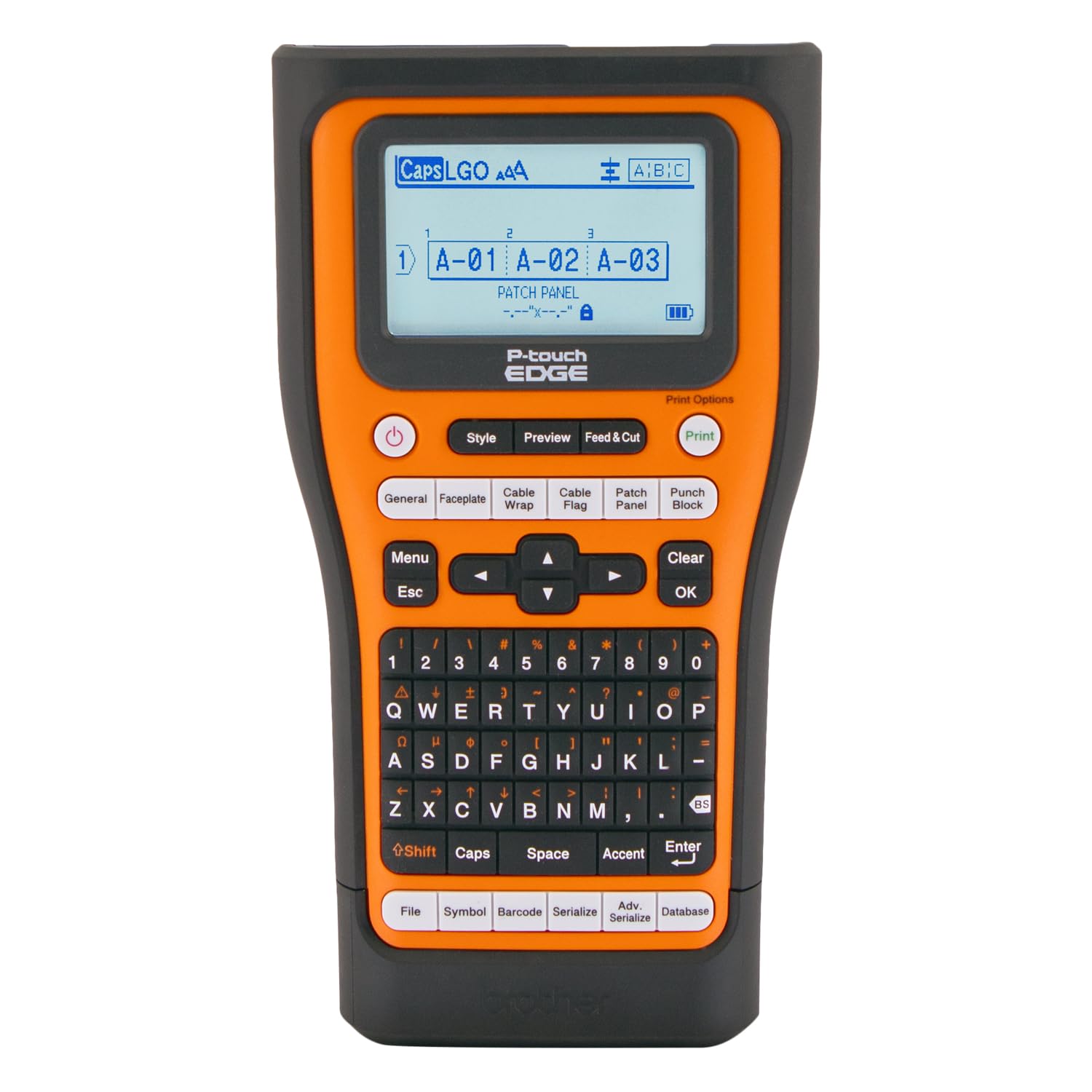
The beast that prints on heat-shrink and still fits in a tool bag.
For an electrician or panel builder who needs heat-shrink tube labels plus standard laminated labels, the Brother PT-E510VP is a purpose-built machine. It accepts labels from 3.5mm up to 24mm (1 inch), prints on TZe, HGe, Hse (heat-shrink), and even STe tapes, and includes quick-application keys for cable wrap, cable flag, patch panel, punch block, and faceplate labels. The dual auto-cutter creates half-cut labels — scoring the backing so you can peel and apply instantly — which saves time on a big install.
The print quality is the most praised aspect, and owners describe it as a “solid piece of machinery.” It has a nice grippy texture, good button action, and an ambidextrous hand strap for drop protection. The rechargeable battery lasts over two months under normal use, and USB-C connectivity means you can charge and print from a PC with one cable. It also accepts third-party tapes, which is a big reason some buyers switched from Brady.
The frank truth: this printer is shockingly large — bigger than you probably picture. Combined with a steep learning curve from all its features, it can overwhelm casual users. The P-Touch software also needs a separate database for batch printing, which is not intuitive. If you are an avid labeler who will use every feature, the investment pays off. For occasional light labeling, it is overkill and a bit expensive.
Why pros love it
- Prints on heat-shrink tubing, laminated tape, and standard labels — all in one device
- Dual auto-cutter with half-cut function makes peel-and-apply fast
- USB-C charging and connectivity, plus excellent battery life measured in months
The honest downsides
- Very large and heavy — not a pocket-friendly portable
- Steep learning curve; the software is not intuitive for batch printing
- Higher price point than many alternatives
Best for: An electrician or datacom technician who needs heat-shrink labeling and is willing to invest in a pro-grade tool.
Think twice if: You need only basic label making — this machine has more capability than you will use.
6. Brother QL-820NWB Professional Label Printer

Print 110 labels a minute from any desktop on the network.
In a warehouse or office where multiple people need to access the label printer, the Brother QL-820NWB is the solution. It connects via USB, Ethernet, wireless (802.11b/g/n), and Bluetooth — meaning any computer or tablet on the network can send print jobs. It prints up to 110 standard address labels per minute at 300 DPI, and its monochrome LCD screen allows standalone operation without a computer. A neat trick: it can print black-and-red labels using the DK-2251 continuous tape roll.
Software and reliability are the two top praised aspects, with owners noting the printer works well as a shared office tool, especially for check-in stations and prescription labeling. One owner found network setup straightforward with static IP experience, calling it easier than Zebra and more stable than Dymo. The ability to print from an iPad via Bluetooth is a convenience many appreciate.
The persistent friction points: paper loading can be finicky, the small screen dims too quickly, Bluetooth connections can be unreliable after the laptop goes to sleep, and the P-Touch software feels dated. The USB-A host port also doesn’t play well with USB-C adapters on modern Macs. But the printer itself is a solid, fast workhorse that earns a strong 4.4-star rating from over 600 owners.
Network flexibility
- Four connection methods (USB, Ethernet, Wi-Fi, Bluetooth) — fits any office setup
- Blazing 110 address labels per minute at 300 DPI
- Can print black-and-red labels using DK-2251 tape roll
Watch out for
- Paper loading is finicky and takes some practice
- Bluetooth connection can drop after the laptop sleeps
- P-Touch software looks dated and can frustrate setup
Best for: A shared office or warehouse environment where multiple staff need to print labels from different devices.
Not for: Job sites or field work — this is a desktop unit that needs AC power and a stable network connection.
7. Brother QL-1110NWB Wide Format Label Printer
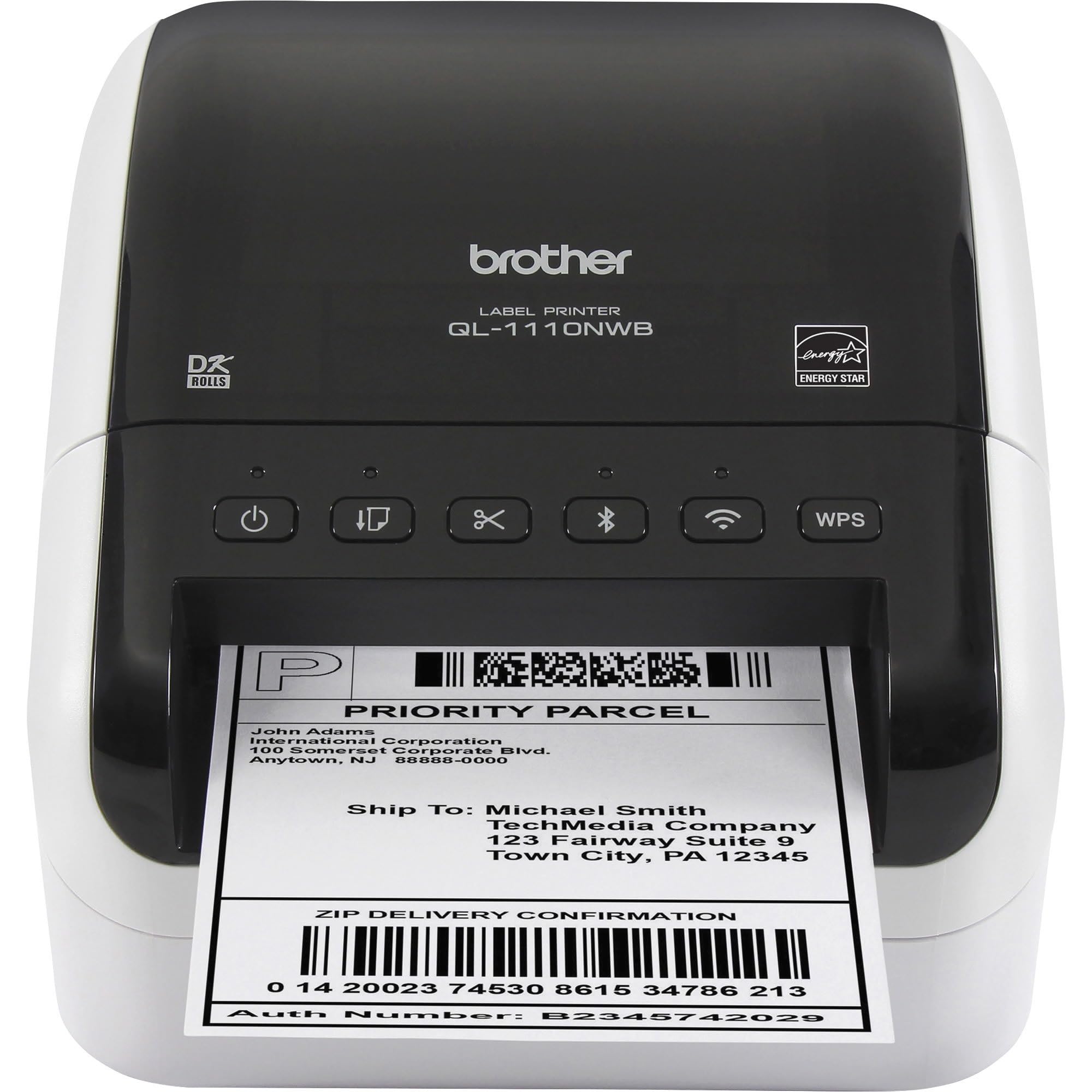
The wide-format wireless that prints 4-inch shipping labels from your phone.
When your 5S system requires big labels — 4-inch-wide shipping labels, visitor badges, or large bin tags — the Brother QL-1110NWB is the obvious choice. It prints on labels up to 4 inches wide and connects via Bluetooth, Ethernet, or wireless (802.11b/g/n), so you can print from your iPhone or Android without plugging in. It also features a Barcode Crop function that lets you select and print individual barcodes from a template, saving you from wasting a whole sheet of labels.
Setup is the most praised aspect, and owners confirm it is straightforward — one owner says they were “finally printing labels off iPhone” after a brief initial setup that required downloading the driver on a computer first. Another Poshmark seller specifically notes it prints boldly and perfectly from an iPhone with no jams, unlike a Rollo or Dymo they had before. The printer is also quiet and compact enough to sit on a desktop without dominating it.
The wireless connectivity receives mixed feedback — while the Wi-Fi option works well for many, a segment of owners mention limited or frustrating wireless printing experiences. The “Plug & Label” feature is helpful on Windows PCs, but Mac users may find the software compatibility narrower. And the printer is expensive compared to the Rollo, though it offsets that with wide-format capability and wireless freedom.
Why it wins for width
- Prints labels up to 4 inches wide — covers shipping, badges, and oversized tags
- Wireless printing from iPhone and Android with no cable required
- Barcode Crop function saves time and waste on barcode sheets
What holds it back
- Wireless connectivity reliability is inconsistent; some owners struggle with setup
- Premium price point compared to similarly fast wired printers
- Mac software support is more limited than Windows
Great for: A small business that ships packages and wants wireless wide-format printing without relying on a computer.
Not for: Anyone who needs guaranteed wireless reliability on a Mac — test your setup first or plan for Ethernet.
8. Zebra ZD410 Desktop Thermal Printer

The space-saver that spits out thousands of crisp barcodes in minutes.
When your workspace is tight and you need a dedicated barcode machine, the Zebra ZD410 is engineered to tuck into the smallest desktop footprint. It accepts media rolls with a 1-inch core, a max diameter of 5 inches, and a max width of 2.25 inches — so it is ideal for address labels, file folder labels, binder labels, and name tags. It prints at 203 DPI and a maximum speed of 6 inches per second, and it is Energy Star approved. The Link-OS remote management tool lets you deploy and troubleshoot a fleet of these printers across multiple locations from a central dashboard.
Print quality and speed are the two most praised aspects. One owner sums up the experience: “Spits out thousands of clear dark labels in minutes.” For greenhouse QR codes, thermal printing is a win because the labels don’t smear when wet, and the printer held up through a season of high humidity and temperature swings. Another owner says they wish they had bought this one first after returning other printers.
The painful truth: this printer is notoriously difficult to set up for some users. The wireless version is especially tricky — one owner spent 1.5 hours and three reinstalls to get the right driver. It is not plug-and-play with Square or Chromebooks, and the USB-only connectivity (no built-in wireless on this model) frustrates anyone expecting a cable-free experience. Reliability also receives mixed feedback, with some reporting frequent breakdowns. For a controlled office or warehouse setup with a dedicated USB connection, it is excellent. For a multi-platform or mobile workflow, look elsewhere.
Strengths you can count on
- Fast 6 in/sec print speed produces thousands of labels quickly
- Compact footprint fits in the tightest workspaces
- Excellent print quality for barcodes and QR codes that scan reliably
Areas to be cautious about
- Setup can be a nightmare — driver conflicts and configuration issues are common
- USB-only; no wireless on this model, and the USB-C adapter situation is messy
- Reliability is mixed; some customers note units breaking down frequently
Right for: A location with a dedicated IT person who can handle the initial driver setup and wants a fast, compact barcode printer.
Avoid if: You need plug-and-play simplicity or wireless printing — the setup pain here is real.
9. LABELWORKS Epson LW-PX900PCD Industrial Label Maker Kit

The industrial grader that prints on inch-and-a-half tape and survives a drop from a ladder.
If you need the widest industrial label tape available in a portable format, the Epson LW-PX900 prints on labels up to 1.5 inches (36mm) wide. That extra width over the PX700 (which maxes at 1 inch) makes it the right choice for big panel labels, oversized wire markers, and compliance tags that need to be read from a distance. It supports vinyl, polyester, heat-shrink tubing, self-laminating wire wraps, magnetic labels, and specialty tapes, with color combinations across white, black, yellow, blue, and more. The deluxe kit includes a rechargeable lithium-ion battery, AC adapter, USB cable, Label Editor Professional software, magnetic attachments, a starter tape, and a rugged black hard case that holds six cartridges plus the charger and battery.
Print quality is the most praised feature, and owners say the output is “exceptionally clear” and “class-leading.” The magnetic attachments are a favorite — they hold the printer on vertical metal surfaces, so you can work on a panel hands-free. One owner who switched from a Dymo Rhino describes it as far exceeding the competition in print quality, adhesive strength, and cartridge variety. The device meets MilSpec drop standards, matching the tough build of the Brady units.
The biggest letdown here is the software. The Label Editor Professional software is Windows-only with no CUPS, Linux, or Mac support. The on-printer screen is also criticized as blocky and washed out compared to the competition. And if you need wireless printing, skip this one — it is USB-only with no Bluetooth or Wi-Fi. For a pure industrial labeling tool with maximum tape width, it is superb. For a modern software experience, it falls short.
Widest tape, strongest build
- Prints on labels up to 1.5″ wide — the widest portable option here, great for big panel tags
- MilSpec drop-tested; magnetic attachments hold it to metal surfaces for hands-free work
- Excellent print quality with fast output and minimal waste from rollback technology
Serious software limitations
- Label Editor software is Windows-only; no Mac, Linux, or CUPS support
- No wireless connectivity — USB-only, so you must be tethered
- Onboard LCD screen is blocky and washed out compared to competitors
Choose this for: The widest possible industrial tape width in a portable, durable package — ideal for facilities and electricians who need large, clear ID tags.
Pass if: You need Mac software support or wireless printing; this is strictly a wired Windows companion.
Understanding the Specs
Maximum Label Width (mm)
This is the widest piece of tape or label the printer can handle. A wider printer is more versatile — you can print large shipping labels (4 inches) or big safety tags (1.5 inches). A narrow printer (0.75 inches) is fine for wire marking and cable flags but will not produce a readable bin tag or a shipping label. Match this spec to the largest label you know you will need.
Connectivity: USB, Bluetooth, Wi-Fi, or Ethernet
How you connect changes how you work. USB is simple and reliable but keeps you tethered to a computer. Bluetooth lets you print from a phone or tablet, but range is short and it typically supports only one connection at a time. Wi-Fi allows any device on the network to print, and Ethernet is the most stable choice for a shared office printer. If you are labeling in a server room or electrical closet, Bluetooth or on-device keys are better than rolling a laptop cart.
Print Speed (labels per minute or pages per minute)
This tells you how fast the printer produces a final label. High-speed desktop printers can hit 110 labels per minute, which matters for a busy shipping desk. Portable units can be as slow as 0.39 pages per minute — fine for a dozen labels on a job site, frustrating for a batch of 100. If your 5S workflow involves bulk labeling, prioritize speed. If you are marking individual cables as you install them, a slow speed is tolerable.
Label Material Compatibility (heat-shrink, self-laminating, vinyl)
This determines what kind of labels the printer can physically feed and print on. A standard shipping label printer (like the Rollo) works only with rolled thermal paper. Industrial printers support heat-shrink tubing (for wires that will be soldered or bundled), self-laminating wraps (that seal around a cable), and durable vinyl or polyester (that resist oil, solvents, and UV light). If your 5S system includes labeling wires inside a machine panel, heat-shrink compatibility is a must.
FAQ
What is a 5S label printer and who needs one?
Can I use a regular shipping label printer for 5S labeling?
What is the difference between a Brady M210 and M211?
Which printer works best for heat-shrink labels on wires?
How long do the batteries last on portable label printers?
Will these printers work with third-party or generic labels?
Can I print from my phone instead of a computer?
What is “self-laminating” label wrap and why would I use it?
Final Thoughts: The Verdict
For most buyers, the 5s label printer winner is the Rollo USB Shipping Label Printer because it is the fastest, most affordable, and most versatile machine for high-volume bin tags, shipping labels, and barcodes — and it never needs proprietary cartridges. If you work in the field labeling wires and panels, grab the Brady M211 for its rugged build and powerful Bluetooth app. And for the widest industrial tape in a portable form factor, the Epson LW-PX900 kit is the one to reach for.
How We Picked
We do not accept paid placement. Every pick is matched to a real buyer and a real use-case; we do not hands-on test units.
Sources & Methodology
Specifications: manufacturer listings and product documentation. Review insights: verified customer reviews, as of July 2026. Pricing: not shown on this page (it changes often); check the current price via the retailer link.
As an Amazon Associate, Gadgets Feed earns from qualifying purchases. This does not affect which products we feature.