
Our readers keep the lights on and my morning glass full of iced black tea. As an Amazon Associate, I earn from qualifying purchases.
Specs are compiled from manufacturer listings and verified buyer reviews and can change over time — please confirm the key details on the product page before buying.
The right set of desktop speakers transforms your computer from a tool into a place you want to be. Scratchy laptop speakers kill movie immersion and make every Zoom call a strain. This guide picks through the best affordable options, zeroing in on real-world clarity, connectivity, and bass depth that won’t rattle your desk.
I’m Min — the founder and writer behind Gadgets Feed. This guide is built by comparing the manufacturers’ published specifications and the patterns across verified customer reviews, so you get each pick’s real strengths and trade-offs instead of marketing spin.
These picks deliver the biggest sonic upgrade for the smallest cash outlay — the best affordable desktop speakers that turn daily computing and listening into a genuinely richer experience.
Our Picks at a Glance


How To Choose The Best Affordable Desktop Speakers
Picking a set of desktop speakers under a budget is about figuring out what you actually need—huge bass for action games or accurate vocals for music production. These three factors will steer you right.
Driver Size and Type
The driver is the speaker cone that pushes air to make sound. A 3-inch driver with a carbon fiber or woven cone delivers much tighter, cleaner sound than a cheap paper cone of the same size. A silk dome tweeter handles the highest frequencies (treble, cymbals, sibilance) without harshness.
Inputs and Connectivity
Your desk setup might include a PC, a console, a tablet, and headphones. The more wired and wireless input options a speaker offers—Bluetooth, USB-C, 3.5mm AUX, RCA, optical—the fewer times you will need to reach behind your monitor to swap cables. A built-in headphone jack on the front of the speaker is a huge convenience for quick privacy.
Size and Placement
A 2.0 system (two satellite speakers, no subwoofer) fits on almost any desk. A 2.1 system adds a subwoofer box on the floor for deeper bass but eats up space underneath the desk. A “desktop mode” tune for near-field listening (you sit 2-3 feet away) gives you clearer imaging than a speaker tuned for a room.
Quick Comparison
| Model | Best For | Driver Size | Inputs | Wattage (RMS) | Amazon |
|---|---|---|---|---|---|
| Ortizan C7★ Best Overall | Studio & Production | 3.5″ + 0.75″ | BT 5.3, USB-C, TRS, RCA, AUX | — | Amazon |
| Logitech Z313Best Value | Gaming & Movies (with Sub) | 5.9″ Subwoofer | 3.5mm AUX, RCA | 25W | Amazon |
| IBALL·BOX H1 | Wired Versatility | 3″ + 1″ | BT, USB-C, Optical, AUX | 60W | Amazon |
| OHAYO 60W | All-Around Desktop | 3″ + 0.75″ | BT 5.3, RCA, AUX, USB | 60W | Amazon |
| Creative T60 | Dialog Clarity | 2.75″ | BT 5.0, USB-C, AUX | 30W | Amazon |
| Edifier MR3 | Hi-Res Monitoring | 3.5″ + 1″ | BT 5.4, TRS, RCA, AUX | 18Wx2 | Amazon |
| Mackie CR3.5 | Entry-Level Production | 3.5″ + 0.75″ Silk Dome | RCA, TRS | — | Amazon |
In‑Depth Reviews
1. Ortizan C7 Dual-Mode 2.0 Studio Monitors
Our pick — over 4.5★ from 850+ verified ratings; the strongest balance of quality and price.
The studio reference that fits in your budget and on your desk.
The Ortizan C7 is the top pick because it delivers an accurate near-flat frequency response, a trait usually reserved for monitors costing three times as much. The combination of a 3.5-inch carbon fiber mid-bass driver and a 0.75-inch silk dome tweeter, paired with an electronic 2-way crossover, lets you hear every instrument layer without the bass overpowering the mids. Buyers report the bass reaches down to about 45Hz, which is impressive for a 2.0 system without a subwoofer.
Versatility is its second strongest card. You get Bluetooth 5.3, a USB-C port with a built-in 24-bit DAC for direct digital audio from your PC, 6.35mm TRS balanced inputs for pro gear, plus RCA and AUX. That means one cable swap gets the same set of speakers working with a gaming console, a mixer, or a phone. The volume knob on the front feels premium, though a few owners mention it jumps from silent to audible instead of smoothly ramping up.
dual-mode versatility
- Accurate near-flat response with bass to about 45Hz
- Bluetooth 5.3 plus USB-C, RCA, and TRS inputs
- Compact build with solid wood enclosures
trade-off compromises
- Faint idle hiss in near-silent passages
- Volume knob is choppy, not smooth
- No grille cover for driver protection
studio-ready: you want near-field accuracy for music production or mixing, and need the widest range of wired and wireless inputs on a budget.
look elsewhere: deep sub-bass for action movies or gaming is non-negotiable—the C7 lacks a subwoofer output and the low end is tight but not thumping.
2. Logitech Z313 2.1 Multimedia Speaker System
The mighty little 2.1 system that has been a hit for well over a decade.
If you want deep bass for gaming and movies without a separate subwoofer, the Logitech Z313 delivers a rumbling low end that the 2.0 speakers above cannot match, thanks to its 25 watts of RMS total power and a compact subwoofer that sits under your desk. Owners mention that the sound stays distortion-free even when you push the volume high, and the wired control pod keeps volume at your fingertips. This system is for you if you want a subwoofer in a small space without emptying your wallet; skip it if you need Bluetooth or USB connectivity, because it is wired with a 3.5mm AUX and RCA input.
Setup is as simple as plugging in—a 3.5mm AUX connection and a power cable—and the satellite speakers take up very little desk space. However, the sound has noticeable trade-offs. The subwoofer is not adjustable, so if it feels too boomy for your taste, you cannot dial it back. The tone also leans toward a sharper high end that makes voice clarity okay for video calls but can fatigue your ears during long music sessions. Unlike the Ortizan C7 with its USB-C DAC, the Z313 is strictly analog, so do not expect studio-grade instrument separation.
value pick: gamers and movie fans who want a palpable low-end rumble without spending on a large subwoofer.
skip if: you need balanced monitoring for music work or want wireless Bluetooth streaming built in.
3. IBALL·BOX H1 Computer Speakers
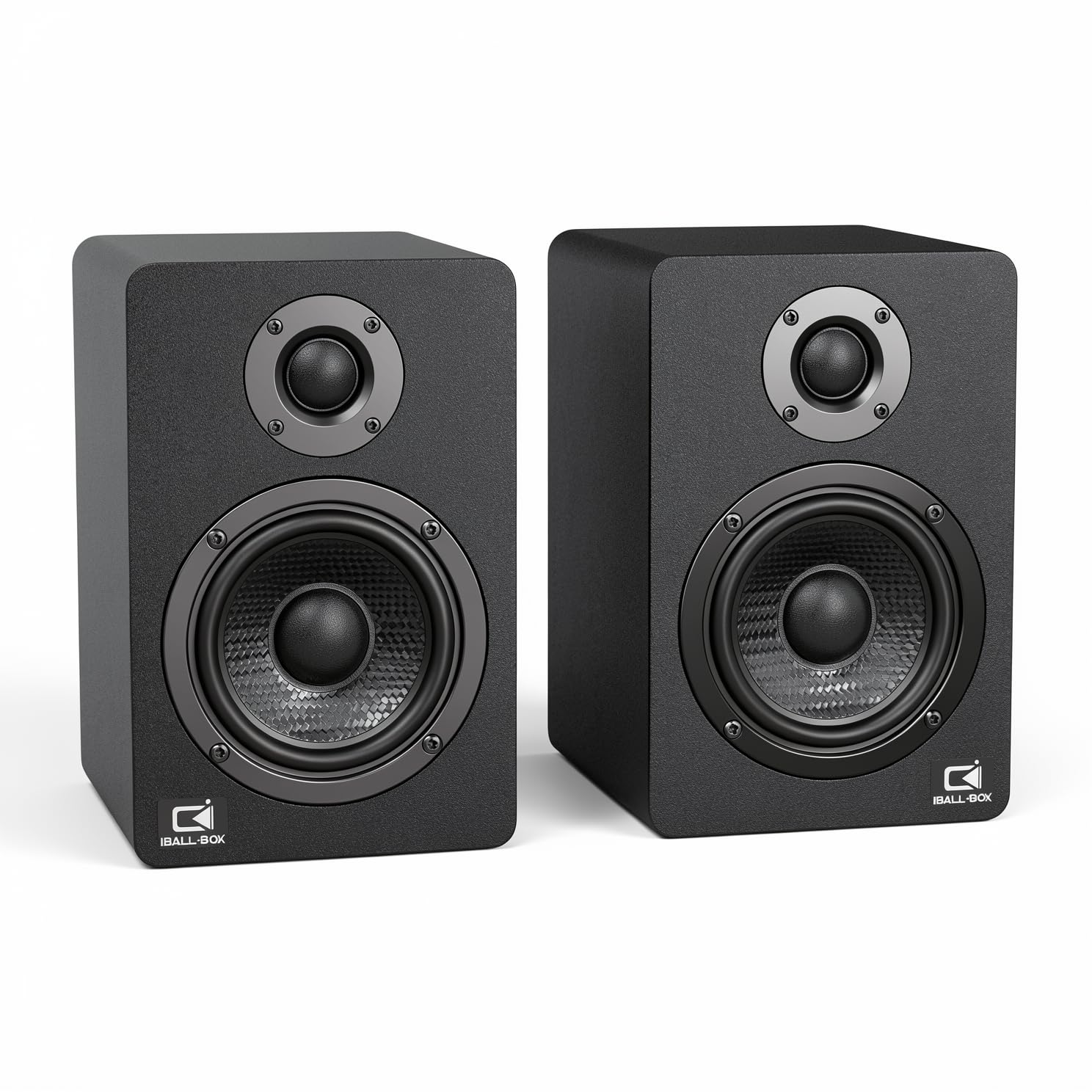
The desktop soundbar alternative with every input you can think of.
The H1 speakers pack a massive 60 watts of total power into a compact 2.0 design, making them one of the loudest options on this list without needing a subwoofer. Dual 3-inch carbon-fiber woofers and 1-inch silk dome tweeters work together to cover a wide frequency range from 40Hz to 20KHz, with a signal-to-noise ratio of at least 95dB for clean playback. Unlike the Logitech Z313, the H1 lets you tweak the sound with front-panel bass and treble controls so you can dial in a balanced tone for music or boost vocals for dialog-heavy movies.
What sets the H1 apart is its connectivity. It supports optical input from a TV or console, USB-C for high-resolution 24-bit audio from your PC, Bluetooth for wireless streaming, and a standard 3.5mm AUX jack. That is four different ways to connect audio sources without ever unplugging a cable. A few owners note that the optical cable alignment is a bit fussy—the beveled end needs a specific angle—but once connected, the sound quality through the optical input is described as excellent for both movies and music. The H1 is slightly taller than the other 2.0 speakers here, so check that your monitor base does not block the top of the left driver.
space-saver: you need to connect multiple devices (PC, console, TV) to a single speaker set and want physical tone controls to tune the sound.
skip it: you prioritize a tiny footprint—the H1s are more substantial than the compact Ortizan C7 or Creative T60.
4. OHAYO 60W Computer Speakers

A 60W powerhouse that brings studio-style drivers to the everyday desktop.
The OHAYO 60W speakers share a similar driver setup to the Ortizan C7—a 0.75-inch carbon fiber silk dome tweeter and a 3-inch carbon fiber full-range driver—but they push 30 watts per channel for noticeably more headroom. The rear bass port amplifies the low end so that action sequences and bass-heavy music have a richness that 2.0 speakers at this price rarely achieve. Multiple customers note the speakers are impressively energy-efficient,
Connectivity covers Bluetooth 5.3, RCA, AUX, and USB inputs, making it easy to pair with anything from a turntable to a gaming PC. The one area where the OHAYO falls slightly short of the Ortizan C7 is the input variety—it lacks the balanced TRS connections and the USB-C DAC that the C7 offers. The volume knob doubles as a Bluetooth toggle, which can be confusing at first, but becomes intuitive after a day of use. For a pure desktop upgrade that competes directly with the IBALL·BOX H1, the OHAYO is a strong alternative if you favor the sleek wood enclosure over the H1’s plastic-metal build.
loud choice: all-around desktop use where you want a lively sound with good bass response and the convenience of Bluetooth 5.3.
skip if: you need balanced TRS inputs for a professional audio interface or a subwoofer output.
5. Creative T60 Compact 2.0 Desktop Speakers

The speaker that makes dialogue crisp without needing a subwoofer.
The Creative T60 stands out with its Clear Dialog feature, powered by Sound Blaster audio technology. This is not just marketing speak—reviewers point out that voices in movies, Zoom calls, and YouTube narrations are immediately clearer than on standard speakers. The T60 uses a 2.75-inch full-range driver with BasXPort technology to enhance low-end response, so you get satisfying bass without the extra box.
Connectivity includes Bluetooth 5.0, USB-C audio for laptops and consoles, and a 3.5mm AUX port. A clever headphone/speaker switch on the front lets you instantly toggle between private listening and room-filling sound without unplugging anything—Creative calls this a unique feature that owners consistently praise. The volume knob has a slight delay on initial rotation, and Bluetooth is limited to the basic SBC codec rather than higher-quality codecs like aptX. For those who prioritize vocal clarity for work and media over game-shaking bass, the T60 is an unusually thoughtful choice.
vocal clarity: you spend hours on video calls or watch a lot of dialog-heavy content and find standard speakers muddy.
look elsewhere: you want deep sub-bass for gaming or the loudest possible volume for a large room.
6. Edifier MR3 Powered Studio Monitor Speakers

Hi-Res Audio certification for the price of a standard multimedia set.
The Edifier MR3 is the most technically capable set in this list, boasting Hi-Res Audio certification with a frequency response from 52Hz up to 40kHz. The 3.5-inch mid-low drivers and 1-inch tweeters deliver a flat, neutral sound that is ideal for audio production, video editing, and critical listening. The signal-to-noise ratio is high enough that shoppers say zero hiss and no distortion, even at higher volumes. When paired with a dedicated subwoofer like the T5s, the MR3 becomes a genuinely reference-grade near-field system that competes with sets costing more.
Connectivity is sturdy but less broad than the Ortizan C7—you get balanced TRS inputs (for professional audio gear), RCA, AUX, and Bluetooth 5.4 with multi-point support for swapping between your phone and PC. The EDIFIER ConneX app lets you switch between Music, Monitor, and Custom EQ modes, offering granular control that no other speaker in this price range provides. A few owners found the initial Bluetooth pairing process finicky; the control knob can be unresponsive until you read the manual. Unlike the Mackie CR3.5 below, the MR3 does not include a location switch for desktop vs. bookshelf placement, so you need to place them carefully on your desk to get the best imaging.
nearfield use: critical listeners and content creators who want the most accurate frequency response and app-based EQ control.
skip it: you want a truly all-in-one set without needing a separate subwoofer for deep bass extension.
7. Mackie CR3.5 Creative Reference Powered Studio Monitors

Studio-proven sound in a size that fits next to any monitor.
The Mackie CR3.5 is an entry-level studio monitor from a brand that has been in professional recording studios for decades. The 3.5-inch woven woofer and 0.75-inch silk dome tweeter deliver clean, articulate sound with plenty of clarity for near-field listening (sitting close to the speakers). A unique tone control knob lets you dial in extra low-end punch and high-end sparkle for rich gaming or casual listening, while the location switch tune the speaker for desktop (close up) or bookshelf (across the room) placement—a feature the similarly-priced Edifier MR3 lacks.
Performance is solid for basic content creation, gaming, and HiFi listening, and owners say the build quality is sturdy enough to handle the bumps of daily use. However, the connectivity is limited to RCA and TRS inputs only—there is no Bluetooth, no USB, and no optical input. That means the CR3.5 is strictly wired, making it less versatile than the Ortizan C7 or the IBALL·BOX H1 for a multi-device desk. At 10.2 pounds for the pair, the CR3.5 is also the heaviest option here, so they are not for moving around frequently. If you need a simple, wired near-field monitor with real-studio DNA, the CR3.5 is a reliable choice.
budget monitor: you want dedicated wired studio monitors for a clean audio interface setup and do not need wireless or optical inputs.
look elsewhere: you need Bluetooth, USB, or optical connectivity for a multi-device desktop.
Understanding the Specs
Driver Size and Material
The driver is the part of the speaker that makes the actual sound. A larger driver (like a 3.5-inch woofer) pushes more air and produces deeper bass, but the material matters too. A carbon fiber or woven cone is stiffer than a paper cone, which means less distortion at high volumes and cleaner transients (the snap of a snare drum or a plucked string). A silk dome tweeter handles the highest frequencies without the harshness that cheaper metal tweeters can introduce.
RMS vs. Peak Power
RMS (Root Mean Square) wattage is the continuous power a speaker can handle without distorting, while peak power is the short burst it tolerates. A 60W RMS speaker can fill a medium-sized room much better than a 30W RMS speaker of the same size. Keep in mind that higher wattage also draws more electricity—the OHAYO speakers, for example, are noted for running at under 1 watt even at full volume.
FAQ
Can I use studio monitors like the Ortizan C7 or Edifier MR3 for gaming?
Do I need a subwoofer with these 2.0 speakers?
What is the difference between Bluetooth 5.0 and Bluetooth 5.3 or 5.4?
Can I use these speakers with my turntable?
How do I choose between a 2.0 and a 2.1 system for my desk?
What does Clear Dialog do on the Creative T60?
Do these speakers work with a PlayStation or Xbox?
What is the tone control or location switch on a speaker?
How important is the USB-C DAC in the Ortizan C7?
Can I wall-mount these speakers?
Final Thoughts: The Verdict
If you want one dependable pick, the top affordable desktop speakers winner is the Ortizan C7 because it combines a near-flat studio frequency response with the widest range of wired and wireless inputs, including a USB-C DAC (a digital-to-analog converter that connects directly to your computer’s USB-C port), at a price that undercuts most competitors. If you want the deepest bass for gaming and movies without adding a subwoofer, grab the Logitech Z313. And for the most connectivity flexibility—optical, USB-C, Bluetooth, and physical tone controls—the IBALL·BOX H1 is the one to reach for.
How We Picked
We do not accept paid placement. Every pick is matched to a real buyer and a real use-case; we do not hands-on test units.
Sources & Methodology
Specifications: manufacturer listings and product documentation. Review insights: verified customer reviews, as of July 2026. Pricing: not shown on this page (it changes often); check the current price via the retailer link.
As an Amazon Associate, Gadgets Feed earns from qualifying purchases. This does not affect which products we feature.