
Our readers keep the lights on and my morning glass full of iced black tea. As an Amazon Associate, I earn from qualifying purchases.
Specs are compiled from manufacturer listings and verified buyer reviews and can change over time — please confirm the key details on the product page before buying.
That single USB-C port on your laptop is the gateway to a full desktop — two or three external monitors, a wired network, charging, and all your peripherals — but only if you pick the right dock. The wrong one leaves you hunting for drivers, wrestling with flickering screens, or discovering your Mac can only mirror displays. This guide focuses on the docking stations that actually deliver true 4K output over a single USB-C cable, cutting through the spec-sheet confusion to the models owners praise most for reliability and real-world use.
I’m Min — the founder and writer behind Gadgets Feed. This guide is built by comparing the manufacturers’ published specifications and the patterns across verified customer reviews, so you get each pick’s real strengths and trade-offs instead of marketing spin.
Whether you are expanding a MacBook for a trading setup or connecting a Windows laptop to a multi-screen creative workstation, the best 4k docking station usb-c delivers stable video, enough power, and the right ports without making you a part-time IT troubleshooter.
Our Picks at a Glance


How To Choose The Best 4K Docking Station USB-C
Choosing a dock by price alone often leads to flickering screens, weak charging, or port starvation. Focus your search on a few core compatibility and performance factors instead.
Your Laptop’s USB-C Capabilities
Not every USB-C port is equal. Your laptop needs to support DisplayPort Alt Mode for video output over a single cable. If it also supports USB Power Delivery (PD), the dock can charge your laptop through the same connection. Thunderbolt 3/4 ports are fully compatible, but a standard USB-C port without Alt Mode won’t drive a monitor at all — you would need a DisplayLink dock that side-steps that limitation.
Multi-Monitor Support: DisplayLink vs. Native
For Windows laptops with native MST (Multi-Stream Transport), many docks can drive two or three independent 4K displays without extra software. MacOS does not support MST, so to run multiple external monitors with extended (not mirrored) content you need a dock using DisplayLink technology. DisplayLink requires a free driver installation, but it open up triple 4K setups even on M-series MacBooks that natively support only one external display.
Power Delivery (PD) Rating
A dock’s PD rating determines how fast it charges your laptop. A 100W PD port is ideal for a 16-inch MacBook Pro or a demanding workstation. Some docks output 85W to the laptop (reserving power for internal operations), which is still enough for most models but may not sustain a full load under heavy gaming or rendering. Always check the fine print — a dock may take a 100W input but only pass 85W through.
Port Selection and Layout
Count the ports you need daily: how many USB-A devices (keyboard, mouse, webcam), if you need an SD card slot for camera work, and if a 3.5mm audio jack matters for your headset. Front-facing USB ports are far more convenient for plugging in a thumb drive than ports hidden around the back. Ethernet is a must for stable video calls and large file transfers — look for Gigabit (1 Gbps) at minimum; 2.5 Gbps is a bonus for faster local networking.
Quick Comparison
| Model | Best For | Max Video Output | Laptop Charging (PD) | Total Ports | Amazon |
|---|---|---|---|---|---|
| TobenONE DisplayLink Dock★ Best Overall | Triple 4K on Mac & Windows | Triple 4K@60Hz | 100W (96W certified) | 18 | Amazon |
| UGREEN 11-in-1 Revodock ProBest Value | Budget dual monitor with high refresh | Dual 4K (DP 4K@120Hz) | 85W (100W input) | 11 | Amazon |
| Lenovo USB-C Travel DockCompact Pick | Ultra-portable travel dock | Dual 4K | 65W (100W adapter) | 7 | Amazon |
| Acer 11-in-1 Dock Stand | All-in-one stand + dock | Triple (8K@30Hz DP / dual 4K@60Hz) | 85W (100W input) | 11 | Amazon |
| Baseus Spacemate | Vertical upright space-saver | Triple 4K (Windows) | 85W (100W input) | 11 | Amazon |
| UGREEN DisplayLink 9-in-1 | Dual 4K on Mac without mirroring | Dual 4K@60Hz (DisplayLink) | 100W PD 3.0 | 9 | Amazon |
| Anker Nano 13-in-1 | Detachable hub for desk & travel | Triple (4K@60Hz / dual 2K) | 100W (140W adapter) | 13 | Amazon |
| WAVLINK 15-in-1 DisplayLink | Mac triple 4K with many ports | Triple 4K@60Hz | 100W (130W adapter) | 15 | Amazon |
| Anker Prime DL7400 | High-end triple 4K with smart display | Triple 4K@60Hz | 140W upstream | 14 | Amazon |
In‑Depth Reviews
1. TobenONE DisplayLink Docking Station
Our pick — 4.5★ from 950+ verified ratings; the strongest balance of quality and price.
This DisplayLink dock drives three 4K@60Hz displays on both Mac and Windows.
This is the dock for anyone who needs three external 4K displays running at a smooth 60Hz each — stock traders tracking multiple charts, video editors previewing on a second and third monitor, or developers juggling code across screens. It uses DisplayLink technology (a small driver install is all it takes) so it works on macOS where native multi-monitor is limited, and it handles up to four screens on Windows if your laptop supports video output via USB-C. The crowd favorite — backed by strong owner consensus — praises the rock-solid reliability and the sheer variety of ports: 3x HDMI, 3x DisplayPort, 2x USB-C, and 4x USB 3.2 ports that transfer data at 10Gbps. The 120W power adapter delivers 100W (96W certified) back to your laptop and has an extra 18W front USB-C port for topping off your phone.
For your desk, the TobenONE is a true one-cable setup — plug a single USB-C into your laptop and the dock handles video, peripherals, Ethernet, and charging. Owners say the straightforward DisplayLink driver setup is painless and that the dock runs cool even under load. The main trade-off appears with the third HDMI port: some units develop an intermittent signal drop after several months. The company’s support team is widely praised for offering refunds or replacements quickly, but if you absolutely need flawless long-term operation on every single port, this is the honest caveat.
It also serves well in clamshell-mode desk setups where the laptop lid stays closed. The compact size — 4.26 inches wide and just 1.5 inches tall — slides easily under a monitor stand. Heavy streaming services like Netflix or Amazon Prime will show a black screen due to DisplayLink’s screen-recording restriction, so keep that in mind if DRM-protected video playback is a daily need.
What wins people over
- Drives three 4K@60Hz displays on both Mac and Windows
- 18 total ports include 3 HDMI, 3 DP, and 4 USB 3.2 at 10Gbps
- 120W adapter supplies 100W laptop charging plus 18W for a phone
- Owner support is consistently called out as excellent
The honest caveat
- Third HDMI port may fail intermittently after months of use
- DisplayLink blocks DRM-protected streaming services
- Must manually power on the dock each time
Reach for this if: you need three 4K monitors from a single USB-C cable and value port variety and strong warranty support over everything else.
Think twice if: you rely heavily on Netflix or other DRM-streaming on an external monitor, or you want zero software driver installation.
2. UGREEN USB C Docking Station Dual Monitor, 11-in-1 Revodock Pro
Its DisplayPort 1.4 delivers 4K@120Hz, and dual 10Gbps USB-C ports come in an affordable aluminum shell.
If your priority is high-refresh external displays while staying affordable, this UGREEN dock stands out. Its DisplayPort 1.4 port delivers 4K at 120Hz — a rare spec at this level — and buyers confirm it runs QHD at 180Hz, making it a strong match for gamers or anyone who notices screen smoothness. HDMI 2.0 handles a second 4K display at 60Hz. On Windows, the dock supports triple independent screens (laptop + HDMI + DP) via MST, while Mac users get dual extended displays in SST mode. The 11 ports include a pair of USB-C and two USB-A 2.0 ports, plus SD/TF card slots, Gigabit Ethernet, and a 3.5mm audio jack.
The build is aluminum, which keeps the dock running at or below 45°C even after a full 12-hour workday — buyers report it gets warm but never hot enough to worry about. The 100W PD input passes up to 85W to your laptop, enough for a MacBook Pro 16 or Dell XPS 15 during normal use. Note that you need a compatible USB-C port on your laptop that supports video output and power delivery; some users found that only one side of the dock’s ports worked for data transfer. Also, the USB-A ports are USB 2.0 speed, which is fine for mouse and keyboard but not for fast external drive transfers.
A small number of owners received a unit that stopped working, and a few note it can be picky about the specific USB-C port on the computer. The 1-year warranty is standard, and UGREEN’s support is generally responsive.
Best for the budget-focused: high-refresh 120Hz DP output at a price that undercuts most rivals, but comfort-check your laptop’s full USB-C capability and accept USB-A 2.0 for peripherals only.
Grab it for: smooth 120Hz 4K or QHD@180Hz workflows on a Windows laptop without paying a premium.
skip it if: you need fast USB-A ports for external drives or a guaranteed triple-monitor Mac setup (Mac extended mode is limited to dual).
3. Lenovo USB-C Dual Display Travel Dock
At 4.8 ounces, this dock slips into any bag and drives dual 4K monitors.
At just 4.8 ounces and roughly the size of a deck of cards, this Lenovo dock is built for professionals who move between meeting rooms, co-working spaces, and hotel desks. It has 7 ports: 1x HDMI 2.0, 1x DP 1.4, 1x USB-A 3.2 (10Gbps), 2x USB-C (10Gbps, with one always-on for charging a phone), and a Gigabit Ethernet port. It drives two 4K external displays alongside your laptop screen — exactly what remote workers and consultants need for presenting or multi-tasking on the go. The included 100W USB-C charger delivers 65W to the laptop, which is enough for most ultrabooks and business laptops.
Owner feedback highlights the build quality and the compact, minimalist look. The dock uses 66% post-consumer recycled plastic in the chassis, which is a nice sustainability angle. Setup is truly plug-and-play — no drivers needed for Windows or macOS. The key limitation is that the laptop must support DisplayPort Alt Mode over USB-C. Some owners mention that it won’t drive the second monitor without a separate power adapter, and a few could not get dual monitors working at all, likely due to their laptop’s USB-C limitations rather than the dock itself. If your laptop has a Thunderbolt port or a full-featured USB-C port, you should be fine. Charging is slower at 65W compared to the 100W-class docks above.
Your on-the-go partner: light, small, and reliable for dual 4K, but verify your laptop’s USB-C video support and expect modest charging speed.
Travelers, reach for this: you need a no-fuss dual 4K dock that weighs nothing and disappears into a laptop sleeve.
Pass if: you run a power-hungry workstation or need more than 7 ports for your desk setup.
4. Acer Docking Station 3 Monitors, 11-in-1 Laptop Stand
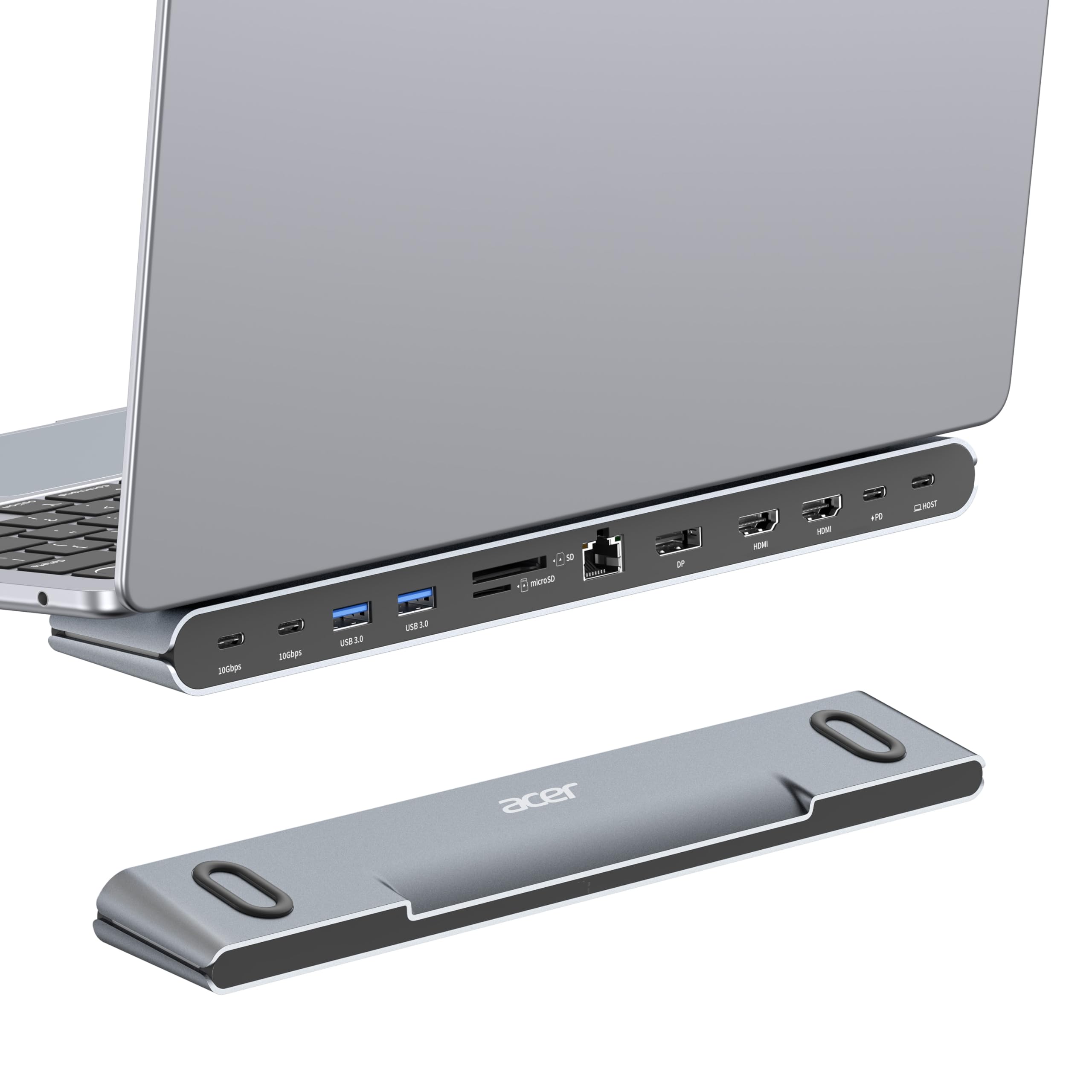
This dock combines a laptop stand with triple-monitor support in a single metal block.
This Acer dock does double duty: it improve your laptop for a better ergonomic viewing angle and improved airflow, while packing 11 ports into a single USB-C connection. It offers 2x HDMI (4K@60Hz), 1x DisplayPort (single 8K@30Hz), 2x USB-C (10Gbps), 2x USB-A (5Gbps), Gigabit Ethernet, SD/MicroSD slots, and 100W PD input (85W output to laptop). The design includes anti-slip silicone pads so your laptop stays firmly in place. On Windows, it supports triple displays — typically two at 4K and one at 1080P. On Mac, the external monitors mirror each other.
The build quality is praised across owner feedback — the metal chassis feels sturdy and keeps things running cool. The integrated stand frees up desk space by putting the laptop above the dock, hiding cable clutter underneath. A few owners note that the unit failed after a couple of weeks, and seller support was unhelpful in those cases. The main requirement is that your laptop’s USB-C port must support DisplayPort Alt Mode and power delivery. This dock is best for anyone who wants to reduce desk footprint while adding a second or third monitor — just know that the triple-display resolution ceiling is real (the third screen caps at 1080P on many setups).
Best for desk organizers: combines an improve laptop stand with strong port selection, but check your laptop’s Alt Mode support and temper triple-monitor expectations.
Buy it for: a cleaner desk with better ergonomics and plenty of ports at a mid-range price.
pass on it if: you need three full 4K monitors or want a guaranteed long-term warranty experience.
5. Baseus Spacemate Docking Station, 11-in-1
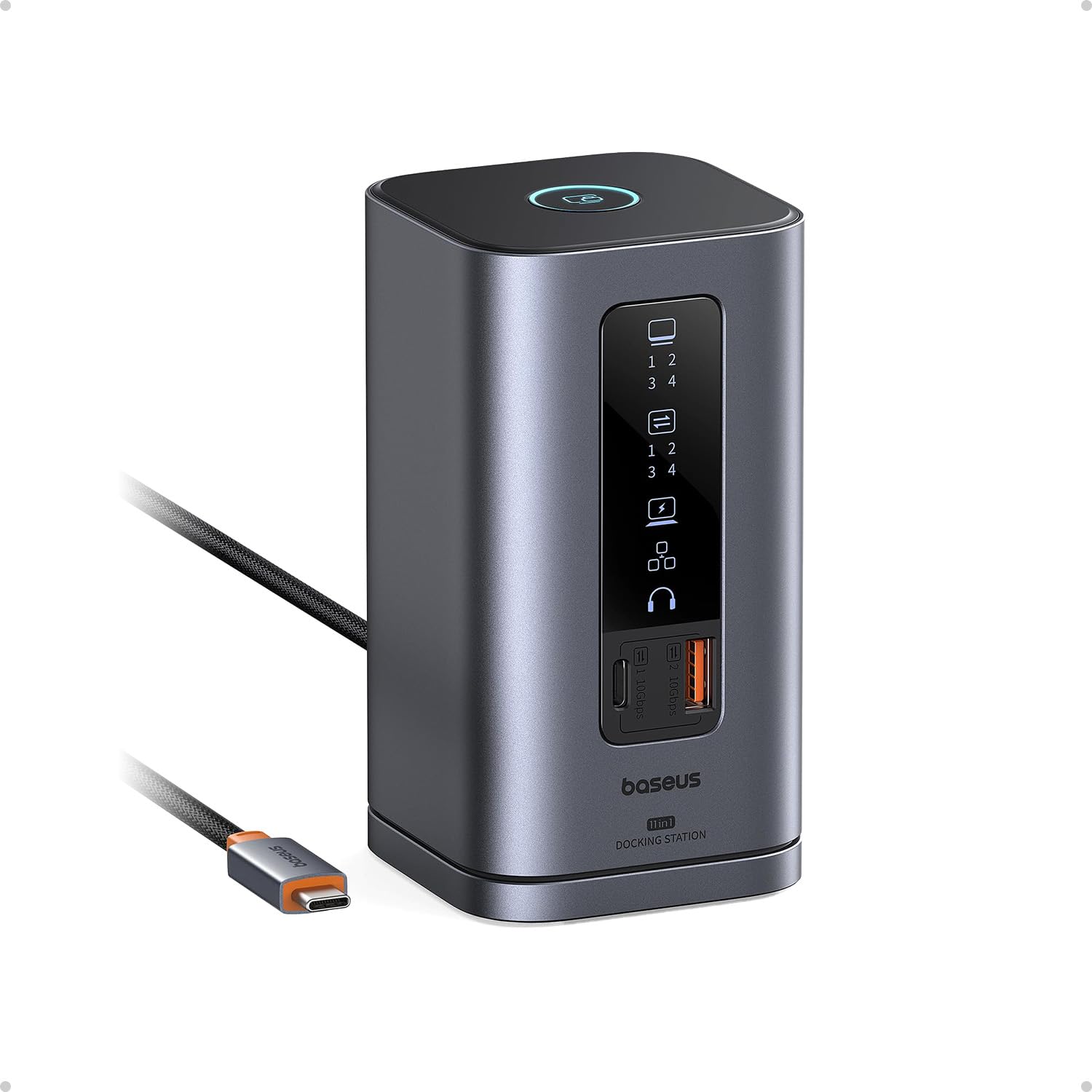
This vertical dock stands your laptop upright and runs triple 4K monitors on Windows.
The Baseus Spacemate takes a different approach: instead of lying flat, the dock sits vertically with a magnetic base, and your laptop rests on top. It has 11 ports including 2 HDMI, 2 DisplayPort, a USB-C and 2 USB-A at 10Gbps, Gigabit Ethernet, a 3.5mm audio jack, and 100W PD input (85W output). On Windows, it drives three 4K displays (HDMI + DP combo). MacOS users should know the triple-display mode does not work — you can only extend one external monitor. An 80cm built-in cable connects to your laptop, and a small LED screen shows which ports are active. There is also a screen-lock button for privacy.
Owners consistently praise the port selection and the sleek, upright look — it genuinely clears desk clutter. The main complaint is reliability: several units arrived with non-functional USB ports or failed after a week, and the built-in cable is not replaceable if it breaks. The company is praised for proactive customer support and quick replacements. You need to install the correct software (Windows vs Mac version) for displays to function properly, and a dedicated 100W power adapter is not included in the box. If you get a good unit, it is a fantastic space-saving dock. If you get a lemon, the support team will make it right.
Standout strengths
- Unique vertical design with magnetic base saves desk space
- Triple 4K on Windows with HDMI and DisplayPort flexibility
- Front USB ports and LED status display are convenient
- Excellent customer service for defect replacements
The trade-offs
- Quality control can be spotty — some units arrive dead
- Built-in cable is non-replaceable
- No power adapter included; you must supply a 100W one
Choose this for: a clean, vertical workstation and generous port count if you are on Windows and accept a slight lottery on initial unit quality.
Think twice if: you need guaranteed out-of-box reliability, a replaceable cable, or triple displays on a Mac.
6. UGREEN USB C DisplayLink Docking Station, 9-in-1

This DisplayLink dock enables dual extended 4K monitors on any Mac.
If you own a MacBook Air or Pro and need two external monitors showing different content (not a mirror image), this UGREEN dock is built for you. It uses DisplayLink technology to bypass macOS’s native one-external-display limit, delivering dual 4K@60Hz over HDMI and DisplayPort. It works on Windows too, but its real value is for Mac users who have been frustrated by Apple’s SST-only restriction. The 9-in-1 port selection includes 2x HDMI, 2x DP, a USB-C and 2 USB-A at 10Gbps, Gigabit Ethernet, and PD 3.0 charging at 100W.
Owners confirm that the driver install is straightforward and that the dock transforms a MacBook into a proper multi-monitor workstation. The build feels premium, and the single-cable setup keeps the desk tidy. Several customers note screen flickering or blanking when other devices are plugged in, which is almost always solved by using a dedicated 100W or higher power supply (not included). Another common note: external monitors may fail to wake after the laptop sleeps, requiring a manual press of the dock’s power button. The larger disappointment for some is that DisplayLink blocks protected streaming video (Netflix, Apple TV, etc.), and a few owners found the dock incompatible with MacBook Air entirely. UGREEN support is described as slow in those cases.
Best for Mac multi-monitor users: delivers dual extended 4K where macOS natively cannot, but require a dedicated 100W charger and tolerate occasional wake-up quirks.
Get it for: extending your MacBook to two separate 4K monitors at a reasonable price.
Pass if: you watch streaming services on your external monitors or want driver-free plug-and-play.
7. Anker Nano Laptop Docking Station, 13-in-1
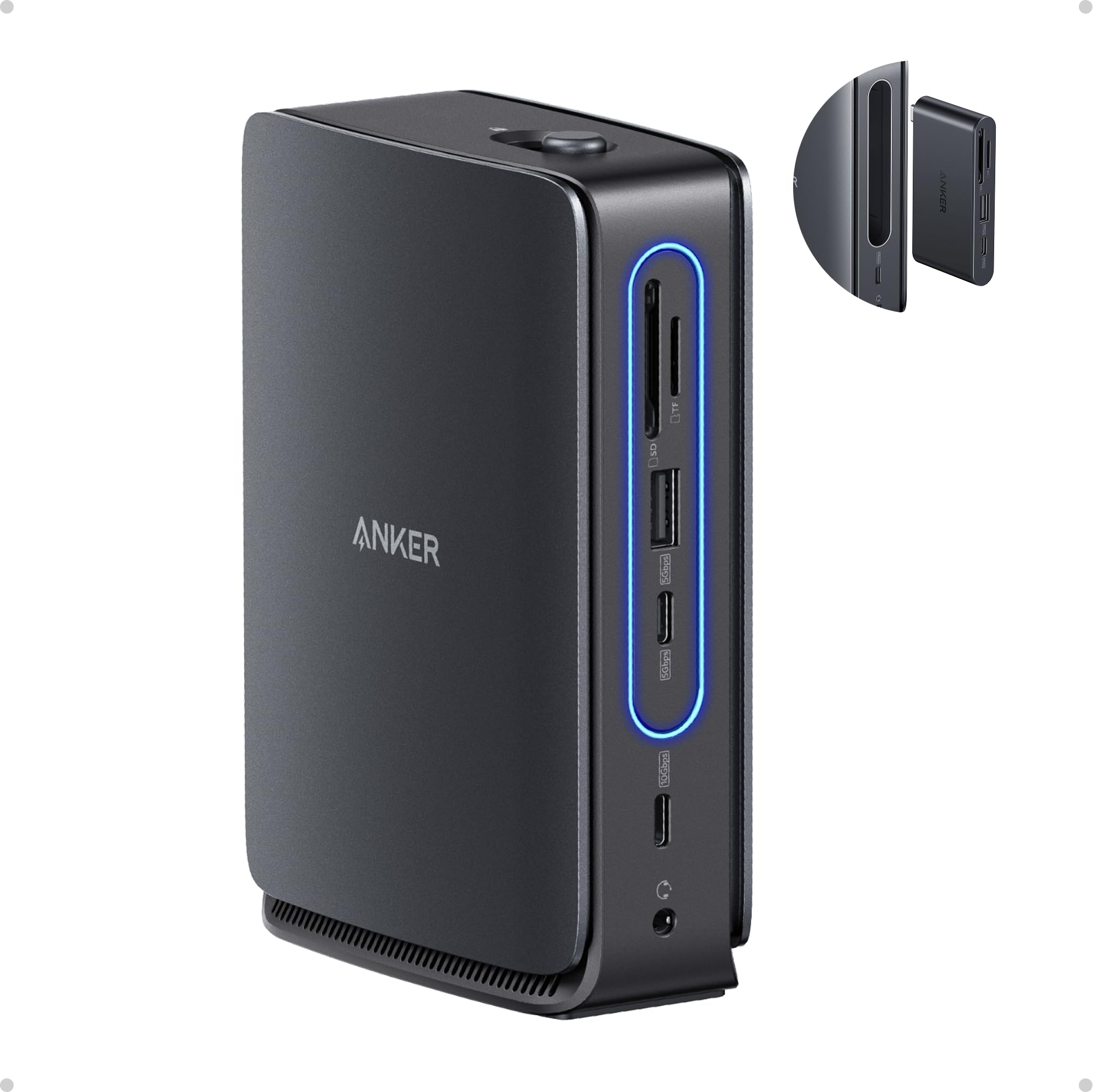
This 13-port desk dock unclips into a 6-port travel hub, giving you two docks in one.
Anker solves the problem of buying separate docks for home and travel with this clever design. The main unit has 13 ports: 2x HDMI, 1x DisplayPort, a 10Gbps USB-C and 5Gbps USB-C, 3x USB-A, Gigabit Ethernet, SD/TF slots, and a 3.5mm audio jack. It delivers up to 100W Power Delivery via a generous 140W included adapter — one of the highest included wattages in this list. The 6-in-1 hub snaps off from the main unit, giving you a USB-C passthrough, HDMI, USB-A, and SD card reader for your laptop bag. On Windows, it supports triple displays (4K single / dual 2K / triple 1080P). Mac users get mirrored content on multiple external monitors.
Owner feedback highlights how easy it is to set up — plug and play with no drivers needed on Windows. The separate power adapter is bulky but ensures rock-solid performance for all ports even under full load. Build quality is described as premium, and the unit stays cool. The main trade-off is that the detachable hub can pop out of the dock if bumped, and the plastic build of the travel hub feels less premium than the main station. Occasional display glitches on power-up are reported. This dock is strictly for Windows laptops if you want independent multi-monitor support; Mac users get mirrored displays only.
Why it stands out
- Detachable 6-in-1 hub for travel — no second dock needed
- 140W adapter included for stable 100W laptop charging
- 13 ports cover every need without driver installation
- Stays cool even with all ports in use
What to consider
- Mac users get mirrored monitors only, not extended
- Plastic travel hub feels less durable
- Power adapter is bulky
Ideal for Windows users who: split their time between a home office and travel and want one device that does both.
Not ideal if: you run macOS and need independent extended monitors, or you prefer a single-piece dock.
8. WAVLINK Docking Station 3 Monitors, 15-in-1 DisplayLink
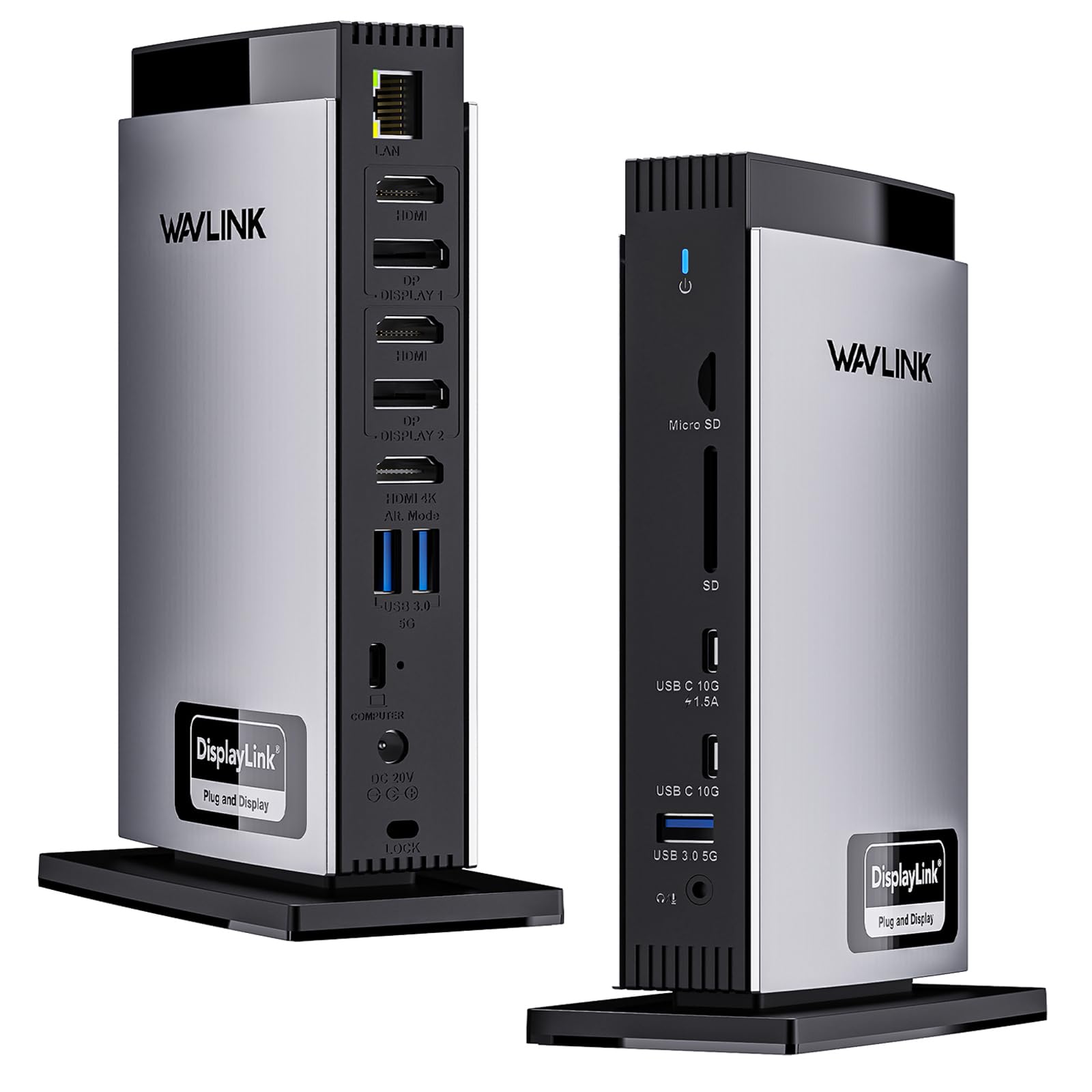
The most complete Mac-friendly dock for triple 4K with a generous 130W power supply.
WAVLINK packs 15 ports into this dock, making it among the most feature-rich options for Mac users who need triple 4K@60Hz displays. It uses a DisplayLink chipset (the DL-6950, requiring a driver download) to deliver three extended 4K screens on M-series MacBooks — something even the TobenONE above does on Mac, but with even more ports. The layout includes 3x HDMI, 2x DisplayPort (use one HDMI and one DP from each pair), 2x USB-C (10Gbps), 3x USB-A (5Gbps), SD/TF slots, Gigabit Ethernet, and separate audio/mic jacks. The included 130W power adapter delivers 100W to your laptop, which is sturdy for a 16-inch MacBook Pro.
Owner reports are positive: the dock feels sturdy, setup is straightforward after installing DisplayLink software, and it reliably runs dual monitors on MacBook Air M4. The main frustration is common to all DisplayLink docks — DRM-protected streaming services (Netflix, Hulu, Apple TV, MLBTV) will show a black box. Also, only one HDMI and one DisplayPort can be used at the same time from the designated Display 1/2 ports. Some users also note that you need a USB-A to USB-C adapter if you want to use the USB-A ports for video. This dock is for the power user who needs maximum port variety and Mac triple-monitor support, and who can accept the streaming limitation.
Mac triple-monitor powerhouse: 15 ports, a strong 130W adapter, and true triple 4K on M-series Macs, but streaming video is a no-go and port pairing requires attention.
Perfect for: Mac users who need a full triple 4K workstation with every port imaginable and don’t stream protected video on external monitors.
Not for: anyone who wants a simple, driver-free experience or relies on Netflix/Hulu on a secondary screen.
9. Anker Prime Docking Station (DL7400), 14-in-1
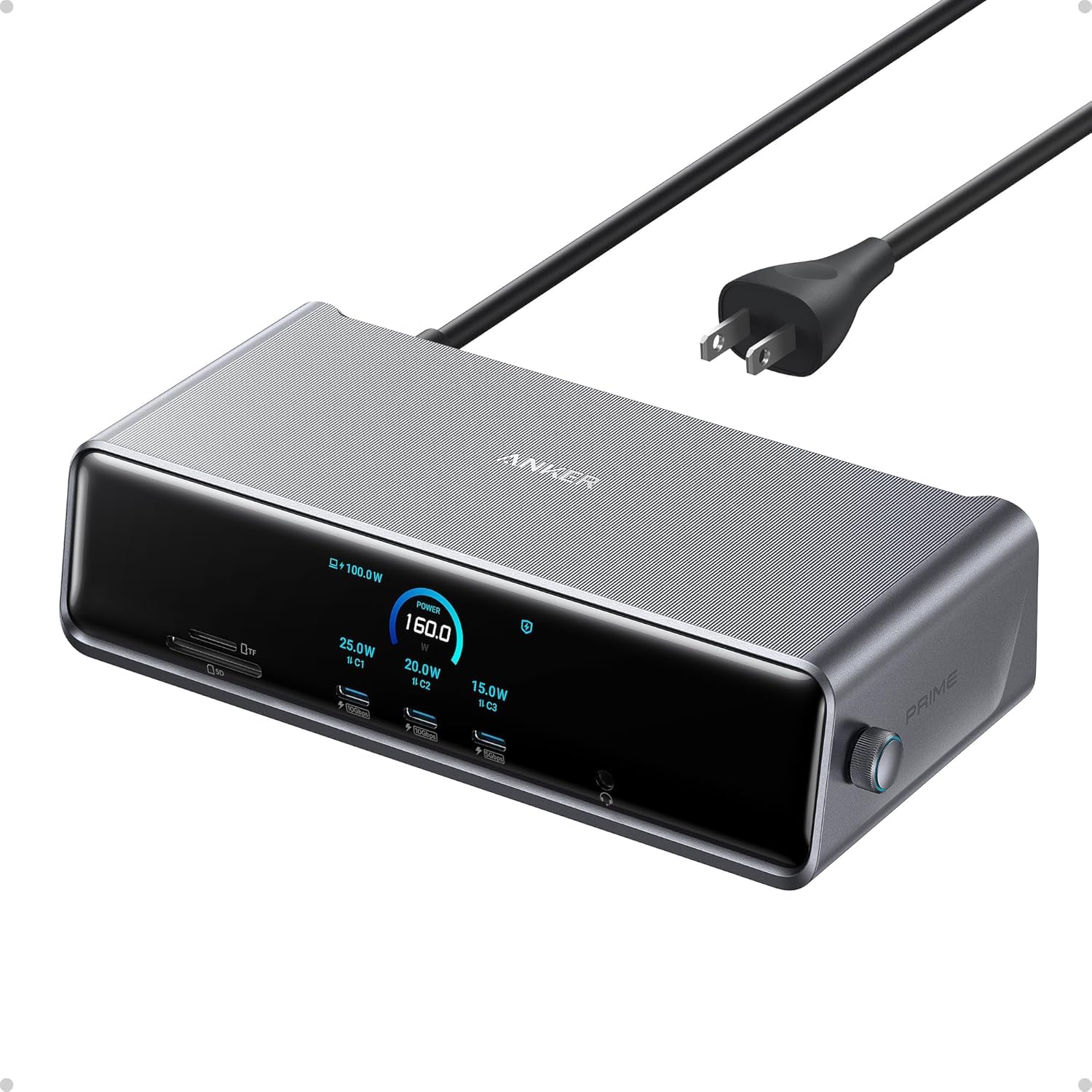
The flagship that throws a smart display, a fan, and 140W charging at your triple 4K workflow.
Anker’s Prime series is built for the demanding user who wants every bell and whistle. The DL7400 offers 14 ports including a 140W 10Gbps USB-C upstream port that powers the most power-hungry laptops, two front USB-C ports delivering 100W each, 2 HDMI, 1 DP, 2 USB-A (5Gbps) plus a 480Mbps USB-A, a 2.5Gbps Ethernet port (faster than the common Gigabit), SD and TF card slots, and a headphone/mic combo jack. A built-in smart display shows real-time charging power, display performance, and fan speed. The internal fan and ActiveShield 3.0 thermal management keep temperatures in check.
It drives triple 4K@60Hz displays on Windows 10/11 using DisplayLink (driver required). Mac users report success with dual monitors after driver setup. Owners love the futuristic design, the solid build, and the sheer power — it charges a MacBook Pro fast while running all accessories. The main complaint is that the DisplayLink driver is mandatory and the Ethernet port is not a true 2.5Gbps (some users measure 700-900 Mbps download, short of claimed speeds). Some buyers also experience intermittent monitor connection loss that requires a reset. DRM streaming is blocked by DisplayLink, as with all docks in this category. This is a premium pick for the person who wants the most advanced dock Anker makes and is willing to pay for it and tweak settings.
Flagship features
- 140W upstream port for the fastest laptop charging on this list
- 2.5Gbps Ethernet for faster local network transfers
- Smart display for real-time power and cooling stats
- Built-in fan for sustained high-load performance
Premium caveats
- Ethernet may underperform vs. claimed 2.5G speeds
- DisplayLink driver required; DRM streaming blocked
- Some users report intermittent monitor drops requiring a reset
Choose this if: you want the absolute fastest charging, a smart display, and a sturdy thermal solution for a demanding triple 4K setup.
Think twice if: you want a simpler, more affordable dock or need reliable 2.5G Ethernet performance from the start.
Understanding the Specs
DisplayLink vs. Native MST
DisplayLink is a chipset and driver technology that lets a docking station drive multiple external monitors even when the laptop’s USB-C port does not natively support multiple display streams. It works on nearly any laptop with a USB port, including Macs. The cost is that you must install a free driver, and DRM-protected video (Netflix, Prime Video) usually appears as a black screen. Native MST (Multi-Stream Transport) is built into Windows laptops and some Intel-based Macs, allowing multi-monitor output without extra software. However, M-series Macs do not support MST, so DisplayLink is the only way to get extended dual or triple monitors on those machines.
Power Delivery (PD) and Wattage
The PD wattage rating on a dock tells you how fast it can charge your laptop. A 100W PD port is enough for a 16-inch MacBook Pro or a Dell XPS 15 under normal use. However, many docks take a 100W input but only pass 85W to the laptop, reserving the rest for internal operation. If your laptop demands 100W under full load (like during gaming or rendering), you may see the battery drain slowly even while plugged in. The upstream cable and the included power adapter also matter — a dock that ships with a 140W adapter (like the Anker Nano) is more likely to maintain stable power than one that expects you to supply your own charger.
FAQ
Will any USB-C docking station work with my MacBook Air M4?
Can I use a 4K docking station with a regular USB-C port on my laptop?
How many 4K monitors can I actually run from a USB-C dock?
Why does Netflix show a black screen on my DisplayLink dock?
Does a docking station charge my laptop and run monitors at the same time?
What is the difference between a USB-C hub and a docking station?
Can I use a 4K docking station for gaming?
How important is the included power adapter on a docking station?
Will a 4K USB-C dock work with my iPad Pro or Android tablet?
How can I tell if my laptop supports video over USB-C?
Final Thoughts: The Verdict
For most buyers, the best 4k docking station usb-c overall is the TobenONE DisplayLink Docking Station because it offers 18 ports, reliable triple 4K@60Hz output on both Mac and Windows, and a 120W power adapter with strong owner support backing it up for a reasonable investment. If you value a high-refresh display and budget efficiency, the UGREEN 11-in-1 Revodock Pro gives you DP at 4K@120Hz for a fraction of the cost. And for Mac users who need a full-featured triple 4K setup without compromise, the WAVLINK 15-in-1 DisplayLink Dock provides the most comprehensive port selection and a sturdy power supply.
How We Picked
We do not accept paid placement. Every pick is matched to a real buyer and a real use-case; we do not hands-on test units.
Sources & Methodology
Specifications: manufacturer listings and product documentation. Review insights: verified customer reviews, as of July 2026. Pricing: not shown on this page (it changes often); check the current price via the retailer link.
As an Amazon Associate, Gadgets Feed earns from qualifying purchases. This does not affect which products we feature.