
Our readers keep the lights on and my morning glass full of iced black tea. As an Amazon Associate, I earn from qualifying purchases.
Specs are compiled from manufacturer listings and verified buyer reviews and can change over time — please confirm the key details on the product page before buying.
Your 3D printer melts plastic, and that process releases fumes you do not want hanging around your room. A dedicated exhaust fan pulls those smells, smoke, and particles out of your enclosure and sends them outside. The difference between a decent setup and a safe one depends on airflow (CFM), noise (dB), and fan longevity.
I’m Min — the founder and writer behind Gadgets Feed. This guide is built by comparing the manufacturers’ published specifications and the patterns across verified customer reviews, so you get each pick’s real strengths and trade-offs instead of marketing spin.
Every option here is a real, owner-tested choice, from budget-friendly kits to premium inline setups. This article is your straight-to-the-point resource for finding the best 3d printer exhaust fan for your enclosure and your printing needs.
Our Picks at a Glance

How To Choose The Best 3D Printer Exhaust Fan
Picking the right fan for your 3D printer setup means matching airflow to your enclosure size and your tolerance for noise. A small USB-powered kit works fine for a compact tent, but a larger enclosure or printing materials like ABS (acrylonitrile butadiene styrene) or ASA (acrylonitrile styrene acrylate) needs a more powerful inline fan to really clear the air.
Match Airflow to Your Enclosure
Airflow is measured in CFM (cubic feet per minute), which tells you how much air the fan moves each minute. A basic enclosure fan kit might move around 40-50 CFM, enough for a small tent. For an average 24″x24″x24″ enclosure, a fan in the 100-140 CFM range gives you a complete air exchange every minute or two. The POLISI3D, for example, pushes out 117.71 CFM, so it refreshes the air fast. Too little airflow, and fumes linger inside the enclosure. Overdoing it on a small tent just creates unnecessary noise.
Consider Speed Control
Not all fans run at a single speed. A fan with a variable speed controller lets you dial in the exact airflow you need. This is useful because you can run the fan at a whisper-quiet low speed for basic PLA (polylactic acid) printing, then crank it up to maximum ventilation when you switch to a material that produces heavier fumes. Several picks here include some form of speed control, from a simple dimmer-style knob to a multi-position switch.
Installation and Fit
Most kits mount into an enclosure wall, either by cutting a hole or fitting into an existing opening. The hose diameter is a key spec to check — common sizes are 70mm (about 2.75 inches) for kits like the YOOPAI, or 4 inches for most inline duct fans. Check your enclosure for an existing vent port before you buy. Some kits are USB-powered for simple plug-and-play, while others use a standard AC wall plug that might need a bit more cable management.
Quick Comparison
| Model | Best For | Fan Speed (RPM) | Airflow (CFM) | Noise Level | Amazon |
|---|---|---|---|---|---|
| YOOPAI Fan Fume Extraction Kit★ Best Overall | Enclosure Kit Simplicity | 4000 | — | Low | Amazon |
| Upgrade 3-Layers Filter SystemFilter Ready | Built-in Filtration | 5000 (Max) | — | Moderate | Amazon |
| Creality Official Fume Extraction KitBrand Fit | Brand Compatibility | 4000 | — | Low | Amazon |
| VIVOSUN 4″ Inline Fan | High CFM Inline Use | — | 130 | 26 dB(A) | Amazon |
| 4″ Axial Exhaust Fan (Hose Vary) | DIY Flexibility | 3000 | 141 | 18 dB | Amazon |
| GDSTIME 120mm x 38mm Fan | Versatile Kit | 3000 | 116 | 45 dB | Amazon |
| POLISI3D 3 Inch Duct Fan | Inline Power | 2600 | 117.71 | 30 dB | Amazon |
| 4in DC12V Fume Extractor Kit (Hose Vary) | Complete Inline Kit | 3000 | 141 | 32 dB | Amazon |
In‑Depth Reviews
1. YOOPAI Fan Fume Extraction Kit
Our pick — over 4.5★ from 100+ verified ratings; the strongest balance of quality and price.
The simple, effective kit that cleans the air without complicating your setup.
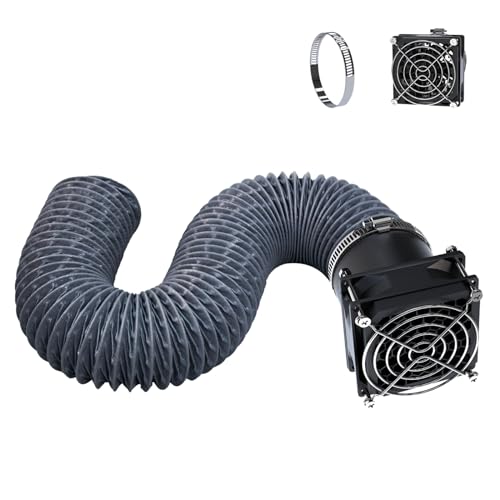
This kit is the crowd favorite because it balances ease of use with real performance. The 4000RPM (rotations per minute) fan pulls fumes out of an enclosure quickly, and it does so quietly, so your printer works well in a bedroom or small office. The retractable hose extends up to 2 meters (about 6.5 feet), letting you route it to a window or vent without a hassle.
Buyers highlight its excellent fume removal and how simple it is to install. It screws right into the side of most tent enclosures. While the noise level is generally low, some owners note it is slightly loud during operation, but find it fine for a printing session. It also works well with laser engravers, showing versatility beyond 3D printing.
The hose diameter is 70mm (about 2.75 inches), so you need to make sure your enclosure has a side opening or is cut to match. A minority of buyers report the fan stopping after several uses, but the vast majority find it a great value for a kit that just works.
Installed in minutes: The YOOPAI beats the Creality kit in sheer number of happy owners who call the fan strong and reliable — it is the top-rated option for a straightforward, effective solution.
Reach for this if: you want a proven, quiet, and easy-to-install kit for a standard tent enclosure and you value simplicity over complex filter systems.
Look elsewhere if: you need a high-CFM inline fan for a large, hard-ventilated space or if you prefer a built-in three-layer filter system.
2. Upgrade 3-Layers Filter System Smoke Exhaust Kit
The budget-friendly pick with a three-layer filter for cleaner exhaust air.
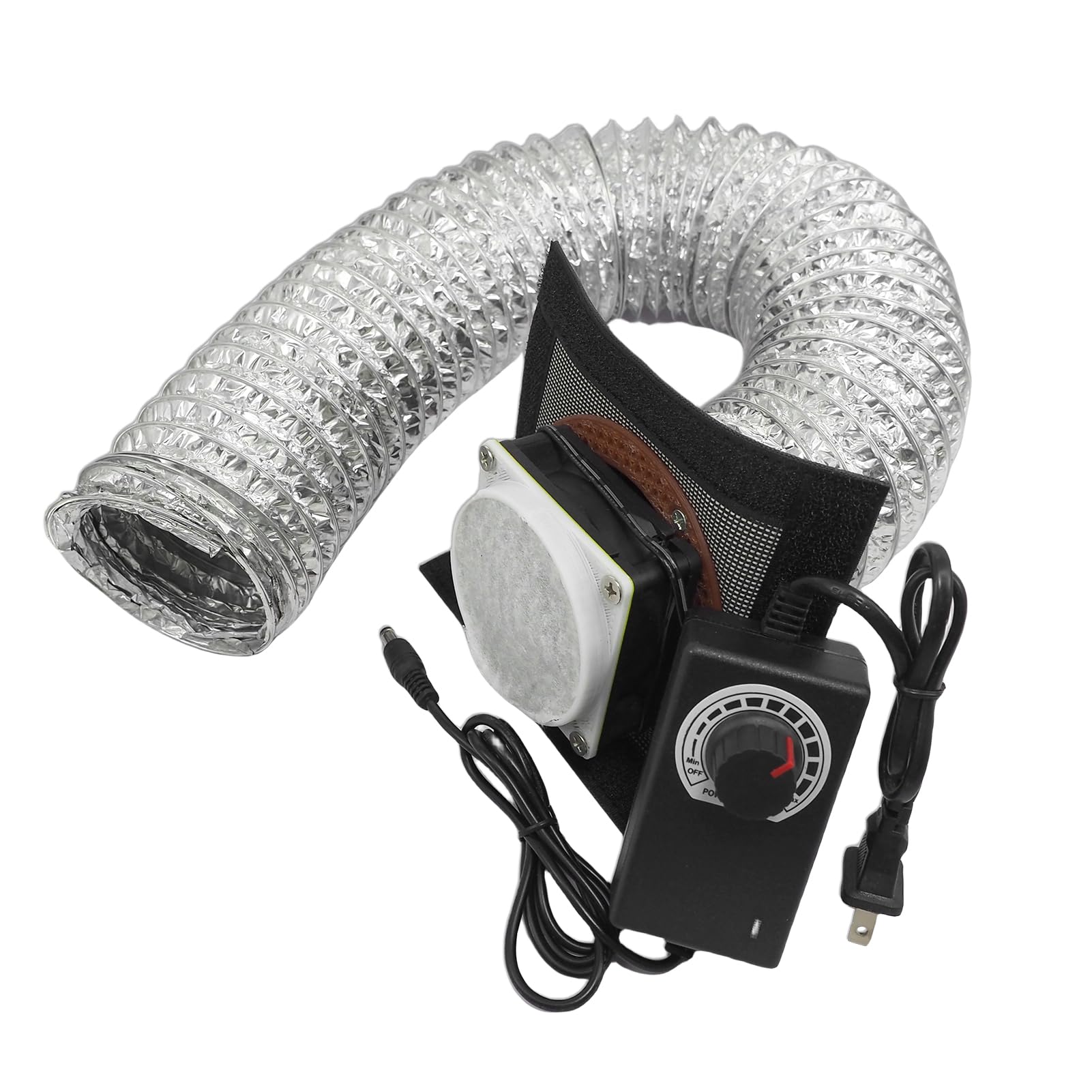
This kit includes a three-layer filter system from the start, designed to absorb dust and harmful gases before they leave the enclosure. The fan hits a max of 5000RPM (25% faster than the YOOPAI’s 4000RPM) and includes a speed control power adapter, so you dial in the exact airflow you need — a feature not found on simpler USB-only kits.
Owners generally find it works well, with many noting it is effective for PLA printing and even laser engraving tasks. The variable speed control is a highlight, and the included 12V adapter and speed controller give it a more customizable feel than fixed-speed options.
The catch is the filter itself. Several owners mention that while the fan moves air, the three-layer filter slows down airflow noticeably. You trade some raw CFM for cleaner exhaust. The included steel fan bracket is meant to be swapped for a plastic adaptor you need to 3D print yourself (the file is on Thingiverse), which adds an extra step. Some feel the filter lifespan is short.
A filtered starting point: This kit is a good deal for a starter filter system, offering more functionality than the basic YOOPAI kit but with a trade-off in raw airflow.
Pick this for: a cost-effective way to get filtration on your enclosure, especially if you print with materials that produce more particles and you are handy with a little DIY.
Think twice if: you need maximum airflow above all else, or if you do not want to 3D print a part to get the best filter setup.
3. Creality Official Fume Extraction Kit
The official Creality option for a clean fit with their own enclosures.
This is the authentic Creality accessory, designed to be a perfect match for their Ender Plus enclosures and laser engraver covers. It shares many specs with the YOOPAI kit — a 4000RPM fan, a 2-meter retractable hose, and simple screw-in installation. The key distinction is the brand guarantee and a 1-year limited warranty with lifetime technical support.
Buyers confirm it expels smoke and odors effectively, and the retractable hose is handy for directing fumes. Some owners find it quite loud during operation, and there are mixed reports about how easily it fits onto various printers, even some Creality models. One long-term owner reported the fan failing after about 1.5 years of light use, questioning the quality.
The fan is low quality compared to options like the VIVOSUN or the 4-inch Axial Fan, and for the price, many owners feel a more sturdy solution from a general electronics fan brand would be a better buy. It works, but the build quality is a common point of concern, with one buyer calling it “not a good buy” due to the fan’s lifespan.
Warranty confidence: The 1-year warranty is a plus, but the raw performance and value do not outshine the top-tier YOOPAI kit, which costs less and has a stronger track record with users.
Best for Creality fans: who want a “just works” kit that matches their enclosure perfectly and values brand after-sales service.
skip it if: long-term durability is your highest priority — the reviews suggest you can find a higher-quality fan for the same or less money.
4. VIVOSUN 4″ Inline Fan
A surprisingly quiet powerhouse that moves serious air through ductwork.
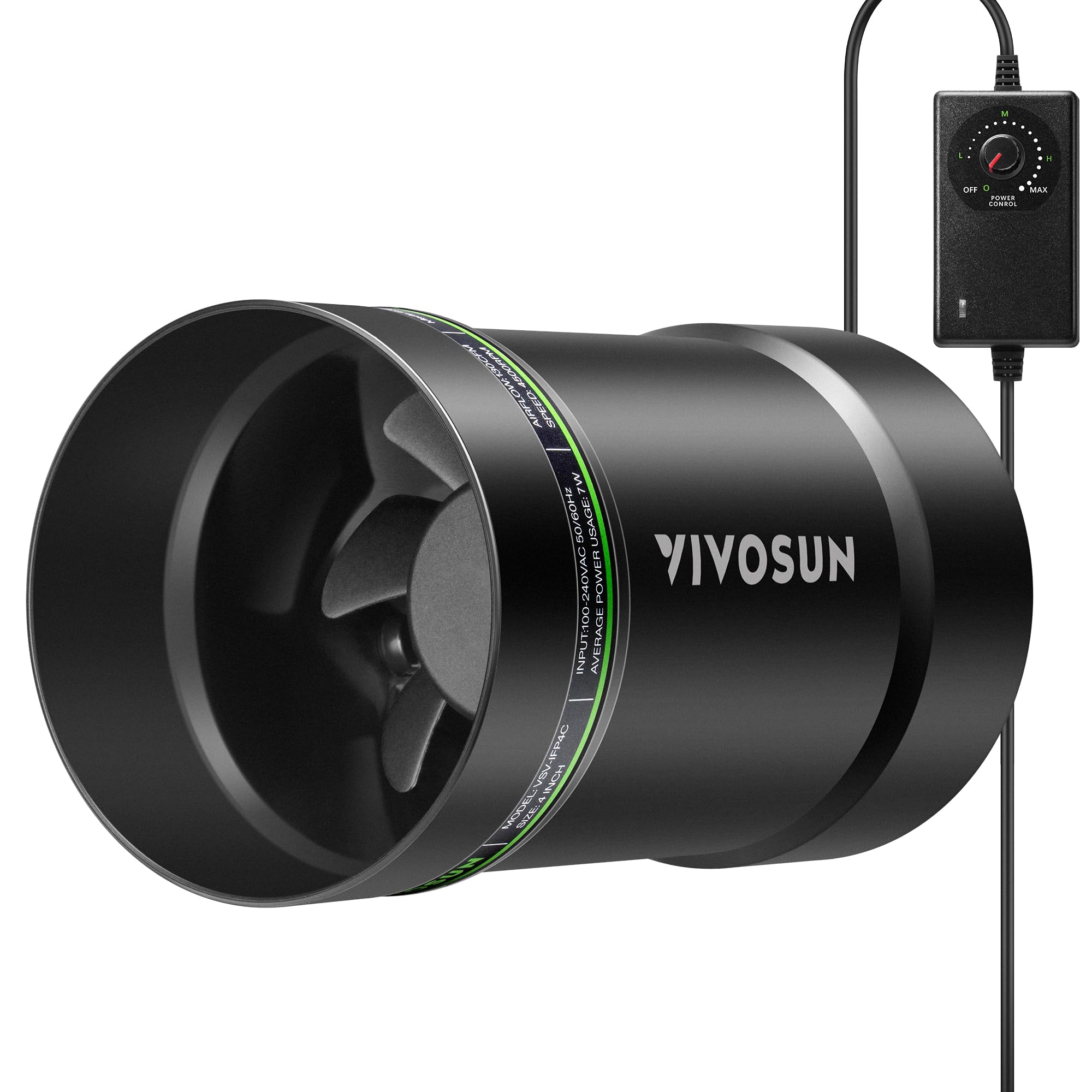
This is a true 4-inch inline duct fan designed for serious ventilation, not a simple wall-mount kit. The VIVOSUN delivers 130 CFM of airflow with a noise level of just 26 dB(A) (as quiet as a library), which is extraordinarily low for this class of fan. The stepless speed controller lets you fine-tune the airflow from a whisper to a full blast, and the upgraded EC (electronically commutated) motor is built for efficiency and longevity.
Owners are impressed with how much air it moves for its size. Many use it successfully for laser engraver exhaust and 3D printer fume extraction. One buyer notes it works so well with their Bambu printer for ABS/ASA that they had to keep the speed very low to avoid a “chamber heater malfunction” from the fan pulling too much heat out. The quiet operation at low speeds is a consistent praise point.
The main downside is it is an inline fan, so you need to mount it in the ductwork itself with 4-inch hoses. It does not come with a filter, enclosure mounting bracket, or a wall-mounting kit. Building a custom setup is required. At full blast, some owners find it louder than expected, but at the lower speeds most 3D printer users need, it is impressively quiet.
The high points
- Remarkably quiet at 26 dB(A) for 130 CFM of airflow.
- Stepless speed controller gives total control over ventilation.
- Built with a durable ABS housing and an efficient EC motor.
The trade-offs
- Requires a DIY mounting setup with 4-inch ductwork.
- No filter included — you have to add your own if needed.
- Can be loud at full speed, though most users run it low.
Grab this for: a permanent, powerful, and quiet ventilation solution that needs to be integrated into a duct system, perfect for a dedicated printer room.
pass on it if: you want a simple screw-on kit for a soft enclosure or you need a built-in carbon filter to scrub the air.
5. 4″ Axial Exhaust Fan (Hose Vary)
A powerful 141 CFM fan that comes as a DIY kit for custom ventilation setups.
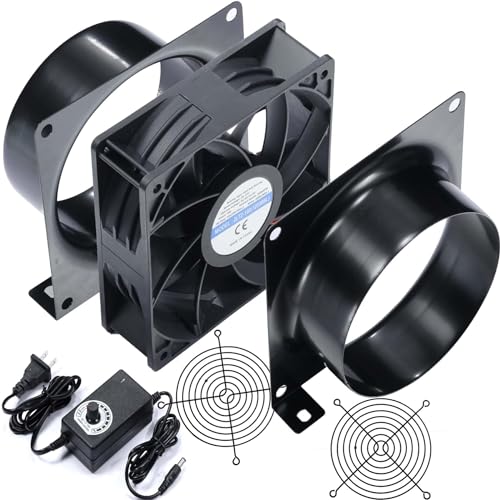
This kit is for the maker who wants to build their ventilation system from the ground up. The 120mm axial fan spins at up to 3000RPM and delivers a strong 141 CFM of airflow — more than the VIVOSUN’s 130 CFM. The PWM (pulse-width modulation) variable speed controller lets you dial in from 0% to 100%, which is more precise than a simple on/off switch. The package includes two metal 4-inch duct adapters, making it ready to connect to standard duct hose.
The performance and airflow win people over here, with the fan doing a great job at clearing smoke and fumes from laser cutters and 3D printer enclosures. The variable speed is a genuine plus, allowing quiet operation at low speeds and max extraction when needed. Many owners find it a solid value for the price, outperforming expectations for a DC12V (direct current 12-volt) motor.
The main trade-off is the noise level. The spec sheet lists 18 dB, but many customers note it is not quiet, especially at higher speeds. It is best described as “okay but not quiet.” The installation also requires a bit of DIY assembly and mounting. The screws included are short, and some owners found the included plastic guards do not fit perfectly. It also requires a 4-inch duct hose, which is not included.
Why it stands out
- Delivers very strong 141 CFM airflow, beating most kit fans.
- PWM speed control offers fine 0-100% adjustment.
- Includes metal 4-inch duct adapters for flexible installation.
The drawbacks
- Notably louder than some quieter inline fans at the same speed.
- DIY assembly required, and mounting hardware feels basic.
- Duct hose is not included in the package.
Ideal for the DIY enthusiast who wants a high-CFM, custom-mounted exhaust solution and does not mind a little extra noise for the power.
Think twice if you need a whisper-quiet fan for a shared room — the noise level gets mixed reviews at higher speeds.
6. GDSTIME 120mm x 38mm Fan Kit
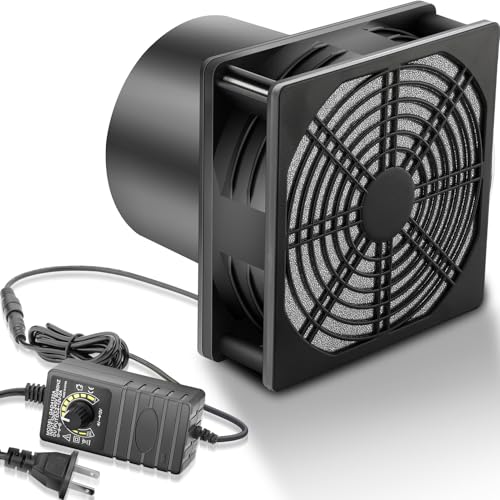
A complete, well-built kit with multiple guard options for versatile mounting.
The GDSTIME kit stands out for its completeness and flexibility. It comes with a 120mm x 38mm fan, a variable speed controller, a 4-inch duct connector flange, a plastic filter, and three types of guards (metal grill, single-layer plastic net, and a filter-embedded plastic net). So you can use it as a bare fan, a filtered fume extractor, or ducted exhaust straight from the start.
Buyers consistently praise the build quality and that everything needed is included. The speed control and switch feel well-built, and the fan offers adjustable airflow with relatively low noise at lower speeds. It is proven effective for 3D printer fume venting, with owners using it on Bambu P1S printers and custom window mounts. The 116 CFM airflow is solid for most medium to large enclosures.
The noise level is mixed. Some find it quiet, others call it loud at high speed. It is rated at 45 dB (comparable to a quiet conversation), which is higher than the VIVOSUN’s 26 dB. The fan’s primary use case is general fume extraction, and it gets the job done, but it is not the quietest option here. Some owners also note the included filter is small, but it is still a nice addition for basic particle filtration.
A very complete package: The GDSTIME offers more included accessories than the Hose Vary DIY kit, including a filter and multiple guards, making it a truly versatile starter solution.
Great for a versatile setup: if you want a fan that can be a filtered extractor, a bare fan, or a ducted exhaust, all with the included parts.
Consider other options if: low noise is your absolute top priority — the 45 dB rating is higher than the top performers here.
7. POLISI3D 3 Inch Inline Duct Fan

A compact, powerful inline fan that includes a pipe and speed controller.
This is a focused kit for anyone needing a 3-inch inline duct fan. It uses a 1Kg copper motor to achieve 117.71 CFM, and it comes with a 1.5-meter pipe and a speed controller to adjust the wind speed. It is a dedicated solution for venting fumes from a 3D printer enclosure or laser engraver, and its compact size makes it perfect for smaller spaces.
Customers find it performs well for exhaust fumes and appreciate the good airflow for its size. It is quiet enough to run in a craft room, with several owners forgetting it is even on. The 3-inch hose fits well in home constraints, and the fan is strong enough to pull through a 20-foot run with ease. The included expansion screws make mounting straightforward.
There are two recurring issues. First, leakage — the housing unit and power box are not sealed, so smoke can leak out before being exhausted. Several owners had to add custom gaskets and plumber’s tape to get it fully sealed. Second, durability — some reviewers point out the press-fit fan blade stripping over time, leading to noise and vibrations. A rubber pad is recommended to reduce vibration.
What works
- Great airflow for a 3-inch inline fan at 117.71 CFM.
- Comes with a 1.5-meter pipe and speed controller.
- Quiet enough for use in a small craft room.
The drawbacks
- Housing and power box leak smoke without custom sealing.
- Some reports of fan blade stripping and vibrations.
- No customer support for replacement parts.
Perfect for small spaces that need an inline fan with a 3-inch duct system, especially if you are handy with sealing and vibration dampening.
it’s not for you if you want a leak-proof, maintenance-free setup — the leakage and potential fan blade issues are not for everyone.
8. 4in DC12V Fume Extractor Kit (Hose Vary)
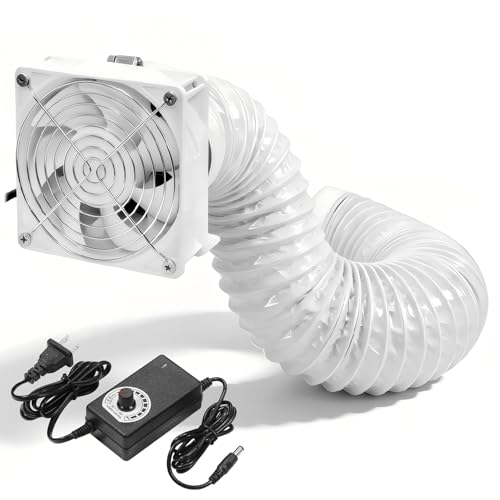
A complete 141 CFM inline kit that comes with a long hose and clamps.
This kit is a step up in completeness from the other Hose Vary axial fan. It wraps the same powerful 141 CFM 120mm fan into a package that includes a 6.5-foot 4-inch dryer hose and two hose clamps, so you have everything to go from enclosure to window right from the start. It also features PWM variable speed control from 0-100% for precise airflow management.
Buyers confirm it works great for 3D printer exhaust systems, with one owner using it practically non-stop for extracting nitric fumes from a fish tank setup. The adjustable speed is a highlight, allowing low-noise operation most of the time with the option for full blast extraction when needed. The 141 CFM airflow is top-tier for this category, matching the fastest options here.
The main area for caution is the build quality of the fan blades. Some shoppers say they break easily if handled roughly during installation. The included screws are short, and the instructions are not the clearest. While most owners are very satisfied, a few report receiving units with non-functional parts or blades that broke easily. It also requires DIY assembly, so expect to spend a few minutes putting it together.
Almost everything included: This kit makes it easier than the basic Hose Vary model to get a 4-inch exhaust system up and running by including the hose and clamps. It is a better value for those who do not want to buy components separately.
Pick this if: you want a powerful, complete inline kit that includes a long hose and clamps, and you are comfortable with a little DIY assembly.
Consider alternatives if: fragile blades worry you, or you prefer a more sturdy, pre-built fan housing like the VIVOSUN.
Understanding the Specs
Fan Speed (RPM)
RPM stands for rotations per minute, or how fast the fan blades spin each minute. A higher RPM generally means more air movement, but it also often means more noise. Basic enclosure kits run at 4000-5000 RPM, which is powerful enough for a small to medium tent. Inline fans tend to list CFM (cubic feet per minute) rather than RPM, as the blade design affects how much air is actually moved per rotation.
Airflow (CFM)
CFM stands for cubic feet per minute, and it tells you how much air the fan moves each minute. This is a more practical spec than RPM because it measures the actual volume of air being shifted. For a typical 3D printer enclosure, you want at least 100 CFM to change the air a few times per minute. The strongest kits here, like the Hose Vary and VIVOSUN, push 130-141 CFM, which is excellent for quick fume removal.
FAQ
Will a 3D printer exhaust fan fit any enclosure?
How loud is a 3D printer exhaust fan?
Do I need a filter with my exhaust fan?
Can I use a 3D printer exhaust fan for a laser engraver?
What is the difference between a USB-powered fan and an AC-powered fan?
A 4000RPM fan vs a 5000RPM fan — is 1000 RPM a big difference?
How do I install a 3D printer exhaust fan?
How long do 3D printer exhaust fans last?
Can I run the exhaust fan 24/7?
Does a 3D printer exhaust fan help with ABS and ASA fumes?
Final Thoughts: The Verdict
For most buyers, the best 3D Printer Exhaust Fan winner is the YOOPAI Fan Fume Extraction Kit because it delivers the right balance of ease of installation, quiet operation, and proven performance at a great price. If you need a more permanent and powerful solution for a dedicated room, grab the VIVOSUN 4″ Inline Fan. And for a versatile setup with a built-in filter system, the Upgrade 3-Layers Filter System Kit is the one to reach for. You cannot go wrong with any of these, but the YOOPAI consistently delivers the most confidence to the most owners.
How We Picked
We do not accept paid placement. Every pick is matched to a real buyer and a real use-case; we do not hands-on test units.
Sources & Methodology
Specifications: manufacturer listings and product documentation. Review insights: verified customer reviews, as of July 2026. Pricing: not shown on this page (it changes often); check the current price via the retailer link.
As an Amazon Associate, Gadgets Feed earns from qualifying purchases. This does not affect which products we feature.